
The Arrays class in java.util is a utility class that provides static methods to perform operations like sorting, searching, comparing, and converting arrays. It cannot be instantiated and is used only for utility purposes.
- Provides static methods such as sort(), binarySearch(), equals(), toString()
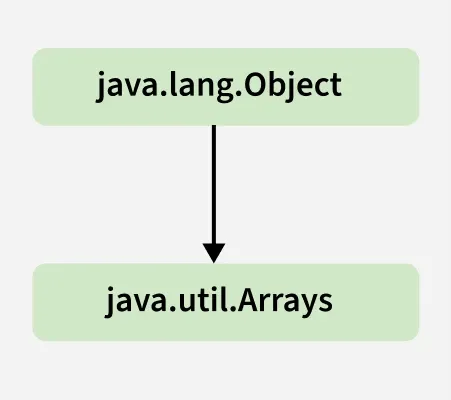
- Implicitly extends Object and is not meant to be instantiated
Why do we need the Java Arrays class
Java provides a utility class called java.util.Arrays to help developers perform common array operations easily and efficiently. like:
- Fill an array with a particular value.
- Sort an array
- Search in an array
- And many more
Class Declaration
Arrays is a final utility class in java.util package that extends Object class, which is the root of the Java class hierarchy
public class Arrays extends Object
To use Arrays,
Arrays.<function name>;
Arrays.sort(array_name);
Methods in Java Array Class
The Arrays class of the java.util package contains several static methods that can be used to fill, sort, search, etc in arrays. Let's take a look at methods and their implementation:
1. asList() method.
This method converts an array into a list.
import java.util.Arrays;

class Geeks{

    public static void main(String[] args){
        // Get the Array
        int intArr[] = { 10, 20, 15, 22, 35 };

        // To convert the elements as List
        System.out.println("int Array as List: "
                           + Arrays.asList(intArr));
    }
}
Output
Integer Array as List: [[I@19469ea2]
Note: When asList() is used with primitive arrays, it shows the memory reference of the array instead of the list contents. This happens because the asList() method returns a fixed-size list backed by the original array, and for primitive types like int[], it treats the array as an object, not as a list of values.
2. binarySearch() Method
This methods search for the specified element in the array with the help of the binary search algorithm.
import java.util.Arrays;

public class Geeks {

    public static void main(String[] args){

        // Get the Array
        int intArr[] = { 10, 20, 15, 22, 35 };

        Arrays.sort(intArr);

        int intKey = 22;

        // Print the key and corresponding index
        System.out.println(
            intKey + " found at index = "
            + Arrays.binarySearch(intArr, intKey));
    }
}
Output
22 found at index = 3
3. binarySearch(array, fromIndex, toIndex, key, Comparator) Method
This method searches a range of the specified array for the specified object using the binary search algorithm.
import java.util.Arrays;

public class Main {
    public static void main(String[] args)
    {

        // Get the Array
        int intArr[] = { 10, 20, 15, 22, 35 };

        Arrays.sort(intArr);

        int intKey = 22;

        System.out.println(
            intKey
            + " found at index = "
            + Arrays
                  .binarySearch(intArr, 1, 3, intKey));
    }
}
Output
22 found at index = -4
4. compare(array 1, array 2) Method
This method returns the difference as an integer lexicographically.
import java.util.Arrays;

public class Main {
    public static void main(String[] args)
    {

        // Get the Array
        int intArr[] = { 10, 20, 15, 22, 35 };

        // Get the second Array
        int intArr1[] = { 10, 15, 22 };

        // To compare both arrays
        System.out.println("int Arrays on comparison: "
                           + Arrays.compare(intArr, intArr1));
    }
}
Output
Integer Arrays on comparison: 1
Below table contains list of all methods:
| Methods | Action Performed |
|---|---|
| asList() | Returns a fixed-size list backed by the specified Arrays |
| binarySearch() | Searches for the specified element in the array with the help of the Binary Search Algorithm |
| binarySearch(array, fromIndex, toIndex, key, Comparator) | Searches a range of the specified array for the specified object using the Binary Search Algorithm |
| compare(array 1, array 2) | Compares two arrays passed as parameters lexicographically. |
| copyOf(originalArray, newLength) | Copies the specified array, truncating or padding with the default value (if necessary) so the copy has the specified length. |
| copyOfRange(originalArray, fromIndex, endIndex) | Copies the specified range of the specified array into a new Arrays. |
| deepEquals(Object[] a1, Object[] a2) | Returns true if the two specified arrays are deeply equal to one another. |
| deepHashCode(Object[] a) | Returns a hash code based on the "deep contents" of the specified Arrays. |
| deepToString(Object[] a) | Returns a string representation of the "deep contents" of the specified Arrays. |
| equals(array1, array2) | Checks if both the arrays are equal or not. |
| fill(originalArray, fillValue) | Assigns this fill value to each index of this arrays. |
| hashCode(originalArray) | Returns an integer hashCode of this array instance. |
| mismatch(array1, array2) | Finds and returns the index of the first unmatched element between the two specified arrays. |
| parallelPrefix(originalArray, fromIndex, endIndex, functionalOperator) | Performs parallelPrefix for the given range of the array with the specified functional operator. |
| parallelPrefix(originalArray, operator) | Performs parallelPrefix for complete array with the specified functional operator. |
| parallelSetAll(originalArray, functionalGenerator) | Sets all the elements of this array in parallel, using the provided generator function. |
| parallelSort(originalArray) | Sorts the specified array using parallel sort. |
| setAll(originalArray, functionalGenerator) | Sets all the elements of the specified array using the generator function provided. |
| sort(originalArray) | Sorts the complete array in ascending order. |
| sort(originalArray, fromIndex, endIndex) | Sorts the specified range of array in ascending order. |
| sort(T[] a, int fromIndex, int toIndex, Comparator< super T> c) | Sorts the specified range of the specified array of objects according to the order induced by the specified comparator. |
| sort(T[] a, Comparator< super T> c) | Sorts the specified array of objects according to the order induced by the specified comparator. |
| spliterator(originalArray) | Returns a Spliterator covering all of the specified Arrays. |
| spliterator(originalArray, fromIndex, endIndex) | Returns a Spliterator of the type of the array covering the specified range of the specified arrays. |
| stream(originalArray) | Returns a sequential stream with the specified array as its source. |
| toString(originalArray) | It returns a string representation of the contents of this array. The string representation consists of a list of the array’s elements, enclosed in square brackets (“[]”). Adjacent elements are separated by the characters a comma followed by a space. |
