
ArrayList in Java is a resizable array provided in the java.util package. Unlike normal arrays, its size can grow or shrink dynamically as elements are added or removed.
- Elements can be accessed using their indices, similar to arrays.
- Duplicates are allowed.
- Elements are stored in the order they are inserted.
- ArrayList is not thread-safe. To make it thread-safe, you must wrap it manually using Collections.synchronizedList().
import java.util.ArrayList;

class Main {
    public static void main (String[] args) {

      	// Creating an ArrayList
      	ArrayList<Integer> a = new ArrayList<Integer>();

      	// Adding Element in ArrayList
      	a.add(1);
      	a.add(2);
      	a.add(3);

      	// Printing ArrayList
      	System.out.println(a);
    }
}
Output
[1, 2, 3]
Explanation: This program creates an ArrayList of integers, adds elements to it using the add() method, and stores them dynamically. Finally, it prints the elements in insertion order as [1, 2, 3].
Note: ArrayList cannot hold primitive types like int, double, or char directly. we must use their wrapper classes instead:
- Use Integer instead of int
- Use Double instead of double
- Use Character instead of char
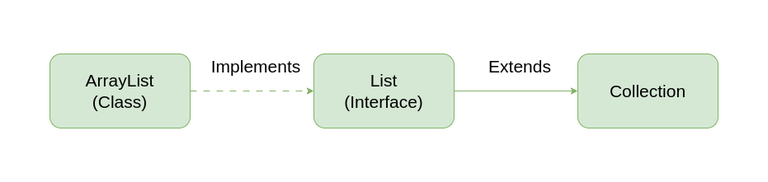
Hierarchy of ArrayList
It implements List Interface which is a sub-interface of Collection Interface.
ArrayList Constructors in Java
Java provides multiple constructors to create an ArrayList based on different requirements:
1. ArrayList()
Creates an empty ArrayList with default initial capacity.
ArrayList<Integer> arr = new ArrayList<>();
2. ArrayList(Collection<? extends E> c)
Creates an ArrayList initialized with elements from the specified collection.
ArrayList<String> arr = new ArrayList<>(collection);
3. ArrayList(int initialCapacity)
This constructor is used to build an array list with the initial capacity being specified.
ArrayList<Double> arr = new ArrayList<>(20);
Operations of ArrayList
Now, Using the constructors we have got ArrayList for further operations like Insertion,Deletion and Updation of the elements in ArrayList.
import java.util.*;

class GFG{

    public static void main(String args[]){

        // Creating an Array of string type
        ArrayList<String> al = new ArrayList<>();

        // 1. Adding elements to ArrayList at the end
        al.add("Geeks");
        al.add("Geeks");

      	System.out.println("Original List : "+al);

      	// Adding Elements at the specific index
        al.add(1, "For");

      	System.out.println("After Adding element at index 1 : "+ al);

      	// 2. Removing Element using index
      	al.remove(0);

      	System.out.println("Element removed from index 0 : "+ al);

      	// Removing Element using the value
      	al.remove("Geeks");

      	System.out.println("Element Geeks removed : "+ al);

      	// 3. Updating value at index 0
      	al.set(0, "GFG");

        System.out.println("List after updation of value : "+al);
    }
}

Output
Original List : [Geeks, Geeks]
After Adding element at index 1 : [Geeks, For, Geeks]
Element removed from index 0 : [For, Geeks]
Element Geeks removed : [For]
List after updation of value : [GFG]
Internal Implementation:
Internally an ArrayList uses a dynamically resizable array to store elements.
- Dynamic Array Structure: An ArrayList is internally implemented using a dynamic array (usually an Object[] array). This array stores all the elements of the list.
- Automatic Resizing: When the internal array becomes full, the ArrayList automatically increases its capacity by creating a new larger array and copying the existing elements into it.
- Index-Based Access: Elements are stored in contiguous memory locations, allowing fast access using indexes (e.g., get(index)), typically in O(1) time complexity.
- Element Shifting on Insert/Delete: When an element is added or removed at a specific index, the elements after that position are shifted to maintain order.
- Default Capacity:When an ArrayList is created using the default constructor, its default capacity is 10.
- New Capacity Calculation:
The new capacity is calculated using the formula:
New Capacity = Old Capacity + (Old Capacity / 2)
This increases the capacity by 50% of the old capacity.
Capacity vs Size Management
ArrayList maintains two values:
- Size: number of elements currently stored
- Capacity: total length of the internal array that can hold elements before resizing is required.
Complexity of Java ArrayList
Operation | Time Complexity | Space Complexity |
|---|---|---|
Inserting Element in ArrayList at the end | O( 1) (amortized) | O(1) |
Inserting Element at specific index | O(N) | O(1) |
Removing an elements | O(N) | O(1) |
Replacing Elements (set) | O(1) | O(1) |
Traversing an elements | O(N) | O(1) |
Java ArrayList Methods
| Method | Description |
|---|---|
| add(int index, Object element) | This method inserts the specified element at the specified position index in the ArrayList. |
| add(Object o) | This method appends the specified element to the end of the ArrayList. Default behavior: always adds at the end. |
| addAll(Collection C) | This method is used to append all the elements from a specific collection to the end of the mentioned list, in such an order that the values are returned by the specified collection’s iterator. |
| addAll(int index, Collection C) | Used to insert all of the elements starting at the specified position from a specific collection into the mentioned list. |
| clear() | This method is used to remove all the elements from any list. |
| clone() | This method is used to return a shallow copy of an ArrayList in Java. |
| contains(Object o) | Returns true if this list contains the specified element. |
| ensureCapacity(int minCapacity) | Increases the capacity of this ArrayList instance, if necessary, to ensure that it can hold at least the number of elements specified by the minimum capacity argument. |
| forEach(Consumer<? super E> action) | Performs the given action for each element of the Iterable until all elements have been processed or the action throws an exception. |
| get(int index) | Returns the element at the specified position in this list. |
| indexOf(Object O) | The index the first occurrence of a specific element is either returned or -1 in case the element is not in the list. |
| isEmpty() | Returns true if this list contains no elements. |
| lastIndexOf(Object O) | The index of the last occurrence of a specific element is either returned or -1 in case the element is not in the list. |
| listIterator() | Returns a list iterator over the elements in this list (in proper sequence). |
| listIterator(int index) | Returns a list iterator over the elements in this list (in proper sequence), starting at the specified position in the list. |
| remove(int index) | Removes the element at the specified position in this list. |
| remove(Object o) | Removes the first occurrence of the specified element from this list, if it is present. |
| removeAll(Collection c) | Removes all elements from this ArrayList that are present in the specified collection. |
| removeIf(Predicate filter) | Removes all of the elements of this collection that satisfy the given predicate. |
| removeRange(int fromIndex, int toIndex) | Removes from this list all of the elements whose index is between from Index, inclusive and to Index, exclusive. |
| retainAll(Collection<?> c) | Retains only the elements in this list that are contained in the specified collection. |
| set(int index, E element) | Replaces the element at the specified position in this list with the specified element. |
| size() | Returns the number of elements in this list. |
| spliterator() | Creates a late-binding and fail-fast Spliterator over the elements in this list. |
| subList(int fromIndex, int toIndex) | Returns a view of the portion of this list between the specified fromIndex, inclusive and toIndex, exclusive. |
| toArray() | This method is used to return an array containing all of the elements in the list in the correct order. |
| toArray(Object[] O) | It is also used to return an array containing all of the elements in this list in the correct order same as the previous method. |
| trimToSize() | This method is used to trim the capacity of the instance of the ArrayList to the list's current size. |
