
The super keyword in Java is used to refer to the immediate parent class object in an inheritance hierarchy. It allows a subclass to explicitly access parent class members when they are hidden or overridden. This keyword helps maintain clarity and control while working with inheritance.
- Used to call parent class constructors using super().
- Helps access parent class methods and variables when overridden or hidden.
- Ensures proper inheritance behavior and code reusability.
Note: Super keyword allows subclasses to inherit the behavior and functionality of the parent class.
Use of the super Keyword in Java
Super keywords are mainly used in the following contexts, which are listed below:
1. Use of super with Variables
This scenario occurs when a derived class and base class have the same data members. In that case, there is a possibility of ambiguity for the JVM.
Real-world example: Suppose there is a child, whose name is "Max" and the child has also a parent named "Max". Normally, to refer to the parent, we would say "parent Max", this is similar to using super.maxSpeed.
Program:
// Base class vehicle
class Vehicle {
    int maxSpeed = 120;
}

// sub class Car extending vehicle
class Car extends Vehicle {
    int maxSpeed = 180;

    void display()
    {
        // print maxSpeed from the vehicle class
        // using super
        System.out.println("Maximum Speed: "
                           + super.maxSpeed);
    }
}

// Driver Program
class Test {
    public static void main(String[] args)
    {
        Car small = new Car();
        small.display();
    }
}
Output
Maximum Speed: 120
Explanation: In the above example, both the base class and subclass have a member maxSpeed. We could access the maxSpeed of the base class in subclass using super keyword.
2. Use of super with Methods
This is used when we want to call the parent class method. So, whenever a parent and child class have the same-named methods then to resolve ambiguity we use the super keyword.
Real-world Example: It is simply just like when we want to listen to our parents' advice instead of our own decision, super.methodName() helps us follow the parents' behavior in code.
Program:
// superclass Person
class Person {
    void message()
    {
        System.out.println("This is person class\n");
    }
}

// Subclass Student
class Student extends Person {
    void message()
    {
        System.out.println("This is student class");
    }

    // Note that display() is
    // only in Student class
    void display()
    {
        // will invoke or call current
        // class message() method
        message();

        // will invoke or call parent
        // class message() method
        super.message();
    }
}

// Driver Program
class Test {
    public static void main(String args[])
    {
        Student s = new Student();

        // calling display() of Student
        s.display();
    }
}
Output
This is student class
This is person class
Explanation: In the above example, we have seen that if we only call method message() then, the current class message() is invoked but with the use of the super keyword, message() of the superclass could also be invoked.
3. Use of super with Constructors
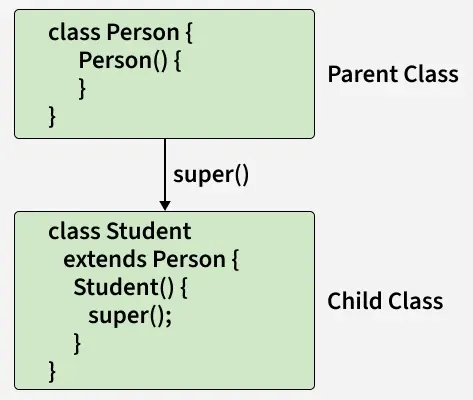
The super keyword can also be used to access the parent class constructor. One more important thing is that ‘super’ can call both parameterized as well as non-parameterized constructors depending on the situation.
Real-world Example: Before a child born, first the parent exists. Similarly, the parent class constructor must be called before the child's constructor finishes it's work.
Program:
// superclass Person
class Person {
    Person()
    {
        System.out.println("Person class Constructor");
    }
}

// subclass Student extending the Person class
class Student extends Person {
    Student()
    {
        // invoke or call parent class constructor
        super();

        System.out.println("Student class Constructor");
    }
}

// Driver Program
class Test {
    public static void main(String[] args)
    {
        Student s = new Student();
    }
}
Output
Person class Constructor
Student class Constructor
Explanation: In the above example, we have called the superclass constructor using the keyword "super" via subclass constructor.
Example: How to modify parent methods result
class ParentClass {
    public boolean isTrue() { return true; }
}

class ChildClass extends ParentClass {
    public boolean isTrue()
    {
        // calls parent implementation of isTrue()
        boolean parentResult = super.isTrue();
        // negates the parent result
        return !parentResult;
    }
}

public class Main {
    public static void main(String[] args)
    {
        ChildClass child = new ChildClass();

        // calls child implementation
        // of isTrue()
        boolean result = child.isTrue();

        System.out.println(result);
    }
}
Output
false
Explanation: In the above example, the child class changes the behavior of the parent class isTrue() method. It calls the parent's method using super keyword and changes the result, that's why the result is false.
Advantages of Using Java Super Keyword
The advantages of super keyword are listed below:
- With the help of super keyword, subclasses can inherit the functionality from their parent classes.
- Subclasses can override methods and can access fields and methods from their parent class with the help of super keyword, because of this the code becomes more flexible.
- With the help of super keyword we can easily access the methods and fields from the parent class without recreating it in the subclass.
- With the help of super keyword we can achieve abstraction and encapsulation. Subclass can focus on their specified tasks and the parent class take care of the general functionality.
Note: The super keyword is a key feature of inheritance and polymorphism in Java and it provides several benefits for developers seeking to write reusable, extensible and well-organized code.
Important Points
- super() must be the first statement in a subclass constructor.
- If no superclass constructor is explicitly called, Java automatically inserts a call to the no-argument constructor.
- If the superclass does not have a no-argument constructor, compilation fails.
- Constructor calls form a chain, ending with the Object class constructor (constructor chaining).
