
Integrating an SQL database with FastAPI enables efficient data storage and retrieval. SQLite is commonly used along with SQLAlchemy to define and manage database models. Let's understand it with an example that demonstrates how to integrate an SQL database with FastAPI.
Step 1: Installation of Required Libraries
Make sure you have FastAPI, pydantic, sqlalchemy and uvicorn libraries installed in the system. Run the below command in the terminal to install them.
pip install fastapi pydantic sqlalchemy uvicorn
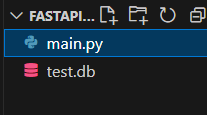
The project uses a single main.py file containing all the code. Running it creates a "test.db" SQLite database to store and manage data.
Step 2: Importing Necessary Libraries and Classes
Import the necessary modules for building the FastAPI application, handling the database with SQLAlchemy, and defining data models using Pydantic.
# Import required libraries
from fastapi import FastAPI, Depends, HTTPException
from sqlalchemy import create_engine, Column, Integer, String
from sqlalchemy.orm import sessionmaker, Session
from pydantic import BaseModel
Step 3: Creating a FastAPI Instance and SetUp the Database
Create the FastAPI app instance, configure the SQLite database connection using a SQLAlchemy engine and define SessionLocal for managing database sessions. Also, initialize Base to define SQLAlchemy models like Item
# FastAPI app instance
app = FastAPI()

# Database setup
DATABASE_URL = "sqlite:///./test.db"
engine = create_engine(DATABASE_URL)
SessionLocal = sessionmaker(autocommit=False, autoflush=False, bind=engine)
Base = sqlalchemy.orm.declarative_base()
Step 4: Defining the Database Model
Define a SQLAlchemy model Item to store data in the database, with fields for id, name and description.
# Database model
class Item(Base):
    __tablename__ = "items"
    id = Column(Integer, primary_key=True, index=True)
    name = Column(String, index=True)
    description = Column(String)
Step 5: Creating Database Tables
Create necessary tables in the database based on the defined models.
# Create tables
Base.metadata.create_all(bind=engine)
Step 6: Dependency for Getting the Database Session
Define a dependency function (get_db) to get a database session. It yields the database session to be used in API endpoints and ensures that the database session is properly closed after use by API.
# Dependency to get the database session
def get_db():
    db = SessionLocal()
    try:
        yield db
    finally:
        db.close()
Step 7: Pydantic Model for Request Data and Response Data
Define a Pydantic model ItemCreate with name and description fields to validate input data when creating an item.
# Pydantic model for request data
class ItemCreate(BaseModel):
    name: str
    description: str
Also, define a Pydantic model ItemResponse with id, name and description to structure the response data returned by the API.
# Pydantic model for response data
class ItemResponse(BaseModel):
    id: int
    name: str
    description: str
Step 8: API Endpoint to Create an Item
Create a POST endpoint /items/ to add items to the database. It accepts input via ItemCreate, validates the data, stores it and returns a response structured by ItemResponse.
# API endpoint to create an item
@app.post("/items/", response_model=ItemResponse)
async def create_item(item: ItemCreate, db: Session = Depends(get_db)):
    db_item = Item(**item.model_dump())
    db.add(db_item)
    db.commit()
    db.refresh(db_item)
    return db_item
Step 9: API Endpoint to Read an Item by ID
Create a GET endpoint /items/{item_id} to retrieve an item by ID. It queries the database and returns the item, or raises a 404 error if not found.
# API endpoint to read an item by ID
@app.get("/items/{item_id}", response_model=ItemResponse)
async def read_item(item_id: int, db: Session = Depends(get_db)):
    db_item = db.query(Item).filter(Item.id == item_id).first()
    if db_item is None:
        raise HTTPException(status_code=404, detail="Item not found")
    return db_item
Step 10: Run the FastAPI Application
Add a main block to run the FastAPI application only when the script is executed directly, using Uvicorn on http://127.0.0.1:8000.
if __name__ == "__main__":
    import uvicorn

    uvicorn.run(app, host="127.0.0.1", port=8000)
Complete Code
from fastapi import FastAPI, Depends, HTTPException
from sqlalchemy import create_engine, Column, Integer, String
from sqlalchemy.ext.declarative import declarative_base
from sqlalchemy.orm import sessionmaker, Session
from pydantic import BaseModel

# FastAPI app instance
app = FastAPI()

# Database setup
DATABASE_URL = "sqlite:///./test.db"
engine = create_engine(DATABASE_URL)
SessionLocal = sessionmaker(autocommit=False, autoflush=False, bind=engine)
Base = declarative_base()


# Database model
class Item(Base):
    __tablename__ = "items"
    id = Column(Integer, primary_key=True, index=True)
    name = Column(String, index=True)
    description = Column(String)


# Create tables
Base.metadata.create_all(bind=engine)


# Dependency to get the database session
def get_db():
    db = SessionLocal()
    try:
        yield db
    finally:
        db.close()


# Pydantic model for request data
class ItemCreate(BaseModel):
    name: str
    description: str


# Pydantic model for response data
class ItemResponse(BaseModel):
    id: int
    name: str
    description: str


# API endpoint to create an item
@app.post("/items/", response_model=ItemResponse)
async def create_item(item: ItemCreate, db: Session = Depends(get_db)):
    db_item = Item(**item.dict())
    db.add(db_item)
    db.commit()
    db.refresh(db_item)
    return db_item


# API endpoint to read an item by ID
@app.get("/items/{item_id}", response_model=ItemResponse)
async def read_item(item_id: int, db: Session = Depends(get_db)):
    db_item = db.query(Item).filter(Item.id == item_id).first()
    if db_item is None:
        raise HTTPException(status_code=404, detail="Item not found")
    return db_item


if __name__ == "__main__":
    import uvicorn

    # Run the FastAPI application using Uvicorn
    uvicorn.run(app, host="127.0.0.1", port=8000)
Output: We can run this code as we run any simple python file. API will be available at "127.0.0.1:8000", and to use Swagger UI we will acess "127.0.0.1:8000/docs" in browser.
.jpg)
Video Demonstration
Explanation:
- Creates SessionLocal to manage database sessions
- Defines get_db dependency to provide and close database sessions
- Defines ItemCreate Pydantic model for validating request data
- Defines ItemResponse Pydantic model for structuring response data
- Implements GET endpoint /items/{item_id} to fetch an item by ID
