
List is a built-in data structure used to store an ordered collection of items. They are dynamic, resizable and capable of storing multiple data types.
- Allows duplicate elements
- Mutable: list elements can be changed, updated, added, or removed after the list is created.
- Ordered: elements maintain the order in which they are inserted.
- Index-based: elements are accessed using their position, starting from index 0.
- Heterogeneous: a list can store different data types such as integers, strings, booleans and even other lists.
Creating a List
Lists can be created in several ways, such as using square brackets [] , the list() constructor or by repeating elements.
1. Using Square Brackets: Square brackets [] are used to create a list directly.
a = [1, 2, 3, 4, 5] # List of integers
b = ['apple', 'banana', 'cherry'] # List of strings
c = [1, 'hello', 3.14, True] # Mixed data types

print(a)
print(b)
print(c)
Output
[1, 2, 3, 4, 5]
['apple', 'banana', 'cherry']
[1, 'hello', 3.14, True]
2. Using list() Constructor: A list can also be created by passing an iterable (such as tuple, string or another list) to the list() constructor.
a = list((1, 2, 3, 'apple', 4.5))
print(a)

b = list("GFG")
print(b)
Output
[1, 2, 3, 'apple', 4.5]
['G', 'F', 'G']
3. Creating List with Repeated Elements: A list with repeated elements can be created using the multiplication (*) operator.
a = [2] * 5
b = [0] * 7

print(a)
print(b)
Output
[2, 2, 2, 2, 2]
[0, 0, 0, 0, 0, 0, 0]
Internal Representation of Lists
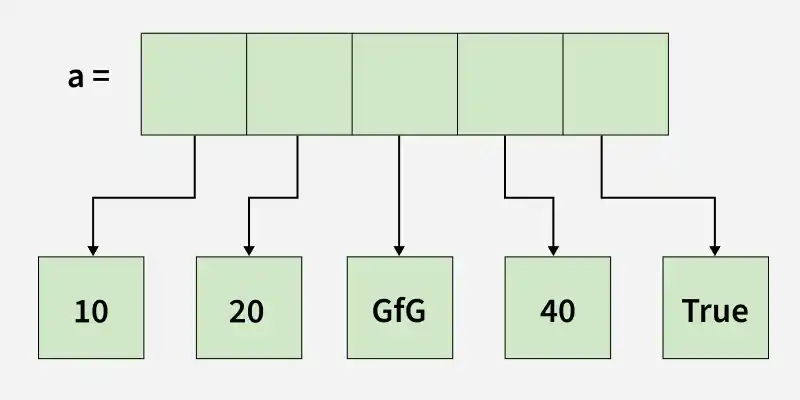
Python list stores references to objects, not the actual values directly.
- The list keeps memory addresses of objects like integers, strings, or booleans.
- Actual objects exist separately in memory.
- Modifying a mutable object inside a list changes the original object.
- Reassigning an immutable object creates a new object instead of changing the old one.
a = [10, 20, "GfG", 40, True]
print(a)
print(a[0])
print(a[1])
print(a[2])
Output
[10, 20, 'GfG', 40, True]
10
20
GfG
Explanation:
- The list a contains an integer (10, 20 and 40), a string ("GfG") and a boolean (True).
- Elements are accessed using indexing (a[0], a[1], etc.).
- Each element keeps its original type.
Accessing List Elements
Elements in a list are accessed using indexing. Python uses zero-based indexing, meaning a[0] represents the first element. Negative indexing is also supported, where -1 accesses the last element.
a = [10, 20, 30, 40, 50]
print(a[0])
print(a[-1])
print(a[1:4])   # elements from index 1 to 3
Output
10
50
[20, 30, 40]
Adding Elements into List
Elements can be added to a list using the following methods:
- append(): Adds an element at the end of the list.
- extend(): Adds multiple elements to the end of the list.
- insert(): Adds an element at a specific position.
- clear(): removes all items.
a = []

a.append(10)
print("After append(10):", a)

a.insert(0, 5)
print("After insert(0, 5):", a)

a.extend([15, 20, 25])
print("After extend([15, 20, 25]):", a)

a.clear()
print("After clear():", a)
Output
After append(10): [10]
After insert(0, 5): [5, 10]
After extend([15, 20, 25]): [5, 10, 15, 20, 25]
After clear(): []
Updating Elements into List
Since lists are mutable, elements can be updated by assigning new values using their index.
a = [10, 20, 30, 40, 50]
a[1] = 25
print(a)
Output
[10, 25, 30, 40, 50]
Removing Elements from List
Elements can be removed from a list using the following methods:
- remove(): Removes the first occurrence of an element.
- pop(): Removes the element at a specific index or the last element if no index is specified.
- del statement: Deletes an element at a specified index.
a = [10, 20, 30, 40, 50]

a.remove(30)
print("After remove(30):", a)

popped_val = a.pop(1)
print("Popped element:", popped_val)
print("After pop(1):", a)

del a[0]
print("After del a[0]:", a)
Output
After remove(30): [10, 20, 40, 50]
Popped element: 20
After pop(1): [10, 40, 50]
After del a[0]: [40, 50]
Iterating Over Lists
Lists can be iterated using loops, allowing operations to be performed on each element.
a = ['apple', 'banana', 'cherry']
for item in a:
    print(item)
Output
apple
banana
cherry
Nested Lists
A nested list is a list that contains another list as its element. It is commonly used to represent matrices or tabular data. Nested elements can be accessed by chaining multiple indexes.
matrix = [ [1, 2, 3],
           [4, 5, 6],
           [7, 8, 9] ]
print(matrix[1][2])
Output
6
List Comprehension
List comprehension provides a concise way to create lists in a single line of code. It is commonly used to apply an operation or condition to elements of an iterable, such as a list, tuple, or range.
squares = [x**2 for x in range(1, 6)]
print(squares)
Output
[1, 4, 9, 16, 25]
Explanation:
- for x in range(1, 6): loops through each number from 1 to 5 (excluding 6).
- x**2: squares each number x.
- [ ]: collects all the squared numbers into a new list.
Recommended Problems: List Traversal, Length of The List, Sum The List, Decrement List Values, Append To List
