
A tuple is an immutable ordered collection of elements.
- Tuples are similar to lists, but unlike lists, they cannot be changed after their creation.
- Can hold elements of different data types.
- These are ordered, heterogeneous and immutable.
Creating a Tuple
A tuple is created by placing all the items inside parentheses (), separated by commas. A tuple can have any number of items.
tup = ()
print(tup)

# Using String
tup = ('Geeks', 'For')
print(tup)

# Using List
li = [1, 2, 4, 5, 6]
print(tuple(li))

# Using Built-in Function
tup = tuple('Geeks')
print(tup)
Output
()
('Geeks', 'For')
(1, 2, 4, 5, 6)
('G', 'e', 'e', 'k', 's')
Creating a Tuple with Mixed Datatypes
Tuples can store elements of different data types, such as integers, strings, lists and dictionaries, within a single structure.
tup = (5, 'Welcome', 7.5, True, [1, 2, 3], {'key': 'value'})
print(tup)
Output
(5, 'Welcome', 7.5, True, [1, 2, 3], {'key': 'value'})
Tuple Basic Operations
Accessing of Tuples
We can access the elements of a tuple by using indexing and slicing, similar to how we access elements in a list. Indexing starts at 0 for the first element and goes up to n-1, where n is the number of elements in the tuple. Negative indexing starts from -1 for the last element and goes backward.
tup = tuple("Geeks")
print(tup[0])
print(tup[1:4])
print(tup[:3])

# Tuple unpacking
tup = ("Geeks", "For", "Geeks")

# This line unpack values of Tuple1
a, b, c = tup
print(a)
print(b)
print(c)
Output
G
('e', 'e', 'k')
('G', 'e', 'e')
Geeks
For
Geeks
Concatenation of Tuples
Tuples can be concatenated using the + operator. This operation combines two or more tuples to create a new tuple.
Note: Only the same datatypes can be combined with concatenation, an error arises if a list and a tuple are combined.
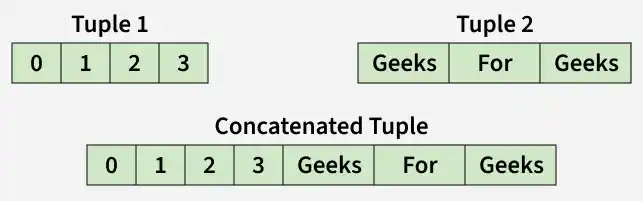
tup1 = (0, 1, 2, 3)
tup2 = ('Geeks', 'For', 'Geeks')
tup3 = tup1 + tup2
print(tup3)
Output
(0, 1, 2, 3, 'Geeks', 'For', 'Geeks')
Slicing of Tuple
Slicing a tuple means creating a new tuple from a subset of elements of the original tuple. The slicing syntax is tuple[start:stop:step].
Note: Negative Increment values can also be used to reverse the sequence of Tuples.

tup = tuple('GEEKSFORGEEKS')
print(tup[1:])
print(tup[::-1])
print(tup[4:9])
Output
('E', 'E', 'K', 'S', 'F', 'O', 'R', 'G', 'E', 'E', 'K', 'S')
('S', 'K', 'E', 'E', 'G', 'R', 'O', 'F', 'S', 'K', 'E', 'E', 'G')
('S', 'F', 'O', 'R', 'G')
Note: [:] returns a shallow copy of the tuple, while [::step] allows stepping through elements. Using [::-1] reverses the sequence.
Deleting a Tuple
Since tuples are immutable, we cannot delete individual elements of a tuple. However, we can delete an entire tuple using del statement.
Note: Printing of Tuple after deletion results in an Error.
tup = (0, 1, 2, 3, 4)
del tup
print(tup)
Output
ERROR!
Traceback (most recent call last):
File "<main.py>", line 6, in <module>
NameError: name 'tup' is not defined
Tuple Unpacking with Asterisk (*)
*operator is used in tuple unpacking to grab multiple items into a list. This is useful to extract just a few specific elements and collect the rest together.
tup = (1, 2, 3, 4, 5)
a, *b, c = tup
print(a)
print(b)
print(c)
Output
1
[2, 3, 4]
5
Explanation: a gets the first item, c gets the last item and *b collects everything in between into a list.
