<?xml version="1.0" encoding="utf-8"?><feed xmlns="http://www.w3.org/2005/Atom" ><generator uri="https://jekyllrb.com/" version="4.2.0">Jekyll</generator><link href="https://www.steveonstuff.com/feed.xml" rel="self" type="application/atom+xml" /><link href="https://www.steveonstuff.com/" rel="alternate" type="text/html" /><updated>2022-02-21T08:46:59+00:00</updated><id>https://www.steveonstuff.com/feed.xml</id><title type="html">Steve On Stuff</title><entry><title type="html">Nitpicky Code Reviews Are a Drag</title><link href="https://www.steveonstuff.com/2022/02/09/nitpicky-code-reviews-are-are-drag" rel="alternate" type="text/html" title="Nitpicky Code Reviews Are a Drag" /><published>2022-02-09T00:00:00+00:00</published><updated>2022-02-09T00:00:00+00:00</updated><id>https://www.steveonstuff.com/2022/02/09/nitpicky-code-reviews-are-are-drag</id><content type="html" xml:base="https://www.steveonstuff.com/2022/02/09/nitpicky-code-reviews-are-are-drag"><![CDATA[<p>Programmers can be a pedantic bunch. We like everything to be consistent. Uniform. Organised. Just so.</p>

<p>This mindset is as much a part of our culture and identity as it is good practice for our craft. Sometimes I wonder if developers come to somewhat view themselves as robots, running some internal software whose rules can be optimised and fine-tuned. With this mindset we strive for the human element of our practice to have the same traits as our software; it should be rule-based, consistent, and reproducible.</p>

<p>We love making the non-conforming conform, and there’s no more fertile ground than that of a code review. Here’s the thing though, what if conformity isn’t always worth the effort that we put in to it? What if we’re wasting our time on things that don’t make a difference to anything?</p>

<p>Every team has their ‘things’ that they’ve become perhaps a bit too obsessive over. Whitespace, braces, indentation, comment lengths, ternary statements vs if-else. Things that they might have once picked up on as being an indicator of code quality, but which they may be in danger of believing are <em>the</em> indicator of code quality.</p>

<h2 id="a-short-story">A short story</h2>

<p>I once worked with a developer who was really strict on identifying places in the code where we were using redundant <code class="language-plaintext highlighter-rouge">self</code> (using <code class="language-plaintext highlighter-rouge">self.something</code> when the <code class="language-plaintext highlighter-rouge">self</code> could be inferred), and each pull request was met with a flurry of suggestions to remove the redundant <code class="language-plaintext highlighter-rouge">self</code>s. Seems reasonable, right? I thought that this was making things consistent, so I also took part in the war on redundant <code class="language-plaintext highlighter-rouge">self</code>.</p>

<p>Then that guy left the team, and we became a little less strict about it, and you know what happened?</p>

<p>Nothing.</p>

<p>Nothing caught fire. Nothing broke. Sure, there were a few more redundant <code class="language-plaintext highlighter-rouge">self</code>s, and the team preference was loosely still to omit them, but they were harmless. There was one positive effect though: less noise in the code reviews, and more focus on the things that matter.</p>

<h2 id="things-that-actually-matter">Things that actually matter</h2>

<p>Some things in your code review really matter. For instance, a team member might spot a bug, suggest and architectural improvement, or identify some way to remove complexity.</p>

<p>The problem is that code review comments are often flooded with things like <em>“Why not make this guard statement a single line”</em>, or <em>“We leave two whitespaces after a protocol declaration”</em> or <em>“You could use a ternary statement instead of an if-else</em>” or <em>“private comes before static in the method declaration”</em>.</p>

<p>All of these things have the same thing in common. Once you make the change, the code does exactly 100% the same thing as it did before. It’s no more maintainable, no more scalable. You could recompile this, diff the binary, and see that it’s the same as before. So why do we bother?</p>

<h2 id="youre-not-a-robot">You’re not a robot</h2>

<p>Everyone’s at least once in their life lined up all the drinks cans in their fridge so that the labels all face the right way. I know you’ve done it. I also guess that you decided not to carry on this practice on account of it having no real value.</p>

<p>But there is <em>some</em> value. It’s aesthetically pleasing, and gives you a moment of satisfaction when you open the fridge. Perhaps it even allows you to identify the correct drink some small percentage faster. Now, if I were building a robot to fill the fridge then I’d probably make it line the drinks up all the same way, because why not?</p>

<p>If I, a human with limited time and energy, am filling the fridge, however, then I’ll skip the bit where I spin all the drinks around to face the same way, because the benefit is infinitesimally small compared to the time and effort that I expend in doing so.</p>

<p>We should see our code reviews like this. We have to weigh up if our energy is being well spent in fixing these ‘nitpicks’. If something <em>really</em> is just a nitpick, then well, probably not!</p>

<h2 id="but-it-annoys-me">But it annoys me!</h2>

<p>Sometimes it’s worth fixing something just so you can put your mind at ease and that nitpicky thing you care about will stop irking you. That’s ok, and is one of the best arguments for using tools such as linters; once all of the braces and spaces are uniform then you can just concentrate on the important things, right?</p>

<p>But we should recognise that it’s our own flaw to be irresistibly drawn to the insignificant minutiae of code formatting, rather than focussing on the details that contribute to the success of the code. Requesting a change to the code that results in exactly the same logic is the lowest value suggestion we could make. If the compiler doesn’t care, you have to question how much should you?</p>

<p>We have to be careful that we don’t come to believe that consistency of the minute details <em>is</em> what makes code good. What makes code good is scaleable architecture, useful abstractions, good design. No one really comes to regret writing a <code class="language-plaintext highlighter-rouge">guard</code> statement on a single line. At least, I’ve never heard that as being grounds for a rewrite, or sinking a once prosperous team.</p>

<h2 id="formatting-churn">Formatting churn</h2>

<p>The behaviour that we’re encouraging is the search for an ever increasing number of things to be pedantic about. We just add more and more things to the list. It starts with braces, then spaces, then naming conventions, then class layout, etc. Eventually you will probably yearn for the time that you could just get on with your job.</p>

<p>The worst type of suggestion is one from a reviewer who doesn’t actually know their own rules. They might like this <code class="language-plaintext highlighter-rouge">guard</code> statement on a single line, but that other one across multiple, but they can’t quite articulate why. In this case, the team can never learn or align on these rules, and this just results in ‘formatting churn’ for each pull request, that creates a drag on the team’s output.</p>

<p>New developers learn this ‘habit’ from their more experienced peers. Rather than considering the different trade offs between design patterns and approaches, they come to view surface level consistency and ‘neatness’ as being the goal that all teams should aspire too.</p>

<p>Once we come to believe that this is what makes code good, then we start actively search for new things to be pedantic about. More conditions to check in code review, more reasons to request changes to a pull request, believing that each of these rules represents some kind of mark of quality in our codebase.</p>

<p>In reality though, it doesn’t matter, and the team who just live in blissful ignorance of these ‘inconsistencies’ will probably put more energy into the things that do matter, such as what their code actually does.</p>

<h2 id="a-thought-experiment">A thought experiment</h2>

<p>Imagine that you could wear a pair of glasses that would allow you to see other people’s code with consistent formatting that aligned with all the nitpicky rules and conditions that you like, would you wear them?</p>

<p>I think it’s a no brainier. You would be able to focus just on what the code did, without being irked by the fact that the author used an <code class="language-plaintext highlighter-rouge">if-else</code> when you just <em>‘know’</em> that a ternary statement would look better here.</p>

<p>We can have these magic glasses! They’re just a mindset. We just need to be more chill about stuff. Here’s how we review an <code class="language-plaintext highlighter-rouge">if-else</code> condition:</p>

<p>We see that it’s an <code class="language-plaintext highlighter-rouge">if-else</code>, read what’s in the <code class="language-plaintext highlighter-rouge">if</code> condition, read what’s in the <code class="language-plaintext highlighter-rouge">else</code> condition, check the logic is sound, and just move on.</p>

<h2 id="so-whats-the-takeaway">So, what’s the takeaway?</h2>

<p>I’m not advocating for us not caring about things, but we should care about things proportional to the value that they provide. Shuffling some whitespace around is simply not worth the feedback cycle that you put in to it. It’s not worth the time it takes to make the comment. It’s not worth the time it takes for the author to fix it. It’s not worth clogging up the CI for a new build. You could have spent that time doing something of actual value.</p>

<p>Rather than nitpicking, we should instead focus on what the code actually does, not how well it aligns with a set of arbitrary habits that we’ve come to have Stockholm syndrome for.</p>

<p>So my advice is: when you’re about to make a nitpicky suggestion, take a deep breath, and just… let it go.</p>]]></content><author><name>Steve Barnegren</name></author><summary type="html"><![CDATA[Programmers can be a pedantic bunch. We like everything to be consistent. Uniform. Organised. Just so.]]></summary></entry><entry><title type="html">There’s No Such Thing as Clean Code</title><link href="https://www.steveonstuff.com/2022/01/27/no-such-thing-as-clean-code" rel="alternate" type="text/html" title="There’s No Such Thing as Clean Code" /><published>2022-01-27T00:00:00+00:00</published><updated>2022-01-27T00:00:00+00:00</updated><id>https://www.steveonstuff.com/2022/01/27/no-such-thing-as-clean-code</id><content type="html" xml:base="https://www.steveonstuff.com/2022/01/27/no-such-thing-as-clean-code"><![CDATA[<p>Everyone seems to be striving for ‘clean’ code at the moment. You can’t read a blog post without the author telling you how clean their approach is. Engineering teams get together and discuss which of the possible solutions is the cleanest. Other developers assure you that they practice ‘clean code’.</p>

<p>I’ve come to a realisation though. <em>There’s no such thing as clean code.</em></p>

<p>‘Clean’ isn’t a measure of anything useful. Code can’t be clean simply because ‘clean’ doesn’t describe anything about code.</p>

<div class="blue-box">
<p><b>What a hypocrite!</b></p>
<p>I'm not innocent myself, I've used the term 'clean' plenty of times in the past. I also want to make it clear that I'm not trying to disparage anyone who uses this term.</p>
<p></p>
<p>As a marketing term, or a description of a vision or ethos, 'clean' is great! As a technical term, though, it's got some issues...</p>
</div>

<h2 id="clean-code-is-good-code-right">Clean code is good code, right?</h2>

<p>When people describe code as clean they usually mean that the code is good in some way.</p>

<p>The thing is, code can be good for a variety of reasons. It could be:</p>

<ul>
  <li>Readable</li>
  <li>Understandable</li>
  <li>Simple</li>
  <li>Performant</li>
  <li>Safe</li>
  <li>Elegant</li>
  <li>Testable</li>
  <li>Encapsulated</li>
  <li>Scaleable</li>
  <li>Maintainable</li>
  <li>Reusable</li>
  <li>Easy to delete</li>
  <li>Neat and tidy</li>
  <li>Noninvasive</li>
  <li>Systematic</li>
  <li>Consistent</li>
  <li>or any number of other things</li>
</ul>

<p>But these traits are in some ways at odds with each other. The most simple code is probably not the most testable. All those interfaces and injected dependencies make for convenient testing, but have a cost in terms of simplicity.</p>

<p>Your heavy reliance on singletons may make things easy to understand, but it might not lead to a maintainable application.</p>

<p>It could be argued that some of these things are fundamentally opposing forces that can’t all be satisfied simultaneously. Engineering is about trade-offs, so we’ve got be aware of the trade-offs we’re proposing, and be able to discuss them as a team.</p>

<h2 id="if-the-code-is-good-weve-gotta-say-why">If the code is good, we’ve gotta say why</h2>

<p>When someone says a solution is ‘clean’, they’re often touting it as the superior option without being able to rationalise why.</p>

<p>If we want to have constructive discussion around technical solutions then we’ve got to be able to articulate to each other why one solution is better than another. It’s no good arguing over which solution is the ‘cleanest’, as if we should get our clean-o-meter out any weigh up each solution according to this mysterious metric.</p>

<p>It’s actually quite difficult to express sometimes why one approach is better or worse than another, but it’s a skill that is worth honing.</p>

<p><span style="color:#505050">
<strong>Would you rather have discussion like this?</strong>
</span></p>

<p><em>“I like solution X, it feels much cleaner.”</em></p>

<p><span style="color:#505050">
<strong>Or this?</strong>
</span></p>

<p><em>“I like solution X. It decouples the error message presentation from the core logic. It’s easier to understand, because you don’t have to consider both at the same time. This separation also unlocks some testability, as we can mock either object whilst testing the other. It does come at the expense of requiring the parent object to inject the dependencies, but that’s a worthwhile tradeoff for the testability.”</em></p>

<p>The second statement actually conveys something tangible about the pros and cons of the solution we’re discussing. Terms like ‘clean’ allow us to cop-out, rather than working to improve our ability to articulate our ideas.</p>

<h2 id="we-need-to-use-precise-terms">We need to use precise terms</h2>

<p>Coding is generally a team sport. If you’re hacking away on your own then you can do what you want, but when we’re working with a team then we’ve got to discuss our ideas. Being able to have discussion about technical solutions using language that is specific and has common understanding throughout the team is invaluable in understanding one another.</p>

<p>‘Clean code’ means <a href="https://www.quora.com/What-does-clean-code-mean">a different thing to everyone</a>.</p>

<p>To some developers, code is clean because it has a well defined architecture. To other developers, code is clean simply because it uses a consistent formatting style.</p>

<p>Words like ‘encapsulated’, ‘testable’, ‘mockable’, ‘reusable’ have meanings that we can all agree on. When we use more specific words that describe the various code traits that affect our project then we can be sure that we’re all on the same page.</p>

<p>‘Clean’ has the same level of precision as ‘good’. You can say that code is good, just as you can say that it’s clean, but that doesn’t absolve you from having to justify that with more concrete rationale.</p>

<h2 id="so-what-is-clean-code">So what is clean code?</h2>

<p>I’ve come to the conclusion that often when we describe code as ‘clean’ when we think it’s good but we’re not entirely sure why. It just <em>feels</em> like the right solution.</p>

<p>Or sometimes we do know why the code is good, but we can’t find the words to articulate it, and somehow the conclusion of our blog post just reads <em>“See! Look how much cleaner that it is!”</em>.</p>

<p>It’s good to build that intuition, but we can’t just stop there. We need to dig deeper beyond those feelings to understand and articulate <em>why</em> we think the code is good. What characteristics does this code have that other solutions don’t? Are those the characteristics that make the most sense for our project? Perhaps it’s actually not the right solution after all.</p>

<p>Hopefully I can convince you that you don’t really need clean code, you need _____ code. It’s up to you to fill in that blank with words that describe what your project requires.</p>]]></content><author><name>Steve Barnegren</name></author><summary type="html"><![CDATA[Everyone seems to be striving for ‘clean’ code at the moment. You can’t read a blog post without the author telling you how clean their approach is. Engineering teams get together and discuss which of the possible solutions is the cleanest. Other developers assure you that they practice ‘clean code’.]]></summary></entry><entry><title type="html">An Approach for Migrating From Objective-C to Swift</title><link href="https://www.steveonstuff.com/2022/01/13/migrating-from-objc-to-swift" rel="alternate" type="text/html" title="An Approach for Migrating From Objective-C to Swift" /><published>2022-01-13T00:00:00+00:00</published><updated>2022-01-13T00:00:00+00:00</updated><id>https://www.steveonstuff.com/2022/01/13/migrating-from-objc-to-swift</id><content type="html" xml:base="https://www.steveonstuff.com/2022/01/13/migrating-from-objc-to-swift"><![CDATA[<p>It feels like Swift is pretty ubiquitous across the Apple ecosystem now, but there’s a lot of Objective-C out there. The larger and older the app, the more likely that there’s still a bunch of Objective-C powering various bits behind the scenes.</p>

<p>At my last job I worked on a fairly large iOS and tvOS app for nearly 4 years, during which time we transitioned almost the whole app to Swift. At least the first year was spent learning how not to do a language transition, during the second and third we figured things out and really hit our stride, and by the fourth we had something resembling a formalised approach.</p>

<p>I’ve realised that there’s a bunch of teams out there still maintaining Objective-C projects, and struggling to make much headway on a Swift transition. So in this post I’m going to tell you what I learned along the way.</p>

<div class="blue-box">
<p><b>Ok, just how large was this app?</b></p>
<p></p>
<p>It’s all relative, but if you work on an app with 2 or 3 developers then it probably looks monstrous. If you work at Netflix then it probably looks pretty small!</p>
<p></p>
<p>It was large enough that a full rewrite from the ground up in Swift would take years and was out of the question.</p>
</div>

<h2 id="how-not-to-do-it">How not to do it</h2>

<p>The naive approach is to simply decide to write all new code in Swift. Surely, then, over time there will be more Swift code and less Objective-C.</p>

<p>This is probably most teams’ initial idea, and it was ours too. I can tell you that it didn’t move the needle very much.</p>

<p>It was difficult to gracefully integrate new Swift code into existing Objective-C classes and systems. A year down the line we still had a mostly Objective-C code base. Almost anything of any real importance was still in Objective-C, and all we’d really built was some surface level Swift on top of an Objective-C core.</p>

<h2 id="swift-and-objective-c-are-not-friends">Swift and Objective-C are not friends</h2>

<p>Swift and Objective-C are interoperable, right?</p>

<p>Swift and Objective-C are interoperable in the same way that you can plug a VHS player into your 4K TV. It’s possible, but if that’s your plan then you really don’t need a 4K TV anyway.</p>

<p>Everything that’s great about Swift has to be sacrificed for Objective-C interoperability. Value types, generics, enums with associated values, optionals.</p>

<p>If you have a whole bunch of Objective-C and you write a tiny bit of Swift in the middle, then that Swift ends up being crappy Swift. Instead of using value types for your model objects, you end up with model classes that inherit from <code class="language-plaintext highlighter-rouge">NSObject</code>, all your enums use <code class="language-plaintext highlighter-rouge">Int</code> as a raw value, and <em>everything</em> is optional. (Urgh!)</p>

<p>We’ll call this code <em>‘Objective-C compromised Swift’</em>.</p>

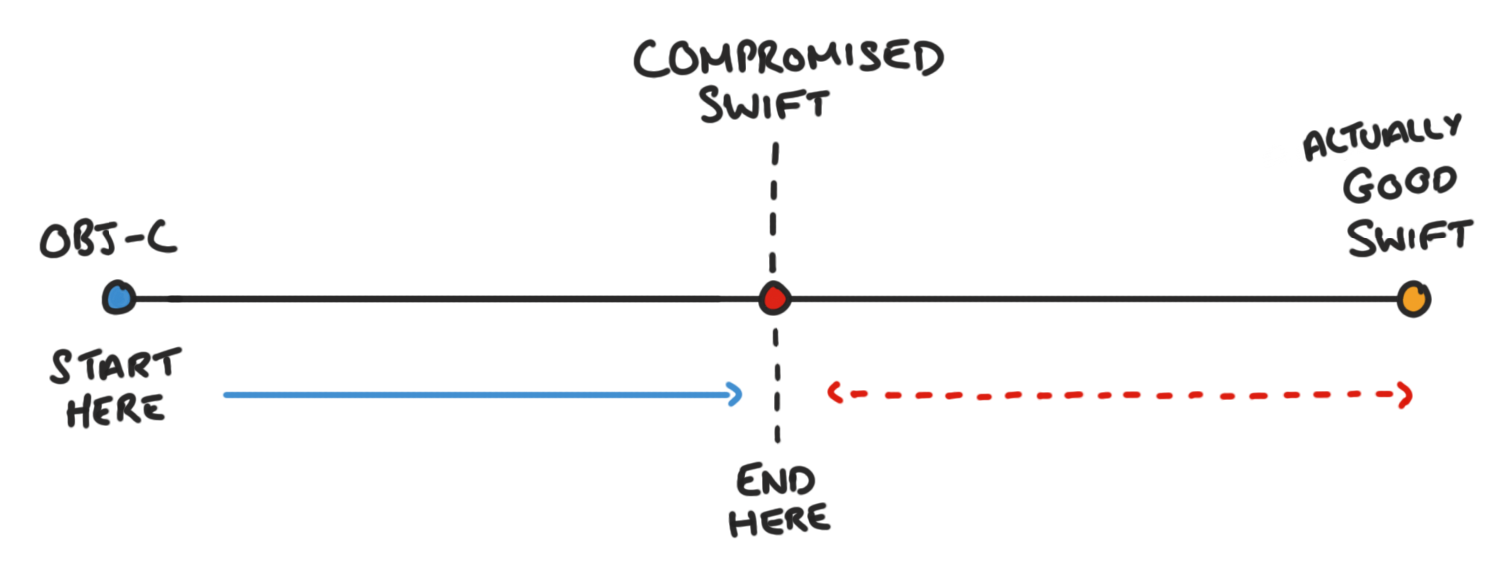
<p>It feels good that you’re writing Swift, but remember our goal is to go from A to B, where A is a fully Objective-C codebase, and B is a fully Swift one.</p>

<p><img class="post-image" src="https://www.steveonstuff.com/assets/posts/2022-01-13-migrating-from-objc-to-swift/images/ObjCToSwift.png" alt="ObjectiveC to Swift" /></p>

<p>Once we remove all of our Objective-C code we’ll be at the end goal, right?</p>

<p>Nope, we’ll be at some awkward point between A and B. Yes, theoretically the project will be in Swift, but once the Objective-C is removed none of the compromises will make sense anymore. All of our model objects will be classes for no reason, and we’ll have to do a second refactoring pass to get to our fully Swift vision.</p>

<p><img class="post-image" src="https://www.steveonstuff.com/assets/posts/2022-01-13-migrating-from-objc-to-swift/images/ObjCToSwiftCompromised.png" alt="ObjectiveC to compromised Swift" /></p>

<p>It took us a while to realise that this is what we were creating. We would end up sort of ‘halfway’ to the goal of having a Swift codebase. The Swift code would be horrible to work with, and the team would be suggesting yet another refactoring effort to rewrite things in a nicer way (management absolutely wouldn’t approve of this!).</p>

<p>The goal is that the Swift that we write needs to idiomatic Swift, following patterns that make sense in Swift. But how to we do that, if our new Swift lives alongside our existing Objective-C?</p>

<h2 id="swift-islands">Swift islands</h2>

<p>The key is to not tightly intermingle the two languages. What we need is separation between them. If system X is written in Objective-C and system Y is written in Swift, then only the api for system Y needs to be compatible with Objective-C. The innards of that system can use all the Swift goodness that we’re after.</p>

<p>This is great in theory, but we also don’t want to completely rewrite whole subsystems of our application in Swift in one go. We want a gradual approach that moves us to closer to having a full Swift codebase over time.</p>

<p>The approach that we developed was what we called ‘Swift islands’.</p>

<p>Our codebase would end up with three types of code.</p>

<ul>
  <li>Idiomatic Swift that we intend to keep.</li>
  <li>Temporary Swift to Objective-C shims.</li>
  <li>Legacy Objective-C.</li>
</ul>

<p>An island looks like this:</p>

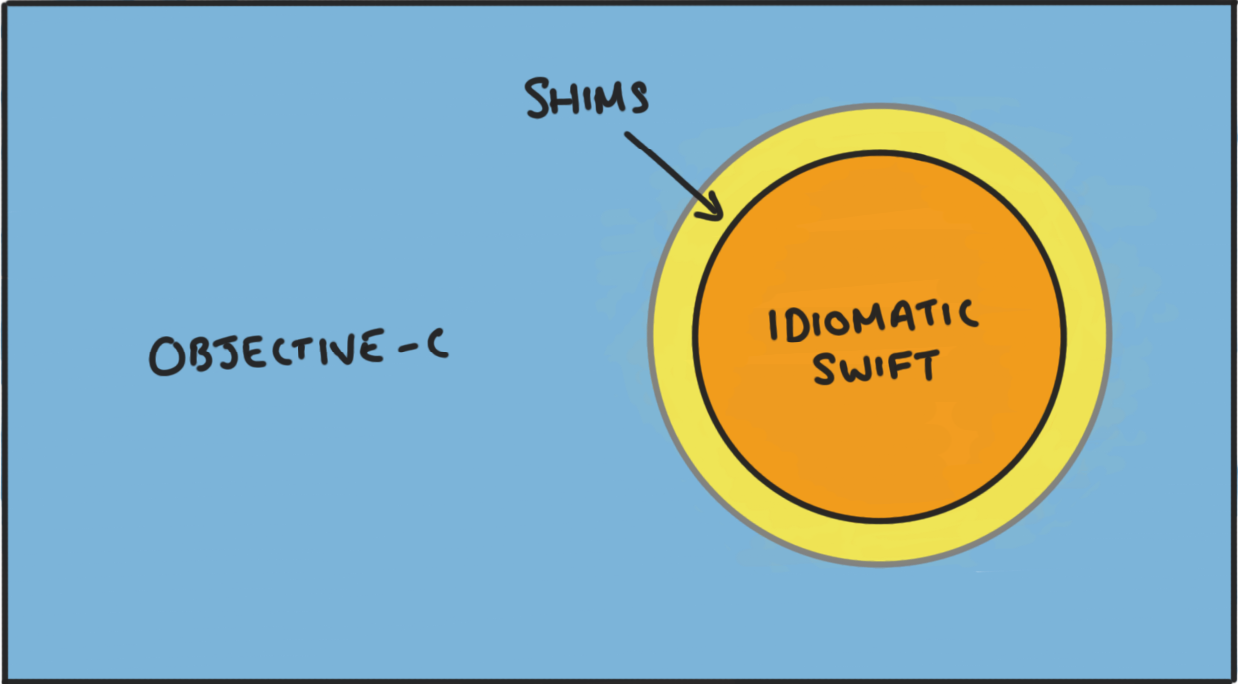
<p><img class="post-image" src="https://www.steveonstuff.com/assets/posts/2022-01-13-migrating-from-objc-to-swift/images/SwiftIslandWithShim.png" alt="Swift Island" /></p>

<p>We can start anywhere that makes sense. The key is that we start with a small Swift ‘island’. It can be just be one Swift class. We write nice Swifty code that we can be proud of, and then we provide shims that our Objective-C code uses to interface with it.</p>

<p>When we come to write some new Swift code that lives in the same area, we interface with the Swift apis directly, not via the shims. Every time we rewrite some adjacent code in Swift, the island will expand a bit. This new code will provide more shims, but as we rewrite, the island expands and we can start removing the shims from inside of the island once there are no longer any Objective-C calls to them.</p>

<p>There’s no need to limit ourselves to a single island, either. As we start writing Swift in new areas of the app we create new little islands of Swift, and these will grow and merge together.</p>

<p>The feeling of deleting a shim is great. You’re left with idiomatic Swift that the team can be proud of and that you can maintain into the future.</p>

<h2 id="how-to-shim">How to Shim</h2>

<p>Let’s look at some shimming strategies. There’s a variety of ways to write a shim, but these are the ones that I’ve got the most mileage from.</p>

<p>The important thing to remember is that <em>shims are temporary</em>. This means they can be a bit ugly. Remember, the thing that we’re optimising for is what the code will be like once the shim is removed, not the experience of using the shim.</p>

<h3 id="the-shim-extension">The shim extension</h3>

<p>The simplest way to add a shim is to write a extension on your class that provides an Objective-C compatible api.</p>

<div class="language-swift highlighter-rouge"><div class="highlight"><pre class="highlight"><code><span class="kd">@objc</span> <span class="kd">class</span> <span class="kt">NotificationScheduler</span><span class="p">:</span> <span class="kt">NSObject</span> <span class="p">{</span>
  <span class="kd">enum</span> <span class="kt">NotificationTime</span> <span class="p">{</span>
    <span class="k">case</span> <span class="n">now</span>
    <span class="k">case</span> <span class="nf">scheduled</span><span class="p">(</span><span class="nv">date</span><span class="p">:</span> <span class="kt">Date</span><span class="p">)</span>
  <span class="p">}</span>

  <span class="kd">func</span> <span class="nf">sendNotification</span><span class="p">(</span><span class="nv">time</span><span class="p">:</span> <span class="kt">NotificationTime</span><span class="p">,</span> <span class="nv">text</span><span class="p">:</span> <span class="kt">String</span><span class="p">)</span> <span class="p">{</span>
    <span class="o">...</span>
  <span class="p">}</span>
<span class="p">}</span>

<span class="c1">/// Objective-C Shim</span>
<span class="kd">extension</span> <span class="kt">NotificationScheduler</span> <span class="p">{</span>
  <span class="kd">@objc</span> <span class="nf">objc_sendNotificationNow</span><span class="p">(</span><span class="nv">text</span><span class="p">:</span> <span class="kt">String</span><span class="p">)</span> <span class="p">{</span>
    <span class="nf">sendNotification</span><span class="p">(</span><span class="o">.</span><span class="n">now</span><span class="p">,</span> <span class="nv">text</span><span class="p">:</span> <span class="n">text</span><span class="p">)</span>
  <span class="p">}</span>
  
  <span class="kd">@objc</span> <span class="nf">objc_sendNotificationAtDate</span><span class="p">(</span><span class="nv">date</span><span class="p">:</span> <span class="kt">Date</span><span class="p">,</span> <span class="nv">text</span><span class="p">:</span> <span class="kt">String</span><span class="p">)</span> <span class="p">{</span>
    <span class="nf">sendNotification</span><span class="p">(</span><span class="o">.</span><span class="nf">scheduled</span><span class="p">(</span><span class="nv">date</span><span class="p">:</span> <span class="n">date</span><span class="p">),</span> <span class="nv">text</span><span class="p">:</span> <span class="n">text</span><span class="p">)</span>
  <span class="p">}</span>
<span class="p">}</span>
</code></pre></div></div>

<p><code class="language-plaintext highlighter-rouge">NotificationScheduler</code> has the Swift api that we want, but the enum with associated values for <code class="language-plaintext highlighter-rouge">NotificationTime</code> prevents it from being callable from Objective-C. Instead, we provided an additional api for Objective-C using a shim extension.</p>

<p>The caveat with this approach is that we still had to make the class visible to Objective-C, so it required the <code class="language-plaintext highlighter-rouge">@objc</code> attribute and needed to inherit from <code class="language-plaintext highlighter-rouge">NSObject</code>. A small concession, but preferable to a fully Objective-C compatible api.</p>

<p>Also I like to prefix the shim methods with <code class="language-plaintext highlighter-rouge">objc_</code>. This makes the shims stand out, and prevents anyone accidentally calling them from Swift code. Remember, we’ll delete them, so it’s ok for them to be ugly.</p>

<h3 id="the-value-type-wrapper">The value type wrapper</h3>

<p>Value types are pretty easy to deal with, we simply wrap them up, like this:</p>

<div class="language-swift highlighter-rouge"><div class="highlight"><pre class="highlight"><code><span class="kd">struct</span> <span class="kt">User</span> <span class="p">{</span>
  <span class="k">var</span> <span class="nv">name</span><span class="p">:</span> <span class="kt">String</span>
  <span class="k">var</span> <span class="nv">email</span><span class="p">:</span> <span class="kt">String</span>
<span class="p">}</span>

<span class="kd">@objc</span> <span class="kd">class</span> <span class="kt">User_ObjC</span><span class="p">:</span> <span class="kt">NSObject</span> <span class="p">{</span>
  <span class="k">let</span> <span class="nv">user</span><span class="p">:</span> <span class="kt">User</span>
  <span class="nf">init</span><span class="p">(</span><span class="nv">user</span><span class="p">:</span> <span class="kt">User</span><span class="p">)</span> <span class="p">{</span>
    <span class="k">self</span><span class="o">.</span><span class="n">user</span> <span class="o">=</span> <span class="n">user</span>
  <span class="p">}</span>
  
  <span class="kd">@objc</span> <span class="k">var</span> <span class="nv">name</span><span class="p">:</span> <span class="kt">String</span> <span class="p">{</span>
    <span class="n">user</span><span class="o">.</span><span class="n">name</span>
  <span class="p">}</span>
  
  <span class="kd">@objc</span> <span class="k">var</span> <span class="nv">email</span><span class="p">:</span> <span class="kt">String</span> <span class="p">{</span>
    <span class="n">user</span><span class="o">.</span><span class="n">email</span>
  <span class="p">}</span>
<span class="p">}</span>
</code></pre></div></div>

<p>We use <code class="language-plaintext highlighter-rouge">User</code> inside of our Swift island, and we wrap it in <code class="language-plaintext highlighter-rouge">User_ObjC</code> when it travels outside of the island through a shim, and unwrap <code class="language-plaintext highlighter-rouge">User_ObjC</code> to get back a <code class="language-plaintext highlighter-rouge">User</code> if it travels into our Swift island.</p>

<p>We can provide shims that facilitate all of this for us:</p>

<div class="language-swift highlighter-rouge"><div class="highlight"><pre class="highlight"><code><span class="kd">@objc</span> <span class="kd">class</span> <span class="kt">UserManager</span><span class="p">:</span> <span class="kt">NSObject</span> <span class="p">{</span>
  <span class="kd">func</span> <span class="nf">getCurrentUser</span><span class="p">()</span> <span class="o">-&gt;</span> <span class="kt">User</span> <span class="p">{</span> <span class="o">...</span> <span class="p">}</span>
  <span class="kd">func</span> <span class="nf">updateUser</span><span class="p">(</span><span class="nv">user</span><span class="p">:</span> <span class="kt">User</span><span class="p">)</span> <span class="p">{</span> <span class="o">...</span> <span class="p">}</span>
<span class="p">}</span>

<span class="kd">extension</span> <span class="kt">UserManager</span> <span class="p">{</span>
  <span class="kd">@objc</span> <span class="kd">func</span> <span class="nf">objc_getCurrentUser</span><span class="p">()</span> <span class="p">{</span>
    <span class="kt">User_ObjC</span><span class="p">(</span><span class="nv">user</span><span class="p">:</span> <span class="nf">getCurrentUser</span><span class="p">())</span>
  <span class="p">}</span> 
  <span class="kd">@objc</span> <span class="kd">func</span> <span class="nf">objc_updateUser</span><span class="p">(</span><span class="nv">user</span><span class="p">:</span> <span class="kt">User_ObjC</span><span class="p">)</span> <span class="p">{</span>
    <span class="nf">updateUser</span><span class="p">(</span><span class="nv">user</span><span class="p">:</span> <span class="n">user</span><span class="o">.</span><span class="n">user</span><span class="p">)</span>
  <span class="p">}</span>
<span class="p">}</span>
</code></pre></div></div>

<h3 id="awkward-conversions-and-how-to-cheat-them">Awkward conversions (and how to cheat them)</h3>

<p>Some Swift concepts are harder to convert to Objective-C than others. Take this model for a train status:</p>

<div class="language-swift highlighter-rouge"><div class="highlight"><pre class="highlight"><code><span class="kd">enum</span> <span class="kt">TrainStatus</span> <span class="p">{</span>
  <span class="k">case</span> <span class="n">onTime</span>
  <span class="k">case</span> <span class="nf">delayed</span><span class="p">(</span><span class="nv">minutes</span><span class="p">:</span> <span class="kt">Int</span><span class="p">)</span>
  <span class="k">case</span> <span class="n">cancelled</span>
<span class="p">}</span>
</code></pre></div></div>

<p>We might have a table view in Objective-C that lists incoming trains and highlights them red if they’re either cancelled or more than 15 minutes late.</p>

<p>If you have many places where you use this type from Objective-C then you might write a fancy shim.</p>

<p>Or you can cheat:</p>

<div class="language-swift highlighter-rouge"><div class="highlight"><pre class="highlight"><code><span class="kd">@objc</span> <span class="kt">TrainStatus_ObjC</span><span class="p">:</span> <span class="kt">NSObject</span> <span class="p">{</span>
  <span class="k">var</span> <span class="nv">status</span><span class="p">:</span> <span class="kt">TrainStatus</span>
  <span class="nf">init</span><span class="p">(</span><span class="nv">status</span><span class="p">:</span> <span class="kt">TrainStatus</span><span class="p">)</span> <span class="p">{</span>
    <span class="k">self</span><span class="o">.</span><span class="n">status</span> <span class="o">=</span> <span class="n">status</span>
  <span class="p">}</span>
  
  <span class="kd">@objc</span> <span class="nv">isCancelledOrMoreThan15MinutesLate</span><span class="p">:</span> <span class="kt">Bool</span> <span class="p">{</span>
    <span class="k">switch</span> <span class="n">status</span> <span class="p">{</span>
      <span class="k">case</span> <span class="o">.</span><span class="nv">onTime</span><span class="p">:</span> <span class="k">return</span> <span class="kc">false</span>
      <span class="k">case</span> <span class="o">.</span><span class="nf">delayed</span><span class="p">(</span><span class="k">let</span> <span class="nv">mins</span><span class="p">):</span> <span class="k">return</span> <span class="n">mins</span> <span class="o">&gt;</span> <span class="mi">15</span>
      <span class="k">case</span> <span class="o">.</span><span class="nv">cancelled</span><span class="p">:</span> <span class="k">return</span> <span class="kc">true</span>    
    <span class="p">}</span>
  <span class="p">}</span>
<span class="p">}</span>
</code></pre></div></div>

<p>You might balk at this. This isn’t very good design. We added a computed variable on this object that’s weirdly specific for this one use case, but remember, it’s for a shim! Shims are temporary, and we want them to be quick and easy to produce, and to leave no lasting negative effects on our application design once removed.</p>

<p>I’ve created a bunch of shims just like this and I have no regrets because I’ve since deleted them.</p>

<p>How much investment you make in the shim should be guided by how long you think it will last, and how many use cases you have for it. A long lasting shim should probably provide a reasonable api. A shim that only supports one call site can be pretty naive.</p>

<h2 id="messaging-space">Messaging space</h2>

<p>One thing that became evident to me over time was that when you have a collection of objects that work together, where most are Swift but some are Objective-C, you get a sort of ‘lowest common denominator’ effect, where even just a few Objective-C types pollute the design of the whole system. The reason is that these objects want to pass and receive Objective-C friendly types, and force everything around them into an Objective-C friendly style to work with them.</p>

<p>I’m going to call this part of the code the ‘messaging space’.</p>

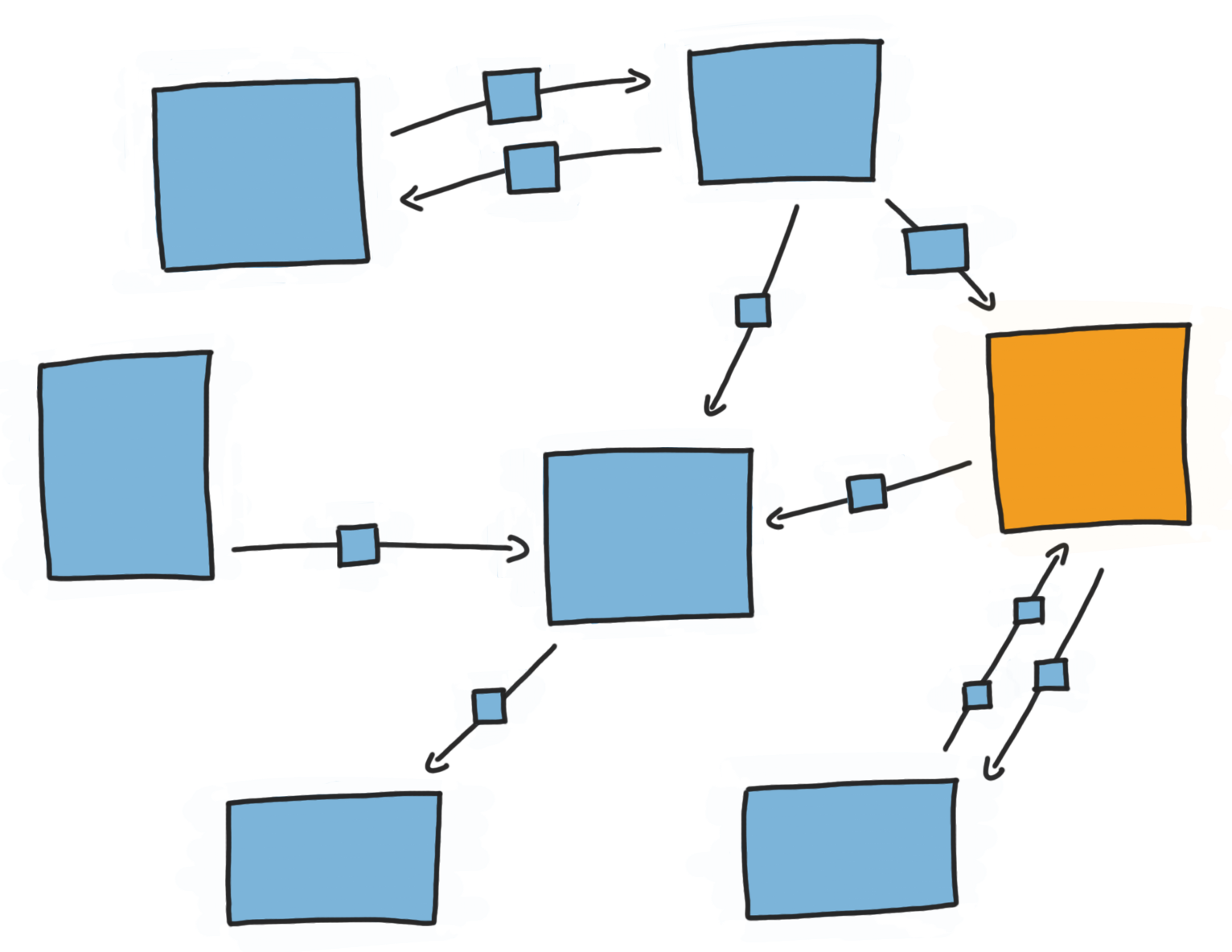
<p>We can sort of visualise the objects in our application as little self contained boxes. We can then imagine connections between them, and imagine them sending little messages to each other. The space that the boxes sit in is the messaging space.</p>

<p>The messaging space also has a sort of language to it. A predominantly Objective-C messaging space might probably has messages flowing through it containing <code class="language-plaintext highlighter-rouge">NSValues</code> and <code class="language-plaintext highlighter-rouge">NSNumbers</code>, and model classes inheriting from <code class="language-plaintext highlighter-rouge">NSObject</code>.</p>

<p>Being a Swift class in this world is tough. Nothing feels like it really fits nicely with the design of Swift. For a new Swift object to participate here it also needs to pass and receive Objective-C objects.</p>

<p><img class="post-image" src="https://www.steveonstuff.com/assets/posts/2022-01-13-migrating-from-objc-to-swift/images/MessagingWithoutShims.png" alt="Messaging without shims" /></p>

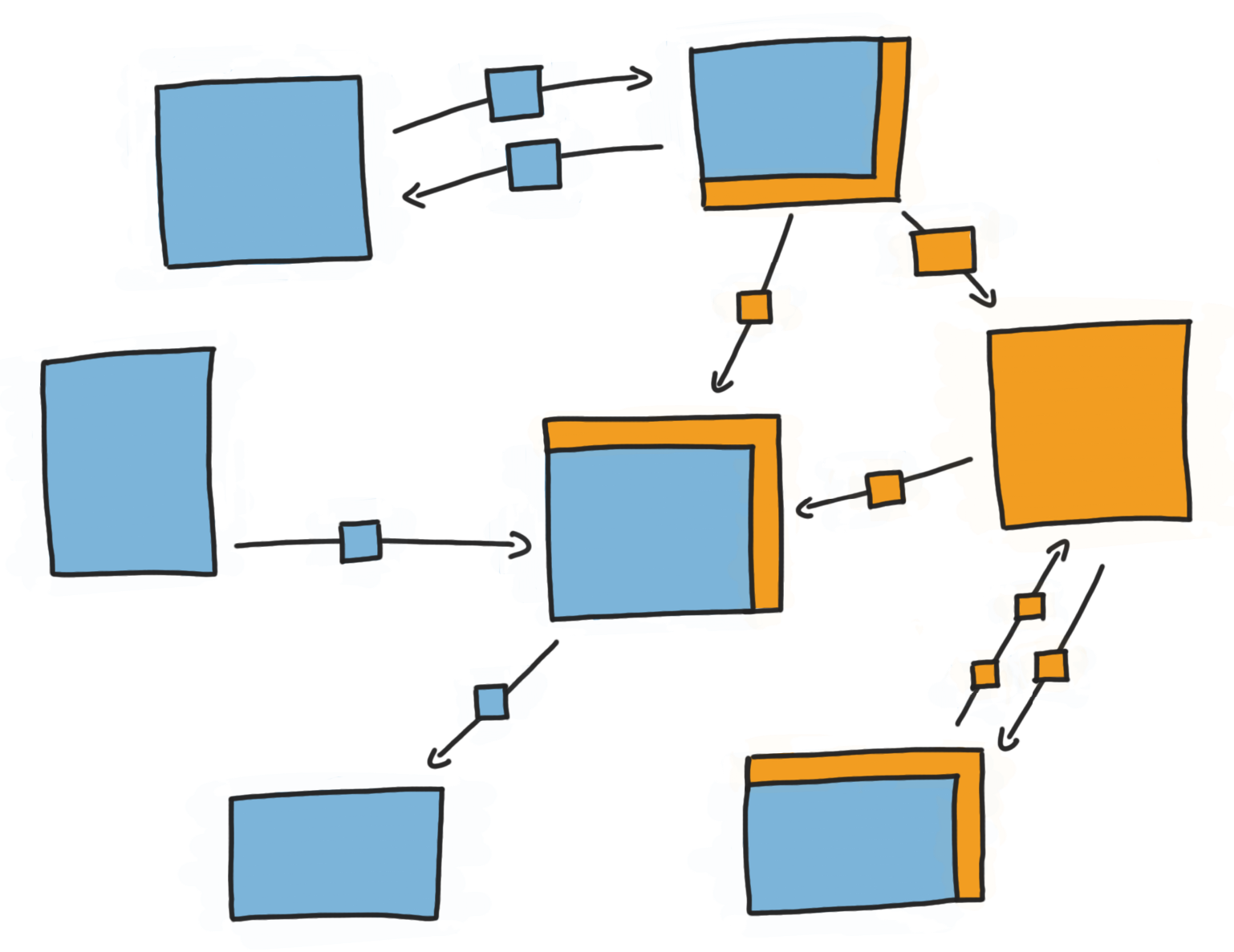
<p>What we need to do is change the language of the messaging space to be Swift friendly, but without rewriting all of our Objective-C objects. We can do this by creating a Swift wrapper around our Objective-C classes and presenting a Swift friendly api.</p>

<p>Once these shims are in place our new Swift object is much happier, and probably contains much better Swift code.</p>

<p><img class="post-image" src="https://www.steveonstuff.com/assets/posts/2022-01-13-migrating-from-objc-to-swift/images/MessagingWithShims.png" alt="Messaging with shims" /></p>

<p>For example, if we have a food order service declared in Objective-C, the api might import to Swift like this:</p>

<div class="language-swift highlighter-rouge"><div class="highlight"><pre class="highlight"><code><span class="kd">class</span> <span class="kt">FoodOrderService</span><span class="p">:</span> <span class="kt">NSObject</span> <span class="p">{</span>
  <span class="kd">func</span> <span class="nf">order</span><span class="p">(</span><span class="nv">food</span><span class="p">:</span> <span class="kt">Food</span><span class="p">,</span> <span class="nv">completion</span><span class="p">:</span> <span class="p">(</span><span class="kt">Receipt</span><span class="p">?,</span> <span class="kt">Error</span><span class="p">?)</span> <span class="o">-&gt;</span> <span class="kt">Void</span><span class="p">)</span>
<span class="p">}</span>
</code></pre></div></div>

<p>This wouldn’t be an unusual api in Objective-C, but this probably isn’t the design that we’d choose for Swift. The optional <code class="language-plaintext highlighter-rouge">Receipt?</code> and <code class="language-plaintext highlighter-rouge">Error?</code> completion isn’t very idiomatic, and we’d rather user a <code class="language-plaintext highlighter-rouge">Result</code> type.</p>

<p>Let’s wrap our <code class="language-plaintext highlighter-rouge">FoodOrderService</code> in a Swift wrapper, providing a nice Swift api. Here’s how I would go about it:</p>

<ul>
  <li>Rename our existing Objective-C <code class="language-plaintext highlighter-rouge">FoodOrderService</code> to <code class="language-plaintext highlighter-rouge">FoodOrderService_ObjC</code>.</li>
  <li>Create a new Swift <code class="language-plaintext highlighter-rouge">FoodOrderService</code>.</li>
  <li><code class="language-plaintext highlighter-rouge">FoodOrderService</code> will internally hold an instance of <code class="language-plaintext highlighter-rouge">FoodOrderService_ObjC</code>, passing on any calls to the legacy service.</li>
  <li><code class="language-plaintext highlighter-rouge">FoodOrderService</code> translate any calls into a Swift friendly API, and can provide translations for model objects such as <code class="language-plaintext highlighter-rouge">Food</code> and <code class="language-plaintext highlighter-rouge">Receipt</code> too, into value types.</li>
</ul>

<p>Here’s how it might look:</p>

<div class="language-swift highlighter-rouge"><div class="highlight"><pre class="highlight"><code><span class="kd">class</span> <span class="kt">FoodOrderService</span><span class="p">:</span> <span class="kt">NSObject</span> <span class="p">{</span>
  <span class="kd">private</span> <span class="k">let</span> <span class="nv">wrappedService</span> <span class="o">=</span> <span class="kt">FoodOrderService_ObjC</span><span class="p">()</span>
  
  <span class="kd">func</span> <span class="nf">order</span><span class="p">(</span><span class="nv">food</span><span class="p">:</span> <span class="kt">Food</span><span class="p">,</span> <span class="nv">completion</span><span class="p">:</span> <span class="p">(</span><span class="kt">Result</span><span class="o">&lt;</span><span class="kt">Receipt</span><span class="p">,</span> <span class="kt">Error</span><span class="o">&gt;</span><span class="p">)</span> <span class="o">-&gt;</span> <span class="kt">Void</span><span class="p">)</span> <span class="p">{</span>
    <span class="n">wrappedService</span><span class="o">.</span><span class="nf">order</span><span class="p">(</span><span class="nv">food</span><span class="p">:</span> <span class="kt">Food_ObjC</span><span class="p">(</span><span class="n">food</span><span class="p">))</span> <span class="p">{</span> <span class="nv">receipt</span><span class="p">:</span> <span class="kt">Receipt_ObjC</span><span class="p">,</span> <span class="n">error</span> <span class="k">in</span>
      <span class="k">if</span> <span class="k">let</span> <span class="nv">error</span> <span class="o">=</span> <span class="n">error</span> <span class="p">{</span>
        <span class="nf">completion</span><span class="p">(</span><span class="o">.</span><span class="nf">failure</span><span class="p">(</span><span class="n">error</span><span class="p">))</span>
      <span class="p">}</span> <span class="k">else</span> <span class="k">if</span> <span class="k">let</span> <span class="nv">receipt</span> <span class="o">=</span> <span class="n">receipt</span> <span class="p">{</span>
        <span class="nf">completion</span><span class="p">(</span><span class="o">.</span><span class="nf">success</span><span class="p">(</span><span class="n">receipt</span><span class="o">.</span><span class="n">wrappedReciept</span><span class="p">))</span>
      <span class="p">}</span> <span class="k">else</span> <span class="p">{</span>
        <span class="nf">completion</span><span class="p">(</span><span class="o">.</span><span class="nf">failure</span><span class="p">(</span><span class="err">“</span><span class="kt">Unexpected</span><span class="p">:</span> <span class="kt">Receipt</span> <span class="n">and</span> <span class="n">error</span> <span class="n">are</span> <span class="n">both</span> <span class="kc">nil</span><span class="err">”</span><span class="p">))</span>
      <span class="p">}</span>
    <span class="p">}</span>
  <span class="p">}</span>
<span class="p">}</span>
</code></pre></div></div>

<p>With just a little bit of translation we’re able to provide a sensible Swift api.</p>

<ul>
  <li>Our completion handler uses <code class="language-plaintext highlighter-rouge">Result&lt;Receipt, Error&gt;</code> rather than <code class="language-plaintext highlighter-rouge">(Receipt?, Error?)</code>.</li>
  <li>We handled the weird case where both <code class="language-plaintext highlighter-rouge">Receipt?</code> and <code class="language-plaintext highlighter-rouge">Error?</code> are <code class="language-plaintext highlighter-rouge">nil</code> in the wrapper, so our call sites don’t have to deal with it.</li>
  <li>We replaced the original <code class="language-plaintext highlighter-rouge">Food</code> model with a struct and made a simple refactoring to the old system to reference <code class="language-plaintext highlighter-rouge">Food_ObjC</code> instead, and handle conversions in the wrapper.</li>
  <li>We did the same for <code class="language-plaintext highlighter-rouge">Receipt</code>, unwrapping the value as it comes out of the old system.</li>
</ul>

<p>And if we need to still need to provide an Objective-C compatible interface for now, then we can write shims for this wrapper as we did for our ‘real’ Swift types.</p>

<p>It may seem like overkill to have an Objective-C shim for a Swift wrapper around an Objective-C type, but remember this is all a means to an end. If we’re making good progress on our language transition then we’re deleting shims as fast as we’re creating them.</p>

<p>Once the ‘messaging space’ for a cluster of objects is Swift friendly, then all of the interaction between them will be using ‘Swift’ apis. If some of the objects are just wrapped Objective-C types, the rest of the system is oblivious to this, and it will feel like a Swift codebase. You can choose any convenient time in the future to refactor the Objective-C insides of these objects, but these no pressure to do it any time soon.</p>

<h2 id="good-luck">Good Luck!</h2>

<p>Ok, so here’s my list of approaches:</p>

<ul>
  <li>Create ‘Swift islands’ and expand them over time.</li>
  <li>Create shims for existing Objective-C objects to call your new Swift ones.</li>
  <li>Use value types within the Swift portions of your codebase, and wrap them in Objective-C compatible reference types for the Objective-C parts.</li>
  <li>Try to convert the ‘messaging space’ of each subsystem to Swift as early as possible, and then the messaging space between subsystems.</li>
  <li>Wrap Objective-C types that you’re not ready to tackle yet with Swift friendly interfaces. If these are working well for you, then they can stay as Objective-C on the inside for years.</li>
</ul>

<p>Moving a codebase of any reasonable size from Objective-C to Swift is a harder challenge than it appears on the surface.</p>

<p>You still need to be prepared that it does require some level of dedicated effort. It’s possible to use the shimming approach for new code that gets written during the course for feature development and make some really good headway. At the end of the day though, no one’s going to rewrite the app delegate in Swift though unless it’s given some dedicated time.</p>

<p>With the shimming approach we were able to move our application from around 15% Swift to around 80% over a couple of years. Some of that required some dictated effort, but much was delivered during the course of feature development. All of the message passing between objects had transitioned to Swift, and the remaining 20% Objective-C was code that has living behind a shim that was working well.</p>

<p>The best part is that the Swift code that we’re left with no longer carries around the baggage of Objective-C interoperability. It’s pure, uncompromising Swift code, designed with a Swift mindset, which is the sort of codebase we all want to work in.</p>]]></content><author><name>Steve Barnegren</name></author><summary type="html"><![CDATA[It feels like Swift is pretty ubiquitous across the Apple ecosystem now, but there’s a lot of Objective-C out there. The larger and older the app, the more likely that there’s still a bunch of Objective-C powering various bits behind the scenes.]]></summary></entry><entry><title type="html">Own Your Abstractions</title><link href="https://www.steveonstuff.com/2019/09/12/own-your-abstractions" rel="alternate" type="text/html" title="Own Your Abstractions" /><published>2019-09-12T00:00:00+00:00</published><updated>2019-09-12T00:00:00+00:00</updated><id>https://www.steveonstuff.com/2019/09/12/own-your-abstractions</id><content type="html" xml:base="https://www.steveonstuff.com/2019/09/12/own-your-abstractions"><![CDATA[<p>If you want to test your Swift code, at some point you’re probably going to need to make some mocks in order to isolate a type that you’re testing from system apis. For instance, if your type calls <code class="language-plaintext highlighter-rouge">UNNotificationCenter</code>, then in your tests you don’t want it to call the real <code class="language-plaintext highlighter-rouge">UNNotificiationCenter</code>, but rather a mock substitute that you control.</p>

<p>If you do some research on how to do this, you’ll likely come across the following strategy:</p>

<ul>
  <li>Create a protocol that mirrors the api of the system type that you need to call</li>
  <li>Conform the system type to this protocol. It already has the required api, so there should be no additional code required.</li>
  <li>Inject the dependancy as the protocol</li>
  <li>In production inject the system type, and in your tests inject a mock that adopts the protocol</li>
</ul>

<p>This works, and I’ve successfully used this strategy myself. I think there’s some issues with this approach though, and for many cases there may be a better alternative. Let’s take a deeper look at the issues that you might be introducing using this technique, and then I’ll propose a possible better solution.</p>

<h1 id="the-shadowing-technique">The shadowing technique</h1>

<p>I’m going to refer to the technique described above as the ‘shadowing’ technique. Essentially, we have a concrete type that we don’t own, and we want to have an abstraction over it. We create a protocol with the same api as the concrete type, and refer that instead. Here’s an example with <code class="language-plaintext highlighter-rouge">FileManager</code>:</p>

<div class="language-swift highlighter-rouge"><div class="highlight"><pre class="highlight"><code><span class="kd">protocol</span> <span class="kt">FileManagerProtocol</span><span class="p">:</span> <span class="kd">class</span> <span class="p">{</span>
  <span class="kd">func</span> <span class="nf">fileExists</span><span class="p">(</span><span class="n">atPath</span> <span class="nv">path</span><span class="p">:</span> <span class="kt">String</span><span class="p">,</span> <span class="nv">isDirectory</span><span class="p">:</span> <span class="kt">UnsafeMutablePointer</span><span class="o">&lt;</span><span class="kt">ObjCBool</span><span class="o">&gt;</span><span class="p">?)</span> <span class="o">-&gt;</span> <span class="kt">Bool</span>
<span class="p">}</span>

<span class="kd">extension</span> <span class="kt">FileManager</span><span class="p">:</span> <span class="kt">FileManagerProtocol</span> <span class="p">{}</span>
</code></pre></div></div>

<p>The type we’re testing will only know about <code class="language-plaintext highlighter-rouge">FileManagerProtocol</code>, so in production we’ll inject the real <code class="language-plaintext highlighter-rouge">FileManager</code>, and in our tests we’ll inject a <code class="language-plaintext highlighter-rouge">MockFileManager</code>:</p>

<div class="language-swift highlighter-rouge"><div class="highlight"><pre class="highlight"><code><span class="kd">class</span> <span class="kt">MockFileManager</span><span class="p">:</span> <span class="kt">FileManagerProtocol</span> <span class="p">{</span>
  <span class="k">var</span> <span class="nv">fileExists</span> <span class="o">=</span> <span class="kc">true</span>
  <span class="k">var</span> <span class="nv">isDirectory</span> <span class="o">=</span> <span class="kc">false</span>
  <span class="kd">func</span> <span class="nf">fileExists</span><span class="p">(</span><span class="n">atPath</span> <span class="nv">path</span><span class="p">:</span> <span class="kt">String</span><span class="p">,</span> <span class="nv">isDirectory</span><span class="p">:</span> <span class="kt">UnsafeMutablePointer</span><span class="o">&lt;</span><span class="kt">ObjCBool</span><span class="o">&gt;</span><span class="p">?)</span> <span class="o">-&gt;</span> <span class="kt">Bool</span> <span class="p">{</span>
    <span class="n">isDirectory</span><span class="p">?</span><span class="o">.</span><span class="n">pointee</span> <span class="o">=</span> <span class="k">self</span><span class="o">.</span><span class="n">isDirectory</span>
    <span class="k">return</span> <span class="n">fileExists</span>
  <span class="p">}</span>
<span class="p">}</span>
</code></pre></div></div>

<p>Of course, our test can alter the <code class="language-plaintext highlighter-rouge">fileExists</code> and <code class="language-plaintext highlighter-rouge">isDirectory</code> properties of the <code class="language-plaintext highlighter-rouge">MockFileManager</code> in order to assert that a specific behaviour occurs when a file exists or not. Lets look at a few downsides with this approach though.</p>

<h2 id="no-deprecation-warnings">No deprecation warnings</h2>

<p>Both Objective-C and Swift support annotations to mark types or methods as deprecated. When we call a deprecated method in our code, we will trigger a compiler warning, letting us know that we need to update to a newer version of the api.</p>

<p>These annotations only exist on the concrete type though. If we refer to the type through a protocol, even with the same api, then the compiler won’t warn us at all. This can allow usage of deprecated apis to go unnoticed.</p>

<h2 id="the-api-might-not-be-great-anyway">The api might not be great anyway</h2>

<p>Let’s take a look at that method signature again:</p>

<div class="language-swift highlighter-rouge"><div class="highlight"><pre class="highlight"><code><span class="kd">func</span> <span class="nf">fileExists</span><span class="p">(</span><span class="n">atPath</span> <span class="nv">path</span><span class="p">:</span> <span class="kt">String</span><span class="p">,</span> <span class="nv">isDirectory</span><span class="p">:</span> <span class="kt">UnsafeMutablePointer</span><span class="o">&lt;</span><span class="kt">ObjCBool</span><span class="o">&gt;</span><span class="p">?)</span> <span class="o">-&gt;</span> <span class="kt">Bool</span>
</code></pre></div></div>

<p>Personally, I’m not a fan. There’s clearly a bit of Objective-C era baggage here. No one really wants to deal with <code class="language-plaintext highlighter-rouge">UnsafeMutablePointer&lt;ObjCBool&gt;?</code> if they can avoid it, right?</p>

<p>It would be nicer if the api looked more like this:</p>

<div class="language-swift highlighter-rouge"><div class="highlight"><pre class="highlight"><code><span class="kd">func</span> <span class="nf">fileExists</span><span class="p">(</span><span class="n">atPath</span> <span class="nv">path</span><span class="p">:</span> <span class="kt">String</span><span class="p">)</span> <span class="o">-&gt;</span> <span class="kt">Bool</span>
<span class="kd">func</span> <span class="nf">directoryExists</span><span class="p">(</span><span class="n">atPath</span> <span class="nv">path</span><span class="p">:</span> <span class="kt">String</span><span class="p">)</span> <span class="o">-&gt;</span> <span class="kt">Bool</span>
</code></pre></div></div>

<p>Given that we think this api is awkward to work with, why do we want to proliferate it around our codebase?</p>

<h2 id="its-not-really-abstraction">It’s not really abstraction</h2>

<p>By mirroring the api of a type, we’re creating a code level abstraction over it, because we can refer to it via the interface instead of the concrete type.</p>

<p>What we’re missing, though, is the opportunity to create a <em>semantic</em> abstraction. Imagine a new and improved api becomes available for working with the file system. It’s unlikely that it’s going to have this exact method:</p>

<div class="language-swift highlighter-rouge"><div class="highlight"><pre class="highlight"><code><span class="kd">func</span> <span class="nf">fileExists</span><span class="p">(</span><span class="n">atPath</span> <span class="nv">path</span><span class="p">:</span> <span class="kt">String</span><span class="p">,</span> <span class="nv">isDirectory</span><span class="p">:</span> <span class="kt">UnsafeMutablePointer</span><span class="o">&lt;</span><span class="kt">ObjCBool</span><span class="o">&gt;</span><span class="p">?)</span> <span class="o">-&gt;</span> <span class="kt">Bool</span>
</code></pre></div></div>

<p>We’d have to change the <code class="language-plaintext highlighter-rouge">FileReader</code> protocol anyway, which means that we’ll have to alter every call-site, which means our abstraction didn’t buy us much.</p>

<p>There’s also something that doesn’t sit right with me about letting a third party api dictate the api for my abstraction. I want to own my abstractions! If I need to work with a type that reads files, I’d prefer to decide on what public api that would have, and then lean on a third party type inside of the implementation, rather than have the api of the third party type dictate to my application what the interface to read files should be.</p>

<p>There are limits here, of course. If the api that you wish to have and the api that the third party type has don’t map easily on to each other, then you may need an additional layer of abstraction between them that you can test.</p>

<h1 id="the-wrapping-technique">The wrapping technique</h1>

<p>Let’s look at another approach, where we’ll wrap the type that we want to abstract away from rather than ‘shadow’ its api.</p>

<p>That would look more like this:</p>

<div class="language-swift highlighter-rouge"><div class="highlight"><pre class="highlight"><code><span class="kd">protocol</span> <span class="kt">FileReader</span> <span class="p">{</span>
  <span class="kd">func</span> <span class="nf">fileExists</span><span class="p">(</span><span class="n">atPath</span> <span class="nv">path</span><span class="p">:</span> <span class="kt">String</span><span class="p">)</span> <span class="o">-&gt;</span> <span class="kt">Bool</span>
  <span class="kd">func</span> <span class="nf">directoryExists</span><span class="p">(</span><span class="n">atPath</span> <span class="nv">path</span><span class="p">:</span> <span class="kt">String</span><span class="p">)</span> <span class="o">-&gt;</span> <span class="kt">Bool</span>
<span class="p">}</span>

<span class="kd">class</span> <span class="kt">FileReaderImpl</span><span class="p">:</span> <span class="kt">FileReader</span> <span class="p">{</span>
  <span class="kd">func</span> <span class="nf">fileExists</span><span class="p">(</span><span class="n">atPath</span> <span class="nv">path</span><span class="p">:</span> <span class="kt">String</span><span class="p">)</span> <span class="o">-&gt;</span> <span class="kt">Bool</span> <span class="p">{</span>
    <span class="k">var</span> <span class="nv">isDirectory</span><span class="p">:</span> <span class="kt">ObjCBool</span> <span class="o">=</span> <span class="kc">false</span>
    <span class="k">let</span> <span class="nv">exists</span> <span class="o">=</span> <span class="kt">FileManager</span><span class="o">.</span><span class="k">default</span><span class="o">.</span><span class="nf">fileExists</span><span class="p">(</span><span class="nv">atPath</span><span class="p">:</span> <span class="n">path</span><span class="p">,</span> <span class="nv">isDirectory</span><span class="p">:</span> <span class="o">&amp;</span><span class="n">isDirectory</span><span class="p">)</span>
    <span class="k">return</span> <span class="n">exists</span> <span class="o">&amp;&amp;</span> <span class="o">!</span><span class="n">isDirectory</span>
  <span class="p">}</span>

  <span class="kd">func</span> <span class="nf">directoryExists</span><span class="p">(</span><span class="n">atPath</span> <span class="nv">path</span><span class="p">:</span> <span class="kt">String</span><span class="p">)</span> <span class="o">-&gt;</span> <span class="kt">Bool</span> <span class="p">{</span>
    <span class="k">var</span> <span class="nv">isDirectory</span><span class="p">:</span> <span class="kt">ObjCBool</span> <span class="o">=</span> <span class="kc">false</span>
    <span class="k">let</span> <span class="nv">exists</span> <span class="o">=</span> <span class="kt">FileManager</span><span class="o">.</span><span class="k">default</span><span class="o">.</span><span class="nf">fileExists</span><span class="p">(</span><span class="nv">atPath</span><span class="p">:</span> <span class="n">path</span><span class="p">,</span> <span class="nv">isDirectory</span><span class="p">:</span> <span class="o">&amp;</span><span class="n">isDirectory</span><span class="p">)</span>
    <span class="k">return</span> <span class="n">exists</span> <span class="o">&amp;&amp;</span> <span class="n">isDirectory</span>
  <span class="p">}</span>
<span class="p">}</span>
</code></pre></div></div>

<p>So now we can do this:</p>

<div class="language-swift highlighter-rouge"><div class="highlight"><pre class="highlight"><code><span class="k">let</span> <span class="nv">fileReader</span><span class="p">:</span> <span class="kt">FileReader</span> <span class="o">=</span> <span class="kt">FileReaderImpl</span><span class="p">()</span>
<span class="k">let</span> <span class="nv">fileExists</span> <span class="o">=</span> <span class="n">fileReader</span><span class="o">.</span><span class="nf">fileExists</span><span class="p">(</span><span class="nv">atPath</span><span class="p">:</span> <span class="s">"path/to/file"</span><span class="p">)</span>
</code></pre></div></div>

<p>You might shudder a bit at the <code class="language-plaintext highlighter-rouge">FileReaderImpl</code> name - I did the first time I used this approach. We shouldn’t really worry about it though, because we should only initialise the type once, and inject it in to an object that depends on it. Any other references to this type should be through the <code class="language-plaintext highlighter-rouge">FileReader</code> protocol.</p>

<p>Let’s see what we’ve earned ourselves:</p>

<h2 id="easy-mocking">Easy Mocking</h2>

<p>Mocking just became a lot easier, because we’re using an api that is more to our taste than the original.</p>

<div class="language-swift highlighter-rouge"><div class="highlight"><pre class="highlight"><code><span class="kd">class</span> <span class="kt">MockFileReader</span><span class="p">:</span> <span class="kt">FileReader</span> <span class="p">{</span>

  <span class="k">var</span> <span class="nv">findsFile</span> <span class="o">=</span> <span class="kc">true</span>
  <span class="k">var</span> <span class="nv">findsDirectory</span> <span class="o">=</span> <span class="kc">true</span>

  <span class="kd">func</span> <span class="nf">fileExists</span><span class="p">(</span><span class="n">atPath</span> <span class="nv">path</span><span class="p">:</span> <span class="kt">String</span><span class="p">)</span> <span class="o">-&gt;</span> <span class="kt">Bool</span> <span class="p">{</span>
    <span class="k">return</span> <span class="n">findsFile</span>
  <span class="p">}</span>

  <span class="kd">func</span> <span class="nf">directoryExists</span><span class="p">(</span><span class="n">atPath</span> <span class="nv">path</span><span class="p">:</span> <span class="kt">String</span><span class="p">)</span> <span class="o">-&gt;</span> <span class="kt">Bool</span> <span class="p">{</span>
    <span class="k">return</span> <span class="n">findsDirectory</span>
  <span class="p">}</span>
<span class="p">}</span>

<span class="c1">// We can just inject the mock in to the type that we want to test</span>
<span class="k">let</span> <span class="nv">mock</span> <span class="o">=</span> <span class="kt">MockFileReader</span><span class="p">()</span>
<span class="n">mock</span><span class="o">.</span><span class="n">findsFile</span> <span class="o">=</span> <span class="kc">false</span>

<span class="k">let</span> <span class="nv">objectToTest</span> <span class="o">=</span> <span class="kt">MyObject</span><span class="p">(</span><span class="nv">fileReader</span><span class="p">:</span> <span class="n">mock</span><span class="p">)</span>
</code></pre></div></div>

<h2 id="deprecation-warnings-are-back">Deprecation warnings are back!</h2>

<p>We only ever call the <code class="language-plaintext highlighter-rouge">FileManager</code> type directly inside of <code class="language-plaintext highlighter-rouge">FileReaderImpl</code>. Because we’re not re-declaring its api in a protocol, if any of its methods become deprecated then we’ll get deprecation warnings!</p>

<h2 id="we-have-a-semantic-abstraction">We have a semantic abstraction</h2>

<p>If a newer and better thing comes out than <code class="language-plaintext highlighter-rouge">FileManager</code>, then we can swap for a different implementation, whilst still keeping the same api that we designed. In fact, our code is actually completely abstracted from the <code class="language-plaintext highlighter-rouge">FileManager</code> type, it only knows about <code class="language-plaintext highlighter-rouge">FileReader</code>s. We can change the innards of <code class="language-plaintext highlighter-rouge">FileReaderImpl</code> to utilise a different underlying type and our code would happily work with it.</p>

<h1 id="ok-so-whats-the-catch">Ok, so what’s the catch?</h1>

<p>Ok, technically, if you want to nit-pick, we lost a tiny bit of testability. Because we wrapped the <code class="language-plaintext highlighter-rouge">FileManager</code> in a <code class="language-plaintext highlighter-rouge">FileReader</code> protocol, we’re unable to test the inside of <code class="language-plaintext highlighter-rouge">FileManagerImpl</code> to ensure that it actually interacted with <code class="language-plaintext highlighter-rouge">FileManager</code> in the correct way.</p>

<p>Personally, I don’t think this is too much of a loss. The implementation inside of the wrapper should be so simple that a bug is unlikely and would be squashed early. You can think of it as a very basic translation layer from the protocol api (<code class="language-plaintext highlighter-rouge">FileReader</code>) to the concrete type’s api (<code class="language-plaintext highlighter-rouge">FileManager</code>). In some cases you may even be just forwarding a call with the same method signature.</p>

<p>The benefits outweigh the costs in my opinion, and let’s be honest - your code base probably isn’t so tested that you’ll lose sleep about that little binding function inside of a wrapper!</p>]]></content><author><name>Steve Barnegren</name></author><summary type="html"><![CDATA[If you want to test your Swift code, at some point you’re probably going to need to make some mocks in order to isolate a type that you’re testing from system apis. For instance, if your type calls UNNotificationCenter, then in your tests you don’t want it to call the real UNNotificiationCenter, but rather a mock substitute that you control.]]></summary></entry><entry><title type="html">Exhaustive Collections Of Structs</title><link href="https://www.steveonstuff.com/2019/03/14/exhaustive-collections-of-sructs" rel="alternate" type="text/html" title="Exhaustive Collections Of Structs" /><published>2019-03-14T00:00:00+00:00</published><updated>2019-03-14T00:00:00+00:00</updated><id>https://www.steveonstuff.com/2019/03/14/exhaustive-collections-of-sructs</id><content type="html" xml:base="https://www.steveonstuff.com/2019/03/14/exhaustive-collections-of-sructs"><![CDATA[<p>It’s not uncommon that we need to model a dataset composed of a finite number of discrete data types, where each data type has it’s own unique data model. This is often the case for table view data sources - they’re often comprised of a few different cell types, with each cell type having a different set of properties that it needs to be configured with.</p>

<p>Let’s consider a social networking feed, comprised of text posts, image posts, and article posts. We want only our image posts to have a <code class="language-plaintext highlighter-rouge">UIImage</code> associated with them, and only our article posts to have a <code class="language-plaintext highlighter-rouge">URL</code> associated with them.</p>

<p>We could model this with an enum:</p>

<div class="language-swift highlighter-rouge"><div class="highlight"><pre class="highlight"><code><span class="kd">enum</span> <span class="kt">Post</span> <span class="p">{</span>
    <span class="k">case</span> <span class="nf">text</span><span class="p">(</span><span class="kt">String</span><span class="p">)</span>
    <span class="k">case</span> <span class="nf">image</span><span class="p">(</span><span class="kt">String</span><span class="p">,</span> <span class="kt">UIImage</span><span class="p">)</span>
    <span class="k">case</span> <span class="nf">article</span><span class="p">(</span><span class="kt">String</span><span class="p">,</span> <span class="kt">URL</span><span class="p">)</span>
<span class="p">}</span>
</code></pre></div></div>

<p>The enum feels like a reasonably good fit here because it enforces exhaustiveness. The compiler will force us to consider all of the cases of the enum, and let us know if we missed one.</p>

<p>Associated values also help us tie additional information to each case, and only that case. You have to switch on the enum to extract the associated information, and you only get an <code class="language-plaintext highlighter-rouge">image</code> with the image case, and an <code class="language-plaintext highlighter-rouge">article</code> with the article case.</p>

<p>We could simply pass that information to a set of table view cells (one for each post type) to create a feed:</p>

<div class="language-swift highlighter-rouge"><div class="highlight"><pre class="highlight"><code><span class="kd">func</span> <span class="nf">cellForRow</span><span class="p">(</span><span class="n">at</span> <span class="nv">indexPath</span><span class="p">:</span> <span class="kt">IndexPath</span><span class="p">)</span> <span class="o">-&gt;</span> <span class="kt">UITableViewCell</span> <span class="p">{</span>
    <span class="k">let</span> <span class="nv">post</span> <span class="o">=</span> <span class="n">posts</span><span class="p">[</span><span class="n">indexPath</span><span class="o">.</span><span class="n">row</span><span class="p">]</span>
    <span class="k">switch</span> <span class="n">post</span> <span class="p">{</span>
        <span class="k">case</span> <span class="kd">let</span> <span class="o">.</span><span class="nf">post</span><span class="p">(</span><span class="n">text</span><span class="p">):</span>
            <span class="k">let</span> <span class="nv">cell</span> <span class="o">=</span> <span class="n">tableView</span><span class="o">.</span><span class="nf">dequeueCell</span><span class="p">(</span><span class="err">“</span><span class="kt">TextCell</span><span class="err">”</span><span class="p">)</span>
            <span class="n">cell</span><span class="o">.</span><span class="nf">configure</span><span class="p">(</span><span class="n">text</span><span class="p">)</span>
            <span class="k">return</span> <span class="n">cell</span>
        <span class="k">case</span> <span class="kd">let</span> <span class="o">.</span><span class="nf">image</span><span class="p">(</span><span class="n">text</span><span class="p">,</span> <span class="n">image</span><span class="p">):</span>
            <span class="k">let</span> <span class="nv">cell</span> <span class="o">=</span> <span class="n">tableView</span><span class="o">.</span><span class="nf">dequeueCell</span><span class="p">(</span><span class="err">“</span><span class="kt">ImageCell</span><span class="err">”</span><span class="p">)</span>
            <span class="n">cell</span><span class="o">.</span><span class="nf">configure</span><span class="p">(</span><span class="n">text</span><span class="p">,</span> <span class="n">image</span><span class="p">)</span>
            <span class="k">return</span> <span class="n">cell</span>
        <span class="k">case</span> <span class="kd">let</span> <span class="o">.</span><span class="nf">article</span><span class="p">(</span><span class="n">url</span><span class="p">):</span>
            <span class="k">let</span> <span class="nv">cell</span> <span class="o">=</span> <span class="n">tableView</span><span class="o">.</span><span class="nf">dequeueCell</span><span class="p">(</span><span class="err">“</span><span class="kt">ArticleCell</span><span class="err">”</span><span class="p">)</span>
            <span class="n">cell</span><span class="o">.</span><span class="nf">configure</span><span class="p">(</span><span class="n">text</span><span class="p">,</span> <span class="n">url</span><span class="p">)</span>
            <span class="k">return</span> <span class="n">cell</span>
    <span class="p">}</span>
<span class="p">}</span>
</code></pre></div></div>

<p>There’s a few problems with this design though. The first is that is doesn’t scale. You can look forward to this future:</p>

<div class="language-swift highlighter-rouge"><div class="highlight"><pre class="highlight"><code><span class="k">case</span> <span class="nf">post</span><span class="p">(</span><span class="n">text</span><span class="p">,</span> <span class="n">url</span><span class="p">,</span> <span class="nv">headline</span><span class="p">:</span> <span class="kt">String</span><span class="p">,</span> <span class="nv">subtitle</span><span class="p">:</span> <span class="kt">String</span><span class="p">,</span> <span class="nv">sharedVia</span><span class="p">:</span> <span class="kt">User</span><span class="p">?,</span> <span class="nv">originalComment</span><span class="p">:</span> <span class="kt">String</span><span class="p">?,</span> <span class="nv">promoted</span><span class="p">:</span> <span class="kt">Bool</span><span class="p">)</span>
</code></pre></div></div>

<p>Another issue with relying heavily on enums with associated values is that they’re a pretty unstructured way to organise information. What if you have a view of your timeline that just shows all of the media, without text?  You’ll soon end up in underscore hell with this type of thing:</p>

<div class="language-swift highlighter-rouge"><div class="highlight"><pre class="highlight"><code><span class="k">switch</span> <span class="kt">Post</span> <span class="p">{</span>
   <span class="k">case</span> <span class="o">.</span><span class="nf">post</span><span class="p">(</span><span class="n">_</span><span class="p">,</span> <span class="k">let</span> <span class="nv">image</span><span class="p">,</span> <span class="n">_</span><span class="p">,</span> <span class="n">_</span><span class="p">,</span> <span class="n">_</span><span class="p">,</span> <span class="n">_</span><span class="p">):</span>
       <span class="c1">//... Show the image cell</span>
<span class="p">}</span>
</code></pre></div></div>

<p>Just think, every time you added one of those new values you would have to go through your whole codebase, adding yet another underscore to all of your switch statements!</p>

<p>Another serious flaw of the <code class="language-plaintext highlighter-rouge">enum</code> strategy is that we can’t represent a single case outside the context of the whole <code class="language-plaintext highlighter-rouge">enum</code> type. For instance, if we created an <code class="language-plaintext highlighter-rouge">ImagePostComposer</code>, we wouldn’t be able to just return the information for an image post. We’d instead have to return a <code class="language-plaintext highlighter-rouge">Post</code>, and then switch on that, leaving us unsure of how to handle the other cases:</p>

<div class="language-swift highlighter-rouge"><div class="highlight"><pre class="highlight"><code><span class="k">let</span> <span class="nv">post</span> <span class="o">=</span> <span class="n">imagePostComposer</span><span class="o">.</span><span class="nf">createPost</span><span class="p">()</span>

<span class="k">switch</span> <span class="n">post</span> <span class="p">{</span>
    <span class="k">case</span> <span class="kd">let</span> <span class="o">.</span><span class="nf">image</span><span class="p">(</span><span class="n">text</span><span class="p">,</span> <span class="n">image</span><span class="p">):</span>
        <span class="c1">// Do something with the post</span>
    <span class="k">default</span><span class="p">:</span>
        <span class="c1">// How should we handle the other cases?</span>
<span class="p">}</span>
</code></pre></div></div>

<p>Ok, so maybe an <code class="language-plaintext highlighter-rouge">enum</code> isn’t the best choice after all. Let’s look at another common way to structure this type of data, using <code class="language-plaintext highlighter-rouge">struct</code>`s.</p>

<h1 id="structs">Structs</h1>

<p>We can instead model our feed as a collection of <code class="language-plaintext highlighter-rouge">struct</code>s, like this:</p>

<div class="language-swift highlighter-rouge"><div class="highlight"><pre class="highlight"><code><span class="kd">struct</span> <span class="kt">TextPost</span> <span class="p">{</span>
    <span class="k">let</span> <span class="nv">text</span><span class="p">:</span> <span class="kt">String</span>
<span class="p">}</span>

<span class="kd">struct</span> <span class="kt">ImagePost</span> <span class="p">{</span>
    <span class="k">let</span> <span class="nv">text</span><span class="p">:</span> <span class="kt">String</span>
    <span class="k">let</span> <span class="nv">image</span><span class="p">:</span> <span class="kt">UIImage</span>
<span class="p">}</span> 

<span class="kd">struct</span> <span class="kt">ArticlePost</span> <span class="p">{</span>
    <span class="k">let</span> <span class="nv">text</span><span class="p">:</span> <span class="kt">String</span>
    <span class="k">let</span> <span class="nv">articleUrl</span><span class="p">:</span> <span class="kt">URL</span>
<span class="p">}</span>
</code></pre></div></div>

<p>This approach fixes a bunch of the issues that we had with <code class="language-plaintext highlighter-rouge">enum</code>s.</p>

<ul>
  <li>We can easily extend the model for a post type and we won’t have to add lots of underscores to our <code class="language-plaintext highlighter-rouge">switch</code> statements.</li>
  <li>We can write code that deals with a single post model. For instance, our <code class="language-plaintext highlighter-rouge">ImagePostComposer</code> could return an <code class="language-plaintext highlighter-rouge">ImagePost</code>.</li>
</ul>

<p>Creating table view cells looks like this:</p>

<div class="language-swift highlighter-rouge"><div class="highlight"><pre class="highlight"><code><span class="kd">func</span> <span class="nf">cellForRow</span><span class="p">(</span><span class="n">at</span> <span class="nv">indexPath</span><span class="p">:</span> <span class="kt">IndexPath</span><span class="p">)</span> <span class="o">-&gt;</span> <span class="kt">UITableViewCell</span> <span class="p">{</span>
    <span class="k">let</span> <span class="nv">post</span> <span class="o">=</span> <span class="n">posts</span><span class="p">[</span><span class="n">indexPath</span><span class="o">.</span><span class="n">row</span><span class="p">]</span>
    
    <span class="k">if</span> <span class="k">let</span> <span class="nv">textPost</span> <span class="o">=</span> <span class="n">post</span> <span class="k">as?</span> <span class="kt">TextPost</span> <span class="p">{</span>
        <span class="k">let</span> <span class="nv">cell</span> <span class="o">=</span> <span class="n">tableView</span><span class="o">.</span><span class="nf">dequeueCell</span><span class="p">(</span><span class="err">“</span><span class="kt">TextCell</span><span class="err">”</span><span class="p">)</span>
        <span class="n">cell</span><span class="o">.</span><span class="nf">configure</span><span class="p">(</span><span class="n">textPost</span><span class="p">)</span>
        <span class="k">return</span> <span class="n">cell</span>
    <span class="p">}</span> <span class="k">else</span> <span class="k">if</span> <span class="k">let</span> <span class="nv">imagePost</span> <span class="o">=</span> <span class="n">post</span> <span class="k">as?</span> <span class="kt">ImagePost</span> <span class="p">{</span>
        <span class="k">let</span> <span class="nv">cell</span> <span class="o">=</span> <span class="n">tableView</span><span class="o">.</span><span class="nf">dequeueCell</span><span class="p">(</span><span class="err">“</span><span class="kt">ImageCell</span><span class="err">”</span><span class="p">)</span>
        <span class="n">cell</span><span class="o">.</span><span class="nf">configure</span><span class="p">(</span><span class="n">imagePost</span><span class="p">)</span>
        <span class="k">return</span> <span class="n">cell</span>
    <span class="p">}</span> <span class="k">else</span> <span class="k">if</span> <span class="k">let</span> <span class="nv">articlePost</span> <span class="o">=</span> <span class="n">post</span> <span class="k">as?</span> <span class="kt">ArticlePost</span> <span class="p">{</span>
        <span class="k">let</span> <span class="nv">cell</span> <span class="o">=</span> <span class="n">tableView</span><span class="o">.</span><span class="nf">dequeueCell</span><span class="p">(</span><span class="err">“</span><span class="kt">ArticleCell</span><span class="err">”</span><span class="p">)</span>
        <span class="n">cell</span><span class="o">.</span><span class="nf">configure</span><span class="p">(</span><span class="n">articlePost</span><span class="p">)</span>
        <span class="k">return</span> <span class="n">cell</span>
    <span class="p">}</span> <span class="k">else</span> <span class="p">{</span>
        <span class="nf">fatalError</span><span class="p">(</span><span class="err">“</span><span class="kt">Unknown</span> <span class="n">cell</span> <span class="n">type</span><span class="err">”</span><span class="p">)</span>
    <span class="p">}</span>
<span class="p">}</span>
</code></pre></div></div>

<p>This approach feels a bit easier to work with than the <code class="language-plaintext highlighter-rouge">enum</code> example. We no longer have to unpack each field from the enum case and pass it to the cell separately, instead we can just pass the whole post model.</p>

<p>So is a collection of <code class="language-plaintext highlighter-rouge">structs</code> better than an <code class="language-plaintext highlighter-rouge">enum</code> then? I’d say so, but whilst this is better in a some ways than the <code class="language-plaintext highlighter-rouge">enum</code>, we’ve lost something too. We’re now unable to <code class="language-plaintext highlighter-rouge">switch</code> over our post types. We’ve got to add that <code class="language-plaintext highlighter-rouge">fatalError</code> in for the <code class="language-plaintext highlighter-rouge">default</code> case. We’ve lost exhaustiveness.</p>

<p>This is going to be a problem if we want to add a new post type later on (for instance, a <code class="language-plaintext highlighter-rouge">VideoPost</code>). We’re going to be hitting those <code class="language-plaintext highlighter-rouge">fatalError</code>s a lot!</p>

<p>What we want is a way to represent an exhaustive set of <code class="language-plaintext highlighter-rouge">struct</code>s, and have the compiler warn us when we haven’t considered all cases at compile time, rather than crashing at run time. But we can’t exhaustively switch on a collection of <code class="language-plaintext highlighter-rouge">structs</code>, right? Or can we?</p>

<h1 id="combining-the-two-approaches">Combining the two approaches</h1>

<p><code class="language-plaintext highlighter-rouge">enum</code>s give us exhaustiveness. <code class="language-plaintext highlighter-rouge">struct</code>s give us scalability, and the ability to pass around a single case’s data in a way that isn’t tied to other cases.</p>

<p>We can combine these two approaches to get the best of both worlds. We’ll create a <code class="language-plaintext highlighter-rouge">Post</code> enum like we did before, and for case we’ll create an associated model <code class="language-plaintext highlighter-rouge">struct</code>.</p>

<div class="language-swift highlighter-rouge"><div class="highlight"><pre class="highlight"><code><span class="kd">struct</span> <span class="kt">TextPostModel</span> <span class="p">{</span>
    <span class="nv">text</span><span class="p">:</span> <span class="kt">String</span>
<span class="p">}</span>

<span class="kd">struct</span> <span class="kt">ImagePostModel</span> <span class="p">{</span>
    <span class="nv">text</span><span class="p">:</span> <span class="kt">String</span>
    <span class="nv">image</span><span class="p">:</span> <span class="kt">UIImage</span>
<span class="p">}</span>

<span class="kd">struct</span> <span class="kt">ArticlePostModel</span> <span class="p">{</span>
    <span class="nv">text</span><span class="p">:</span> <span class="kt">String</span>
    <span class="nv">articleUrl</span><span class="p">:</span> <span class="kt">URL</span>
<span class="p">}</span>

<span class="kd">enum</span> <span class="kt">Post</span> <span class="p">{</span>
    <span class="k">case</span> <span class="nf">text</span><span class="p">(</span><span class="kt">TextPostModel</span><span class="p">)</span>
    <span class="k">case</span> <span class="nf">image</span><span class="p">(</span><span class="kt">ImagePostModel</span><span class="p">)</span>
    <span class="k">case</span> <span class="nf">article</span><span class="p">(</span><span class="kt">ArticlePostModel</span><span class="p">)</span>
<span class="p">}</span>
</code></pre></div></div>

<p>Let’s see how that looks when we create our table view cells. Note that we don’t need to extract every field of each case separately this time, we can just pass the model directly to the table view cell:</p>

<div class="language-swift highlighter-rouge"><div class="highlight"><pre class="highlight"><code><span class="kd">func</span> <span class="nf">cellForRow</span><span class="p">(</span><span class="n">at</span> <span class="nv">indexPath</span><span class="p">:</span> <span class="kt">IndexPath</span><span class="p">)</span> <span class="o">-&gt;</span> <span class="kt">UITableViewCell</span> <span class="p">{</span>
    <span class="k">let</span> <span class="nv">post</span> <span class="o">=</span> <span class="n">posts</span><span class="p">[</span><span class="n">indexPath</span><span class="o">.</span><span class="n">row</span><span class="p">]</span>
    <span class="k">switch</span> <span class="n">post</span> <span class="p">{</span>
        <span class="k">case</span> <span class="o">.</span><span class="nf">post</span><span class="p">(</span><span class="k">let</span> <span class="nv">model</span><span class="p">):</span>
            <span class="k">let</span> <span class="nv">cell</span> <span class="o">=</span> <span class="n">tableView</span><span class="o">.</span><span class="nf">dequeueCell</span><span class="p">(</span><span class="err">“</span><span class="kt">TextCell</span><span class="err">”</span><span class="p">)</span>
            <span class="n">cell</span><span class="o">.</span><span class="nf">configure</span><span class="p">(</span><span class="n">model</span><span class="p">)</span>
            <span class="k">return</span> <span class="n">cell</span>
        <span class="k">case</span> <span class="o">.</span><span class="nf">image</span><span class="p">(</span><span class="k">let</span> <span class="nv">model</span><span class="p">):</span>
            <span class="k">let</span> <span class="nv">cell</span> <span class="o">=</span> <span class="n">tableView</span><span class="o">.</span><span class="nf">dequeueCell</span><span class="p">(</span><span class="err">“</span><span class="kt">ImageCell</span><span class="err">”</span><span class="p">)</span>
            <span class="n">cell</span><span class="o">.</span><span class="nf">configure</span><span class="p">(</span><span class="n">model</span><span class="p">)</span>
            <span class="k">return</span> <span class="n">cell</span>
        <span class="k">case</span> <span class="o">.</span><span class="nf">article</span><span class="p">(</span><span class="k">let</span> <span class="nv">model</span><span class="p">):</span>
            <span class="k">let</span> <span class="nv">cell</span> <span class="o">=</span> <span class="n">tableView</span><span class="o">.</span><span class="nf">dequeueCell</span><span class="p">(</span><span class="err">“</span><span class="kt">ArticleCell</span><span class="err">”</span><span class="p">)</span>
            <span class="n">cell</span><span class="o">.</span><span class="nf">configure</span><span class="p">(</span><span class="n">model</span><span class="p">)</span>
            <span class="k">return</span> <span class="n">cell</span>
    <span class="p">}</span>
<span class="p">}</span>
</code></pre></div></div>

<p>Let’s look at what we’ve achieved:</p>

<ul>
  <li>We’ve restored exhaustiveness, if we add another post type the compiler will tell us that we need to consider it in our switch statement.</li>
  <li>We still have a separate model object that represents each post type (eg. <code class="language-plaintext highlighter-rouge">ArticlePostModel</code>). We can pass this to objects that only deal with article posts, like our <code class="language-plaintext highlighter-rouge">ArticleCell</code>, and we don’t have to unpack them in the process. Or we can return an <code class="language-plaintext highlighter-rouge">ImagePostModel</code> from our <code class="language-plaintext highlighter-rouge">ImagePostComposer</code>.</li>
</ul>

<h1 id="leveraging-protocols">Leveraging Protocols</h1>

<p>Now we have a model for each post, we can also leverage the power of protocols to write more readable code. Remember the example from earlier about creating a feed that only showed images? We can easily build this by conforming some of our models to an <code class="language-plaintext highlighter-rouge">ImageProvider</code> protocol:</p>

<div class="language-swift highlighter-rouge"><div class="highlight"><pre class="highlight"><code><span class="c1">// Creating a convenience to grab the models will often come in handy</span>
<span class="kd">extension</span> <span class="kt">Post</span> <span class="p">{</span>
    <span class="k">var</span> <span class="nv">model</span> <span class="p">{</span>
        <span class="k">switch</span> <span class="k">self</span> <span class="p">{</span>
            <span class="k">case</span> <span class="o">.</span><span class="nf">text</span><span class="p">(</span><span class="k">let</span> <span class="nv">model</span><span class="p">)</span> <span class="p">{</span> <span class="k">return</span> <span class="n">model</span> <span class="p">}</span>
            <span class="k">case</span> <span class="o">.</span><span class="nf">image</span><span class="p">(</span><span class="k">let</span> <span class="nv">model</span><span class="p">)</span> <span class="p">{</span> <span class="k">return</span> <span class="n">model</span> <span class="p">}</span>
            <span class="k">case</span> <span class="o">.</span><span class="nf">article</span><span class="p">(</span><span class="k">let</span> <span class="nv">model</span><span class="p">)</span> <span class="p">{</span> <span class="k">return</span> <span class="n">model</span> <span class="p">}</span>
        <span class="p">}</span>
    <span class="p">}</span>
<span class="p">}</span>

<span class="k">let</span> <span class="nv">images</span> <span class="o">=</span> <span class="n">posts</span><span class="o">.</span><span class="n">compactMap</span> <span class="p">{</span> <span class="p">(</span><span class="nv">$0</span><span class="o">.</span><span class="n">model</span> <span class="k">as?</span> <span class="kt">ImageProvider</span><span class="p">)</span><span class="o">.</span><span class="n">image</span> <span class="p">}</span>
</code></pre></div></div>

<p>The key difference with this setup rather than the ‘<code class="language-plaintext highlighter-rouge">enum</code> with associated types’ setup is that we can conform to protocols on the case level. For instance, an <em>’image’</em> post, an <em>’image carousel’</em> post, and a <em>‘album’</em> post could all adopt the <code class="language-plaintext highlighter-rouge">ImageProvider</code> protocol, allowing us to easily extract all of the images from all <code class="language-plaintext highlighter-rouge">ImageProvider</code> models.</p>

<h1 id="conclusion">Conclusion</h1>

<p><code class="language-plaintext highlighter-rouge">enum</code>s provide us with exhaustiveness. Any time we need to model a finite set of types they’re a good fit. Associated values are also great for simple requirements, but they don’t scale well, and having too many leads to code that’s difficult to read.</p>

<p><code class="language-plaintext highlighter-rouge">struct</code>s provide a way to model each case individually outside of the context of the other types. This allows us to easily pass around the data associated with a case, and create code that only deal with that single type. Structs also give our data structure <em>(I guess the clue’s in the name!)</em>, leading more readable  and maintainable code, and the ability to adopt protocols on a case by case basis.</p>

<p>Recently this <em>‘enum of structs’</em> pattern has been my go to starting point for modelling this type of data. Most commonly it’s been useful for table view data sources. I’ve found it to  be a good pattern for providing type safety, exhastiveness and helping manage complexity. Hopefully it might work for you too!</p>]]></content><author><name>Steve Barnegren</name></author><summary type="html"><![CDATA[It’s not uncommon that we need to model a dataset composed of a finite number of discrete data types, where each data type has it’s own unique data model. This is often the case for table view data sources - they’re often comprised of a few different cell types, with each cell type having a different set of properties that it needs to be configured with.]]></summary></entry><entry><title type="html">The Humble TableView</title><link href="https://www.steveonstuff.com/2018/12/05/the-humble-table-view" rel="alternate" type="text/html" title="The Humble TableView" /><published>2018-12-05T00:00:00+00:00</published><updated>2018-12-05T00:00:00+00:00</updated><id>https://www.steveonstuff.com/2018/12/05/the-humble-table-view</id><content type="html" xml:base="https://www.steveonstuff.com/2018/12/05/the-humble-table-view"><![CDATA[<p>I’ve been thinking about tableviews recently. Table views and collection views have become the default way to build UI for many types of applications, especially content driven ones. As our table views become increasingly complex though, testing that they’re showing the correct content becomes difficult to do.</p>

<p>I think that much of the difficulty in creating testable tables stems from a pattern where we have model objects that describe our application’s domain, which we then try to show in a table. Whilst these models describe a particular concern of the application’s domain perfectly, they might not fully describe the content that we want to show in a particular table cell.</p>

<p>Let’s have a look at an example, and then we’ll see how we can improve things. I’m going to use a table view because it’s a little simpler, but you can apply these techniques to a collection view too.</p>

<h1 id="tables-showing-domain-models">Tables showing domain models</h1>

<p>You probably have some model objects in your application that describe the domain that your app is concerned about. For example, if you make a social networking app you might have <code class="language-plaintext highlighter-rouge">User</code>, <code class="language-plaintext highlighter-rouge">Friend</code> and <code class="language-plaintext highlighter-rouge">Message</code> objects. You probably obtain these objects by creating them from Json representations that you get from your api, and use them throughout your application to model the application’s domain.</p>

<p>For our example we can imagine a music streaming application, with a screen for a particular artist that displays all of the tracks that can be played for that artist. We probably already have a domain object <code class="language-plaintext highlighter-rouge">Track</code>, so we can just get all of the <code class="language-plaintext highlighter-rouge">Track</code>s for the artist, and show them in a table:</p>

<div class="language-swift highlighter-rouge"><div class="highlight"><pre class="highlight"><code><span class="kd">struct</span> <span class="kt">Track</span> <span class="p">{</span>
  <span class="k">let</span> <span class="nv">id</span><span class="p">:</span> <span class="kt">String</span>
  <span class="k">let</span> <span class="nv">title</span><span class="p">:</span> <span class="kt">String</span>
  <span class="k">let</span> <span class="nv">duration</span><span class="p">:</span> <span class="kt">Double</span>
  <span class="k">let</span> <span class="nv">streamURL</span><span class="p">:</span> <span class="kt">URL</span>
<span class="p">}</span>

<span class="kd">class</span> <span class="kt">TrackCell</span><span class="p">:</span> <span class="kt">UITableViewCell</span> <span class="p">{</span>
  <span class="kd">func</span> <span class="nf">configure</span><span class="p">(</span><span class="nv">track</span><span class="p">:</span> <span class="kt">Track</span><span class="p">)</span> <span class="p">{</span>
    <span class="c1">// configure the cell with the track</span>
  <span class="p">}</span>
<span class="p">}</span>
</code></pre></div></div>

<p>Ok, not bad! When the user opens the artist page, we’ll fetch the <code class="language-plaintext highlighter-rouge">Track</code>s from our <code class="language-plaintext highlighter-rouge">MusicAPI</code>, and show them in the table. The cell can then show the track title and duration, and when the user presses play we can start streaming.</p>

<p>With this setup we go straight from Domain Models (<code class="language-plaintext highlighter-rouge">Track</code>) to <code class="language-plaintext highlighter-rouge">UITableViewCell</code>s.</p>

<p><img class="post-image" src="https://www.steveonstuff.com/assets/posts/2018-12-05-the-humble-table-view/images/DomainCells.png" alt="Domain models data flow" /></p>

<p>This strategy breaks down though when we have to display information in our cell that isn’t described by the <code class="language-plaintext highlighter-rouge">Track</code> object. Let’s imagine that we have a new requirement - Our application can now download tracks and we need to show the downloaded state of each track in the list.</p>

<p>Our UI will look something like this. In this example the third track has been downloaded but the others haven’t.</p>

<p><img class="post-image" src="https://www.steveonstuff.com/assets/posts/2018-12-05-the-humble-table-view/images/AppUI.png" alt="The artist page" /></p>

<p>Unfortunately our <code class="language-plaintext highlighter-rouge">Track</code> model now isn’t going to fully describe everything that a <code class="language-plaintext highlighter-rouge">TrackTableViewCell</code> needs to know. We get the <code class="language-plaintext highlighter-rouge">Track</code>s from our <code class="language-plaintext highlighter-rouge">MusicAPI</code>, but we need to consult our <code class="language-plaintext highlighter-rouge">DownloadsManager</code> to find out if a track is downloaded locally or not.</p>

<p>Perhaps We could call out to the <code class="language-plaintext highlighter-rouge">DownloadsManager</code> when we create the cell and pass it the download state separately, or even call it from within the cell itself, like this:</p>

<div class="language-swift highlighter-rouge"><div class="highlight"><pre class="highlight"><code><span class="kd">class</span> <span class="kt">TrackCell</span><span class="p">:</span> <span class="kt">UITableViewCell</span> <span class="p">{</span>
  <span class="kd">func</span> <span class="nf">configure</span><span class="p">(</span><span class="nv">track</span><span class="p">:</span> <span class="kt">Track</span><span class="p">)</span> <span class="p">{</span>
    <span class="c1">// configure the cell with the track</span>
    <span class="n">downloadIcon</span><span class="o">.</span><span class="n">showDownloaded</span> <span class="o">=</span> <span class="kt">DownloadsManager</span><span class="o">.</span><span class="nf">hasDownloaded</span><span class="p">(</span><span class="n">track</span><span class="p">)</span>
  <span class="p">}</span>
<span class="p">}</span>
</code></pre></div></div>

<p>It’s pretty difficult to test that our cell is showing the correct information though:</p>

<ul>
  <li>We can test that the <code class="language-plaintext highlighter-rouge">MusicAPI</code> returns the correct tracks.</li>
  <li>We can test that the <code class="language-plaintext highlighter-rouge">DownloadsManager</code> reports the correct downloaded state for a track.</li>
  <li>But we <em>can‘t</em> test that a cell that is showing a downloaded track would actually show that track as having been downloaded.</li>
</ul>

<p>This is because the code that coordinates between the <code class="language-plaintext highlighter-rouge">MusicAPI</code> and the <code class="language-plaintext highlighter-rouge">DownloadsManager</code> is now in the UI portion of our app, which is really difficult to test. Our unit test would have to create an instance of the view controller that owns the table, scroll the table to ensure the cell that we want to inspect has been created, and reach in a check the state of its views <em>(which should really be private anyway)</em>.</p>

<p>There must be a better way! Let’s look at how we can make this table more testable.</p>

<h1 id="making-cell-models">Making Cell Models</h1>

<p>Rather than using domain models to configure our cells, we’ll make a <code class="language-plaintext highlighter-rouge">TrackCellModel</code> that will fully describe the information that needs to be displayed in a cell, including the download state.</p>

<div class="language-swift highlighter-rouge"><div class="highlight"><pre class="highlight"><code><span class="kd">struct</span> <span class="kt">TrackCellModel</span> <span class="p">{</span>
  <span class="k">let</span> <span class="nv">title</span><span class="p">:</span> <span class="kt">String</span>
  <span class="k">let</span> <span class="nv">duration</span><span class="p">:</span> <span class="kt">String</span>
  <span class="k">let</span> <span class="nv">isDownloaded</span><span class="p">:</span> <span class="kt">Bool</span>
<span class="p">}</span>

<span class="kd">class</span> <span class="kt">TrackCell</span> <span class="p">{</span>
  <span class="kd">func</span> <span class="nf">configure</span><span class="p">(</span><span class="nv">model</span><span class="p">:</span> <span class="kt">TrackCellModel</span><span class="p">)</span> <span class="p">{</span>
    <span class="c1">// configure the cell</span>
  <span class="p">}</span>
<span class="p">}</span>
</code></pre></div></div>

<p>A <code class="language-plaintext highlighter-rouge">TrackCellModel</code> provides the cell with the title, duration, and download state. Notice how we’ve already formatted the duration in to a <code class="language-plaintext highlighter-rouge">String</code> - We’re going to display it in a text field, so this makes sense. We’ll also benefit from pushing this processing up to the data source, that way we’ll be able to easily test it (more on that soon).</p>

<p>With this setup we go from Domain Models (<code class="language-plaintext highlighter-rouge">Track</code>) to Cell Models (<code class="language-plaintext highlighter-rouge">TrackCellModel</code>) to <code class="language-plaintext highlighter-rouge">UITableViewCell</code>s.</p>

<p><img class="post-image" src="https://www.steveonstuff.com/assets/posts/2018-12-05-the-humble-table-view/images/CellModels.png" alt="Cell Models Data Flow" /></p>

<p>Where do these cell models get created though? Let’s look at an example flow:</p>

<p><img class="post-image" src="https://www.steveonstuff.com/assets/posts/2018-12-05-the-humble-table-view/images/DataSourceFlow.png" alt="Data Source Flow" /></p>

<p>The <code class="language-plaintext highlighter-rouge">ArtistTableDataSource</code> calls the <code class="language-plaintext highlighter-rouge">MusicAPI</code> to get the <code class="language-plaintext highlighter-rouge">Track</code>s. It then asks the <code class="language-plaintext highlighter-rouge">DownloadsManager</code> for the download state of each <code class="language-plaintext highlighter-rouge">Track</code>, and builds <code class="language-plaintext highlighter-rouge">TrackCellModel</code>s with this information.</p>

<p>Our <code class="language-plaintext highlighter-rouge">ArtistTableDataSource</code> is now completely decoupled from the UI, simply providing an array of <code class="language-plaintext highlighter-rouge">TrackCellModel</code>s to be displayed. All that’s left is to create a <code class="language-plaintext highlighter-rouge">UITableViewDataSource</code> that can create the relevant cell to display each cell model, and configure that cell with the model.</p>

<p>With this setup, the actual <code class="language-plaintext highlighter-rouge">UITableViewDataSource</code> is simply a lightweight translation layer from <code class="language-plaintext highlighter-rouge">TrackCellModel</code> to <code class="language-plaintext highlighter-rouge">UITableViewCell</code>, so I often find it ok to just let the view controller fill this role.</p>

<h1 id="testing">Testing</h1>

<p>Now that we have a full table representation that is described by simple model objects, we can easily write tests that verify the content of the table. We’ll simply test the output of the <code class="language-plaintext highlighter-rouge">ArtistTableDataSource</code>, before the <code class="language-plaintext highlighter-rouge">UITableViewCell</code>s would even be created.</p>

<p><img class="post-image" src="https://www.steveonstuff.com/assets/posts/2018-12-05-the-humble-table-view/images/DataSourceFlowTesting.png" alt="Data Source Flow With Testing" /></p>

<p>A test that verifies that the download state is correctly displayed might look like this:</p>

<div class="language-swift highlighter-rouge"><div class="highlight"><pre class="highlight"><code><span class="kd">func</span> <span class="nf">testArtistCellDisplaysCorrectDownloadState</span><span class="p">()</span> <span class="p">{</span>
  <span class="k">let</span> <span class="nv">mockMusicAPI</span> <span class="o">=</span> <span class="kt">MockMusicAPI</span><span class="p">()</span>
  <span class="n">mockMusicAPI</span><span class="o">.</span><span class="nf">returnTracksWithIds</span><span class="p">([</span><span class="err">“</span><span class="n">a</span><span class="err">”</span><span class="p">,</span> <span class="err">“</span><span class="n">b</span><span class="err">”</span><span class="p">,</span> <span class="err">“</span><span class="n">c</span><span class="err">”</span><span class="p">,</span> <span class="err">“</span><span class="n">d</span><span class="err">”</span><span class="p">])</span>
	
  <span class="k">let</span> <span class="nv">mockDownloadsManager</span> <span class="o">=</span> <span class="kt">MockDownloadsManager</span><span class="p">()</span>
  <span class="n">mockDownloadsManager</span><span class="o">.</span><span class="n">downloadedTrackIds</span> <span class="o">=</span> <span class="p">[</span><span class="err">“</span><span class="n">a</span><span class="err">”</span><span class="p">,</span> <span class="err">“</span><span class="n">d</span><span class="err">”</span><span class="p">]</span>
	
  <span class="k">let</span> <span class="nv">dataSource</span> <span class="o">=</span> <span class="kt">ArtistTableDataSource</span><span class="p">(</span><span class="nv">musicAPI</span><span class="p">:</span> <span class="n">mockMusicAPI</span><span class="p">,</span>
                                 <span class="nv">downloadsManager</span><span class="p">:</span> <span class="n">mockDownloadsManager</span><span class="p">)</span>
  <span class="n">dataSource</span><span class="o">.</span><span class="nf">reload</span><span class="p">()</span>
	
  <span class="c1">// Verify that the table will show tracks ‘a’ and ‘d’ as downloaded</span>
  <span class="kt">XCTAssertTrue</span><span class="p">(</span><span class="n">dataSource</span><span class="o">.</span><span class="n">cellModels</span><span class="p">[</span><span class="mi">0</span><span class="p">]</span><span class="o">.</span><span class="n">isDownloaded</span><span class="p">)</span>
  <span class="kt">XCTAssertFalse</span><span class="p">(</span><span class="n">dataSource</span><span class="o">.</span><span class="n">cellModels</span><span class="p">[</span><span class="mi">1</span><span class="p">]</span><span class="o">.</span><span class="n">isDownloaded</span><span class="p">)</span>
  <span class="kt">XCTAssertFalse</span><span class="p">(</span><span class="n">dataSource</span><span class="o">.</span><span class="n">cellModels</span><span class="p">[</span><span class="mi">2</span><span class="p">]</span><span class="o">.</span><span class="n">isDownloaded</span><span class="p">)</span>
  <span class="kt">XCTAssertTrue</span><span class="p">(</span><span class="n">dataSource</span><span class="o">.</span><span class="n">cellModels</span><span class="p">[</span><span class="mi">3</span><span class="p">]</span><span class="o">.</span><span class="n">isDownloaded</span><span class="p">)</span>
<span class="p">}</span>
</code></pre></div></div>

<p>Using this technique we can ensure that a table that is built from multiple sources of information will display the correct data.</p>

<p>We can scale this solution as our table’s data becomes more complex. For instance, we might also add the ability for a user to favourite a track, and we want to show if each track is favourited. The <code class="language-plaintext highlighter-rouge">ArtistTableDataSource</code> could also check with the <code class="language-plaintext highlighter-rouge">FavouritesManager</code> for each track and set an <code class="language-plaintext highlighter-rouge">isFavourited</code> flag on the <code class="language-plaintext highlighter-rouge">TrackCellModel</code> which we can then verify in a test.</p>

<h1 id="staying-humble">Staying Humble</h1>

<p>The <a href="https://www.google.co.uk/search?q=humble+object+pattern">humble object pattern</a> helps us make our code testable by keeping the complexities in our code in the parts of the codebase that we can test, and making the parts that we can’t so simple that they don’t require testing.</p>

<p>There’s no good way for us to test that an actual <code class="language-plaintext highlighter-rouge">UITableView</code> is showing the correct <code class="language-plaintext highlighter-rouge">UITableViewCell</code>s and that all of those cells have the correct content. It’s far easier for us to build an array of <code class="language-plaintext highlighter-rouge">TrackCellModel</code>s, each which completely describes a cell’s content, and write a test suite that verifies that those models contain the expected configurations for each cell given a range of inputs.</p>

<p><img class="post-image" src="https://www.steveonstuff.com/assets/posts/2018-12-05-the-humble-table-view/images/TestableUntestable.png" alt="Testable and Untestable" /></p>

<p>To make our table as humble as possible we need to perform as little calculation in the actual <code class="language-plaintext highlighter-rouge">UITableViewCell</code> as possible (the untestable portion of our flow). We’ll achieve this by just performing simple binding of the <code class="language-plaintext highlighter-rouge">TrackCellModel</code>’s data to the views of the cell, and pushing all of the hard work to the <code class="language-plaintext highlighter-rouge">ArtistTableDataSource</code>.</p>

<p>For example, when you pass a domain model to your cell it might contain a <code class="language-plaintext highlighter-rouge">Date</code> which you then convert to a <code class="language-plaintext highlighter-rouge">String</code> using a <code class="language-plaintext highlighter-rouge">DateFormatter</code> inside of the cell. Using cell models, we can increase the testability of our table by converting the domain models’s <code class="language-plaintext highlighter-rouge">Date</code> to a <code class="language-plaintext highlighter-rouge">String</code> before giving it our cell model. We can then test that the date formatting is being applied correctly on the cell model, and in the actual cell itself we’ll just bind that string to a <code class="language-plaintext highlighter-rouge">UILabel</code>.</p>

<h1 id="thinking-bigger">Thinking Bigger</h1>

<p>By creating a testable dataSource, we can not only test the configuration of individual cells, but the content of the table as a whole. For instance, we might give the user the ability to change the sorting order of the tracks, by most popular, or newest. We could write a test that creates an <code class="language-plaintext highlighter-rouge">ArtistTableDataSource</code> connected to a mock <code class="language-plaintext highlighter-rouge">MusicAPI</code>, sets the sorting order, and verifies that the <code class="language-plaintext highlighter-rouge">TrackCellModels</code> that are produced appear in the correct order.</p>

<p>Here’s how we might test an alphabetically ascending sorting option, for instance:</p>

<div class="language-swift highlighter-rouge"><div class="highlight"><pre class="highlight"><code><span class="kd">func</span> <span class="n">testAlphabeticalOrdering</span> <span class="p">{</span>
  <span class="k">self</span><span class="o">.</span><span class="n">mockMusicAPI</span><span class="o">.</span><span class="nf">returnTracksWithTitles</span><span class="p">([</span><span class="err">“</span><span class="kt">Wonderwall</span><span class="err">”</span><span class="p">,</span> <span class="err">“</span><span class="kt">Hello</span><span class="err">”</span><span class="p">,</span> <span class="err">“</span><span class="kt">Supersonic</span><span class="err">”</span><span class="p">])</span>
  <span class="k">self</span><span class="o">.</span><span class="n">dataSource</span><span class="o">.</span><span class="n">sortMode</span> <span class="o">=</span> <span class="o">.</span><span class="n">alphabeticalAscending</span>
  <span class="n">dataSource</span><span class="o">.</span><span class="nf">reload</span><span class="p">()</span>
	
  <span class="kt">XCTAssertEqual</span><span class="p">(</span><span class="n">dataSource</span><span class="o">.</span><span class="n">cellModels</span><span class="p">[</span><span class="mi">0</span><span class="p">]</span><span class="o">.</span><span class="n">title</span><span class="p">,</span> <span class="s">"Hello"</span><span class="p">)</span>
  <span class="kt">XCTAssertEqual</span><span class="p">(</span><span class="n">dataSource</span><span class="o">.</span><span class="n">cellModels</span><span class="p">[</span><span class="mi">1</span><span class="p">]</span><span class="o">.</span><span class="n">title</span><span class="p">,</span> <span class="s">"Supersonic"</span><span class="p">)</span>
  <span class="kt">XCTAssertEqual</span><span class="p">(</span><span class="n">dataSource</span><span class="o">.</span><span class="n">cellModels</span><span class="p">[</span><span class="mi">2</span><span class="p">]</span><span class="o">.</span><span class="n">title</span><span class="p">,</span> <span class="s">"Wonderwall"</span><span class="p">)</span>
<span class="p">}</span>
</code></pre></div></div>

<p>We can also expand our model to include different cell types. Alongside showing the tracks for a specific artist, we might want to show playlists that feature that artist and related artists. We’ll have a separate cell for each of these. Our model might look like this:</p>

<div class="language-swift highlighter-rouge"><div class="highlight"><pre class="highlight"><code><span class="kd">enum</span> <span class="kt">ArtistCellModelType</span> <span class="p">{</span>
  <span class="k">case</span> <span class="nf">track</span><span class="p">(</span><span class="kt">TrackCellModel</span><span class="p">)</span>
  <span class="k">case</span> <span class="nf">playlist</span><span class="p">(</span><span class="kt">PlaylistCellModel</span><span class="p">)</span>
  <span class="k">case</span> <span class="nf">relatedArtist</span><span class="p">(</span><span class="kt">RelatedArtistCellModel</span><span class="p">)</span>
<span class="p">}</span>
</code></pre></div></div>

<p>Our <code class="language-plaintext highlighter-rouge">ArtistTableDataSource</code> will now produce an array of <code class="language-plaintext highlighter-rouge">ArtistCellModelType</code>s.</p>

<p>We can now write a test that verifies that specific cells appear in the correct places in the table. The following test verifies that a playlist  cell will be shown under the track cells:</p>

<div class="language-swift highlighter-rouge"><div class="highlight"><pre class="highlight"><code><span class="kd">func</span> <span class="n">testPlaylistAppearsOnArtistPage</span> <span class="p">{</span>
  <span class="k">self</span><span class="o">.</span><span class="n">mockMusicAPI</span><span class="o">.</span><span class="nf">returnTracksWithIds</span><span class="p">([</span><span class="err">“</span><span class="n">a</span><span class="err">”</span><span class="p">,</span> <span class="err">“</span><span class="n">b</span><span class="err">”</span><span class="p">,</span> <span class="err">“</span><span class="n">c</span><span class="err">”</span><span class="p">])</span>
  <span class="k">self</span><span class="o">.</span><span class="n">mockPlaylistAPI</span><span class="o">.</span><span class="nf">returnPlaylistsWithName</span><span class="p">([</span><span class="err">“</span><span class="kt">Top</span> <span class="kt">Hits</span><span class="err">”</span><span class="p">])</span>
  <span class="k">self</span><span class="o">.</span><span class="n">dataSource</span><span class="o">.</span><span class="nf">reload</span><span class="p">()</span>
	
  <span class="c1">// Adding convenience extensions on ArtistCellModelType makes our tests much easier to read</span>
  <span class="kt">XCTAssertTrue</span><span class="p">(</span><span class="n">dataSource</span><span class="o">.</span><span class="n">cellModels</span><span class="p">[</span><span class="mi">0</span><span class="p">]</span><span class="o">.</span><span class="nf">isTrack</span><span class="p">(</span><span class="nv">withId</span><span class="p">:</span> <span class="s">"a"</span><span class="p">))</span>
  <span class="kt">XCTAssertTrue</span><span class="p">(</span><span class="n">dataSource</span><span class="o">.</span><span class="n">cellModels</span><span class="p">[</span><span class="mi">1</span><span class="p">]</span><span class="o">.</span><span class="nf">isTrack</span><span class="p">(</span><span class="nv">withId</span><span class="p">:</span> <span class="s">"b"</span><span class="p">))</span>
  <span class="kt">XCTAssertTrue</span><span class="p">(</span><span class="n">dataSource</span><span class="o">.</span><span class="n">cellModels</span><span class="p">[</span><span class="mi">2</span><span class="p">]</span><span class="o">.</span><span class="nf">isTrack</span><span class="p">(</span><span class="nv">withId</span><span class="p">:</span> <span class="s">"c"</span><span class="p">))</span>
  <span class="kt">XCTAssertTrue</span><span class="p">(</span><span class="n">dataSource</span><span class="o">.</span><span class="n">cellModels</span><span class="p">[</span><span class="mi">3</span><span class="p">]</span><span class="o">.</span><span class="nf">isPlaylist</span><span class="p">(</span><span class="nv">withName</span><span class="p">:</span> <span class="s">"Top Hits"</span><span class="p">))</span>
<span class="p">}</span>
</code></pre></div></div>

<p>The test was made much more readable due to the extensions on <code class="language-plaintext highlighter-rouge">ArtistCellModelType</code>. This type of extension is just for testing so can be declared in your testing target. As your table’s data becomes more complex I find that maintaining a good set of these extensions helps keep the tests short and understandable.</p>

<p>There’s plenty more that we can do too.</p>

<ul>
  <li>Perhaps the user can favourite tracks, and favourited tracks appear at the top of the list. By passing a <code class="language-plaintext highlighter-rouge">MockFavouritesManager</code> to our datasource, we can mark some track IDs as favourited and verify that they appear first in the array.</li>
  <li>Perhaps we add a feature whereby for younger users, tracks with explicit lyrics are filtered out of the list. We can initialise our <code class="language-plaintext highlighter-rouge">ArtistTableDataSource</code> with a <code class="language-plaintext highlighter-rouge">User</code> that has an <code class="language-plaintext highlighter-rouge">age</code> where this feature is enabled. We can then tell our <code class="language-plaintext highlighter-rouge">MockMusicAPI</code> to return tracks with the <code class="language-plaintext highlighter-rouge">containsExplicitLyrics</code> flag set to <code class="language-plaintext highlighter-rouge">true</code>, and verify that our data source doesn’t include these tracks in the table.</li>
</ul>

<p>I’ve been using the ‘cell model’ approach for my table views and collection views recently and have found it to be a great pattern to increase testability. Having a full representation of the table’s content as model objects makes it easy to write tests that verify that individual cells contain the correct content, and also that the overall structure of the table is as we expect. I hope that you find it useful too!</p>]]></content><author><name>Steve Barnegren</name></author><summary type="html"><![CDATA[I’ve been thinking about tableviews recently. Table views and collection views have become the default way to build UI for many types of applications, especially content driven ones. As our table views become increasingly complex though, testing that they’re showing the correct content becomes difficult to do.]]></summary></entry><entry><title type="html">Intentional Optionality</title><link href="https://www.steveonstuff.com/2018/09/13/intentional-optionality" rel="alternate" type="text/html" title="Intentional Optionality" /><published>2018-09-13T00:00:00+00:00</published><updated>2018-09-13T00:00:00+00:00</updated><id>https://www.steveonstuff.com/2018/09/13/intentional-optionality</id><content type="html" xml:base="https://www.steveonstuff.com/2018/09/13/intentional-optionality"><![CDATA[<p>When I first started writing Swift, I felt like <code class="language-plaintext highlighter-rouge">Optional</code>s were a constant pain point. Everything seemed to end up being <code class="language-plaintext highlighter-rouge">Optional</code>, resulting in me littering <code class="language-plaintext highlighter-rouge">if let</code>s  and <code class="language-plaintext highlighter-rouge">guard</code>s around my code, and generally just making a horrible mess of things.</p>

<p>Pretty quickly I came to the realisation that most Swift developers come to - that the awesomeness of <code class="language-plaintext highlighter-rouge">Optionals</code> is actually in types being NON-Optional. You acquire some kind of resource that may or may not exist (such as the contents of a file), unwrap it, and then from that point onwards frolic in a utopia of non-optionalness, without a null pointer exception in sight.</p>

<p>For the most part, I viewed <code class="language-plaintext highlighter-rouge">Optionals</code> kind of like little gremlins. Your aim is to contain and confine those little gremlins to small parts of your codebase, ridding yourself of them as quickly as possible, so that they can’t wreak havoc anywhere else.</p>

<p>I think this is a pretty good way to approach <code class="language-plaintext highlighter-rouge">Optional</code>s. Recently though, I’ve come to realise that non-optionalness isn’t <em>always</em> helpful, so here’s some tricks where intentionally using a bit of <code class="language-plaintext highlighter-rouge">Optional</code>ity might actually be helpful:</p>

<h1 id="optional-array-access">Optional Array Access</h1>

<p>Here’s the brief. We’re making the leaderboard for a game, and any number of players could be on the leaderboard. Crucially, the first, second and third place players will be displayed on a podium at the top of the leaderboard.</p>

<p>We’ve got a method that can populate the podium, taking three optional <code class="language-plaintext highlighter-rouge">Player</code>s:</p>

<div class="language-swift highlighter-rouge"><div class="highlight"><pre class="highlight"><code><span class="kd">func</span> <span class="nf">showPodium</span><span class="p">(</span><span class="nv">first</span><span class="p">:</span> <span class="kt">Player</span><span class="p">?,</span> <span class="nv">second</span><span class="p">:</span> <span class="kt">Player</span><span class="p">?,</span> <span class="nv">third</span><span class="p">:</span> <span class="kt">Player</span><span class="p">?)</span> <span class="p">{}</span>
</code></pre></div></div>

<p>We’ll pass the first three players from our <code class="language-plaintext highlighter-rouge">players</code> array to this method. There might not be three players on the leaderboard yet though, so we have to check that each player exists before we grab it from the array:</p>

<div class="language-swift highlighter-rouge"><div class="highlight"><pre class="highlight"><code><span class="k">var</span> <span class="nv">players</span> <span class="o">=</span> <span class="nf">getLeaderboardPlayers</span><span class="p">()</span>

<span class="k">var</span> <span class="nv">firstPlayer</span><span class="p">:</span> <span class="kt">Player</span><span class="p">?</span>
<span class="k">if</span> <span class="n">players</span><span class="o">.</span><span class="n">count</span> <span class="o">&gt;</span> <span class="mi">0</span> <span class="p">{</span>
	<span class="n">firstPlayer</span> <span class="o">=</span> <span class="n">players</span><span class="p">[</span><span class="mi">0</span><span class="p">]</span>
<span class="p">}</span>

<span class="k">var</span> <span class="nv">secondPlayer</span><span class="p">:</span> <span class="kt">Player</span><span class="p">?</span>
<span class="k">if</span> <span class="n">players</span><span class="o">.</span><span class="n">count</span> <span class="o">&gt;</span> <span class="mi">1</span> <span class="p">{</span>
	<span class="n">secondPlayer</span> <span class="o">=</span> <span class="n">players</span><span class="p">[</span><span class="mi">1</span><span class="p">]</span>
<span class="p">}</span>

<span class="k">var</span> <span class="nv">thirdPlayer</span><span class="p">:</span> <span class="kt">Player</span><span class="p">?</span>
<span class="k">if</span> <span class="n">players</span><span class="o">.</span><span class="n">count</span> <span class="o">&gt;</span> <span class="mi">2</span> <span class="p">{</span>
	<span class="n">thirdPlayer</span> <span class="o">=</span> <span class="n">players</span><span class="p">[</span><span class="mi">2</span><span class="p">]</span>
<span class="p">}</span>

<span class="nf">showPodium</span><span class="p">(</span><span class="nv">first</span><span class="p">:</span> <span class="n">firstPlayer</span><span class="p">,</span> <span class="nv">second</span><span class="p">:</span> <span class="n">secondPlayer</span><span class="p">,</span> <span class="nv">third</span><span class="p">:</span> <span class="n">thirdPlayer</span><span class="p">)</span>
</code></pre></div></div>

<p>We don’t know how many players will be in the array, so before each access we check that the array has enough items so that we don’t crash. Notice as well how we’re also technically violating the <a href="https://en.wikipedia.org/wiki/Don%27t_repeat_yourself">DRY</a> principle because for each access we had to define the index twice.</p>

<p>Any exception can be traded for an <code class="language-plaintext highlighter-rouge">Optional</code> though. Simply check for the exception condition, and return <code class="language-plaintext highlighter-rouge">nil</code> if it fails.</p>

<p>We’ll define a subscript on <code class="language-plaintext highlighter-rouge">Array</code> that returns <code class="language-plaintext highlighter-rouge">nil</code> if the index is out of bounds:</p>

<div class="language-swift highlighter-rouge"><div class="highlight"><pre class="highlight"><code><span class="kd">extension</span> <span class="kt">Array</span> <span class="p">{</span>
    
    <span class="kd">public</span> <span class="nf">subscript</span><span class="p">(</span><span class="n">maybe</span> <span class="nv">index</span><span class="p">:</span> <span class="kt">Int</span><span class="p">)</span> <span class="o">-&gt;</span> <span class="kt">Element</span><span class="p">?</span> <span class="p">{</span>
            <span class="k">if</span> <span class="n">index</span> <span class="o">&gt;</span> <span class="n">count</span> <span class="o">-</span> <span class="mi">1</span> <span class="p">{</span>
                <span class="k">return</span> <span class="kc">nil</span>
            <span class="p">}</span> <span class="k">else</span> <span class="k">if</span> <span class="n">index</span> <span class="o">&lt;</span> <span class="mi">0</span> <span class="p">{</span>
                <span class="k">return</span> <span class="kc">nil</span>
            <span class="p">}</span> <span class="k">else</span> <span class="p">{</span>
                <span class="k">return</span> <span class="k">self</span><span class="p">[</span><span class="n">index</span><span class="p">]</span>
            <span class="p">}</span>
    <span class="p">}</span>
<span class="p">}</span>
</code></pre></div></div>

<p>Let’s see if that can improve our code:</p>

<div class="language-swift highlighter-rouge"><div class="highlight"><pre class="highlight"><code><span class="k">var</span> <span class="nv">players</span> <span class="o">=</span> <span class="nf">getLeaderboardPlayers</span><span class="p">()</span>
<span class="nf">showPodium</span><span class="p">(</span><span class="nv">first</span><span class="p">:</span> <span class="n">players</span><span class="p">[</span><span class="nv">maybe</span><span class="p">:</span> <span class="mi">0</span><span class="p">],</span> 
					 <span class="nv">second</span><span class="p">:</span> <span class="n">players</span><span class="p">[</span><span class="nv">maybe</span><span class="p">:</span> <span class="mi">1</span><span class="p">],</span> 
					 <span class="nv">third</span><span class="p">:</span> <span class="n">players</span><span class="p">[</span><span class="nv">maybe</span><span class="p">:</span> <span class="mi">2</span><span class="p">])</span>
</code></pre></div></div>

<p>That’s so much better. Using <code class="language-plaintext highlighter-rouge">Optional</code>s actually made our code easier to read and understand!</p>

<h1 id="optional-array-appending">Optional Array appending</h1>

<p>Ok, new brief. We’re making a navigational menu. It’s a list of links that open other pages of our application, that we’ll use a tableview to display.</p>

<p>The only issue is that what items show in the menu depends on the state of user. A user might be logged in, upgraded, and  have some number of credits. So we end up with something like this:</p>

<div class="language-swift highlighter-rouge"><div class="highlight"><pre class="highlight"><code><span class="k">var</span> <span class="nv">menuItems</span><span class="p">:</span> <span class="p">[</span><span class="kt">String</span><span class="p">]</span>

<span class="k">if</span> <span class="n">user</span><span class="o">.</span><span class="n">isLoggedIn</span> <span class="p">{</span>
    <span class="n">menuItems</span><span class="o">.</span><span class="nf">append</span><span class="p">(</span><span class="s">"Manage Account"</span><span class="p">)</span>
<span class="p">}</span> <span class="k">else</span> <span class="p">{</span>
    <span class="n">menuItems</span><span class="o">.</span><span class="nf">append</span><span class="p">(</span><span class="s">"Login"</span><span class="p">)</span>
<span class="p">}</span>

<span class="k">if</span> <span class="o">!</span><span class="n">user</span><span class="o">.</span><span class="n">isUpgraded</span> <span class="p">{</span>
    <span class="n">menuItems</span><span class="o">.</span><span class="nf">append</span><span class="p">(</span><span class="s">"Purchase Upgrade"</span><span class="p">)</span>
<span class="p">}</span> <span class="k">else</span> <span class="p">{</span>
    <span class="n">menuItems</span><span class="o">.</span><span class="nf">append</span><span class="p">(</span><span class="s">"Manage purchases"</span><span class="p">)</span>
<span class="p">}</span>

<span class="k">if</span> <span class="n">user</span><span class="o">.</span><span class="n">numberOfCredits</span> <span class="o">&lt;</span> <span class="mi">10</span> <span class="p">{</span>
    <span class="n">menuItems</span><span class="o">.</span><span class="nf">append</span><span class="p">(</span><span class="s">"Purchase additional credits"</span><span class="p">)</span>
<span class="p">}</span>
</code></pre></div></div>

<p>This is ok, but it’s getting a bit messy. As it grows it will become difficult to see how the menu is ordered. What we really want is a ordered list of possible elements that will appear in the menu if they are applicable to the user, and to hide all the additional logic elsewhere.</p>

<p>Let’s make another <code class="language-plaintext highlighter-rouge">maybe</code> function, but this time for appending to an array:</p>

<div class="language-swift highlighter-rouge"><div class="highlight"><pre class="highlight"><code><span class="kd">extension</span> <span class="kt">Array</span> <span class="p">{</span>
    <span class="k">mutating</span> <span class="kd">func</span> <span class="nf">append</span><span class="p">(</span><span class="n">maybe</span> <span class="nv">item</span><span class="p">:</span> <span class="kt">Element</span><span class="p">?)</span> <span class="p">{</span>
        <span class="k">if</span> <span class="k">let</span> <span class="nv">item</span> <span class="o">=</span> <span class="n">item</span> <span class="p">{</span>
            <span class="nf">append</span><span class="p">(</span><span class="n">item</span><span class="p">)</span>
        <span class="p">}</span>
    <span class="p">}</span>
<span class="p">}</span>
</code></pre></div></div>

<p>Now we can rewrite our example to make use of it:</p>

<div class="language-swift highlighter-rouge"><div class="highlight"><pre class="highlight"><code><span class="k">var</span> <span class="nv">menuItems</span><span class="p">:</span> <span class="p">[</span><span class="kt">String</span><span class="p">]</span>

<span class="n">menuItems</span><span class="o">.</span><span class="nf">append</span><span class="p">(</span><span class="nv">maybe</span><span class="p">:</span> <span class="nf">makeManageAccountItem</span><span class="p">())</span>
<span class="n">menuItems</span><span class="o">.</span><span class="nf">append</span><span class="p">(</span><span class="nv">maybe</span><span class="p">:</span> <span class="nf">makeLoginItem</span><span class="p">())</span>
<span class="n">menuItems</span><span class="o">.</span><span class="nf">append</span><span class="p">(</span><span class="nv">maybe</span><span class="p">:</span> <span class="nf">makePurchaseUpgradeItem</span><span class="p">())</span>
<span class="n">menuItems</span><span class="o">.</span><span class="nf">append</span><span class="p">(</span><span class="nv">maybe</span><span class="p">:</span> <span class="nf">makeManagePurchasesItem</span><span class="p">())</span>
<span class="n">menuItems</span><span class="o">.</span><span class="nf">append</span><span class="p">(</span><span class="nv">maybe</span><span class="p">:</span> <span class="nf">makeAdditionalCreditsItem</span><span class="p">())</span>

<span class="c1">// Each 'make' method returns an optional</span>
<span class="kd">func</span> <span class="nf">makeManageAccountItem</span><span class="p">()</span> <span class="o">-&gt;</span> <span class="kt">String</span><span class="p">?</span> <span class="p">{</span>
    <span class="k">return</span> <span class="n">user</span><span class="o">.</span><span class="n">isLoggedIn</span> <span class="p">?</span> <span class="s">"Manage Account"</span> <span class="p">:</span> <span class="kc">nil</span>
<span class="p">}</span>
</code></pre></div></div>

<p>Each <code class="language-plaintext highlighter-rouge">make</code> method returns a <code class="language-plaintext highlighter-rouge">String?</code>, which will be <code class="language-plaintext highlighter-rouge">nil</code> if that option shouldn’t appear in the menu for the current user.</p>

<p>This gives us a declarative list of elements that could appear in the menu. The order is obvious from the code, and all of the conditions are handled elsewhere. Sure, we purposefully added some optionality to our code, but because we now have purpose built extensions for dealing with optionals, there’s not an <code class="language-plaintext highlighter-rouge">if let</code> in sight!</p>

<h1 id="conclusion">Conclusion</h1>

<p>In general we want things to be non-optional where possible. The <code class="language-plaintext highlighter-rouge">Optional</code> type is designed to model a situation where something may or may not exist, though, and if this is what our code needs then we shouldn’t be afraid to use it.</p>

<p>The important thing is to build the mechanisms to work with optionals in a convenient way. Once these are in place, we can sometimes use optionality to our advantage to write more readable code.</p>]]></content><author><name>Steve Barnegren</name></author><summary type="html"><![CDATA[When I first started writing Swift, I felt like Optionals were a constant pain point. Everything seemed to end up being Optional, resulting in me littering if lets and guards around my code, and generally just making a horrible mess of things.]]></summary></entry><entry><title type="html">Delegates vs Closure Callbacks</title><link href="https://www.steveonstuff.com/2018/08/16/delegates-vs-closure-callbacks" rel="alternate" type="text/html" title="Delegates vs Closure Callbacks" /><published>2018-08-16T00:00:00+00:00</published><updated>2018-08-16T00:00:00+00:00</updated><id>https://www.steveonstuff.com/2018/08/16/delegates-vs-closure-callbacks</id><content type="html" xml:base="https://www.steveonstuff.com/2018/08/16/delegates-vs-closure-callbacks"><![CDATA[<p>Remember how awesome the delegate pattern was in Objective-C? Enabling classes to be super reusable by delegating out the bits that you might want control over. There’s a reason that it’s so ubiquitous across Cocoa Touch, it’s just so damn good!</p>

<p>But there’s a new pattern that seems to be quietly replacing the delegate pattern. I’m not sure if it has an official name, but I call it:</p>

<p><em>The Closure Callback Pattern</em></p>

<p>You probably know which one I mean, but in case you need a refresher, here’s the delegate way of doing things:</p>

<div class="language-swift highlighter-rouge"><div class="highlight"><pre class="highlight"><code><span class="kd">protocol</span> <span class="kt">ImageDownloaderDelegate</span><span class="p">:</span> <span class="kd">class</span> <span class="p">{</span>
    <span class="kd">func</span> <span class="nf">imageDownloader</span><span class="p">(</span><span class="n">_</span> <span class="nv">downloader</span><span class="p">:</span> <span class="kt">ImageDownloader</span><span class="p">,</span> <span class="n">didDownloadImage</span> <span class="nv">image</span><span class="p">:</span> <span class="kt">UIImage</span><span class="p">)</span>
<span class="p">}</span>

<span class="kd">class</span> <span class="kt">ImageDownloader</span> <span class="p">{</span>
    
    <span class="k">weak</span> <span class="k">var</span> <span class="nv">delegate</span><span class="p">:</span> <span class="kt">ImageDownloaderDelegate</span><span class="p">?</span>
    
    <span class="kd">func</span> <span class="nf">downloadImage</span><span class="p">(</span><span class="nv">url</span><span class="p">:</span> <span class="kt">URL</span><span class="p">)</span> <span class="p">{</span>
        <span class="c1">// download the image asynchronously then...</span>
        <span class="n">delegate</span><span class="p">?</span><span class="o">.</span><span class="nf">imageDownloader</span><span class="p">(</span><span class="k">self</span><span class="p">,</span> <span class="nv">didDownloadImage</span><span class="p">:</span> <span class="n">theImage</span><span class="p">)</span>
    <span class="p">}</span>
<span class="p">}</span>
</code></pre></div></div>

<p>and here’s the closure callback way:</p>

<div class="language-swift highlighter-rouge"><div class="highlight"><pre class="highlight"><code><span class="kd">class</span> <span class="kt">ImageDownloader</span> <span class="p">{</span>
    
    <span class="k">var</span> <span class="nv">didDownload</span><span class="p">:</span> <span class="p">((</span><span class="kt">UIImage</span><span class="p">?)</span> <span class="o">-&gt;</span> <span class="kt">Void</span><span class="p">)?</span>
    
    <span class="kd">func</span> <span class="nf">downloadImage</span><span class="p">(</span><span class="nv">url</span><span class="p">:</span> <span class="kt">URL</span><span class="p">)</span> <span class="p">{</span>
        <span class="c1">// download the image asynchronously then...</span>
        <span class="nf">didDownload</span><span class="p">?(</span><span class="n">theImage</span><span class="p">)</span>
    <span class="p">}</span>
<span class="p">}</span>
</code></pre></div></div>

<p>Like everyone else, when Swift came out I dabbled with the closure callback pattern, using it where I might have previously used a delegate in a quest for ever increasing ‘Swifty-ness’. I was left unsatisfied though. Sometimes it felt like an improvement, and sometimes it didn’t. Is the delegate or the closure callback the superior pattern? I guess, well, <em>it depends</em>.</p>

<p><em>Depends on what</em>, though??? Let’s compare these two approaches and see if we might learn something.</p>

<h1 id="breaking-the-retain-cycle">Breaking the retain cycle</h1>

<p>Whenever two objects reference each other, one of them has to hold a weak reference to the other or we get a retain cycle. The handling of this couldn’t be more different between these two patterns.</p>

<p>How the delegate pattern does it:</p>

<div class="language-swift highlighter-rouge"><div class="highlight"><pre class="highlight"><code><span class="kd">class</span> <span class="kt">ImageDownloader</span> <span class="p">{</span>
    <span class="k">weak</span> <span class="k">var</span> <span class="nv">delegate</span><span class="p">:</span> <span class="kt">ImageDownloaderDelegate</span><span class="p">?</span>
    <span class="c1">//...</span>
<span class="p">}</span>

<span class="kd">class</span> <span class="kt">ImageViewer</span><span class="p">:</span> <span class="kt">ImageDownloaderDelegate</span> <span class="p">{</span>
    
    <span class="k">let</span> <span class="nv">downloader</span><span class="p">:</span> <span class="kt">ImageDownloader</span><span class="p">()</span>
    
    <span class="nf">init</span><span class="p">(</span><span class="nv">url</span><span class="p">:</span> <span class="kt">URL</span><span class="p">)</span> <span class="p">{</span>
        <span class="n">downloader</span><span class="o">.</span><span class="n">delegate</span> <span class="o">=</span> <span class="k">self</span>
        <span class="n">downloader</span><span class="o">.</span><span class="nf">downloadImage</span><span class="p">(</span><span class="nv">url</span><span class="p">:</span> <span class="n">url</span><span class="p">)</span>
    <span class="p">}</span>
    
    <span class="kd">func</span> <span class="nf">imageDownloader</span><span class="p">(</span><span class="n">_</span> <span class="nv">downloader</span><span class="p">:</span> <span class="kt">ImageDownloader</span><span class="p">,</span> <span class="n">didDownloadImage</span> <span class="nv">image</span><span class="p">:</span> <span class="kt">UIImage</span><span class="p">)</span> <span class="p">{</span>
        <span class="c1">// view the downloaded image...</span>
    <span class="p">}</span>
<span class="p">}</span>
</code></pre></div></div>

<ul>
  <li>The <code class="language-plaintext highlighter-rouge">ImageDownloader</code> is responsible for breaking the retain cycle by holding a <code class="language-plaintext highlighter-rouge">weak</code> reference to it’s delegate</li>
  <li>The weak / strong relationship only has to be defined in a single place</li>
  <li>Convention is for delegates to be held weakly, and a linter like <a href="https://github.com/realm/SwiftLint">SwiftLint</a> will warn you if you forget to do this</li>
</ul>

<p>How the closure callbacks do it:</p>

<div class="language-swift highlighter-rouge"><div class="highlight"><pre class="highlight"><code><span class="kd">class</span> <span class="kt">ImageDownloader</span> <span class="p">{</span>
    <span class="k">var</span> <span class="nv">didDownload</span><span class="p">:</span> <span class="p">((</span><span class="kt">UIImage</span><span class="p">?)</span> <span class="o">-&gt;</span> <span class="kt">Void</span><span class="p">)?</span>
	<span class="c1">//...    </span>
<span class="p">}</span>

<span class="kd">class</span> <span class="kt">ImageViewer</span> <span class="p">{</span>
    
    <span class="k">let</span> <span class="nv">downloader</span><span class="p">:</span> <span class="kt">ImageDownloader</span>
    
    <span class="nf">init</span><span class="p">(</span><span class="nv">url</span><span class="p">:</span> <span class="kt">URL</span><span class="p">)</span> <span class="p">{</span>
        <span class="n">downloader</span> <span class="o">=</span> <span class="kt">ImageDownloader</span><span class="p">()</span>
        <span class="n">downloader</span><span class="o">.</span><span class="nf">downloadImage</span><span class="p">(</span><span class="nv">url</span><span class="p">:</span> <span class="n">url</span><span class="p">)</span>
        <span class="n">downloader</span><span class="o">.</span><span class="n">didDownload</span> <span class="o">=</span> <span class="p">{</span> <span class="p">[</span><span class="k">weak</span> <span class="k">self</span><span class="p">]</span> <span class="n">image</span> <span class="k">in</span>
            <span class="c1">// view the image</span>
        <span class="p">}</span>
    <span class="p">}</span>
<span class="p">}</span>
</code></pre></div></div>

<ul>
  <li>The <code class="language-plaintext highlighter-rouge">ImageViewer</code> is responsible for making sure that it’s references itself weakly in the callback</li>
  <li>The weak / strong relationship must be correctly implemented in every callback</li>
  <li>It’s easy to make a mistake a cause a memory leak</li>
</ul>

<p>It may be the old way of doing things, but the delegate pattern is a clear winner on this front. The <code class="language-plaintext highlighter-rouge">weak</code> relationship is only defined once, and it’s much harder to make a mistake.</p>

<p>There’s plenty more to consider though, let’s see if the closure callbacks can redeem themselves…</p>

<h1 id="one-to-many-relationships">One to many relationships</h1>

<p>What if one class needs use multiple <code class="language-plaintext highlighter-rouge">ImageDownloader</code>s, how might our two patterns fair then?</p>

<p>First up, the delegate pattern:</p>

<div class="language-swift highlighter-rouge"><div class="highlight"><pre class="highlight"><code><span class="kd">class</span> <span class="kt">ProfilePage</span><span class="p">:</span> <span class="kt">ImageDownloaderDelegate</span> <span class="p">{</span>
    
    <span class="k">let</span> <span class="nv">profilePhotoDownloader</span> <span class="o">=</span> <span class="kt">ImageDownloader</span><span class="p">()</span>
    <span class="k">let</span> <span class="nv">headerPhotoDownloader</span> <span class="o">=</span> <span class="kt">ImageDownloader</span><span class="p">()</span>

    <span class="nf">init</span><span class="p">(</span><span class="nv">profilePhotoUrl</span><span class="p">:</span> <span class="kt">URL</span><span class="p">,</span> <span class="nv">headerPhotoUrl</span><span class="p">:</span> <span class="kt">URL</span><span class="p">)</span> <span class="p">{</span>
        
        <span class="n">profilePhotoDownloader</span><span class="o">.</span><span class="n">delegate</span> <span class="o">=</span> <span class="k">self</span>
        <span class="n">profilePhotoDownloader</span><span class="o">.</span><span class="nf">downloadImage</span><span class="p">(</span><span class="nv">url</span><span class="p">:</span> <span class="n">profilePhotoUrl</span><span class="p">)</span>
        
        <span class="n">headerPhotoDownloader</span><span class="o">.</span><span class="n">delegate</span> <span class="o">=</span> <span class="k">self</span>
        <span class="n">headerPhotoDownloader</span><span class="o">.</span><span class="nf">downloadImage</span><span class="p">(</span><span class="nv">url</span><span class="p">:</span> <span class="n">headerPhotoUrl</span><span class="p">)</span>
    <span class="p">}</span>
    
    <span class="kd">func</span> <span class="nf">imageDownloader</span><span class="p">(</span><span class="n">_</span> <span class="nv">downloader</span><span class="p">:</span> <span class="kt">ImageDownloader</span><span class="p">,</span> <span class="n">didDownloadImage</span> <span class="nv">image</span><span class="p">:</span> <span class="kt">UIImage</span><span class="p">)</span> <span class="p">{</span>
        
        <span class="k">if</span> <span class="n">downloader</span> <span class="o">===</span> <span class="n">profilePhotoDownloader</span> <span class="p">{</span>
            <span class="c1">// show the profile photo...</span>
        <span class="p">}</span> <span class="k">else</span> <span class="k">if</span> <span class="n">downloader</span> <span class="o">===</span> <span class="n">headerPhotoDownloader</span> <span class="p">{</span>
            <span class="c1">// show the profile photo...</span>
        <span class="p">}</span>
    <span class="p">}</span>
<span class="p">}</span>
</code></pre></div></div>

<p>We have to check which instance of the <code class="language-plaintext highlighter-rouge">ImageDownloader</code> is calling us in each callback. If you have a whole bunch of delegate methods this is going to get really tedious. Plus you’re likely to make a mistake.</p>

<p>I’m sure we’ve all worked on an app before where the same object was the delegate for multiple <code class="language-plaintext highlighter-rouge">UITableView</code>s. Not cool.</p>

<p>Let’s see if the closure callback pattern can save us:</p>

<div class="language-swift highlighter-rouge"><div class="highlight"><pre class="highlight"><code><span class="kd">class</span> <span class="kt">ProfilePage</span> <span class="p">{</span>
    
    <span class="k">let</span> <span class="nv">profilePhotoDownloader</span> <span class="o">=</span> <span class="kt">ImageDownloader</span><span class="p">()</span>
    <span class="k">let</span> <span class="nv">headerPhotoDownloader</span> <span class="o">=</span> <span class="kt">ImageDownloader</span><span class="p">()</span>
    
    <span class="nf">init</span><span class="p">(</span><span class="nv">profilePhotoUrl</span><span class="p">:</span> <span class="kt">URL</span><span class="p">,</span> <span class="nv">headerPhotoUrl</span><span class="p">:</span> <span class="kt">URL</span><span class="p">)</span> <span class="p">{</span>
        
        <span class="n">profilePhotoDownloader</span><span class="o">.</span><span class="n">didDownload</span>  <span class="o">=</span> <span class="p">{</span> <span class="p">[</span><span class="k">weak</span> <span class="k">self</span><span class="p">]</span> <span class="n">image</span> <span class="k">in</span>
            <span class="c1">// show the profile image</span>
        <span class="p">}</span>
        <span class="n">profilePhotoDownloader</span><span class="o">.</span><span class="nf">downloadImage</span><span class="p">(</span><span class="nv">url</span><span class="p">:</span> <span class="n">profilePhotoUrl</span><span class="p">)</span>
        
        <span class="n">headerPhotoDownloader</span><span class="o">.</span><span class="n">didDownload</span>  <span class="o">=</span> <span class="p">{</span> <span class="p">[</span><span class="k">weak</span> <span class="k">self</span><span class="p">]</span> <span class="n">image</span> <span class="k">in</span>
            <span class="c1">// show the header image</span>
        <span class="p">}</span>
        <span class="n">headerPhotoDownloader</span><span class="o">.</span><span class="nf">downloadImage</span><span class="p">(</span><span class="nv">url</span><span class="p">:</span> <span class="n">headerPhotoUrl</span><span class="p">)</span>
    <span class="p">}</span>
<span class="p">}</span>
</code></pre></div></div>

<p>It’s a clear win. The callbacks for the two instances are completely separate, so there’s no chance of us getting them mixed up.</p>

<p>The closure callbacks win this one. It’s 1-1. Let’s see what’s next:</p>

<h1 id="datasources">Datasources</h1>

<p>Ok, these aren’t strictly delegate patterns, but I’ve seen the closure callbacks used to supply information to an object too, so I’m including them.</p>

<p>Lets look at a <code class="language-plaintext highlighter-rouge">protocol</code> based datasource pattern:</p>

<div class="language-swift highlighter-rouge"><div class="highlight"><pre class="highlight"><code><span class="kd">protocol</span> <span class="kt">SerialImageUploaderDataSource</span><span class="p">:</span> <span class="kd">class</span> <span class="p">{</span>
    <span class="k">var</span> <span class="nv">numberOfImagesToUpload</span><span class="p">:</span> <span class="kt">Int</span> <span class="p">{</span> <span class="k">get</span> <span class="p">}</span>
    <span class="kd">func</span> <span class="nf">image</span><span class="p">(</span><span class="n">atIndex</span> <span class="nv">index</span><span class="p">:</span> <span class="kt">Int</span><span class="p">)</span> <span class="o">-&gt;</span> <span class="kt">UIImage</span>
    <span class="kd">func</span> <span class="nf">caption</span><span class="p">(</span><span class="n">atIndex</span> <span class="nv">index</span><span class="p">:</span> <span class="kt">Int</span><span class="p">)</span> <span class="o">-&gt;</span> <span class="kt">String</span>
<span class="p">}</span>

<span class="kd">class</span> <span class="kt">SerialImageUploader</span> <span class="p">{</span>
    
    <span class="k">weak</span> <span class="k">var</span> <span class="nv">dataSource</span><span class="p">:</span> <span class="kt">SerialImageUploaderDataSource</span><span class="p">?</span>
    
    <span class="nf">init</span><span class="p">(</span><span class="nv">dataSource</span><span class="p">:</span> <span class="kt">SerialImageUploaderDataSource</span><span class="p">)</span> <span class="p">{</span>
        <span class="k">self</span><span class="o">.</span><span class="n">dataSource</span> <span class="o">=</span> <span class="n">dataSource</span>
    <span class="p">}</span>
    
    <span class="kd">func</span> <span class="nf">startUpload</span><span class="p">()</span> <span class="p">{</span>
        
        <span class="k">guard</span> <span class="k">let</span> <span class="nv">dataSource</span> <span class="o">=</span> <span class="n">dataSource</span> <span class="k">else</span> <span class="p">{</span> <span class="k">return</span> <span class="p">}</span>
        
        <span class="k">for</span> <span class="n">index</span> <span class="k">in</span> <span class="mi">0</span><span class="o">..&lt;</span><span class="n">dataSource</span><span class="o">.</span><span class="n">numberOfImagesToUpload</span> <span class="p">{</span>
            <span class="k">let</span> <span class="nv">image</span> <span class="o">=</span> <span class="n">dataSource</span><span class="o">.</span><span class="nf">image</span><span class="p">(</span><span class="nv">atIndex</span><span class="p">:</span> <span class="n">index</span><span class="p">)</span>
            <span class="k">let</span> <span class="nv">caption</span> <span class="o">=</span> <span class="n">dataSource</span><span class="o">.</span><span class="nf">caption</span><span class="p">(</span><span class="nv">atIndex</span><span class="p">:</span> <span class="n">index</span><span class="p">)</span>
            <span class="nf">upload</span><span class="p">(</span><span class="nv">image</span><span class="p">:</span> <span class="n">image</span><span class="p">,</span> <span class="nv">caption</span><span class="p">:</span> <span class="n">caption</span><span class="p">)</span>
        <span class="p">}</span>
    <span class="p">}</span>
    
    <span class="kd">func</span> <span class="nf">upload</span><span class="p">(</span><span class="nv">image</span><span class="p">:</span> <span class="kt">UIImage</span><span class="p">,</span> <span class="nv">caption</span><span class="p">:</span> <span class="kt">String</span><span class="p">)</span> <span class="p">{</span>
        <span class="c1">// Upload the image...</span>
    <span class="p">}</span>
<span class="p">}</span>
</code></pre></div></div>

<ul>
  <li>The protocol methods are all required, so if the <code class="language-plaintext highlighter-rouge">dataSource</code> exists, then we know that it has implemented all of the methods that we require</li>
  <li>We passed the data source in to the <code class="language-plaintext highlighter-rouge">init</code> method, so we’re making it clear to the user of this class that a data source is required</li>
  <li>If we add required methods to the datasource protocol later, we’ll get a compiler error until we implement them</li>
</ul>

<p>Now a Datasource implemented with closures:</p>

<div class="language-swift highlighter-rouge"><div class="highlight"><pre class="highlight"><code><span class="kd">class</span> <span class="kt">SerialImageUploader</span> <span class="p">{</span>
    
    <span class="k">var</span> <span class="nv">numberOfImagesToDownload</span><span class="p">:</span> <span class="p">(()</span> <span class="o">-&gt;</span> <span class="kt">Int</span><span class="p">)?</span>
    <span class="k">var</span> <span class="nv">imageAtIndex</span><span class="p">:</span> <span class="p">((</span><span class="kt">Int</span><span class="p">)</span> <span class="o">-&gt;</span> <span class="kt">UIImage</span><span class="p">)?</span>
    <span class="k">var</span> <span class="nv">captionAtIndex</span><span class="p">:</span> <span class="p">((</span><span class="kt">Int</span><span class="p">)</span> <span class="o">-&gt;</span> <span class="kt">String</span><span class="p">)?</span>
    
    <span class="kd">func</span> <span class="nf">startUpload</span><span class="p">()</span> <span class="p">{</span>
        
        <span class="k">guard</span>
            <span class="k">let</span> <span class="nv">numberOfImagesToDownload</span> <span class="o">=</span> <span class="n">numberOfImagesToDownload</span><span class="p">,</span>
            <span class="k">let</span> <span class="nv">imageAtIndex</span> <span class="o">=</span> <span class="n">imageAtIndex</span><span class="p">,</span>
            <span class="k">let</span> <span class="nv">captionAtIndex</span> <span class="o">=</span> <span class="n">captionAtIndex</span>
            <span class="k">else</span> <span class="p">{</span>
                <span class="k">return</span>
        <span class="p">}</span>
        
        <span class="k">for</span> <span class="n">index</span> <span class="k">in</span> <span class="mi">0</span><span class="o">..&lt;</span><span class="nf">numberOfImagesToDownload</span><span class="p">()</span> <span class="p">{</span>
            <span class="k">let</span> <span class="nv">image</span> <span class="o">=</span> <span class="nf">imageAtIndex</span><span class="p">(</span><span class="n">index</span><span class="p">)</span>
            <span class="k">let</span> <span class="nv">caption</span> <span class="o">=</span> <span class="nf">captionAtIndex</span><span class="p">(</span><span class="n">index</span><span class="p">)</span>
            <span class="nf">upload</span><span class="p">(</span><span class="nv">image</span><span class="p">:</span> <span class="n">image</span><span class="p">,</span> <span class="nv">caption</span><span class="p">:</span> <span class="n">caption</span><span class="p">)</span>
        <span class="p">}</span>
    <span class="p">}</span>
    
    <span class="kd">func</span> <span class="nf">upload</span><span class="p">(</span><span class="nv">image</span><span class="p">:</span> <span class="kt">UIImage</span><span class="p">,</span> <span class="nv">caption</span><span class="p">:</span> <span class="kt">String</span><span class="p">)</span> <span class="p">{</span>
        <span class="c1">// Upload the image...</span>
    <span class="p">}</span>
<span class="p">}</span>
</code></pre></div></div>

<p>This one’s a bit of a train-wreck. We rely on all three closures being non-nil, so I had to <code class="language-plaintext highlighter-rouge">guard</code> against all of them. I could have passed them all in the <code class="language-plaintext highlighter-rouge">init</code> and made them non-optional, but I think that would be a bit ridiculous.</p>

<p>If you just require a single closure then you can supply it in the <code class="language-plaintext highlighter-rouge">init</code> as a non-optional, otherwise using a protocol is clearly the better approach.</p>

<h1 id="scalability">Scalability</h1>

<p>So, we’ve just got one method now, but what if we have 10 in the future? Our protocol now looks like this:</p>

<p>Delegate:</p>

<div class="language-swift highlighter-rouge"><div class="highlight"><pre class="highlight"><code><span class="kd">protocol</span> <span class="kt">ImageDownloaderDelegate</span><span class="p">:</span> <span class="kd">class</span> <span class="p">{</span>
    <span class="kd">func</span> <span class="nf">imageDownloader</span><span class="p">(</span><span class="n">_</span> <span class="nv">downloader</span><span class="p">:</span> <span class="kt">ImageDownloader</span><span class="p">,</span> <span class="n">didDownloadImage</span> <span class="nv">image</span><span class="p">:</span> <span class="kt">UIImage</span><span class="p">)</span>
    <span class="kd">func</span> <span class="nf">imageDownloaderDidFail</span><span class="p">(</span><span class="n">_</span> <span class="nv">downloader</span><span class="p">:</span> <span class="kt">ImageDownloader</span><span class="p">)</span>
    <span class="kd">func</span> <span class="nf">imageDownloaderDidPause</span><span class="p">(</span><span class="n">_</span> <span class="nv">downloader</span><span class="p">:</span> <span class="kt">ImageDownloader</span><span class="p">)</span>
    <span class="kd">func</span> <span class="nf">imageDownloaderDidResume</span><span class="p">(</span><span class="n">_</span> <span class="nv">downloader</span><span class="p">:</span> <span class="kt">ImageDownloader</span><span class="p">)</span>
<span class="p">}</span>

<span class="kd">extension</span> <span class="kt">ViewController</span><span class="p">:</span> <span class="kt">ImageDownloaderDelegate</span> <span class="p">{</span>

    <span class="kd">func</span> <span class="nf">imageDownloader</span><span class="p">(</span><span class="n">_</span> <span class="nv">downloader</span><span class="p">:</span> <span class="kt">ImageDownloader</span><span class="p">,</span> <span class="n">didDownloadImage</span> <span class="nv">image</span><span class="p">:</span> <span class="kt">UIImage</span><span class="p">)</span> <span class="p">{</span>
    <span class="p">}</span>
    
    <span class="kd">func</span> <span class="nf">imageDownloaderDidFail</span><span class="p">(</span><span class="n">_</span> <span class="nv">downloader</span><span class="p">:</span> <span class="kt">ImageDownloader</span><span class="p">)</span> <span class="p">{</span>
    <span class="p">}</span>
    
    <span class="kd">func</span> <span class="nf">imageDownloaderDidPause</span><span class="p">(</span><span class="n">_</span> <span class="nv">downloader</span><span class="p">:</span> <span class="kt">ImageDownloader</span><span class="p">)</span> <span class="p">{</span>
    <span class="p">}</span>
    
    <span class="kd">func</span> <span class="nf">imageDownloaderDidResume</span><span class="p">(</span><span class="n">_</span> <span class="nv">downloader</span><span class="p">:</span> <span class="kt">ImageDownloader</span><span class="p">)</span> <span class="p">{</span>
    <span class="p">}</span>
<span class="p">}</span>
</code></pre></div></div>

<ul>
  <li>We’ve got all of the delegate methods neatly wrapped up in an extension</li>
  <li>It’s really clear how all of this works</li>
</ul>

<p>Closure callbacks:</p>

<div class="language-swift highlighter-rouge"><div class="highlight"><pre class="highlight"><code><span class="kd">class</span> <span class="kt">ImageDownloader</span> <span class="p">{</span>
    <span class="k">var</span> <span class="nv">didDownload</span><span class="p">:</span> <span class="p">((</span><span class="kt">UIImage</span><span class="p">?)</span> <span class="o">-&gt;</span> <span class="kt">Void</span><span class="p">)?</span>
    <span class="k">var</span> <span class="nv">didFail</span><span class="p">:</span> <span class="p">(()</span> <span class="o">-&gt;</span> <span class="p">())?</span>
    <span class="k">var</span> <span class="nv">didPause</span><span class="p">:</span> <span class="p">(()</span> <span class="o">-&gt;</span> <span class="p">())?</span>
    <span class="k">var</span> <span class="nv">didResume</span><span class="p">:</span> <span class="p">(()</span> <span class="o">-&gt;</span> <span class="p">())?</span>
<span class="p">}</span>

<span class="kd">class</span> <span class="kt">ViewController</span><span class="p">:</span> <span class="kt">UIViewController</span> <span class="p">{</span>
    
    <span class="k">let</span> <span class="nv">downloader</span> <span class="o">=</span> <span class="kt">ImageDownloader</span><span class="p">()</span>
    
    <span class="k">override</span> <span class="kd">func</span> <span class="nf">viewDidLoad</span><span class="p">()</span> <span class="p">{</span>
        <span class="k">super</span><span class="o">.</span><span class="nf">viewDidLoad</span><span class="p">()</span>
        
        <span class="n">downloader</span><span class="o">.</span><span class="n">didDownload</span> <span class="o">=</span> <span class="p">{</span>
            <span class="c1">//...</span>
        <span class="p">}</span>
        
        <span class="n">downloader</span><span class="o">.</span><span class="n">didFail</span> <span class="o">=</span> <span class="p">{</span>
            <span class="c1">//...</span>
        <span class="p">}</span>
        
        <span class="n">downloader</span><span class="o">.</span><span class="n">didPause</span> <span class="o">=</span> <span class="p">{</span>
            <span class="c1">//...</span>
        <span class="p">}</span>
        
        <span class="n">downloader</span><span class="o">.</span><span class="n">didResume</span> <span class="o">=</span> <span class="p">{</span>
            <span class="c1">//...</span>
        <span class="p">}</span>
    <span class="p">}</span>
<span class="p">}</span>
</code></pre></div></div>

<p>I don’t like this at all. It’s not clear where we should even put the setup code for all the callbacks. Maybe we could make a method called <code class="language-plaintext highlighter-rouge">setupDelegateCallbacks()</code>? It’s all a bit messy for my liking.</p>

<p>Another win for the delegate pattern.</p>

<p>And on to our last test!</p>

<h1 id="enforcing-the-contract">Enforcing the contract</h1>

<p>Any type that works with another type should expect the other type to adhere to a contract. That way, if that contract isn’t fulfilled then the compiler can let us know at compile time, and we can avoid nasty surprises at runtime.</p>

<p>Lets look at how type-safe these two approaches are.</p>

<p>Delegates:</p>

<p>Add a new method, get a compiler error, sweet!</p>

<p>Closures callbacks:</p>

<p>Add a new callback and you’ll be blissfully unaware that you haven’t implemented it. Which might have bad consequences. Hope it wasn’t important!</p>

<h1 id="so-which-is-better">So which is better?</h1>

<p>So which is best? As we already knew, <em>it depends</em>! But hopefully we have a better idea <em>on what</em> now, so lets try to lay down some guidelines:</p>

<h1 id="scenario-1">Scenario 1:</h1>

<p><strong>You have a single callback</strong></p>

<p>The callback closures pattern is the best here. Pass it in the initialiser, and you can even make it non-optional:</p>

<div class="language-swift highlighter-rouge"><div class="highlight"><pre class="highlight"><code><span class="kd">class</span> <span class="kt">ImageDownloader</span> <span class="p">{</span>
    
    <span class="k">var</span> <span class="nv">onDownload</span><span class="p">:</span> <span class="p">(</span><span class="kt">UIImage</span><span class="p">?)</span> <span class="o">-&gt;</span> <span class="kt">Void</span>
    
    <span class="nf">init</span><span class="p">(</span><span class="nv">onDownload</span><span class="p">:</span> <span class="kd">@escaping</span> <span class="p">(</span><span class="kt">UIImage</span><span class="p">?)</span> <span class="o">-&gt;</span> <span class="kt">Void</span><span class="p">)</span> <span class="p">{</span>
        <span class="k">self</span><span class="o">.</span><span class="n">onDownload</span> <span class="o">=</span> <span class="n">onDownload</span>
    <span class="p">}</span>
<span class="p">}</span>
</code></pre></div></div>

<h1 id="scenario-2">Scenario 2:</h1>

<p><strong>Your callbacks are more like notifications</strong></p>

<p>If your callbacks are more like ‘notifications’ or ‘triggers’ that fire when other things happen, then the closure callbacks can be a less invasive option. Keep them optional, and you can just implement the ones that you are interested in.</p>

<p>If your delegator is saying <em>Hey I just did this thing btw, letting you know</em>, rather than <em>I really need you to do something now!</em> an optional closure can let you subscribe to that callback if you need it, or not if you don’t.</p>

<h1 id="scenario-3">Scenario 3:</h1>

<p><strong>You need to become the delegate to multiple instances</strong></p>

<p>The closure callback is the better pattern here. Be careful that this is really what you require though. You can always have an object that is a dedicated delegate or datasource, and have many instances of those.</p>

<h1 id="scenario-3-1">Scenario 3:</h1>

<p><strong>Your delegate is actually a datasource</strong></p>

<p>Use a protocol, it enforces a stronger contract between the two types, and the compiler can help you find bugs.</p>

<h1 id="scenario-4">Scenario 4:</h1>

<p><strong>Your have many callbacks, and they might change in the future</strong></p>

<p>Use a protocol. If you forget to implement new methods in the future, the compiler will tell you rather than your users.</p>

<h1 id="anything-else-or-youre-not-sure">Anything else, or you’re not sure:</h1>

<p><strong>Anything else, or you’re not sure</strong></p>

<p>If in doubt, use a protocol. Defining a protocol guarantees that conforming types will have implemented the specified methods. If the protocol requirements change the future, the compiler will require you to update your types. It also simplifies the weak / strong relationship, allowing you to define it in a single place.</p>

<h1 id="conclusion">Conclusion</h1>

<p>The callback closures pattern seems to be creeping in everywhere. It can be a great way to reduce complexity, handle one to many relationships, and make code more readable. I still think that a protocol is more appropriate for the majority of cases, though.</p>

<p>Choose the write tool for the right job, and if you only remember one thing from this post - never become the delegate to two <code class="language-plaintext highlighter-rouge">UITableView</code>s!</p>

<h1 id="further-reading">Further reading</h1>

<p><a href="https://medium.com/anysuggestion/preventing-memory-leaks-with-swift-compile-time-safety-49b845df4dc6">This post by Oleg Dreyman</a> presents a nice solution for avoiding the pitfalls of the weak / strong dance using closure callbacks</p>

<p><a href="https://www.swiftbysundell.com/posts/delegation-in-swift">This post by John Sundell</a> has some nice examples of closure callbacks vs. delegates.</p>]]></content><author><name>Steve Barnegren</name></author><summary type="html"><![CDATA[Remember how awesome the delegate pattern was in Objective-C? Enabling classes to be super reusable by delegating out the bits that you might want control over. There’s a reason that it’s so ubiquitous across Cocoa Touch, it’s just so damn good!]]></summary></entry><entry><title type="html">Fixing Xcode’s Comment Wrapping Problem</title><link href="https://www.steveonstuff.com/2018/06/28/fixing-xcodes-comment-wrapping-problem" rel="alternate" type="text/html" title="Fixing Xcode’s Comment Wrapping Problem" /><published>2018-06-28T00:00:00+00:00</published><updated>2018-06-28T00:00:00+00:00</updated><id>https://www.steveonstuff.com/2018/06/28/fixing-xcodes-comment-wrapping-problem</id><content type="html" xml:base="https://www.steveonstuff.com/2018/06/28/fixing-xcodes-comment-wrapping-problem"><![CDATA[<p>I’m sure we’ve all come across the comment wrapping problem. You write a long comment that looks like this:</p>

<div class="plain-code">
<pre>// This is a really long comment that describes something important, but it either goes off the edge of the screen, or Xcode wraps it a the edge of the editor</pre>
</div>

<p>This comment isn’t that easy to read. There’s a good reason why newspapers write in columns, and websites show articles in a narrow strip in the middle of your screen - It’s hard to read long horizontal text!</p>

<p>It would be better if our comment looked like this:</p>

<div class="plain-code">
<pre>// This is a really long comment that describes something
// important, but it either goes off the edge of the screen,
// or Xcode wraps it a the edge of the editor</pre>
</div>

<p>This comment wraps at 60 characters. As long as your monitor can display 60 characters across then it will look the same whether you’re reading on a 12 inch display or a 27 inch one, and it’s much easier to read.</p>

<p>If you take a look at the documentation for the swift standard library, Apple also use this formatting technique</p>

<p>Formatting your own comments like this usually just requires writing the whole comment out first, then just going though and adding the line breaks and the <code class="language-plaintext highlighter-rouge">//</code> prefix to each line. A few extra key strokes but no biggie.</p>

<p>But then, inevitably, you have to edit it.</p>

<p>This requires having to undo all of the wrapping, insert the new text, move words to different lines, reinsert the line breaks in new positions. It’s a world of pain.</p>

<h1 id="the-solution">The Solution</h1>

<p>It sounds like we need an automated solution for this! Xcode doesn’t provide one, so I decided to write my own. Xcode Source Editor Extensions <em>(yeah, remember those?)</em> are actually a perfect fit for this.</p>

<p>Simply write out your comment, select ‘wrap’ and:</p>

<p><img class="post-image" src="https://www.steveonstuff.com/assets/posts/2018-06-28-fixing-xcodes-comment-wrapping-problem/images/wrap.gif" alt="Wrapping gif" /></p>

<p>And if you want to edit an already wrapped comment? ‘Re-wrap’ has got you covered:</p>

<p><img class="post-image" src="https://www.steveonstuff.com/assets/posts/2018-06-28-fixing-xcodes-comment-wrapping-problem/images/rewrap.gif" alt="Rewrapping gif" /></p>

<p>There’s a few other handy features too:</p>

<ul>
  <li>Comment prefixes are maintained (eg. ‘//’ or ‘///’)</li>
  <li>Maintains indenting</li>
  <li>If you’re wrapping documentation, code examples won’t be wrapped</li>
</ul>

<p>Check out <a href="https://github.com/SteveBarnegren/XcodeCommentWrapper">Comment wrapper on GitHub</a> or <a href="https://geo.itunes.apple.com/gb/app/comment-wrapper-for-xcode/id1377998565?mt=12">download on the app store</a></p>]]></content><author><name>Steve Barnegren</name></author><summary type="html"><![CDATA[I’m sure we’ve all come across the comment wrapping problem. You write a long comment that looks like this:]]></summary></entry><entry><title type="html">Better Xcode Build Numbers</title><link href="https://www.steveonstuff.com/2018/05/24/better-xcode-build-numbers" rel="alternate" type="text/html" title="Better Xcode Build Numbers" /><published>2018-05-24T00:00:00+00:00</published><updated>2018-05-24T00:00:00+00:00</updated><id>https://www.steveonstuff.com/2018/05/24/better-xcode-build-numbers</id><content type="html" xml:base="https://www.steveonstuff.com/2018/05/24/better-xcode-build-numbers"><![CDATA[<p>iOS and macOS apps have a version number and a build number. Typically you see these in Xcode or iTunes Connect represented something like this:</p>

<div class="plain-code">
<pre>1.0 (1)</pre>
</div>

<p>This is version number <code class="language-plaintext highlighter-rouge">1.0</code>, build number <code class="language-plaintext highlighter-rouge">1</code></p>

<p>As I’m sure you know, the build number is used to differentiate different builds of the same version, so you might upload build <code class="language-plaintext highlighter-rouge">1</code>, then make amendments, and then upload build <code class="language-plaintext highlighter-rouge">2</code></p>

<p>I used to manually increment this build number each time I created a build, but that strategy has it’s problems:</p>

<ul>
  <li>iTunes Connect will reject builds that have the same build number as a previously uploaded build. So you can waste a load of time if you forget to increment the build number.</li>
  <li>Sometimes I couldn’t remember if I’d incremented it, so would end up doing it twice</li>
  <li>The build number says nothing useful about this particular build</li>
</ul>

<p>The last point is the most important. How do you know that you have the right build? QA might tell you that they found a problem on build <code class="language-plaintext highlighter-rouge">8</code>… which one was that again? Or you’re submitting your app on iTunes Connect, and the build is <code class="language-plaintext highlighter-rouge">9</code> - was that the one you just created or not?</p>

<p>Recently I’ve been using a timestamp <code class="language-plaintext highlighter-rouge">(yyyyMM.dd.HHmm)</code> for my build numbers, which looks like this:</p>

<div class="plain-code">
<pre>1.0 (201805.15.1407)</pre>
</div>

<p>This build was created on 15/05/2018 at 14:07</p>

<p><em>Note that you can only have three periods in the build number, which is why I’ve put the year and month together</em></p>

<p>This has some great benefits:</p>

<ul>
  <li>If QA want to test the changes that were built today, they can  easily verify that the build time of their version looks right</li>
  <li>Newer builds always have higher build numbers, and it’s automated, so you don’t have to worry that a developer made a mistake</li>
  <li>If you upload a build to iTunes Connect and then another the next day with some changes, it’s obvious which is which one is which!</li>
</ul>

<p>This is pretty easy to achieve using a ‘Run Script Phase’ in Xcode’s build phases with the following script:</p>

<div class="plain-code">
<pre># Generate the build number using current date and time
buildNumber=$(date "+%Y%m.%d.%H%M")

# Set the build number in plist file
/usr/libexec/PlistBuddy -c "Set :CFBundleVersion $buildNumber" "${TARGET_BUILD_DIR}/${INFOPLIST_PATH}"</pre>
</div>]]></content><author><name>Steve Barnegren</name></author><summary type="html"><![CDATA[iOS and macOS apps have a version number and a build number. Typically you see these in Xcode or iTunes Connect represented something like this:]]></summary></entry></feed>