First and foremost: use slf4j exclusively as logging API, with logback as the underlying logging implementation. slf4j is a flexible API that can utilize any of the popular logging frameworks (logback, log4j, java.util.logging, etc) at runtime to provide the low-level logging implementation. As such, the only dependency in application components should be on the slf4j API; no class should reference any other logging interfaces.
Showing posts with label java. Show all posts
Showing posts with label java. Show all posts
Thursday, September 11, 2014
Java Application Logging Guidelines
Here are some guidelines or "best practices" for logging; they're hard-earned lessons from my own 17+ years' experience writing Java code as well as several other sources.
First and foremost: use slf4j exclusively as logging API, with logback as the underlying logging implementation. slf4j is a flexible API that can utilize any of the popular logging frameworks (logback, log4j, java.util.logging, etc) at runtime to provide the low-level logging implementation. As such, the only dependency in application components should be on the slf4j API; no class should reference any other logging interfaces.
First and foremost: use slf4j exclusively as logging API, with logback as the underlying logging implementation. slf4j is a flexible API that can utilize any of the popular logging frameworks (logback, log4j, java.util.logging, etc) at runtime to provide the low-level logging implementation. As such, the only dependency in application components should be on the slf4j API; no class should reference any other logging interfaces.


Friday, May 18, 2012
Tuesday, August 17, 2010
Setting up .java files to automatically open with Eclipse on Mac OS X
With the 3.6 (aka, Helios) release of Eclipse, there is now support for opening files from the operating system command line or file browser directly into Eclipse. This has been a long-standing feature request (one of the oldest requests to ever have been implemented, in fact) and many people are happy to have it. Here is a quick tutorial on utilizing this feature under Mac OS X to associate .java files so that they open in Eclipse upon double-click from Finder. Although this demonstrates using .java files, you can do the same for any other file type; as long as your installation of Eclipse has an editor to handle that file type, it should work just fine.
- Just to re-iterate, you have to have Eclipse Helios (version 3.6 of the platform) in order to take advantage of this feature. If you don't already have it, go get it.
- In Finder, locate a .java file that you'd like to open in Eclipse; right-click (or Control+click if that's the way you roll) and select Get Info

- In the Info dialog, under the "Open with:" section, click the drop-down list and select Other...

- Here comes the only tricky part about this process.
In the resulting Finder dialog to select an application, navigate to where Eclipse is installed. You'll see Eclipse.app listed but chances are, it's disabled; you can't select it. You just have to enable it using the Enable: drop-down list at the bottom of the window, as shown here: Once you do that, you'll be able to select Eclipse.app.
 - Before clicking the Add button, decide if you want to select the "Always Open With" option (checkbox). Then click Add.
- Back in the "Info" dialog, you can use the Change All... button to associate all .java files with Eclipse. Even if you don't do it now, you an always come back to this dialog and do it later.


Wednesday, July 28, 2010
Tip of the hat to Oracle
As most Eclipse community members probably already know, a recent change by Oracle in the JDK/JRE for Windows caused serious problems for Eclipse. But in a sign that Oracle really does understand the importance of Eclipse in the Java community, as well as a nice gesture of cooperation and consideration, they've rolled back the change that caused the problems and released new builds.
I admire Oracle's willingness to respond quickly to this issue, in spite of the fact that Eclipse code was admittedly relying on non-documented and non-API data. Ian Skerret also deserves credit for directly engaging people at Oracle to make this happen.
Hats off to cooperation!
I admire Oracle's willingness to respond quickly to this issue, in spite of the fact that Eclipse code was admittedly relying on non-documented and non-API data. Ian Skerret also deserves credit for directly engaging people at Oracle to make this happen.
Hats off to cooperation!
Wednesday, August 19, 2009
Mac OS X and Eclipse Debugger's "Drop To Frame"
After years of using it, I've become dependent on the debugger feature, Drop To Frame (described here, here, and here). Briefly, it allows you to select any level (frame) in the call stack during debugging and force the JVM to rollback to that point. It's a little difficult to explain briefly, but trust me when I say that once you've used it you quickly learn to depend on it.
So you can imagine my dismay when I recently started doing all of my Eclipse work on Mac OS X and discovered that Drop To Frame is disabled. It is a feature that not all JVMs support (specifically, those prior to Java 1.4), but I just can't believe that the modern Mac JVMs don't (I've tried running my apps in both Java 5 and Java 6 JVMs).
I asked about this on the Eclipse newsgroups/forums and on IRC, but no response so far. I'm hoping that the blogosphere might have some more insight...
Update: it seems that Drop to Frame is enabled sometimes, but only part-way down the stack, and sometimes not at all. The app I'm debugging has no native code in it, so that's not the culprit in this case. So I'm still looking for some insight into what enables/disables the feature.
So you can imagine my dismay when I recently started doing all of my Eclipse work on Mac OS X and discovered that Drop To Frame is disabled. It is a feature that not all JVMs support (specifically, those prior to Java 1.4), but I just can't believe that the modern Mac JVMs don't (I've tried running my apps in both Java 5 and Java 6 JVMs).
I asked about this on the Eclipse newsgroups/forums and on IRC, but no response so far. I'm hoping that the blogosphere might have some more insight...
Update: it seems that Drop to Frame is enabled sometimes, but only part-way down the stack, and sometimes not at all. The app I'm debugging has no native code in it, so that's not the culprit in this case. So I'm still looking for some insight into what enables/disables the feature.
Monday, August 3, 2009
Access the new Eclipse Community Forums from inside Eclipse itself
Thanks to Denis Roy, Eclipse now has a modern web user interface for its user/developer newsgroups. While I, personally, still prefer to use Thunderbird to access the newsgroups the "old fashioned" way, I'm sure many users will appreciate this big improvement over the old web interface.
The new forums site is still in a "beta" stage (please report any problems or suggestions to bug 284281), but I thought it would be nice to have easy access to it from right within Eclipse itself. So I've developed this little plug-in that adds an "Eclipse Community Forums" view to all perspectives. The View is basically an SWT Browser widget that is hard-coded to the forums site, along with some basic toolbar buttons for navigation.

A few notes on this "first draft" implementation:
The new forums site is still in a "beta" stage (please report any problems or suggestions to bug 284281), but I thought it would be nice to have easy access to it from right within Eclipse itself. So I've developed this little plug-in that adds an "Eclipse Community Forums" view to all perspectives. The View is basically an SWT Browser widget that is hard-coded to the forums site, along with some basic toolbar buttons for navigation.

A few notes on this "first draft" implementation:
- I've only tested it on OS X (Cocoa) so far; please let me know how (or if) it works on Windows XP, Vista, and Linux.
- The View is supposed to be automatically added as a Fast View to all perspectives (and it does correctly when I test it in a self-hosting environment), but when I installed it into an existing Eclipse instance I had to manually open the View via Window > Show View > Other...
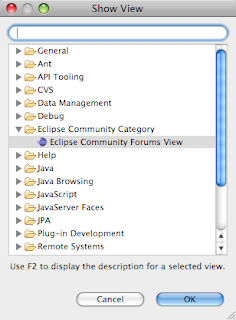 If anyone has some ideas why it isn't automatically added after installation, please let me know.
 - The Login toolbar action currently only takes you to the Login page, but my plan is to have it (optionally) automatically submit your login credentials if you choose to store them. I need to get with Denis to help debug why my attempts at submitting a login via URL isn't working.
- The Shortcuts list is an extension point that any plug-in can contribute to. For now I've included just some of the more popular
newsgroupsforums; if I get this accepted as an official plug-in, the vision is that different Eclipse projects would contribute to the extension point to have their forum included. - Notice the "Open in External Browser" button in the View toolbar (not the toolbar that is inside the view above the browser). I waffled back and forth on whether to put the Login and Shortcuts actions up there, too. If you have a UI design opinion about that, please let me know.
- My goal is to get feedback and improve this over the next week or two and eventually submit it for inclusion as a first-class citizen of the SDK and package builds. So please let me know what you think and help me make it better.

Wednesday, July 1, 2009
Screencast: Creating an Eclipse download package "from scratch"
UPDATE: As of Service Release 1 (SR1) of Eclipse Galileo (aka, 3.5.1) the process described in this screencast is no longer necessary for 64-bit Mac OS X builds. 64-bit Cocoa builds of all the download packages are now available directly from the Eclipse downloads page.
If the cave you've been living in does not have Internet service, then perhaps it will come as news to you that Galileo was successfully released last week. It's a truly impressive feat to release so reliably so many projects year after year - you'd think that corporate internal and consumer software projects would take note and figure out what it is that enables the yearly release train to succeed when so many projects deliver late, over budget, or not at all. But, I digress...
Being a recent immigrant to the Nation of Mac, I was among the glad to see the Cocoa port graduate from incubation. However, all is not 100% happy in Eclipse+Mac land. The Eclipse Packaging Project (EPP), the small group that produces those easily consumable downloads, the themed packages of plug-ins built on top of the core platform, has limited resources. And with limited people, they can not produce the packages for every hardware/OS platform on which Eclipse is known to run. Of particular interest to me is the conspicuous absence of EPP package builds for 64-bit OS X. After some discussion, it appears we the community can't make a 64-bit build happen until the first "service release" of Galileo, sometime in the Fall. I'm disappointed, but I (mostly) understand the position that EPP is in.
So, what do we do if we want to make full use of all the 64-bit goodness of our operating system and Java 6 JVM? Well, it turns out that re-constructing the EPP packages from the "base platform" SDK is not all that difficult. Ekke Gentz has already blogged some text+picture instructions; my screencast below brings the process to life.
Note: the URL of the EPP update site used in the screencast is
UPDATE: The package downloads page has been updated so that the Mac 64-bit SDK download is available directly, rather than having to go through the "Other Downloads" page. This makes the process a bit simpler than what is demonstrated in the screencast. If you're following this process for 64-bit Cocoa on OS X, you can get the Platform SDK directly in the Eclipse Classic section, as shown here (click to enlarge):

If the cave you've been living in does not have Internet service, then perhaps it will come as news to you that Galileo was successfully released last week. It's a truly impressive feat to release so reliably so many projects year after year - you'd think that corporate internal and consumer software projects would take note and figure out what it is that enables the yearly release train to succeed when so many projects deliver late, over budget, or not at all. But, I digress...
Being a recent immigrant to the Nation of Mac, I was among the glad to see the Cocoa port graduate from incubation. However, all is not 100% happy in Eclipse+Mac land. The Eclipse Packaging Project (EPP), the small group that produces those easily consumable downloads, the themed packages of plug-ins built on top of the core platform, has limited resources. And with limited people, they can not produce the packages for every hardware/OS platform on which Eclipse is known to run. Of particular interest to me is the conspicuous absence of EPP package builds for 64-bit OS X. After some discussion, it appears we the community can't make a 64-bit build happen until the first "service release" of Galileo, sometime in the Fall. I'm disappointed, but I (mostly) understand the position that EPP is in.
So, what do we do if we want to make full use of all the 64-bit goodness of our operating system and Java 6 JVM? Well, it turns out that re-constructing the EPP packages from the "base platform" SDK is not all that difficult. Ekke Gentz has already blogged some text+picture instructions; my screencast below brings the process to life.
Note: the URL of the EPP update site used in the screencast is
http://download.eclipse.org/technology/epp/packages/galileo/
UPDATE: The package downloads page has been updated so that the Mac 64-bit SDK download is available directly, rather than having to go through the "Other Downloads" page. This makes the process a bit simpler than what is demonstrated in the screencast. If you're following this process for 64-bit Cocoa on OS X, you can get the Platform SDK directly in the Eclipse Classic section, as shown here (click to enlarge):

Saturday, August 9, 2008
Model-Driven Software Development
Yesterday I blogged on my employer's site some thoughts on Model-Driven Software Development.
Tuesday, August 5, 2008
Customizing Builds for Your Eclipse Projects
I was answering a question on the Eclipse newsgroups today, a question that I must have answered at least 20 times in the past couple of years. The question was, basically, "How can I add additional steps to a project's build?" In my continuing (seemingly futile) efforts to make more use of blogging, I decided to put my explanation here.
The Java Project build really only does two things: it compiles source .java files into .class files into your project's Build Output location, and it copies any non-.java files it finds in your Source Locations to the corresponding place in your Build Output location (Source Locations and Build Output Locations are configured in the Java Build Path section of the project properties). If you want or need to do more during the builds, you can augment it with your own Ant script.
Open the Properties dialog for your project and select the Builders section. There you can add your own builder to run after the Java Builder.
 You can specify your builder as Ant or any arbitrary program. For many typical tasks (such as copying/moving files, creating a JAR, signing it, etc.) I usually recommend Ant because it makes such tasks very easy to implement. There are more details available in the Ant Tutorial section of the Eclipse Help.
Be aware that all custom Builders will be executed for every build, which by default happens every time you save a source file (or something that the project depends on gets built). So having a Builder that takes more than a few seconds to start up and execute can be a real drag your the coding flow. If you find that you don't really want it to run on every build, I recommend opening the Ant View (I like to make it a Fast View to tuck it out of the way but still easily accessible) and adding your Ant script there. That way it is only a couple of clicks away at all times, easy to manually invoke at the times when you need it.
The Java Project build really only does two things: it compiles source .java files into .class files into your project's Build Output location, and it copies any non-.java files it finds in your Source Locations to the corresponding place in your Build Output location (Source Locations and Build Output Locations are configured in the Java Build Path section of the project properties). If you want or need to do more during the builds, you can augment it with your own Ant script.
Open the Properties dialog for your project and select the Builders section. There you can add your own builder to run after the Java Builder.
 You can specify your builder as Ant or any arbitrary program. For many typical tasks (such as copying/moving files, creating a JAR, signing it, etc.) I usually recommend Ant because it makes such tasks very easy to implement. There are more details available in the Ant Tutorial section of the Eclipse Help.
Be aware that all custom Builders will be executed for every build, which by default happens every time you save a source file (or something that the project depends on gets built). So having a Builder that takes more than a few seconds to start up and execute can be a real drag your the coding flow. If you find that you don't really want it to run on every build, I recommend opening the Ant View (I like to make it a Fast View to tuck it out of the way but still easily accessible) and adding your Ant script there. That way it is only a couple of clicks away at all times, easy to manually invoke at the times when you need it.
Tuesday, June 24, 2008
Imminent Cosmic Collision: You and Eclipse Ganymede
The arrival of Eclipse's latest release (named, like other Eclipse multi-project simultaneous releases, after a moon of Jupiter: Ganymede) is upon us. It represents version 3.4 of the platform what I'd call the "core" set of tools on top of it, and I applaud Eclipse for not succumbing to the version numbering frenzy that most vendors seem to follow, where new releases with only minor or cosmetic changes are given entirely new major version numbers. I've been using the milestone and release candidate builds for a couple of months now, and here are some of the items that I've noticed (the good with the bad).
The next challenge will be getting Skyway Visual Perspectives working with 3.4 and, eventually, taking advantage of the new features and API that are available.
- p2, the replacement for the much-maligned Update Manager (among other things), is a big step in the right direction. Up until the RC builds it had some pretty serious UI and error-handling problems, but it is now a pretty good front-end to the complex problem of managing an open-ended platform of plugins and update sites. I think there is still a lot of room for improvement and enhancement in the UI, but what will ship with 3.4 is certainly good enough and a LOT better than the old update mechanism (in terms of both underlying architecture and user experience). I still think it is too complicated and subtle for inclusion in the average RCP, but for developers (the primary audience of Eclipse applications, including the Java IDE), it will be welcomed with open arms.
- Plug-in Spy is a very handy tool for those of us who develop Eclipse-based applications (or for anyone who is trying to learn how Eclipse is put together and/or how to mimic what you see in the "standard" plugins). Just hit Alt+Shift+F1 and a convenient view will appear giving lots of details about current state of active Part (View or editor), such as the class that implements it, he plugin that contributes it, and lots of other details.
- Mark Occurrences has been enhanced to use different colors for write occurences and read occurences. This is a small thing that makes a big difference.
- The Error Log view has been vastly improved. Not only is it now packaged as a separate plugin/feature that is more easily included in RCP apps, but it now has the ability to group messages by various criteria, provides a "quick search" box for filtering the logs, and allows you to easily view the logs of workspaces that have been used when launching an Eclipse app to test/debug plugins and RCPs. Very nice!
- "Rich" hovers/tooltips. This is a broad improvement to many of the hover/tooltip lightweight windows that Eclipse pops up to give you information about elements under the cursor.
- The Javadoc hover is really nice now - links work seamlessly, it is easily resizable, and it has a great little toolbar with actions like navigation (back and forward), transferring to the Javadoc View, and opening the source code for the thing whose doc is being viewed.
- The debug hover is also much improved, letting you explore the contents of rich objects without using a separate View.
- My favorite hover enhancement has to be the hover for errors and warnings. It now presents hyperlinks to Quick Fix options, right there in the hover window. Before, you had to manually invoke Quick Fix, but now my hands don't have to find the awkward keyboard combo of Ctrl+F1; I just hover over a problem marker and click the link for the fix I want. Very nice!
- Performance. The UI is as snappy as ever, I don't notice and decrease or improvement there. There is reportedly a lot of internal improvement made to the JDT compiler to take advantage of multi-core and multi-CPU hardware, especially when running on a Java 6 JVM. I did seem to notice some improvment in Java build times. Startup time seems to be slightly better than 3.3, but that is hard to really judge because of all the variables that OSGi, p2, and the list of 3rd-party plugins that might be installed, can introduce.
- Collapse-all button for the Projects view. OK, so this one is only on my list because I contributed the idea and code for it :-) Still, it is something that I have longed for for quite a while: in the Projects view (usually used in the Java Browsing perspective), there is a new button to collapse the entire tree (Collapse-All), similar to what you find in other tree-bsaed views like Navigator, Package Explorer, etc. Here's the bug report for the curious.
The next challenge will be getting Skyway Visual Perspectives working with 3.4 and, eventually, taking advantage of the new features and API that are available.
Monday, March 31, 2008
Podcast with Wayne Beaton
When we were at EclipseCon, I did a podcast with Eclipse's official Evangelist, Wayne Beaton (yes, that's his actual job title - pretty cool job title if you ask me!). The topic was finding and giving help on the Eclipse newsgroups. Wayne just published it here.
Saturday, March 22, 2008
EclipseCon 2008
I just returned from EclipseCon and, although I thoroughly enjoyed the conference/vacation, I have to admit that its nice to be home.  I guess I should just get it out of the way and point out that I was only able to attend EclipseCon because I was the winner of one of the annual Eclipse Community Awards (specifically, "Most Prolific Newcomer Evangelist") and the foundation was very generous in their help. Specifically, I have to thank Wayne Beaton, Ian Skerrett, and Lynn Gayowski for their encouragement and help - thankyouthankyouthankyou!
As for the award, not only did I get a spiffy personalized acrylic trophy thingy, but a totally tricked out "cell phone," an E90 donated by Nokia - its really more of a mini-computer than a phone, very similar in function to an iPhone. Now I just have to read the 90-page User Guide and figure out what US carrier it works with. In any case, I was totally surprised and blown away by the quality of the prize.
As for the conference itself, I have to say that the highlight was just meeting, face-to-face, so many people with whom I've corresponded, cooperated, and collaborated over the past 5 years. It is great to finally put faces to names like Wayne, Ian, Ed Merks, Tom Schindl, Walter Harely, Denis Roy (thank goodness he introduced himself 'cause I would certainly planted my foot well into my mouth if I had called him "Dennis") and so many more that I can't recall. For me the people aspect was definitely the most interesting part of the whole week.
As for technical content, I was impressed by the long talk on Mylyn, a project that I had been aware of and moderately curious about before; but after seeing it live and presented by its charismatic and passionate creator Mik Kersten, I'm determined to give it some dedicated time and share it with my teammates at Skyway Software.
Speaking of Skyway, I spent considerable time hanging out at the booth and I think our product launch was well-received. Most people seemed impressed with the modeling GUI (I heard words like "slick," "easy-to-use," and "wow") which, admittedly, I am glad to hear because that has been the focus of my work there. But I think we also heard some good feedback about potential directions to take the runtime portion; hopefully the community thing will take off and we'll soon see some contributions in those areas.
The p2 effort is making good progress and looks well on its way to solving the problems with the old Update Manager (and much more).
I was also educated about the profiling tools that are part of the TPTP project. The presenters were clearly not 100% comfortable speaking English in front of a large audience, but the tools look quite robust and complete, certainly capable of competing with their commercial competitors. I will be profiling the Afriterra catalog (and probably Skyway Perspectives, too) in the near future.
Replay Solutions's product also looks very interesting, but as of now it is only for JEE applications so my current (paying) work can't really find much use for it.
I'll close with something that won't surprise those who have spent any amount of time talking to me or reading this blog, a critical statement about the future direction that The Powers That Be apparently have set for one of my chosen technologies. I attended the Eclipse 4 (e4) talk and am confused and somewhat dismayed by the overwhelming focus on bringing the Eclipse platform (specifically, its UI) to the web. Because the details are vague (intentionally, because as with everything else at Eclipse, the real story will be determined by "the community"), I'm having a hard time verbalizing my thoughts; suffice it to say, just in the area of SWT and Platform UI, I'd rather see the growing mound of bugs and feature requests be more addressed instead of spending scarce resources on a completely new "platform." I understand and appreciate the need for architecture cleanup and evolution, but I can't help but wonder how much say "the community" will really have in this, seeing as nearly 100% of the committers are employed by the big member companies. Jesper asks some good questions and raises some good points in this blog post. I'm keeping my mind open, but with a healthy does of skepticism - after all, the last thing that Eclipse needs is a bunch of yes-men all nodding along with the ideas of a very small number of vocal, powerful committers and member companies.
All in all, the week was very enjoyable. Jazmine and Little-j traveled with me and we had some wonderful family tourist days before and after the conference. I'll post photos later this week when my body recovers from the time-zone-difference whiplash...
I guess I should just get it out of the way and point out that I was only able to attend EclipseCon because I was the winner of one of the annual Eclipse Community Awards (specifically, "Most Prolific Newcomer Evangelist") and the foundation was very generous in their help. Specifically, I have to thank Wayne Beaton, Ian Skerrett, and Lynn Gayowski for their encouragement and help - thankyouthankyouthankyou!As for the award, not only did I get a spiffy personalized acrylic trophy thingy, but a totally tricked out "cell phone," an E90 donated by Nokia - its really more of a mini-computer than a phone, very similar in function to an iPhone. Now I just have to read the 90-page User Guide and figure out what US carrier it works with. In any case, I was totally surprised and blown away by the quality of the prize.
As for the conference itself, I have to say that the highlight was just meeting, face-to-face, so many people with whom I've corresponded, cooperated, and collaborated over the past 5 years. It is great to finally put faces to names like Wayne, Ian, Ed Merks, Tom Schindl, Walter Harely, Denis Roy (thank goodness he introduced himself 'cause I would certainly planted my foot well into my mouth if I had called him "Dennis") and so many more that I can't recall. For me the people aspect was definitely the most interesting part of the whole week.
As for technical content, I was impressed by the long talk on Mylyn, a project that I had been aware of and moderately curious about before; but after seeing it live and presented by its charismatic and passionate creator Mik Kersten, I'm determined to give it some dedicated time and share it with my teammates at Skyway Software.
Speaking of Skyway, I spent considerable time hanging out at the booth and I think our product launch was well-received. Most people seemed impressed with the modeling GUI (I heard words like "slick," "easy-to-use," and "wow") which, admittedly, I am glad to hear because that has been the focus of my work there. But I think we also heard some good feedback about potential directions to take the runtime portion; hopefully the community thing will take off and we'll soon see some contributions in those areas.
The p2 effort is making good progress and looks well on its way to solving the problems with the old Update Manager (and much more).
I was also educated about the profiling tools that are part of the TPTP project. The presenters were clearly not 100% comfortable speaking English in front of a large audience, but the tools look quite robust and complete, certainly capable of competing with their commercial competitors. I will be profiling the Afriterra catalog (and probably Skyway Perspectives, too) in the near future.
Replay Solutions's product also looks very interesting, but as of now it is only for JEE applications so my current (paying) work can't really find much use for it.
I'll close with something that won't surprise those who have spent any amount of time talking to me or reading this blog, a critical statement about the future direction that The Powers That Be apparently have set for one of my chosen technologies. I attended the Eclipse 4 (e4) talk and am confused and somewhat dismayed by the overwhelming focus on bringing the Eclipse platform (specifically, its UI) to the web. Because the details are vague (intentionally, because as with everything else at Eclipse, the real story will be determined by "the community"), I'm having a hard time verbalizing my thoughts; suffice it to say, just in the area of SWT and Platform UI, I'd rather see the growing mound of bugs and feature requests be more addressed instead of spending scarce resources on a completely new "platform." I understand and appreciate the need for architecture cleanup and evolution, but I can't help but wonder how much say "the community" will really have in this, seeing as nearly 100% of the committers are employed by the big member companies. Jesper asks some good questions and raises some good points in this blog post. I'm keeping my mind open, but with a healthy does of skepticism - after all, the last thing that Eclipse needs is a bunch of yes-men all nodding along with the ideas of a very small number of vocal, powerful committers and member companies.
All in all, the week was very enjoyable. Jazmine and Little-j traveled with me and we had some wonderful family tourist days before and after the conference. I'll post photos later this week when my body recovers from the time-zone-difference whiplash...
Friday, April 27, 2007
Java Closures
Here we go again with language syntax changes...but this time is it different?
Brian Goetz recently posted an article on IBM DeveloperWorks about closures in Java. It is a well-written description of both the theory behind closures and the two proposals that are currently being considered for including them in Java.
Brian Goetz recently posted an article on IBM DeveloperWorks about closures in Java. It is a well-written description of both the theory behind closures and the two proposals that are currently being considered for including them in Java.
I applaud the article, but as for the issue, I don't really like either proposal very much. BGGA is just more of the increasing complexity of syntax that, IMNSHO, is going to kill Java. On the other hand CICE does not appear to go far enough in simplifying the syntax. It seems that what is keeping the syntax so ugly is the damn static typing, having to declare the types of all your variables; if we could get away from that we'd have lots simpler syntax options (and we'd not be in Java anymore :-)
I guess I'll root for CICE, since it is fairly obvious that one of thee two is going to be The One. However, I was delighted to see this at the end of the article, since it is precisely what I have been harping on for so long in relation to the Parameterized Types decision:
"The issue being debated is not whether closures are a good idea -- because they clearly are -- but whether the benefits of retrofitting the Java language with closures are worth the costs."
That quote notwithstanding, does anyone really believe this proposal won't be railroaded through now that the camel's nose is under the tent?
Saturday, November 18, 2006
Reaction to Sun's open source release of Java
It's been inevitable for quite a while now, and this week Sun finally officially announced the open-source plan for Java. Let me take this opportunity to log my personal reaction to this "long time coming" news:
Yaaaaaaaawwwwwn
As far as I saw, the only people who complained about Java not being "open" were the frothing-at-the-mouth FOSS zealots (OK, I'm going to get some flames for that word choice - but I have a soft spot for the overly-dramatic, so it will stay).
Let's be honest: the critical parts of Java, the libraries and reference implementations and compatibility test kits, have been source-available from the beginning. I just don't see a lot of people caring that the JVM and compiler are open now.
Actually, now that I think about it, I take back the yawn. I am very interested, because I'm now concerned that Sun does not have enough influence any more to keep Java from fracturing. We have to hope that the community can restrain itself to keep that from happening - but I would not bet on that. Maybe some other big players like IBM will be able to police the renegades who want this or that little thing and, when they can't convince the rest of the community, go off and create MyJava.
The last thing Java needs right now is to become the next Linux, where binaries aren't compatible and users of one distro can barely find standard file locations on other distros.
Friday, September 9, 2005
EJBFactory
A handy utility/helper class for obtaining instances of EJBs (and InitialContext instances and Home interface instances)
In a recent mailing list discussion I mentioned a utility class called EJBFactory that I've used in the past. It encapsulates most of the ugly boilerplate and error-handling code that an EJB client usually must include in order to obtain references to EJBs. I offered to publish a version of the code, so here it is:
http://www.rizzoweb.com/java/EJBFactory.java
It is not complete; for one thing, as the class comment says, it does not do narrow() ing of the remote references it gets. But that should be easy enough to add, and the more robust, complete version of this idea is in code owned by a previous employer of mine.
Hopefully someone will find this interesting and useful as a starting point for implementing whatever their EJB client code needs. I welcome any feedback about improving it.
In a recent mailing list discussion I mentioned a utility class called EJBFactory that I've used in the past. It encapsulates most of the ugly boilerplate and error-handling code that an EJB client usually must include in order to obtain references to EJBs. I offered to publish a version of the code, so here it is:
http://www.rizzoweb.com/java/EJBFactory.java
It is not complete; for one thing, as the class comment says, it does not do narrow() ing of the remote references it gets. But that should be easy enough to add, and the more robust, complete version of this idea is in code owned by a previous employer of mine.
Hopefully someone will find this interesting and useful as a starting point for implementing whatever their EJB client code needs. I welcome any feedback about improving it.
Tuesday, September 6, 2005
Private Abuse
The use of private scope qualifier for methods is one of the biggest barriers to reuse in Java.
I was recently searching for a way to dynamically get an instance of a java.lang.Class that represents a primitive type (basically, I needed a dynamic form of what you get when you reference something like java.lang.Boolean.TYPE). I never did find an acceptable way to do it (please email me if you know of one), but someone brought to my attention that there is a method, java.lang.Class.getPrimitiveClass(String) that appears to do exactly what I need. Great! No - the method is private, so I have no chance of ever using it.
This gets to one of my biggest peeves about the state of the Java programming art - the abuse of private, which I see as one of the biggest hurdles to reuse and extension.
A typical response to this position is that "private has a definite use and can often times be preferred as once you make something public then so it must remain for ever," but I take issue with those points.
First of all, they're forgetting about protected scope, which is much more friendly than private and provides the same level of "protection" (the notion of protection in coding is a tricky concept , as I'll get to later) in most cases.
Beyond that, I don't buy the argument about once something is public you can't change it. Very few of us are writing the kinds of code that is set in stone - refactoring is usually an option. Deprecation is your friend, too.
Actually, if you are writing some kind of code that must be set in stone, all the more reason to use protected instead of private. Because in that kind of situation (rare as it may be) you should be striving for more flexibility, not less. Private scope can only add flexibility for code in the same class; on the other hand, for increased flexibility of all other code (the clients/callers and extenders), protected and public provide much more flexibility. When you use private, you are essentially assuming that you know exactly every way in which the code might be used or extended, which is, IMO, rather short-sighted and brash.
The kind of attitude that thinks that way (must make things private because I might want to change them one day or because I know this would never be needed outside of this class) is what Martin Fowler refers to as a Directing attitude (as opposed to Enabling) and I find Directing attitude to usually be counter-productive an frustrating to work with.
Finally, I'll say this: making methods private is often justified by saying "this is implementation specific and could 'break' the code if used externally." But again I find that a bogus argument - if I subclass a class and call or override its protected methods and it does not behave how I thought (so long as it adheres to the documentation or other contract), it is not necessarily the original class author's fault. I would certainly expect testing to happen, which would uncover any false assumptions or mis-use of inherited code. Again, Directing vs. Enabling - I prefer that I'm given as many tools as possible rather than being stuck with the limited set that
some original programmer thought I would need.
OK, one more "finally": Smalltalk, probably the most pure of widespread OO languages, gets by just fine without private methods at all. I've never heard of anyone coming upon a situation where they just NEEDED them and where marking them as "intended to be" private
didn't suffice. Here is an excellent article on the subject
If you read nothing else I've written in this diatribe, read at least that and the Martin Fowler article. They are written by far more effective writers than I, and it shows.
Sorry for ranting - it's late and I was bored. Seriously, I've spent 10+ years thinking about this topic on and off, and my position is very firmly set after all that time.
I was recently searching for a way to dynamically get an instance of a java.lang.Class that represents a primitive type (basically, I needed a dynamic form of what you get when you reference something like java.lang.Boolean.TYPE). I never did find an acceptable way to do it (please email me if you know of one), but someone brought to my attention that there is a method, java.lang.Class.getPrimitiveClass(String) that appears to do exactly what I need. Great! No - the method is private, so I have no chance of ever using it.
This gets to one of my biggest peeves about the state of the Java programming art - the abuse of private, which I see as one of the biggest hurdles to reuse and extension.
A typical response to this position is that "private has a definite use and can often times be preferred as once you make something public then so it must remain for ever," but I take issue with those points.
First of all, they're forgetting about protected scope, which is much more friendly than private and provides the same level of "protection" (the notion of protection in coding is a tricky concept , as I'll get to later) in most cases.
Beyond that, I don't buy the argument about once something is public you can't change it. Very few of us are writing the kinds of code that is set in stone - refactoring is usually an option. Deprecation is your friend, too.
Actually, if you are writing some kind of code that must be set in stone, all the more reason to use protected instead of private. Because in that kind of situation (rare as it may be) you should be striving for more flexibility, not less. Private scope can only add flexibility for code in the same class; on the other hand, for increased flexibility of all other code (the clients/callers and extenders), protected and public provide much more flexibility. When you use private, you are essentially assuming that you know exactly every way in which the code might be used or extended, which is, IMO, rather short-sighted and brash.
The kind of attitude that thinks that way (must make things private because I might want to change them one day or because I know this would never be needed outside of this class) is what Martin Fowler refers to as a Directing attitude (as opposed to Enabling) and I find Directing attitude to usually be counter-productive an frustrating to work with.
Finally, I'll say this: making methods private is often justified by saying "this is implementation specific and could 'break' the code if used externally." But again I find that a bogus argument - if I subclass a class and call or override its protected methods and it does not behave how I thought (so long as it adheres to the documentation or other contract), it is not necessarily the original class author's fault. I would certainly expect testing to happen, which would uncover any false assumptions or mis-use of inherited code. Again, Directing vs. Enabling - I prefer that I'm given as many tools as possible rather than being stuck with the limited set that
some original programmer thought I would need.
OK, one more "finally": Smalltalk, probably the most pure of widespread OO languages, gets by just fine without private methods at all. I've never heard of anyone coming upon a situation where they just NEEDED them and where marking them as "intended to be" private
didn't suffice. Here is an excellent article on the subject
If you read nothing else I've written in this diatribe, read at least that and the Martin Fowler article. They are written by far more effective writers than I, and it shows.
Sorry for ranting - it's late and I was bored. Seriously, I've spent 10+ years thinking about this topic on and off, and my position is very firmly set after all that time.
Monday, July 25, 2005
Code Structure: Multiple Exit Points & Code Standards
On the StriaghtTalking-Java list today, the following question came up:
There were many responses, some agreeing but mostly disagreeing that it was a good "standard" to enforce. Some of the arguments in favor of single-exit-point-ness were:
To address the "more potential for bugs" argument, I respond with unit testing. A method that is complex or intricate enough to have multiple paths of logic should usually have a set of tests for each of those paths.
In summary: sometimes a single exit point (return) is more elegant, but sometimes multiple returns lead to more elegant code. We might all disagree (and almost certainly do) about how big those two "sometimes" are in relation to each other, but the bottom line is, "Readability/elegance/simplicity trump all coding rules or standards" - it's going to be pretty hard to argue with that.
In general I feel that code standards usually go too far, are too dogmatic. A coding standards doc should, IMO, always be called a "guidelines" doc and the first section/chapter should state something like "code readability and elegance" trump other rules. Yes, it requires careful attention and discipline to avoid the "I don't feel like it today" trap - but if programmers don't have discipline good attention to detail, well then "where they put their curly-braces" or "how many exit points they have in methods" are going to be the least of the problems...
"What is the consensus with regards to single entry, single exit methods. I was never taught to code to this convention but recently heard that some companies require it. I wondered how people felt about this?"
There were many responses, some agreeing but mostly disagreeing that it was a good "standard" to enforce. Some of the arguments in favor of single-exit-point-ness were:
- Multiple exit points can lead to more bugs
- There's too much license in "sometimes it's ok to do x". That's the same as saying "It's always OK if I feel like it on any given day."
- It is easier to "see" the method structure with one exit point.
To address the "more potential for bugs" argument, I respond with unit testing. A method that is complex or intricate enough to have multiple paths of logic should usually have a set of tests for each of those paths.
In summary: sometimes a single exit point (return) is more elegant, but sometimes multiple returns lead to more elegant code. We might all disagree (and almost certainly do) about how big those two "sometimes" are in relation to each other, but the bottom line is, "Readability/elegance/simplicity trump all coding rules or standards" - it's going to be pretty hard to argue with that.
In general I feel that code standards usually go too far, are too dogmatic. A coding standards doc should, IMO, always be called a "guidelines" doc and the first section/chapter should state something like "code readability and elegance" trump other rules. Yes, it requires careful attention and discipline to avoid the "I don't feel like it today" trap - but if programmers don't have discipline good attention to detail, well then "where they put their curly-braces" or "how many exit points they have in methods" are going to be the least of the problems...
Wednesday, July 6, 2005
Java Generics: I'm not alone
My thoughts on the addition of parameterized types (aka, "generics") to Java have been documented well here, on the StraightTalking-Java mailing list, and the Eclipse newsgroups. Bruce Eckel has always been on the same side as I, but until now there was little high-profile support for that position. Now, however, it appears to be gaining momentum. Ken Arnold has posted a blog entry "Generics Considered Harmful" and I'm glad to see it got Bruce Eckel's attention as well as Lambda the Ultimate.
Mr. Arnold and Mr Eckel are more eloquent than I have been about expressing the position that we all seem to share - I particularly like Ken's coining of the term "complexity budget." That is the succinct, easy-to-understand phrase that I have been searching for in my ramblings on the topic.
Bottom line: I'm glad to see some others coming out to express the idea that this "upgrade" may have pushed Java out of the realm of "simple" languages for good. I'm not alone any longer in my distaste for the increasing complexity the language designers are introducing.
Not that the company makes the discomfort any easier to live with...
Mr. Arnold and Mr Eckel are more eloquent than I have been about expressing the position that we all seem to share - I particularly like Ken's coining of the term "complexity budget." That is the succinct, easy-to-understand phrase that I have been searching for in my ramblings on the topic.
Bottom line: I'm glad to see some others coming out to express the idea that this "upgrade" may have pushed Java out of the realm of "simple" languages for good. I'm not alone any longer in my distaste for the increasing complexity the language designers are introducing.
Not that the company makes the discomfort any easier to live with...
Tuesday, June 7, 2005
Early Thoughts on Portals/Portlets
I am in the process of evaluating/learning portal and portlet technology for my company. We are a HUGE organization, so there have been several efforts of exploration in various groups within the company. In fact, the "official" company-wide web-app and services framework team has actually implemented portlet functionality into the proprietary framework. I don't like the level to which they have abstracted away everything, though, so I'm making it part of my effort to evaluate their implementation. We use WebSphere Portal Server (we are a huge IBM shop, so it was the only realistic choice).
Thus far, my impressions of Java portal/portlet technology is that it is over-hyped. How many applications really have Yahoo-like requirements? Also, the portlet spec is over 18 months old at this point, but there is no public information about any activity on it. IOW, it appears to be stalled at the 1.0 level, and that 1.0 spec is quite immature. There are several key ideas that the vendors have all solved in proprietary ways that need to be part of the standard API and spec. The authors of the spec are remarkably silent on the progress of a 1.1 or 2.0 version - my educated speculation is that there is little or no progress happening at all.
The user activity I keep seeing (a Yahoo Group, articles, blog entries, etc) seems to be inordinately focused in the offshore population. I wonder if the offshore/outsourcing companies are hearing the hype from management types and trying to find ways to inject portal/portlet into every project they contract now...
Performance also appears to be a major issue. The extra processing required for every single user request is multiple times that for servlet apps, and, especially within our company, that results in apps that can handle significantly fewer concurrent users per unit of hardware than equivalent servlet/JSP apps. IBM claims that latest versions of WPS are significantly better than previous versions, but also seems to acknowledge that it is not equivalent to plain-old servlets and may never be - the stated hardware requirements for running Portal Server are pretty high-end.
Something else: I haven't seen much talk about portal in terms of transactional applications. I can see that having a "main" app as a portlet surrounded by little helper stuff like calculators, mail checkers, stock quotes, etc. would be "nice to have" candy, I haven't seen any examples of highly transactional portlets all coexisting and sharing window space.
Another potential problem is that of screen real estate - you UI designers have a significantly harder job when you're dealing with multiple portlets on every page; it means none of the portlets have as much real estate to work with as they would if they were individual pages or traditional web apps.
I think the portal idea can be very useful for certain applications that have specific requirements about incorporating multiple data views onto one page. I just don't think many applications actually have such needs. When they do, implementing it in plain servlets and JSP can be done, but would require building something like the portlet API and container anyway. It's just that I prefer to build something like that as-needed and specific to what you really need, rather than relying on a huge, bloated, wants-to-do-everything implementation like is provided by IBM, BEA, etc.
As I said, I am still learning and evaluating and planning some PoC mini-projects to explore these topics. Thus, my opinions are young and likely to change at least a little over the next few months
Thus far, my impressions of Java portal/portlet technology is that it is over-hyped. How many applications really have Yahoo-like requirements? Also, the portlet spec is over 18 months old at this point, but there is no public information about any activity on it. IOW, it appears to be stalled at the 1.0 level, and that 1.0 spec is quite immature. There are several key ideas that the vendors have all solved in proprietary ways that need to be part of the standard API and spec. The authors of the spec are remarkably silent on the progress of a 1.1 or 2.0 version - my educated speculation is that there is little or no progress happening at all.
The user activity I keep seeing (a Yahoo Group, articles, blog entries, etc) seems to be inordinately focused in the offshore population. I wonder if the offshore/outsourcing companies are hearing the hype from management types and trying to find ways to inject portal/portlet into every project they contract now...
Performance also appears to be a major issue. The extra processing required for every single user request is multiple times that for servlet apps, and, especially within our company, that results in apps that can handle significantly fewer concurrent users per unit of hardware than equivalent servlet/JSP apps. IBM claims that latest versions of WPS are significantly better than previous versions, but also seems to acknowledge that it is not equivalent to plain-old servlets and may never be - the stated hardware requirements for running Portal Server are pretty high-end.
Something else: I haven't seen much talk about portal in terms of transactional applications. I can see that having a "main" app as a portlet surrounded by little helper stuff like calculators, mail checkers, stock quotes, etc. would be "nice to have" candy, I haven't seen any examples of highly transactional portlets all coexisting and sharing window space.
Another potential problem is that of screen real estate - you UI designers have a significantly harder job when you're dealing with multiple portlets on every page; it means none of the portlets have as much real estate to work with as they would if they were individual pages or traditional web apps.
I think the portal idea can be very useful for certain applications that have specific requirements about incorporating multiple data views onto one page. I just don't think many applications actually have such needs. When they do, implementing it in plain servlets and JSP can be done, but would require building something like the portlet API and container anyway. It's just that I prefer to build something like that as-needed and specific to what you really need, rather than relying on a huge, bloated, wants-to-do-everything implementation like is provided by IBM, BEA, etc.
As I said, I am still learning and evaluating and planning some PoC mini-projects to explore these topics. Thus, my opinions are young and likely to change at least a little over the next few months
Wednesday, April 6, 2005
The price We've Paid
A few days ago I came across yet another example of why the implementation of parameterized types (sometimtes called "generics") in Java 5 (JDK 1.5) is going to hurt more than it helps. I dread the intricacy, complexity, and sinuosity that quickly results once you've started down this path...
Let me be clear, lest I get a flurry of emails from people who don't get my point: I am not arguing that parameterized types are without merit or use - of course every feature has a place where it will prove valuable. However, it is important to evaluate the cost of a feature when considering it. In the case of parameterized types in Java, the cost is an inordinate increase in syntax and complexitiy and mental overhead. The cost, IMNSHO, is very high - way too high to justify the feature.
Do we really want to have to write (or worse, read/maintain) this kind of code on a daily basis?
-------- Original Message --------
Subject: Re: (De)serialization and Type Safety?
Date: Fri, 25 Mar 2005 07:05:48 +0100
From: Philippe Marschall <xxxxxxx>
Organization: EclipseCorner
Newsgroups: eclipse.platform
What to do? Are these all ignorable warnings, given that I know I'm > putting a Map<String, List<String>> in at the other end? Even if so, I'd > still like to be able to write warning-free code Well it depends what you want, if you want type safety and get rid of the warning, something like this might work.
Let me be clear, lest I get a flurry of emails from people who don't get my point: I am not arguing that parameterized types are without merit or use - of course every feature has a place where it will prove valuable. However, it is important to evaluate the cost of a feature when considering it. In the case of parameterized types in Java, the cost is an inordinate increase in syntax and complexitiy and mental overhead. The cost, IMNSHO, is very high - way too high to justify the feature.
Do we really want to have to write (or worse, read/maintain) this kind of code on a daily basis?
-------- Original Message --------
Subject: Re: (De)serialization and Type Safety?
Date: Fri, 25 Mar 2005 07:05:48 +0100
From: Philippe Marschall <xxxxxxx>
Organization: EclipseCorner
Newsgroups: eclipse.platform
What to do? Are these all ignorable warnings, given that I know I'm > putting a Map<String, List<String>> in at the other end? Even if so, I'd > still like to be able to write warning-free code Well it depends what you want, if you want type safety and get rid of the warning, something like this might work.
public Map<String, List<String>> readFromSteam(InputStream is)
        throws IOException, ClassNotFoundException {
    ObjectInputStream ois = new ObjectInputStream(is);
    Map<?, ?> currentLists = (Map<?, ?>) ois.readObject();
    return this.copyToNewMap(currentLists);
}

private Map<String, List<String>> copyToNewMap(Map<?, ?> oldLists) {
    Map<String, List<String>> newLists = new HashMap<String,
    List<String>>();
    for (Entry<?, ?> each : oldLists.entrySet()) {
        String key = (String) each.getKey();
        List<?> oldList = (List<?>) each.getValue();
        List<String> value = this.copyToNewList(oldList);
        newLists.put(key, value);
    }
    return newLists;
}

private List<String> copyToNewList(List<?> oldList) {
    List<String> newList = new LinkedList<String>();
    for (Object each : oldList) {
        newList.add((String) each);
    }
    return newList;
}
Subscribe to:
Comments (Atom)


