:focal(smart))
Pixi: Modern package management for Robotics
Developing Robots is hard; Pixi makes it easier by creating reproducible, cross-platform ROS development environments without Docker or Ubuntu lock-in.

Ruben Arts
Pixi — one package manager for Windows, macOS, and Linux. Fast. Declarative. Reproducible.
To install, run the following command in your terminal:
curl -fsSL https://pixi.sh/install.sh | bash
Or find alternative installation methods in our documentation.
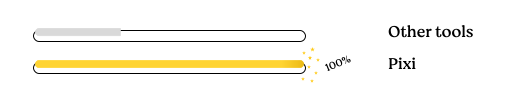
Pixi is up to 10x faster than other tools (such as Conda or Mamba). It is written in Rust and downloads and installs packages in parallel.
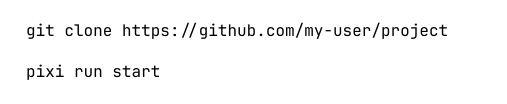
Running a Pixi project is very simple, thanks to the integrated task system. Just clone a project, and run `pixi run start` to get going!

Pixi is licensed under the permissive BSD3-License. By default, Pixi uses packages from conda-forge which are free, and contain over 25'000 open source packages to choose from!

We use lockfiles to capture your environment perfectly. You run the same software locally as in the CI or your coworkers machine. No more: works on my machine!
Spin up your data science environment in seconds—complete with Jupyter, pandas, SciPy and more. Reproducible across your team, on any machine (Windows, macOS, Linux).

Use pixi with RoboStack to set up, build, and deploy your ROS/ROS 2 workspaces—on your dev machine, in CI, and directly on your robot.

pixi has first-class support for PyTorch, CUDA, SciKit-Learn, Transformers and more. Set up multiple environments to control what GPU's and optimizations make sense for your project.

Fast Dependency Resolution for Everyone
rattler-build enables you to write simple recipes to build complex software into easy-to-install packages.

Rattler is a collection of Rust libraries with Python Bindings that makes it easy to create your tool based on the conda ecosystem. Used in production by pixi itself.

Where we talk about software package and environment management as well as some of the puzzles we solved recently and in the near future.
Developing Robots is hard; Pixi makes it easier by creating reproducible, cross-platform ROS development environments without Docker or Ubuntu lock-in.
:focal(1004x723:1005x724))
Pixi Global can be used for much more than just downloading and exposing CLI tools. In this blog post, we demonstrate two capabilities of pixi global which are core to making it a featureful and powerful system package manager: shortcuts, and (auto-)completions.

:focal(smart))
Painless dependency management (including shared libraries), monorepos and CI/CD is here for C++/CMake projects with Pixi.
When we created Prefix.dev, our goal was simple: to solve the challenges developers face every day by providing a seamless, efficient, and intuitive platform. We believe in empowering developers to focus on what matters—building and innovating—while we handle the complexities behind the scenes.

