I’m working on a YARA-L detection rule in Google SecOps for Intune wipe operations. The rule should alert when any user performs more than 3 device wipe attempts within a 1-hour window.
However, I need to add an exception for one specific identity (X), where the threshold should instead be 6 wipe attempts.
In other words: in one hour
For all attempts alert if wipe count > 3
For user X → alert only if wipe count > 6
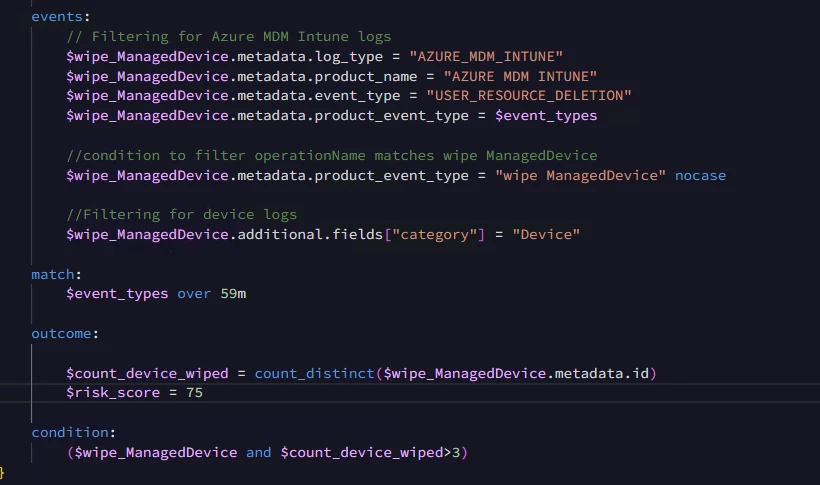
My current simplified condition is:
This triggers for all identities—including X—even though X should only alert after 6 events.
I’m trying to implement logic like:
IF identity == "X" THEN threshold = 6 ELSE threshold = 3
Does anyone know the correct YARA-L pattern to implement identity-based thresholds?
Thanks in advance!
@jstoner
Best answer by JeremyLand
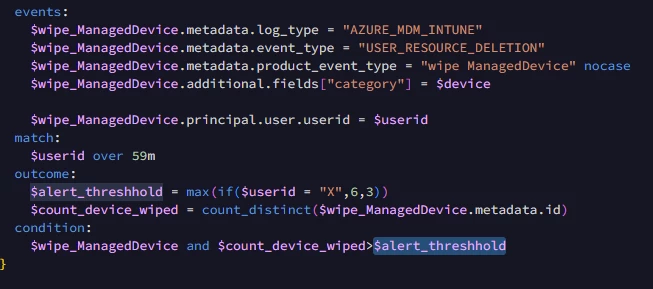
The pattern for having conditional based alert thresholds is to create an additional outcome variable where you us an IF (or nested IFs) to define your threshold, then you can compare your count against the threshold in the condition section.
With your example we will also need to change the match variable to UserID since that is how we want to group and eval those events. Having your match on product_event_type will result in events from different users being grouped together if the event type matches.
Example:
Here I set the $userid variable in the event section and then use that for the Match.
Then in the outcome section I set the alert_threshold based on the results of the if() conditional. This is a multi event rule which requires all outcome variables must be aggregated so I wrap that in a max(). Normally that max returns the highest result in the match group, but in this case we are evaluating the same variable we use for match so are only using it for its aggregation capability.
The pattern for having conditional based alert thresholds is to create an additional outcome variable where you us an IF (or nested IFs) to define your threshold, then you can compare your count against the threshold in the condition section.
With your example we will also need to change the match variable to UserID since that is how we want to group and eval those events. Having your match on product_event_type will result in events from different users being grouped together if the event type matches.
Example:
Here I set the $userid variable in the event section and then use that for the Match.
Then in the outcome section I set the alert_threshold based on the results of the if() conditional. This is a multi event rule which requires all outcome variables must be aggregated so I wrap that in a max(). Normally that max returns the highest result in the match group, but in this case we are evaluating the same variable we use for match so are only using it for its aggregation capability.
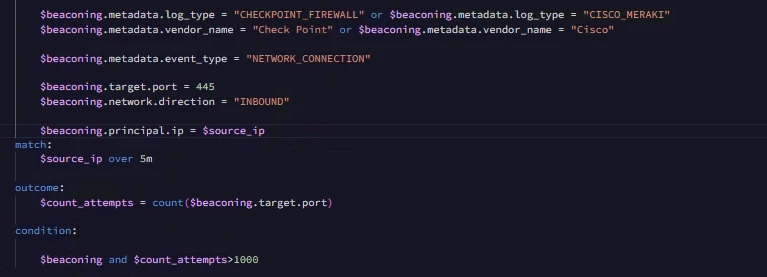
I have one more question regarding another rule. In this case, I need the alert to trigger only when the number of network connections on port 445 exceeds three times the average for that window, rather than the fixed frequency threshold of 5000 that I currently have in the query.
So I need a 5-minute average of the connection count on port 445 based on the last 30 days of data. How can I achieve that in this query? I don’t see any metrics functions available that would support this scenario.