Summary: in this tutorial, you will learn how to perform batch operations in SQL Server using JDBC API.
This tutorial begins where the Inserting data into a table from Java tutorial left off.
Introduction to batch operations #
When you have multiple updates to a SQL server database, you should perform them as a single unit of work, also referred to as a batch, to improve the performance.
The following outlines the steps for batch processing:
- First, open a new database connection.
- Second, create a new
PreparedStatementobject that accepts an SQL statement includingINSERT,UPDATE, andDELETE. - Third, set the parameters for the statement by calling the
set*methods of thePreparedStatementobject. - Fourth, call the
addBatch()method of thePreparedStatementto add the statement to a batch. - Fifth, call the
executeBatch()to execute the statements as a batch. - Finally, close the statements and database connection.
If you use the try-with-resources statement, you don’t need to close the statements and the database connection manually.
JDBC batch operation example #
We’ll demonstrate how to read author data from authors.csv file and insert them into the Authors table.
1) Reading data from a CSV file #
Step 1. Download the author.csv file:
Click here to download the authors.csv file
The authors.csv file has a heading and 30 lines of data, each representing a record that stores the author’s information including first name, last name, and birth date.
Step 2. Copy the authors.csv file to a directory on your computer such as D:\csv\authors.csv.
Step 3. Create a CSV class that has methods to read data from the authors.csv file, parse each line, and return a list of Author objects:
import java.io.IOException;
import java.nio.file.Files;
import java.nio.file.Paths;
import java.util.List;
import java.util.stream.Collectors;
import java.time.LocalDate;
import java.time.format.DateTimeFormatter;

public class CSV {
    public static List<Author> read(String filename) throws IOException {
        return Files.lines(Paths.get(filename))
                .skip(1) // Skip the first line (header)
                .map(CSV::parseLineToAuthor)
                .collect(Collectors.toList());
    }

    private static Author parseLineToAuthor(String line) {
        String[] fields = line.split(",");

        if (fields.length < 3) {
            throw new IllegalArgumentException("Invalid line: " + line);
        }

        String firstName = fields[0].trim();
        String lastName = fields[1].trim();
        LocalDate birthDate = LocalDate.parse(fields[2].trim(), DateTimeFormatter.ISO_LOCAL_DATE);

        return new Author(firstName, lastName, birthDate);
    }
}Code language: Java (java)
2) Performing batch operations #
Step1. Add a new method insertMany() to the AuthorDB class:
public void insertMany(List < Author > authors) throws DBException {

  if (authors == null || authors.isEmpty()) {
    return;
  }

  var sql = "INSERT INTO Authors (FirstName, LastName, BirthDate) VALUES (?, ?, ?)";

  try (var statement = connection.prepareStatement(sql)) {
    for (Author author: authors) {

      // Bind values
      statement.setString(1, author.getFirstName());
      statement.setString(2, author.getLastName());
      statement.setDate(3, Date.valueOf(author.getBirthDate()));

      // Add to batch
      statement.addBatch();
    }

    // Execute batch
    statement.executeBatch();
  } catch(SQLException e) {
    throw new DBException(e.getMessage());
  }
}Code language: Java (java)
How it works.
First, define a new method insertMany that accepts a list of Author objects:
public void insertMany(List<Author> authors) {Code language: Java (java)Second, return immediately if the authors list is null or empty:
if (authors == null || authors.isEmpty()) {
  return;
}Code language: Java (java)
Third, construct an SQL statement to insert a new row into the Authors table:
var sql = "INSERT INTO Authors (FirstName, LastName, BirthDate) VALUES (?, ?, ?)";Code language: Java (java)Fourth, create a PreparedStatement object:
try (var statement = connection.prepareStatement(sql))Code language: Java (java)Fifth, iterate over the authors list, bind values to the query, and add the PreparedStatement to a batch.
for (Author author: authors) {
  // Bind values
  statement.setString(1, author.getFirstName());
  statement.setString(2, author.getLastName());
  statement.setDate(3, Date.valueOf(author.getBirthDate()));

  // Add to batch
  statement.addBatch();
}Code language: Java (java)
Finally, throw a new DBException if an error occurs during the batch processing:
throw new DBException(e.getMessage());Code language: Java (java)Step 2. Modify the Main class to read data from the authors.csv file and import it to the Authors table:
import java.io.IOException;
import java.sql.SQLException;
import java.util.List;

public class Main {
    public static void main(String[] args) {
        // Read data from authors.csv file
        List<Author> authors;
        try {
            authors = CSV.read("D:/csv/authors.csv");
        } catch (IOException e) {
            System.err.println(e.getMessage());
            return;
        }

        // Connect to the SQL Server
        try (var connection = SQLServerConnection.connect()) {
            var authorDB = new AuthorDB(connection);
            // insert authors
            authorDB.insertMany(authors);
        } catch (SQLException | DBException e) {
            System.err.println(e.getMessage());
        }
    }
}Code language: Java (java)
How it works.
First, read data from the CSV file by calling the read() method of the CSV class:
List <Author> authors;
try {
  authors = CSV.read("D:/csv/authors.csv");
} catch(IOException e) {
  System.err.println(e.getMessage());
  return;
}Code language: Java (java)
Second, connect to the SQL Server and call the insertMany() method of the AuthorDB object to insert the author list into the database:
// Connect to the SQL Server
try (var connection = SQLServerConnection.connect()) {
  var authorDB = new AuthorDB(connection);
  // insert authors
  authorDB.insertMany(authors);
} catch(SQLException | DBException e) {
  System.err.println(e.getMessage());
}Code language: Java (java)
Step 3. Run the Java program.
3) Verify batch operations #
Step 1. Launch SQL Server Management Studio (SSMS) and connect to the SQL Server.
Step 2. Execute the following query to retrieve data from the Authors table:
SELECT * FROM Authors;Code language: Java (java)Output:
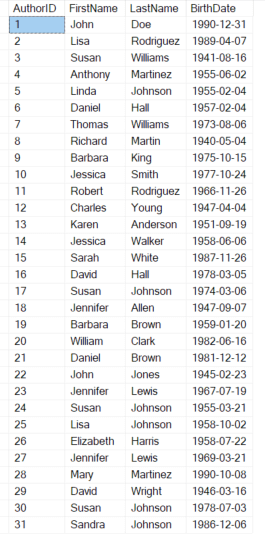
The output indicates that the program inserted 30 more rows into the Authors table successfully.
Download the project source code #
Download the project source code
Summary #
- Use the
addBatch()method to add a prepared statement to a batch. - Call the
executeBatch()method to execute multiple prepared statements as a batch to improve the performance.


