> For the complete documentation index, see [llms.txt](https://docs.proxyman.com/llms.txt). Markdown versions of documentation pages are available by appending `.md` to page URLs; this page is available as [Markdown](https://docs.proxyman.com/mcp.md).

# MCP

Connect Codex, Claude Code, or Cursor to Proxyman MCP to inspect captured HTTP/HTTPS traffic and create debugging rules from your AI assistant.

Proxyman MCP connects your AI assistant to the Proxyman macOS app running on your computer. Use it to inspect captured requests and responses, investigate failures, and create debugging rules. Keep Proxyman open and capture the traffic you want to investigate before asking your assistant to analyze it.

## 1. What is Proxyman MCP?

**Proxyman MCP** (Model Context Protocol) is a feature that enables AI assistants (Codex, Claude Code, Cursor, and other MCP-compatible tools) to directly interact with the Proxyman macOS app. It allows AI to inspect HTTP traffic, create debugging rules, and control Proxyman - all through natural language conversations.

The architecture consists of two components:

* **MCP HTTP Server** - Runs inside Proxyman app on localhost with token-based authentication
* **MCP CLI Server** - A stdio-based MCP server that AI tools connect to, which forwards commands to Proxyman

{% hint style="info" %}
Check out the [Proxyman SKILL.md](/skill-md.md) for your AI Agents
{% endhint %}

#### ✅ Example Prompts

* Show me the last 10 API requests to api.example.com
* Create a breakpoint for all POST requests to /api/users
* Export the failed request as a cURL command
* Enable SSL proxying for \*.stripe.com
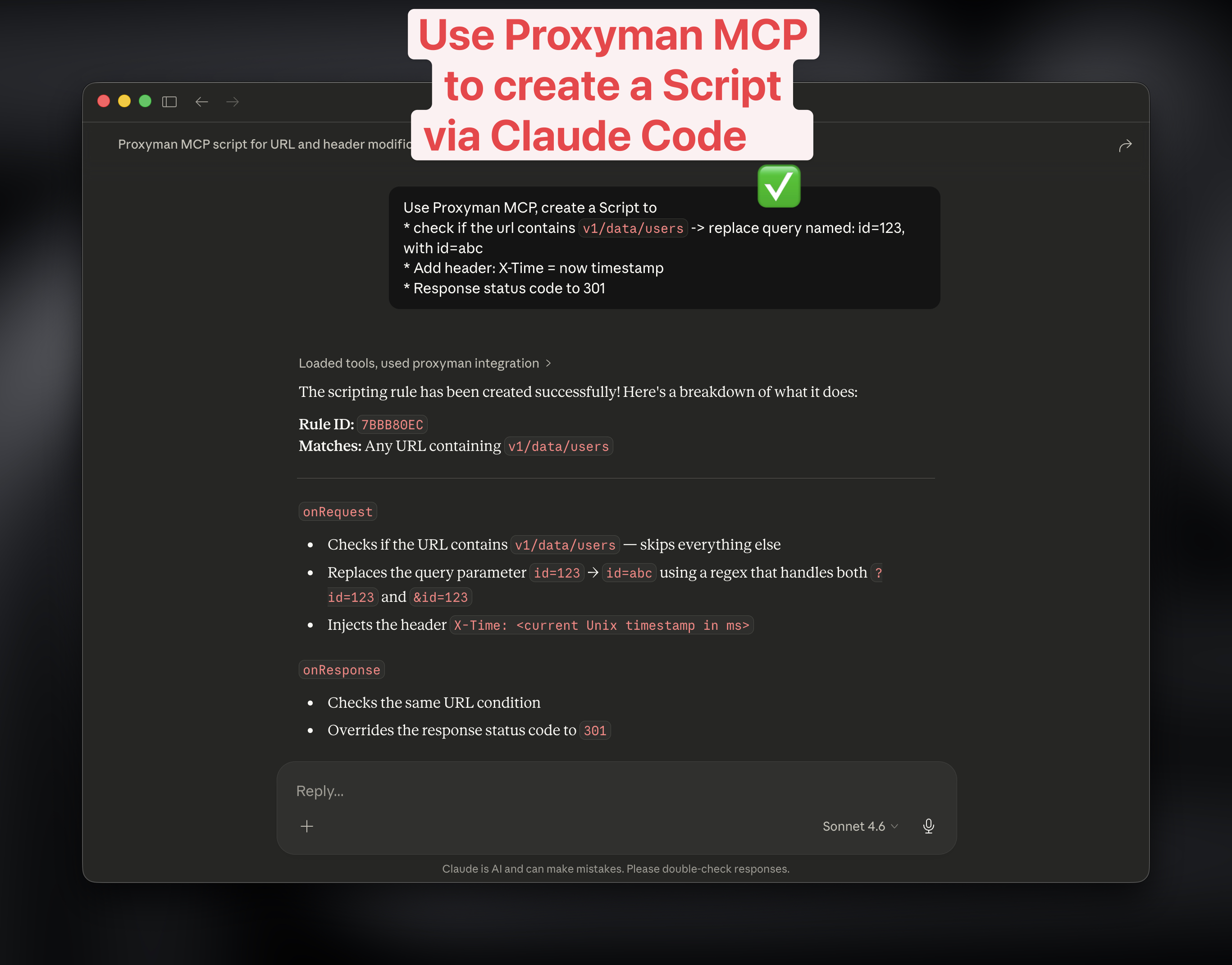
* Create a new Script to change the status code, headers, body.
* Create Map Local, Breakpoint Tools with given URL

<figure><img src="https://1856518738-files.gitbook.io/~/files/v0/b/gitbook-x-prod.appspot.com/o/spaces%2F-LlPt_6BePnJ3oK3saP1%2Fuploads%2FqQcsFS5hz30hI5PCINtN%2FScreenshot%202026-03-16%20at%2011.20.29.jpg?alt=media&amp;token=7094ae92-e967-4a5f-b6e9-084de3f203d8" alt="Use Claude Code to create the Script"><figcaption></figcaption></figure>

## 2. Benefits

<table><thead><tr><th width="229.90625">Benefit</th><th>Description</th></tr></thead><tbody><tr><td><strong>AI-Powered Debugging</strong></td><td>Ask AI to analyze captured traffic, find specific requests, or explain API responses</td></tr><tr><td><strong>Hands-Free Rule Creation</strong></td><td>Create breakpoints, map local/remote rules through conversation</td></tr><tr><td><strong>Faster Workflow</strong></td><td>Export cURL commands, filter flows, and manage sessions without switching context</td></tr><tr><td><strong>Secure by Design</strong></td><td>Localhost-only server with per-session token authentication</td></tr><tr><td><strong>IDE Integration</strong></td><td>Works seamlessly with Cursor and other MCP-compatible tools</td></tr></tbody></table>

## 3. How to add Proxyman MCP

1. **Enable MCP in Proxyman**
   * Open Proxyman → Settings → MCP Tab
   * Toggle **Enable MCP Server to start the MCP Server**
2. **Choose your MCP client:** In Proxyman Settings → MCP, select **Codex** or **Claude Code**, then use **Copy Command**. For **Cursor**, choose **Manual** and add the displayed configuration to Cursor's MCP settings.
3. Use the setup below for your client and installation. The command generated by Proxyman uses the path of your installed app, which may differ from these examples. Keep sensitive-data redaction enabled for normal debugging.

#### Codex

* Production Version:

```bash
codex mcp add proxyman -- "/Applications/Proxyman.app/Contents/MacOS/mcp-server"
```

* Setapp Version:

```bash
codex mcp add proxyman -- "/Applications/Setapp/Proxyman.app/Contents/MacOS/mcp-server"
```

#### Claude Code

* Production Version:

{% code overflow="wrap" %}

```bash
claude mcp add proxyman --transport stdio -- "/Applications/Proxyman.app/Contents/MacOS/mcp-server"
```

{% endcode %}

* Setapp Version:

{% code overflow="wrap" %}

```bash
claude mcp add proxyman --transport stdio -- "/Applications/Setapp/Proxyman.app/Contents/MacOS/mcp-server"
```

{% endcode %}

#### Manual

For Cursor and other MCP clients, add the configuration from Proxyman's **Manual** tab to the client's MCP settings. Select the configuration for your installed Proxyman app. These examples show the `mcpServers` entry:

* Production Version:

```json
{
  "mcpServers": {
    "proxyman": {
      "command": "/Applications/Proxyman.app/Contents/MacOS/mcp-server"
    }
  }
}
```

* Setapp Version

```json
{
  "mcpServers": {
    "proxyman": {
      "command": "/Applications/Setapp/Proxyman.app/Contents/MacOS/mcp-server"
    }
  }
}
```

4. **Start using Proxyman MCP**

* Ensure Proxyman is running
* Ask your AI assistant to interact with Proxyman, for example: "Show the latest requests to api.example.com."
* If the client cannot find Proxyman, check that MCP is enabled and the configured app path is correct, then reconnect the client. If it connects but finds no flows, make a new request and use the [missing-traffic checklist](/troubleshooting/i-couldnt-see-any-traffics-on-proxyman.md).

## 4. Available Tools

#### Read-Only Tools

| Tool                     | Description                                                                                                      |
| ------------------------ | ---------------------------------------------------------------------------------------------------------------- |
| `get_version`            | Returns Proxyman version and build number                                                                        |
| `get_proxy_status`       | Returns recording state, proxy port, and SSL proxying status                                                     |
| `get_flows`              | Lists captured HTTP/HTTPS flows with optional filters (`limit`, `host_filter`, `method_filter`, `status_filter`) |
| `get_flow_detail`        | Returns full details of a specific flow including headers, body preview, query params, and cookies               |
| `list_rules`             | Lists all debugging rules (breakpoints, map local, map remote, blacklist)                                        |
| `get_ssl_proxying_list`  | Returns SSL proxying include/exclude domain lists                                                                |
| `get_certificate_status` | Returns root certificate installation status                                                                     |

#### Write Tools

| Tool                    | Description                                             | Required Params      |
| ----------------------- | ------------------------------------------------------- | -------------------- |
| `create_breakpoint`     | Creates a breakpoint to pause/inspect matching requests | `url` (pattern)      |
| `create_map_local`      | Returns custom responses for matching URLs              | `url` (pattern)      |
| `create_map_remote`     | Redirects requests from one URL to another              | `from_url`, `to_url` |
| `create_blacklist`      | Blocks requests matching a URL pattern                  | `url` (pattern)      |
| enable\_scripting\_tool | Create Script                                           |                      |
| `enable_ssl_proxying`   | Enables HTTPS decryption for a domain                   | `domain`             |

#### Session Control

| Tool               | Description                                    |
| ------------------ | ---------------------------------------------- |
| `clear_session`    | Clears all captured flows from current session |
| `toggle_recording` | Starts or stops traffic recording              |

#### Flow Operations

| Tool               | Description                                                                                                         |
| ------------------ | ------------------------------------------------------------------------------------------------------------------- |
| `export_flow_curl` | Exports a captured request as a runnable cURL command                                                               |
| `filter_flows`     | Advanced filtering with multiple criteria (url, host, method, status, headers, body) supporting AND/OR combinations |

#### App Control

| Tool            | Description                      |
| --------------- | -------------------------------- |
| `open_proxyman` | Launches Proxyman if not running |
| `quit_proxyman` | Quits the Proxyman app           |

***

## Changelogs

MCP v3 (Proxyman macOS ≥ 6.8.0)

| Name                           | Description                                                                                                                            |
| ------------------------------ | -------------------------------------------------------------------------------------------------------------------------------------- |
| get\_version                   | Get the current Proxyman macOS app version and build number                                                                            |
| get\_proxy\_status             | Get current proxy status including recording state, port number, and SSL proxying status                                               |
| get\_flows                     | Get recent HTTP/HTTPS flows from Proxyman's active session data source                                                                 |
| get\_flow\_detail              | Get detailed information about a specific flow including headers, body, query params, and cookies                                      |
| list\_rules                    | List all active debugging rules (breakpoints, map local, map remote, blacklist, scripting, dns spoofing, network condition, whitelist) |
| get\_ssl\_proxying\_list       | Get the current SSL Proxying configuration including enabled status and domain lists                                                   |
| create\_breakpoint             | Create a new breakpoint rule to pause and inspect/modify requests or responses matching a URL pattern                                  |
| create\_map\_local             | Create a Map Local rule to return a custom response for matching requests                                                              |
| create\_map\_remote            | Create a Map Remote rule to redirect requests from one URL to another                                                                  |
| create\_blacklist              | Create a Blacklist rule to block requests matching a URL pattern                                                                       |
| create\_scripting\_rule        | Create a Scripting rule with custom JavaScript to modify requests/responses                                                            |
| enable\_ssl\_proxying          | Enable SSL Proxying for a specific domain to decrypt HTTPS traffic                                                                     |
| clear\_session                 | Clear all captured flows from the current session                                                                                      |
| toggle\_recording              | Start or stop recording HTTP traffic                                                                                                   |
| export\_flow\_curl             | Export a captured HTTP request as a cURL command                                                                                       |
| filter\_flows                  | Filter captured HTTP/HTTPS flows using advanced filter criteria                                                                        |
| get\_certificate\_status       | Get the current status of Proxyman's root certificate                                                                                  |
| install\_certificate           | Install and trust the Proxyman root CA certificate                                                                                     |
| uninstall\_certificate         | Remove the Proxyman root CA certificate from the Keychain                                                                              |
| inject\_terminal               | Launch a terminal app with Proxyman proxy environment variables injected                                                               |
| get\_terminal\_manual\_command | Get a bash source command for manually setting proxy environment variables                                                             |
| answer\_setup\_question        | Answer setup questions about capturing HTTPS from iOS, Android, browsers, etc.                                                         |
| search\_docs                   | Search the built-in Proxyman setup and troubleshooting doc index                                                                       |
| list\_setup\_workflows         | List the supported setup workflows Proxyman MCP can guide users through                                                                |
| list\_popular\_workflows       | List popular setup workflows using Proxyman's curated fallback ranking                                                                 |
| open\_proxyman\_screen         | Open a specific Proxyman guide or setup screen in the macOS app                                                                        |
| run\_guided\_setup             | Run a one-click automation in Proxyman for browsers or Android emulators                                                               |
| list\_reverse\_proxies         | List configured Reverse Proxy entries                                                                                                  |
| create\_reverse\_proxy         | Create a Reverse Proxy entry for localhost or custom local port routing                                                                |
| generate\_code                 | Generate code from a captured HTTP flow in 18+ languages/frameworks                                                                    |
| create\_dns\_spoofing          | Create a DNS Spoofing rule to redirect a hostname to a different IP address                                                            |
| list\_dns\_spoofing            | List all DNS Spoofing rules and their enabled status                                                                                   |
| update\_dns\_spoofing          | Update an existing DNS Spoofing rule                                                                                                   |
| get\_external\_proxy           | Get the current External Proxy (upstream proxy) configuration                                                                          |
| set\_external\_proxy           | Configure an External Proxy setting for a specific protocol kind                                                                       |
| toggle\_no\_caching            | Toggle the No Caching feature (strips cache-related headers)                                                                           |
| inject\_electron               | Launch an Electron app with Proxyman proxy configuration injected                                                                      |
| open\_proxyman                 | Launch the Proxyman macOS application                                                                                                  |
| quit\_proxyman                 | Quit the Proxyman macOS application                                                                                                    |

### MCP v2 (Proxyman ≥ v6.7.0)

* Built-in knowledge base covering iOS, Android, browsers, terminal, VPN, localhost, and third-party libraries
* New commands: answer\_setup\_question, search\_docs, list\_setup\_workflows, open\_proxyman\_screen, run\_guided\_setup, create\_reverse\_proxy
* MCP resources and prompt templates for chat clients
* Reverse proxy create/list support

### Security

* The server binds to `127.0.0.1` only (no network exposure)
* Per-session cryptographic token stored in `~/Library/Application Support/com.proxyman.NSProxy/mcp-handshake.json`
* The handshake file has `0600` permissions (owner-only access)
* Sensitive data (auth tokens, passwords, API keys) is automatically redacted in responses
