Restore & Colorize Old Photos with AI — Free Online
Free AI photo restoration and colorization tools online. PixRestorer repairs scratches, fading, and blur — or adds natural color to black and white pictures — in about 30 seconds.
2 free creditsresults in ~30 secondsno card, no subscription


Damaged family photo restoration · restored with PixRestorer
Free AI tools
Pick a tool to get started
Three focused tools for old pictures — repair damage, add color to vintage prints, or colorize any black and white photo.


The problem
Your old photos deserve better
Decades of storage take their toll. Four problems show up in nearly every family album.
- 01
Faded Colors
Colors washed out over decades, losing the warmth of original moments.
- 02
Scratches & Tears
Physical damage from years of handling, storage accidents, and aging.
- 03
Blur & Noise
Low-resolution cameras and poor storage created grainy, unfocused images.
- 04
Black & White
Precious memories trapped in monochrome, missing the vibrancy of real life.
How it works
AI handles the hard part
Every common issue with old photos is repaired automatically and in seconds.
AI-Powered Restoration
Faded & Scratched PhotosAdvanced AI analyzes and repairs damage automatically, restoring colors and details.
Scratch & Damage Removal
Scratches & TearsDetects and removes scratches, tears, creases, and marks from aged photos.
Colorize Black & White
Black & White PhotosTransforms monochrome photos into natural, vivid color using AI colorization.
HD Upscale
Blur & NoiseEnlarges and sharpens photos up to 4x, recovering lost detail and removing noise.
Results in Seconds
General BenefitMost photos restored in under 30 seconds, no technical skills needed.
Privacy Protected
Trust BuilderPhotos processed securely and deleted immediately after restoration.
How to restore old photos with AIWe treat every photo like it's someone's only one.
Most photos are back in your hands in under thirty seconds.
- 01
Upload Your Photo
Drag and drop your old, damaged, or faded photo.
- 02
AI Restoration
Repairs damage, removes scratches, and brings back color in under thirty seconds.
- 03
Download Restored Image
Most photos are back in your hands in high resolution.
Real results
See the transformation
Real photos restored by PixRestorer — side by side, before and after.
BeforeAfter Before
 After
After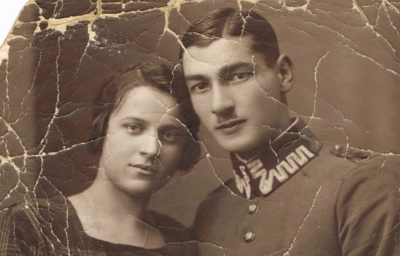 Before
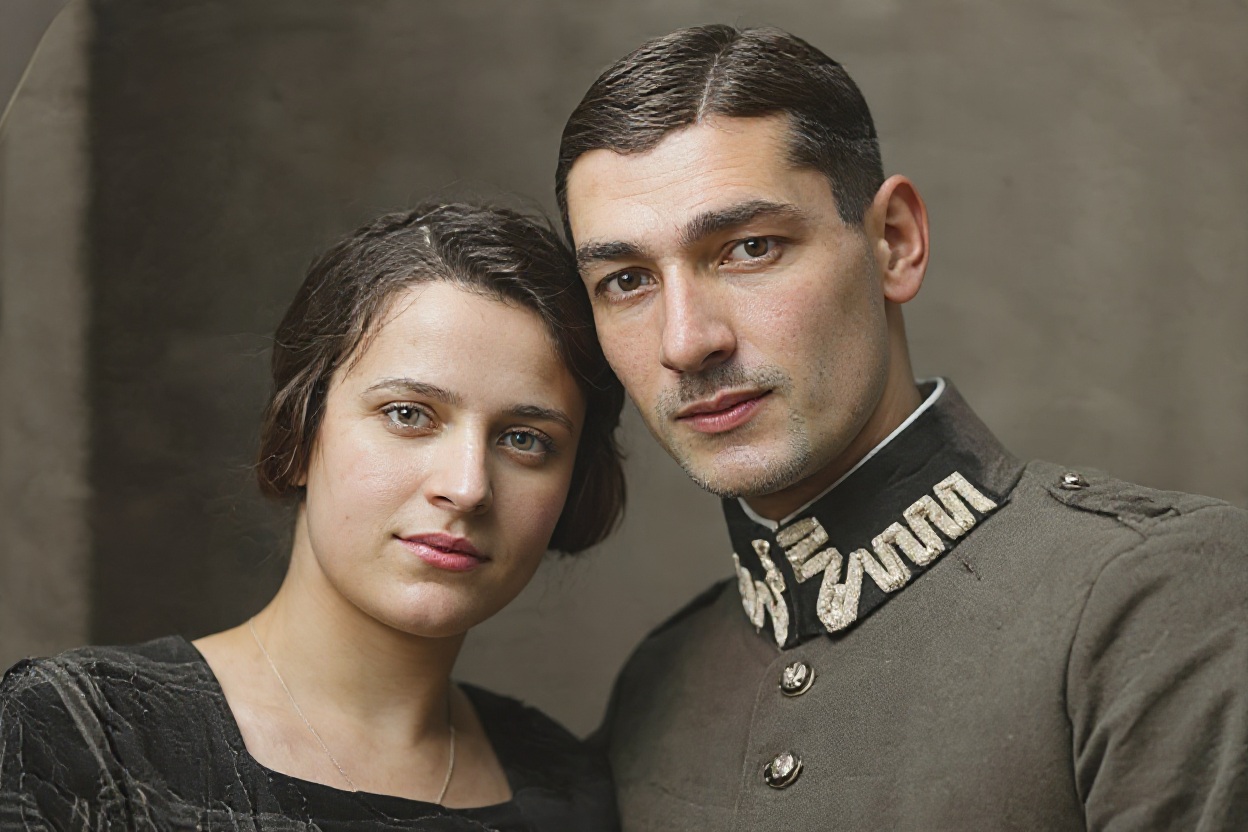 After
AfterComparison
How we compare
A straightforward look at how PixRestorer stacks up against the alternatives.
| Feature | PixRestorer | Photoshop | Other Tools |
|---|---|---|---|
Price | $0.30–$0.40/photo | $20+/month | $0.5–3/photo |
Time | 30 seconds | 30–60 minutes | 2–5 minutes |
Skill Required | None — just upload | Advanced skills | Basic |
Quality | AI-optimized, HD | Depends on skill | Basic enhancement |
Privacy | Auto-deleted | Local only | May retain photos |
From the blog
Learn how to restore old photos
Practical guides and step-by-step tutorials for restoring your family photos with AI.
How to Colorize Black and White Photos from Scanned Prints
Follow a practical workflow for scanned prints and old family pictures, from source prep to AI colorization and final review.
Read the guideHow to Fix Blurry Scanned Photos Before You Repair Scratches
Learn why scans turn soft, how to avoid scanner mistakes, and how to use AI to sharpen blurry scanned photos and clean up scratches.
Read the guideHow to Restore Old Photos Without Photoshop
Use a simple AI workflow to restore faded, scratched, or blurry old photos without learning Photoshop or paying for a subscription.
Read the guideFAQ
Frequently asked questions
Start restoring old photos today
Sign in with Google to claim your 2 free restorations.
No credit card required · No subscription
