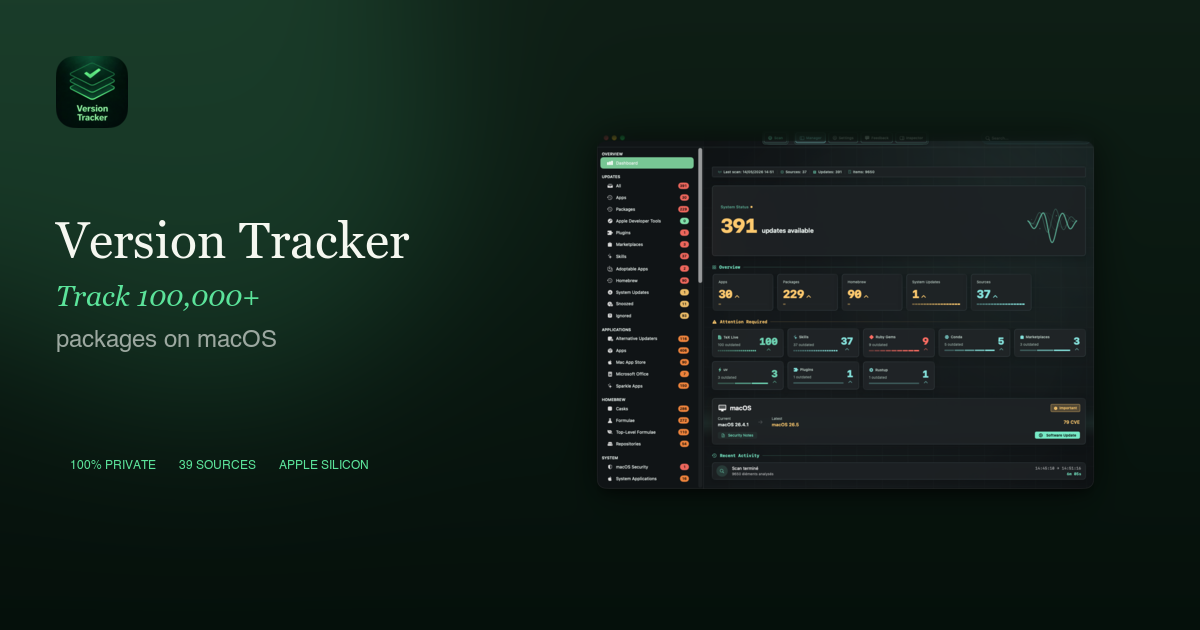
Version Tracker is a comprehensive macOS application designed to centralize and streamline the management of over 100,000 software packages and applications. It serves as an essential tool for macOS users, developers, and IT professionals who need to ensure their software ecosystem is secure, up-to-date, and performing optimally.
Key Features
Unified Dashboard: Gain total visibility into all installed apps and packages from 48 diverse sources, including package managers, dev runtimes, and system updates.
One-Click Updates: Effortlessly update individual applications or all outdated software simultaneously with a single click, featuring real-time progress tracking.
Robust Security Checks: Benefit from Apple code signing verification, Gatekeeper assessment, notarization validation, and CVE database enrichment to ensure you're running trusted and secure software.
Extensive Developer Tool Support: Track and update a wide array of developer tools and runtimes like npm, pip, Cargo, Go, Flutter, Docker, Deno, Bun, Composer, and many more.
100% Private: All scanning is performed locally on your Mac with no sign-up required and no telemetry transmitted, ensuring your privacy.
MacUpdater Replacement: Positioned as the natural and superior replacement for the discontinued MacUpdater, offering enhanced features and broader coverage.
Use Cases
Version Tracker is invaluable for maintaining a healthy and secure macOS environment. For individual users, it eliminates the tedious process of manually checking for updates across various applications and package managers, ensuring they always have the latest features and bug fixes. This prevents common issues like app incompatibility with new macOS versions and improves overall system performance.
Developers will find Version Tracker particularly useful for managing their complex toolchains. It ensures that critical components like npm, pip, Cargo, and Docker are always current, preventing dependency conflicts, broken builds, and missed deprecation warnings. This consistency in the development environment is crucial for productivity and project stability.
Furthermore, for IT administrators and security-conscious users, Version Tracker acts as a proactive defense mechanism. By alerting users to known security vulnerabilities (CVEs) and verifying code signing and notarization, it significantly reduces the risk of exploitation from outdated software, which is a primary attack vector in cyber breaches.
Pricing Information
Version Tracker operates on a freemium model, offering a "Free" tier that allows scanning of all 48 sources and dashboard access indefinitely. For full functionality, including one-click updates, CVE/SOFA security intelligence, and scheduled scans, users can choose between annual subscriptions or one-time lifetime licenses. Plans include "Mono" (1 Mac), "Solo" (2 Macs), and "Family" (5 Macs), with launch pricing available until December 31, 2026. A 7-day free trial of premium features is also available.
User Experience and Support
The application boasts a user-friendly dashboard that provides total visibility and real-time refresh of your software inventory. Its one-click update mechanism simplifies the entire process, making software maintenance effortless. Version Tracker is designed for ease of use, with intuitive navigation and clear reporting. While basic support is available via email, "Family" plan subscribers receive priority support. The commitment to local scanning and no sign-up underscores a strong focus on user privacy.
Technical Details
Version Tracker is built using modern Apple technologies, specifically Swift 6 and SwiftUI, ensuring a native and optimized experience on macOS. It runs natively on both Apple Silicon and Intel Macs and requires macOS 15 (Sequoia) or later. This choice of technology ensures high performance, reliability, and seamless integration with the macOS ecosystem.
Pros and Cons
Pros:
Centralized management for 48 diverse software sources.
Comprehensive security checks (code signing, notarization, CVEs).
Extensive support for developer tools and package managers.
100% private with local scanning and no telemetry.
User-friendly interface with one-click updates.
Direct replacement for the discontinued MacUpdater.
Cons:
Requires macOS 15 (Sequoia) or later.
Full update functionality requires a paid subscription or lifetime license.
Lifetime licenses require separate purchase for major version upgrades (e.g., 1.x to 2.x).
Conclusion
Version Tracker offers an unparalleled solution for macOS software management, providing a secure, efficient, and private way to keep your entire digital toolkit up-to-date. By consolidating updates and offering critical security insights, it empowers users to protect their investment, enhance performance, and unlock new features. Stop guessing and start tracking – explore Version Tracker today with a free 7-day trial.