

Java Hello World Program is the first program commonly used to learn Java. It introduces the basic structure of a Java program, including a class, the main() method, and the statement used to display output on the console.
- It shows how System.out.println() is used to print text on the console.
- It helps beginners understand how Java source code is compiled and executed.
Prerequisites
Implementation of Java Hello World
The below-given program is the most simple program of Java printing "Hello World" to the screen. Let us try to understand every bit of code step by step.
public class HelloWorld {

    // Your program begins with a call to main()

    public static void main(String[] args)
    {
        // Prints "Hello, World" to the terminal window.

        System.out.println("Hello, World");
    }
}
Output
Hello, World
Explanation
- public class HelloWorld declares a public class named HelloWorld.
- public allows the class to be accessed from other classes.
- static allows the main() method to be invoked without creating an object of HelloWorld.
- void indicates that the main() method does not return a value.
- main() is the method that the Java launcher uses to start the application.
- String[] args stores command-line arguments passed to the program.
- System.out.println() prints the specified text and moves the cursor to the next line.
- "Hello, World!" is the string displayed on the console.
Understanding the Java Hello World Program
1. Class Definition
Every Java program must have at least one class. Here, the class is defined using the class keyword:
public class HelloWorld {
// Statements go here
}
Note: If the class is public, the filename must match the class name HelloWorld.java
2. main Method
In the Java programming language, every application must contain a main method as it is the entry point of the application:
public static void main(String[] args)
- public: Allows JVM to access the method from anywhere.
- static: Method can run without creating an object.
- void: It doesn’t return any value.
- String[] args: Accepts command-line arguments.
3. System.out.println()
This prints output to the console.
System.out.println("Hello, World");
- System: Built-in class from java.lang package.
- out: Static member (PrintStream object) of System.
- println(): Method that prints to console and moves to the next line.
Steps to Implement a Java Program
Java is a platform-independent language that follows a two-step execution process:
- Compilation (source code -> bytecode)
- Execution (bytecode -> machine code via JVM)
1. Compilation in Java
Java source code (.java files) is compiled by the Java Compiler (javac) into Bytecode, stored in .class files. This bytecode is platform-independent and ready to run on any system with a JVM.
- Internally, compilation involves:
- Parsing: Converts code into syntax trees (AST).
- Entering: Populates symbol tables.
- Annotation Processing: Handles annotations.
- Attribution: Performs type checking and name resolution.
- Flow Analysis: Checks for variable use and reachability.
- Desugaring: Removes syntactic shortcuts.
- Generation: Produces .class files.
2. Execution via JVM
The .class files are executed by the Java Virtual Machine (JVM), which includes the following stages:
Class Loader
Loads the main class and other dependencies into memory.
- Primordial Loader: Default system loader.
- Non-primordial Loader: Custom loaders for advanced control.
Class r = loadClass(String className, boolean resolveIt);
Bytecode Verifier
Checks that the loaded bytecode is safe to execute. It ensures:
- Variables are initialized
- Method signatures are correct
- Private access rules aren’t violated
- No stack overflows
Just-In-Time (JIT) Compiler
Converts bytecode into native machine code at runtime for faster execution.
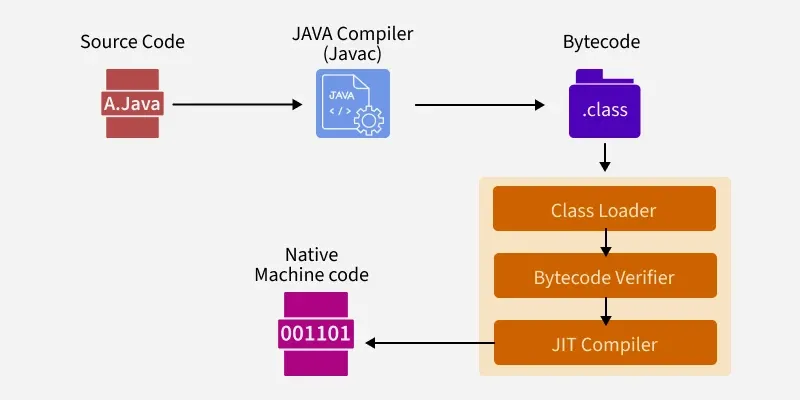
How Java Hello World Program Works
Java source code goes through compilation and execution before the output is displayed.
- The programmer writes the source code in a
.javafile. - The Java compiler (
javac) compiles the source code into bytecode. - The bytecode is stored in a
.classfile. - The Java launcher starts the application.
- The JVM loads and executes the required class and its
main()method. System.out.println()displays the output on the console.
The bytecode generated by the Java compiler is designed to run on any compatible JVM, which is a key part of Java's platform-independent execution model.
Java Compilation and Execution Example
class HelloWorld{
    public static void main(String[] args) {
        System.out.print("Hello, World");
    }
}
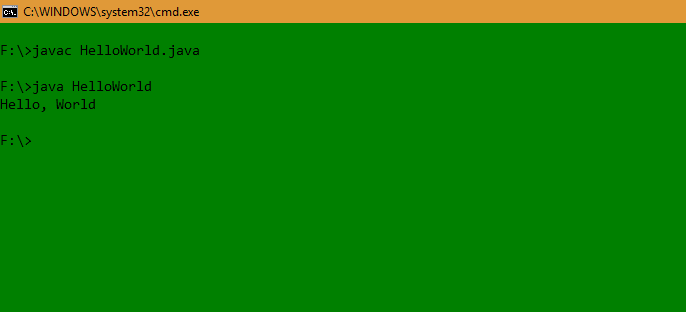
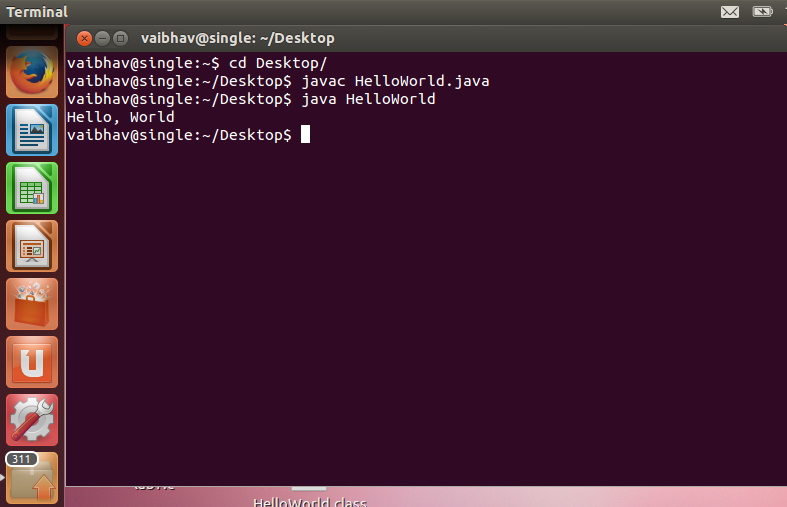
Steps to Run
1. Create File: Save the file as HelloWorld.java.
2. Open Terminal: Navigate to the folder containing the file.
3. Compile:
javac HelloWorld.java
4. Run:
java HelloWorld
Output
Hello, World
1. In Windows
2. In Linux
Note: If you get ClassNotFoundException, ensure the .class file is in the correct directory or check your CLASSPATH.
