Skip to content

Welcome to Planet KDE

This is a feed aggregator that collects what the contributors to the KDE community are writing on their respective blogs, in different languages

Saturday, 25 April 2026

Welcome to a new issue of This Week in Plasma!

This week includes an interesting blend of improvements. Lots of visual stuff, so get ready for a ton of screenshots and screen recordings!

Notable new features

Plasma 6.7

The Kicker Application Menu widget can now be configured to show a “Recent Locations” item. (Christoph Wolk, KDE Bugzilla #420951)

Recent places in Kicker

Network connections can now be duplicated. (Kartikeya Tyagi, KDE Bugzilla #499188)

Context menu showing option to duplicate a network connection

There’s now a new “has parent window” window rule you can use to target child dialog windows specifically. (Kai Uwe Broulik, kwin MR #8969)

Notable UI improvements

Plasma 6.6.5

Dragging a search result for a System Settings page to the desktop now creates a launcher to that page as you would expect. This completes a mini-project to improve dragging-and-dropping things to the desktop that we started a while back. (Antti Savolainen, KDE Bugzilla #500259)

Plasma 6.7

Discover now has fancier application page headers with more obvious install buttons! (Oliver Beard, discover MR #1297)

Discover no longer disables the “More Information” button on list items for in-progress updates. (Tobias Fella, KDE Bugzilla #431719)

Discover now does a better job of handling the rare case where an automatic update to a Flatpak app introduces a compatibility issue you can’t easily recover from. Now it will warn you about this once instead of continuously. (Tobias Fella, KDE Bugzilla #509760)

You can now drag favorite apps out of their areas in Kicker and Dashboard to un-favorite them. Kickoff is coming soon, too! (Christoph Wolk, plasma-desktop MR #3665 and KDE Bugzilla #518749)

When your laptop is plugged in at maximum charge, doing something that changes the power profile to a non-default one now shows only the power profile icon in the System Tray, and omits the fully-charged battery icon because that part is obvious. (Nate Graham, KDE Bugzilla #518802)

Improved some awkwardly-worded labels in System Settings and Plasma. (Philipp Kiemle, plasma-desktop MR #3674 and plasma-workspace MR #6522)

Frameworks 6.26

Reduced the amount of blurriness seen in icons throughout QtQuick-based apps using the Kirigami.Icon component when using a low fractional scale factor like 150% or less. (Volodymyr Zolotopupov, kirigami MR #2070)

Before:

A row of blurry white icons on a black background
After:
A row of less-blurry white icons on a black background

Added a search provider for startpage.com, so you can search there from KRunner. (Antti Savolainen, KDE Bugzilla #503976)

KRunner showing the option to search using startpage.com by entering “sp KDE Linux”

Notable bug fixes

Plasma 6.6.5

Fixed a case where the Plasma Login Manager could crash when connecting and disconnecting multiple monitors while the login screen is visible. (David Edmundson, KDE Bugzilla #519302)

Fixed some cases where Plasma could crash at login. (David Edmundson, plasma-workspace MR #6520)

Fixed multiple accessibility issues: key repeat not working in the Orca screen reader, and various UI elements not being read properly. (Nicolas Fella, KDE Bugzilla #519143, KDE Bugzilla #519333, and KDE Bugzilla #519217)

Fixed a tricky issue in Spectacle that could make large images fail to automatically copy to the clipboard right after the app exits. (David Edmundson, KDE Bugzilla #509065)

Fixed another cause of the issue whereby de-focused full-screen windows could sometimes inappropriately appear at the top of the window stack. (Xaver Hugl, KDE Bugzilla #484155)

Fixed a layout glitch on System Settings’ Colors page that could make UI elements in the color previews overflow when using some non-default fonts and font sizes. (Akseli Lahtinen, KDE Bugzilla #516413)

Changing the brightness or any screen settings no longer terminates Spectacle’s sectangular region recordings. (Xaver Hugl, kwin MR #9127)

Frameworks 6.26

Fixed some visual glitches around radio buttons in the Audio Volume widget. (David Edmundson, ksvg MR #103)

Notable in performance & technical

Plasma 6.6.5

Fixed an issue that made System Settings’ Touchscreen page appear while the “highlight changed settings” feature is enabled even if you don’t have a touchscreen. (Jin Liu, KDE Bugzilla #518868)

Plasma 6.7

Turned on the “overlay planes” feature for Intel GPUs, which should improve performance and save some energy when using cooperative games and apps. (Xaver Hugl, kwin MR #8699)

Improved power efficiency for full-screen windows and effects that don’t gain any benefit from using the “direct scan-out” feature; now they’ll only use it if it will save power. (Xaver Hugl, kwin MR #9120)

How you can help

KDE has become important in the world, and your time and contributions have helped us get there. As we grow, we need your support to keep KDE sustainable.

Would you like to help put together this weekly report? Introduce yourself in the Matrix room and join the team!

Beyond that, you can help KDE by directly getting involved in any other projects. Donating time is actually more impactful than donating money. Each contributor makes a huge difference in KDE — you are not a number or a cog in a machine! You don’t have to be a programmer, either; many other opportunities exist.

You can also help out by making a donation! This helps cover operational costs, salaries, travel expenses for contributors, and in general just keeps KDE bringing Free Software to the world.

To get a new Plasma feature or a bug fix mentioned here

Push a commit to the relevant merge request on invent.kde.org.

Friday, 24 April 2026

As an exception to my usual posts, this time I’ll write about a feature that’s already released. Since Plasma 6.6, you can enable automatic brightness in the display settings… let’s take a look at how it works, and why it took so long to make it happen.

The hardware

This is where the problems start - most laptops unfortunately don’t come with a brightness sensor, and there’s effectively no monitors that have a built-in sensor either (let alone one that can be accessed by the connected PC).

While it’s possible to buy or build a brightness sensor that connects via USB, brightness control for external monitors usually has limitations in how often we can safely adjust the brightness… So for quite some time, there was noone working on Plasma that had the combination of hardware, motivation and knowledge to do something about it.

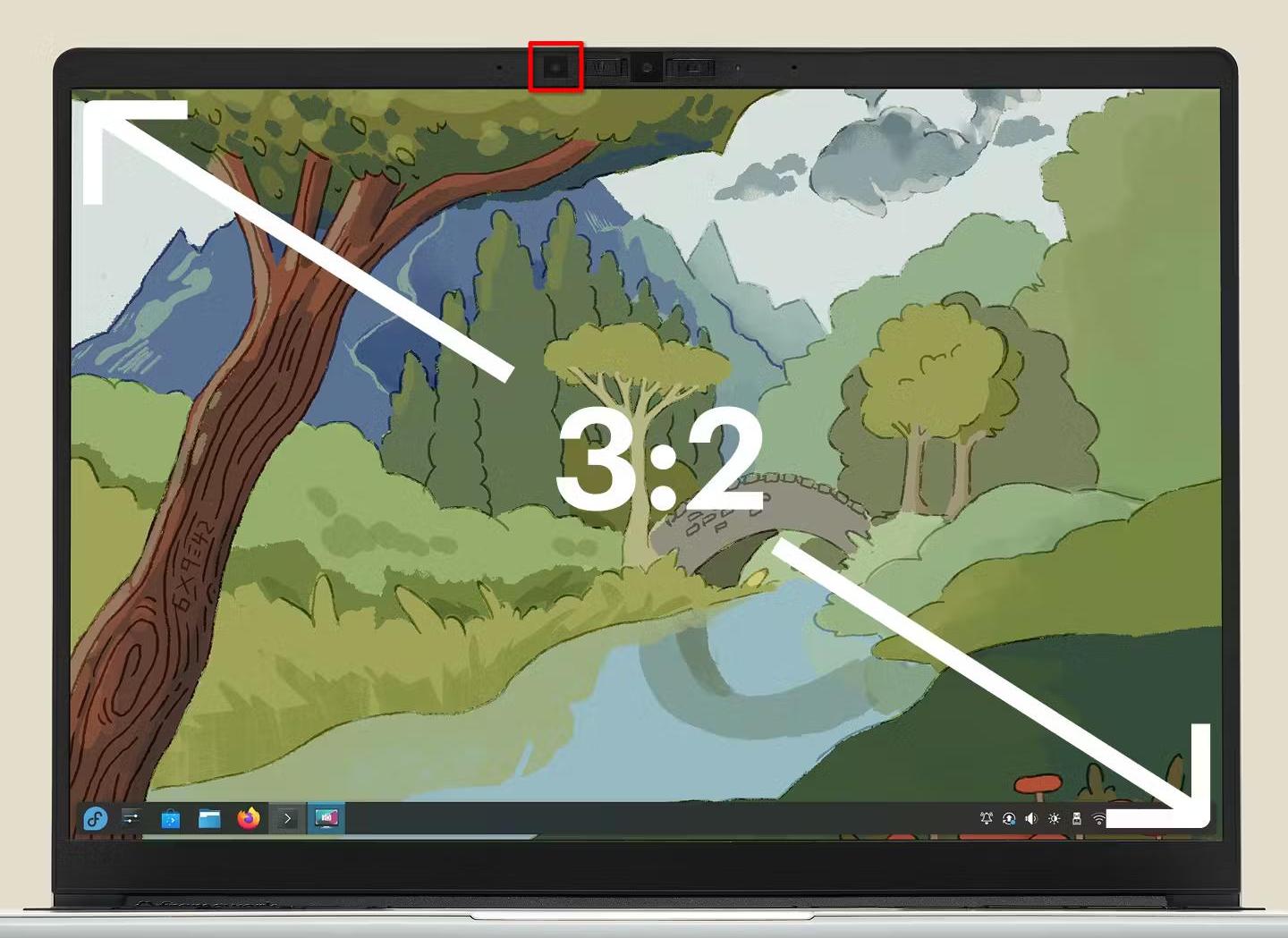
Luckily, the Framework Laptop 13 comes with a brightness sensor, so on the hardware side I was all set:

Framework 13

The software

Making automatic brightness do something is easy, but making it work well enough that you actually want to use it is a very different story.

My first approach was to assume brightness of the display should scale linearly with environmental brightness. I tried this, and it was sort of usable, but just not good enough. There’s three problems with it:

  1. the brightness setting sadly does not linearly control display luminance. 0% is generally not “off”, and sometimes firmware or drivers make the curve non-linear to make the brightness more “intuitive”
  2. in order for automatic brightness to be easy to use, we can’t expect the end user to configure an equation for their system. We need to automatically detect what they’re doing, and configuring two parameters based off one brightness slider is a challenge
  3. the best brightness curve isn’t necessarily linear. Depending on your personal preferences and how reflective your display is, you might want to keep brightness a lot higher in bright environments than in dark ones, or vice versa.

So a different approach was needed. I looked a bit at other operating systems for inspiration, and from the UX side I definitely wanted to copy Android: You use the brightness slider however you want, and the system should try to replicate what you do on its own. On the implemtation side however, I only saw claims that it uses machine learning, so that wasn’t exactly helpful.

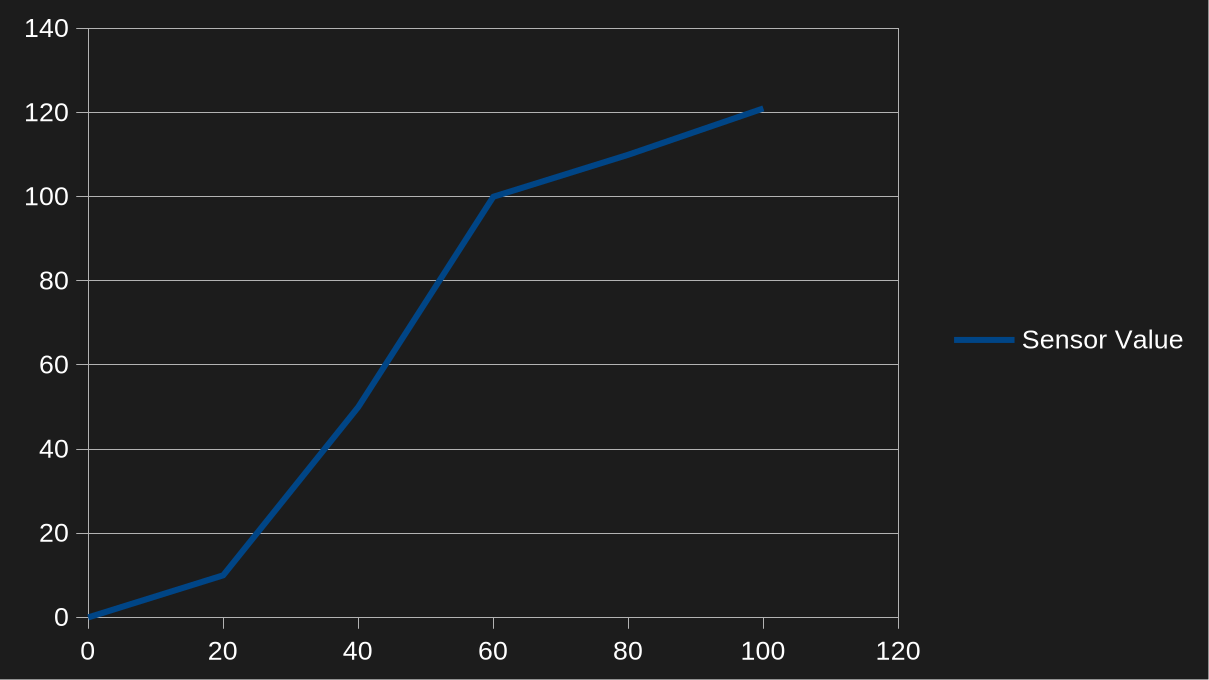
Ultimately, what I settled on is pretty simple: We just store 6 sensor values, one per 20% brightness step. When processing sensor readings, KWin finds the matching brightness setting by linearly interpolating between the two closest sensor values.

final brightness curve

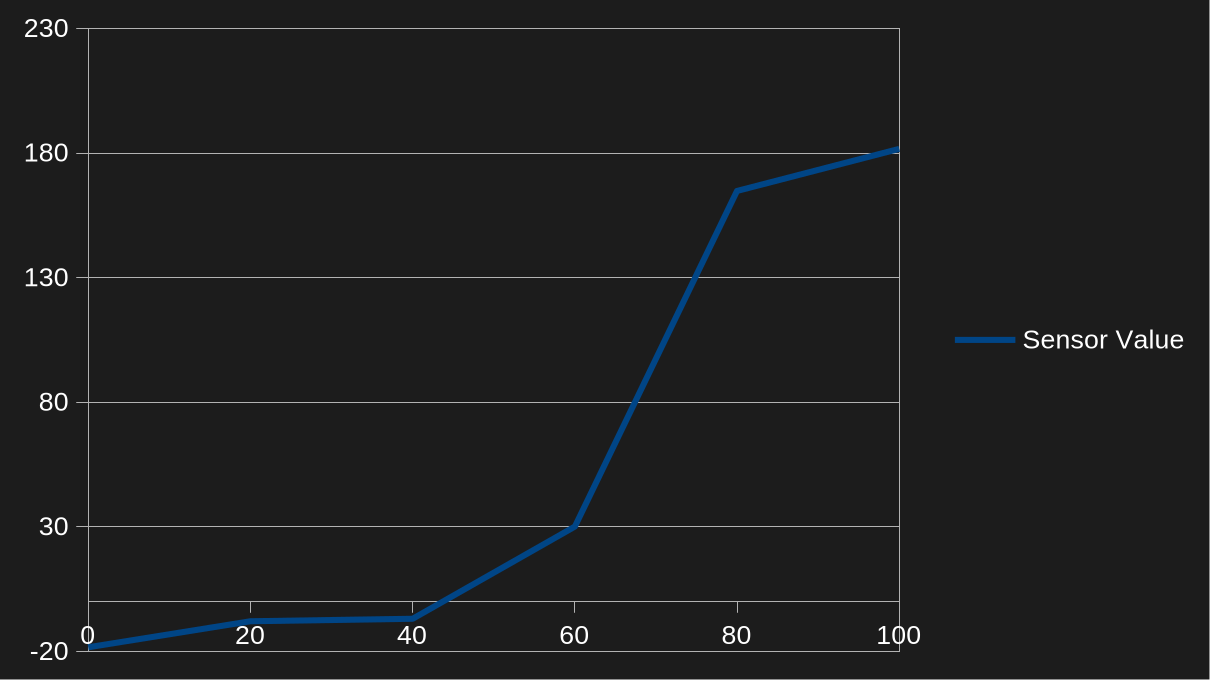
When the user touches the brightness slider or uses the brightness shortcuts, KWin adjusts the curve so the current sensor value will result in that desired brightness setting. At first, I only made it adjust the two closest points and enforce the rest of the curve to be monotonic, but it ended up causing problems:

full brightness issue

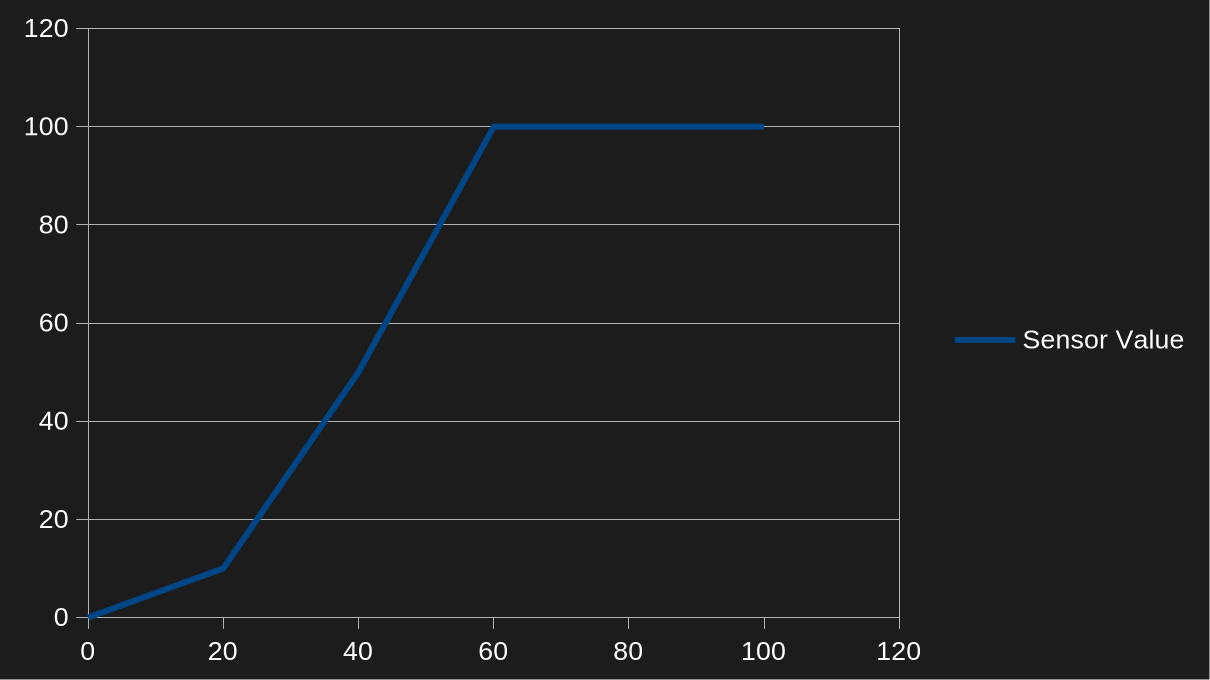
With this configuration, any sensor readings above 100 lux - for example, 101 - resulted in 100% brightness. To fix that, we now enforce a minimum difference of at least 1 lux or 10% between control points, so the curve above would look more like

full brightness issue fixed

To ensure the curve would always stay strictly monotonic and so you can have an arbitrary backlight setting at zero lux, values below zero also had to be allowed when updating the curve with those constraints.

However, I was still not done. While it now followed my preferences pretty well, it was still annoying! Especially if you sit in between a light source and the laptop, or if you sit on a train with trees around the tracks (like I recently did, traveling to and from Graz for a Plasma sprint), the brightness constantly fluctuated up and down.

To make it less annoying, I added some more adjustments on top:

  • some hysteresis. As long as the sensor reports ±10% of the last value, KWin should do nothing
  • a time delay before changes get applied. If after two seconds the sensor value is back in that 10% range, the brightness stays unchanged
  • a much slower animation for reducing display brightness (but not that much slower for increasing it)

This is how it was released in Plasma 6.6, and I’m pretty happy with it on both the Framework 13 and on my OnePlus 6 with Plasma mobile.

What now?

Just because I’m happy with it, doesn’t mean it’s done. If you’re using automatic brightness and it’s still annoying you for some reason, please tell me about it! If you’re really happy with it, I won’t complain about being told that either of course ;)

To fully catch up to what phones have done for years though, one feature is still missing: I’d like to adjust not just the brightness, but also the white point of the display to the environment. Unfortunately, none of my devices have a sensor for that… but since the camera module in the Framework 13 is easy to replace, I hope that changes one day!

As many long running projects, Qt too over the years has accumulated some APIs that in hindsight are deemed unsafe or sub-optimal. For example, Qt by default implicitly converts const char* to QString. While that usually only incurs a runtime overhead, maybe encoding problems, but also admittedly less cluttered code, there’s other APIs that can backfire in more subtle ways. One such API is doing a “context-less connect”.

Signals and Slots are a core principle of Qt that make it super easy to connect one object to another and keep a certain separation of concerns. The typical syntax to establish an connection is:

connect(sender, &Foo::somethingHappened, receiver, &Bar::doStuff);

This connects the signal somethingHappened in our sender of Type Foo to the member function doStuff in our receiver (context object) of type Bar. Whenever sender “emits” somethingHappened, doStuff on receiver will be called. The neat part about Qt connections is that when receiver gets destroyed, the connection is severed automatically. However, you can not just connect a signal to a member function but also use a lambda:

connect(job, &WallpaperFinder::wallpaperFound, [this](const QString &path) {
    m_wallpapers << path;
});

In our hypothetical wallpaper selector when the “job” that goes looking for wallpapers found one, it emits a signal and tells us the path of the file, so we can show it to the user. Now what happens when the user closes the dialog (which then gets destroyed) before the job has finished? Well… job still emits the signal which then results in our lambda being called. And then we try to access m_wallpapers on this which is long gone. Boom!

The fix is easy: provide a “context object”, too, just like you would with pointer to member function:

connect(job, &WallpaperFinder::wallpaperFound, this, [this](const QString &path) {
    m_wallpapers << path;
});

If this gets destroyed, the connection is severed, our lambda will no longer be called and all is well. The receiver object also decides what thread the slot is called, i.e. it will be called in the thread the receivers “lives in”. Context-less connections are always of DirectConnection type. Since Qt 6.7 you can actually enforce the use of a context object by defining QT_NO_CONTEXTLESS_CONNECT.

add_definitions(-DQT_NO_CONTEXTLESS_CONNECT)

It requires you think about the lifetime of your objects more and make a conscious decision about what your context object is. It also removes one thing to look out for in code review. I started adding this option to a couple KDE repositories to improve the quality of our code and I encourage you to do that, too! It probably comes to no surprise that in general, the bigger and older a repository, the higher the probability of it using non-ideal code.

What context object to use?

Of course, the situation is not always as simple as our example above. Here’s a few tips and tricks:

  • Look at the lambda captures. If you capture this, chances are, you want this as your context object.
  • If you capture a single object, perhaps you want it as your context object rather than this. If you use the sender, too, that’s fine, capture them both:
    connect(job, &Job::finished, manager, [job, manager] {
    manager->report(job);
    });

    When the sender gets destroyed, evidently the connection is useless and will be severed.
  • You can try to avoid capturing this by doing an init capture, i.e. [foo = m_foo] { ... }
  • Perhaps you don’t even need a lambda and can just connect to the method directly. Lambdas are so ubiquitous that you tend to forget you could just replace
    connect(job, &Job::finished, [timer] {
    timer->start();
    });

    with:
    connect(job, &Job::finished, timer, &QTimer::start);
  • At last, you may also use the sender as context object.
  • A context object must be a QObject, though. If you don’t have one, you’ll have to find another way. For instance, QObject::connect returns a QMetaObject::Connection object that you can store in a member variable and then disconnect when appropriate, like in your destructor.
  • For connections where it doesn’t really matter qApp can also be an option.

I’m a huge fan of QT_ENABLE_STRICT_MODE_UP_TO that lets you turn on most strictness features in a single shot. The biggest hurdle of rolling that out more widespread in KDE repositories is actually the Java-style iterators. Qt hates them, many use them, particularly for mutating a container, and imho they’re much more pleasing to look at than STL algorithms. If you start a new project, however, do consider setting your baseline to be as strict as it can be!

I’ll be vacationing a bit, so there will be no web review next week. It means the next one might be a double issue though, we’ll see.

Anyway, let’s go for my web review for the week 2026-17.


Inside GitHub’s Fake Star Economy

Tags: tech, social-media, github, scam

People are manipulating vanity metrics to attract VC money? Who would have expected? This is so unsurprising, I don’t even understand why people look at those…

https://awesomeagents.ai/news/github-fake-stars-investigation/


Anthropic’s Claude Mythos Launch Is Built on Misinformation

Tags: tech, ai, machine-learning, gpt, copilot, security, hype

More in depth look at the launch white paper and the issues covered in the PR. Not much survives scrutiny… there’s nothing special with this model.

https://www.artificialintelligencemadesimple.com/p/anthropics-claude-mythos-launch-is


AI adoption will accelerate the e-waste crisis

Tags: tech, hardware, ai, machine-learning, gpt, ecology

One of the dark sides of our industry, and this is is accelerating at a worrying pace. Maybe it’s time to look at and fix the whole hardware life cycle?

https://restofworld.org/2026/global-ewaste-crisis/


LLM pricing has never made sense

Tags: tech, ai, machine-learning, gpt, copilot, business

Indeed, and it’s going to get even crazier at some point. I guess somewhat soon but who knows…

https://anderegg.ca/2026/04/22/llm-pricing-has-never-made-sense?ref=bubbles.town


Highlights from Git 2.54

Tags: tech, git, version-control, tools

Nice quality of life improvements for the history rewrites. That said, I’m particularly looking forward to the changes in hooks handling, it’s always been a pain to deal with in teams, moving them to config should help.

https://github.blog/open-source/git/highlights-from-git-2-54/


Forge

Tags: tech, git, version-control, command-line, tools

A single CLI tool for any Git forge? This sounds appealing.

https://nesbitt.io/2026/03/13/forge.html


How Hard Is It To Open a File?

Tags: tech, unix, posix, filesystem, security, flatpak

A reminder that path based APIs and security don’t go well together to manage files.

https://blog.sebastianwick.net/posts/how-hard-is-it-to-open-a-file/


Game Devs Explain The Tricks Involved With Letting You Pause

Tags: tech, game, time

Pausing a game is not as simple as it sounds. There are many approaches to it.

https://kotaku.com/video-game-devs-explain-how-pausing-works-and-sometimes-it-gets-weird-2000686339


What Async Promised and What it Delivered

Tags: tech, asynchronous, complexity

Interesting piece which gives some perspective on the path which led to async/await. It seems to omit some pieces of the history to me but that’s a minor issue. I like how it points that it indeed led to gradual improvements locally for developers writing their functions, but is overall leading to larger issues in the involved ecosystems.

https://causality.blog/essays/what-async-promised/


Box to save memory

Tags: tech, rust, memory

Indeed, the memory layout of your structs can matter. Be it Rust or not, but in the case of Rust the use of Option might give the wrong feel about the resulting layout.

https://dystroy.org/blog/box-to-save-memory/


Lenses in Rust and My Solution

Tags: tech, rust, memory, type-systems

Finer grained borrowing is still something people need in Rust. Here is a potential solution to get them today.

https://lambdalemon.gay/posts/grist-lens


A Field Guide to Bugs

Tags: tech, debugging, funny, satire

OK, I find it funny. That said, there’s a kernel of truth in this piece: there’s clearly a taxonomy of bugs and you better know on what you just stepped.

https://www.stephendiehl.com/posts/field_guide_to_bugs/


“What’s In It For Me” Architecture

Tags: tech, architecture, organisation

Indeed, architecture work is not only technical (what is really?). You definitely need to account for the organisation and the process to actually put the architecture in place. It’s not just about having pretty pictures.

https://frederickvanbrabant.com/blog/2026-04-04-whats-in-it-for-me-architecture/


Good architecture shouldn’t need a carrot or a stick

Tags: tech, architecture, organisation

Architecture work is not only technical, you need processes to put the architecture of a project in place. That said, you can make things easier with standards to smooth the path toward the preferred types of architectures in your organisation.

https://frederickvanbrabant.com/blog/2026-04-17-good-architecture-shouldnt-need-a-carrot-or-a-stick/


In defence of bureaucracy

Tags: tech, engineering, organisation, management, bureaucracy

Clearly, any endeavour which has to scale will need some form of bureaucracy to stay afloat. The art is keeping it to a minimal before it starts to be an end in itself.

https://blog.ploeh.dk/2026/04/20/in-defence-of-bureaucracy/


How to Use One of the Most Valuable Management Tools: Active Listening

Tags: management, organisation, delegation, communication

Interesting insights, or how listening helps finding risk or making sure delegation will go well. It’s indeed also a good illustration that story telling works often betterthan explaining abstract concepts.

https://www.jrothman.com/newsletter/2026/04/how-to-use-one-of-the-most-valuable-management-tools-active-listening/


An asteroid extinguished all the dinosaurs except for birds. Here’s why

Tags: history, biology, science

And this is why… we now have chickens. More seriously it’s a true testament to genetic and behavioral diversity. This is clearly what allowed some species to escape the disaster.

https://www.scientificamerican.com/article/an-asteroid-extinguished-all-the-dinosaurs-except-for-birds-heres-why/


How do we deal with the catastrophe of uninsurability?

Tags: ecology, economics, politics

The insurances are starting to crumble under the risks. Looks like it’s time to do something about it.

https://aeon.co/essays/how-do-we-deal-with-the-catastrophe-of-uninsurability


The commodification of travel

Tags: travel, culture, social-media

Yes, I’m definitely bummed by this behavior as well. Best travel is when you take your time and enjoy the place, definitely not running around to take pictures for vanity reasons.

https://herman.bearblog.dev/the-commodification-of-travel/


re: The commodification of travel

Tags: travel, culture, social-media

Another one on the commodification of travel, it exemplifies what real travel is.

https://thatalexguy.dev/re-the-commodification-of-travel?ref=bubbles.town


Bye for now! See you in two weeks.

Chennai FOSS 2026

Earlier this month, on 18th April 2026, I had the incredible opportunity to speak at Chennai FOSS 2026, an event organized by FOSS United. If you aren’t familiar with them, FOSS United is a non-profit foundation dedicated to promoting the Free and Open Source Software ecosystem in India.

About my talk

My talk, titled "Getting started with GUI Design and Music Generation using Qt and C++," was a reflection of my recent contributions to the Season of KDE 2026.

The session shares how I, personally, as a new developer, found my way across one of my favorite projects, Mankala Engine, and started contributing in the Season of KDE 2026. I had shared my work from the Season of KDE, which included updating the GUI using C++ and QML, and also implementing elements like sounds and physics using QT. How developers can make contributions using Kirigami and other QT modules of KDE.

Most contributions are not limited to code, and I also shared the artworks I created for Mankala Engine, as well as my experience being part of Season of KDE 2026.

Here is my session PDF:

I don't like too much text, my session was mostly a live demo :)

Apart from learning about many new topics, which proved helpful to me, I also got the chance to network with other projects and contributors.

Thanks for reading 🚀

References & useful resources

Kubuntu 26.04 LTS Resolute Raccoon is officially released, plus a fresh batch of KDE application snaps land in stable.

Thursday, 23 April 2026

One of the many benefits of going to in-person sprints is you get to see how other people use their computers, and you can learn some workflow tricks from them. Or, you might notice areas of inefficiency and share tips of your own.

This post will be about the latter, on the subject of email.

Because during the sprint, I observed multiple people using email on their laptops in ways that are slow or ineffective:

  • Logging into webmail in a web browser
  • Switching between multiple webmail sites to manage multiple email accounts
  • Clicking on buttons in the webmail UI to delete or reply to messages

If you recognize yourself here, there’s a better way, I promise. 🙂 And I’d like to help you achieve it!

Back in 2024, I wrote about my email workflow and offered some general tips for managing email overload in KDE. I’m going to write more in depth about this topic, today starting with…

Use an email client app.

KDE has one: KMail. If it works well for you, use it! If it doesn’t, use Thunderbird instead, it’s fine. Don’t feel guilty for not using a piece of KDE software. Nobody’s gonna excommunicate you from KDE! I’m officially giving you permission.

Maybe you use an email client on your desktop but haven’t set one up on your travel laptop yet? Well, it’s time!

Because the important part is to consistently use an email client app of some sort. Why?

Way better for multiple accounts

Most of us have 2 or more email accounts. With webmail, this becomes a pain that scales linearly with the number of accounts.

With an email client app, you can manage multiple accounts’ worth of emails in one UI. When all your accounts are managed from one app, your brain doesn’t need to learn and remember multiple UIs, and and opening new email accounts doesn’t scale the mental burden at all.

Faster to use

An email client app lets you interact with emails using learnable and consistent keyboard shortcuts. Processing emails this way is super fast, so you can get done quickly and go back to something useful. Email sucks; life’s too short to waste time on it.

Easier to access

You can access the email client app easily using the Task Switcher, Overview, or Alt+Tab, rather than letting those webmail tabs get buried among your 75 normal browser tabs and 10 pinned tabs.

Easier to leave email mode

Quit the email client app when you want to stop receiving emails.

For webmail, you’re tempted to leave it open in a tab forever, which means to avoid being constantly tortured with email notification, you’ll have to turn them off entirely, so you stop noticing emails when they arrive. This is problematic for the “keep my email open all day” approach where the whole point is being able to action new emails immediately so they don’t pile up.

Using an app that can be turned off also facilitates being a “check email once a day” kind of person, if that’s your jam. Open the app, check your email, action the important ones, delete or archive all of them, then close the app. You can carve out 5-20 minutes for email, be free of email for the rest of the day, and still keep on top of everything!

Using good tools is enjoyable

Imagine trying to manage versions or debug code without git or gdb. It would take ages and the results wouldn’t be as good. Proficiency with these tools makes you feel like a bird soaring above the clouds or a wizard effortlessly wielding powerful magic, not some clod stumbling around in the mud.

Email clients are the same way. Learn powerful tools to bolster your professional skills and feel better about the process of participating in KDE, not just the outcomes.


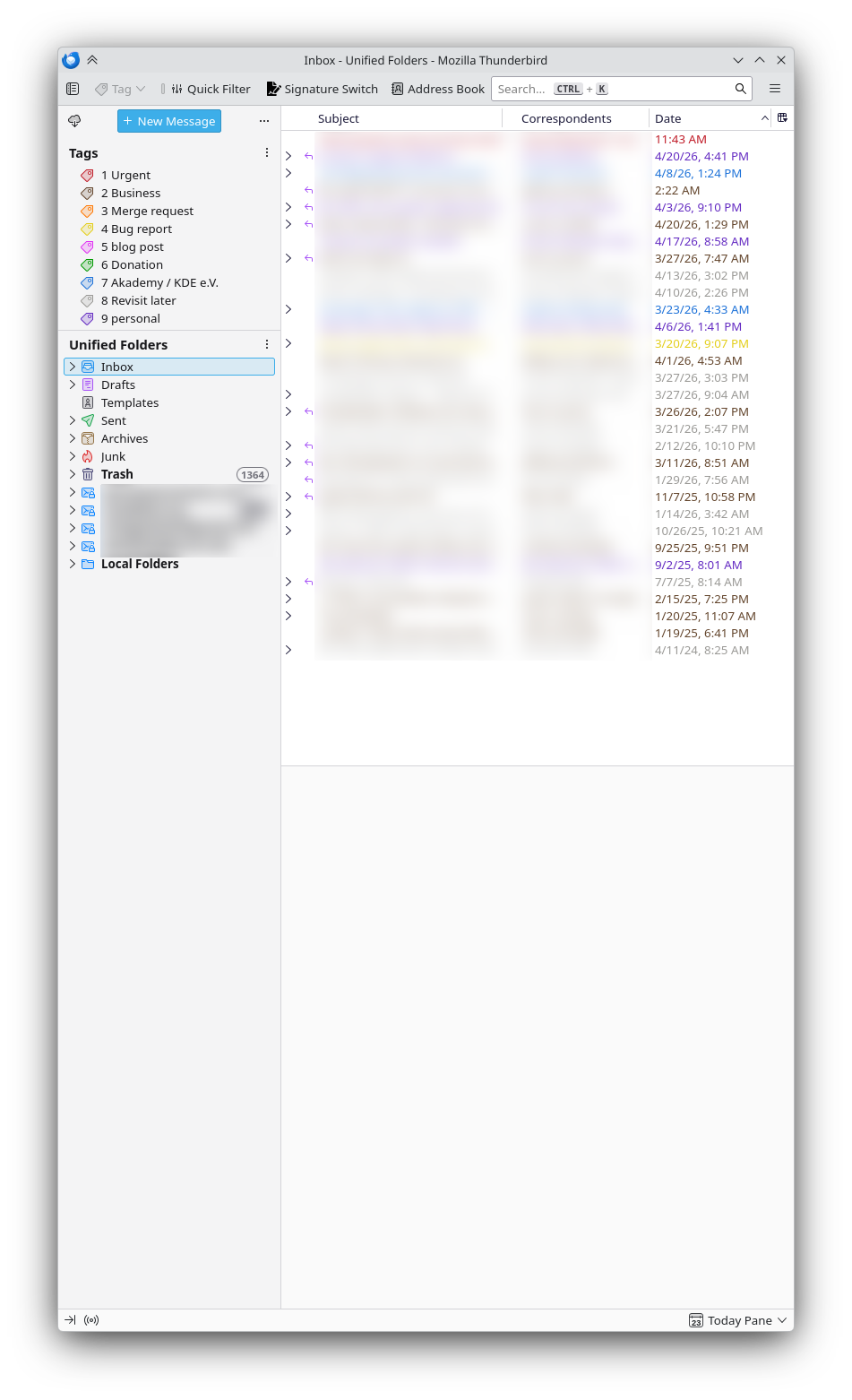
The Thunderbird email client is the foundation of my email system. In conjunction with other techniques — which I briefly described in the earlier post and will flesh out in more detail over the coming weeks — this is currently my email situation:

Thunderbird email client window showing not too many emails

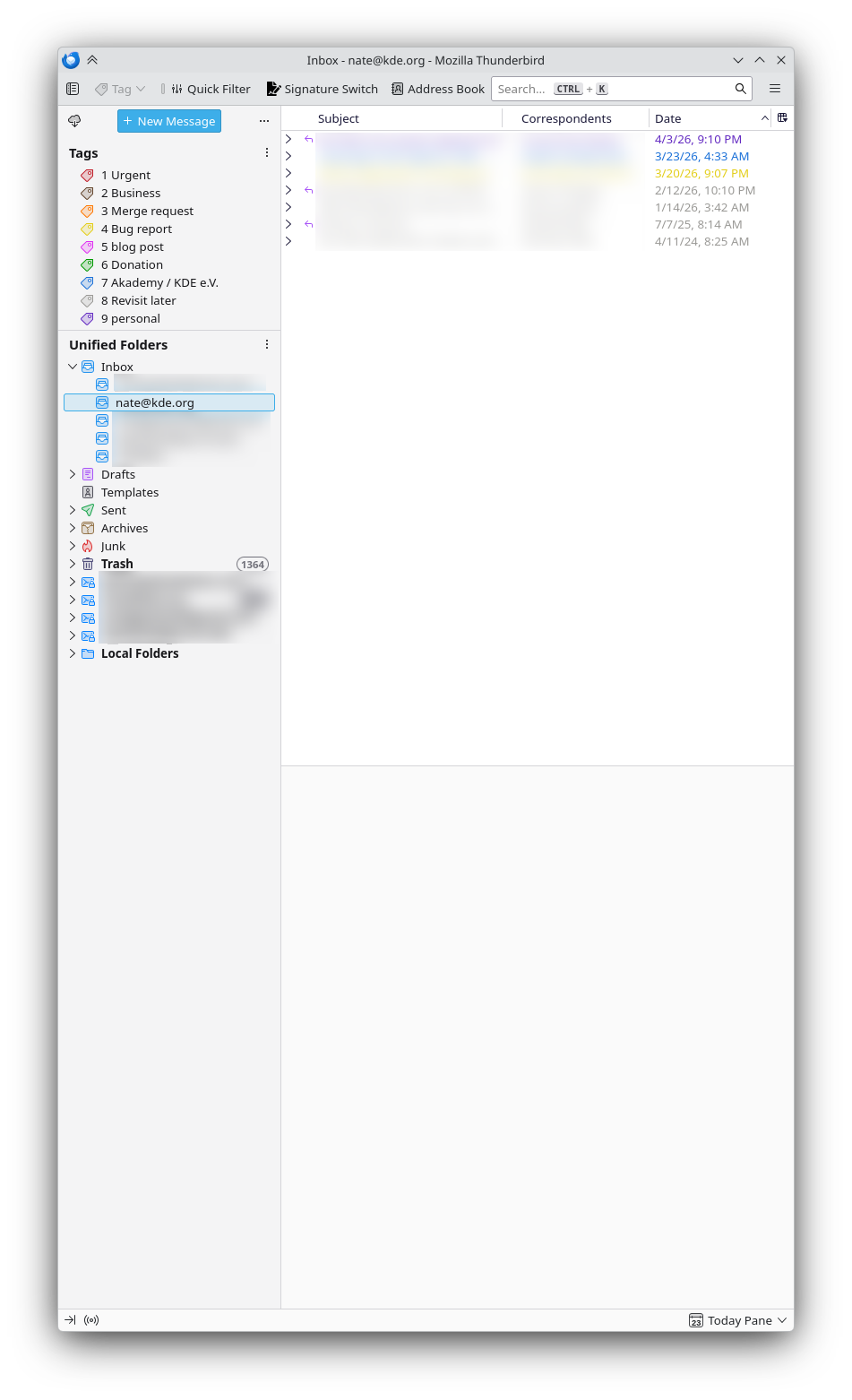
Those are all of my emails across 5 accounts. Here are just my KDE emails:

Image

As you can see, this is completely manageable. It takes practically no effort to keep it this way, and there’s no feeling of dread when checking emails in the morning. If you’re drowning in email, you can get here too, I promise.

It starts with using an email client. If you aren’t regularly using one yet, it will take some up-front work, and some re-training, but it’s worth it: you’ll spend less time and mental resources on email and more of it on what actually matters — without taking the easy path of neglecting email and being perceived as a person who’s hard to contact or unreliable.

So get started today with KMail or Thunderbird!

We are happy to announce the release of Qt Creator 19.0.1!

This release of Qt Creator fixes various issues, including but not limited to

Image

Wednesday, 22 April 2026

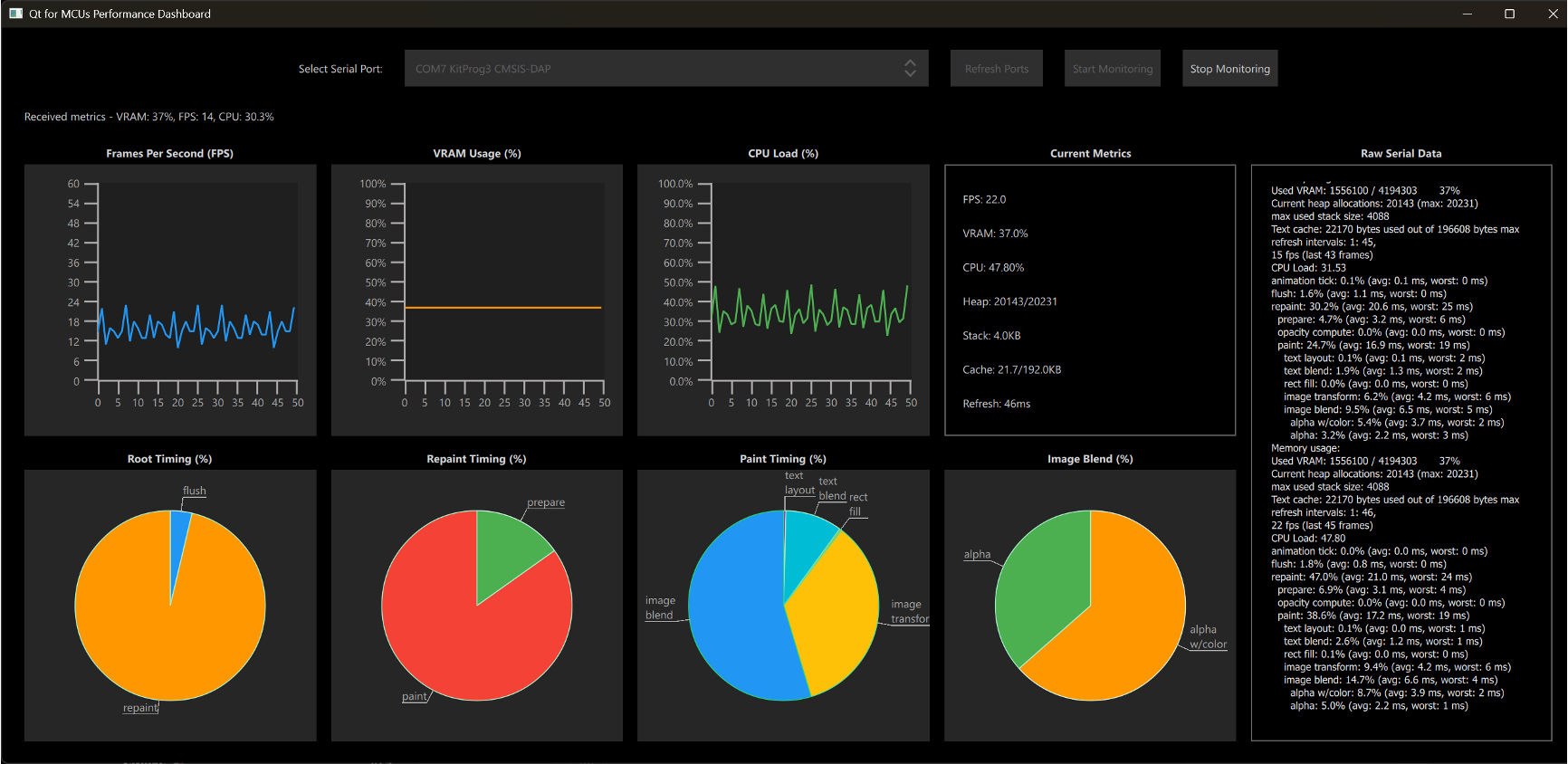
Qt for MCUs 2.12.1 LTS has been released and is available for download. This patch release provides bug fixes and other improvements while maintaining source compatibility with Qt for MCUs 2.12 (see Qt for MCUs 2.12 LTS released). This release does not add any new functionality.

Image

Tuesday, 21 April 2026

Krita 5.3.0/6.0.0 is here, and 5.3.1/6.0.1 followed soon after.

Read on for a look at development news and the Krita-Artists forum's featured artwork from last month.

Development Report

Krita 5.3.0/6.0.0 Released!

Krita 5.3.0/6.0.0 has finally been released!

However, some Windows users experienced slowdowns with 5.3.0. After much effort by users and developers trying to track down the problem, it was determined some external apps were triggering slowdowns in Qt Accessibility.

The problem was fixed with a backported Qt patch, and 5.3.1/6.0.1 released.

Fixes in 5.3.1/6.0.1

That release also contains a few other fixes. Resize Canvas's canvas size values no longer become huge after toggling 'Constrain proportions" (bug; change).

On Krita 6, incremental version failing to save and incremental backup freezing Krita (bug; change), and moving or copy-pasting a keyframe doing nothing (bug; change) were fixed. Drag-and-dropping an image no longer crashes on Wayland (change).

5.3.1.1 Released for Android

On Android, 5.3.1 introduced some regressions, which were fixed in 5.3.1.1. Editing a text field on Android 12 or older once again doesn't crash (change), which was related to fixes for the text edit popup covering text and the window panning up when using Text Tool (bug 1, bug 2; change 1; change 2).

Handling stylus buttons of some devices works again, and OnePlus stylus button (F21) is middle click (change 1, change 2), Huawei stylus double-tap gesture (Android key 718) is F25 (change).

Additionally, setting fallback languages has been disabled, as it makes the UI unusably slow (CCbug; change).

On macOS, 5.3.1.1/6.0.1.1 was released to fix an issue with Krita's built-in FFmpeg not working due to incorrect entitlements.

Further Developments

Wolthera has started working on the roadmap goal of improving HDR. In the unstable Krita Next builds, canvas decorations such as the transparency checkerboard, tool outlines, and the color sampler (bug 1, bug 2; change); reference images (bug; change); and the pixel grid (change) in are now displayed properly in HDR.

Luna continues to refine the Selection Actions Bar. An issue where the bar disappeared when toggling selection visibility was fixed (change), it's no longer interactable when covered by the pop-up palette (change), and a toggle for it was added to the selection tools' options docker (change).

Check out the Additional Changes section near the bottom of this post for more development build fixes and improvements.

Community Report

March 2026 Monthly Art Challenge Results

The winner of the "An unforgettable scene – 5 seconds before" challenge is…

Mayhem in 3…2…1 by Elixiah

Mayhem in 3…2…1 by Elixiah

Join This Month's Art Challenge!

For April's theme, last month's winner has chosen "Microadventure", with the optional challenge of using a gamut mask. What might the world outside your door look like if you were one inch tall? Little things you take for granted may no longer seem so small!

This month's featured forum artwork, as voted in the Best of Krita-Artists - February/March 2026:

Working Late at Night (Pikat fanart) by RaitzInk

Working Late at Night (Pikat fanart) by RaitzInk

Happy Dancing Girl by YaMuuS

Happy Dancing Girl by YaMuuS

Gato al aire libre. (Wet paint) by Syn27

Gato al aire libre by Syn27

Digital Collage Artist Using Krita by Deleted_Designs

Digital Collage by Deleted_Designs

Hornet! by desenhunos

Hornet! by desenhunos

Participate in next month's nominations and voting to voice your opinion on the Best of Krita-Artists - March/April 2026.

Krita is Free - But You Can Contribute!

Krita is free to use and modify, but it can only exist with the contributions of the community. A small sponsored team alongside volunteer programmers, artists, writers, testers, translators, and more from across the world keep development going.

If this software has value to you, consider donating to the Krita Development Fund. Or Get Involved and put your skills to use making Krita and its community better!

Krita's mascot Kiki putting money in a piggy bank

Additional Changes

Krita Plus (Stable, 5.3.2/6.0.2 prealpha):

  • Usability: Allow pasting images on the welcome page. (change by Luna Lovecraft)
  • Transform Tool: Make increase/decrease brush size actions work with Liquify. (change by Carsten Hartenfels)
  • Text Tool: Fix crash when activating Text Tool after opening two views on a document and closing the first one. (bug; change by Gregg Jansen van Vuren)
  • Text Tool: Select the text that's created on a new vector layer when the selected layer was raster. (bug; change by Luna Lovecraft)
  • General: Fix brushstrokes briefly freezing in images with large empty areas, by using coarse thumbnails for the Undo History docker. (change by Dmitry Kazakov)
  • Brush Engines: Fix random texture offsets being reset to 0 on every stroke. (bug; change by Dmitry Kazakov)
  • Canvas: Fix part of the canvas appearing transparent after cropping the image. (bug; change by Dmitry Kazakov)
  • File Formats: KRA: Fix importing .kra as layers reversing the layer order. (bug; change by Dmitry Kazakov)
  • Animation Timeline Docker: Select the given layer when selecting a frame. (change by Luna Lovecraft)
  • Animation Rendering: Error out if duplicating a frame fails when rendering frames. (change by Raidon Chrome)
  • Android: Prevent "Application not responding" message on startup by copying assets out of the APK later. (change by Carsten Hartenfels)
  • G'MIC: Fix using a G'MIC filter causing parentheses in layer names to be converted to control characters. Files with these messed-up layer names are unloadable by Krita 6. (bug; change by Dmitry Kazakov)
  • Qt6: Text Properties Docker: Fix clicking on fonts in the fonts dropdown doing nothing. (bug; change by Wolthera van Hövell)
  • Qt6: Text Properties Docker: Fix using tags. (change by Wolthera van Hövell)
  • Python Plugins: Show an error when trying to import the wrong version of PyQt, rather than trying to remove it from Python's path. (bug; change by Freya Lupen)

Krita Next (Unstable, 5.4.0/6.1.0-prealpha):

  • G'MIC: Update to version 3.7.4.1. (change by Ivan Yossi)
  • Layer Stack: Fix unnecessary updating of a layer mask when merging two layers below it. (bug; change by Dmitry Kazakov)
  • Text Properties Docker: Fix popups such as the font dropdown to not be cropped to the containing widget. (change by Wolthera van Hövell)

Nightly Builds

These pre-release versions of Krita are built every day.

Note that there are currently no Qt6 builds for Android.

Get the latest bugfixes in Stable Krita Plus (5.3.2/6.0.2 prealpha): Linux Qt6 Qt5 — Windows Qt6 Qt5 — macOS Qt6 Qt5 — Android arm64 Qt5 – Android arm32 Qt5 – Android x86_64 Qt5

Or test out the latest Experimental features in Krita Next (5.4.0/6.1.0-prealpha). Feedback and bug reports are appreciated!: Linux Qt6 Qt5 — Windows Qt6 Qt5 — macOS Qt6 Qt5 — Android arm64 Qt5 – Android arm32 Qt5 – Android x86_64 Qt5