-
-
Intro
-
Interact natively with confluence
-
Setting directory
-
Consolidated actionable view
-
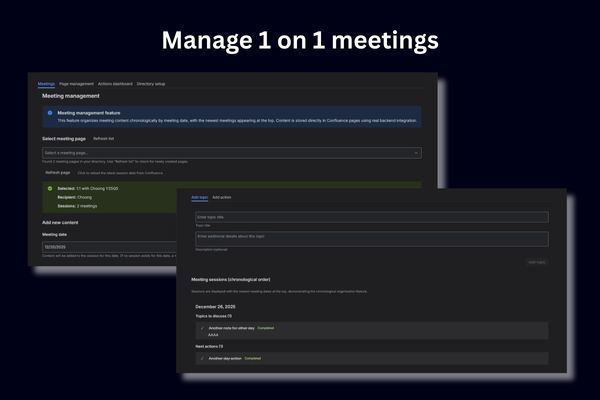
Managing 1 on 1 meetings


Inspiration
We noticed that 1on1 meetings often become scattered conversations with lost action items and forgotten discussions. Traditional note-taking tools don't capture the chronological nature of ongoing relationships, and important commitments slip through the cracks. We wanted to create a solution that transforms these crucial conversations into structured, trackable sessions that actually help teams build stronger working relationships.
What it does
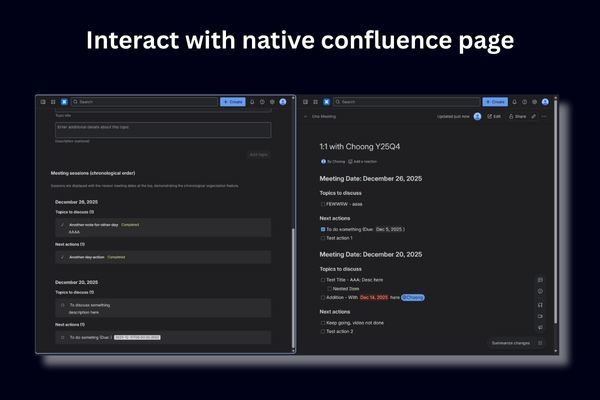
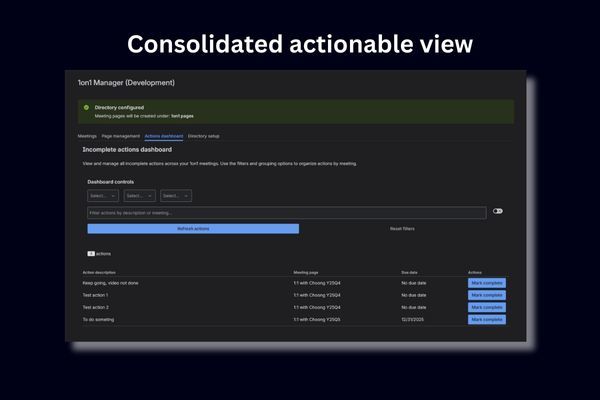
1on1 Manager is a Confluence space page application that organizes one-on-one meeting notes into chronological, date-grouped sessions. It automatically structures content by meeting dates, surfaces incomplete action items across all sessions, and provides a centralized dashboard for tracking progress over time.
The app stores everything natively in Confluence pages, ensuring content remains accessible and searchable even without the app, while adding intelligent organization and action tracking on top.
How we built it
We built this as an Atlassian Forge app using UI Kit components and TypeScript, leveraging modern development practices and AI-assisted tooling. The architecture leverages Confluence's native page structure for content storage while adding a React-based frontend for enhanced user experience.
We used Kiro AI assistant with spec-driven development to systematically build and iterate on the application. The combination of structured AGENTS.md guidance and the forge-knowledge MCP server made development significantly more efficient and streamlined.
- Frontend: React components using @forge/react UI Kit for date selection, meeting management, and action tracking
- Backend: Forge resolvers handling content creation, date management, and page operations
- Storage: Confluence pages with structured ADF (Atlassian Document Format) for meeting content, plus Forge KVS for user preferences
- Quality assurance: Property-based testing with comprehensive test coverage for data integrity and edge cases
Challenges we ran into
- ADF complexity: Working with Atlassian Document Format required deep understanding of structured content creation and manipulation to effectively guide the AI toward the desired outcome
- Permission management: The Confluence restriction API appears to have issues, preventing us from automatically adding restrictions for recipients and creators - this currently requires manual configuration
- Vision articulation: The third attempt proved to be the charm. The first two iterations involved significant time investment in learning and developing a clear vision that could be articulated as precise requirements for Kiro to implement
Accomplishments that we're proud of
- Native integration: Successfully storing all content in standard Confluence pages, ensuring long-term accessibility and searchability
- Intelligent organization: Automatic chronological grouping that makes meeting history immediately navigable while keeping Confluence pages minimal and clean
- Cross-session tracking: Consolidated action item dashboard that surfaces incomplete tasks across all meeting sessions
- Type safety: Comprehensive TypeScript implementation with property-based testing for data integrity
- User experience: Clean, intuitive interface that feels natural within the Confluence ecosystem
What we learned
- The importance of starting with UI prototypes to validate user experience before backend implementation
- Having a clear vision is essential before attempting to communicate with an LLM - you can't expect magic without preparation. The vision must include a well-defined technical architecture, especially for projects like this where we wanted notes stored directly in Confluence
What's next for 1on1 Manager
- AI-powered insights: Suggest discussion topics based on previous meetings and identify patterns in conversations
- Recipient collaboration: Enable collaboration within the same app and Confluence space with meeting recipients, including linking between personal spaces


Log in or sign up for Devpost to join the conversation.