-
-
Web UI
-
The device
-
Using the device


TL;DR
Bite is an intelligent wearable accessory that uses computer vision to track your daily food and nutritional intake. It makes food tracking more convenient and informative. When we’re not building, we are a competitive rower, a former Pie Chef, a student who grew up around and in his family restaurant, and an aspiring home cook. We find health and nutrition important to us and many around us, but find existing nutrition tracking inconvenient.
What is Bite?
Often, the dorm is food desert ridden with bizarre eating schedules, periods of [unintentional] fasting, and stress induced sweets binges. Other dorms contain a lifetime's supply of Cup Noodles. Maintaining a healthy diet is hard. Globally, obesity continues to be a major issue. In March of 2023, the World Obesity Federation [stated] that by 2035 over 4 billion people (greater than half of the world’s population) will be obese. That would raise even higher our already alarming rates of heart disease, stroke, cancer, and type 2 diabetes (UCLA Health). The possible culprit of the rising obesity epidemic? Something as simple as portion size. Multiple acute, well-controlled [studies] demonstrated that portion size has a powerful effect on the amount of food consumed (National Library of Medicine). So if we could just simply be more aware of what and how often we're eating…would obesity go away?
Well, anyone can "be more aware." They can do that by typing their meal descriptions into a fitness app -- log what they're eating and Google a calorie estimate to capture their meal. So why don't we? There exists this solution of great simplicity! But being computer scientists, we are also familiar with great laziness. Even if we often half heartedly say to our friends "I should eat healthier," logging our food is far too much work. Our laziness or busyness (whichever you prefer) gives us an excuse to never come face to face with the junk we're eating. That’s where our gadget, Bite, comes in.
What it does
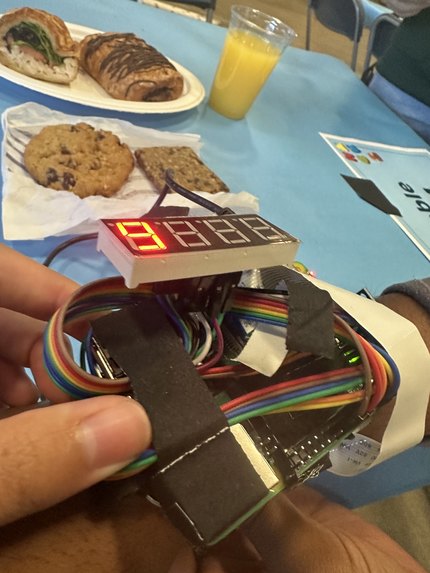
Imagine you're sitting at a local restaurant and your food has just arrived. To log your meal, simply swipe your arm over your food, Bite will activate, you’ll hear a snappy “BEEP!”, the calories flash onto your watch screen, and now Bite has seen your food and has logged its calories and nutrition info, including every macronutrient and vitamin in the book. That's it. So simple, yet completely removing the barrier between you and knowing the gritty details of your daily diet. More than that, Bite “BEEP!”s at you when your daily calorie intake has exceeded the calories you worked off. Bite is an elf on your shoulder, your personal nutrition assistant. At some point, even a CS major can't hide behind laziness and say they are too lazy to keep track of their diet. Bite does the heavy lifting of imagining, recognizing, and organizing your nutrition info so the truth of it is glaring and unavoidable.
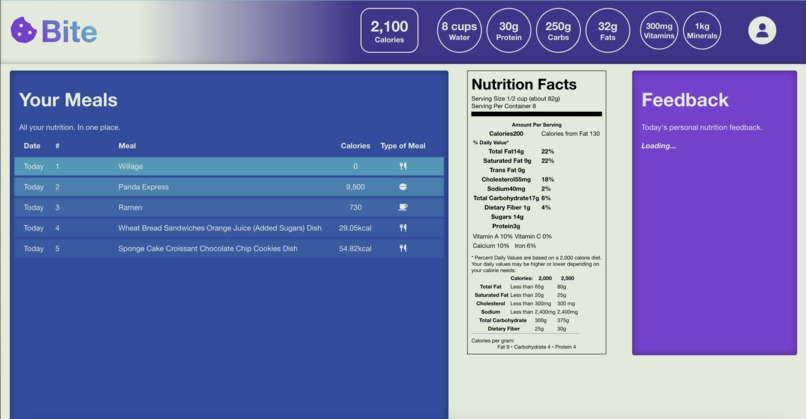
Once you reach our web app, you’ll be greeted with a comprehensive log of your meals for the day, and access to your full diet history. Based on your personal health and goals, we have an LLM-powered nutritional assistant to give you feedback and analysis of your food intake and progress. You may be suggested some alternative meals to lower the amount of sodium you eat or even the amount of saturated fats in your diet. The possibilities are endless. With Bite, it has never been more convenient to be nutritionally conscious.
How it works
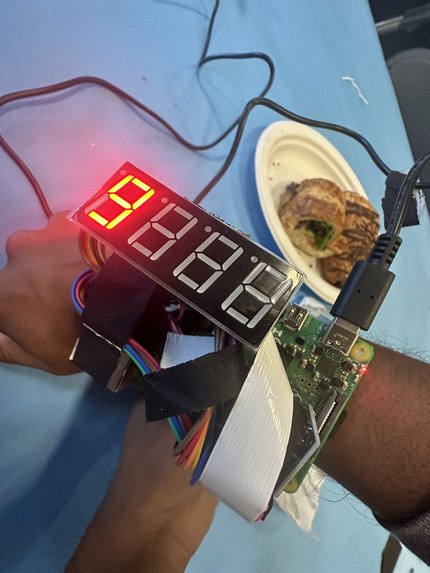
Our wearable is a raspberry pi 4b, miniature camera, IMU, and buzzer, compactified and attached to our velcro wrist strap. We use our 3-axis IMU to detect the orientation and acceleration of the user’s hand. We determine the orientation of the wrist by using the three components of acceleration values we receive, which when Bite is still is purely caused by gravitational acceleration, which we can convert into spherical angle coordinates. We apply some basic signal processing techniques by finding a moving average filter for the derivative of the magnitude of acceleration and this allows us to know precisely when the user is holding the wrist still. Using a state machine model, by tracking the orientation of the wrist and whether or not their wrist is still we can determine if they are performing our custom gesture that indicates to the PI that it should take a picture. Once we have a picture of their meal, we rotate the image to orient it correctly and then use a deep learning vision and segmentation model from the LogMeal API that segments up the meal in front of you, classifies the food on the plate, and uses regression to estimate the nutritional content of each component. The wearable then beeps for user feedback. We process the data for individual meals and sum up your daily macronutrients and micronutrients. We then send all your meals to GPT3.5 and create personalized recommendations for the person. We have a display on the wearable that tells you how many calories you just ate in a meal. All of this data goes to a dashboard where you can see all your daily meals and total macronutrients and vitamins consumed. We send the data to our React frontend using an ngrok tunnel and a Flask server hosted on the raspberry pi. Additionally, we query the Terra API if the user already uses a fitness wearable. We get the amount of calories they burned in the day and send it to our web app display.
Challenges we ran into
Wifi via eduroam was slow and HackMIT wifi was spotty so downloading software such as Android Studio which we needed to create an Apple Health app to connect to Terra API was difficult. After consulting with Terra and finding out that some open source code they provide didn’t work so well in our specific instance, we pivoted to using Fitbit (still via Terra) which would not need a separate mobile app to collect data with. Suddenly, something we realized our sensor was detecting false positives and exploding so we all pivoted to that instead and did a soft giv- up on implementing real net calorie tracking on my Fitbit so now we are just using Terra to generate a fake demo user account which has Fitbit net calories burned count for a proof of concept.
We flew in very sleep deprived because GeorigaTech College of Computing students had just gone through three day-long career fairs, 3 of them in the span of 4 days, which led to lots of build up of homework and misc house tasks. Due to lack of time management, we all got 0 sleep trying to cram in work on the day before the flight and some of us also took red eye flights. Everyone was very tired. We classify this state of being as “eepy."
Rasp-pi acceleration via gyroscope was very hard to detect. Wrist rotation or a parallel to ground force is easy to detect, but testing proved that those movements happen too often in daily life so our buzzer would go off when you were trying to do things like wipe down the table or punch the wall. We ended up engineering a state system that created a series of gates that led to authenticating a true/intended wrist movement so it would not detect random acts of cleanliness or frustration.
Originally, we were worried that the rasp-pi strapped on the wrist would be too bulky and unappealing. We tried to wire the camera, buzzer, and other components on carefully/neatly to reduce overall wiring and stuff on the wrist. We had to abandon the idea of having a fully wireless device because the rasp-pi battery pack would be too heavy and clumsy (this would not be a real issue if Bite was integrated with a preexisting fitness tracker, like a Fitbit Versa 3 or Apple Watch. In a happy turn of events, once we put everything together we realized that all the wiring and electronic pieces gave us a cool iron man aesthetic with the resemblance of a wrist bomb.
We use an API called Log Meal to classify foods via machine learning. But the output Log Meal gives is ginormous and impossible to read so we had to do some annoying layers of json parsing. We also found it challenging but satisfying to design a good/consistent and readable format for the data, and choose which of Log Meal’s billion datapoints we wanted to actually use.
We got yelled at for taking two Caprisun juices which was sad. We hope there will be more Caprisun in the future.
In terms of front end, getting Fetch API and connecting React web app with server was traumatizing but I am running out of time so you will have to use your imagination to think of how that can be.
We abused our creation and kept scanning teammates to find their theoretical aggregate calorie count and food classifications (ie. I am apparently baked toast) which resulted in a lot of name calling. For me personally, accepting and coming to peace with the baked toast label was a challenge.
Accomplishments that we're proud of
Integrating Log Meal API to get comprehensive nutritional value data from our embedded camera. Robust/accurate gesture recognition for the device to know when to scan your food. Simple and aesthetic UI for users to see all nutritional data; integrating OpenAI API to make a ML powered user feedback system based on data collected. Integration with Terra to integrate well with fitness ecosystem (kind of). Connection with raspberry pi to web app through ngrok and JS fetch API. Surviving the hackathon on a total of 8 hrs of sleep across 3 days. Convincing Pranav to build this instead of iBrowse — a sleek pair of fake eyebrows to be mounted at real eyebrow level, to take care of all of your expressive needs and also function as a browser and ad display screen.
What we learned
Motion detection is hard. Pack more snacks next time and get more sleep. Boston is cold. A bunch of new technologies: using json intensively for the first time, python server, first hardware hack, using openAI API for first time, so much more.
What's next for Bite
Make everything more robust. Actually fix the visual display bug (currently displays calories in testing mode but not in actual run time when something is scanned). Add more features on the web dashboard to display more relevant data. The google eyes on Bite keep falling off. "The grind never ends" -the Inspirational Mingkuan
Built With
- 8-segment-display
- css
- flask
- html
- imu
- javascript
- json
- logmeal
- ngrok
- node.js
- pi-cam
- python
- raspberry-pi


Log in or sign up for Devpost to join the conversation.