-
-
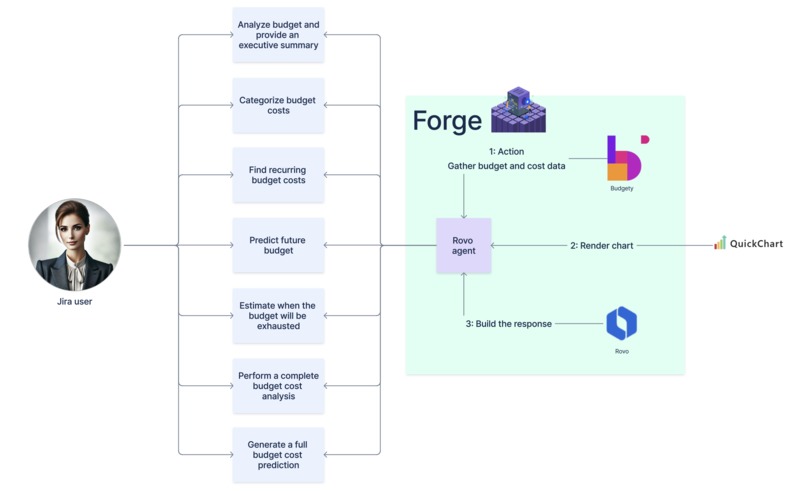
Communication diagram
-
Inspiration
-
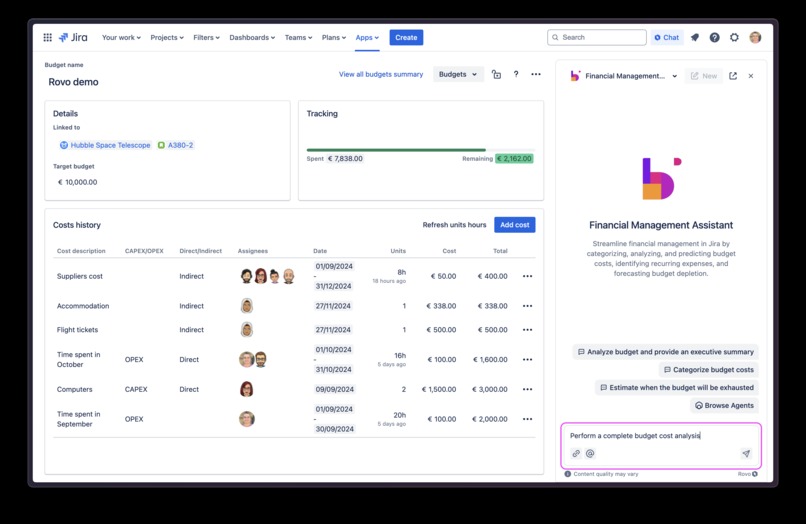
Budgety - Rovo question
-
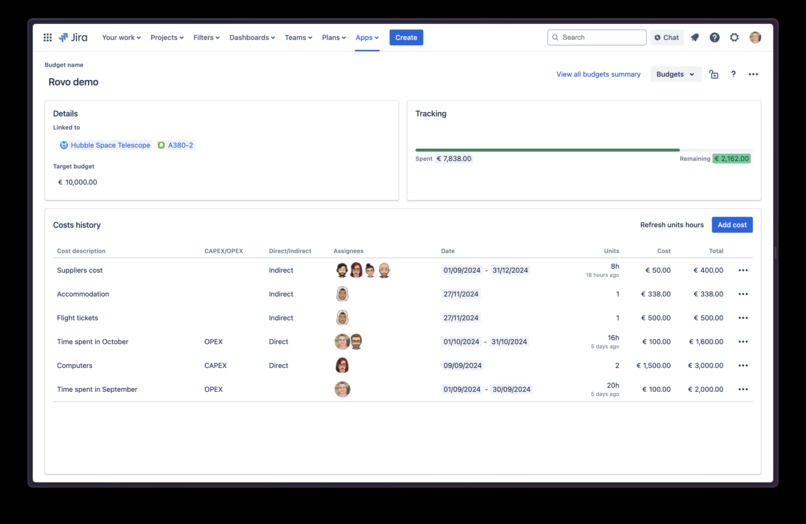
Budgety
-
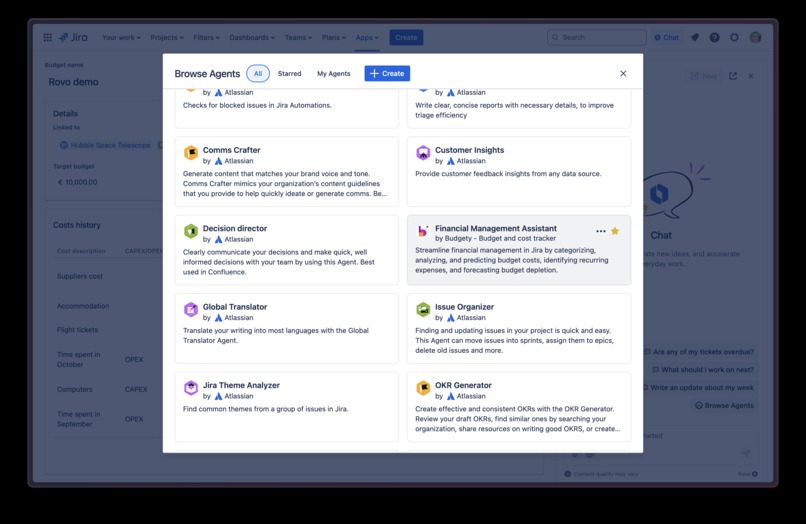
Budgety - Rovo Agent
-
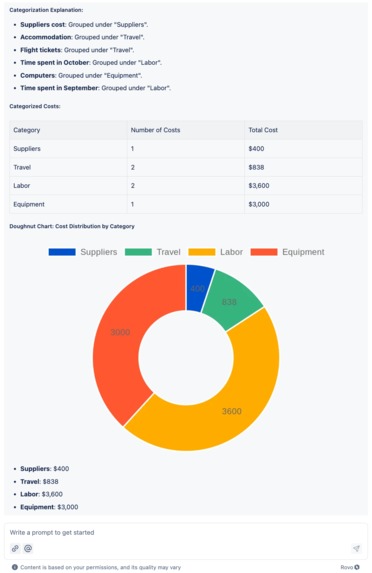
Rovo answer - Insight 1
-
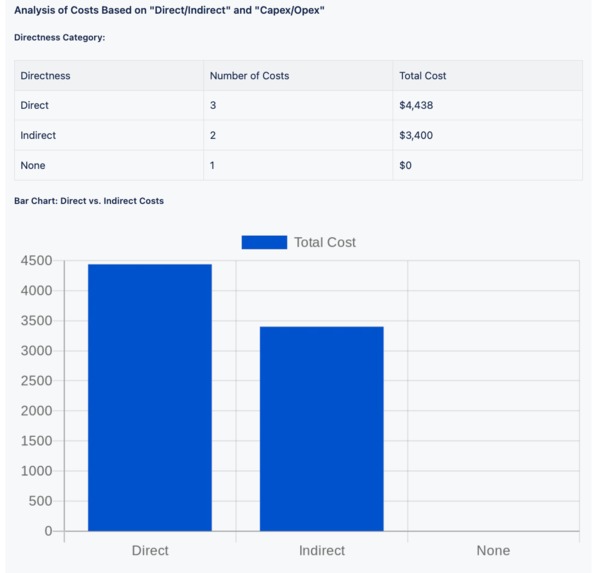
Rovo answer - Insight 2
-
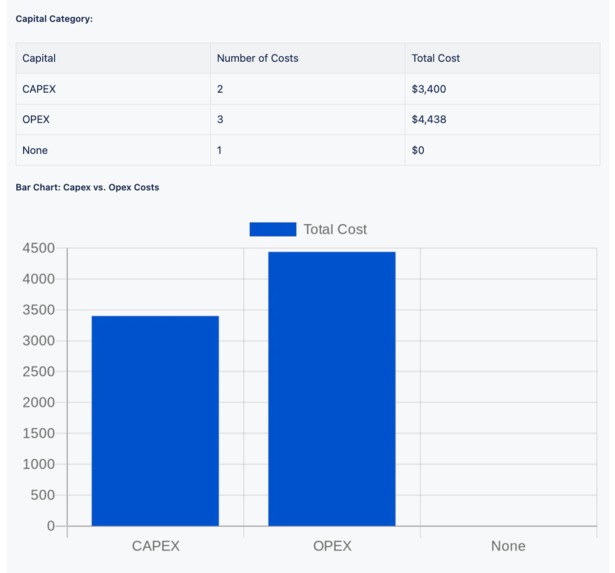
Rovo answer - Insight 3
-
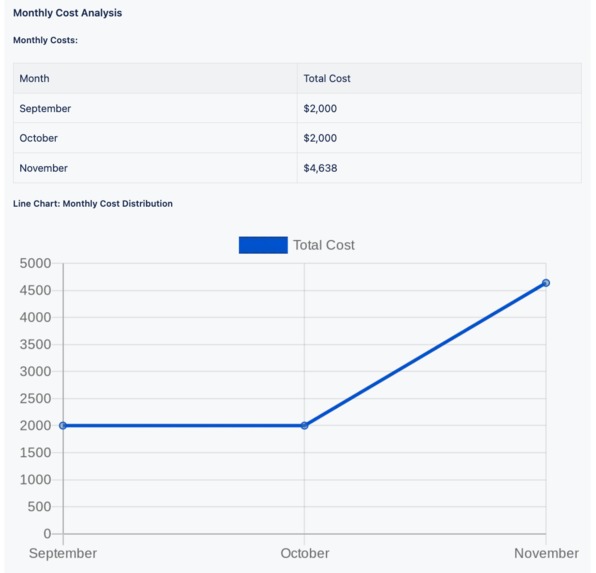
Rovo answer - Insight 4
-
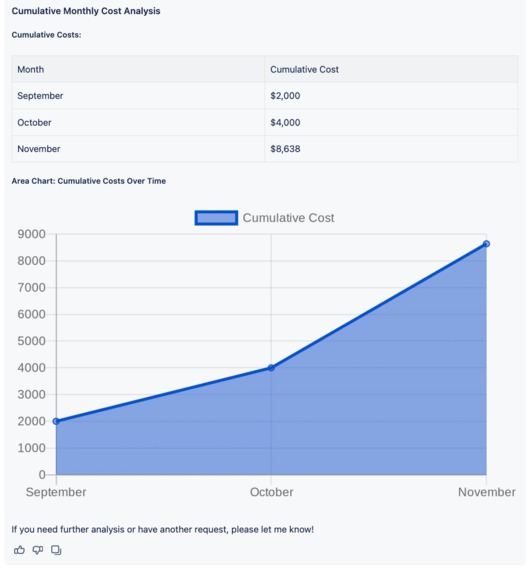
Rovo answer - Insight 5


Inspiration
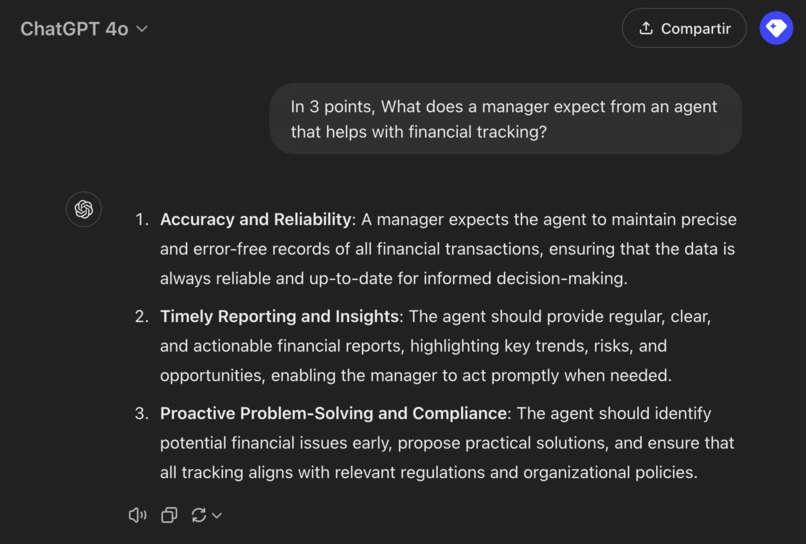
Right now, in terms of AI and Rovo it’s a bit challenging to conduct user discovery on what someone who needs financial control actually requires. So, we asked our CFO and some managers, and there was a common insight: Reports that help us understand the budget situation.
In addition to this and our own common sense, we asked ChatGPT, and this was its response:
Both human finance experts and AI agree: incorporating reporting is essential if we want to help managers with their financial tracking. Let’s do it! 🚀
What it does
Budgety is a 100% Forge application. During August, we worked on the Rovo agent, enabling Budgety users to interact with it to facilitate financial summaries related to their project budgets. When Codegeist was announced, we noticed in the rules that changes were required to be made during the Hackathon period. Although we thought our previous work might qualify, we got to work immediately. During the Hackathon, we took the opportunity to refine and improve the agent’s responses and (here’s the big news!) INCLUDE GRAPHS DIRECTLY IN THE AGENT’S RESPONSES 📈 🤯 to provide better financial tracking.
How it works
Step 1: Install Budgety and create a budget and add costs (preferably one that has been active for several months).
Step 2: Find the Budgety agent.
Step 3: Ask a question, for example, “Perform a complete budget cost analysis.”
Step 4: Enjoy the magic of your colleague Rovo, review their response, and start analyzing your budget.
Check the categorization of Budget Costs
Review how the costs are categorized within the budget, ensuring they are correctly assigned to appropriate categories for better financial tracking and management.
Check the analysis of Costs Based on "Direct/Indirect"
Examine the breakdown of costs to identify which are directly attributable to a project or task and which are indirect or overhead expenses.
Check the analysis of Costs Based on "Capex/Opex"
Analyze the costs by their type, distinguishing between capital expenditures (CapEx) and operational expenditures (OpEx) to better understand their impact on financial planning.
Check the Monthly Cost Analysis
Review the cost distribution over months to monitor spending patterns, identify trends, and ensure alignment with the budget plan.
Check the Cumulative Monthly Cost Analysis
Review the accumulated costs month by month to track the total spending over time and compare it against the budgeted amount for better financial oversight.
How we built it
Development
As we had previously developed a Rovo agent for Budgety, it was easy to start working with it. We have highly improved it, but having a solid base to build over it is always something that may help you to create better things.
In a Rovo agent configuration there are two main part in what you need to work, the agent itself and his available actions.
Both of them apply in here:
- The prompt of the Rovo agent has been highly improved to bring better financial analysis inisghts according to customer budgets. And, the most important here, to support charts that will be render in every interaction with the agent.
- The actions that provide the Budgety information regarding budgets and costs have also been improved to be more accurate in the data analysis.
Testing
Testing was done across the development as we were doing a fine-tuning of our agent in every step to offer the best results to our customers.
We have been doing lots of tests to be as accurate as possible taking into account we do not have the possibility to make a Rovo agent more deterministic.
Challenges we ran into
Bring graphs to a Rovo agent
When Rovo was announced it was not possible to create charts for a Rovo agent. Same happened when it was released.
Now we have realized that it was possible. But it is not something that will work by default: you have to ensure the agent will render them in the agent conversation.
During our tests we have faced different scenarios here: from bad chart rendering to just creating a URL where you can navigate to see the chart outside the conversation. Finally we have succeed and charts are always rendered in the chat, so the customer can be focused there and get all the insights together.
Deal with the lack of Rovo agents temperature configuration
Rovo is at the moment in the first steps of a long road. For sure it will be crucial to save time in every company worker interactions, but it has lots of improvements that can be done around Rovo agents.
And some of them are related to the IA configuration. For the use cases we have covered here, it would be awesome to have the possibility to configure the Rovo temperature.
Temperature is the property that allows AI to behave in a deterministic, non-deterministic way or somewhere in between. This is very important if you want to deliver similar results for similar inputs. In the case of financial data analysis, this can be particularly relevant.
Share an unreleased version of a Forge app that is already in the Atlassian Marketplace
Budgety is a native Forge app that has been in the Atlassian Marketplace for more than a year.
Forge apps that are not in the Marketplace can create an installation link that can be shared with the people that are going to test the app before release it there.
But, if your app is already in the Atlassian Marketplace, is not so easy to share it internally with people. For that, we have created a new Forge app that is not released in the Marketplace with the unreleased Budgety code to be able to create the installation link and share it with the Codegeist 2024 competition judges.
Accomplishments that we're proud of
Give our customers better financial insights
Insights must be reliable and accurate by definition. However, this becomes even more critical when working with financial data.
That’s exactly what we achieve with the Rovo agent included in Budgety. The charts are designed to be precise, delivering the essential information at a glance, empowering our clients to make the best decisions.
Save time analyzing your budgets
Our previous version of the Rovo agent did not include charts. Since it is an agent that works with financial data, many interactions could involve a large volume of information and it might be difficult to work with them.
Now, with every interaction in Budgety’s Rovo agent that results in a dataset, the data will be presented not only in tables but also with charts. These visuals will enable clients to quickly gain control of the situation and take action accordingly.
Moreover, the Rovo agent will not only bring you charts but offers the most useful ones for each interaction, tailored to the specific needs of our clients.
What we learned
Never keep testing your use cases based in AI interactions
Interactions with any AI can be great to unleash use cases that can be done in several minutes instead of building them for months.
But, if you are going to provide a service to a customer based in an AI interaction, you need to be sure the use case will work as expected. Sometimes the potential behind an AI insight can blind you but customers may need more control rather than better features.
For that, never stop testing the use cases behind AI interactions as the customer need to get the best results from your app.
Date management with an AI can be tricky
There are some data that can be represented in different ways. Probably, one of the most dependent data are dates as they are represented differently even inside the same company.
For that, we started telling Rovo to work with dates in a particular format. This worked well sometimes, but not always. Prompts can be full of details but an AI may not follow every particular details every time, specially if it is not completely deterministic.
After some tests we realized it is better to work with dates using an standard like timestamps. That way we were able to take control of every Rovo interaction where dates where taking part.
What's next for Budgety - Financial Management Assistant
We would like Rovo to be more deterministic or at least able us to configure its temperature. Because of the current Rovo agent lack of configuration, we have not been able to fix some weird responses during our tests.
Every test iteration is using the same set of tests an it does not make any sense that a Rovo agent can manage data differently sometimes. This can require more fine-tuning on our side but we are sure that being able to have a more deterministic agent can be crucial when working with sensitive data, like financial ones.
For that, we are not releasing these improvements in our Rovo agent until we can meet the expected quality results that fit with our internal standards.
Built With
- atlassianintelligence
- forge
- javascript
- rovo




Log in or sign up for Devpost to join the conversation.