-
-
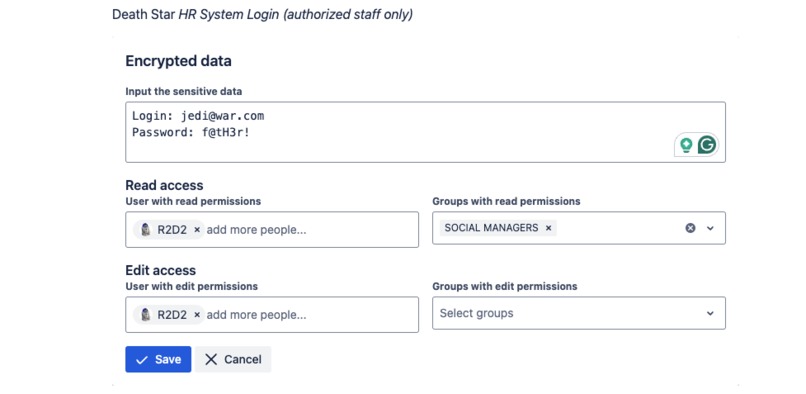
Add a secret and manage permissions
-

Easily decrypt or encrypt content
-
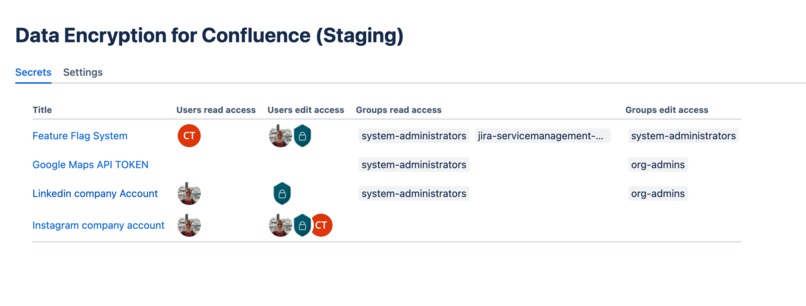
Manage all the secrets and permissions


Inspiration
The inspiration came from conversations with Confluence users who are moving to Cloud and expressed concerns about security in their environments. Companies already rely on Confluence for knowledge management, but they still keep sensitive knowledge and information in other tools such as LastPass and 1Password. The need for secure, integrated solutions to safeguard confidential data became clear. Leveraging Confluence’s strong security infrastructure, we envisioned a tool that enhances data protection without disrupting workflows.
What it does
A Password and Secret Management solution inside Confluence. The app provides robust encryption directly within Confluence Cloud. Users can encrypt and manage passwords, credit cards, PII, and other sensitive data.
This encryption is seamlessly integrated into Confluence’s user permissions, so it’s intuitive and doesn’t require external tools. It ensures sensitive data never leaves the Confluence environment, offering peace of mind for compliance and security-focused teams.
How we built it
We developed the app using Atlassian’s Forge framework, leveraging its native integration capabilities and scalability. Encryption is powered by AES-256, an industry-standard encryption algorithm. We utilized Atlassian’s APIs to ensure seamless alignment with Confluence’s permissions and access control systems. The development also included rigorous testing to meet enterprise-grade performance and security standards.1
Challenges we ran into
Developing a secure and same time flexible application to manage sensitive data was a challenge. We heard a requirement from users to provide a way for a particular group to bypass the security restrictions, read/write the secrets, and modify the permissions. By default, only org admins have this power. However, they can extend this feature to any other group.
Accomplishments that we're proud of
- A solution that encrypts data entirely within the Confluence instance using Forge, ensuring no information leaves the system.
- Integrating the app with Confluence’s permission architecture to create a frictionless user experience.
- Receiving positive feedback from early testers about the app’s usability and its potential to fill a gap in their workflows.
- Providing users with a powerful yet simple tool to protect their sensitive data.
What we learned
We learned a lot about cybersecurity and compliance requirements. We learned the importance of aligning with user needs and workflows to deliver a valuable security tool. User feedback was instrumental in refining features like permission management and encryption workflows. We also developed our understanding of how security and compliance concerns influence app adoption, particularly in industries like healthcare, finance, and IT.
What's next for Data Encryption for Confluence
- Add advanced features like audit logs, 2FA, and change notifications to create a complete Secret management solution for the Enterprise.
- Build a mechanism to scan the confluence, search for passwords/tokens written as text on the confluence pages, and notify administrators.
- Pursue Cloud Fortified status and compliance certifications to strengthen the app’s credibility within the Atlassian Marketplace.
- Continue to speak with users to gather feedback and ensure the app meets diverse use cases.


Log in or sign up for Devpost to join the conversation.