-
-
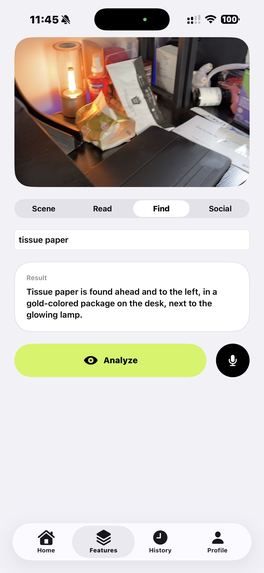
Find item
-
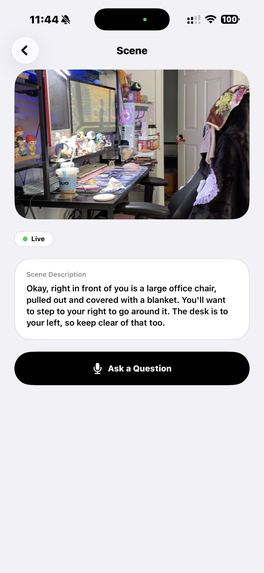
Real-time Navigation Guide
-
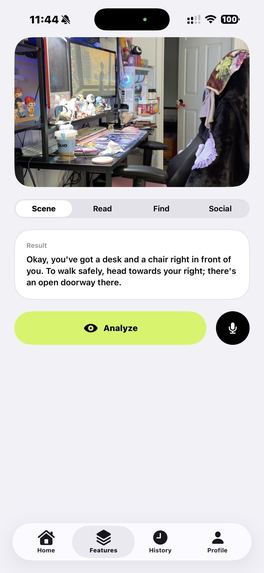
Analyze surrounding
-
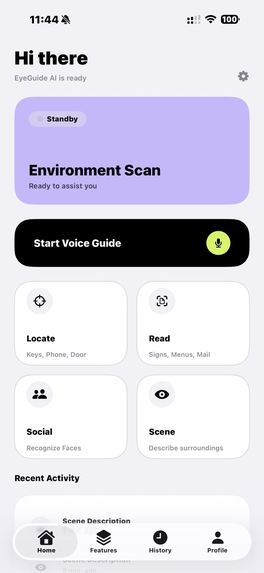
Home Page


EyeGuide - Project Story
Inspiration
The idea for EyeGuide came from a simple but powerful observation: 285 million people worldwide live with visual impairments, yet the smartphone in their pocket has a camera capable of seeing the world for them. We asked ourselves — what if AI could act as a pair of eyes, describing the world in real time through natural speech?
We were inspired by conversations with visually impaired individuals who described the daily challenges of navigating unfamiliar environments, reading menus at restaurants, or understanding social cues in group settings. Existing solutions often felt robotic, slow, or limited to a single use case. We wanted to build something that felt like having a helpful friend by your side — conversational, context-aware, and always ready.
The recent breakthroughs in multimodal AI, particularly Google Gemini's ability to understand images and respond in natural language, made this vision technically feasible for the first time.
What It Does
EyeGuide is a cross-platform AI vision assistant (iOS + Android) designed specifically for visually impaired users. It transforms the phone's camera into an intelligent guide through four core modes:
- Scene Description — Point the camera and hear a natural description of surroundings, including obstacles, pathways, landmarks, and navigation cues.
- Text Reading — Capture signs, menus, documents, or mail and have them read aloud in conversational speech.
- Object Finder — Tell the app what you're looking for (keys, phone, door) and receive directional guidance: "Your keys are to the left, about two feet away."
- Social Assist — Understand social situations — how many people are present, their expressions, body language, and what they're doing.
Additionally, the app supports real-time voice interaction via WebSocket streaming, allowing continuous conversation with the AI while the camera is active.
How We Built It
Architecture
We designed EyeGuide as a full-stack mobile application with three main components:
Mobile Apps (iOS + Android) ←→ Backend API (Google Cloud Run) ←→ Google Gemini AI
Mobile Clients
iOS: Built natively with Swift and SwiftUI, using the modern
@Observablepattern for state management. Camera integration uses AVFoundation for real-time video capture, and speech services leverage Apple's built-in Speech and AVFoundation frameworks.Android: Built natively with Kotlin and Jetpack Compose, using Hilt for dependency injection and CameraX for the camera pipeline. The app follows the MVVM architecture with
StateFlowfor reactive UI updates.
Both apps share the same feature set and UX philosophy: voice-first, accessibility-first.
Backend
The backend runs on Google Cloud Run using Hono.js (a lightweight TypeScript web framework), containerized with Docker. It serves as the orchestration layer between the mobile clients and Google Gemini:
- Manages user registration and preferences
- Proxies AI requests with appropriate system prompts
- Tracks sessions and usage statistics
- Stores data in Neon (serverless PostgreSQL)
AI Integration
We use Google Gemini 2.5 Flash in two modes:
- REST API — For standard image analysis (scene description, text reading, object finding)
- WebSocket (Gemini Live) — For real-time, bidirectional voice guidance with continuous camera streaming
The system prompts are carefully crafted per feature and language to ensure responses are concise, actionable, and appropriate for visually impaired users. For example, the scene description prompt emphasizes spatial relationships and safety-critical information (obstacles, vehicles, stairs).
Landing Page
A responsive, accessibility-first landing page built with Vite and Tailwind CSS, deployed on Cloudflare Pages.
Challenges We Faced
1. Real-Time Performance
Streaming camera frames over WebSocket while simultaneously handling speech synthesis and recognition was the biggest technical challenge. On iOS, we had to carefully manage AVCaptureSession configurations to avoid audio interruptions when the speech synthesizer was active. On Android, coordinating CameraX with TextToSpeech and SpeechRecognizer required careful lifecycle management with coroutines.
2. Cross-Platform Feature Parity
Maintaining identical functionality across iOS and Android with completely native codebases (no cross-platform framework) meant implementing every feature twice. We chose this approach deliberately — native development provides better camera performance, speech quality, and accessibility support than any cross-platform alternative. But it doubled the implementation effort.
3. Accessibility-First Design
Designing for visually impaired users is fundamentally different from sighted-user UX. Every interaction had to work without visual feedback:
- All buttons need meaningful
accessibilityLabel/contentDescriptionvalues - Navigation must work entirely through VoiceOver (iOS) and TalkBack (Android)
- Haptic feedback supplements audio cues for important state changes
- The UI supports high-contrast mode for users with partial vision
4. AI Response Quality
Getting the AI to produce responses that are genuinely useful for navigation (rather than generic image captions) required extensive prompt engineering. We iterated through dozens of system prompt variations to achieve responses that:
- Lead with safety-critical information (obstacles, vehicles)
- Use spatial language (left, right, ahead, behind)
- Adapt detail level to user preferences
- Work naturally in multiple languages
5. Latency Optimization
For a vision assistant to be useful, responses need to arrive quickly. We optimized at every layer:
- Image compression before transmission (max 640px width)
- Gemini Live WebSocket for streaming responses (partial results appear immediately)
- Google Cloud Run for auto-scaling containerized deployment
- Local activity storage to reduce API calls
What We Learned
Accessibility is a feature, not a checkbox. Building for visually impaired users taught us that true accessibility requires rethinking the entire interaction model, not just adding labels to existing UI.
Native performance matters for real-time AI. Camera capture, speech synthesis, and WebSocket streaming all benefit significantly from native platform APIs. The ~50ms difference adds up when you're processing live video.
Prompt engineering is product design. The quality of AI responses is directly tied to how well the system prompts encode the user's needs. We spent as much time on prompts as on UI code.
Serverless scales perfectly for this use case. Google Cloud Run + Neon PostgreSQL gave us a backend that costs nearly nothing at low scale but can handle spikes without any infrastructure management.
Built With
- avfoundation
- camerax
- cloudflare-pages
- docker
- gemini
- google-cloud-run
- google-gemini-2.5-flash
- hilt
- hono.js
- html/css
- jetpack-compose
- kotlin
- liveapi
- neon-postgresql
- swift
- swiftui
- tailwind-css
- typescript
- vite


Log in or sign up for Devpost to join the conversation.