-
-
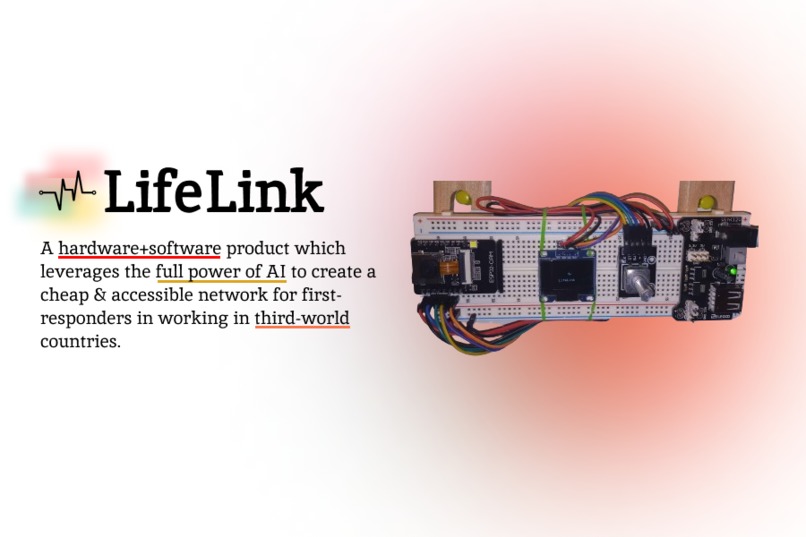
Thumbnail
-
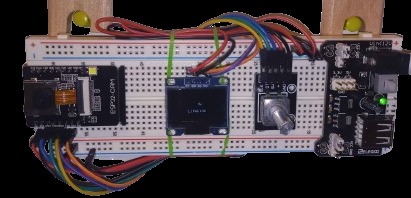
Device Close Up
-
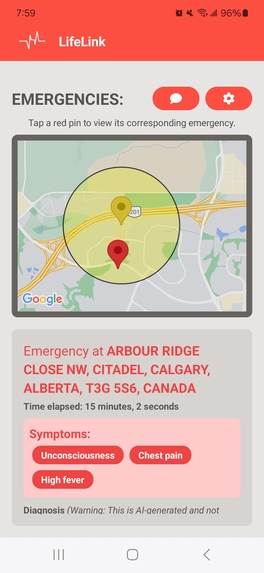
App Main Page
-
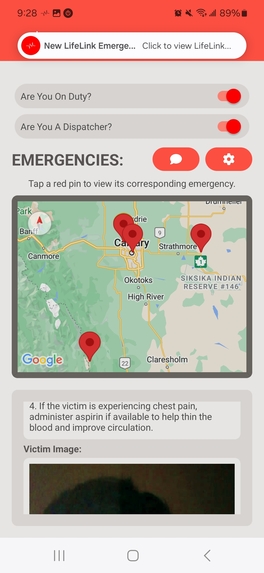
App Dispatcher Mode
-
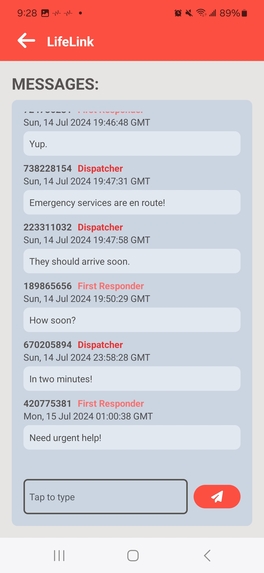
App Communication Page


⭐ Judges, we will be more than happy to provide a live demonstration of the hardware parts of our project if needed. Due to limited resources, we only built one hardware LifeLink component. In the real world, multiple would be constructed. ⭐
Project Demo ▶️
Github Repo: https://github.com/ericli3690/lifelink
A live build of the React Native app Android is available here. Open this link on your Android device: https://expo.dev/accounts/ericli3690/projects/lifelink/builds/50cfe48a-4857-4205-ae7b-cc792737bb10 ❗However, some important caveats: 🛑
- You MUST grant ALL permissions to the app for it to work, including the ability to track your location at all times and send notifications.
- This does NOT include a demo of the hardware and middle-end. ❗Judges, we will be more than happy to provide a live demonstration of those parts of our project if needed.❗ We could not publish them because they are physical components in Gautham's house.
- This app data is optimized for testing in Calgary, Alberta, Canada. No emergencies will show up in any other places.
The Prize Track fulfilled for this project was the Laerdal Prize Track, Option 3. Some elements of the project also somewhat fit Option 2.
Inspiration 💡
When an emergency breaks out, a first responder getting to the scene before professional help arrives can be the difference between life and death. This is the challenge posed by Laerdal Prize Track, Option #3: can a technological system be devised that notifies nearby trained first responders when an emergency happens, beckoning them over to help? However, when we examined this problem, we quickly determined that there is one demographic that particularly needs the help of a first responder network and response system: those in low-income, developing nations. Not only do these societies suffer from a lack of proper rapid-response medical systems, but many citizens don't even have mobile phones.
In an ideal world, every person in the world would have a phone. Every country would have a strong central dispatch system. Every person would be able to rely on emergency services and first responder aid. But enacting that kind of dream would cost millions. We believe there is a cheaper, rapidly-scalable solution to this problem.
LifeLink 🩺🏥📱
Imagine a rural village in a developing country. Only a few villagers have phones and first responder training. Most do not. The village is isolated from the country's central dispatch services, which are often slow to respond.
Step One 1️⃣ We use simple, cheap parts to mass-produce LifeLink devices and distribute them across the village. They act as a sort of fire-alarm system for the entire area! When an emergency breaks out, someone runs to the nearest LifeLink and presses the button, leading to...
Step Two 2️⃣ The LifeLink processes data provided about the emergency on locally-hosted AI and saves the data to a server, leading to...
Step Three 3️⃣ First responders nearby with the LifeLink app installed on their phones receive a notification. Upon opening the app, they can view location and symptom information, including a full AI-provided diagnosis of the situation. They rush over to help. Meanwhile...
Step Four 4️⃣ Central dispatchers in the developing country also have access to the LifeLink app and notice an emergency. They send whatever emergency services they can while using the app to correspond with the first responders that are on-scene, leading to...
Step Five 5️⃣ Hopefully a happy, healthy outcome to this health emergency!
How we built it 🛠️
Due to limited resources, we only built one hardware LifeLink component. In the real world, multiple would be constructed. LifeLink is made of three major parts!
Part One: Hardware ⚙️
- An Arduino to control the system
- An ESP32 to send HTTP requests
- An I2C Protocol for component communication & the display
Part Two: Middle-End 🤖
- Flask to run the Python server
- OpenCV for color-correction & face-detection using Haar Cascades
- LangChain & Synthia-7B to generate AI-diagnoses
- Firebase-Admin to remotely update the Cloud Firestore DB
Part Three: Mobile App
- React-Native and TailwindCSS used to develop the application and its interface
- The Google Maps API to show relevant location data and the Nominatim API for reverse geocoding
- Cloud Firestore for a realtime-chat feature and notifications
Challenges we ran into 💢
Eric: It took me a lot of time to figure out how to run background processes using React Native... only to realize it wasn't really needed. 🤦
Gautham: Not having a better camera and power supply. Hardware is a pain in the 🫏.
Accomplishments that we're proud of 🌟
Eric: I'm really proud of how quickly I managed to put together the chat system!
Gautham: Managing to host the LLM locally rather than using the OpenAI API.
What we learned 🧠
Eric: This was my first time using React Native!
Gautham: I learned how to use OpenCV!
Future improvements ➡️
In the future, we could add:
- A microphone or speech-to-text functionality for the physical LifeLink, allowing victims to talk directly with first responders and dispatchers
- A better camera and sensor system for the physical LifeLink
- Given more funding, an integrated AI-chatbot in the mobile app that first responders can talk to
- Much more! The app and physical device are both infinitely extensible!
Built With
- arduino
- c++
- esp32
- firebase
- flask
- google-maps
- haar-cascades
- langchain
- llms
- opencv
- openstreetmap
- react-native
- tailwind



Log in or sign up for Devpost to join the conversation.