-
-
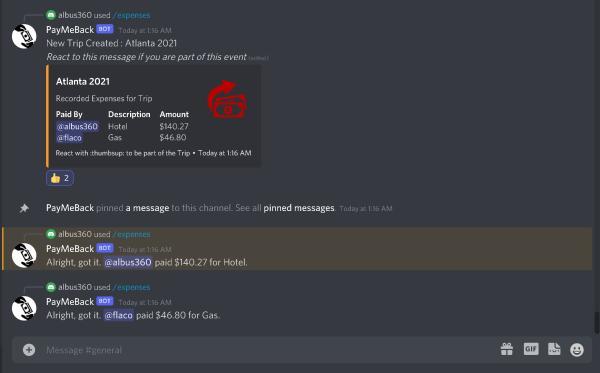
Adding Expenses to a Trip using the PayMeBack Bot
-
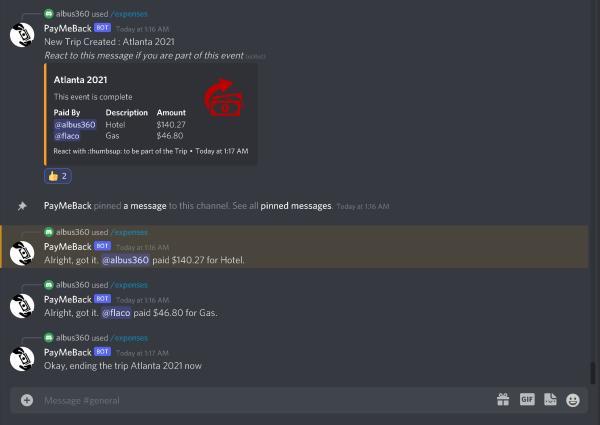
Ending an Event for Expenses
-
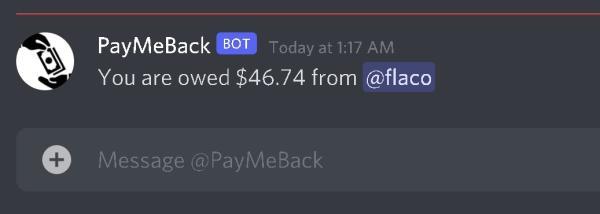
DM received after Event Concludes for Amount's Owed and to be Received


Inspiration
Imagine a simpler way to split expenses on a trip. This past summer, our friend group took several vacations to various parts around the U.S. One of the challenges faced on these trips was how to effectively, and efficiently, split the cost of larger expenses among all of our friends. As such, we decided to implement a tool that can minimize the amount of transactions needed to split the expenses evenly for all people on the trip.
What it does
The discord app that we created can be used in a Discord server. It can be given commands to start/end events, and if there is an ongoing event, transactions can be added to the event. Users can react to the event start message to be included in the calculations. Here, the bot keeps track of the amounts and who paid. Once an event ends, the bot will send a direct message to each person in the event telling them which transactions to complete so everyone pays each other back.
How we built it
We built this app with JavaScript in Node.js, using the discord.js library to use the Discord API.
Challenges we ran into
One challenge was learning how to effectively use Discord’s API, since neither of us had used it before. In particular, obtaining the list of users that reacted to a specific message was more challenging than we expected.
Accomplishments that we're proud of
We’re proud of learning how to use the Discord API quickly to build this application. The application can currently run and function correctly.
What we learned
We learned how to use the Discord API in JavaScript, and we learned more about how to write server-side Node.js applications.
What's next for PayMeBack Discord Bot
One feature that we didn’t have time to implement was adding in the ability to delete a transaction that was submitted by mistake. Also, the current implementation only stores the transactions and events in-memory, so a proper database should be used to avoid potential data loss. With these two features, this application should be ready for use in our Discord server!
Built With
- discord.js
- javascript
- node.js
- yarn


Log in or sign up for Devpost to join the conversation.