# Cybus Connectware Documentation

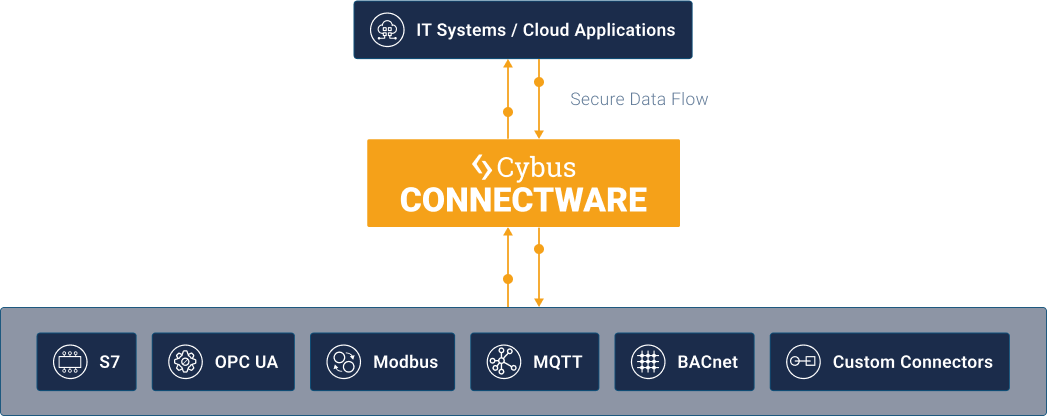
Cybus Connectware is the **Industrial Edge and Data Orchestration Platform** for factories and production environments. It enables secure, scalable, and centralized access to machine, sensor, and system data — from any protocol to any application.

With Connectware, manufacturers and system integrators can build **future-ready Industry 4.0 infrastructures**, reduce integration costs, and retain full control over their data.

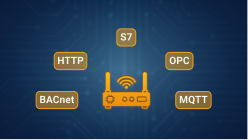
<figure><img src="https://2355450750-files.gitbook.io/~/files/v0/b/gitbook-x-prod.appspot.com/o/spaces%2FGzXPesVecsUM1eHBfwea%2Fuploads%2Fgit-blob-02b36517bc5a006d7ec9fec70f96bf3648c55309%2Fconnectors.png?alt=media" alt=""><figcaption><p>Connectware supports a wide range of industrial and enterprise protocols</p></figcaption></figure>

## Getting Started

<table data-view="cards"><thead><tr><th align="center"></th><th align="center"></th><th data-hidden data-card-cover data-type="files"></th><th data-hidden data-card-target data-type="content-ref"></th></tr></thead><tbody><tr><td align="center"><strong>System Requirements</strong></td><td align="center">Hardware, software, and virtual host requirements for installing and operating Connectware.</td><td><a href="https://2355450750-files.gitbook.io/~/files/v0/b/gitbook-x-prod.appspot.com/o/spaces%2FGzXPesVecsUM1eHBfwea%2Fuploads%2Fgit-blob-7154c6e68eda2fcaf277fac106c26dd1203ae95f%2Fcards-system-requirements.png?alt=media">cards-system-requirements.png</a></td><td><a href="system-requirements">system-requirements</a></td></tr><tr><td align="center"><strong>Installation &#x26; Upgrades</strong></td><td align="center">Installation and upgrade guides for Kubernetes and Docker, plus licensing setup.</td><td><a href="https://2355450750-files.gitbook.io/~/files/v0/b/gitbook-x-prod.appspot.com/o/spaces%2FGzXPesVecsUM1eHBfwea%2Fuploads%2Fgit-blob-0eae119e867003b23121838aed40b211b43319b8%2Fcards-installation-and-upgrades.png?alt=media">cards-installation-and-upgrades.png</a></td><td><a href="../documentation/installation-and-upgrades">installation-and-upgrades</a></td></tr><tr><td align="center"><strong>Concepts of Connectware</strong></td><td align="center">Make yourself familiar with the concepts of Connectware.</td><td><a href="https://2355450750-files.gitbook.io/~/files/v0/b/gitbook-x-prod.appspot.com/o/spaces%2FGzXPesVecsUM1eHBfwea%2Fuploads%2Fgit-blob-2e143b81c320462b88ece318326b9a9d5601b834%2Fcards-basic-components-of-connectware.png?alt=media">cards-basic-components-of-connectware.png</a></td><td><a href="concepts-of-connectware">concepts-of-connectware</a></td></tr></tbody></table>

## Security & User Management

<table data-view="cards"><thead><tr><th align="center"></th><th align="center"></th><th data-hidden data-card-cover data-type="files"></th><th data-hidden data-card-target data-type="content-ref"></th></tr></thead><tbody><tr><td align="center"><strong>User Management</strong></td><td align="center">Configure users, permissions, and authentication methods like Single Sign-On.</td><td><a href="https://2355450750-files.gitbook.io/~/files/v0/b/gitbook-x-prod.appspot.com/o/spaces%2FGzXPesVecsUM1eHBfwea%2Fuploads%2Fgit-blob-e8caefd944cd20f10d959ef1fc9b9ceba4e3484a%2Fcards-user-management.png?alt=media">cards-user-management.png</a></td><td><a href="../documentation/user-management">user-management</a></td></tr><tr><td align="center"><strong>Security</strong></td><td align="center">Set up TLS certificates and client/server authentication.</td><td><a href="https://2355450750-files.gitbook.io/~/files/v0/b/gitbook-x-prod.appspot.com/o/spaces%2FGzXPesVecsUM1eHBfwea%2Fuploads%2Fgit-blob-432029fd906423140b985696fc9fb48119d4fd25%2Fcards-security.png?alt=media">cards-security.png</a></td><td><a href="../documentation/security">security</a></td></tr><tr><td align="center"><strong>Client Registry</strong></td><td align="center">Register clients, users, and hardware devices without manually handling credentials.</td><td><a href="https://2355450750-files.gitbook.io/~/files/v0/b/gitbook-x-prod.appspot.com/o/spaces%2FGzXPesVecsUM1eHBfwea%2Fuploads%2Fgit-blob-4a6ccfef67cc501b233fc3830f2997a259ac6e62%2Fcards-client-registry.png?alt=media">cards-client-registry.png</a></td><td><a href="../documentation/client-registry">client-registry</a></td></tr></tbody></table>

## Connect Your Systems

<table data-view="cards"><thead><tr><th align="center"></th><th align="center"></th><th data-hidden data-card-cover data-type="files"></th><th data-hidden data-card-target data-type="content-ref"></th></tr></thead><tbody><tr><td align="center"><strong>Connectors</strong></td><td align="center">Configure OPC UA, Modbus, MQTT, and other connectors to connect your shop floor, enterprise systems, and servers.</td><td><a href="https://2355450750-files.gitbook.io/~/files/v0/b/gitbook-x-prod.appspot.com/o/spaces%2FGzXPesVecsUM1eHBfwea%2Fuploads%2Fgit-blob-32e464a1f9dd105e01c4a815ca8f3a6099e17e57%2Fcards-connectors.png?alt=media">cards-connectors.png</a></td><td><a href="../connectors/shop-floor-connectors">shop-floor-connectors</a></td></tr><tr><td align="center"><strong>Services</strong></td><td align="center">Create and deploy service commissioning files to define your data connections and transformations.</td><td><a href="https://2355450750-files.gitbook.io/~/files/v0/b/gitbook-x-prod.appspot.com/o/spaces%2FGzXPesVecsUM1eHBfwea%2Fuploads%2Fgit-blob-da3f07deb5062cc8d21793fe30ebac2b30d52f3e%2Fcards-services.png?alt=media">cards-services.png</a></td><td><a href="../documentation/services">services</a></td></tr><tr><td align="center"><strong>Agents</strong></td><td align="center">Install and manage agents across your infrastructure for remote or distributed data access.</td><td><a href="https://2355450750-files.gitbook.io/~/files/v0/b/gitbook-x-prod.appspot.com/o/spaces%2FGzXPesVecsUM1eHBfwea%2Fuploads%2Fgit-blob-0ebbe2950351f3b947ca7a968b8e4563b9a7664b%2Fcards-agents.png?alt=media">cards-agents.png</a></td><td><a href="../documentation/agents">agents</a></td></tr></tbody></table>

## Monitoring

<table data-view="cards"><thead><tr><th align="center"></th><th align="center"></th><th data-hidden data-card-cover data-type="files"></th><th data-hidden data-card-target data-type="content-ref"></th></tr></thead><tbody><tr><td align="center"><strong>Data Explorer</strong></td><td align="center">The Data Explorer allows you to visualize and interact with MQTT messages.</td><td><a href="https://2355450750-files.gitbook.io/~/files/v0/b/gitbook-x-prod.appspot.com/o/spaces%2FGzXPesVecsUM1eHBfwea%2Fuploads%2Fgit-blob-9324b7012e28d5322abc3dc3aeddcb5723dd7ebe%2Fcards-data-explorer.png?alt=media">cards-data-explorer.png</a></td><td><a href="../documentation/monitoring/data-explorer">data-explorer</a></td></tr><tr><td align="center"><strong>Live Data</strong></td><td align="center">Get insights into topic activity, message content, and associated resources.</td><td><a href="https://2355450750-files.gitbook.io/~/files/v0/b/gitbook-x-prod.appspot.com/o/spaces%2FGzXPesVecsUM1eHBfwea%2Fuploads%2Fgit-blob-ed52710b9afb7154edbf061c7ab1b8a85535449b%2Fcards-live-data.png?alt=media">cards-live-data.png</a></td><td><a href="../documentation/monitoring/live-data">live-data</a></td></tr></tbody></table>

## API Reference & Changelog

<table data-view="cards"><thead><tr><th align="center"></th><th align="center"></th><th data-hidden data-card-cover data-type="files"></th><th data-hidden data-card-target data-type="content-ref"></th></tr></thead><tbody><tr><td align="center"><strong>API Reference</strong></td><td align="center">RESTful and HTTP-based APIs to interact with and automate your Connectware environment.</td><td><a href="https://2355450750-files.gitbook.io/~/files/v0/b/gitbook-x-prod.appspot.com/o/spaces%2FGzXPesVecsUM1eHBfwea%2Fuploads%2Fgit-blob-5cf7f362f514521d7d482f01d60b42cee6478da8%2Fcards-api-reference.png?alt=media">cards-api-reference.png</a></td><td><a href="../reference/api-reference">api-reference</a></td></tr><tr><td align="center"><strong>Changelog</strong></td><td align="center">Stay updated with all relevant changes, new features, and improvements.</td><td><a href="https://2355450750-files.gitbook.io/~/files/v0/b/gitbook-x-prod.appspot.com/o/spaces%2FGzXPesVecsUM1eHBfwea%2Fuploads%2Fgit-blob-a7a8bc3d0d31d46aa0f622770ce7a4f8e4e9d32d%2Fcards-changelog.png?alt=media">cards-changelog.png</a></td><td><a href="../whats-new/changelog">changelog</a></td></tr></tbody></table>

## Need Help?

* [Cybus Support Portal](https://support.cybus.io)
* [Contact Sales](https://www.cybus.io/contact)

For deeper learning, ask about our **training workshops** or **partner programs**.


---

# Agent Instructions: Querying This Documentation

If you need additional information that is not directly available in this page, you can query the documentation dynamically by asking a question.

Perform an HTTP GET request on the current page URL with the `ask` query parameter:

```
GET https://docs.cybus.io/getting-started/readme.md?ask=<question>
```

The question should be specific, self-contained, and written in natural language.
The response will contain a direct answer to the question and relevant excerpts and sources from the documentation.

Use this mechanism when the answer is not explicitly present in the current page, you need clarification or additional context, or you want to retrieve related documentation sections.