RoboEval: Where Robotic Manipulation Meets Structured and Scalable Evaluation
Yi Ru Wang1, Carter Ung1, Christopher Tan1, Grant Tannert1, Jiafei Duan1,2, Josephine Li1, Amy Le1, Rishabh Oswal1, Markus Grotz1, Wilbert Pumacay1, Yuquan Deng2, Ranjay Krishna1,2, Dieter Fox*1, Siddhartha Srinivasa*1
1University of Washington, 2Allen Institute for AI, *Equal advising
RoboEval is a benchmark for bimanual manipulation featuring:
- 8 task families with 28 total variations
- Bimanual tasks: LiftPot, StackSingleBookShelf, PickSingleBookFromTable, StackTwoBlocks, CubeHandover (including VerticalCubeHandover), RotateValve, PackBox, LiftTray, DragOverAndLiftTray
- Bimanual Franka Panda robot configuration
- Data collection tools: Oculus Quest VR and keyboard teleoperation
- Comprehensive metrics: Coordination, efficiency, safety, and task progression tracking
RoboEval includes 8 task families with 28 total variations:
-
Lift Pot (4 variants) -
lift_pot.py- LiftPot, LiftPotPosition, LiftPotOrientation, LiftPotPositionAndOrientation
-
Stack Single Book Shelf (3 variants) -
stack_books.py- StackSingleBookShelf, StackSingleBookShelfPosition, StackSingleBookShelfPositionAndOrientation
-
Pick Single Book From Table (4 variants) -
stack_books.py- PickSingleBookFromTable, PickSingleBookFromTablePosition, PickSingleBookFromTableOrientation, PickSingleBookFromTablePositionAndOrientation
-
Stack Two Blocks (4 variants) -
manipulation.py- StackTwoBlocks, StackTwoBlocksPosition, StackTwoBlocksOrientation, StackTwoBlocksPositionAndOrientation
-
Cube Handover (5 variants) -
manipulation.py- CubeHandover, CubeHandoverPosition, CubeHandoverOrientation, CubeHandoverPositionAndOrientation, VerticalCubeHandover
-
Rotate Valve (3 variants) -
rotate_utility_objects.py- RotateValve, RotateValvePosition, RotateValvePositionAndOrientation
-
Pack Box (4 variants) -
pack_objects.py- PackBox, PackBoxPosition, PackBoxOrientation, PackBoxPositionAndOrientation
-
Lift Tray (5 variants) -
lift_tray.py- LiftTray, LiftTrayPosition, LiftTrayOrientation, LiftTrayPositionAndOrientation, DragOverAndLiftTray
RoboEval is a structured benchmark for bimanual manipulation, featuring diverse tasks with varying coordination and complexity. Unlike existing benchmarks that evaluate policies solely based on task success, RoboEval introduces an initial suite of tiered, semantically diverse manipulation tasks with fine-grained diagnostic metrics to probe the capabilities and failure modes of learning-based agents. Our benchmark provides 8 task families with 28 total variations that target specific skills such as coordination, precision, and interaction under variability, and are accompanied with 3,000+ total human-collected demonstrations. It additionally includes a standardized asset library—collision meshes, annotated sites, and manipulable objects—for building and augmenting tasks with spatial perturbations and distractors; a VR-based teleoperation interface enables realistic data collection; and rich evaluation tools that go beyond binary success, measuring task progression, coordination, trajectory efficiency, and spatial proximity.
For more information, please visit our full documentation site
- Python 3.10+
- Git with submodule support
- CUDA-compatible GPU (recommended for model evaluation)
- Clone the repository with submodules:
git clone --recurse-submodules git@github.com:Robo-Eval/RoboEval.git
cd RoboEval- Create and activate conda environment:
conda create -n roboeval python=3.10
conda activate roboeval- Install the package:
# Basic installation
pip install -e .

# Install with example dependencies (recommended)
pip install -e ".[examples]"

# Install with VR support for teleoperation
pip install -e ".[vr]"

# Install development dependencies
pip install -e ".[dev]"Test your installation by running a simple demo replay:
python examples/1_data_replay.pyClick to expand: Examples Overview
The examples/ directory contains several scripts demonstrating different aspects of RoboEval:
| Example | Description | Purpose |
|---|---|---|
1_data_replay.py |
Load and replay demonstrations from dataset | Basic demo loading and environment usage |
2_convert_and_replay.py |
Demo recording with action mode conversion | Understanding action modes and conversions |
3_load_convert_replay.py |
Load demos and convert between action modes | Advanced action mode handling |
4_eval_openvla.py |
Evaluate OpenVLA models on tasks | Model evaluation framework |
5_gather_metrics.py |
Collect and analyze task metrics | Metrics aggregation and analysis |
6_collect_data.py |
Data collection pipeline (keyboard) | Keyboard teleoperation demonstration collection |
7_collect_data_oculus.py |
Data collection pipeline (Oculus VR) | VR teleoperation demonstration collection |
Start with the simplest example to verify your setup:
python examples/replay_demo.pyThis script:
- Automatically downloads demonstration datasets on first run
- Loads human-collected teleoperation demonstrations
- Replays them in the simulated environment with visual rendering
- Demonstrates basic environment and robot control
RoboEval supports different action modes. Learn about them with:
python examples/2_convert_and_replay.pyThis example demonstrates:
- Joint position vs. end-effector control
- Absolute vs. delta (relative) actions
- Recording custom demonstrations
- Converting between action modes
- Trajectory visualization and comparison
For more complex action mode conversions:
python examples/3_load_convert_replay.pyFeatures:
- Loading demonstrations in one action mode
- Converting to different target action modes
- Handling lightweight vs. full observation modes
- Batch processing of multiple demonstrations
Evaluate pre-trained models (e.g., OpenVLA) on RoboEval tasks:
# Model inference mode
python examples/4_eval_openvla.py --ckpt_path /path/to/model/checkpoint

# Demo replay evaluation mode
python examples/4_eval_openvla.py --ckpt_path /path/to/model/checkpoint \
                                  --use_demos --dataset_path /path/to/demos

# Custom configuration
python examples/4_eval_openvla.py --ckpt_path /path/to/model/checkpoint \
                                  --instruction "pick up the book" \
--num_episodes 10 --max_steps 300RoboEval supports two modes of teleoperation for collecting demonstrations:
Collect demonstrations using keyboard control (good for testing and simple data collection):
# Using keyboard teleoperation
cd roboeval
python data_collection/demo_recorder.py input_mode=Keyboard robot="Bimanual Panda" env="LiftPot"

# Or use the example script
python examples/6_collect_data.pyCollect high-quality demonstrations with immersive VR control for more natural bimanual manipulation:
# Using Oculus Quest VR teleoperation
python examples/7_collect_data_oculus.py

# Or use the demo recorder directly
cd roboeval
python data_collection/demo_recorder.py input_mode=VR robot="Bimanual Panda" env="LiftPot"
VR Setup Requirements:
- Oculus Quest headset (Quest 2, Quest Pro, or Quest 3)
- USB-C cable for connecting headset to computer
- Developer mode enabled on Oculus Quest
- VR dependencies installed:
pip install -e ".[vr]" - System requirement: GLIBC 2.32+ (Ubuntu 20.10+, Debian 11+, or equivalent)
- Check your version:
ldd --version - If you have an older system, use Docker or the direct
demo_recorder.pyscript
- Check your version:
📖 For detailed VR setup instructions, including:
- Step-by-step Oculus Quest configuration
- ADB installation and troubleshooting
- Developer mode activation
- USB debugging authorization
- Complete VR controls reference
See the comprehensive guide: roboeval/data_collection/README.md
Note on VR Compatibility: The VR teleoperation requires PyOpenXR which has GLIBC 2.32+ dependency. If you encounter GLIBC compatibility issues, you can:
- Use the keyboard teleoperation mode instead (
examples/6_collect_data.py) - Run in a Docker container with Ubuntu 20.10+ base image
- Use the direct
demo_recorder.pyscript which may have better system compatibility
Each task comes with multiple variants focusing on different aspects:
- Base Task: Standard version of the task
- Position: Only position control (orientation fixed)
- Orientation: Only orientation control (position fixed)
- PositionAndOrientation: Both position and orientation control
RoboEval supports different action modes for flexible control:
- Joint Position Mode: Direct joint angle control
absolute=True: Specify target joint positionsabsolute=False: Specify joint position deltas
- End-Effector Mode: Cartesian space control
ee=True: Control end-effector poses directly- Combined with absolute/delta for position specification
- Full: Complete observations including RGB images, depth, point clouds
- Lightweight: Minimal observations for faster training (joint positions, object poses)
- BimanualPanda: Dual Franka Panda arms with parallel grippers
- Configurable degrees of freedom and control frequencies
- Support for floating base and custom joint configurations
Click to expand: Environment Configuration
from roboeval.envs.lift_pot import LiftPotPositionAndOrientation
from roboeval.action_modes import JointPositionActionMode
from roboeval.robots.configs.panda import BimanualPanda
from roboeval.utils.observation_config import ObservationConfig, CameraConfig

# Create environment with specific action mode
env = LiftPotPositionAndOrientation(
    action_mode=JointPositionActionMode(
        floating_base=True,
        absolute=True,  # Use absolute positions
        ee=False,       # Joint control (not end-effector)
        floating_dofs=[]
    ),
    render_mode="human",
    control_frequency=20,
    robot_cls=BimanualPanda,
    observation_config=ObservationConfig(
        cameras=[
            CameraConfig(
                name="external",
                rgb=True,
                depth=False,
                resolution=(128, 128),
                pos=[0.0, 10.0, 10.0]
            )
        ]
    )
)
Click to expand: Demo Loading and Conversion
from roboeval.demonstrations.demo_store import DemoStore
from roboeval.demonstrations.demo_converter import DemoConverter
from roboeval.demonstrations.utils import Metadata

# Load demonstrations
metadata = Metadata.from_env(env)
demo_store = DemoStore()
demos = demo_store.get_demos(metadata, amount=10, frequency=20)

# Convert between action modes
for demo in demos:
    # Convert joint absolute to end-effector delta
    converted_demo = DemoConverter.joint_absolute_to_ee_delta(demo)

    # Convert absolute to delta positions
    delta_demo = DemoConverter.absolute_to_delta(demo)

    # Convert joint to end-effector control
ee_demo = DemoConverter.joint_to_ee(demo)Click to expand: Common Issues and Solutions
-
MuJoCo Installation Problems
# Make sure you have the correct MuJoCo version pip install mujoco==3.1.5 -
Display Issues (Headless Servers)
# Use virtual display
export DISPLAY=:99
Xvfb :99 -screen 0 1024x768x24 &
-
CUDA/GPU Issues
# Check CUDA availability
python -c "import torch; print(torch.cuda.is_available())"
-
Demo Download Failures
- Check internet connection
- Verify GitHub access for private repositories
- Clear demo cache:
rm -rf ~/.roboeval/
-
Import Errors
# Reinstall in development mode
pip install -e .

# Check Python path
python -c "import roboeval; print(roboeval.__file__)"
-
VR/Oculus Quest Issues
- GLIBC version error: PyOpenXR requires GLIBC 2.32+
# Check your GLIBC version
ldd --version

# If version is < 2.32, use alternatives:
# - Keyboard teleoperation: python examples/6_collect_data.py
# - Docker with Ubuntu 20.10+ image
# - Direct demo_recorder.py script
- Quest not detected: Ensure USB debugging is enabled and cable is connected
- Permission denied: Run
adb devicesand accept prompt in headset
- GLIBC version error: PyOpenXR requires GLIBC 2.32+
- Use
render_mode=Nonefor faster training/evaluation - Reduce camera resolution for better performance
- Use lightweight observation mode when possible
- Adjust
control_frequencybased on your needs (higher = more precise, slower)
Click to expand: Development and Testing
# Install development dependencies
pip install -e ".[dev]"

# Run tests
pytest

# Run specific test
python test_metric_rollout.pyRoboEval provides a comprehensive suite of bimanual manipulation tasks designed to evaluate different aspects of robotic coordination and control. Each task has multiple variants that test specific capabilities.
Each base task comes with up to 4 variants:
- Base: Full 6-DOF control (position + orientation)
- Position: Position-only control (orientation fixed)
- Orientation: Orientation-only control (position fixed)
- PositionAndOrientation: Combined position and orientation control
| Task | Description |
|---|---|
| LiftPot | Grip kitchen pot by handles and lift above table |
| LiftTray | Grasp breakfast tray with both grippers and lift |
| PackBox | Close two-flap packing box using both arms |
| PickSingleBookFromTable | Grip and lift target book from table |
| RotateValve | Rotate valves counterclockwise |
| StackSingleBookShelf | Place book on shelf in contact |
| StackTwoCubes | Stack two cubes on table |
| CubeHandover | Pass cube between robot arms |
# Import available tasks
from roboeval.envs.lift_pot import LiftPot, LiftPotPosition, LiftPotOrientation, LiftPotPositionAndOrientation
from roboeval.envs.manipulation import StackTwoBlocks, StackTwoBlocksPosition, CubeHandover
from roboeval.envs.stack_books import PickSingleBookFromTable, StackSingleBookShelf
from roboeval.envs.pack_objects import PackBox, PackBoxPosition
from roboeval.envs.lift_tray import LiftTray, LiftTrayPosition
from roboeval.envs.rotate_utility_objects import RotateValve, RotateValvePosition

# Create a task instance
env = LiftPotPositionAndOrientation(
    action_mode=JointPositionActionMode(floating_base=True, absolute=True),
    render_mode="human",
    control_frequency=20,
    robot_cls=BimanualPanda
)RoboEval goes beyond binary success metrics with comprehensive evaluation:
- Task Success Rate: Binary completion of primary objective
- Partial Success: Credit for partial task completion
- Semantic Progress: Task-specific milestone achievement
- Trajectory Efficiency: Path optimality and smoothness
- Coordination Quality: Synchronization between arms
- Spatial Precision: Accuracy of positioning and orientation
- Safety Violations: Collision and constraint violations
from roboeval.envs.lift_pot import LiftPotPositionAndOrientation
from roboeval.demonstrations.demo_player import DemoPlayer

# Load environment and demo
env = LiftPotPositionAndOrientation(...)
demo = demo_store.get_demos(metadata, amount=1)[0]

# Replay and evaluate
player = DemoPlayer()
metrics = player.replay_in_env(demo, env, return_metrics=True)

print(f"Success Rate: {metrics['success_rate']}")
print(f"Trajectory Efficiency: {metrics['trajectory_efficiency']}")
print(f"Coordination Score: {metrics['coordination_quality']}")Click to expand: Comprehensive Metrics Documentation
RoboEval includes a comprehensive metrics tracking system (MetricRolloutEval) that provides fine-grained evaluation beyond binary success metrics. Environments can inherit from this class to enable detailed performance analysis.
To enable metrics tracking, initialize the metric system in your environment's _initialize_env method:
from roboeval.utils.metric_rollout import MetricRolloutEval

class MyTask(RoboEvalEnv, MetricRolloutEval):
    def _initialize_env(self):
        # Initialize your environment objects
        self.object = SomeObject(self._mojo)

        # Initialize metrics tracking
        self._metric_init(
            track_vel_sync=True,              # Track velocity synchronization
            track_vertical_sync=True,          # Track vertical alignment
            track_slippage=True,               # Track object slippage
            slip_objects=[self.object],        # Objects to monitor for slippage
            slip_sample_window=20,             # Frames between slip checks
            track_collisions=True,             # Track collision events
            track_cartesian_jerk=True,         # Track end-effector smoothness
            track_joint_jerk=True,             # Track joint smoothness
            track_cartesian_path_length=True,  # Track cartesian distance
            track_joint_path_length=True,      # Track joint space distance
            track_orientation_path_length=True, # Track orientation changes
            robot=self._robot                  # Robot instance
        )

    def _on_step(self):
        # Update metrics each step
        self._metric_step()

    def _success(self) -> bool:
        # Your success condition
        return self.object.position[2] > 1.0

    def get_info(self):
        info = super().get_info()
        if self.success or self.terminate:
            # Finalize metrics at episode end
            metrics = self._metric_finalize(
                success_flag=self.success,
                target_distance=self.target_distance,  # Optional
                pose_error=self.pose_error             # Optional
            )
            info["metrics"] = metrics
return info-
bimanual_arm_velocity_difference: Average difference in joint velocities between left and right arms- Lower is better - indicates better synchronized movement
- Measured as L2-norm of velocity difference
- Units: rad/s
-
bimanual_gripper_vertical_difference: Average vertical (Z-axis) height difference between grippers- Lower is better - indicates better height coordination
- Units: meters
- Useful for tasks requiring parallel lifting (e.g., LiftPot, LiftTray)
-
env_collision_count: Number of new collision events with the environment- Counts unique collision events (not contact duration)
- Excludes target objects being manipulated
- Lower is better - indicates safer execution
-
self_collision_count: Number of robot self-collision events- Detects when robot parts collide with each other
- Lower is better - indicates better motion planning
Cartesian Jerk (End-Effector Space):
-
avg_cartesian_jerk: Average jerk magnitude in cartesian space- Jerk = rate of change of acceleration (m/s³)
- Lower is better - smoother end-effector motion
- Per-arm dictionary for bimanual:
{"left": 0.5, "right": 0.6}
-
rms_cartesian_jerk: Root mean square cartesian jerk- More sensitive to large jerk spikes than average
- Better indicator of motion smoothness
-
overall_avg_cartesian_jerk/overall_rms_cartesian_jerk: Combined metrics for bimanual robots
Joint Jerk (Joint Space):
avg_joint_jerk: Average jerk in joint space (rad/s³)rms_joint_jerk: RMS joint jerkoverall_avg_joint_jerk/overall_rms_joint_jerk: Combined bimanual metrics
Cartesian Path Length:
-
cartesian_path_length: Total distance traveled by end-effector(s)- Per-arm for bimanual:
{"left": 1.2, "right": 1.5} - Units: meters
- Useful for evaluating trajectory efficiency
- Per-arm for bimanual:
-
total_cartesian_path_length: Sum of both arms (bimanual only) -
avg_cartesian_path_length: Average across arms (bimanual only)
Joint Path Length:
-
joint_path_length: Total distance in joint space- Per-arm for bimanual
- Units: radians
- Indicates joint space efficiency
-
total_joint_path_length/avg_joint_path_length: Combined bimanual metrics
Orientation Path Length:
-
orientation_path_length: Total orientation change (quaternion angular distance)- Per-arm for bimanual
- Units: radians
- Measures rotational efficiency
-
total_orientation_path_length/avg_orientation_path_length: Combined bimanual metrics
-
slip_count: Total number of slip events detected- Slip = object was held but gripper opened while moving
- Lower is better - indicates stable grasping
- Detection frequency controlled by
slip_sample_window
-
slip_count_per_object: Slip events per tracked object- Dictionary:
{"object_1": 0, "object_2": 1, ...} - Useful for multi-object tasks
- Dictionary:
-
success: Binary task completion (0.0 or 1.0) -
completion_time: Wall-clock time to complete episode- Units: seconds
- Includes rendering time
-
subtask_progress: Percentage of subtask stages completed- Range: [0.0, 1.0]
- Calculated from
task_stage_reachedflags - Useful for partial credit in failed attempts
-
task_stage_reached: Boolean flags for each subtask stage- Dictionary:
{1: True, 2: True, 3: False, ...} - Set via
self._metric_stage(stage_idx, success=True)in environment code
- Dictionary:
-
target_distance: Final distance to target position(s)- Can be single float or dictionary for multiple targets
- Units: meters
- Lower is better
-
object_pose_error: Pose error of manipulated object(s)- Combined position and orientation error
- Can be single float or dictionary
- Lower is better
For complex tasks with multiple stages, track intermediate progress:
class MultiStageTask(RoboEvalEnv, MetricRolloutEval):
    def _on_step(self):
        self._metric_step()

        # Check and record subtask completion
        if self.object_grasped and not self.get_metric_stage(1):
            self._metric_stage(1, success=True)  # Stage 1: grasp

        if self.object_lifted and not self.get_metric_stage(2):
            self._metric_stage(2, success=True)  # Stage 2: lift

        if self.object_placed and not self.get_metric_stage(3):
self._metric_stage(3, success=True) # Stage 3: place{
"success": 1.0,
"completion_time": 12.4,
"subtask_progress": 1.0,
"task_stage_reached": {1: True, 2: True, 3: True},
# Coordination
"bimanual_arm_velocity_difference": 0.05,
"bimanual_gripper_vertical_difference": 0.008,
# Collisions
"env_collision_count": 0,
"self_collision_count": 0,
# Smoothness
"avg_cartesian_jerk": {"left": 0.42, "right": 0.38},
"rms_cartesian_jerk": {"left": 0.65, "right": 0.58},
"overall_avg_cartesian_jerk": 0.40,
"overall_rms_cartesian_jerk": 0.62,
# Path efficiency
"cartesian_path_length": {"left": 1.23, "right": 1.18},
"total_cartesian_path_length": 2.41,
"joint_path_length": {"left": 3.45, "right": 3.52},
"orientation_path_length": {"left": 0.87, "right": 0.92},
# Manipulation
"slip_count": 0,
"slip_count_per_object": {"object_1": 0},
# Accuracy
"target_distance": 0.012,
"object_pose_error": 0.034
}-
Slip Detection Window: Set
slip_sample_windowto balance detection accuracy vs. computation- Higher values (20-30): Less frequent checks, faster
- Lower values (5-10): More sensitive, higher overhead
-
Selective Tracking: Only enable metrics you need for your evaluation
- Full tracking has minimal overhead (~5-10% performance impact)
- Collision tracking is most expensive
-
Jerk Calculation: Requires computing numerical derivatives
- Automatically handles timestep from
control_frequency - More accurate with higher control frequencies
- Automatically handles timestep from
| Task | Description | Preview |
|---|---|---|
| LiftPot | Grip the kitchen pot by its handles and raise it above the table. | 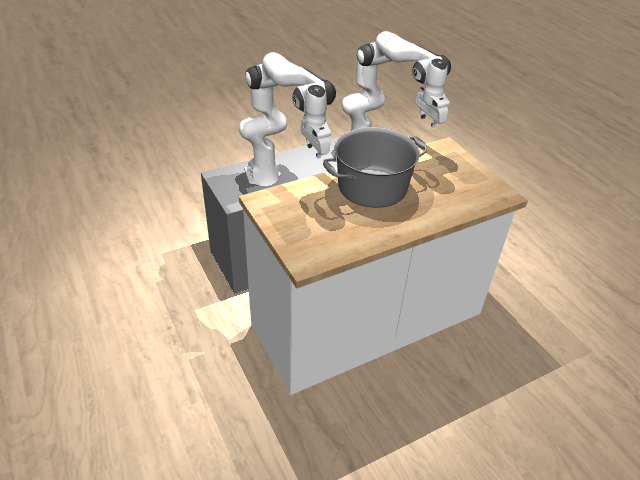 |
| LiftTray | Grasp the breakfast tray with the two grippers and lift it clear of the source table. | 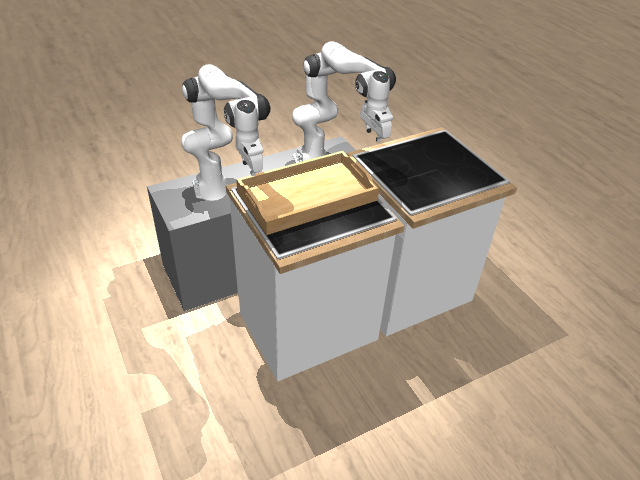 |
| PackBox | Have each arm interact with the two-flap packing box and close both flaps until the opening is fully covered. | 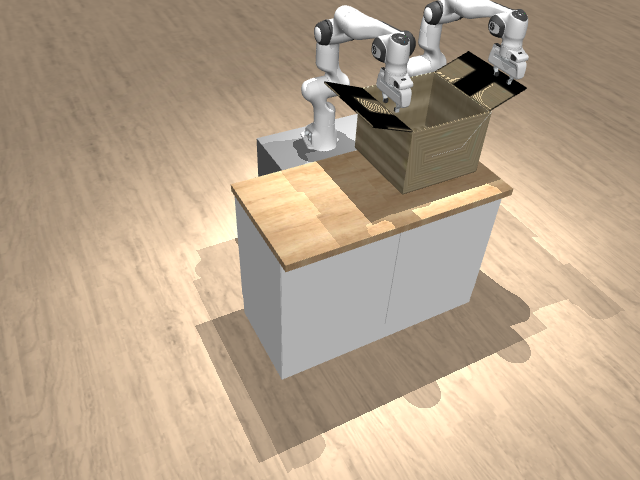 |
| PickSingleBookFromTable | Grip the target book on the table and lift it up. | 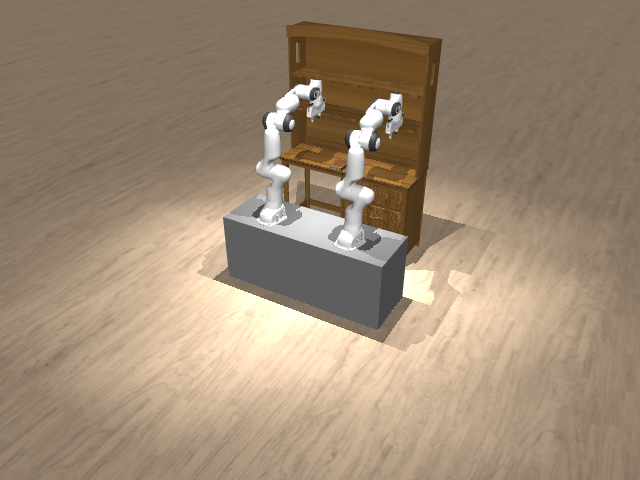 |
| RotateValve | Rotate each valve counterclockwise. | 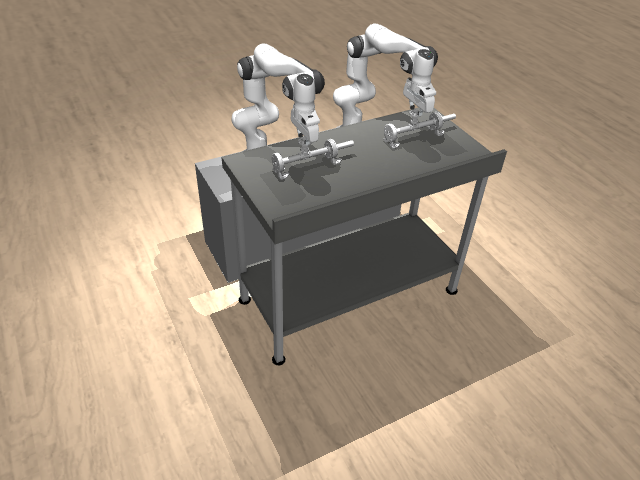 |
| StackSingleBookShelf | Pick up the book from the table and place it in contact with one of the shelves. | 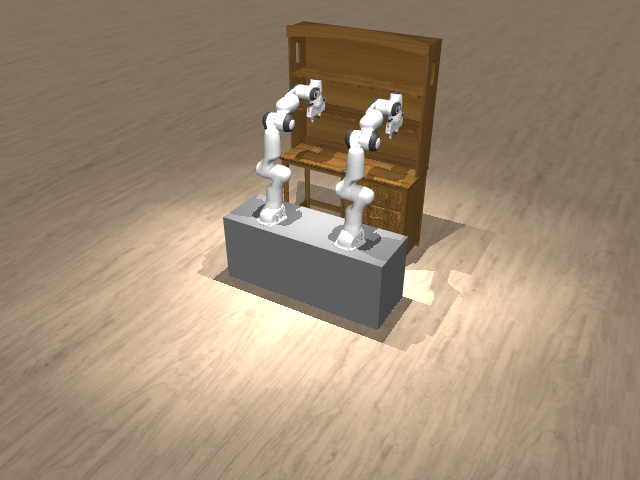 |
| StackTwoBlocks | Manipulate two cubes placed on the table so that they are stacked. | 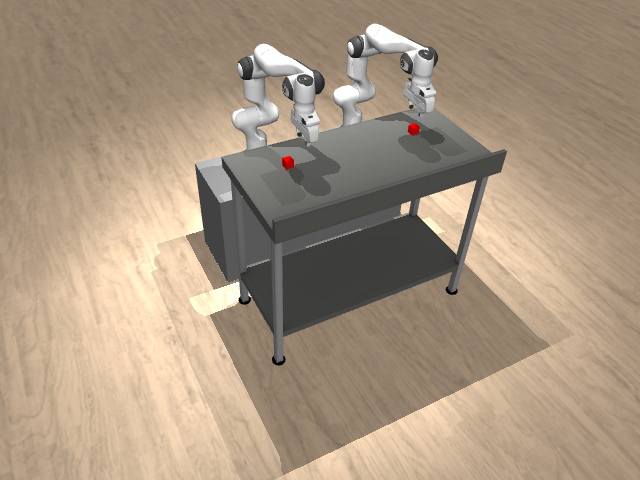 |
| CubeHandover | Pass a cube between the robot's two arms. | 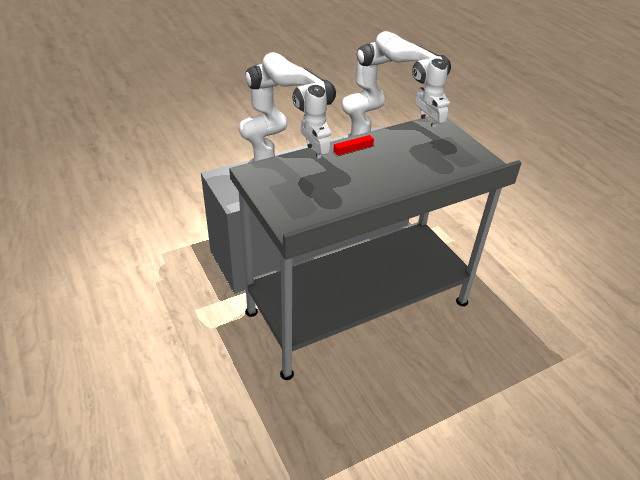 |
Click to expand: Contribution Guidelines
We welcome contributions to RoboEval! Here's how you can help:
- Create task environment in
roboeval/envs/ - Follow existing task structure and naming conventions
- Implement variants (Position, Orientation, PositionAndOrientation)
- Add comprehensive evaluation metrics
- Include demonstration data collection
- Use GitHub Issues for bug reports and feature requests
- Include reproduction steps and environment details
- Check existing issues before creating new ones
- Follow PEP 8 style guidelines
- Write comprehensive tests for new features
- Document all public APIs
- Use pre-commit hooks for code quality
- Fork the repository
- Create feature branch from
main - Make changes with tests and documentation
- Run pre-commit checks and tests
- Submit pull request with clear description
If you use RoboEval in your research, please cite our paper:
@misc{wang2025roboevalroboticmanipulationmeets,
      title={RoboEval: Where Robotic Manipulation Meets Structured and Scalable Evaluation},
      author={Yi Ru Wang and Carter Ung and Grant Tannert and Jiafei Duan and Josephine Li and Amy Le and Rishabh Oswal and Markus Grotz and Wilbert Pumacay and Yuquan Deng and Ranjay Krishna and Dieter Fox and Siddhartha Srinivasa},
      year={2025},
      eprint={2507.00435},
      archivePrefix={arXiv},
      primaryClass={cs.RO},
      url={https://arxiv.org/abs/2507.00435},
}This project is licensed under the MIT License - see the LICENSE file for details.
- MuJoCo: Uses MuJoCo physics simulator (Apache 2.0 License)
- BiGym: Builds upon BiGym framework components
- Mujoco Menagerie: Includes models from Mujoco Menagerie (Apache 2.0 License)
Special thanks to:
- The BiGym team for the foundational bimanual manipulation framework
- MuJoCo team for the physics simulation engine
- The open-source robotics community for tools and inspiration
- Documentation: Full Documentation Site
- Issues: GitHub Issues
- Discussions: GitHub Discussions
- Email: Contact the authors via the paper
For the latest updates and detailed documentation, visit our documentation site.
