In this article, I’ll cover 24 of the best Python libraries of 2026.
Python is popular because you can move fast, and its ecosystem is a big reason why. If you are building APIs, doing data analysis, prototyping games, or automating workflows, the right open source library can save hours.
This matters for working software engineers because libraries are where the real leverage is. From matrices and linear algebra on multidimensional data to neural networks for natural language processing and speech recognition, Python libraries help you ship faster, with fewer reinventions, and more flexibility.
TL;DR: Python libraries are collections of reusable code, functions, classes, and modules that you can plug into your projects instead of writing everything from scratch.
- You’ll learn how libraries differ from frameworks, and how to pick tools that stay reliable in production.
- You’ll get a quick picker for common tasks like data visualization, regression, classification, and API development.
- You’ll get a curated 2026 list with official documentation links for every recommendation.
What Is A Python Library?
Think of a Python library as a toolbox. Each tool is a piece of code you can reuse, like functions, classes, and modules. Instead of reinventing the wheel, you use proven building blocks and spend your time on what makes your project unique.
Python is often described as a multi-tool language because it works well across many domains. A big reason for that versatility is its library ecosystem, especially open source libraries that solve common problems well.
If you are working on real Python projects, libraries let you build faster and more reliably. Whether you are doing data science, data visualization, backend services, automation, or predictive modeling, there is usually a library that fits.
How To Choose A Python Library To Use
With so many options, the best library is usually the one that fits your project and reduces long-term risk. Here are the filters I use before committing to a dependency.
- Project fit: choose the tool that matches what you are building, avoid overkill.
- Python version support: confirm compatibility with your interpreter and deployment target.
- Maintenance: look for recent releases, active issues, and docs that reflect current behavior.
- Documentation quality: strong docs usually means fewer surprises and faster onboarding.
- Ecosystem fit: the library should work cleanly with the rest of your stack.
- Performance: important for web traffic, big data files, and production workloads.
- License: confirm you can use it commercially if you are shipping software.
Also confirm your basics. A lot of beginner pain comes from mismatched Python installers and environments, not the library itself. Use the official Python installers for your OS when you can, and install libraries into an isolated environment so each project has clean dependencies.
If you are targeting interviews, you will see common libraries come up frequently. This is especially true in a Python interview, where candidates are expected to explain why they chose a tool, not just how to import it.
Quick Picker: Choose A Library Fast
- Call web APIs quickly: Requests documentation
- Build web APIs: FastAPI documentation
- Serve FastAPI in production: Uvicorn documentation
- Async concurrency for IO heavy services: asyncio documentation plus HTTPX documentation
- Numeric computing with numpy array workflows: NumPy documentation
- Tables, CSVs, time series, and data analysis: Pandas documentation
- Scientific computing, optimization, and linear algebra: SciPy documentation
- Data visualization with scatter plots and bar charts: Matplotlib documentation
- Classic ML for classification and regression: scikit-learn documentation and LightGBM documentation
- Neural networks and deep learning library stacks: TensorFlow documentation or PyTorch documentation
- Natural language processing with transformer models: Transformers documentation
- Big data workflows in Python: Dask documentation and PyArrow documentation
- Scraping and crawling: Scrapy documentation plus Beautiful Soup documentation
- Speech recognition on-device: Vosk documentation
- Simple desktop utilities: tkinter documentation
Top Python Libraries of 2026
Everything listed below is a Python library or framework you can install and use from Python. These tools ship as Python packages, including items from the Python standard library, and they show up constantly in real production work.
If you are still building fundamentals, start with a solid python course. If you are deciding between stacks, this overview of python frameworks is a useful shortcut. If you are prepping for hiring loops, these python interview questions reflect what comes up most often. We'll start with data manipulation, those are vital all around, so you can use them for data cleaning, visualizations, etc. We'll get into automations after sharing resources for specific tasks in web development and production.
Data science, machine learning, and NLP
This is where you will see matrices, linear algebra, multidimensional data, and predictive modeling show up fast. These libraries also power everyday work like regression, classification, and data visualization.
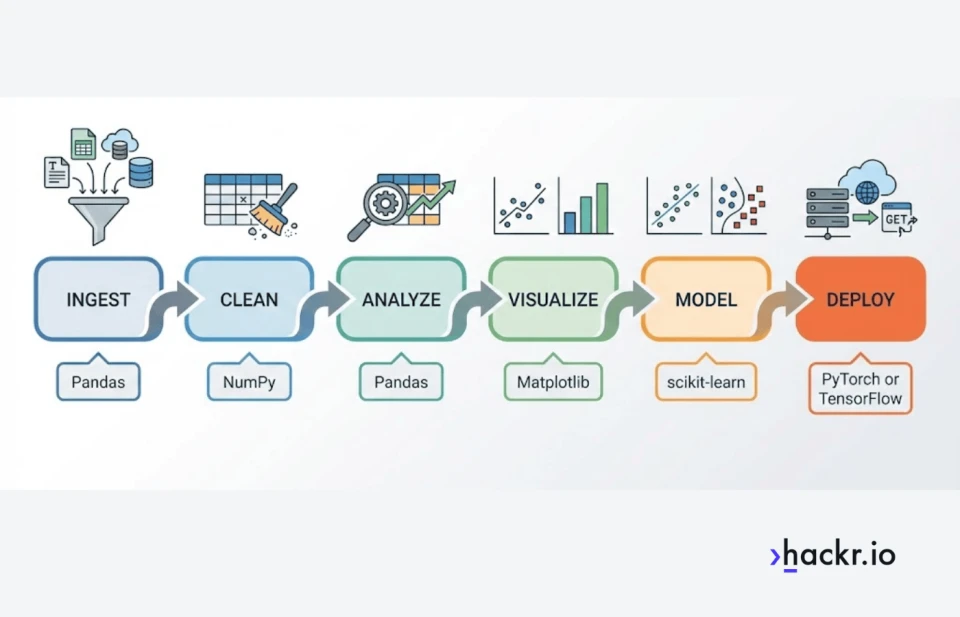
- NumPy documentation is the foundation for numerical computing. If you work with matrices, linear algebra, and multidimensional data, this is the library that makes numpy array workflows fast and practical.
- Pandas documentation is the default DataFrame tool for cleaning, joining, grouping, and time series work. For day to day data analysis, it is hard to beat.
- PyArrow documentation matters when your data lives in Parquet, Arrow, or columnar formats. It is a key building block for modern analytics pipelines and big data file workflows.
- SciPy documentation adds higher level scientific computing tools on top of NumPy, including optimization routines and numerical methods you will see in research and production modeling.
- Matplotlib documentation is the plotting workhorse for data visualization. If you need publication style charts, it covers the basics and deep customization, including scatter plots and bar charts.
- scikit-learn documentation is the standard toolkit for classic machine learning. It is excellent for predictive modeling with clean pipelines, and it covers the bread and butter of classification and regression.
- LightGBM documentation is a top baseline for tabular predictive modeling. It is widely used for classification and regression when you want strong results fast without deep learning complexity.
- TensorFlow documentation is a widely used deep learning library for training and deploying neural networks. It is often chosen when you care about deployment tooling and production ecosystems.
- PyTorch documentation is a top pick for deep learning. Its dynamic computation graphs make iteration and debugging easier, which is why it is popular across research and production.
- Transformers documentation is a practical entry point for natural language processing in 2026. It is widely used for modern NLP tasks like text classification, embeddings, and generation, built on top of transformer based neural networks.
- Dask documentation helps when your workflows outgrow a single machine. It lets you scale array and DataFrame style workloads for big data processing without rewriting everything from scratch.
Web development
If your job is building web apps or APIs, the best tools are the ones that keep your code readable and your deploys boring.
- Django documentation is a batteries included framework for full web apps. If you want a guided overview first, see this breakdown of django.
- Flask documentation is a lightweight framework that stays out of your way. It is a good fit when you want flexibility and a minimal starting point. If you want a hands on path, start here to learn flask.
- FastAPI documentation is a modern API framework built around type hints, validation, and automatic interactive documentation. It is a strong default for API first development.
- Requests documentation remains the simplest, most readable way to make HTTP calls in many scripts and integrations, especially when you do not need async.
- HTTPX documentation is a modern HTTP client that supports both sync and async. It is a strong fit when you expect to move from small scripts to async services later.
- asyncio documentation is the foundation for async concurrency in Python. It is essential when web workloads need to handle many simultaneous IO operations efficiently.
Backend and production
This is the reliability layer: validation, database access, and the server components that make APIs and services behave predictably.
- Uvicorn documentation is a fast ASGI server commonly used to run FastAPI in production. It is the part that actually serves requests in real deployments.
- SQLAlchemy documentation is a core backend dependency for database access. It scales from simple queries to production grade ORM and SQL modeling.
- Pydantic documentation is valuable for data validation and serialization. This is a practical tool for APIs, configs, and internal schemas, and it helps keep data flowing cleanly between services and model pipelines.
Automation, scraping, GUI, and speech
This category covers the practical work: grabbing data, cleaning it, wrapping it in a small tool, and making it repeatable.
- Scrapy documentation is a full framework when you need crawling, link following, structured extraction, and exports at scale.
- Beautiful Soup documentation is a lightweight, friendly HTML parsing library. It is a strong complement to Scrapy when you need to extract and clean page content reliably.
- tkinter documentation lets you turn scripts into small desktop utilities. If you want a practical starting point, use this guide to building a GUI with Tkinter.
- Vosk documentation is a practical option for speech recognition projects, including offline transcription workflows where you want local processing and predictable latency.
Common Python Library Stacks That Work Well Together
- Data analysis and visualization: NumPy + Pandas + Matplotlib
- Classic ML for regression and classification: Pandas + scikit-learn + LightGBM
- Deep learning and neural networks: NumPy + PyTorch or TensorFlow
- Modern NLP pipelines: Transformers + PyTorch or TensorFlow
- Big data file workflows: PyArrow + Dask
- API development: FastAPI + Pydantic + Uvicorn
- Scraping to analysis: Scrapy + Beautiful Soup + Pandas
Wrapping Up
That’s the list, 24 of the best Python libraries of 2026. If you want to get faster and more effective with Python, library literacy is one of the highest leverage skills you can build. It helps you move from toy scripts to production systems, including serious work like regression models, classification pipelines, and neural network experiments.
If you are thinking about career upside, the Bureau of Labor Statistics is a useful reference point for pay data and role definitions. The median annual wage for computer programmers was $98,670 in May 2024.
Which Python library do you use the most, and what would you add to this list? Share your favorites in the comments.
Frequently Asked Questions
What is the difference between a Python library and a Python framework?
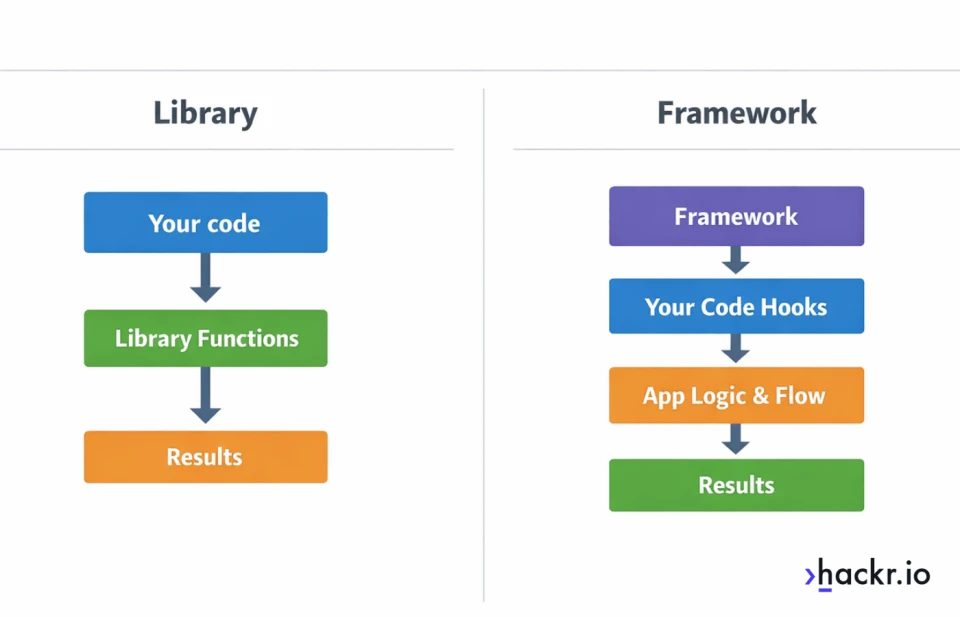
A library is code you call when you need it. A framework is a structure that calls your code and guides how your app is organized, especially in web development and APIs.
Do Python libraries come with Python by default?
Some do. The Python standard library ships with Python and includes modules like asyncio and, on many installs, tkinter. Most third-party libraries need to be installed with pip or conda.
How do I install a Python library?
The most common way is pip, for example: pip install requests. If you are using a project environment, install inside that environment so your dependencies stay isolated.
Should I use pip or conda?
pip is the default for Python packages and works well for most projects. conda can be helpful when you need compiled scientific packages and want environment management in one tool, especially on data science stacks.
Do I need a virtual environment for libraries?
Yes in most cases. A virtual environment prevents dependency conflicts between projects and makes deployments and reproducing results much easier.
How do I know if a library is actively maintained?
Check release frequency, open issues, responsiveness from maintainers, and documentation freshness. A library that is popular but stagnant can still work, but it is riskier for new projects.
Which library should I use for calling web APIs, Requests or HTTPX?
Use Requests for simple, synchronous scripts and services. Use HTTPX when you want async support, better control over modern client features, or you expect your code to grow into async services later.
When should I use FastAPI?
Use FastAPI when you are building APIs and want strong validation, modern typing support, and automatic documentation. It is especially useful for services that benefit from clean request models and async performance.
What is asyncio, and do I need it?
asyncio is Python’s built-in async runtime for IO-bound concurrency. You need it when you want to handle many network or file operations efficiently without spinning up lots of threads.
Why do I get ModuleNotFoundError after installing a library?
This usually means you installed into a different Python environment than the one running your code. Confirm your interpreter path, activate your virtual environment, then reinstall in the active environment.
How do I avoid dependency conflicts between libraries?
Use a virtual environment, pin versions, and keep your dependency set minimal. For teams, lock dependencies with a requirements file or a lockfile in your chosen tooling.
Should I pin library versions?
For production, yes. Pinning reduces surprise breakage from upstream releases. For learning projects, you can be looser, but you should still capture working versions once things run.
Are Python libraries safe to use?
Most popular libraries are safe, but you still need basic hygiene. Prefer widely used packages, review licensing, keep dependencies updated, and scan for known vulnerabilities if you ship software.
Do Python libraries slow down my program?
Some can, especially if you import heavy stacks you do not need. The bigger performance wins usually come from choosing the right algorithm, avoiding unnecessary work, and using libraries that push hot paths into optimized native code.
What are the best Python libraries for beginners?
For general usefulness, start with Requests, NumPy, Pandas, and Matplotlib, then add FastAPI if you are web-focused. For scraping basics, Beautiful Soup is a friendly starting point before you move to Scrapy.
Which Python libraries should I learn for data science?
Most data science stacks start with NumPy and Pandas, then add Matplotlib for charts, SciPy for scientific tools, and scikit-learn for classic machine learning. If you do NLP, add Transformers. If your datasets get large, PyArrow and Dask are worth learning early.

