
What is Workflow Automation? - A Complete Overview
Vendor approvals that should take two days take three weeks at most enterprises, and nobody can point to where the delay sits. Workflow automation fixes the invisibility. It routes work through the steps, people, and systems it needs to pass through, without a human chasing each handoff on email.
Kissflow's manufacturing and oil-and-gas customers use workflow automation to compress multi-week approval cycles into same-day decisions. This guide covers what that looks like in practice, why it works, and where automation helps versus where it makes a broken process worse.
If you are starting out, look at a workflow management system that covers form building, routing rules, and integration without needing developer support.
What is workflow automation?
Workflow automation is software that runs a business process from start to finish: assigning tasks, routing approvals, triggering notifications, and moving data between systems without someone emailing, pinging, or walking a form to the next desk.
A finance team using workflow automation does not send invoices to the controller for review. The system routes them based on amount, vendor, and cost centre, sends reminders if approval sits too long, and posts payment details back to the ERP once cleared. The team handles exceptions, not the routine.
Most teams start with one high-volume process. Useful reference: workflow automation tools for comparing options.
What is enterprise workflow automation?
Enterprise workflow automation is the same logic applied across departments, regions, and systems at once. Picture a procurement request that starts in HR, pulls data from the ERP, gets approved by three managers in two countries, and closes in the finance platform. Scale is what makes it different from team-level automation.
"It is impossible to overstate the impact automation has on digital transformation. Automation directly impacts customer experience (CX)."
— Chris Gardner, VP, Research Director at Forrester
Kissflow's larger customers — Puma Energy across 45 countries, McDermott in global engineering, TotalEnergies in energy — run hundreds of workflows on a single platform so the procurement request above actually works without falling apart at a regional handoff.
Related: enterprise automation software.
Why automate workflows for internal operations?
Manual approval chains hide their real cost. A three-week vendor onboarding process that runs on email feels normal until a buyer calculates what it costs to chase the same approval through four reminders. Automation makes the delay visible, then removes it.
The pattern that produces the most value in the first 90 days: pick one high-volume, rule-based process — expense claims, travel approvals, access requests — and automate it end to end. The horizontal benefits (better data, fewer errors, audit trails) come for free once the process is on a platform.
An automated expense management system is a useful starter project because the rules are stable, the volume is high, and the ROI shows up in the first quarter.
Benefits of workflow automation
Eight outcomes Kissflow customers consistently report after moving key processes onto a workflow platform:
- Time savings
- Improved accuracy
- Better cross-team coordination
- Process transparency
- Higher productivity
- Faster decision-making
- Consistency and compliance
- Cost efficiency
1. Time savings
Repetitive approval chains are where time gets lost. An automated system routes an invoice directly to the approver based on amount and vendor, sends a reminder if it sits untouched, and schedules payment once cleared. No one chases it.
Puma Energy cut vendor approval cycle time from three weeks to same-day after moving the process to Kissflow. The business case was not faster approvals — it was accurate cash-flow forecasting, which became possible only when approvals stopped sliding.
Research referenced at PredictiveHR [1] puts average time recovery at 15 to 20 hours per employee per week for teams running mature automation.
2. Improved accuracy
A workflow platform rejects incomplete submissions before they enter the routing chain. Required field blank? The form will not submit. Supporting document missing? The approval cannot advance. This catches errors at the source rather than at the final approver's desk, which is where manual processes usually find them.
3. Better cross-team coordination
Manual cross-team work fails because nobody sees the whole sequence. Marketing does not know Procurement has flagged the vendor; Procurement does not know Legal has signed off.
A workflow orchestration platform gives every participant a live view of where the request sits, who owns the next step, and what is pending. No status meetings needed.
4. Process transparency
Every decision in an automated workflow leaves a timestamp, an approver, and the data state at that moment. In a regulated procurement process, this audit trail is the difference between passing an audit in an afternoon and spending three weeks pulling email threads.
5. Higher productivity
When an automated system assigns support tickets by product area and urgency, agents stop sorting queues and start closing cases. Productivity gains show up in what people stop doing, not what they do more of.
Customer-service teams, HR teams running onboarding, and IT teams handling access requests all report the same shift: the routine falls off the plate, and the judgment work gets attention.
Related: workflow optimization tools.
6. Faster decision-making
Digital marketing workflows that pull performance data in real time let a marketing lead adjust budgets mid-campaign instead of waiting for the monthly report. Speed of decision depends on speed of data arrival, and automation closes the lag.
7. Consistency and compliance
In healthcare and financial services, running a process the same way every time is the compliance requirement. An automated workflow application removes the shortcut temptation — the one time someone skips a step under pressure and creates an audit finding months later. The platform enforces the sequence.
This is why healthcare providers use workflow automation for patient records, consent forms, and prescription workflows where documentation gaps have regulatory consequences.
8. Cost efficiency
Cost savings follow from the previous seven points. Fewer hours chasing approvals, fewer errors to correct later, fewer meetings scheduled to track status. Workflow optimization tools pay back inside a single fiscal year when replacing email-based approvals.
See workflow automation software in action.
Workflow automation statistics and trends
Two data points worth the thirty seconds they take to read:
Cisco Systems automated its CRM process, eliminated 75,000 customer calls per month, and saved $270 million annually in operating expenses, according to Capgemini's Global Business Process Management research.
Business leaders cite cost efficiency, shorter time to market, and scalable customer self-service as the three areas where workflow automation is expected to deliver the most ground in the next two years. Survey data referenced at unmudl [2] reports 78 percent of business leaders say automation has already improved organisational productivity.
How workflow automation works
A workflow automation project has five steps. The order matters more than most teams expect skipping any of the first three produces an automated mess.
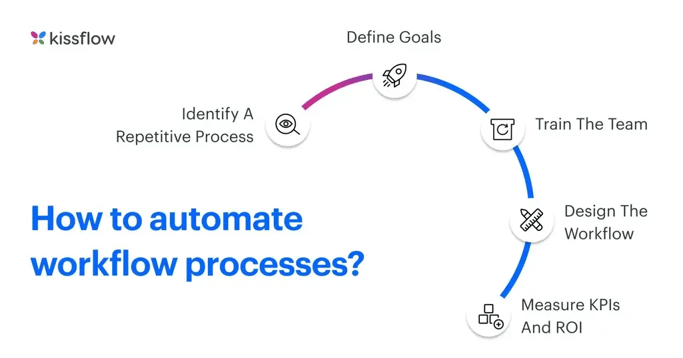
1. Identify a repetitive process
Pick a process that runs often enough to justify the setup effort and stable enough that the rules will not change every month. New-hire IT provisioning qualifies. Quarterly strategy reviews do not.
Two questions to ask before building: is this process mature? Does the team owning it actually want it automated, or will they resist it?
2. Define what success looks like
Before building anything, the team should agree on what the automation is supposed to produce — cycle time down by X, errors down by Y, fewer reminders sent. Without a target, the project has no finish line.
3. Bring the team along
Automation succeeds or fails with the people running the process. Process owners need to see how automation makes their job easier, not replaces their judgment. Communicate the benefit, ask for feedback, adjust before launch.
4. Design the workflow
In the workflow management tool, build the form, define the routing logic, set approval rules, assign permissions. This is the 20 percent of the project that gets 80 percent of the attention and it is not where automation usually fails.
5. Measure KPIs and iterate
Compare pre- and post-automation data. Where did cycle time actually drop? Where is the new workflow still slower than expected? The first version is rarely the right version expect to spend the first 60 to 90 days after launch refining rules.
Related: enterprise workflow management software.
Workflow automation example use casesFour processes where automation returns the most value in the first year:
- Lead generation and management
- Employee onboarding
- Invoice processing
- Contract approval and renewal
Lead generation and management
A prospect moves through awareness, interest, desire, and action. Each stage needs a different message at a different time. Marketing automation pulls data from the CRM, triggers the right email sequence, hands qualified leads to sales when scoring thresholds are met, and flags leads that go cold. No one forwards a spreadsheet.
Employee onboarding
A new hire needs an offer letter, forms, equipment, access to systems, a team introduction, and a first-day schedule. The HR team's job is to provide the experience, not to email every department one by one. A workflow system assigns tasks across IT, facilities, payroll, and the hiring manager, and keeps the new hire informed of what is coming next.
Invoice processing
Invoice workflows cover receipt, matching against purchase orders, routing for approval, payment scheduling, reconciliation, and reporting. Each step is rule-based. Automation turns a process that typically takes a week of finance attention into one that takes an hour, with every invoice traceable.
Contract approval and renewal
Legal and procurement teams lose contracts in the calendar gap between signing and renewal. A workflow system sends alerts at 90, 60, and 30 days before expiration, routes renewals through legal, commercial, and finance, and archives signed documents in the contract repository. The business stops auto-renewing contracts it meant to renegotiate.
Success metrics for workflow automation
Five measurable outcomes worth tracking after launch:
- Cycle time - how long a process takes from start to finish, measured before and after.
- Cost per transaction - labour, rework, and delay cost divided by process volume.
- Error rate - submissions rejected or sent back for correction.
- Employee time recovered - hours freed up per role per week.
- Employee and customer satisfaction - captured through short quarterly surveys, not annual engagement data.
One signal matters more than the rest: whether the process owner trusts the automation enough to stop checking it manually. That is the real adoption marker.
Challenges in workflow automation and how to overcome them
Automation has genuine tradeoffs. Five derail most projects; here is what actually works for each.
1. Resistance to change
The HR team that has run onboarding manually for ten years reads automation as their process being replaced. The reaction is not irrational; it is a reasonable assumption until someone shows them otherwise.
What works: show the HR team their own new role fewer emails, more time with the new hire, better data on where onboarding slows down. Involve them in the workflow design. Ship quick wins in the first month.
2. Undefined processes
A workflow automation system magnifies a broken process. Automate a chaotic procurement flow and the result is a chaotic procurement flow that breaks faster.
What works: map the current process before touching the automation tool. Talk to every participant. Find the undocumented exceptions there are always more than the process owner admits. Clean the process on paper, then automate it.
3. Legacy system integration
Legacy systems are the tax on enterprise automation. A 20-year-old core banking system was not designed to exchange structured data with a modern workflow platform, and making it work is usually the longest part of the project.
What works: choose a workflow platform with pre-built connectors, solid API support, and a history of legacy integration. Phase the integration. Do not try to replace the legacy system; get data flowing cleanly to and from it.
4. Upfront investment
Enterprise automation is not cheap, and the ROI curve is real but delayed. Licensing, implementation, change management, ongoing admin the CFO sees real costs before seeing returns.
What works: start with one process that has strong, measurable ROI - expense claims, access requests, vendor onboarding. Use the first win to fund the next project. This is how automation programmes earn permission to expand.
5. Data security concerns
Workflow systems handle employee records, vendor data, financial information, and customer details. Breaches are not hypothetical, and the compliance team is right to push back hard.
What works: pick a platform with enterprise-grade security built in encryption at rest and in transit, role-based access, audit logging, SSO, and compliance certifications relevant to the industry (HIPAA for healthcare, SOC 2, GDPR readiness). Involve security and compliance teams before procurement, not after.
Automate workflows efficiently with Kissflow
Kissflow is a workflow automation platform built for business teams and IT together. Non-developers configure forms and routing without writing code; developers extend the platform with APIs, custom integrations, and governance controls when enterprise complexity requires it.
Customers include Puma Energy (vendor management), McDermott (engineering workflows), SN Aboitiz (operations), TotalEnergies (procurement), Motorola Solutions (employee services), and Lenskart (retail operations).
Get started or book a demo to see the platform in action.
FAQs on workflow automation
1. What is the definition of workflow automation?
Workflow automation is software that runs a business process from start to finish assigning tasks, routing approvals, triggering notifications, and moving data between systems without manual intervention at each step. It saves time, cuts error rates, and produces an audit trail of every decision.
2. What are some examples of workflow automation processes?
The most common starting points:
- Employee onboarding
- Leave and time-off approvals
- Invoice processing
- Purchase order routing
- Customer support ticket assignment
- Vendor onboarding and contract renewals
These are rule-based, high-volume, and cross-functional the three conditions where automation returns the most value.
3. What is the difference between workflow automation and RPA?
Workflow automation runs a structured business process forms, approvals, routing rules on a platform designed for the full cycle.
Robotic Process Automation (RPA) mimics a human clicking through screens to move data between systems that do not integrate natively. The two work together: RPA bridges legacy gaps, and workflow automation runs the process above them.
4. How does AI improve workflow automation?
AI adds four capabilities to workflow automation: extracting structured data from unstructured inputs (invoices, contracts, emails), predicting bottlenecks before they happen, routing based on content and context rather than fixed rules, and suggesting process improvements based on execution patterns.
The practical effect: processes that used to need human judgment at several steps can now run with human judgment at only the exceptions.
5. What industries benefit most from workflow automation?
Financial services (loan origination, compliance reporting), healthcare (patient scheduling, insurance verification), legal services (contract management, matter intake), manufacturing (quality workflows, maintenance requests), oil and gas (permit-to-work, HSE reporting), and public sector (permit applications, citizen services).
Any industry running many rule-based, multi-party processes qualifies, which is most of them.
Related Articles

8 MINUTES READ
Best AI Workflow Automation Tools for Enterprise in 2026
8 MINUTES READ
How Kissflow Simplifies ERP Workflows
8 MINUTES READ
5 Signs You Need Workflow Automation Now











