
Interactive maps are used to visualize the data based on the geo-location category. any large dataset which contains a lot of geo-location data like cities, states, countries, etc can be plotted easily. bokeh is an open-source package, which uses the Bokeh visualization tool. It gives a flexible declarative interface for dynamic web-based visualizations as well as an interactive dashboard.
Prerequisite: Data Visualization using Bokeh
Example 1: In this example, we will create an exemplary dataset and then plot a Map using that Coordinates.
| X-Coordinate | Y-Coordinate | Data |
| -100833 | 5211172 | GeeksForGeeks |
| -100833 | 3086289 | GeeksForGeeks |
| -9754910 | 5142738 | GeeksForGeeks |
| 1999900 | 12738 | GeeksForGeeks |
| -7100000 | -2425502 | GeeksForGeeks |
Approach:
- Import Library.
- Initialize the tile provider.
- Provide the data needed to be displayed to the tuple.
- Pass height, width, and ranged x,y coordinates to figure(width, height) function.
- Add title.
- Provide the required coordinates to the circle function.
- Mention circle size and color.
- After circling display using show() function.
# Python program to make an
# interactive map using bokeh library
from bokeh.tile_providers import get_provider, Vendors

# Including Positron Map
tile_provider = get_provider(Vendors.CARTODBPOSITRON)

# Provide the data tuple needed
# to be display while hovering.
tooltips = ("GeeksForGeeks")

# Creating Map object
m = figure(title='World Map', plot_width=650,
           plot_height=400, x_range=(-12000000, 9000000),
           y_range=(-1000000, 7000000), x_axis_type='mercator',
           y_axis_type='mercator', tooltips=tooltips)

# Adding title
m.add_tile(tile_provider)

# Circling the coordinates.
m.circle(x=-100833, y=5211172, size=15, color='red')
m.circle(x=-100833, y=3086289, size=15, color='blue')
m.circle(x=-9754910, y=5142738, size=15, color='orange')
m.circle(x=1999900, y=12738, size=15, color='green')
m.circle(x=-7100000, y=-2425502, size=15, color='black')

# Displaying the Map using show function
show(m)
Output:

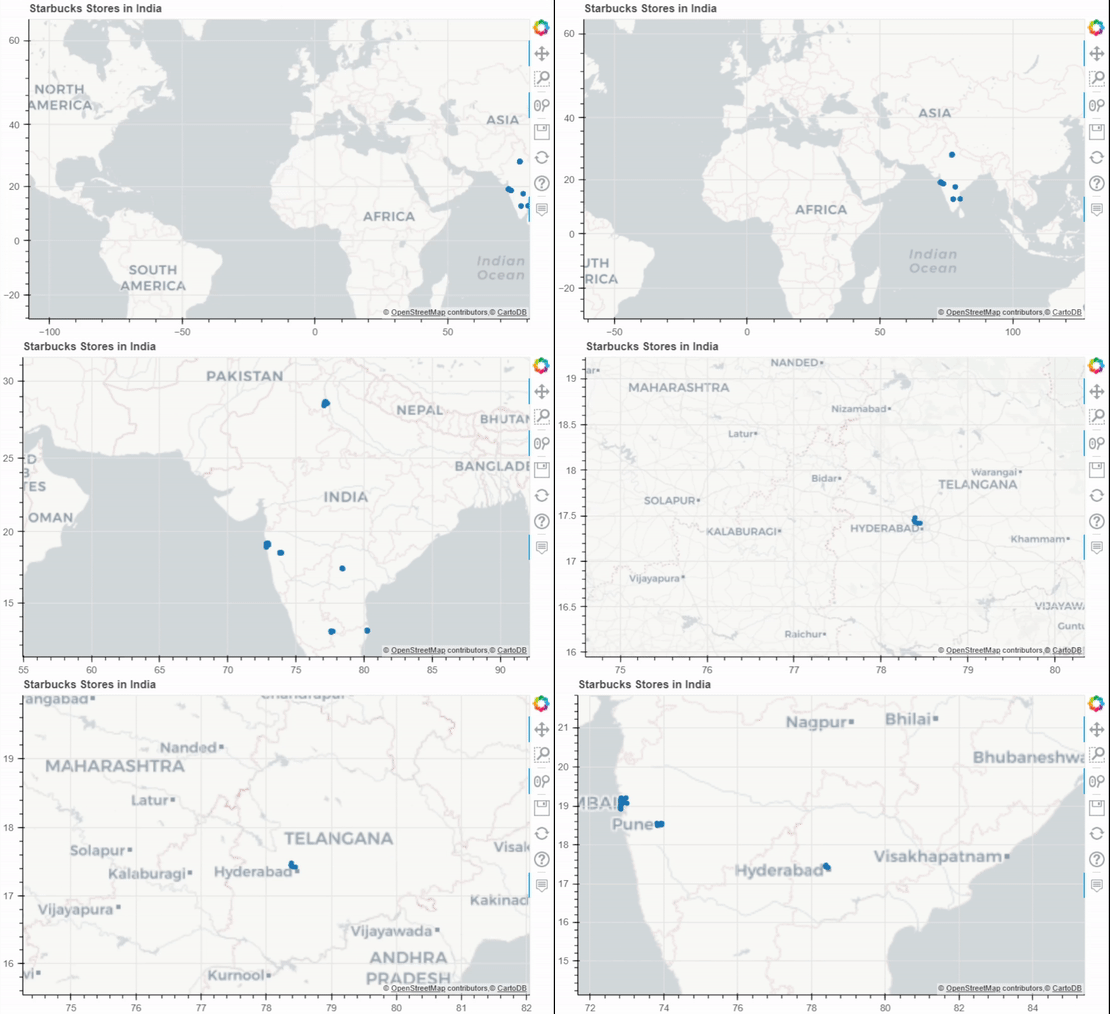
Example 2: Scatter Map for India Starbucks Stores Dataset.

Pyproj: Pyproj is used to Perform cartographic transformations. Converts from longitude, latitude to native map projection x,y coordinates.
Approach:
- Import Required Libraries and functions.
- Initialise the tile provider.
- Preprocess the data needed to be displayed.
- Initialize the outproj and inproj.
- Convert the Respective Longitudes and Latitudes to MercatorX and MercatorY using Pyproj i.e x, y axis.
- Pass height, width and ranged x,y coordinates to figure(width, height) function.
- Add the title needed to be Displayed.
- Provide required coordinates to the circle function.
- Mention circle size and color.
- After circling display using show() function.
# Python program to make an interactive map using bokeh library.
# Importing Dataset.
from bokeh.io import output_notebook, show
from bokeh.plotting import figure
from bokeh.tile_providers import get_provider, Vendors
from pyproj import Proj, transform
import pandas as pd
df = pd.read_csv("./starbucks.csv")

# Initializing pyproj for Converting from longitude,
# latitude to native map projection x, y coordinates.
inProj = Proj(init='epsg:3857')
outProj = Proj(init='epsg:4326')

# Subsetting for indian dataset.
df = df[df.Country == "IN"]
lons, lats = [], []

# Converting Longitude and Latitude to x,y coordinates.
for lon, lat in list(zip(df["Longitude"], df["Latitude"])):
    x, y = transform(outProj, inProj, lon, lat)
    lons.append(x)
    lats.append(y)

# Storing the coordinates.
df["MercatorX"] = lons
df["MercatorY"] = lats

# Renaming Columns for Tooltips
df = df.rename(columns={"Store Name": "Name", "State/Province": "State"})

# Importing all important functions
# for map creation and interaction.

# Including Positron Map.
tile_provider = get_provider(Vendors.CARTODBPOSITRON)

# Provide the data tuple needed to be display while hovering.
tooltips = [("State", "@State"), ('Name', '@Name')]

# Creating Map object.
m = figure(title='Starbucks Stores in India', plot_width=650,
           plot_height=400, x_range=(-12000000, 9000000),
           y_range=(-1000000, 7000000),
           x_axis_type='mercator', y_axis_type='mercator',
           tooltips=tooltips)

# Adding title.
m.add_tile(tile_provider)
m.circle(x='MercatorX', y='MercatorY', size=5, source=df)

# Displaying the Map using show function.
show(m)
Output:
Example 3: Connection Map for America Airport Dataset.
# Importing Airports2 Dataset which
# represent american flight travel data.
from bokeh.io import show
from bokeh.tile_providers import STAMEN_TERRAIN, STAMEN_TONER
from bokeh.plotting import figure
from pyproj import Proj, transform
import pandas as pd
df = pd.read_csv("./Airports2.csv")

# Hence Dataset is huge so selecting fewer rows.
df = df[1:1000]

# Converting Longitude and Latitudes to x,y coordinates
inProj = Proj(init='epsg:3857')
outProj = Proj(init='epsg:4326')
cols = ['Dest_airport_long', 'Dest_airport_lat',
        'Org_airport_long', 'Org_airport_lat']
lines_x, lines_y = [], []
lons, lats = [], []
for lon_dest, lat_dest, lon_orig, lat_orig in df[cols].values:
    lon_orig, lat_orig = transform(outProj, inProj, lon_orig, lat_orig)
    lon_dest, lat_dest = transform(outProj, inProj, lon_dest, lat_dest)

# Append converted Coordinates.
    lons.append(lon_dest)
    lats.append(lat_dest)

# Creating Source and Destination points for connections.
    lines_x.append([lon_orig, lon_dest])
    lines_y.append([lat_orig, lat_dest])

# Two way connection points
df["MercatorX"] = lons
df["MercatorY"] = lats

# Loading Important Functions and Libraries

# Hence Connections needed to be represented so,
# selecting STAMEN_TONER
stamen_toner = get_provider(STAMEN_TONER)

# Selecting world coordinates
lon1, lat1 = transform(outProj, inProj, -150, -75)
lon2, lat2 = transform(outProj, inProj, 140, 75)

# Pass source-destination connections,
# tooltips to be displayed and title
m = figure(plot_width=800, plot_height=700,
           x_range=(lon1, lon2), y_range=(lat1, lat2),
           x_axis_type="mercator", y_axis_type="mercator",
           tooltips=[("Origin_city", "@Origin_city"),
                     ("Destination_city", "@Destination_city")],
           title="Flight Travels in America")

# Add tile for stamen_toner
m.add_tile(stamen_toner)

# Drawing Multiple Lines.
m.multi_line(lines_x, lines_y, color="red")

# Circling the points and lines
m.circle(x="MercatorX", y="MercatorY", size=2,
         alpha=0.8, color="red", source=df)

# Displaying the map.
show(m)
Output:

