
Java operators are special symbols that perform operations on variables or values. These operators are essential in programming as they allow you to manipulate data efficiently.
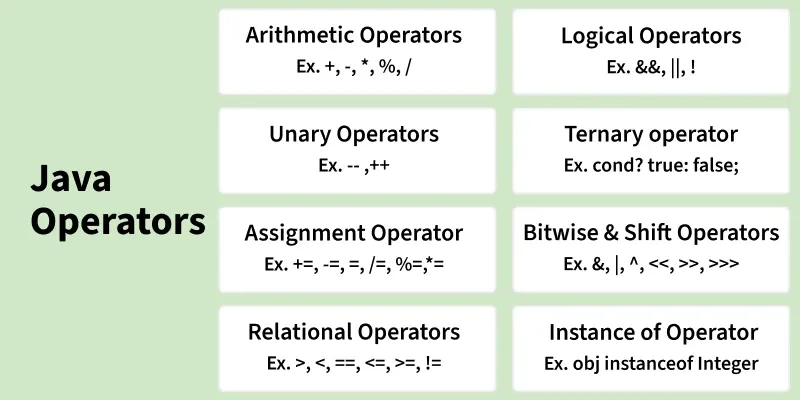
1. Arithmetic Operators
Arithmetic Operators are used to perform simple arithmetic operations on primitive and non-primitive data types.
public class GFG{
    public static void main(String[] args) {
        int a = 10, b = 3;

        // Addition
        int sum = a + b;

        // Subtraction
        int diff = a - b;

        // Multiplication
        int mul = a * b;

        // Division
        int div = a / b;

        // Modulus
        int mod = a % b;      // Modulus

        System.out.println("Sum: " + sum);
        System.out.println("Difference: " + diff);
        System.out.println("Multiplication: " + mul);
        System.out.println("Division: " + div);
        System.out.println("Modulus: " + mod);
    }
}
Output
Sum: 13
Difference: 7
Multiplication: 30
Division: 3
Modulus: 1
Explanation:
- Two variables a = 10 and b = 3 are used to perform arithmetic operations.
- Operators like +, -, *, /, and % are applied to calculate sum, difference, product, division, and remainder.
- Integer division (a / b) returns only the quotient (3), ignoring decimals.
- The results of each operation are stored in variables and printed.
2. Unary Operators
Unary Operators need only one operand. They are used to increment, decrement, or negate a value.
import java.io.*;

// Driver Class
class Geeks{

    public static void main(String[] args){

        // Integer declared
        int a = 10;
        int b = 10;

        // Using unary operators
        System.out.println("Postincrement : " + (a++));
        System.out.println("Preincrement : " + (++a));

        System.out.println("Postdecrement : " + (b--));
        System.out.println("Predecrement : " + (--b));
    }
}
Output
Postincrement : 10
Preincrement : 12
Postdecrement : 10
Predecrement : 8
Explanation:
- Unary operators work on a single operand (
aandb). - Post-increment (
a++) returns the value first, then increments it. - Pre-increment (
++a) increments first, then returns the updated value. - Same behavior applies to decrement operators (
--).
3. Assignment Operator
The assignment operator assigns a value from the right-hand side to a variable on the left. Since it has right-to-left associativity, the right-hand value must be declared or constant.
public class GFG {
    public static void main(String[] args) {

        // initial value
        int num = 10;
        System.out.println("Initial: " + num);

        // add 5 → num = num + 5
        num += 5;
        System.out.println("After +5: " + num);

        // multiply by 2 → num = num * 2
        num *= 2;
        System.out.println("After *2: " + num);

        // subtract 5 → num = num - 5
        num -= 5;
        System.out.println("After -5: " + num);

        // divide by 2 → num = num / 2
        num /= 2;
        System.out.println("After /2: " + num);

        // remainder after dividing by 3 → num = num % 3
        num %= 3;
        System.out.println("After %3: " + num);
    }
}
Output
Initial: 10
After +5: 15
After *2: 30
After -5: 25
After /2: 12
After %3: 0
Explanation:
- The variable num starts with an initial value of 10 and is updated step by step.
- Compound operators like +=, *=, -=, /=, %= perform operation and assignment together.
- Each statement changes the same variable, so the result depends on the previous step.
- The output shows how the value of num changes after each operation.
Note: Use compound assignments (+=, -=) for cleaner code.
4. Relational Operators
Relational Operators are used to check for relations like equality, greater than, and less than. They return boolean results after the comparison and are extensively used in looping statements as well as conditional if-else statements.
import java.io.*;

class Geeks{

    public static void main(String[] args){

        // Comparison operators
        int a = 10;
        int b = 3;
        int c = 5;

        System.out.println("a > b: " + (a > b));
        System.out.println("a < b: " + (a < b));
        System.out.println("a >= b: " + (a >= b));
        System.out.println("a <= b: " + (a <= b));
        System.out.println("a == c: " + (a == c));
        System.out.println("a != c: " + (a != c));
    }
}
Output
a > b: true
a < b: false
a >= b: true
a <= b: false
a == c: false
a != c: true
Explanation:
- Variables a, b, and c are compared using relational operators.
- Operators like >, <, >=, <=, ==, != return boolean values.
- These comparisons help in decision-making (if-else, loops).
- Each expression prints either true or false based on the condition.
5. Logical Operators
Logical Operators are used to perform "logical AND" and "logical OR" operations, similar to AND gate and OR gate in digital electronics. They have a short-circuiting effect, meaning the second condition is not evaluated if the first is false.
import java.io.*;

class Geeks {

      // Main Function
    public static void main (String[] args) {

        // Logical operators
        boolean x = true;
        boolean y = false;

        System.out.println("x && y: " + (x && y));
        System.out.println("x || y: " + (x || y));
        System.out.println("!x: " + (!x));
    }
}
Output
x && y: false
x || y: true
!x: false
Explanation:
- Boolean variables x and y are used to perform logical operations.
- && (AND) returns true only if both conditions are true.
- || (OR) returns true if at least one condition is true.
- ! (NOT) reverses the boolean value.
6. Ternary operator
The Ternary Operator is a shorthand version of the if-else statement. It has three operands and hence the name Ternary. The general format is,
public class Geeks{

    public static void main(String[] args){

        int a = 20, b = 10, c = 30, result;

        // result holds max of three
        // numbers
        result = ((a > b) ? (a > c) ? a : c : (b > c) ? b : c);
        System.out.println("Max of three numbers = "+ result);
    }
}
Output
Max of three numbers = 30
Explanation:
- The ternary operator is used as a shortcut for if-else conditions.
- It evaluates multiple conditions to find the maximum among three numbers.
- Syntax:
(condition) ? value1 : value2. - Nested ternary operators are used here for compact decision-making.
7. Bitwise Operators
These operators perform operations at the bit level.
- Bitwise Operators manipulate individual bits using AND, OR, XOR, and NOT.
- Shift Operators move bits to the left or right, effectively multiplying or dividing by powers of two.
import java.io.*;

class Geeks
{
    public static void main(String[] args)
    {
        // Bitwise operators
        int d = 0b1010;
        int e = 0b1100;

        System.out.println("d & e : " + (d & e));
        System.out.println("d | e : " + (d | e));
        System.out.println("d ^ e : " + (d ^ e));
        System.out.println("~d : " + (~d));
        System.out.println("d << 2 : " + (d << 2));
        System.out.println("e >> 1 : " + (e >> 1));
        System.out.println("e >>> 1 : " + (e >>> 1));
    }
}
Output
d & e : 8
d | e : 14
d ^ e : 6
~d : -11
d << 2 : 40
e >> 1 : 6
e >>> 1 : 6
Explanation:
- Binary values d and e are used to perform bit-level operations.
- Operators like &, |, ^, ~ manipulate individual bits.
- Shift operators (<<, >>, >>>) move bits left or right.
- These operations are useful in low-level programming and optimizations.
8. instanceof Operator
The instanceof operator is used for type checking. It can be used to test if an object is an instance of a class, a subclass, or an interface. The general format,
public class GFG{

    public static void main(String[] args){

        String str = "Hello";
        System.out.println(str instanceof String);

        Object obj = new Integer(10);
        System.out.println(obj instanceof Integer);
        System.out.println(obj instanceof String);
    }
}

Output
true
true
false
Explanation:
- The instanceof operator checks the type of an object at runtime.
- It returns true if the object belongs to a specific class or type.
- str instanceof String confirms the type of the string object.
- It helps ensure type safety and avoid runtime errors.
Common Mistakes to Avoid
The common mistakes that can occur when working with Java Operators are listed below:
- Confusing == with =: Using == for assignment instead of = for equality check leads to logical errors.
- Incorrect Use of Floating Point Comparison: Comparing floating point numbers using == can lead to unexpected results due to precision issues.
- Integer Division Confusion: Dividing two integers will result in integer division (truncating the result).
- Overusing + for String Concatenation in Loops: Using + for concatenating strings in loops leads to performance issues because it creates new string objects on each iteration.
