
In JavaScript, classes and objects are basic concepts of Object Oriented Programming (OOPs) that are used to represent real-world concepts and entities.
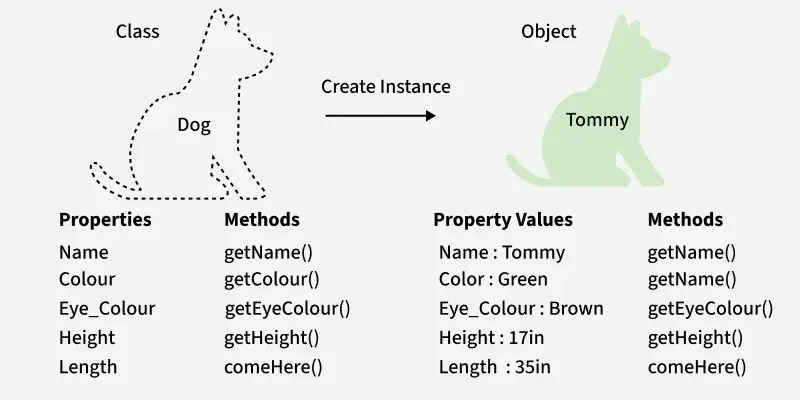
- A class is a template to create objects having similar properties and behavior, or in other words, we can say that a class is a blueprint for objects.
- An object is an instance of a class. For example, the animal type Dog is a class, while a particular dog named Tommy is an object of the Dog class.
JavaScript Classes
A class in JavaScript is a blueprint used to create objects that share similar properties and methods. It’s a cleaner, more structured way to implement object-oriented programming compared to the older prototype-based approach.
Constructor Method
The constructor is a special method inside a JavaScript class that executes automatically when a new object is created using the new keyword. It is primarily used to initialize the object's initial state.
- Assigns and initializes instance properties using this.
- Runs automatically once during object creation.
Creating a JavaScript Class: A JavaScript class is created using the class keyword to define a blueprint for objects.
// define a class
class Dog {
    // class property
    static sound = "bark";

    constructor(name) {
        // instance property
        this.name = name;
    }
}
- static sound: Belongs to the class itself.
- this.name: Belongs to each individual object (instance).
JavaScript Class Methods: Defining class methods in JavaScript is easy and simple, we just need to add () following a method name.
class Dog {
    constructor(name, breed) {

        // instance property
        this.name = name;
        this.breed = breed;
    }

    // defining method
    bark() {
        console.log(`${this.name} says woof!`);
    }
}

// creating an object (instance)
const myDog = new Dog("Rayne", "Husky");
myDog.bark();
Output
Rayne says woof!
Class Getters and Setters
We can use getter and setter methods to get the value of an object and set the value of an object. We can use the get keyword for the getter method and the set keyword for the setter methods
Example: The code below demonstrates the creation and different implementations of JavaScript Classes.
class Dog {
  constructor(name) {
    this.name = name;
  }

  // Getter method
  get dogName() {
    return this.name;
  }

  // Setter method
  set dogName(newName) {
    this.name = newName;
  }

  // Regular method
  bark() {
    console.log(`${this.name} says woof!`);
  }
}

// creating an object
let myDog = new Dog('Rayne');
console.log(myDog.name);

myDog.dogName = 'Buddy';
console.log(myDog.name);

myDog.bark();
Output
Rayne
Buddy
Buddy says woof!
Object
An object in JavaScript is an instance of a class that represents a real-world entity. It holds its own data and can access the methods defined within its class.
- Each object contains unique values for its instance properties.
- Multiple objects can be created from the same class blueprint.
Let’s create an object from the Dog class:
class Dog {
    // Static (class) property
    static sound = "bark";

    // Instance property
    constructor(name) {
        this.name = name;
    }
}

// Create objects
let dog1 = new Dog("Rayne");
let dog2 = new Dog("Buddy");

console.log(dog1.name);
console.log(dog2.name);
console.log(Dog.sound);
Output
Rayne
Buddy
bark
- name is an instance property, meaning each object has its own value.
- sound is a static (class) property, shared by all instances.
- Static properties are accessed using the class name (Dog.sound), not directly through an object.
JavaScript Object Properties
In JavaScript the members inside the object which are the key: values are called Object properties.
Example: In the above code, name is an object property (unique to each instance), and sound is a class property (shared by all instances of the class).
To Access Object Properties:
1. Using dot Notation:
Used to access an object’s property directly by writing the object name followed by a dot and the property name.
Syntax:
object_name.key_12. Using bracket Notation:
Used to access an object’s property by passing the property name as a string inside square brackets.
Syntax:
object_name["key_1"]JavaScript Nested Objects
A nested object is an object that contains another object as the value of one of its properties.
const dog = {
    name: "Rayne",
    breed: "Husky",
    details: {
        height: "18 inches",
        weight: "30 pounds"
    }
};
JavaScript Object Methods
In JavaScript, we can add methods to Objects.
Example: We can see how we can apply JavaScript nested objects and also use the different accessing methods.
const Dog = {
    breed: 'Husky',
    color: 'Gray & White',
    details: {
        height: '18 inches',
        weight: '30 pounds'
    }
};

console.log(Dog.breed);
console.log(Dog.details.height);
console.log(Dog["color"]);
console.log(Dog.details["weight"]);
Output
Husky
18 inches
Gray & White
30 pounds
