
The Normal (Gaussian) Distribution is a commonly used probability distribution that models natural data such as test scores, heights, sensor readings and measurement variations.
In NumPy, we generate values from a Normal Distribution using the numpy.random.normal() method, which makes it simple to create realistic, statistically consistent data for analysis and simulations.
Example: This example generates one random number from a standard normal distribution where mean = 0 and standard deviation = 1.
import numpy as np
x = np.random.normal()
print(x)
Output
-0.972649003393483
Explanation: np.random.normal() generates one random value using default parameters loc=0 and scale=1.
Syntax
numpy.random.normal(loc=0.0, scale=1.0, size=None)
Parameters:
- loc: Mean (center) of the distribution.
- scale: Standard deviation (spread).
- size: Shape of the output (single value, list, matrix, etc.).
Examples
Example 1: This example returns one normally distributed value using default mean and standard deviation.
import numpy as np
x = np.random.normal()
print(x)
Output
0.25448403920265805
Explanation: np.random.normal() generates one random value using default mean 0 and std 1.
Example 2: This example creates a 1-D array of five random numbers drawn from a normal distribution.
import numpy as np
arr = np.random.normal(size=5)
print(arr)
Output
[ 1.15952571 -0.08602516 -1.52141403 -1.24343932 0.43504395]
Explanation: size=5 produces an array containing 5 normally distributed values.
Example 3: This example generates a 2×3 matrix with mean = 10 and standard deviation = 2, useful for simulations.
import numpy as np
m = np.random.normal(loc=10, scale=2, size=(2, 3))
print(m)
Output
[[ 9.65291001  8.83304941 13.11063692]
 [ 6.23383207  9.80784053 11.20479514]]
Explanation:
- loc=10 shifts the distribution’s center to 10.
- scale=2 spreads values around the mean with std = 2.
- size=(2,3) produces a 2×3 matrix.
Visualizing the Normal Distribution
Visualizing the generated numbers helps in understanding their behavior. Below is an example of plotting a histogram of random numbers generated using numpy.random.normal.
import numpy as np
import matplotlib.pyplot as plt
from scipy.stats import norm

# Generate data
data = np.random.normal(loc=0, scale=1, size=1000)

# Plot histogram
plt.hist(data, bins=30, edgecolor='black', density=True)

# Plot theoretical PDF
x = np.linspace(-4, 4, 200)
pdf = norm.pdf(x, loc=0, scale=1)
plt.plot(x, pdf, label="Theoretical PDF")

plt.title("Normal Distribution")
plt.xlabel("Value")
plt.ylabel("Density")
plt.grid(True)
plt.legend()
plt.show()
Output
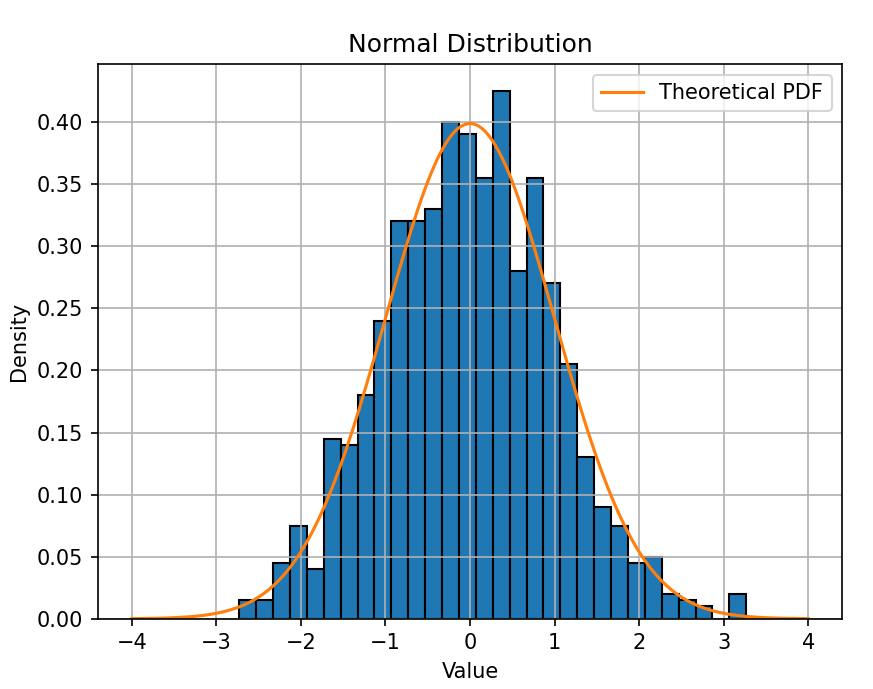
Explanation:
- np.random.normal(loc=0, scale=1, size=1000) generates 1000 values following a standard normal distribution.
- plt.hist(data, density=True) plots the frequency of values, normalized to form a density curve.
- norm.pdf(x, loc=0, scale=1) computes the theoretical bell curve for comparison.
- Plotting both together shows how closely the generated random numbers follow the actual normal distribution.
