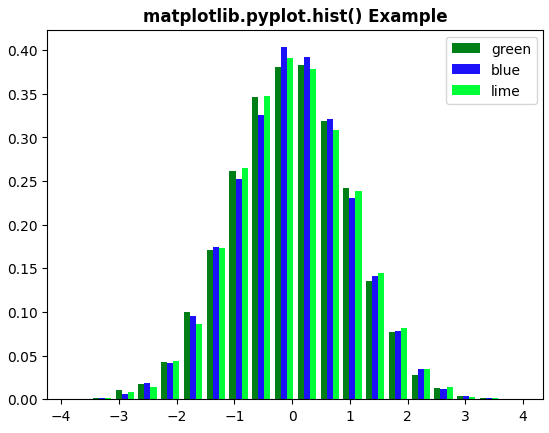
matplotlib.pyplot.hist() function is used to create histograms, which are graphical representations of data distribution. It divides the data into bins (non-overlapping intervals) and counts the frequency of values in each bin, plotting them as bars.
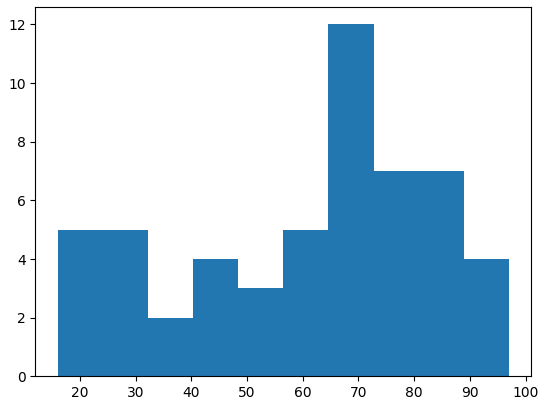
Lets consider the data values and visualise histogram with help of an example:
import matplotlib.pyplot as plt

data = [32, 96, 45, 67, 76, 28, 79, 62, 43, 81, 70,61, 95, 44, 60, 69, 71, 23
       ,69, 54, 76, 67,82, 97, 26, 34, 18, 16, 59, 88, 29, 30, 66,23, 65, 72,
       20, 78, 49, 73, 62, 87, 37, 68,81, 80, 77, 92, 81, 52, 43, 68, 71, 86]
plt.hist(data)
plt.show()
Output
Syntax
matplotlib.pyplot.hist(x, bins=None, range=None, density=False, histtype='bar', color=None, label=None)
Parameters:
- x: data to be represented in the histogram.
- bins: Specifies the number of bins or the bin edges for the histogram.
- range: The lower and upper range of the bins.
- density: If True, the histogram is normalized to form a probability density.
- histtype: Defines the type of histogram (e.g., 'bar' for a traditional bar histogram).
- color: Sets the color of the bars.
- label: Label for the histogram, used in legends.
Create a Histogram in Matplotlib
Example 1: In this example, we will create a histogram and pass the necessary parameters such as bins, color, density, etc.
import matplotlib.pyplot as plt
import numpy as np

mu, sigma = 121, 21
x = np.random.normal(mu, sigma, 1000)

num_bins = 100
n, bins, _ = plt.hist(x, num_bins, density=True, color='green', alpha=0.7)

plt.xlabel('X-Axis')
plt.ylabel('Y-Axis')
plt.title('matplotlib.pyplot.hist() Example', fontweight='bold')

plt.show()
Output
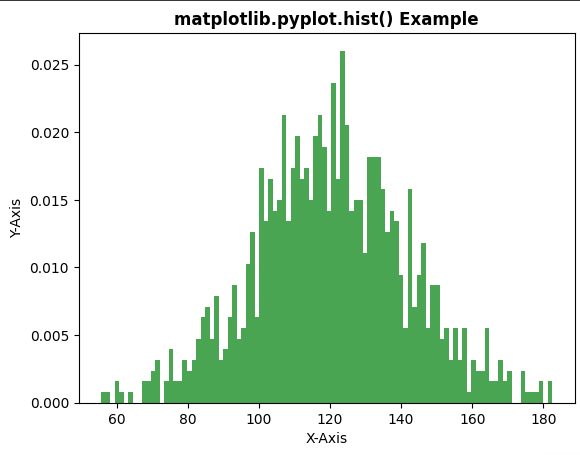
Note: In this example, density=True is used in plt.hist(). When this parameter is enabled, histogram is normalized and y-axis represents probability density instead of frequency counts. Because of this, values on the vertical axis may appear as decimal numbers instead of whole numbers.
Example 2: In this example, we will create a histogram with different attributes using matplotlib.pyplot.hist() function. We define a specific set of colors for the bars of the histogram bars.
import numpy as np
import matplotlib.pyplot as plt

x = np.random.randn(10000, 3)
colors = ['green', 'blue', 'lime']

plt.hist(x, bins=20, density=True, histtype='bar', color=colors, label=colors)

plt.legend(fontsize=10)
plt.title('matplotlib.pyplot.hist() Example', fontweight='bold')

plt.show()
Output