
Object-oriented programming (OOP) allows to model real-world entities in code, making programs more organized, reusable and easier to maintain. By grouping related data and behavior into a single unit, classes and objects help write cleaner, more logical code for everything from small scripts to large applications.
Class
A class is a user-defined template for creating objects. It bundles data and functions together, making it easier to manage and use them. When we create a new class, we define a new type of object. We can then create multiple instances of this object type.
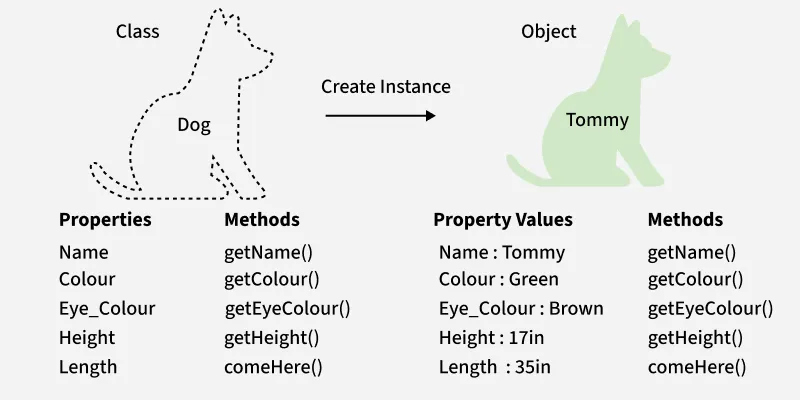
Creating Class
Classes are created using class keyword. Attributes are variables defined inside class and represent properties of the class. Attributes can be accessed using dot . operator (e.g., MyClass.my_attribute).
# define a class
class Dog:
    sound = "bark"  # class attribute
Object
An object is a specific instance of a class. It holds its own set of data (instance variables) and can invoke methods defined by its class. Multiple objects can be created from same class, each with its own unique attributes.
Let's create an object from Dog class.
class Dog:
    sound = "bark"

dog1 = Dog() # Creating object from class
print(dog1.sound) # Accessing the class
Output
bark
Explanation: sound attribute is a class attribute. It is shared across all instances of Dog class, so can be directly accessed through instance dog1.
Initiate Object with __init__()
__init__() method acts as a constructor and is automatically executed when an object is created. It is used to initialize the attributes of the object with the values provided at the time of object creation.
class Dog:
    species = "Canine"  # Class attribute

    def __init__(self, name, age):
        self.name = name  # Instance attribute
        self.age = age  # Instance attribute

# Creating an object of the Dog class
dog1 = Dog("Buddy", 3)

print(dog1.name)
print(dog1.species)
Output
Buddy
Canine
Explanation:
- self refers to the current object and is used to store data inside it.
- Dog("Buddy", 3) creates an object and passes values to __init__().
- self.name and self.age store the object’s name and age.
- dog1.name accesses the object’s instance attribute and dog1.species accesses the shared class attribute.
__str__() Method
__str__ method allows us to define a custom string representation of an object. By default, when we print an object or convert it to a string using str(), Python uses the default implementation, which returns a string like <__main__.ClassName object at 0x00000123>.
Take an example of using __str__() method to provide a readable string output for an object:
class Dog:
    def __init__(self, name, age):
        self.name = name
        self.age = age

    def __str__(self):
        return f"{self.name} is {self.age} years old."
dog1 = Dog("Buddy", 3)
dog2 = Dog("Charlie", 5)

print(dog1)
print(dog2)
Explanation:
- __str__ Implementation: Defined as a method in Dog class. Uses self parameter to access instance's attributes (name and age).
- Readable Output: When print(dog1) is called, Python automatically uses __str__ method to get a string representation of object. Without __str__, calling print(dog1) would produce something like <__main__.Dog object at 0x00000123>.
To know about Class and Instance variable, refer to this article Class (Static) and Instance Variables in Python.
