The SimpleJDBCTemplate includes all the features and functionalities of the JdbcTemplate class, and it also supports the Java 5 features such as var-args(variable arguments) and autoboxing. Along with the JdbcTemplate class, it also provides the update() method, which takes two arguments the SQL query and arbitrary arguments that depend upon the SQL query. In order to access the methods of the old JdbcTemplate class, we use the getJdbcOperations() method and we call all those methods over SimpleJdbcTemplate.
Key features of Spring SimpleJdbcTemplate:
- Simplified database operations with parameterized queries.
- Support for Java 5 features like var-args and autoboxing.
- Backward compatibility with JdbcTemplate methods using getJdbcOperations().
- Seamless integration for Spring database operations.
Note: We need to pass the parameters inside the update() method in the same order we defined them in the parameterized query.
Syntax for update() method
int update(String sqlQuery, Object parameters)
Step-by-Step Implementation
In this example, we will update a student's details using the update() method of the SimpleJDBCTemplate class. For this tutorial, we will be using the following schema for the Student table.
Student(id INT, name VARCHAR(45), department VARCHAR(45))
Step 1: Create the Student Table
In this step, we will create a Student table to store students' information. For this tutorial, we will assume you have created the following table in your database.
CREATE TABLE STUDENT(
id INT PRIMARY KEY,
name VARCHAR(45),
department VARCHAR(45)
);
After creating the table we will insert the following data in our table.
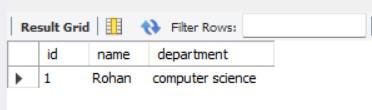
INSERT INTO STUDENT VALUES(1, "geek", "computer science");
Step 2: Adding dependencies
To use Spring JDBC, we need to add the following dependencies to the pom.xml file
<dependencies>
    <!-- Spring JDBC Dependency -->
    <dependency>
        <groupId>org.springframework</groupId>
        <artifactId>spring-jdbc</artifactId>
        <version>5.3.23</version> <!-- Use the latest stable version -->
    </dependency>

    <!-- Database Driver (Example: MySQL) -->
    <dependency>
        <groupId>mysql</groupId>
        <artifactId>mysql-connector-java</artifactId>
        <version>8.0.33</version> <!-- Use the version compatible with your database -->
    </dependency>
</dependencies>
Note: Replace the database driver with the appropriate one for your database (e.g., H2, PostgreSQL).
Step 3: Create a model class
Create a Student class to represent the student entity. This class will have three fields: id, name, and department. Include constructors, getters, setters, and a toString() method.
public class Student {
    // member variables
    private int id;
    private String name;
    private String department;

    // no args constructor
    public Student(){}

    // parameterized constructor
    public Student(int id, String name, String department) {
        super();
        this.id = id;
        this.name = name;
        this.department = department;
    }

    // getters and setters method
    public int getId() {
        return id;
    }
    public void setId(int id) {
        this.id = id;
    }
    public String getName() {
        return name;
    }
    public void setName(String name) {
        this.name = name;
    }
    public String getDepartment() {
        return department;
    }
    public void setDepartment(String department) {
        this.department = department;
    }

    // toString() method
    @Override
    public String toString() {
        return "Student [id=" + id + ", name=" + name + ", department=" + department + "]";
    }
}
Step 4: Create a DAO class
In this step, we will create a StudentDao.java class. In this class, we will define SimpleJdbcTemplate and update() method and provide its definition to update our data.
import org.springframework.jdbc.core.JdbcTemplate;
import org.springframework.dao.DataAccessException;
import javax.sql.DataSource;

public class StudentDao {

    // Defining JdbcTemplate as a member variable
    private JdbcTemplate jdbcTemplate;

    // Constructor - used to inject DataSource using constructor injection
    public StudentDao(DataSource dataSource) {
        this.jdbcTemplate = new JdbcTemplate(dataSource);
    }

    // Method to update student details
    public int update(Student student) {
        String sqlQuery = "UPDATE student SET name = ? WHERE id = ?";

        try {
            // Execute the update query
            return jdbcTemplate.update(sqlQuery, student.getName(), student.getId());
        } catch (DataAccessException e) {

            // Handle database-related exceptions
            System.err.println("Error updating student: " + e.getMessage());
            return 0; // Return 0 to indicate failure
        }
    }
}
Note: The update() method of JdbcTemplate takes the SQL query and parameters as arguments. The parameters must be passed in the same order as they appear in the query.
Step 5: Configure Spring Beans
In this step, we will create the Spring configuration file named application-context.xml. This file will define the beans required for database connectivity and dependency injection.
<beans xmlns="http://www.springframework.org/schema/beans/"
       xmlns:xsi="https://www.w3.org/2001/XMLSchema-instance"
       xsi:schemaLocation="http://www.springframework.org/schema/beans/
       http://www.springframework.org/schema/beans//spring-beans.xsd">

    <!-- Database DataSource Configuration -->
    <bean id="dataSource" class="org.springframework.jdbc.datasource.DriverManagerDataSource">
        <property name="driverClassName" value="com.mysql.cj.jdbc.Driver" />
        <property name="url" value="jdbc:mysql://localhost:3306/your_database" />
        <property name="username" value="root" />
        <property name="password" value="password" />
    </bean>

    <!-- StudentDao Bean Configuration -->
    <bean id="studentDao" class="com.geeksforgeeks.dao.StudentDao">
        <constructor-arg ref="dataSource" />
    </bean>
</beans>
Note: Replace the url, username, and password with your actual database credentials.
Step 6: Create a Utility Class for Testing
Now, we will create a Utility class for testing our application. For this create a new class and name it TestSimpleJDBCTemplate.java and add the following code to it.
import org.springframework.context.ApplicationContext;
import org.springframework.context.support.ClassPathXmlApplicationContext;

public class TestJdbcTemplate {
    public static void main(String[] args) {

        // Load the Spring configuration file
        ApplicationContext context = new ClassPathXmlApplicationContext("application-context.xml");

        // Get the StudentDao bean
        StudentDao studentDao = context.getBean("studentDao", StudentDao.class);

        // Update student details
        int rowsUpdated = studentDao.updateStudent(1, "updatedName", "updatedDepartment");

        // Verify the result
        if (rowsUpdated > 0) {
            System.out.println("Student details updated successfully!");
        } else {
            System.out.println("Failed to update student details.");
        }
    }
}
Output:
Now, we will run our application. If the update() method will return 1 it means the query is executed successfully otherwise not.
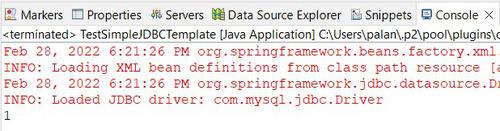
We will also cross-check it by executing the query at the database. We have created a student table and inserted the following data 1, "geek", "computer science" respectively.
SELECT * FROM STUDENT WHERE id = 1;