

Inline indexes in SQL Server allow you to define clustered, nonclustered, and filtered indexes directly within CREATE TABLE syntax – most usefully for table variables, user-defined table types (UDTTs), and multi-statement table-valued functions. Before inline indexes were introduced, table variables could not be indexed beyond the primary key, which made them perform poorly for large intermediate result sets. Inline index syntax solves this without requiring a separate CREATE INDEX statement, and supports the same index options available for regular tables including filtered indexes and composite keys. Requires SQL Server 2014 or later.
Usually, the added features of the CREATE TABLE syntax in new releases of SQL Server are esoteric, and unless you are dealing with memory-optimized tables or other esoteric stuff, they aren’t of great interest. However, the Inline INDEX for both a table and column index has just crept in quietly with SQL Server 2014 (12.x). This was interesting because the SQL Server team back-fitted it to all tables rather than just in-memory OLTP tables for which it was, at the time, found necessary. The new syntax was introduced which allows you to create certain index types inline with the table definition. These could be at column level, concerning just that column, or at the table level, with indexes containing several columns.
Why interesting? This affects multi-statement table functions, user-defined table types, table-valued parameters as well as table variables. It was considered a game-change for table variables because, for a start, it allowed non-unique indexes or explicit clustered indexes to be declared on columns for the first time because you can create indexes on table variables as part of the table definition. Of more significance were the table-level indexes that allowed you to specify multi-column indexes. Previous releases had allowed multi-column primary or unique constraints, but not explicitly named indexes. You still cannot declare an index after the table is created, which is a shame as there are good reasons for being able to do so after a table is stocked with data. Any sort of large import of data into a table that is over-indexed or prematurely-indexed is doomed to crawl rather than to run. I’ll show this later on in this article.
The SQL Server 2014 improvements introduced named indexes for table variables for the first time. I haven’t yet worked out a practical use for explicitly naming such indexes in such ephemeral objects.
The new indexes apply to table variables, multi-statement table-valued functions, user-defined table types and table-valued parameters
The bad news is that no distribution statistics are kept on table variables, so the indexes you create don’t have them either. In some cases, even when using this new syntax, performance isn’t always as effective as using temporary tables, which provide statistics. The most satisfactory workaround is to is to add OPTION (RECOMPILE) to the query referencing the table variable, forcing the optimizer to take the cardinality of the table variable into account after it has been populated. SQL Server 2019 and SQL Azure introduces ‘Table variable deferred compilation’ that obviates the need for the use of the OPTION (RECOMPILE) by using cardinality estimates that are based on actual table variable row counts in order to produce better query plans when compiling queries.
The Syntax
Here are the two syntax diagrams for inline indexes. I’ve corrected them slightly from the MSDN original.
For table variables, multi-statement table functions, and UDTTs:
|
1 2 3 |
<column_index> ::= INDEX index_name { [ NONCLUSTERED ] | [ CLUSTERED ] | [ UNIQUE] } |
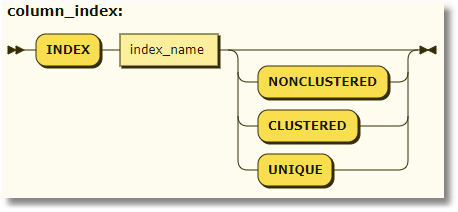
For tables:
|
1 2 3 4 |
<column_index> ::= INDEX index_name { [ NONCLUSTERED ] | [ CLUSTERED ] | [ UNIQUE ] [HASH WITH (BUCKET_COUNT = bucket_count)] } |
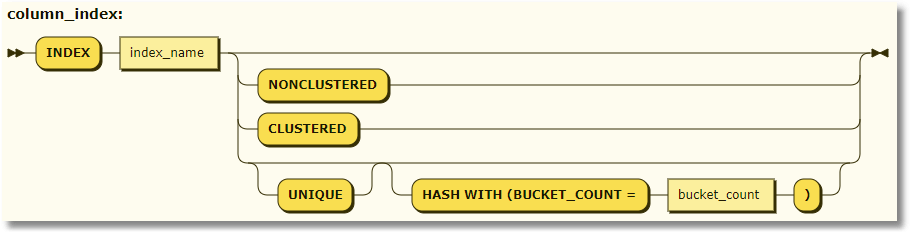
Note: Hash indexes are permitted only in memory optimized tables. You can’t specify UNIQUE as well as (NON)CLUSTERED.
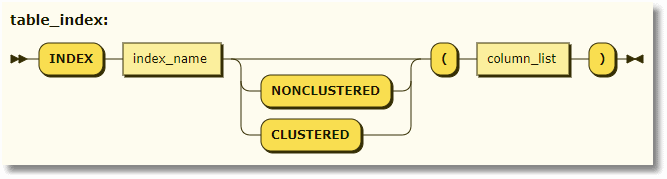
For table variables and their variants, we have the new table index. In fact, the UNIQUE attribute is also allowed on the index, but I’ve kept to the published version because although the UNIQUE keyword is accepted, I’m not certain whether it is implemented.
|
1 2 3 4 5 |
<table_index> ::= INDEX index_name { [ NONCLUSTERED | CLUSTERED ] (column [ ASC | DESC ] [ ,... n ] ) } |
And finally, the new table index for tables is rather more complex due to its specialized uses!
|
1 2 3 4 5 6 7 8 9 10 11 12 |
<table_index> ::= INDEX index_name { [ NONCLUSTERED ] | [ CLUSTERED ] HASH (column [ ,... n ] ) WITH (BUCKET_COUNT = bucket_count) | [ NONCLUSTERED ] | [ CLUSTERED ] (column [ ASC | DESC ] [ ,... n ] ) [ ON filegroup_name | default ] | CLUSTERED COLUMNSTORE [WITH ( COMPRESSION_DELAY = {0 | delay [Minutes]})] [ ON filegroup_name | default ] } |
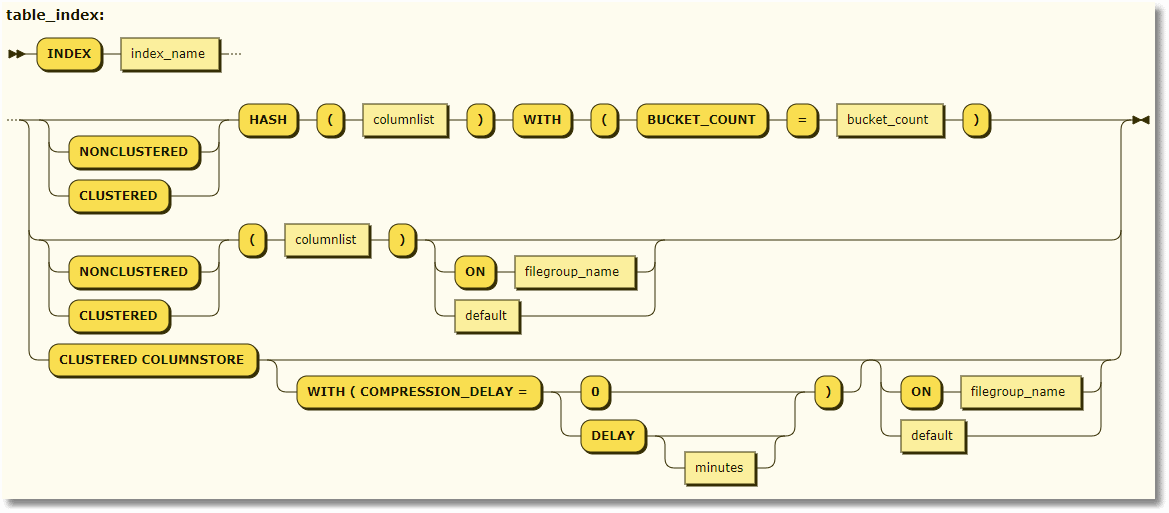
Even if you entirely eschew the useful table variables, multi-statement table functions, UDDTs and TVPs, this is going to save you quite a lot of typing for things like temporary tables.
So, let’s stand back and look at the syntax for table variables (and with a slight difference, UDDTs).
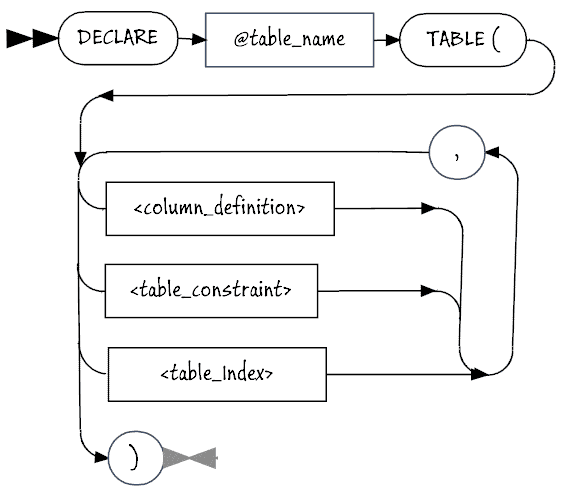
The table type declaration is similar. Instead of Declare @table_name TABLE (, it is CREATE TYPE MyType AS TABLE (.
From this distance, it all looks simple. Perhaps it is time to look closer.
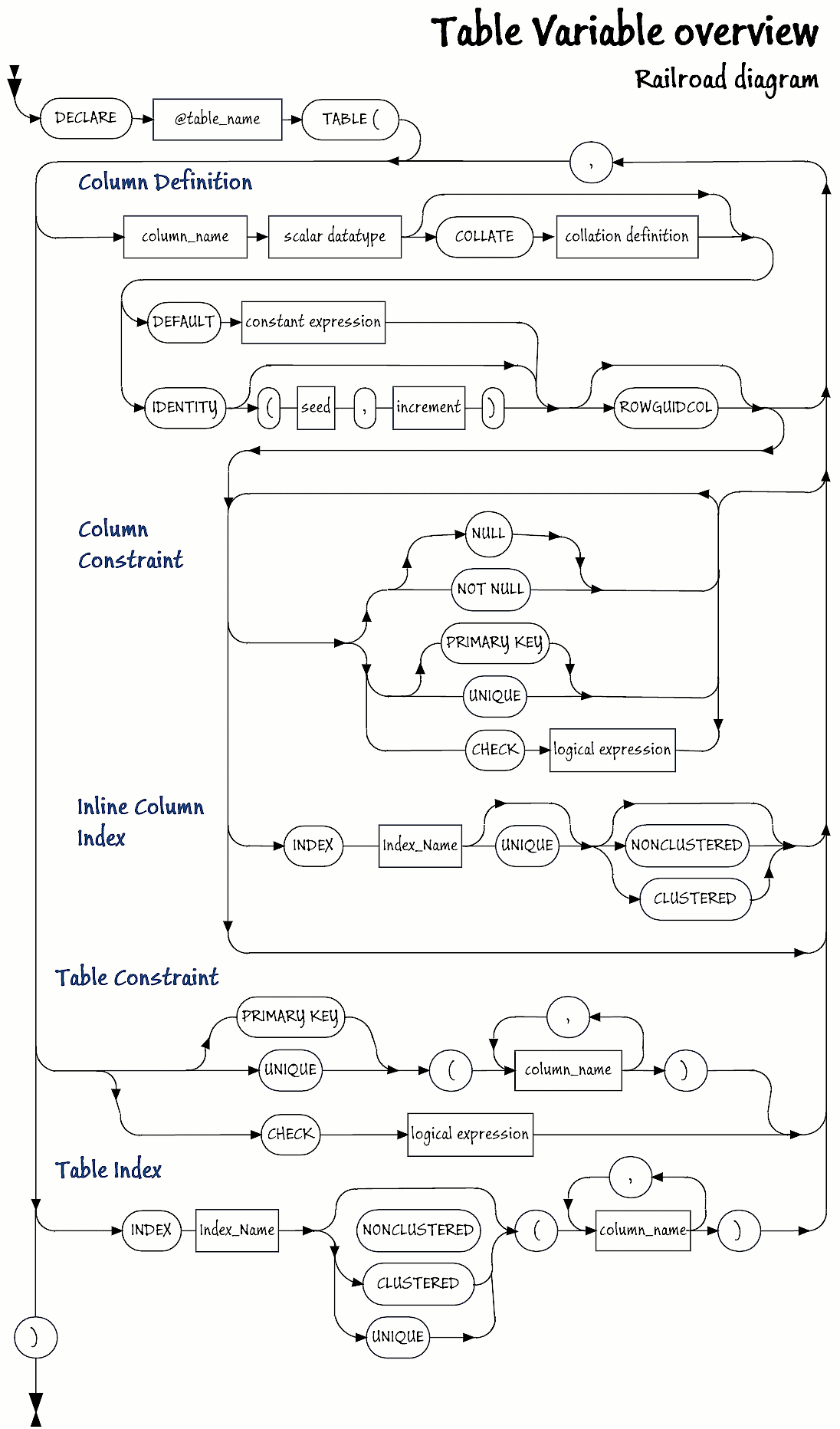
If you would like a better copy of this to print out, here is a PDF.
Syntax Examples
A table variable
|
1 2 3 4 5 6 7 8 9 |
DECLARE @Test TABLE /*showing various indexes*/ ( Firstly INT NOT NULL DEFAULT (0) INDEX firstIndex CLUSTERED, /*clustered index on the column*/ Secondly INT NOT NULL INDEX SecondIndex UNIQUE NONCLUSTERED, /*unique non-clustered index on the column*/ INDEX ThirdIndex UNIQUE NONCLUSTERED (Firstly, Secondly) /*an example composite index*/ ); |
A multi-statement table function with a clustered index
|
1 2 3 4 5 6 7 8 9 10 11 12 13 14 15 16 17 |
CREATE OR ALTER FUNCTION dbo.ConvertListToTable /* SELECT * FROM dbo.ConvertListToTable( '1,2,3,1.435,"firstly","secondly","thirdly"') */ ( @TheList NVARCHAR(MAX) ) RETURNS @returntable TABLE ( TheOrder int, TheItem nvarchar(100) INDEX ItemIndex CLUSTERED ) AS BEGIN DECLARE @JsonString NVARCHAR(MAX) ='['+@TheList+']' INSERT INTO @ReturnTable(TheOrder,TheItem) SELECT [key]+1, value FROM OpenJson(@JsonString) RETURN END |
Filtered indexes on table variable
|
1 2 3 4 |
DECLARE @MyTable TABLE ( MyValue INT NULL INDEX MyValueIndex UNIQUE WHERE MyValue IS NOT NULL ) |
Clustered composite index on a table type
|
1 2 3 4 5 6 |
CREATE TYPE dbo.MyTableType AS TABLE /*user defined table type showing clustered composite index*/ ( TheSequence INT, TheItem nvarchar(100), INDEX test CLUSTERED (TheItem, TheSequence) ) |
Testing Out the Indexes
We’ll demonstrate the effect of an index on a table variable. We will create two table variables, one with an index and one without. We’ll then see how long each took to import four million rows of data. For the data to load, run this script to create the table. I suggest using Redgate’s SQL Data Generator to populate it with four millions rows, but you can use any method you wish. You can also use this script to create a smaller table.
|
1 2 3 4 5 6 7 |
DROP TABLE IF EXISTS dbo.Directory; CREATE TABLE dbo.Directory ( ID INT NOT NULL IDENTITY, Name NVARCHAR(100) NOT NULL, PostCode NVARCHAR(15) NOT NULL); --Populate with 4 million rows to --follow along using SQL Data Generator |
Once you have the Directory table in place, run this code to see how long it takes to populate the table variable with and without indexes:
|
1 2 3 4 5 6 7 8 9 10 11 12 13 14 15 16 17 18 19 20 21 22 23 24 25 26 27 28 29 30 31 32 33 34 35 36 37 38 39 40 |
DECLARE @log TABLE ( TheOrder INT IDENTITY(1, 1), WhatHappened VARCHAR(200), WHENItDid DATETIME2 DEFAULT GetDate() ); ----start of timing INSERT INTO @log (WhatHappened) SELECT 'Starting insert into indexed TV'; --First we create a new table variable with column indexes in it. DECLARE @OrganisationName TABLE ( id INT IDENTITY PRIMARY KEY, Business_id INT NOT NULL UNIQUE NONCLUSTERED, OrganisationName NVARCHAR(100) NOT NULL INDEX NameIndex NONCLUSTERED, PostCode NVARCHAR(15) NOT NULL INDEX IndexPostcode NONCLUSTERED ); INSERT INTO @OrganisationName (Business_id, OrganisationName, PostCode) SELECT id, Name, Postcode FROM Directory; INSERT INTO @log (WhatHappened) SELECT 'insert into indexed TV took'; -- --Now we create a second table variable without any column indexes in it. DECLARE @OrganisationNameNoIndex TABLE ( id INT IDENTITY PRIMARY KEY, Business_id INT NOT NULL, OrganisationName NVARCHAR(100) NOT NULL, PostCode NVARCHAR(15) NOT NULL ); INSERT INTO @OrganisationNameNoIndex (Business_id, OrganisationName, PostCode) SELECT id, Name, Postcode FROM Directory; INSERT INTO @log (WhatHappened) SELECT 'insert into non-indexed TV took'; SELECT ending.WhatHappened, DateDiff(ms, starting.WHENItDid, ending.WHENItDid) AS ms FROM @log AS starting INNER JOIN @log AS ending ON ending.TheOrder = starting.TheOrder + 1 UNION ALL SELECT 'Total', DateDiff(ms, Min(WHENItDid), Max(WHENItDid)) FROM @log; --list out all the timings |
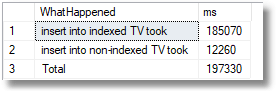
Is this a problem with the size of the table variable? If we repeat the test with just 10,000 rows, by selecting not the entire table but using the TOP xxx syntax to select just a portion …
|
1 2 |
INSERT INTO @OrganisationName (Business_id, OrganisationName, PostCode) SELECT TOP 10000 id, Name, Postcode FROM BigDirectory; |
… we get this
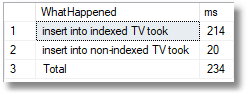
Yes, the old-fashioned table variable still took less than a tenth of the time to insert those rows! There is definitely a problem in stocking a table with a significant amount of data when you’ve placed all those indexes in it.
Let’s not be so unfair. We’ve not indexed the tables for this test but for the imagined usage of the table variables within the batch. In effect, we’ve over-indexed the table. Also, if you are doing a lot of searching with the table variables, surely, it is going to be so much faster, so maybe the long wait to stock the indexed table might be worthwhile?
We run another test, this time doing a search for organisation names, and just timing that, ignoring the interminable wait to stock the table. I’ve also included an INSERT statement to make sure that the rows we are searching for exist in the Directory table.
|
1 2 3 4 5 6 7 8 9 10 11 12 13 14 15 16 17 18 19 20 21 22 23 24 25 26 27 28 29 30 31 32 33 34 35 36 37 38 39 40 41 42 43 44 45 46 47 48 49 50 51 52 53 54 55 56 57 58 59 60 61 |
DECLARE @log TABLE ( TheOrder INT IDENTITY(1, 1), WhatHappened VARCHAR(200), WHENItDid DATETIME2 DEFAULT GetDate() ); ----start of timing DECLARE @OrganisationName TABLE ( id INT IDENTITY PRIMARY KEY, OrganisationName NVARCHAR(100) NOT NULL INDEX NameIndex NONCLUSTERED, PostCode NVARCHAR(15) NOT NULL INDEX IndexPostcode NONCLUSTERED ); INSERT INTO @OrganisationName ( OrganisationName, PostCode) SELECT Name, Postcode FROM Directory UNION ALL (SELECT * FROM (VALUES('D N Philpott','PL56 1GQ'), ('J A Hawkes & Son Ltd','PL56 1GQ'), ('Kath''s Kabin','PL56 1GQ'), ('Quakers (Religious Society Of Friends)','PL56 1GQ'), ('Dr M R Dadhania','PL56 1GQ'), ('Sheffield City Council','PL56 1GQ')) f( OrganisationName, PostCode) ) DECLARE @OrganisationNameNoIndex TABLE ( id INT IDENTITY PRIMARY KEY, OrganisationName NVARCHAR(100) NOT NULL, PostCode NVARCHAR(15) NOT NULL ); INSERT INTO @OrganisationNameNoIndex (OrganisationName, PostCode) SELECT OrganisationName, Postcode FROM @OrganisationName; INSERT INTO @log (WhatHappened) SELECT 'Search for organisation names'; SELECT OrganisationName, id FROM @OrganisationNameNoIndex WHERE OrganisationName IN ('D N Philpott', 'J A Hawkes & Son Ltd', 'Kath''s Kabin', 'Quakers (Religious Society Of Friends)', 'Dr M R Dadhania', 'Sheffield City Council' ); INSERT INTO @log (WhatHappened) SELECT 'Searching for organisation names in unindexed table ' + 'variable took '; SELECT OrganisationName, id FROM @OrganisationName WHERE OrganisationName IN ('D N Philpott', 'J A Hawkes & Son Ltd', 'Kath''s Kabin', 'Quakers (Religious Society Of Friends)', 'Dr M R Dadhania', 'Sheffield City Council' ); INSERT INTO @log (WhatHappened) SELECT 'Searching for organisation names in indexed table ' + 'variable took '; SELECT ending.WhatHappened, DateDiff(ms, starting.WHENItDid, ending.WHENItDid) AS ms FROM @log AS starting INNER JOIN @log AS ending ON ending.TheOrder = starting.TheOrder + 1 UNION ALL SELECT 'Total', DateDiff(ms, Min(WHENItDid), Max(WHENItDid)) FROM @log; --list out all the timings |
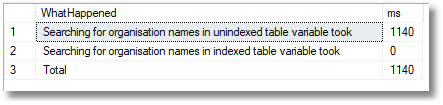
So yes. The unindexed table variable had to do a table scan whereas the indexed table gave the query optimiser the chance to use that ‘NameIndex‘ column index. It was too quick for me to measure it. So, it looks like a tradeoff, but with just a small amount of searching our unindexed table wins hands down.
Were we still being unfair? Hell yes.
That was a simple search. All we actually need is a clustered index for the organisation name. We’ve also added a second index for postcodes that we never used in the test. So, instead of trying to make these two tables equivalent, we optimise them and run the test again. In one case we search using a clustered index, and in the other one we use a non-clustered index.
|
1 2 3 4 5 6 7 8 9 10 11 12 13 14 15 16 17 18 19 20 21 22 23 24 25 26 27 28 29 30 31 32 33 34 35 36 37 38 39 40 41 42 43 44 45 46 47 48 49 50 51 52 53 54 55 56 57 58 59 60 61 62 63 64 65 66 67 68 69 70 71 72 73 74 75 76 77 |
DECLARE @log TABLE ( TheOrder INT IDENTITY(1, 1), WhatHappened VARCHAR(200), WHENItDid DATETIME2 DEFAULT GetDate() ); ----start of timing INSERT INTO @log (WhatHappened) SELECT 'Starting insert into indexed TV'; --First we create a new table variable with a --non clustered column index in it. DECLARE @OrganisationNameNonClustered TABLE ( Business_id INT identity PRIMARY key, OrganisationName NVARCHAR(100) NOT NULL INDEX NameIndex NONCLUSTERED, PostCode NVARCHAR(15) NOT NULL ); INSERT INTO @OrganisationNameNonClustered ( OrganisationName, PostCode) SELECT Name, Postcode FROM Directory UNION ALL (SELECT * FROM (VALUES('D N Philpott','PL56 1GQ'), ('J A Hawkes & Son Ltd','PL56 1GQ'), ('Kath''s Kabin','PL56 1GQ'), ('Quakers (Religious Society Of Friends)','PL56 1GQ'), ('Dr M R Dadhania','PL56 1GQ'), ('Sheffield City Council','PL56 1GQ')) f( OrganisationName, PostCode) ) INSERT INTO @log (WhatHappened) SELECT 'insert into TV with PK and nonclustered index took'; -- --Now we create a second table variable with a clustered index DECLARE @OrganisationNameClustered TABLE ( OrganisationName NVARCHAR(100) INDEX NameIndex CLUSTERED, Business_id INT identity, PostCode NVARCHAR(15) NOT NULL ); INSERT INTO @OrganisationNameClustered (OrganisationName, PostCode) -- SELECT OrganisationName, Postcode FROM @OrganisationNameNonClustered; SELECT Name, Postcode FROM Directory UNION ALL (SELECT * FROM (VALUES('D N Philpott','PL56 1GQ'), ('J A Hawkes & Son Ltd','PL56 1GQ'), ('Kath''s Kabin','PL56 1GQ'), ('Quakers (Religious Society Of Friends)','PL56 1GQ'), ('Dr M R Dadhania','PL56 1GQ'), ('Sheffield City Council','PL56 1GQ')) f( OrganisationName, PostCode) ) INSERT INTO @log (WhatHappened) SELECT 'insert into TV with clustered index took'; -- SELECT OrganisationName FROM @OrganisationNameNonClustered WHERE OrganisationName IN ('D N Philpott', 'J A Hawkes & Son Ltd', 'Kath''s Kabin', 'Quakers (Religious Society Of Friends)', 'Dr M R Dadhania', 'Sheffield City Council' ); INSERT INTO @log (WhatHappened) SELECT 'Searching for organisation names in TV with clustered TV took'; SELECT OrganisationName FROM @OrganisationNameClustered WHERE OrganisationName IN ('D N Philpott', 'J A Hawkes & Son Ltd', 'Kath''s Kabin', 'Quakers (Religious Society Of Friends)', 'Dr M R Dadhania', 'Sheffield City Council' ); INSERT INTO @log (WhatHappened) SELECT 'Searching for organisation names in TV with PK ' + 'and nonclustered TV took '; SELECT ending.WhatHappened, DateDiff(ms, starting.WHENItDid, ending.WHENItDid) AS ms FROM @log AS starting INNER JOIN @log AS ending ON ending.TheOrder = starting.TheOrder + 1 UNION ALL SELECT 'Total', DateDiff(ms, Min(WHENItDid), Max(WHENItDid)) FROM @log; --list out all the timings |
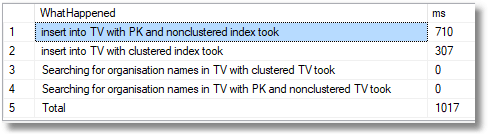
1000 rows
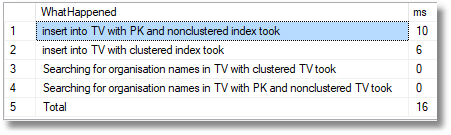
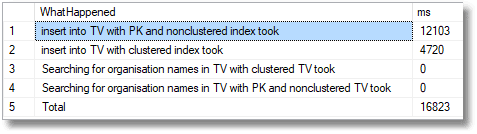
10,000 rows
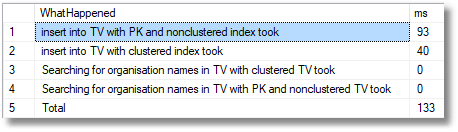
100,000 rows
1,000,000 rows
4,000,000 rows
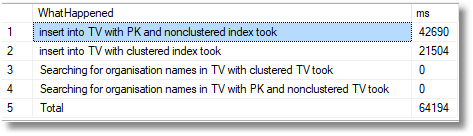
By creating a clustered index on the organisation name we’ve not only kept the @OrganisationNameClustered table to just double the load time for the four million rows when no indexes except the primary key are included, but now the search for organisations is blindingly fast. We have the best of both worlds.
Conclusions
The new indexes could, with care, make a great difference to Table Variables. However, this depends on coming up with a good strategy for the design of the table variable. It pays to do performance testing on the batch that uses the table variable because the best strategy to choose is so dependent on the details of what the batch is doing. Some problems are obvious: Don’t scatter lots of indexes about just because you can. They come at a performance cost which can be far higher than the benefits. Get it right and suddenly table variables are going to be working blindingly fast.
Will we see an advantage too when using multi-statement table-valued functions, user-defined table types and table-valued parameters? My own experiments with functions aren’t conclusive, but so far in my experiments, the costs of creating the index before filling the table outweigh the subsequent gains from the index.
FAQs: What are Inline Indexes?
1. Can you add an index to a SQL Server table variable?
Yes, from SQL Server 2014 onward, using inline index syntax in the DECLARE @table TABLE(…) statement. You can define clustered, nonclustered, and filtered indexes inline in the table variable declaration. This significantly improves query performance for table variables used as large intermediate result sets. The index is created and destroyed with the table variable’s scope – no separate CREATE INDEX or DROP INDEX is needed.
2. What is the syntax for an inline index on a table variable in SQL Server?
Declare the table variable with an INDEX clause after the column definitions: DECLARE @t TABLE (ID INT NOT NULL, Name NVARCHAR(100), INDEX ix_Name NONCLUSTERED (Name)). For a clustered index: add PRIMARY KEY CLUSTERED (ID) in the column definition, or use INDEX ix_cluster CLUSTERED (ID). Filtered indexes use the same WHERE clause syntax as regular filtered indexes.
3. What is a UDTT inline index in SQL Server?
A user-defined table type (UDTT) is a named table type stored in the database that can be used as a parameter type for stored procedures and functions. From SQL Server 2014, UDTTs support inline index definitions using the same syntax as table variable inline indexes. Indexed UDTTs improve performance when large table-valued parameters are passed to stored procedures, because the receiving procedure gets a parameter that is already indexed.
4. Do inline indexes on table variables persist between executions?
No. Table variable inline indexes are created when the DECLARE statement executes and dropped when the table variable goes out of scope – typically at the end of the batch or stored procedure. They do not persist in the database. UDTT indexes are defined as part of the type definition and are recreated each time a variable of that type is declared, but the index definition itself persists with the type in the database.








Load comments