
Document360 v12.8.2 is here, bringing our biggest API evolution yet. This release introduces the all-new API v3 with more endpoints, OAuth 2.0, and scoped API keys to power secure, scalable integrations. This release also includes reader group-based controls for Eddy AI features, enhancements to the Smart bar experience, UI improvements, and several usability, security, and performance updates across the knowledge base.
Features and enhancements
API v3 with latest endpoints & authorization controls
Category: API documentation | Feature
Build secure, scalable integrations with Document360's new API v3, featuring expanded endpoints and permission-aware authorization. API v3 is a ground-up rebuild of Document360's public REST API, expanding what you can automate, including content, users and roles, reader access, drive, and analytics. A select set of advanced endpoints is available as an optional add-on.
Apps acting on behalf of a signed-in user authenticate via OAuth 2.0. Integrations and scripts now use scoped API keys, with a defined portal role, content role, and content scope. New endpoints cover article management, user management, drive management, search, and analytics.
We recommend you upgrade to API v3, which gives you more endpoint capabilities and built-in, permission-aware security controls. Existing API v1/v2 integrations remain unaffected and continue to work as-is.
For more information, read API documentation.
Restrict Eddy AI features for specific reader groups
Category: Reader groups | Feature
You can now control which reader groups can use specific Eddy AI features on your knowledge base site. This is useful when one workspace serves different audiences with different AI needs.
Using the new Restrict access option, you can exclude selected reader groups from features like AI assistive search (Ask Eddy), AI article summarizer, Dynamic related article recommendation, MCP server, and Listen (text to voice). Restricted features are hidden for those readers across the site, while all other groups keep full access by default.
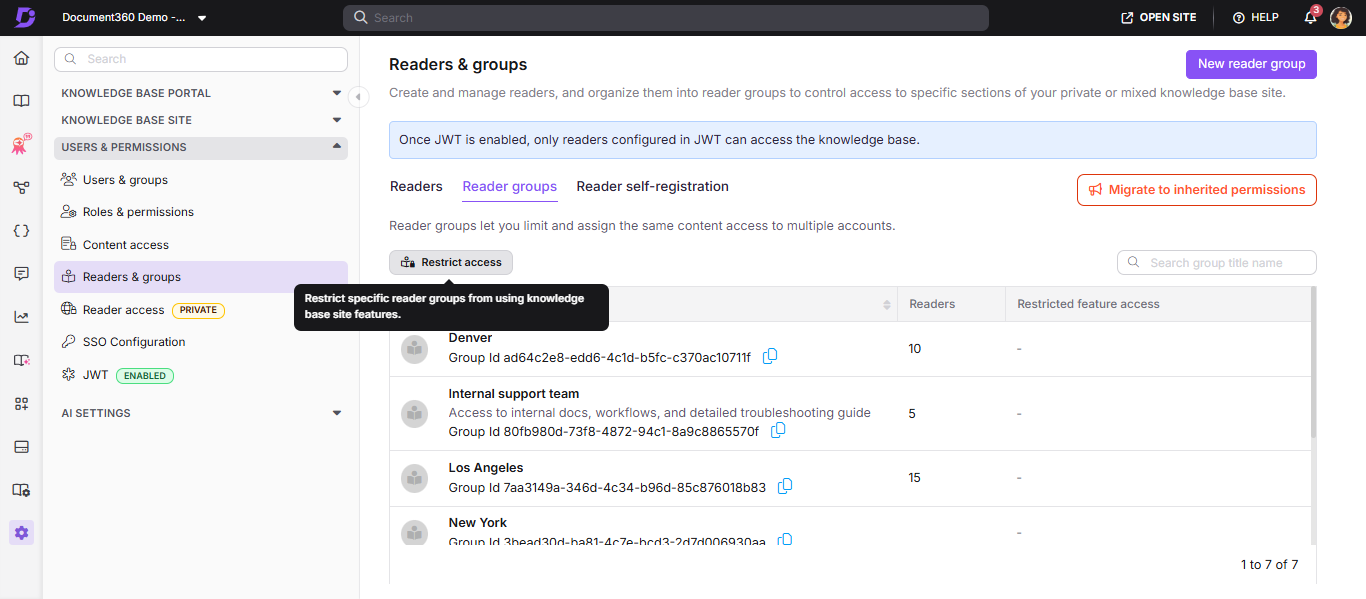
For more information, read the article on Restrict reader group access.
Other updates
- The Smart bar experience has been redesigned with a live preview, an improved creation panel, language selection dropdown, bulk actions, and a duplicate option to simplify Smart bar creation and management.
- The Ticket deflector page has been renamed to Get help in the Knowledge base site. The updated page name is now reflected in the page URL and breadcrumb navigation, making it easier for readers to locate support resources. Existing bookmarks and links will continue to work automatically.
- Minor security updates, bug fixes, and performance improvements have also been implemented across the Knowledge base portal and Knowledge base site.
