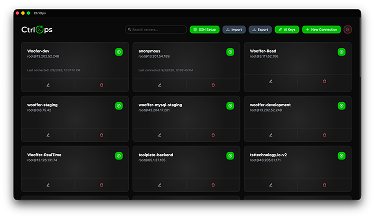
CtrlOps is a local-first desktop app for managing all your Linux servers from one screen with AI-powered assistance, direct SSH connections, and zero cloud dependencies.
What is CtrlOps?
CtrlOps is a desktop application (available for Mac, Windows, and Linux) developed by a team that previously ran an IT services company. It connects to any Linux server over SSH and provides a unified interface for terminal access, file management, deployments, and monitoring. Instead of juggling multiple tools like PuTTY and WinSCP, users manage everything from one native app. Credentials (SSH keys, server IPs) never leave the user's machine — no cloud bridge or telemetry.
Key Features
- AI Terminal — Describe server issues in plain English; CtrlOps generates the exact bash command and shows it for approval before execution. Supports live web search for current docs, errors, and package versions.
- Visual File Manager — Browse, edit, and upload files on remote servers without a separate SFTP client. Edit configs directly within the app.
- One-Click Deployments — Deploy from any GitHub repository with environment variable configuration and optional SSL setup, all in under 5 minutes.
- Multi-Server Dashboard — View all servers at once with real-time CPU, memory, and disk health metrics. Named servers replace messy IP spreadsheets.
- SSH Management — Add, remove, and manage SSH keys centrally. Useful for team offboarding and access control.
- Backup and Scripts — Save and reuse bash scripts as "playbooks" for common maintenance tasks; run them on any server with one click.
Who is it for?
- Developers without dedicated DevOps — Debug and deploy applications without knowing every command; the AI Terminal translates plain English to bash.
- CTOs and Tech Leads — Maintain visibility across multiple client or staging servers without assigning a single "server person".
- Freelancers and solo founders — Deploy and manage production servers from a single app without hiring infrastructure help.
- HR and operations teams — Quickly revoke SSH access during employee offboarding without involving engineering.
What can you do with CtrlOps?
- Debug production issues — Ask the AI to check nginx status, examine logs, or diagnose performance problems. It suggests commands and awaits confirmation.
- Deploy web applications — Connect a GitHub repo, fill in environment variables, toggle SSL, and deploy in minutes. One user reports "deployments don't stress me out anymore."
- Manage server files — Edit configuration files, upload assets, or download logs using the built-in file manager — no separate SFTP client needed.
- Offboard employees — Remove SSH keys from servers in under two minutes using the centralized SSH management panel.
How does CtrlOps work?
- Download the desktop app for your platform (Mac Apple Silicon, Intel, Windows, or Linux).
- Add your server by providing a name, host, and SSH key — no agents to install on the server.
- Use the AI Terminal to ask questions in plain English; review the generated command before it runs.
- Manage files, deploy code, and monitor all servers from the same dashboard.
Pros and cons
- Pros: 100% local data privacy; no cloud keys or agents required; AI suggests commands with an approval gate; one app replaces multiple tools (terminal, SFTP, deployment scripts); free trial without credit card.
- Cons: Requires SSH access (non-SSH servers not supported); AI requires an internet connection for web search and command generation; limited to Linux servers.
Pricing
Free 30-day trial with no credit card required. Paid plans (available as monthly or lifetime subscription, as mentioned in user reviews) are offered.
FAQ
Is my data safe with CtrlOps?
Yes. CtrlOps runs 100% locally. SSH keys, server IPs, and credentials are stored on your machine and never uploaded to a cloud service. There is no cloud bridge or telemetry.
Do I need to install an agent on my servers?
No. CtrlOps connects directly over SSH using your existing keys. No software needs to be installed on the servers.
Can I try it without paying?
Yes. A one-month free trial is available with no credit card required. You can cancel anytime.