Brand24 changelog
Brand24 changelog
brand24.com

๐Ÿ“ฑ Brand24 is now always one tap away - on any device


New


Aug


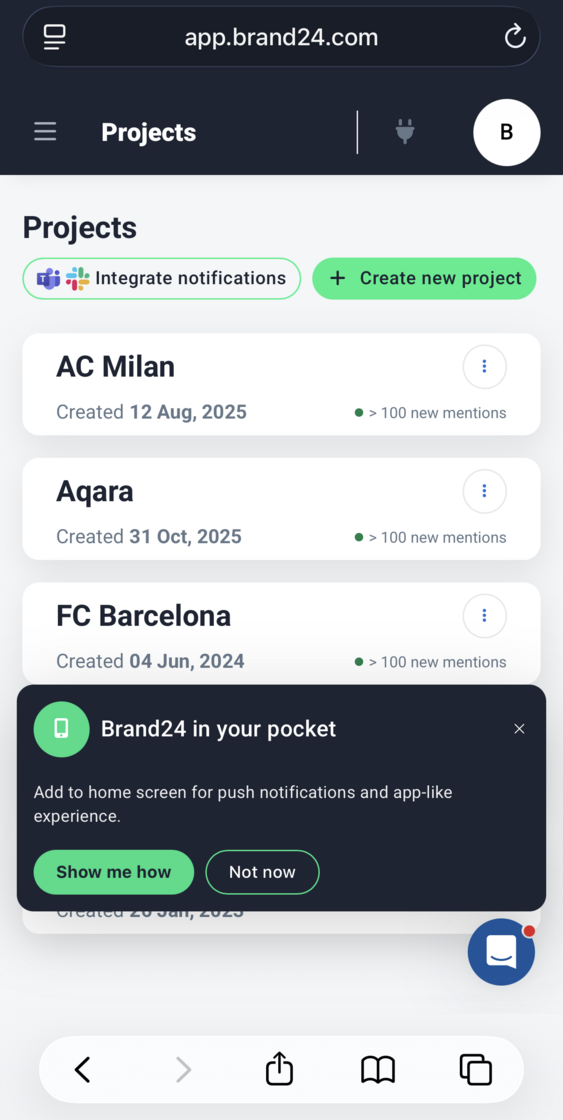
Brand24 can now be installed as an app directly from your browser - on Android, iPhone/iPad, Windows, macOS, and ChromeOS. No App Store or Google Play needed.
IMG_2453_cut.png

You get the full Brand24 dashboard with the same projects, filters, and data you use in your browser - plus push notifications for mentions that need your attention now.

Set up alerts for a specific project, apply filters, choose the frequency, and Brand24 will notify you directly on your phone or computer.

โœ… React faster to negative mentions before they escalate

โœ… Get high-priority alerts without constantly checking the dashboard

โœ… Jump into important conversations while theyโ€™re still active

โœ… Keep an eye on competitor activity wherever you are

โœ… Access the full Brand24 experience from your phone or desktop
Learn more โ†’

๐Ÿ“Š A fresh new look for your Infographic


Boost


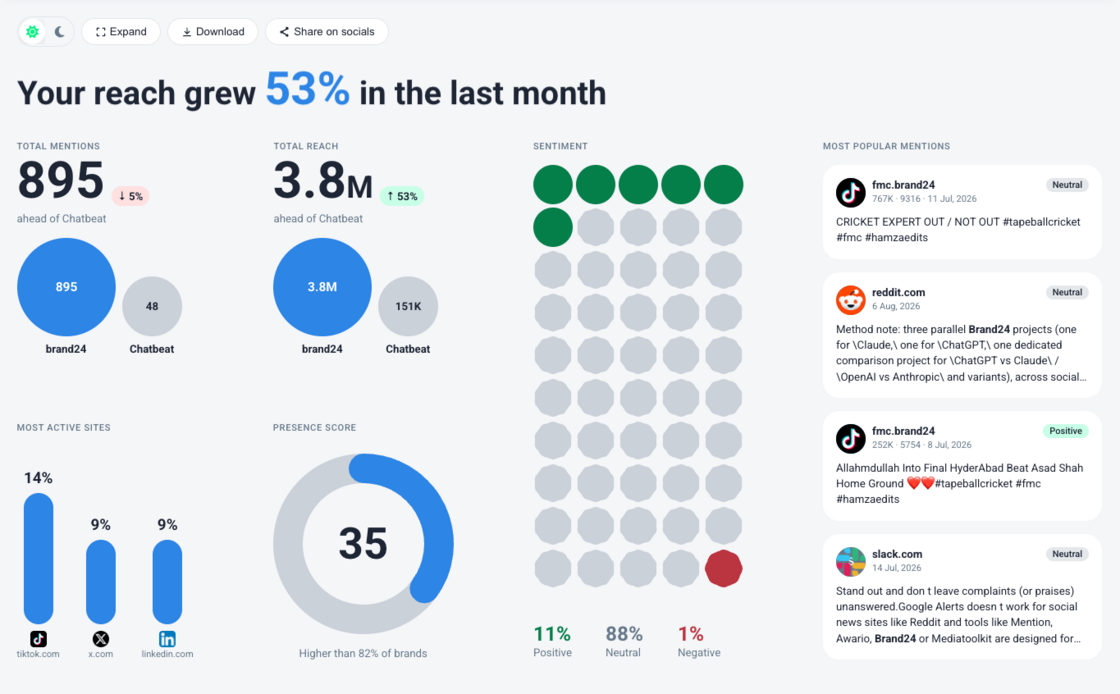
Get the full picture of your brand's performance in seconds - no filters, no setup. Your Infographic just got a modern redesign built for one thing: a fast, clear snapshot of what matters most.

Screenshot 2026-08-07 at 12.35.05.png

What's new:

โœ… A cleaner, more modern design that's easier to scan at a glance

โœ… Light and dark mode, so it fits right into any deck or screen

โœ… One-click download; perfect for presentations and reports

โœ… See your key metrics against your last period and your tracked competitors, side by side

โœ… Fully responsive, so it looks great on mobile too

Whether you need a quick check-in or something polished to share with your team, it's ready in seconds. You'll find it right in your main menu, alongside your other reports.

๐ŸŽ™๏ธ Brand24 now detects your brand's spoken mentions in YouTube videos


New


June


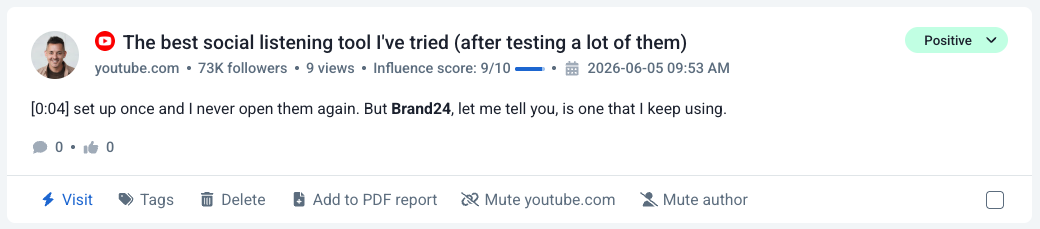
Brand24 now analyzes auto-generated captions on YouTube and catches mentions that only exist in the audio.

Obrazek z Brand24.png

Every spoken mention lands in your dashboard with an exact timestamp. You know the precise minute your brand was said, without watching the whole video. Filter results to Video, set up notifications, and let the tool do the work.

โœ… Protect your reputation before a negative opinion from a popular channel reaches the press

โœ… See how creators actually talk about you and your competitors

โœ… Find creators already mentioning your brand โ€” a ready-made list of potential ambassadors

โœ… Validate influencer collaborations: confirm they actually named your brand in the content

โœ… Catch product misinformation before it spreads

Learn more โ†’

New AI Visibility View: Sources


New


May


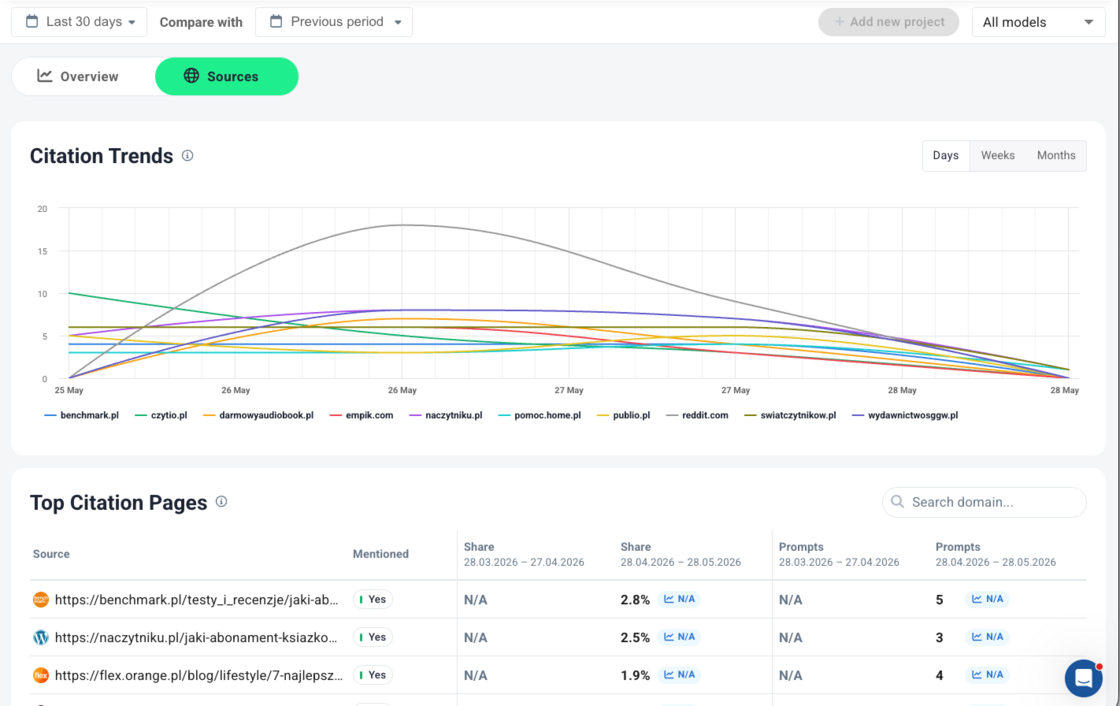
Weโ€™ve added a new Sources tab in AI Visibility to help you understand where LLM citations come from and which sources have the biggest impact on your visibility.

sources_ai.png

In this view, you can explore:

  • citation sources
  • websites most frequently referenced by AI models
  • comparison tables for those sources
  • source type breakdowns
  • which AI models generated the most citations

Why it matters: this data shows where your brand should appear to increase the chances of being cited by LLMs. For example, ranking/listing websites are often highly visible in AI-generated answers โ€” if your brand isnโ€™t present there, it may also be missing from LLM responses.

Brand Assistant 2.0: smarter answers, inline charts, and the open web


New


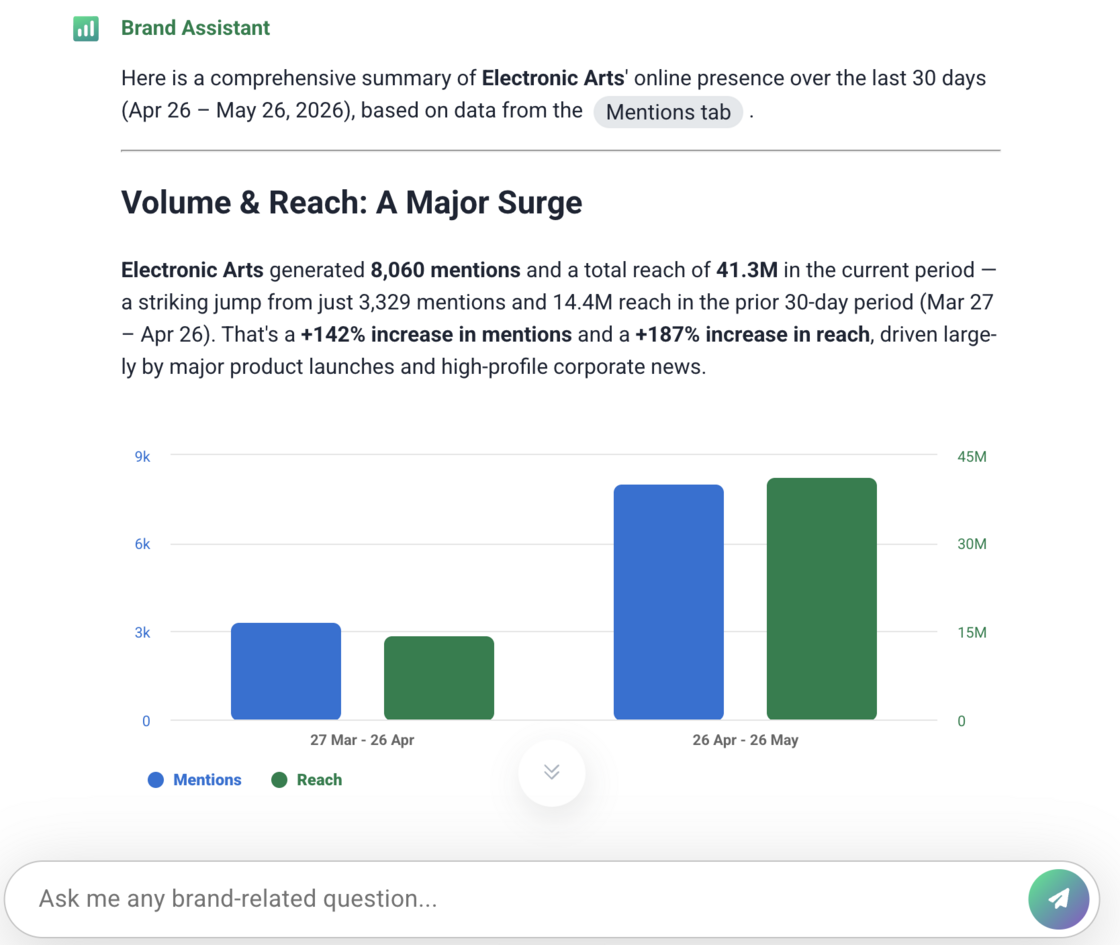
Get sharper answers to harder questions. Brand Assistant 2.0 is here, with stronger reasoning, richer visuals, and access to the open web.

Zrzut ekranu 2026-05-26 o 14.36.02.png

Reasoning that adapts to your question. Brand Assistant works as an agent: it picks the right tools, pulls the right data, and adjusts as it goes. Complex questions get complete answers in one go.

Charts placed exactly where they matter. Visualizations appear inline, right next to the insight they support. Column, pie, and line charts, picked to fit the data.

Answers that reach beyond your project. Brand Assistant can now search the web and read specific pages on demand. Paste a competitor's URL, pull context from a news story, or fact-check a claim in real time.

Open Brand Assistant โ†’

Read a full guide to learn about six ways to use AI Brand Assistant

Add-on: AI Visibility tab โ€“ now activate it yourself from your panel


New


May


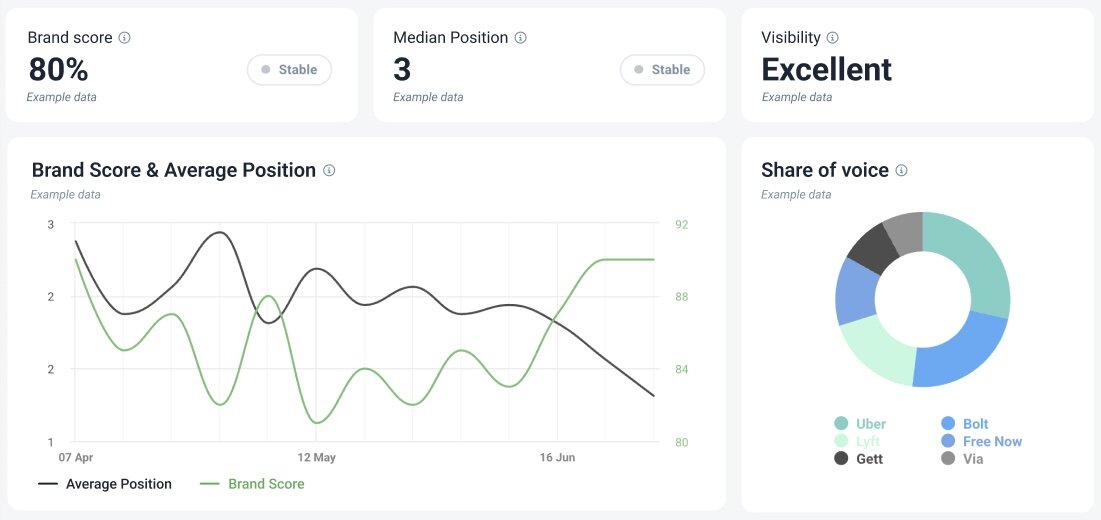
Check how your brand performs in answers from ChatGPT, Gemini, Claude, and other AI models, alongside your Brand24 results, in a single panel.

ChatBeat Integrate Button.jpg

Open the tab from your panel, enter your domain or brand, and you're set!

The first data on how ChatGPT, Perplexity, Google AI Overview, and Gemini talk about your brand will appear in your panel right away.

A new project automatically starts a 14-day AI Visbility trial: 30 prompts monitored across 4 AI models.

Read the full AI Visibility guide โ†’

Emotions analysis back in the panel


New


April


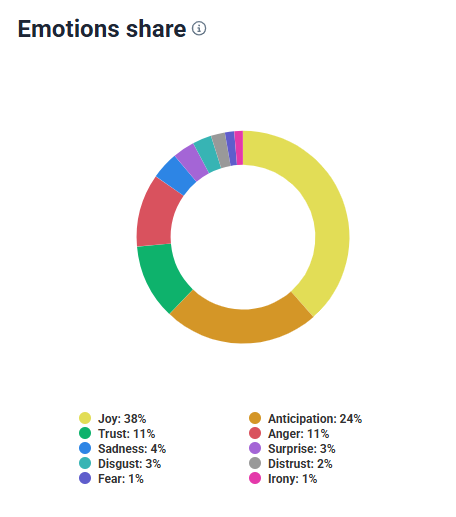
Upgraded emotion analysis is back in the panel - both as a graph and a filter.

With the new model we introduced for emotion analysis you can better observe which emotions are the main driver of a discussion about your (or competitor's) brand or product, analyse emotions around campaigns and specific hashtags or combine it with other data to provide a comprehensive report for the management.

You can find the graph in the Analysis view and the filter in every part of the panel that uses filters.

image.png

Faster analysis for large projects (new search engine rollout)


New


April


Weโ€™ve introduced a major performance upgrade for large-scale projects. Dashboards handling hundreds of thousands of mentions per month now load analysis views in seconds, even when using text filters.

What changed?

Weโ€™ve implemented changes to our databases designed specifically for fast, full-text querying. This significantly improves how quickly data is processed and filtered across the system.

Who will see the improvement?

Currently, the new system is available for a subset of largest projects, primarily the ones using text filter frequently.

Weโ€™re gradually rolling it out to more projects while ensuring system stability.

Important limitations

The new engine supports a rolling last 3 months of data. Queries that span over period older than 3 months will still be using the old search system.

Text filter behaviour change

Text search now matches from the beginning of words only:

โœ… bra โ†’ matches Brand24

โŒ rand โ†’ no longer matches Brand24

While results of some existing text filters may vary slightly compared the previous version, this trade-off enables much better performance.

Why it matters

This change directly improves one of the core Brand24 use casesโ€”fast exploration and analysis of large mention datasets โ€”making the platform significantly more responsive for power users and enterprise-scale monitoring.

AVE calculation update: inflation


April


Boost


Weโ€™ve updated how Advertising Value Equivalent (AVE) is calculated to better reflect the current realities of the online marketing landscape.

The AVE model now takes into account the rising costs of digital advertising and inflation across media markets, ensuring that calculated values better represent the real-world price of gaining similar visibility through paid campaigns.

This change results in:

  • AVE values that better reflect the current cost of online exposure

  • More realistic estimates aligned with todayโ€™s digital advertising market

  • Improved accuracy when reporting the earned value of media coverage

No action is required from users โ€” the update is applied automatically to new calculations. Already existing mentions and calculations are not affected.

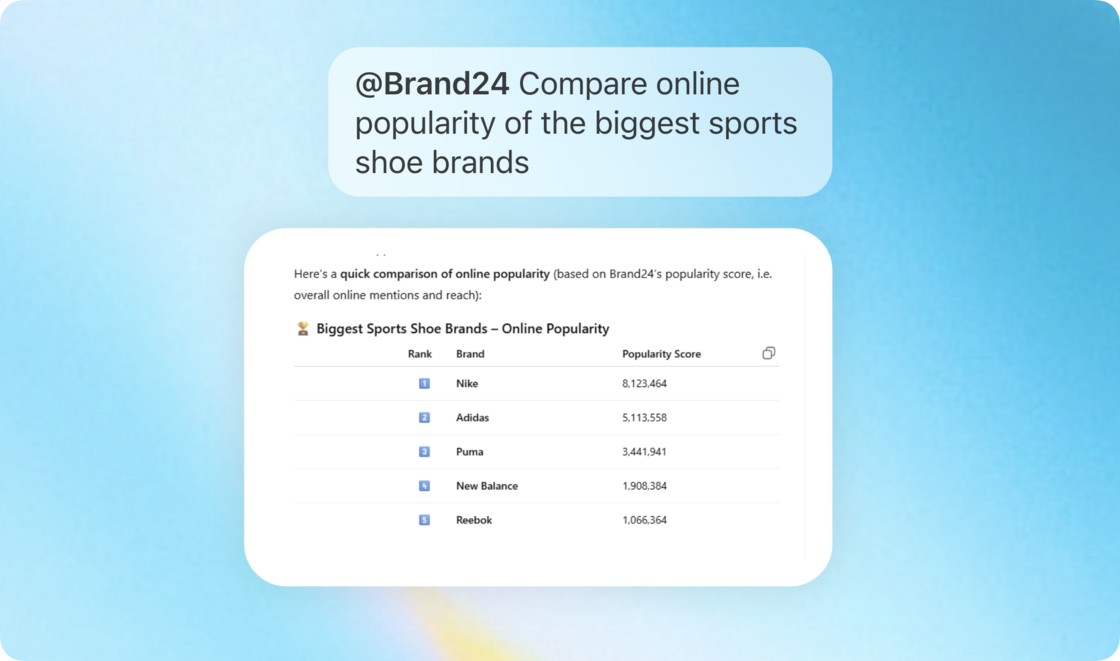
Brand24 ChatGPT App. Your Brand Intelligence, Inside ChatGPT


New


Feb


Boost


Brand24 is now an official app in the OpenAI App Store. Connect it in two minutes and start getting live brand insights without leaving ChatGPT.

CleanShot 2026-02-27 at 10.44.59@2x.png

What this is

Brand24 is one of the first social listening platforms to become an official ChatGPT app. That means you can analyze your brand monitoring data - mentions, sentiment, influencers, media coverage - directly inside ChatGPT, using natural language.

No tab switching. No exports. No copy-pasting data into prompts.

How to get started

  • Install the Brand24 app from the OpenAI App Store
  • Connect your Brand24 account with one click
  • Ask ChatGPT anything about your brand data

What to ask

Start with these prompts to see what's possible:

  • "Summarize what's happening in my [project name] project"
  • "What were the biggest spikes in mentions for [project name] this month?"
  • "Who are the top influencers talking about [brand]?"
  • "What's the current sentiment trend for [project name]?"
  • "List news sites that covered [brand] this week"_

From there, you can combine insights with ChatGPT's capabilities โ€” writing a media briefing based on current coverage, flagging a potential PR issue before it escalates, or identifying a competitor's vulnerability from their mention data.

Want to connect Brand24 to Claude or other AI tools?

The Brand24 ChatGPT app uses MCP (Model Context Protocol) under the hood โ€” the same standard that works with Claude, Gemini, Cursor, and other AI agents.

See the full MCP setup guide โ†’