<?xml version="1.0" encoding="utf-8"?><feed xmlns="http://www.w3.org/2005/Atom" ><generator uri="https://jekyllrb.com/" version="3.10.0">Jekyll</generator><link href="https://vinceth.net/feed.xml" rel="self" type="application/atom+xml" /><link href="https://vinceth.net/" rel="alternate" type="text/html" /><updated>2026-01-14T17:43:05+00:00</updated><id>https://vinceth.net/feed.xml</id><title type="html">Vincent Thorne</title><subtitle>Personal website, curated internet space.</subtitle><entry><title type="html">R Language — A Comprehensive Guide for Beginners</title><link href="https://vinceth.net/2025/05/02/r-tutorial.html" rel="alternate" type="text/html" title="R Language — A Comprehensive Guide for Beginners" /><published>2025-05-02T00:00:00+00:00</published><updated>2025-05-02T00:00:00+00:00</updated><id>https://vinceth.net/2025/05/02/r-tutorial</id><content type="html" xml:base="https://vinceth.net/2025/05/02/r-tutorial.html"><![CDATA[<p>After years of working with Stata for data analysis, I’ve found that R offers a powerful alternative with some distinct advantages. While there are many R tutorials available online, this guide represents my specific perspective and approach as someone who transitioned from Stata. I focus on the elements I found most useful and the challenges I encountered along the way.</p>

<details open="">
  <summary class="text-delta">
    Table of contents
  </summary>
<ol id="markdown-toc">
  <li><a href="#basic-principles-and-advantages-vs-stata" id="markdown-toc-basic-principles-and-advantages-vs-stata">Basic Principles and Advantages vs Stata</a></li>
  <li><a href="#the-main-packages" id="markdown-toc-the-main-packages">The Main Packages</a>    <ol>
      <li><a href="#principles" id="markdown-toc-principles">Principles</a></li>
      <li><a href="#inputoutput-mostly-input" id="markdown-toc-inputoutput-mostly-input">Input/Output (Mostly Input)</a></li>
      <li><a href="#data-manipulation" id="markdown-toc-data-manipulation">Data Manipulation</a></li>
      <li><a href="#plotting" id="markdown-toc-plotting">Plotting</a></li>
      <li><a href="#geo" id="markdown-toc-geo">Geo</a></li>
      <li><a href="#other-useful-features" id="markdown-toc-other-useful-features">Other Useful Features</a></li>
    </ol>
  </li>
  <li><a href="#advanced-topics" id="markdown-toc-advanced-topics">Advanced Topics</a>    <ol>
      <li><a href="#parallel-computing" id="markdown-toc-parallel-computing">Parallel Computing</a></li>
      <li><a href="#large-data-sets" id="markdown-toc-large-data-sets">Large Data Sets</a></li>
      <li><a href="#web-scraping" id="markdown-toc-web-scraping">Web Scraping</a></li>
    </ol>
  </li>
  <li><a href="#learn-more" id="markdown-toc-learn-more">Learn More</a>    <ol>
      <li><a href="#books" id="markdown-toc-books">Books</a></li>
      <li><a href="#websites-and-blogs" id="markdown-toc-websites-and-blogs">Websites and Blogs</a></li>
      <li><a href="#pro-tips" id="markdown-toc-pro-tips">Pro Tips</a></li>
    </ol>
  </li>
</ol>

</details>

<h2 id="basic-principles-and-advantages-vs-stata">Basic Principles and Advantages vs Stata</h2>

<p>R differs fundamentally from Stata in several important ways:</p>

<p>First, R allows you to work with multiple objects in memory simultaneously (data sets, functions, libraries, vectors), while Stata limits you to a single data set in memory. This flexibility enables more complex workflows and reduces the need for constant data loading/saving.</p>

<p>R is much closer to “real” programming languages like Python. Functions and packages are written in the same language as the one you use to code, making it intuitive to create your own tools. This seamless integration between user code and package development creates a lower barrier to expanding your capabilities.</p>

<p>The R community is massive, free, and open-source, offering thousands of specialized packages compared to Stata’s more centralized ecosystem. When you encounter problems, you’ll find extensive help online through forums, blogs, and documentation, all in a generally nice and supportive vibe (vs infamous Nick Cox…).</p>

<p>R’s versatility allows you to do almost everything without leaving the environment. You can run other programs installed on your computer, connect to other languages (notably Python), write websites, books, or interactive dashboards. This extensibility means your skills transfer across various data science domains.</p>

<p>Finally, R offers a much nicer coding environment with features like code completion, syntax highlighting, proper indentation, and faster code writing. It also tends to work better with AI assistants!</p>

<h2 id="the-main-packages">The Main Packages</h2>

<h3 id="principles">Principles</h3>

<p>R was written a long time ago and comes with many commands out of the box, known as “base” commands. The packages that are always loaded include:</p>

<ul>
  <li><code class="language-plaintext highlighter-rouge">base</code></li>
  <li><code class="language-plaintext highlighter-rouge">stats</code></li>
  <li>And some others</li>
</ul>

<p>You can identify which package a command comes from by typing <code class="language-plaintext highlighter-rouge">?&lt;command&gt;</code> — the package name will show in curly brackets <code class="language-plaintext highlighter-rouge">&lt;command&gt; {package}</code>.</p>

<p>You could do 90% of your work with these base packages, but the R community has created additional packages to make your life easier. A pedantic but useful point: base commands are generally faster/more efficient, unless a package was specifically designed for speed. Sometimes packages prioritize convenience over speed, but other times they genuinely help you do things much more efficiently. I personally mix base commands with package commands all the time.</p>

<p>When looking for performance, search for “functions implemented in C” as a marker of speed.</p>

<p>To use additional packages, you need to:</p>

<ol>
  <li>Install them once: <code class="language-plaintext highlighter-rouge">install.packages("package")</code> (and again when you update R)</li>
  <li>Load them every time you start a script: <code class="language-plaintext highlighter-rouge">library(package)</code></li>
</ol>

<p>As you load libraries, they “cover” the names of functions in your environment (this means if two packages have functions with the same name, the most recently loaded package’s version will be used). You can always access the function of a package you have installed using <code class="language-plaintext highlighter-rouge">package::command()</code> to specify exactly which package’s implementation you want.</p>

<h3 id="inputoutput-mostly-input">Input/Output (Mostly Input)</h3>

<p>For working with various file formats, several packages excel:</p>

<p><strong><a href="https://rdatatable.gitlab.io/data.table/"><code class="language-plaintext highlighter-rouge">data.table</code></a> functions:</strong></p>

<ul>
  <li><code class="language-plaintext highlighter-rouge">fread</code> for CSVs, JSON, and many other formats</li>
  <li>Sometimes <code class="language-plaintext highlighter-rouge">fread</code> doesn’t work well with very large files or quirky encodings, in which case you’ll need one of the packages below</li>
</ul>

<p><strong><a href="https://www.tidyverse.org/">tidyverse</a>:</strong></p>

<ul>
  <li><a href="https://readxl.tidyverse.org"><code class="language-plaintext highlighter-rouge">readxl</code></a> for Excel files</li>
  <li><a href="https://readr.tidyverse.org/"><code class="language-plaintext highlighter-rouge">readr</code></a> for CSV files and other formats
    <ul>
      <li>More robust than <code class="language-plaintext highlighter-rouge">fread</code> in some cases, though sometimes slower</li>
    </ul>
  </li>
</ul>

<h3 id="data-manipulation">Data Manipulation</h3>

<p>Two main ecosystems dominate R’s data manipulation landscape:</p>

<p><strong>tidyverse (<a href="https://dbplyr.tidyverse.org/"><code class="language-plaintext highlighter-rouge">dplyr</code></a>, <a href="https://tidyr.tidyverse.org/"><code class="language-plaintext highlighter-rouge">tidyr</code></a>):</strong></p>

<ul>
  <li>Generally considered the “easy” way, though sometimes not using the most efficient commands</li>
  <li>Heavy with lots of dependencies (i.e., other packages required to make it work well)</li>
  <li>Includes useful supplementary tools:
    <ul>
      <li><a href="https://stringr.tidyverse.org/"><code class="language-plaintext highlighter-rouge">stringr</code></a> for string manipulation (learn <a href="https://regex101.com/">regex</a>!)</li>
      <li><a href="https://lubridate.tidyverse.org"><code class="language-plaintext highlighter-rouge">lubridate</code></a> for dates and time manipulation</li>
    </ul>
  </li>
  <li>Tip: don’t load the whole tidyverse! Only load what you need</li>
</ul>

<p><strong><code class="language-plaintext highlighter-rouge">data.table</code>:</strong></p>

<ul>
  <li>Designed for efficiency and speed</li>
  <li>Avoids making copies (memory-efficient), uses low-level C functions, can run on multiple threads</li>
  <li>Steeper learning curve, but worth the investment</li>
  <li>Somewhat similar to SQL syntax</li>
  <li>Can be used with <code class="language-plaintext highlighter-rouge">dplyr</code> style by running <code class="language-plaintext highlighter-rouge">data.table</code> in the background using <a href="https://dtplyr.tidyverse.org/"><code class="language-plaintext highlighter-rouge">dtplyr</code></a></li>
</ul>

<p>As you can tell, <code class="language-plaintext highlighter-rouge">data.table</code> is my go-to :-).</p>

<h3 id="plotting">Plotting</h3>

<p>R offers different approaches to data visualization:</p>

<p><strong>Base functions:</strong></p>

<ul>
  <li>Simple commands like <code class="language-plaintext highlighter-rouge">plot(vector1, vector2)</code> or <code class="language-plaintext highlighter-rouge">hist(vector)</code> for quick and easy plots</li>
</ul>

<p><strong><a href="https://ggplot2.tidyverse.org/"><code class="language-plaintext highlighter-rouge">ggplot2</code></a>:</strong></p>

<ul>
  <li>Part of the tidyverse ecosystem</li>
  <li>Takes time to learn but is incredibly powerful for complex visualizations</li>
  <li>I ask Google (or LLMs) for most of the things I want to do</li>
  <li>A helpful resource with examples: <a href="http://www.sthda.com/english/wiki/ggplot2-essentials">ggplot2 essentials</a></li>
  <li>Can also create maps, though I personally prefer <code class="language-plaintext highlighter-rouge">tmap</code> (a purely taste-based preference)</li>
</ul>

<h3 id="geo">Geo</h3>

<p>For geographic data analysis and visualization:</p>

<p><strong><a href="https://r-spatial.github.io/sf/"><code class="language-plaintext highlighter-rouge">sf</code></a> for vector data:</strong></p>

<ul>
  <li>Handles buffers, intersections, spatial joins</li>
</ul>

<p><strong><a href="https://rspatial.github.io/terra/"><code class="language-plaintext highlighter-rouge">terra</code></a> for raster data:</strong></p>

<ul>
  <li>Processes grid-based spatial data</li>
</ul>

<p>Both may require some external packages installed on your computer (easily manageable with Homebrew).</p>

<p><strong><a href="https://r-tmap.github.io/tmap/"><code class="language-plaintext highlighter-rouge">tmap</code></a> for mapping:</strong></p>

<ul>
  <li>Currently transitioning to version 4.0, so commands might look strange</li>
  <li>I highly recommend the book <a href="https://geocompr.robinlovelace.net/"><em>Geocomputation with R</em></a> as both a learning resource and reference</li>
</ul>

<h3 id="other-useful-features">Other Useful Features</h3>

<p><strong><code class="language-plaintext highlighter-rouge">=</code> vs <code class="language-plaintext highlighter-rouge">&lt;-</code></strong></p>

<ul>
  <li>You can use both <code class="language-plaintext highlighter-rouge">=</code> or <code class="language-plaintext highlighter-rouge">&lt;-</code> to assign a value to a variable</li>
  <li>I usually use <code class="language-plaintext highlighter-rouge">=</code> because it’s faster to type and more consistent with other programming languages</li>
</ul>

<p><strong>Pipes:</strong></p>

<ul>
  <li>You can pipe the result of a function into another function using <code class="language-plaintext highlighter-rouge">|&gt;</code> (base pipe) or <code class="language-plaintext highlighter-rouge">%&gt;%</code> (tidyverse pipe)</li>
  <li>This creates cleaner code for multiple data transformations in a row</li>
  <li>Makes code much more readable by reducing nested function calls</li>
</ul>

<div class="language-r highlighter-rouge"><div class="highlight"><pre class="highlight"><code><span class="c1"># Without pipes (nested calls, hard to read)</span><span class="w">
</span><span class="n">head</span><span class="p">(</span><span class="n">filter</span><span class="p">(</span><span class="n">select</span><span class="p">(</span><span class="n">data</span><span class="p">,</span><span class="w"> </span><span class="n">x</span><span class="p">,</span><span class="w"> </span><span class="n">y</span><span class="p">),</span><span class="w"> </span><span class="n">x</span><span class="w"> </span><span class="o">&gt;</span><span class="w"> </span><span class="m">10</span><span class="p">),</span><span class="w"> </span><span class="m">5</span><span class="p">)</span><span class="w">

</span><span class="c1"># With pipes (much clearer)</span><span class="w">
</span><span class="n">data</span><span class="w"> </span><span class="o">|&gt;</span><span class="w"> 
  </span><span class="n">select</span><span class="p">(</span><span class="n">x</span><span class="p">,</span><span class="w"> </span><span class="n">y</span><span class="p">)</span><span class="w"> </span><span class="o">|&gt;</span><span class="w"> 
  </span><span class="n">filter</span><span class="p">(</span><span class="n">x</span><span class="w"> </span><span class="o">&gt;</span><span class="w"> </span><span class="m">10</span><span class="p">)</span><span class="w"> </span><span class="o">|&gt;</span><span class="w"> 
  </span><span class="n">head</span><span class="p">(</span><span class="m">5</span><span class="p">)</span><span class="w">
</span></code></pre></div></div>

<p><strong>Vectorization:</strong></p>

<ul>
  <li>Many R functions accept vectors as input and efficiently apply operations to the entire vector</li>
  <li>When a function doesn’t accept vectors, you can use the <code class="language-plaintext highlighter-rouge">*apply</code> family of functions</li>
  <li>This approach is typically faster than explicit loops</li>
</ul>

<div class="language-r highlighter-rouge"><div class="highlight"><pre class="highlight"><code><span class="c1"># Vectorized operation (fast)</span><span class="w">
</span><span class="n">x</span><span class="w"> </span><span class="o">&lt;-</span><span class="w"> </span><span class="m">1</span><span class="o">:</span><span class="m">1000</span><span class="w">
</span><span class="n">y</span><span class="w"> </span><span class="o">&lt;-</span><span class="w"> </span><span class="n">x</span><span class="o">^</span><span class="m">2</span><span class="w"> </span><span class="o">+</span><span class="w"> </span><span class="m">2</span><span class="o">*</span><span class="n">x</span><span class="w"> </span><span class="o">+</span><span class="w"> </span><span class="m">1</span><span class="w">

</span><span class="c1"># Using apply for custom function</span><span class="w">
</span><span class="n">nums</span><span class="w"> </span><span class="o">&lt;-</span><span class="w"> </span><span class="m">1</span><span class="o">:</span><span class="m">10</span><span class="w">
</span><span class="n">squared</span><span class="w"> </span><span class="o">&lt;-</span><span class="w"> </span><span class="n">sapply</span><span class="p">(</span><span class="n">nums</span><span class="p">,</span><span class="w"> </span><span class="k">function</span><span class="p">(</span><span class="n">x</span><span class="p">)</span><span class="w"> </span><span class="n">x</span><span class="o">^</span><span class="m">2</span><span class="p">)</span><span class="w">
</span></code></pre></div></div>

<p><strong>Building your own functions:</strong></p>

<ul>
  <li>Creating custom functions in R is straightforward</li>
  <li>You can examine how almost any function works by typing its name without the parentheses in the console</li>
</ul>

<div class="language-r highlighter-rouge"><div class="highlight"><pre class="highlight"><code><span class="c1"># Define your own function</span><span class="w">
</span><span class="n">calculate_bmi</span><span class="w"> </span><span class="o">&lt;-</span><span class="w"> </span><span class="k">function</span><span class="p">(</span><span class="n">weight_kg</span><span class="p">,</span><span class="w"> </span><span class="n">height_m</span><span class="p">)</span><span class="w"> </span><span class="p">{</span><span class="w">
  </span><span class="n">bmi</span><span class="w"> </span><span class="o">&lt;-</span><span class="w"> </span><span class="n">weight_kg</span><span class="w"> </span><span class="o">/</span><span class="w"> </span><span class="p">(</span><span class="n">height_m</span><span class="o">^</span><span class="m">2</span><span class="p">)</span><span class="w">
  </span><span class="nf">return</span><span class="p">(</span><span class="n">bmi</span><span class="p">)</span><span class="w">
</span><span class="p">}</span><span class="w">

</span><span class="c1"># Use it</span><span class="w">
</span><span class="n">my_bmi</span><span class="w"> </span><span class="o">&lt;-</span><span class="w"> </span><span class="n">calculate_bmi</span><span class="p">(</span><span class="m">70</span><span class="p">,</span><span class="w"> </span><span class="m">1.75</span><span class="p">)</span><span class="w">

</span><span class="c1"># See function definition</span><span class="w">
</span><span class="n">head</span><span class="w">  </span><span class="c1"># Type without parentheses to see how it works</span><span class="w">
</span></code></pre></div></div>

<p><strong>Object persistence:</strong></p>

<ul>
  <li>To use a data set in different scripts, save objects with <code class="language-plaintext highlighter-rouge">saveRDS()</code> and load them with <code class="language-plaintext highlighter-rouge">readRDS()</code></li>
  <li>This preserves all attributes of the object as they were when saved</li>
  <li>Please avoid saving CSVs for intermediate data whenever possible!</li>
</ul>

<div class="language-r highlighter-rouge"><div class="highlight"><pre class="highlight"><code><span class="c1"># Save an R object</span><span class="w">
</span><span class="n">complex_dataframe</span><span class="w"> </span><span class="o">&lt;-</span><span class="w"> </span><span class="n">data.frame</span><span class="p">(</span><span class="n">x</span><span class="w"> </span><span class="o">=</span><span class="w"> </span><span class="m">1</span><span class="o">:</span><span class="m">10</span><span class="p">,</span><span class="w"> </span><span class="n">y</span><span class="w"> </span><span class="o">=</span><span class="w"> </span><span class="nb">letters</span><span class="p">[</span><span class="m">1</span><span class="o">:</span><span class="m">10</span><span class="p">])</span><span class="w">
</span><span class="n">saveRDS</span><span class="p">(</span><span class="n">complex_dataframe</span><span class="p">,</span><span class="w"> </span><span class="s2">"data/my_dataframe.rds"</span><span class="p">)</span><span class="w">

</span><span class="c1"># Later, in another script</span><span class="w">
</span><span class="n">complex_dataframe</span><span class="w"> </span><span class="o">&lt;-</span><span class="w"> </span><span class="n">readRDS</span><span class="p">(</span><span class="s2">"data/my_dataframe.rds"</span><span class="p">)</span><span class="w">
</span></code></pre></div></div>

<h2 id="advanced-topics">Advanced Topics</h2>

<h3 id="parallel-computing">Parallel Computing</h3>

<p>One disadvantage of R is that it’s single-threaded by default, while Stata can be natively multithreaded (depending on the license). What does this mean?</p>

<ul>
  <li>Your computer likely has 4-12 cores (processing units that perform calculations)</li>
  <li>Natively, R is single-threaded: operations happen one at a time (sequentially)</li>
  <li>As data sets grow larger, distributing operations across multiple cores can significantly reduce computation time</li>
</ul>

<p>Solutions include:</p>

<ul>
  <li>The <code class="language-plaintext highlighter-rouge">future</code> package ecosystem for “manual” parallel computing</li>
  <li><code class="language-plaintext highlighter-rouge">data.table</code> installed from source to enable multi-threading for specific operations</li>
</ul>

<h3 id="large-data-sets">Large Data Sets</h3>

<p>R, like most programming languages, primarily works with data “in-memory” (what your RAM can hold). This approach is fast but creates limitations with very large datasets (&gt;10 million rows).</p>

<p>For memory-efficient processing:</p>

<ul>
  <li>Use packages designed to minimize RAM usage (like <code class="language-plaintext highlighter-rouge">data.table</code>)</li>
  <li>For data too large to fit in memory, consider database-inspired approaches:
    <ul>
      <li><code class="language-plaintext highlighter-rouge">duckdb</code> or <code class="language-plaintext highlighter-rouge">polars</code> can work with “on-disk” data without loading everything into RAM</li>
      <li>These tools can even handle data split across multiple files</li>
    </ul>
  </li>
</ul>

<h3 id="web-scraping">Web Scraping</h3>

<p>While not my specialty, R offers solid web scraping capabilities through:</p>

<ul>
  <li><code class="language-plaintext highlighter-rouge">rvest</code>, <code class="language-plaintext highlighter-rouge">xml2</code>, and <code class="language-plaintext highlighter-rouge">beautifulsoup</code> packages</li>
  <li>Python might be better for complex scraping projects</li>
</ul>

<h2 id="learn-more">Learn More</h2>

<h3 id="books">Books</h3>

<p>These resources have been invaluable in my R journey:</p>

<ul>
  <li><a href="https://r4ds.hadley.nz/">R for Data Science</a> — The perfect starting point</li>
  <li><a href="https://adv-r.hadley.nz/">Advanced R</a> — Excellent for understanding how things work under the hood</li>
  <li><a href="https://r.geocompx.org/">Geocomputation with R</a> — Essential for spatial analysis</li>
</ul>

<h3 id="websites-and-blogs">Websites and Blogs</h3>

<p>For staying current and solving problems:</p>

<ul>
  <li><a href="https://rdatatable.gitlab.io/data.table/">data.table documentation</a></li>
  <li>Most packages have websites with “vignettes” that demonstrate functionality</li>
  <li>Stack Overflow (an essential resource for troubleshooting)</li>
  <li><a href="https://www.r-bloggers.com/">R-bloggers</a></li>
  <li>Twitter/X, Bluesky (follow R developers and data scientists)</li>
</ul>

<h3 id="pro-tips">Pro Tips</h3>

<p>Read the <strong>help files</strong> and <strong>error messages</strong> carefully! R documentation typically contains far more information than Stata’s, including:</p>

<ul>
  <li>Expected data types for function arguments</li>
  <li>Return value formats</li>
  <li>Detailed examples</li>
</ul>

<p>Most errors can be solved by carefully reading the error message, which usually tells you exactly what went wrong. This approach has saved me countless hours of frustration.</p>

<hr />

<p>I hope this guide helps your transition from Stata to R! The learning curve may feel steep at first, but the flexibility and power you’ll gain are well worth the effort. If you have questions or suggestions, feel free to reach out.</p>]]></content><author><name>Vincent Thorne</name></author><summary type="html"><![CDATA[After years of working with Stata for data analysis, I’ve found that R offers a powerful alternative with some distinct advantages. While there are many R tutorials available online, this guide represents my specific perspective and approach as someone who transitioned from Stata. I focus on the elements I found most useful and the challenges I encountered along the way.]]></summary><media:thumbnail xmlns:media="http://search.yahoo.com/mrss/" url="https://vinceth.net/assets/img/thumb_small.jpeg" /><media:content medium="image" url="https://vinceth.net/assets/img/thumb_small.jpeg" xmlns:media="http://search.yahoo.com/mrss/" /></entry><entry><title type="html">yt-dlp for rookies</title><link href="https://vinceth.net/2024/10/24/yt-dlp-tutorial.html" rel="alternate" type="text/html" title="yt-dlp for rookies" /><published>2024-10-24T00:00:00+00:00</published><updated>2024-10-24T00:00:00+00:00</updated><id>https://vinceth.net/2024/10/24/yt-dlp-tutorial</id><content type="html" xml:base="https://vinceth.net/2024/10/24/yt-dlp-tutorial.html"><![CDATA[<p>yt-dlp is a powerful program that let’s you download audio and video content for a large variety of websites. yt-dlp is a program which you interact with from the terminal (a command-line interface, or CLI). This tutorial is for my dear readers who have no idea on how to install and run programs from the terminal, just like me a couple of years back.</p>

<h2 id="the-steps">The Steps</h2>

<ol>
  <li>Open the terminal (Cmd+space, type “terminal”, press enter)</li>
  <li>
    <p>Install <strong><a href="https://brew.sh/">Homebrew</a></strong></p>

    <p><code class="language-plaintext highlighter-rouge">/bin/bash -c "$(curl -fsSL https://raw.githubusercontent.com/Homebrew/install/HEAD/install.sh)"</code></p>

    <p>Enter your password (no characters will show: this is normal) and press enter. Say yes/press enter when required.</p>

    <p>Homebrew is a package manager: it lets you download programs, their dependencies (other programs they rely on to work) and helps you keep them up to date.</p>
  </li>
  <li>
    <p>Install <strong><a href="https://github.com/yt-dlp/yt-dlp/">yt-dlp</a></strong></p>

    <p><code class="language-plaintext highlighter-rouge">brew install yt-dlp</code></p>

    <p>This will install the program and all its dependencies.</p>
  </li>
  <li>
    <p>Install <strong><a href="https://www.ffmpeg.org/">ffmpeg</a></strong></p>

    <p><code class="language-plaintext highlighter-rouge">brew install ffmpeg</code></p>

    <p>This is a program that converts content in different audiovisual formats.</p>
  </li>
  <li>Download your content (<a href="https://github.com/yt-dlp/yt-dlp/#usage-and-options">full yt-dlp options</a>). <a href="https://github.com/yt-dlp/yt-dlp/blob/master/supportedsites.md">These websites</a> are supported.
    <ol>
      <li>
        <p>If you just want the audio, a command like the following should do the job (don’t forget to input the URL!):</p>

        <p><code class="language-plaintext highlighter-rouge">yt-dlp --extract-audio --ignore-errors --no-warnings --no-check-certificate --audio-format mp3 --embed-thumbnail --restrict-filenames -o '%(title)s.%(ext)s' [url_of_video_or_audio]</code></p>

        <p>Importantly, all the options are optional, i.e., the command will download you <em>something</em>! By default yt-dlp will download the video if it’s a video, and an audio file if it’s a radio show or song. Quick explanation of the options in this case:</p>
        <ul>
          <li><code class="language-plaintext highlighter-rouge">--extract-audio</code>: only extract the audio</li>
          <li><code class="language-plaintext highlighter-rouge">--ignore-errors --no-warnings --no-check-certificate</code>: technical stuff so that the program doesn’t crash/complains too much.</li>
          <li><code class="language-plaintext highlighter-rouge">--audio-format mp3</code>: convert output to mp3</li>
          <li><code class="language-plaintext highlighter-rouge">--embed-thumbnail</code>: use the thumbnail of the video as the “album cover”</li>
          <li><code class="language-plaintext highlighter-rouge">--restrict-filenames</code>: clean the filenames of weird characters and spaces</li>
          <li><code class="language-plaintext highlighter-rouge">-o '%(title)s.%(ext)s'</code>: specify the naming of the output. Here it will take the title of the video/audio file, add a “.” and write the file extension. An example will be: <code class="language-plaintext highlighter-rouge">Chic_–_Soup_for_One.mp3</code>. More on outputs (for example, what variables you can extract from the video and add to the filename) can be found <a href="https://github.com/yt-dlp/yt-dlp/?tab=readme-ov-file#output-template">here</a>.</li>
          <li>
            <p>Note: you can also pass a YouTube <strong>playlist</strong> URL, and it will download all the content of the playlist! I usually then modify the output format as follows:</p>

            <p><code class="language-plaintext highlighter-rouge">-o '%(playlist)s/%(playlist_index)03d_%(title)s.%(ext)s'</code></p>

            <p>This downloads each video/audio of a given playlist in a playlist-specific folder, and adds the index (i.e., order) of the video within the playlist at the start of the filename.</p>
          </li>
        </ul>
      </li>
      <li>
        <p>If you want a video, here is a good command to start with:</p>

        <p><code class="language-plaintext highlighter-rouge">yt-dlp --restrict-filenames --write-subs --convert-subs srt --embed-subs --remux-video mkv -o '%(title)s.%(ext)s' [url_of_video]</code></p>

        <p>This will download the video and all subtitles and make it an mkv (container) file. It is also possible to get multiple audio streams (languages) but I have never tried: search for <code class="language-plaintext highlighter-rouge">--audio-multistreams</code> in the option page and on Google (adding <code class="language-plaintext highlighter-rouge">yt-dlp</code> to your query, of coure) ;-].</p>
      </li>
    </ol>
  </li>
  <li>Controlling where the files will be downloaded. There are two different ways of doing this.
    <ol>
      <li>[preferred method] In the terminal, navigate to the destination folder using <code class="language-plaintext highlighter-rouge">cd path/to/folder</code>. <code class="language-plaintext highlighter-rouge">cd</code> stands for “current directory” where the terminal is “working from”. Then just run one of the above commands and the audio or video file should appear in that folder.</li>
      <li>
        <p>Instead of navigating to destination directory, pass the full path of the destination folder to the <code class="language-plaintext highlighter-rouge">-o</code> (output) option:</p>

        <p><code class="language-plaintext highlighter-rouge">-o 'full/path/to/dir/%(title)s.%(ext)s'</code></p>

        <p>The path should be from the root of your machine. To get any folder’s full path, select it in the Finder and type Cmd+Alt+c: the full path will be in your clipboard, and you just need to paste it (Cmd+v) anywhere. You can also right-click on a folder, keep Alt pressed, and click on “Copy “[directory]” as Pathname”.</p>
      </li>
    </ol>
  </li>
</ol>]]></content><author><name>Vincent Thorne</name></author><summary type="html"><![CDATA[yt-dlp is a powerful program that let’s you download audio and video content for a large variety of websites. yt-dlp is a program which you interact with from the terminal (a command-line interface, or CLI). This tutorial is for my dear readers who have no idea on how to install and run programs from the terminal, just like me a couple of years back.]]></summary><media:thumbnail xmlns:media="http://search.yahoo.com/mrss/" url="https://vinceth.net/assets/img/thumb_small.jpeg" /><media:content medium="image" url="https://vinceth.net/assets/img/thumb_small.jpeg" xmlns:media="http://search.yahoo.com/mrss/" /></entry><entry><title type="html">Bike race GPX library</title><link href="https://vinceth.net/2024/05/19/gpx-library.html" rel="alternate" type="text/html" title="Bike race GPX library" /><published>2024-05-19T00:00:00+00:00</published><updated>2024-05-19T00:00:00+00:00</updated><id>https://vinceth.net/2024/05/19/gpx-library</id><content type="html" xml:base="https://vinceth.net/2024/05/19/gpx-library.html"><![CDATA[<p><img src="/assets/img/banner-gpx-lib.JPG" alt="Landscape in Teruel" /></p>

<p>I’m starting a repository of GPX routes of (usually) self-supported bike races with fixed routes. These routes can serve as inspiration for my own bike trips, or as reference for anyone out there curious about them. So far I’m following these races (links point to official websites):</p>

<ul>
  <li><a href="https://www.lostdot.cc/race-brand/the-accursed-race">Accursed Race</a></li>
  <li><a href="https://www.atlasmountainrace.com/">Atlas Mountain Race</a></li>
  <li><a href="https://www.frenchdivide.com">French Divide</a></li>
  <li><a href="https://www.hellenicmountainrace.cc/">Hellenic Mountain Race</a></li>
  <li><a href="https://www.lausannegravel.cc/lgc">Leman Gravel Challenge</a></li>
  <li><a href="https://pancelticrace.com">Pan Celtic Race</a></li>
  <li><a href="https://www.pdfnonstop.com/">Pedals de Foc Non Stop </a></li>
  <li><a href="https://www.silkroadmountainrace.com/">Silk Road Mountain Race</a></li>
  <li><a href="https://tourdivide.org/">Tour Divide</a></li>
  <li><a href="https://www.transiberica.club/transpyrenees/">Transpyrenees (Transiberica)</a></li>
</ul>

<p>Planned additions: none for now — get in touch if you want to see other race routes!</p>

<p>Cool races that <em>do not</em> follow a fixed route:</p>

<ul>
  <li><a href="https://www.lostdot.cc/race-brand/transcontinental">Transcontinental Race</a></li>
</ul>

<p>Many other great bikepacking routes that are not races can be found on <a href="https://bikepacking.com/bikepacking-routes/">Bikepacking.com</a>.</p>

<p>Files are provided in GPX (ideal for GPS devices) and GeoJSON (more practical for GIS work and mapping). To visualise the files, you can simply drag-and-drop them into <a href="https://www.qgis.org/en/site/">QGIS</a> — let me know if you spot any mistakes and/or files not working!</p>

<details open="">
  <summary class="text-delta">
    Table of contents
  </summary>
<ol id="markdown-toc">
  <li><a href="#accursed-race" id="markdown-toc-accursed-race">Accursed Race</a></li>
  <li><a href="#atlas-mountain-race" id="markdown-toc-atlas-mountain-race">Atlas Mountain Race</a></li>
  <li><a href="#french-divide" id="markdown-toc-french-divide">French Divide</a></li>
  <li><a href="#hellenic-mountain-race" id="markdown-toc-hellenic-mountain-race">Hellenic Mountain Race</a></li>
  <li><a href="#leman-gravel-challenge" id="markdown-toc-leman-gravel-challenge">Leman Gravel Challenge</a></li>
  <li><a href="#pan-celtic-race" id="markdown-toc-pan-celtic-race">Pan Celtic Race</a></li>
  <li><a href="#pedals-de-foc-non-stop" id="markdown-toc-pedals-de-foc-non-stop">Pedals de Foc Non Stop</a></li>
  <li><a href="#silk-road-mountain-race" id="markdown-toc-silk-road-mountain-race">Silk Road Mountain Race</a></li>
  <li><a href="#tour-divide" id="markdown-toc-tour-divide">Tour Divide</a></li>
  <li><a href="#transpyrenees-transiberica" id="markdown-toc-transpyrenees-transiberica">Transpyrenees (Transiberica)</a></li>
</ol>

</details>

<h1 id="accursed-race">Accursed Race</h1>

<ul>
  <li>2024: <a href="assets/gpx-lib/2024_accursed-lost-dot.gpx">GPX</a>, <a href="assets/gpx-lib/2024_accursed-lost-dot.geojson">GeoJSON</a></li>
</ul>

<h1 id="atlas-mountain-race">Atlas Mountain Race</h1>

<p>The route looks pretty similar from year to year… but let me know if you would like to see more years.</p>

<ul>
  <li>2024: <a href="assets/gpx-lib/2024_atlas-mountain-race.gpx">GPX</a>, <a href="assets/gpx-lib/2024_atlas-mountain-race.geojson">GeoJSON</a></li>
</ul>

<h1 id="french-divide">French Divide</h1>

<ul>
  <li>2023: <a href="assets/gpx-lib/2023_french-divide.gpx">GPX</a>, <a href="assets/gpx-lib/2023_french-divide.geojson">GeoJSON</a></li>
  <li>2022: <a href="assets/gpx-lib/2022_french-divide.gpx">GPX</a>, <a href="assets/gpx-lib/2022_french-divide.geojson">GeoJSON</a></li>
</ul>

<h1 id="hellenic-mountain-race">Hellenic Mountain Race</h1>

<ul>
  <li>2024: <a href="assets/gpx-lib/2024_helenic-mountain-race.gpx">GPX</a>, <a href="assets/gpx-lib/2024_helenic-mountain-race.geojson">GeoJSON</a></li>
  <li>2023: <a href="assets/gpx-lib/2023_helenic-mountain-race.gpx">GPX</a>, <a href="assets/gpx-lib/2023_helenic-mountain-race.geojson">GeoJSON</a></li>
</ul>

<h1 id="leman-gravel-challenge">Leman Gravel Challenge</h1>

<ul>
  <li>2024: <a href="assets/gpx-lib/2024_leman-gravel-challenge.gpx">GPX</a>, <a href="assets/gpx-lib/2024_leman-gravel-challenge.geojson">GeoJSON</a></li>
</ul>

<h1 id="pan-celtic-race">Pan Celtic Race</h1>

<ul>
  <li>2023: <a href="assets/gpx-lib/2023_pan-celtic-race.gpx">GPX</a>, <a href="assets/gpx-lib/2023_pan-celtic-race.geojson">GeoJSON</a></li>
  <li>2022: <a href="assets/gpx-lib/2022_pan-celtic-race.gpx">GPX</a>, <a href="assets/gpx-lib/2022_pan-celtic-race.geojson">GeoJSON</a></li>
</ul>

<h1 id="pedals-de-foc-non-stop">Pedals de Foc Non Stop</h1>

<p>Stable route.</p>

<ul>
  <li>2022: <a href="assets/gpx-lib/2022_pedals-de-foc.gpx">GPX</a>, <a href="assets/gpx-lib/2022_pedals-de-foc.geojson">GeoJSON</a></li>
</ul>

<h1 id="silk-road-mountain-race">Silk Road Mountain Race</h1>

<ul>
  <li>2024: <a href="assets/gpx-lib/2024_silk-road-mountain-race.gpx">GPX</a>, <a href="assets/gpx-lib/2024_silk-road-mountain-race.geojson">GeoJSON</a></li>
  <li>2023: <a href="assets/gpx-lib/2023_silk-road-mountain-race.gpx">GPX</a>, <a href="assets/gpx-lib/2023_silk-road-mountain-race.geojson">GeoJSON</a></li>
  <li>2022: <a href="assets/gpx-lib/2022_silk-road-mountain-race.gpx">GPX</a>, <a href="assets/gpx-lib/2022_silk-road-mountain-race.geojson">GeoJSON</a></li>
</ul>

<h1 id="tour-divide">Tour Divide</h1>

<p>The route has been fairly stable over the years — here is the 2023 vintage.</p>

<ul>
  <li>2023: <a href="assets/gpx-lib/2023_tour-divide.gpx">GPX</a>, <a href="assets/gpx-lib/2023_tour-divide.geojson">GeoJSON</a></li>
</ul>

<h1 id="transpyrenees-transiberica">Transpyrenees (Transiberica)</h1>

<ul>
  <li>2023: <a href="assets/gpx-lib/2023_transpyrenees-transiberica.gpx">GPX</a>, <a href="assets/gpx-lib/2023_transpyrenees-transiberica.geojson">GeoJSON</a></li>
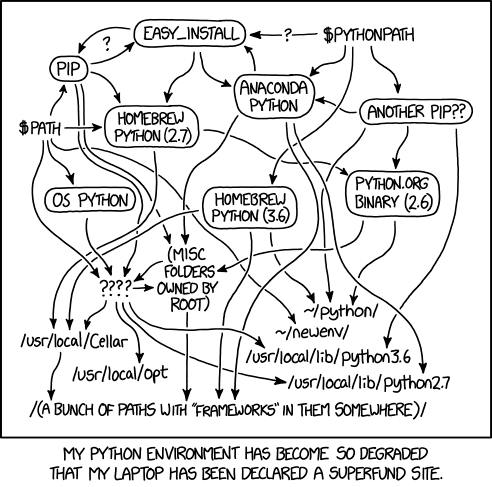
</ul>]]></content><author><name>Vincent Thorne</name></author><summary type="html"><![CDATA[]]></summary><media:thumbnail xmlns:media="http://search.yahoo.com/mrss/" url="https://vinceth.net/assets/img/thumb_small.jpeg" /><media:content medium="image" url="https://vinceth.net/assets/img/thumb_small.jpeg" xmlns:media="http://search.yahoo.com/mrss/" /></entry><entry><title type="html">A Python setup that finally works</title><link href="https://vinceth.net/2022/06/29/python-setup.html" rel="alternate" type="text/html" title="A Python setup that finally works" /><published>2022-06-29T00:00:00+00:00</published><updated>2022-06-29T00:00:00+00:00</updated><id>https://vinceth.net/2022/06/29/python-setup</id><content type="html" xml:base="https://vinceth.net/2022/06/29/python-setup.html"><![CDATA[<p>My punctual use of Python lead to a rocky situation on my computer: multiple installed versions of Python with some managed by Anaconda, unruly <code class="language-plaintext highlighter-rouge">export PATH</code>s and multiple virtual environments. It (kind of) worked when I needed to, but I felt a complete lack of control. In short, my computer was the embodiment of xkcd’s <a href="https://xkcd.com/1987">famous comic</a>:</p>

<p><img src="https://imgs.xkcd.com/comics/python_environment.png" alt="xkcd comic python environment" /></p>

<p>That was until my colleague <a href="https://ie.linkedin.com/in/matteo-pograxha-b9a822148">Matteo</a> took the time the other day to teach me his own protocol to install and maintain a healthy Python ecosystem. This post will walk the reader through the steps that helped me achieve Python sanity on macOS.</p>

<h2 id="the-steps">The Steps</h2>

<p>These commands are to be run in the terminal. They assume that you have Homebrew installed (which I recommend — <a href="http://web.archive.org/web/20211125121141/https://mouselike.de/introduction-to-homebrew/">some reasons why</a>): install instructions are available <a href="https://brew.sh/">here</a>.</p>

<p><strong>Controversial Step 0</strong>: if installed, remove Anaconda completely and clean your <code class="language-plaintext highlighter-rouge">.zshrc</code> of all <code class="language-plaintext highlighter-rouge">export PATH</code>s created by Anaconda or conda. More details on <a href="https://docs.anaconda.com/anaconda/install/uninstall/">Anaconda’s help page</a>. Not taking a stance for or against Anaconda/conda here, just advising to clean up old layers of Python before laying the sturdy foundations!</p>

<ol>
  <li>Install Python from Homebrew
<code class="language-plaintext highlighter-rouge">brew install python</code></li>
  <li>Make sure that the <code class="language-plaintext highlighter-rouge">export PATH</code> in <code class="language-plaintext highlighter-rouge">.zshrc</code> is set to the one prescribed by Homebrew and that there are no other export paths
<code class="language-plaintext highlighter-rouge">export PATH="/usr/local/opt/python/libexec/bin:$PATH"</code></li>
  <li>Restart the terminal session</li>
  <li>Navigate to the directory of the project
<code class="language-plaintext highlighter-rouge">cd path/to/project</code></li>
  <li>Install virtualenv with pip
<code class="language-plaintext highlighter-rouge">pip install virtualenv</code></li>
  <li>Create a new virtual environment
<code class="language-plaintext highlighter-rouge">virtualenv [environment-name]</code></li>
  <li>Activate (source) the new environment
<code class="language-plaintext highlighter-rouge">source [environment-name]/bin/activate</code></li>
  <li>Install required packages with pip
<code class="language-plaintext highlighter-rouge">pip install [package]</code></li>
  <li>If necessary later on, upgrade packages
<code class="language-plaintext highlighter-rouge">pip install [packages] --upgrade</code></li>
  <li>Once done managing the environment, deactivate it
<code class="language-plaintext highlighter-rouge">deactivate</code></li>
</ol>

<h2 id="spyder-setup">Spyder setup</h2>

<p>Accustomed to RStudio and other statistical IDEs, Spyder is a close enough cousin to ease my transition into Python. A few further steps are necessary to link it with the custom environment created above.</p>

<ol>
  <li>Install <code class="language-plaintext highlighter-rouge">spyder-kernels</code> in the virtual environment
<code class="language-plaintext highlighter-rouge">pip install spyder-kernels</code>
    <ul>
      <li>Depending on your version of Spyder, it might ask you to install a specific version. Try with the version displayed first
<code class="language-plaintext highlighter-rouge">pip install spyder-kernels==2.3.0</code>, for example</li>
    </ul>
  </li>
  <li>In Spyder preferences
    <ol>
      <li>Go to the Python Interpreter tab and select “Use the following Python interpreter”.</li>
      <li>Click on the file icon</li>
      <li>In the Finder prompt, navigate to your virtual environment, the bin folder and select the <code class="language-plaintext highlighter-rouge">pyhton</code> file.</li>
      <li>Click OK and restart Spyder</li>
    </ol>
  </li>
  <li>Check if it works by <code class="language-plaintext highlighter-rouge">import [package]</code> a package installed in your virtual environment using the IPython console in Spyder</li>
</ol>

<p><strong>Important</strong>: if you create a new virtual environment, you will have to make sure that it has <code class="language-plaintext highlighter-rouge">spyder-kernels</code> installed (step 1) and re-link Spyder to that new environment (step 2).</p>

<h2 id="updating-and-sharing-your-environment">Updating and sharing your environment</h2>

<ol>
  <li>Export a list of packages with their version to a text file
<code class="language-plaintext highlighter-rouge">pip freeze &gt; requirements.txt</code></li>
  <li>Update the packages listed in <code class="language-plaintext highlighter-rouge">requirements.txt</code>
<code class="language-plaintext highlighter-rouge">pip install --upgrade -r requirements.txt</code></li>
  <li>Send <code class="language-plaintext highlighter-rouge">requirements.txt</code> to someone, and they just need to <code class="language-plaintext highlighter-rouge">pip install -r requirements.txt</code> to install all the packages</li>
</ol>

<h2 id="if-nothing-works">If nothing works</h2>

<p>Take a deep breath and ask your knowledgeable friends and colleagues to take a look at your computer and help you figure things out. There is light at the end of the Python tunnel!</p>]]></content><author><name>Vincent Thorne</name></author><summary type="html"><![CDATA[My punctual use of Python lead to a rocky situation on my computer: multiple installed versions of Python with some managed by Anaconda, unruly export PATHs and multiple virtual environments. It (kind of) worked when I needed to, but I felt a complete lack of control. In short, my computer was the embodiment of xkcd’s famous comic:]]></summary><media:thumbnail xmlns:media="http://search.yahoo.com/mrss/" url="https://vinceth.net/assets/img/thumb_small.jpeg" /><media:content medium="image" url="https://vinceth.net/assets/img/thumb_small.jpeg" xmlns:media="http://search.yahoo.com/mrss/" /></entry><entry><title type="html">Getting started with Simon’s Sunset Radio</title><link href="https://vinceth.net/2022/02/10/getting-started-simon-radio.html" rel="alternate" type="text/html" title="Getting started with Simon’s Sunset Radio" /><published>2022-02-10T00:00:00+00:00</published><updated>2022-02-10T00:00:00+00:00</updated><id>https://vinceth.net/2022/02/10/getting-started-simon-radio</id><content type="html" xml:base="https://vinceth.net/2022/02/10/getting-started-simon-radio.html"><![CDATA[<h1 id="introduction">Introduction</h1>

<p>I love Simon Caldwell’s <a href="https://fbiradio.com/945fm/programs/sunset-simon-caldwell/"><em>Sunset</em> radio show</a> on FBI. It’s jsut the kind of electronic music that can fuel my entire day. Large portion’s of my time is spent on FBI’s website, methodically clicking away to get the next show. Unfortunately for hardcore fans like myself, FBI doesn’t provide a podcast of Simon’s shows, and we’re reduced to navigate the clumsy and laggy website.</p>

<p>That’s until I decided to take matters in my own hands and build my own <em>Sunset with Simon Caldwell</em> “radio”. In this post, I’ll start by trying to understand FBI’s website structure. I will use R, my language of choice since a few years — both because that’s what I’m most comfortable with, but also to check how it will perform in less data-centered tasks. Let’s get started!</p>

<h1 id="code">Code</h1>

<div class="language-R highlighter-rouge"><div class="highlight"><pre class="highlight"><code><span class="n">library</span><span class="p">(</span><span class="n">xml2</span><span class="p">)</span><span class="w">
</span><span class="n">library</span><span class="p">(</span><span class="n">rvest</span><span class="p">)</span><span class="w">
</span><span class="n">library</span><span class="p">(</span><span class="n">stringr</span><span class="p">)</span><span class="w">
</span><span class="n">library</span><span class="p">(</span><span class="n">data.table</span><span class="p">)</span><span class="w">
</span><span class="n">options</span><span class="p">(</span><span class="n">timeout</span><span class="o">=</span><span class="m">10000</span><span class="p">)</span><span class="w"> </span><span class="c1"># increase download timeout threshold</span><span class="w">
</span></code></pre></div></div>

<p>First, let’s get all links on the show’s main landing page.</p>

<div class="language-R highlighter-rouge"><div class="highlight"><pre class="highlight"><code><span class="n">mainpage</span><span class="w"> </span><span class="o">=</span><span class="w"> </span><span class="s2">"https://fbiradio.com/945fm/programs/sunset-simon-caldwell/"</span><span class="w">
</span><span class="n">pg</span><span class="w"> </span><span class="o">=</span><span class="w"> </span><span class="n">read_html</span><span class="p">(</span><span class="n">mainpage</span><span class="p">)</span><span class="w">

</span><span class="n">links.all</span><span class="w"> </span><span class="o">=</span><span class="w"> </span><span class="n">html_attr</span><span class="p">(</span><span class="n">html_elements</span><span class="p">(</span><span class="n">pg</span><span class="p">,</span><span class="w"> </span><span class="s2">"a"</span><span class="p">),</span><span class="w"> </span><span class="s2">"href"</span><span class="p">)</span><span class="w">
</span></code></pre></div></div>

<p>Check if we see any <code class="language-plaintext highlighter-rouge">.mp3</code> links.</p>

<div class="language-R highlighter-rouge"><div class="highlight"><pre class="highlight"><code><span class="n">grep</span><span class="p">(</span><span class="s2">".*\\.mp3"</span><span class="p">,</span><span class="w"> </span><span class="n">links.all</span><span class="p">,</span><span class="w"> </span><span class="n">value</span><span class="w"> </span><span class="o">=</span><span class="w"> </span><span class="nb">T</span><span class="p">)</span><span class="w">
</span><span class="c1"># character(0)</span><span class="w">
</span></code></pre></div></div>

<p>No luck — that would have been too easy!</p>

<p>Inspecting the “play” button, we notice that clicking on it provokes an event. Looking at the network activity (in the browser’s developer tools) when clicking the play button, we see that it <code class="language-plaintext highlighter-rouge">GET</code>s an mp3 file which we can copy the url.</p>

<div class="language-R highlighter-rouge"><div class="highlight"><pre class="highlight"><code><span class="n">mp3_url</span><span class="w"> </span><span class="o">=</span><span class="w"> </span><span class="s2">"https://d27rxetjl76nhc.cloudfront.net/ondemand/2022/02/07/202202071800_1_1_Sunset_-_Simon_Caldwell.mp3"</span><span class="w">
</span></code></pre></div></div>

<p>Let’s try to decompose the URL in intelligible parts: notice the year after the <code class="language-plaintext highlighter-rouge">/ondemand/</code> part.</p>

<div class="language-R highlighter-rouge"><div class="highlight"><pre class="highlight"><code><span class="n">year</span><span class="w"> </span><span class="o">=</span><span class="w"> </span><span class="n">gsub</span><span class="p">(</span><span class="s2">".+/([0-9]{4})/.+"</span><span class="p">,</span><span class="w"> </span><span class="s2">"\\1"</span><span class="p">,</span><span class="w"> </span><span class="n">mp3_url</span><span class="p">)</span><span class="w">
</span><span class="n">month</span><span class="w"> </span><span class="o">=</span><span class="w"> </span><span class="n">gsub</span><span class="p">(</span><span class="s2">".+/[0-9]{4}/([0-9]{2})/.+"</span><span class="p">,</span><span class="w"> </span><span class="s2">"\\1"</span><span class="p">,</span><span class="w"> </span><span class="n">mp3_url</span><span class="p">)</span><span class="w">
</span><span class="n">day</span><span class="w"> </span><span class="o">=</span><span class="w"> </span><span class="n">gsub</span><span class="p">(</span><span class="s2">".+/[0-9]{4}/[0-9]{2}/([0-9]{2}).+"</span><span class="p">,</span><span class="w"> </span><span class="s2">"\\1"</span><span class="p">,</span><span class="w"> </span><span class="n">mp3_url</span><span class="p">)</span><span class="w">
</span><span class="n">print</span><span class="p">(</span><span class="n">paste</span><span class="p">(</span><span class="n">year</span><span class="p">,</span><span class="w"> </span><span class="n">month</span><span class="p">,</span><span class="w"> </span><span class="n">day</span><span class="p">))</span><span class="w">
</span><span class="c1"># [1] "2022 02 07"</span><span class="w">
</span></code></pre></div></div>

<p>Using some regex, <code class="language-plaintext highlighter-rouge">gsub</code> identifies the numbers that represent each date element. Notice the digits in parenthesis which form the group that may be extracted with the second argument <code class="language-plaintext highlighter-rouge">\\1</code>. Notice as well that we can tell regex how many digits we expect in curly brackets. After many years fighting it, I finally started to “get” and enjoy regex — do yourself a favor and get your hands dirty too! Once you start getting comfortable with it’s inner workings, you’ll find out it’s pretty powerful. There are great online tools to get acquainted with the beast: I use <a href="https://regexr.com">regexr.com</a> a lot to test regex code.</p>

<p>Back to our URL: notice how the date is repeated (all concatenated) after the day element we extracted. It seems to be followed by the show’s start time, <code class="language-plaintext highlighter-rouge">18.00</code>. Let’s extract that with more regex.</p>

<div class="language-R highlighter-rouge"><div class="highlight"><pre class="highlight"><code><span class="n">ymd</span><span class="w"> </span><span class="o">=</span><span class="w"> </span><span class="n">paste0</span><span class="p">(</span><span class="n">year</span><span class="p">,</span><span class="w"> </span><span class="n">month</span><span class="p">,</span><span class="w"> </span><span class="n">day</span><span class="p">)</span><span class="w">
</span><span class="n">hour</span><span class="w"> </span><span class="o">=</span><span class="w"> </span><span class="n">gsub</span><span class="p">(</span><span class="n">str_glue</span><span class="p">(</span><span class="s2">".+/{ymd}([0-9]4)_.+"</span><span class="p">),</span><span class="w"> </span><span class="s2">"\\1"</span><span class="p">,</span><span class="w"> </span><span class="n">mp3_url</span><span class="p">)</span><span class="w">
</span><span class="n">hour</span><span class="w">
</span><span class="c1"># [1] "1800"</span><span class="w">
</span></code></pre></div></div>
<p><code class="language-plaintext highlighter-rouge">str_glue</code> from <code class="language-plaintext highlighter-rouge">stringr</code> is great because it let’s you refer to variables directly in the string using curly brackets. However, since our regex code also needs the curly brackets to know how many digits to expect, I had to double the curly brackets around the 4.</p>

<p>The rest of the mp3 name doesn’t seem to have much to it and we may store it as is.</p>

<div class="language-R highlighter-rouge"><div class="highlight"><pre class="highlight"><code><span class="n">ymdh</span><span class="w"> </span><span class="o">=</span><span class="w"> </span><span class="n">paste0</span><span class="p">(</span><span class="n">year</span><span class="p">,</span><span class="w"> </span><span class="n">month</span><span class="p">,</span><span class="w"> </span><span class="n">day</span><span class="p">,</span><span class="w"> </span><span class="n">hour</span><span class="p">)</span><span class="w">
</span><span class="n">stub</span><span class="w"> </span><span class="o">=</span><span class="w"> </span><span class="n">gsub</span><span class="p">(</span><span class="n">str_glue</span><span class="p">(</span><span class="s2">".+/{ymdh}(.+\\.mp3)$"</span><span class="p">),</span><span class="w"> </span><span class="s2">"\\1"</span><span class="p">,</span><span class="w"> </span><span class="n">mp3_url</span><span class="p">)</span><span class="w">
</span><span class="n">stub</span><span class="w">
</span><span class="c1"># [1] "_1_1_Sunset_-_Simon_Caldwell.mp3"</span><span class="w">
</span></code></pre></div></div>

<p>Let’s review the pieces we have so far:</p>
<div class="language-R highlighter-rouge"><div class="highlight"><pre class="highlight"><code><span class="n">year</span><span class="w">
</span><span class="n">month</span><span class="w">
</span><span class="n">day</span><span class="w">
</span><span class="n">ymdh</span><span class="w">
</span><span class="n">stub</span><span class="w">
</span><span class="c1"># [1] "2022"</span><span class="w">
</span><span class="c1"># [1] "02"</span><span class="w">
</span><span class="c1"># [1] "07"</span><span class="w">
</span><span class="c1"># [1] "202202071800"</span><span class="w">
</span><span class="c1"># [1] "_1_1_Sunset_-_Simon_Caldwell.mp3"</span><span class="w">
</span></code></pre></div></div>

<p>We should probably add the very first part of the URL as well.</p>
<div class="language-R highlighter-rouge"><div class="highlight"><pre class="highlight"><code><span class="n">trunk</span><span class="w"> </span><span class="o">=</span><span class="w"> </span><span class="n">gsub</span><span class="p">(</span><span class="n">str_glue</span><span class="p">(</span><span class="s2">"^(.+/){year}/{month}/{day}/{ymdh}(.+\\.mp3)$"</span><span class="p">),</span><span class="w"> </span><span class="s2">"\\1"</span><span class="p">,</span><span class="w"> </span><span class="n">mp3_url</span><span class="p">)</span><span class="w">
</span><span class="n">print</span><span class="p">(</span><span class="n">str_glue</span><span class="p">(</span><span class="s2">"{trunk}{year}/{month}/{day}/{ymdh}{stub}"</span><span class="p">))</span><span class="w">
</span><span class="c1"># https://d27rxetjl76nhc.cloudfront.net/ondemand/2022/02/07/202202071800_1_1_Sunset_-_Simon_Caldwell.mp3</span><span class="w">

</span></code></pre></div></div>

<p>Alright, now that we have the building blocks, let’s try to got other shows at earlier dates. We start manually inputing different values for the dates and see if anything comes up.</p>

<div class="language-R highlighter-rouge"><div class="highlight"><pre class="highlight"><code><span class="n">month</span><span class="w"> </span><span class="o">=</span><span class="w"> </span><span class="s2">"01"</span><span class="w">
</span><span class="n">day</span><span class="w"> </span><span class="o">=</span><span class="w"> </span><span class="s2">"31"</span><span class="w">

</span><span class="n">test_url</span><span class="w"> </span><span class="o">=</span><span class="w"> </span><span class="n">str_glue</span><span class="p">(</span><span class="s2">"{trunk}{year}/{month}/{day}/{year}{month}{day}{hour}{stub}"</span><span class="p">)</span><span class="w">
</span><span class="n">test_url</span><span class="w">
</span><span class="c1"># https://d27rxetjl76nhc.cloudfront.net/ondemand/2022/01/31/202201311800_1_1_Sunset_-_Simon_Caldwell.mp3</span><span class="w">

</span><span class="n">file_name</span><span class="w"> </span><span class="o">=</span><span class="w"> </span><span class="n">str_glue</span><span class="p">(</span><span class="s2">"{year}-{month}-{day}_simon-sunset.mp3"</span><span class="p">)</span><span class="w">

</span><span class="c1"># create "shows" directory if missing </span><span class="w">
</span><span class="k">if</span><span class="p">(</span><span class="o">!</span><span class="n">dir.exists</span><span class="p">(</span><span class="s2">"shows"</span><span class="p">))</span><span class="w"> </span><span class="p">{</span><span class="n">dir.create</span><span class="p">(</span><span class="s2">"shows"</span><span class="p">)}</span><span class="w">
</span><span class="n">download.file</span><span class="p">(</span><span class="n">test_url</span><span class="p">,</span><span class="w"> </span><span class="n">destfile</span><span class="w"> </span><span class="o">=</span><span class="w"> </span><span class="n">file.path</span><span class="p">(</span><span class="n">file_name</span><span class="p">),</span><span class="w"> </span><span class="n">mode</span><span class="w"> </span><span class="o">=</span><span class="w"> </span><span class="s2">"wb"</span><span class="p">)</span><span class="w">
</span></code></pre></div></div>

<p>It worked! In next post, we’ll see how far back in time we can go using some date-time packages for R.</p>]]></content><author><name>Vincent Thorne</name></author><summary type="html"><![CDATA[Introduction]]></summary><media:thumbnail xmlns:media="http://search.yahoo.com/mrss/" url="https://vinceth.net/assets/img/thumb_small.jpeg" /><media:content medium="image" url="https://vinceth.net/assets/img/thumb_small.jpeg" xmlns:media="http://search.yahoo.com/mrss/" /></entry><entry><title type="html">Geospatial intersects with data.table, geos and sf</title><link href="https://vinceth.net/2022/02/09/intersects-datatable-geos-sf.html" rel="alternate" type="text/html" title="Geospatial intersects with data.table, geos and sf" /><published>2022-02-09T00:00:00+00:00</published><updated>2022-02-09T00:00:00+00:00</updated><id>https://vinceth.net/2022/02/09/intersects-datatable-geos-sf</id><content type="html" xml:base="https://vinceth.net/2022/02/09/intersects-datatable-geos-sf.html"><![CDATA[<p>Working with large spatial data sets in R, I was delighted to discover <a href="https://grantmcdermott.com/fast-geospatial-datatable-geos">Grant McDermott’s post</a> on how to combine <code class="language-plaintext highlighter-rouge">data.table</code> and <code class="language-plaintext highlighter-rouge">geos</code> for blazing-fast spatial operations compared to the standard <code class="language-plaintext highlighter-rouge">sf</code> (keeping in mind that <code class="language-plaintext highlighter-rouge">geos</code> assumes planar geometries). The benchmark for the spatial operations he presents are very convincing, so decided to give it a go on the data set I’m currently working with, the infamous <a href="https://www1.nyc.gov/site/tlc/about/tlc-trip-record-data.page">NYC taxi trip records</a>.</p>

<p>In the example below, I am matching each trip pickup coordinates (points) with one of 263 taxi zones (polygons). In the end, I want to know how many taxi trips started in each zones. To find out to which taxi zone each pair of coordinates belongs, I use <code class="language-plaintext highlighter-rouge">st_intersect</code> from the <code class="language-plaintext highlighter-rouge">sf</code> package, and <code class="language-plaintext highlighter-rouge">geos_intersects_matrix</code> from <code class="language-plaintext highlighter-rouge">geos</code>. Surprisingly, the benchmark reveals that <strong>when intersecting points and polygons</strong> <code class="language-plaintext highlighter-rouge">sf</code> is about 40% faster compared to the <code class="language-plaintext highlighter-rouge">data.table</code>+<code class="language-plaintext highlighter-rouge">geos</code> team.</p>

<p>I am in no position to say what is happening behind the scenes here, but found it interesting to report and contrast with Grant’s findings: the advantages of using <code class="language-plaintext highlighter-rouge">data.table</code>+<code class="language-plaintext highlighter-rouge">geos</code> might depend on the type of spatial operation. There might also be a better way to implement the <code class="language-plaintext highlighter-rouge">data.table</code>+<code class="language-plaintext highlighter-rouge">geos</code> version in this case that I overlooked — if you have ideas, please let me know!</p>

<div class="language-R highlighter-rouge"><div class="highlight"><pre class="highlight"><code><span class="n">library</span><span class="p">(</span><span class="n">sf</span><span class="p">)</span><span class="w">
</span><span class="n">library</span><span class="p">(</span><span class="n">geos</span><span class="p">)</span><span class="w">
</span><span class="n">library</span><span class="p">(</span><span class="n">data.table</span><span class="p">)</span><span class="w">
</span><span class="n">library</span><span class="p">(</span><span class="n">microbenchmark</span><span class="p">)</span><span class="w">
</span><span class="n">options</span><span class="p">(</span><span class="n">timeout</span><span class="o">=</span><span class="m">10000</span><span class="p">)</span><span class="w">

</span><span class="n">rm</span><span class="p">(</span><span class="n">list</span><span class="w"> </span><span class="o">=</span><span class="w"> </span><span class="n">ls</span><span class="p">())</span><span class="w">
</span><span class="n">gc</span><span class="p">()</span><span class="w">

</span><span class="n">url_trips</span><span class="w"> </span><span class="o">=</span><span class="w"> </span><span class="s2">"https://s3.amazonaws.com/nyc-tlc/trip+data/yellow_tripdata_2015-01.csv"</span><span class="w">

</span><span class="n">download.file</span><span class="p">(</span><span class="n">url</span><span class="w"> </span><span class="o">=</span><span class="w"> </span><span class="n">url_trips</span><span class="p">,</span><span class="w"> </span><span class="n">destfile</span><span class="w"> </span><span class="o">=</span><span class="w"> </span><span class="s2">"trip_records.csv"</span><span class="p">,</span><span class="w"> </span><span class="n">mode</span><span class="w"> </span><span class="o">=</span><span class="w"> </span><span class="s2">"wb"</span><span class="p">)</span><span class="w"> </span><span class="c1"># takes some time and is pretty heavy!</span><span class="w">
</span><span class="n">trips.dt</span><span class="w"> </span><span class="o">=</span><span class="w"> </span><span class="n">fread</span><span class="p">(</span><span class="s2">"trip_records.csv"</span><span class="p">,</span><span class="w"> </span><span class="n">nrows</span><span class="w"> </span><span class="o">=</span><span class="w"> </span><span class="m">100000</span><span class="p">)</span><span class="w"> </span><span class="c1"># enough rows to benchmark performance</span><span class="w">

</span><span class="c1"># Keep only pickup (origin) coordinate columns</span><span class="w">
</span><span class="n">cols_drop</span><span class="w"> </span><span class="o">=</span><span class="w"> </span><span class="n">grep</span><span class="p">(</span><span class="s2">"pickup_l"</span><span class="p">,</span><span class="w"> </span><span class="nf">names</span><span class="p">(</span><span class="n">trips.dt</span><span class="p">),</span><span class="w"> </span><span class="n">value</span><span class="w"> </span><span class="o">=</span><span class="w"> </span><span class="nb">T</span><span class="p">,</span><span class="w"> </span><span class="n">invert</span><span class="w"> </span><span class="o">=</span><span class="w"> </span><span class="nb">T</span><span class="p">)</span><span class="w">
</span><span class="n">trips.dt</span><span class="p">[,</span><span class="w"> </span><span class="p">(</span><span class="n">cols_drop</span><span class="p">)</span><span class="w"> </span><span class="o">:=</span><span class="w"> </span><span class="kc">NULL</span><span class="p">]</span><span class="w">
</span><span class="n">trips.dt</span><span class="w"> </span><span class="o">=</span><span class="w"> </span><span class="n">trips.dt</span><span class="p">[</span><span class="o">!</span><span class="p">(</span><span class="n">pickup_longitude</span><span class="w"> </span><span class="o">==</span><span class="w"> </span><span class="m">0</span><span class="w"> </span><span class="o">|</span><span class="w"> </span><span class="n">pickup_latitude</span><span class="w"> </span><span class="o">==</span><span class="w"> </span><span class="m">0</span><span class="p">)]</span><span class="w"> </span><span class="c1"># obviously invalid coordinates</span><span class="w">

</span><span class="c1"># Generate geom</span><span class="w">
</span><span class="n">trips.dt</span><span class="p">[,</span><span class="w"> </span><span class="n">`:=`</span><span class="p">(</span><span class="n">o_geom</span><span class="w"> </span><span class="o">=</span><span class="w"> </span><span class="n">geos_make_point</span><span class="p">(</span><span class="n">pickup_longitude</span><span class="p">,</span><span class="w"> 
                                         </span><span class="n">pickup_latitude</span><span class="p">,</span><span class="w"> 
                                         </span><span class="n">crs</span><span class="o">=</span><span class="m">4326</span><span class="p">))]</span><span class="w">

</span><span class="c1"># Generate sf</span><span class="w">
</span><span class="n">trips.sf</span><span class="w"> </span><span class="o">=</span><span class="w"> </span><span class="n">st_as_sf</span><span class="p">(</span><span class="n">trips.dt</span><span class="p">)</span><span class="w">
</span><span class="n">trips.sf</span><span class="w"> </span><span class="o">=</span><span class="w"> </span><span class="n">st_transform</span><span class="p">(</span><span class="n">trips.sf</span><span class="p">,</span><span class="w"> </span><span class="m">4326</span><span class="p">)</span><span class="w">

</span><span class="c1"># Get polygons to intersect</span><span class="w">
</span><span class="n">url_zones</span><span class="w"> </span><span class="o">=</span><span class="w"> </span><span class="s2">"https://s3.amazonaws.com/nyc-tlc/misc/taxi_zones.zip"</span><span class="w">
</span><span class="n">download.file</span><span class="p">(</span><span class="n">url_zones</span><span class="p">,</span><span class="w"> </span><span class="n">destfile</span><span class="w"> </span><span class="o">=</span><span class="w"> </span><span class="s2">"zones_polygons.zip"</span><span class="p">,</span><span class="w"> </span><span class="n">mode</span><span class="w"> </span><span class="o">=</span><span class="w"> </span><span class="s2">"wb"</span><span class="p">)</span><span class="w">
</span><span class="n">unzip</span><span class="p">(</span><span class="s2">"zones_polygons.zip"</span><span class="p">,</span><span class="w"> </span><span class="n">exdir</span><span class="w"> </span><span class="o">=</span><span class="w"> </span><span class="n">file.path</span><span class="p">(</span><span class="s2">"zones"</span><span class="p">))</span><span class="w">

</span><span class="c1"># sf version</span><span class="w">
</span><span class="n">zones.sf</span><span class="w"> </span><span class="o">=</span><span class="w"> </span><span class="n">st_read</span><span class="p">(</span><span class="n">file.path</span><span class="p">(</span><span class="s2">"zones"</span><span class="p">,</span><span class="w"> </span><span class="s2">"taxi_zones.shp"</span><span class="p">))</span><span class="w">
</span><span class="n">zones.sf</span><span class="w"> </span><span class="o">=</span><span class="w"> </span><span class="n">st_transform</span><span class="p">(</span><span class="n">zones.sf</span><span class="p">,</span><span class="w"> </span><span class="m">4326</span><span class="p">)</span><span class="w">

</span><span class="c1"># geom version</span><span class="w">
</span><span class="n">zones.dt</span><span class="w"> </span><span class="o">=</span><span class="w"> </span><span class="n">as.data.table</span><span class="p">(</span><span class="n">zones.sf</span><span class="p">)[,</span><span class="w"> </span><span class="n">geom</span><span class="w"> </span><span class="o">:=</span><span class="w"> </span><span class="n">as_geos_geometry</span><span class="p">(</span><span class="n">geometry</span><span class="p">,</span><span class="w"> </span><span class="n">crs</span><span class="w"> </span><span class="o">=</span><span class="w"> </span><span class="m">4326</span><span class="p">)]</span><span class="w">
</span><span class="n">zones.dt</span><span class="p">[,</span><span class="w"> </span><span class="n">geometry</span><span class="w"> </span><span class="o">:=</span><span class="w"> </span><span class="kc">NULL</span><span class="p">]</span><span class="w">

</span><span class="c1"># Functions to test</span><span class="w">
</span><span class="n">geos.dt</span><span class="w"> </span><span class="o">=</span><span class="w"> </span><span class="k">function</span><span class="p">(</span><span class="n">x</span><span class="p">)</span><span class="w"> </span><span class="p">{</span><span class="w">
  </span><span class="n">geos_intersects_matrix</span><span class="p">(</span><span class="n">zones.dt</span><span class="p">[,</span><span class="w"> </span><span class="n">geom</span><span class="p">],</span><span class="w"> </span><span class="n">trips.dt</span><span class="p">[,</span><span class="w"> </span><span class="n">o_geom</span><span class="p">])</span><span class="w">
</span><span class="p">}</span><span class="w">

</span><span class="n">sf</span><span class="w"> </span><span class="o">=</span><span class="w"> </span><span class="k">function</span><span class="p">(</span><span class="n">x</span><span class="p">)</span><span class="w"> </span><span class="p">{</span><span class="w">
  </span><span class="n">st_intersects</span><span class="p">(</span><span class="n">zones.sf</span><span class="p">,</span><span class="w"> </span><span class="n">trips.sf</span><span class="p">)</span><span class="w">
</span><span class="p">}</span><span class="w">

</span><span class="c1"># Benchmark</span><span class="w">
</span><span class="n">microbenchmark</span><span class="p">(</span><span class="n">geos</span><span class="w"> </span><span class="o">=</span><span class="w"> </span><span class="n">geos.dt</span><span class="p">(),</span><span class="w">
               </span><span class="n">sf</span><span class="w"> </span><span class="o">=</span><span class="w"> </span><span class="n">sf</span><span class="p">(),</span><span class="w">
               </span><span class="n">times</span><span class="w"> </span><span class="o">=</span><span class="w"> </span><span class="m">10</span><span class="p">)</span><span class="w">

</span><span class="c1"># Unit: seconds</span><span class="w">
</span><span class="c1">#  expr      min       lq     mean   median       uq      max neval</span><span class="w">
</span><span class="c1">#  geos 3.406296 3.823752 4.388384 4.226851 4.992151 6.192083    10</span><span class="w">
</span><span class="c1">#    sf 2.431363 2.493557 2.894264 2.870200 3.118318 3.941235    10</span><span class="w">
</span></code></pre></div></div>]]></content><author><name>Vincent Thorne</name></author><summary type="html"><![CDATA[Working with large spatial data sets in R, I was delighted to discover Grant McDermott’s post on how to combine data.table and geos for blazing-fast spatial operations compared to the standard sf (keeping in mind that geos assumes planar geometries). The benchmark for the spatial operations he presents are very convincing, so decided to give it a go on the data set I’m currently working with, the infamous NYC taxi trip records.]]></summary><media:thumbnail xmlns:media="http://search.yahoo.com/mrss/" url="https://vinceth.net/assets/img/thumb_small.jpeg" /><media:content medium="image" url="https://vinceth.net/assets/img/thumb_small.jpeg" xmlns:media="http://search.yahoo.com/mrss/" /></entry><entry><title type="html">Best of 2021 Links</title><link href="https://vinceth.net/2021/12/22/best-of-2021-links.html" rel="alternate" type="text/html" title="Best of 2021 Links" /><published>2021-12-22T00:00:00+00:00</published><updated>2021-12-22T00:00:00+00:00</updated><id>https://vinceth.net/2021/12/22/best-of-2021-links</id><content type="html" xml:base="https://vinceth.net/2021/12/22/best-of-2021-links.html"><![CDATA[<details open="">
  <summary class="text-delta">
    Table of contents
  </summary>
<ol id="markdown-toc">
  <li><a href="#foreword" id="markdown-toc-foreword">Foreword</a></li>
  <li><a href="#the-list" id="markdown-toc-the-list">The list</a>    <ol>
      <li><a href="#society" id="markdown-toc-society">Society</a></li>
      <li><a href="#personal-growth-psychology-philosophy" id="markdown-toc-personal-growth-psychology-philosophy">Personal growth, psychology, philosophy</a></li>
      <li><a href="#cities-architecture" id="markdown-toc-cities-architecture">Cities, architecture</a></li>
      <li><a href="#the-environment" id="markdown-toc-the-environment">The environment</a></li>
      <li><a href="#unclassified-stuff-science-history-computers-etc" id="markdown-toc-unclassified-stuff-science-history-computers-etc">Unclassified stuff: science, history, computers, etc.</a></li>
    </ol>
  </li>
</ol>

</details>

<h1 id="foreword">Foreword</h1>

<p>The holiday season is the perfect time to comfortably sit by the fire with a cup of hot Christmas tea and a great article to read. Here are few suggestions from links I collected in 2021.</p>

<p>The Internet is a wonderland of interesting content. Everyday, millions of people write, record and share excellent pieces of work, with the potential of expanding one’s mindset, knowledge and curiosity on many topics. Throughout the year, I encounter or receive many such fascinating links. Some I share, some I keep for later, some I read right away. But there is always too much content, and a lot ends up in a dusty digital drawer.</p>

<p>But it doesn’t have to be this way, so I decided to browse that dusty drawer and make a Best-Of-2021 list of links I enjoyed the most. Each link has its own value, and made the cut for different reasons: some taught me something new, others showed me a perspective I didn’t know about before, and some are just entertaining. Of course, the list is not exhaustive, missing articles I read but failed to save, for example, but it’s a pretty nice selection already.</p>

<p>I hope you find something in those links, too, and that it starts new conversations, or enriches old ones we’ve had. If you have your own Best Of 2021, I would love to read through it as well!</p>

<p>Thanks to all those who’ve sent me great content, but also to all the thriving online communities that make the Internet a great place — this list is yours.</p>

<p>If you have an issue accessing any article behind a paywall, you may <a href="https://github.com/iamadamdev/bypass-paywalls-chrome/blob/master/README.md">try this tool</a> — otherwise just get in touch and I’ll be happy to help.</p>

<h1 id="the-list">The list</h1>

<p>The list kept on growing as I was writing the post, and now contains 33 links. To help the reader, ★ identify top picks.</p>

<h2 id="society">Society</h2>

<ul>
  <li>★ <a href="https://www.theatlantic.com/magazine/archive/2021/04/private-schools-are-indefensible/618078/"><em>Private Schools Have Become Truly Obscene</em></a> An in-depth dive into U.S. private schools and how they worsen economic and social divides. Resonates with this 2014 article <a href="https://www.newyorker.com/magazine/2014/03/03/the-mobility-myth"><em>The Mobility Myth</em></a> which also presents the <a href="https://opportunityinsights.org/">amazing work of economist Raj Chetty and his team</a> on social mobility.</li>
  <li>★ <a href="https://www.newyorker.com/magazine/2021/09/13/can-progressives-be-convinced-that-genetics-matters"><em>Can Progressives Be Convinced That Genetics Matters?</em></a> Behavior geneticist Kathryn Paige Harden tells the story of her research and how difficult it is to maintain a scientific middle-ground in an increasingly polarized public discourse. She has an interesting discussion with Sam Harris on <a href="https://www.samharris.org/podcasts/making-sense-episodes/212-july-29-2020">his podcast</a> (<a href="https://assets.samharris.org/episodes/audios/d68807f9-96ec-4e65-92e6-d7358365fd57/874b3fe6-2b69-4deb-b898-80e0d641fd9d.mp3">listen directly here</a>).</li>
  <li><a href="https://nymag.com/intelligencer/2021/11/david-graeber-dawn-of-everything.html"><em>David Graeber’s Possible Worlds</em></a> The life and work of anarchist anthropologist David Graeber who passed away in September 2020.</li>
  <li><a href="https://www.newyorker.com/news/letter-from-the-uk/adam-curtis-explains-it-all"><em>Adam Curtis Explains It All</em></a> Adam Curtis is a British filmmaker interested in the intersection between history, ideology and social psychology. His movies are like collages, carving out new ways of understanding the world and its changes. The article focuses on his latest movie.</li>
</ul>

<h2 id="personal-growth-psychology-philosophy">Personal growth, psychology, philosophy</h2>

<ul>
  <li>★ <a href="https://durmonski.com/life-advice/benefits-of-staying-off-social-media/"><em>The Real Benefits Of Staying Off Social Media</em></a> There is a lot written about our contemporary relationship with technology, and this article summarizes the evidence quite well, speaking from lived experience. This other one is a good follow-up article: ★ <a href="https://www.deprocrastination.co/blog/pursue-high-quality-leisure"><em>Pursue High-quality Leisure</em></a>.</li>
  <li><a href="https://www.wsj.com/articles/for-new-years-resolutions-never-think-youre-too-old-to-become-a-beginner-11609426707"><em>For New Year’s Resolutions, Never Think You’re Too Old to Become a Beginner</em></a> Don’t be afraid to start something new and be bad at it. This article also talks about the <em>importance</em> of being bad at something: <a href="https://www.outsideonline.com/health/wellness/80-20-rule-beginner-mastery-benefits/"><em>The Mental Benefits of Being Terrible at Something</em></a>.</li>
  <li><a href="https://backpackinglight.com/learning-curve-learning-to-suffer/"><em>Learning Curve: Learning to Suffer</em></a> A small essay on how suffering is part of life and how endurance sports can help us get used to the mental challenges that suffering causes.</li>
  <li><a href="https://www.bbc.com/future/article/20210222-the-unusual-ways-western-parents-raise-children"><em>Is the Western way of raising kids weird?</em></a> A different perspective on how children are raised around the world.</li>
  <li><a href="https://knowledgeartist.org/article/identify-remarkable-trait-learn"><em>Identify a Remarkable Trait in Anyone. Then Either Copy or Avoid It</em></a> Very short, everything is in the title, but great advice to remind oneself from time to time.</li>
  <li><a href="https://fs.blog/advice-for-young-scientists/"><em>Advice for Young Scientists—and Curious People in General</em></a> Selected extracts from Nobel Prize-winning biologist Peter Medawar.</li>
</ul>

<h2 id="cities-architecture">Cities, architecture</h2>

<ul>
  <li>★ <a href="https://www.bbc.com/travel/article/20211213-how-are-romes-monuments-still-standing"><em>How are Rome’s monuments still standing?</em></a> Talks about the special type of concrete that the Romans used to build, which lasted almost 2,000 years, versus 100 years for modern concrete. The future of concrete might be in Roman recipes!</li>
  <li>★ <a href="https://www.youtube.com/watch?v=_51_YJQpeg0"><em>Unboxing the hidden politics of SimCity</em></a> Don’t know if you ever played SimCity, but this video goes “behind the curtain” and exposes the underlying ideology behind one of the world’s most successful strategy video game.</li>
  <li><a href="https://metropolisjapan.com/why-tokyo-works/"><em>Why Tokyo Works</em></a> The title is pretty self-explanatory: what are some of the key ingredients that make one of the biggest cities in the world work pretty well? Hint: public transportation.</li>
  <li><a href="https://www.ft.com/content/db40e9a0-f043-4200-ae74-a3fc7b800f74"><em>How a dearth of tourists has transformed Barcelona’s property market</em></a> Looks at the effect of the pandemic on Barcelona’s real-estate market. (Use the tool linked above to access.)</li>
  <li><a href="https://www.youtube.com/watch?v=Wehsz38P74g"><em>Why New York’s Billionaires’ Row Is Half Empty</em></a> New York recently built some of the most crazy skyscrapers, and here’s an analysis of the economics behind such luxurious buildings.</li>
  <li><a href="https://www.theguardian.com/world/2021/jan/24/as-birth-rates-fall-animals-prowl-in-our-abandoned-ghost-villages"><em>As birth rates fall, animals prowl in our abandoned ‘ghost villages’</em></a> How some regions are emptying and what does that mean for human settlements and biodiversity.</li>
  <li><a href="https://www.theguardian.com/cities/2015/may/13/habitat-67-montreal-expo-moshe-safdie-history-cities-50-buildings-day-35"><em>Habitat 67, Montreal’s ‘failed dream’</em></a> A short history and critique of the highly innovative (at the time) Habitat 67, a housing project built for the 1967 Universal Exhibition in Montreal.</li>
  <li><a href="https://www.atlasobscura.com/articles/ancient-cambodian-megacities"><em>How Early Megacities Emerged From the Jungles of Cambodia</em></a> The story of old cities in South-East Asia and what led to their abandonment.</li>
  <li><a href="https://www.currentaffairs.org/2021/04/when-is-the-revolution-in-architecture-coming"><em>When Is the Revolution in Architecture Coming?</em></a> A critique of contemporary architecture being too cold and disconnected from people’s lives. Disclaimers: he is not an architect (at all), and I don’t necessarily agree with all his arguments, but I found his perspective interesting.</li>
</ul>

<h2 id="the-environment">The environment</h2>

<ul>
  <li>★ <a href="https://www.science.org/content/article/millions-electric-cars-are-coming-what-happens-all-dead-batteries"><em>A dead battery dilemma</em></a> The issues linked with increasing the share of electric vehicles, in particular producing and recycling their batteries.</li>
  <li><a href="https://theconversation.com/cycling-is-ten-times-more-important-than-electric-cars-for-reaching-net-zero-cities-157163"><em>Cycling is ten times more important than electric cars for reaching net-zero cities</em></a> Of course, it comes to no surprises that bicycles will save the world!</li>
  <li><a href="https://www.europeanscientist.com/en/environment/biodiversity-decline-will-require-millions-of-years-to-recover/"><em>Biodiversity decline will require millions of years to recover</em></a> The biodiversity decline that we are creating is not temporary and will have dramatic consequences for centuries to come.</li>
  <li><a href="https://tourduvalat.org/en/media/living-mediterranean-report-an-unprecedented-source-of-data-on-the-evolution-of-mediterranean-biodiversity/"><em>Living Mediterranean Report</em></a> This report documents the collapse of Mediterranean biodiversity.</li>
</ul>

<h2 id="unclassified-stuff-science-history-computers-etc">Unclassified stuff: science, history, computers, etc.</h2>

<ul>
  <li>★ <a href="https://www.newyorker.com/magazine/2020/05/18/thirty-six-thousand-feet-under-the-sea"><em>Thirty-six Thousand Feet Under the Sea</em></a> The fascinating adventure of 21st century explorers and how their crazy personalities collide.</li>
  <li>★ <a href="https://www.youtube.com/watch?v=YZuP41ALx_Q"><em>21 old films from 1895 to 1902 colorized and upscaled in 60 fps, with sound</em></a> <a href="https://www.youtube.com/c/DenisShiryaev">Denis Shiryaev</a> has been uploading some of the first ever made films completely restored in 4K and colorized. I find it really amazing to watch the oldest moving images in such high quality — puts things in perspective.</li>
  <li><a href="https://www.bbc.com/travel/article/20210117-stromatolites-the-earths-oldest-living-lifeforms"><em>Stromatolites: The Earth’s oldest living lifeforms</em></a> A story about very old living organisms and how the Earth became what it is today.</li>
  <li><a href="https://www.bbc.com/news/science-environment-37047168"><em>400-year-old Greenland shark ‘longest-living vertebrate’</em></a> Just amazing how long an animal may live: this shark was already 150 years old when the U.S. became a country.</li>
  <li><a href="https://blog.torh.net/2021/05/12/the-digital-natives-are-not-who-you-think-it-is/"><em>The digital natives are not who you think it is</em></a> A humorous comment on the new “digital native” buzzword: true digital natives are the ones who know how computers work, as opposed to those who know how to scroll and make TikTok videos.</li>
  <li><a href="https://www.theatlantic.com/science/archive/2021/05/evolution-butts/618915/"><em>The Body’s Most Embarrassing Organ Is an Evolutionary Marvel</em></a> A history of the anus, which apparently is an amazing organ.</li>
  <li><a href="https://hakaimagazine.com/features/are-we-on-the-verge-of-chatting-with-whales/"><em>Are We on the Verge of Chatting with Whales?</em></a> The article starts by proposing a definition of language (always an interesting challenge) and how some biologists are using machine learning to try to communicate with sperm whales.</li>
  <li><a href="https://worldwideweb.cern.ch/"><em>CERN 2019 WorldWideWeb Rebuild</em></a> A team at the CERN recreated the original World Wide Web browser. A true delight to be able to browse the Web as it originally looked like.</li>
</ul>]]></content><author><name>Vincent Thorne</name></author><summary type="html"><![CDATA[Table of contents]]></summary><media:thumbnail xmlns:media="http://search.yahoo.com/mrss/" url="https://vinceth.net/assets/img/thumb_small.jpeg" /><media:content medium="image" url="https://vinceth.net/assets/img/thumb_small.jpeg" xmlns:media="http://search.yahoo.com/mrss/" /></entry><entry><title type="html">PhD and research resources</title><link href="https://vinceth.net/2021/10/15/phd-ressources.html" rel="alternate" type="text/html" title="PhD and research resources" /><published>2021-10-15T00:00:00+00:00</published><updated>2021-10-15T00:00:00+00:00</updated><id>https://vinceth.net/2021/10/15/phd-ressources</id><content type="html" xml:base="https://vinceth.net/2021/10/15/phd-ressources.html"><![CDATA[<p>This post was originally written by my friend and colleague <a href="https://www.jeffreypagel.com/">Jeff</a>, expanded by myself and available <a href="https://barcelonavault.home.blog/2019/10/01/writing-tips-and-tricks/">here</a>. It lists some useful resources for starting PhD students in economics, and more broadly for any research in social sciences. The links focus on finding research questions, best writing practices and how to approach PhD life.</p>

<p>I am reposting this here as a personal reminder, a form of archive and to spread all this good advice wider. Hope this inspires and helps some people out there!</p>

<hr />

<p>So I hear you’re thinking about doing a PhD in Economics! Well if that’s true, then you must be a masochist!</p>

<p>There are many people that are willing to offer free advice on how  best to complete the enduring task of writing a PhD dissertation, and I  am not going to write out my top ten tips as to how to be successful.  Mainly because I don’t have such a list! This is an individualized  journey, a process of self-exploration, and your development is an  internal one that should not be compared to your classmates.</p>

<p>Here are a couple sources from successful academics that I have found to be insightful to various degrees.</p>

<ol>
  <li><a href="https://barcelonavaulthome.files.wordpress.com/2020/02/writing-tips-for-ph.d.-students.pdf">Writing Tips for Ph.D. Students</a>: John Cochrane writes an entertaining paper on how to write a research paper.</li>
  <li><a href="https://barcelonavaulthome.files.wordpress.com/2020/02/ph.d.-thesis-research-where-do-i-start.pdf">Ph.D. Thesis Research – Where do I start?</a>, Don Davis</li>
  <li><a href="https://barcelonavaulthome.files.wordpress.com/2020/02/successful-paper-seminar.pdf">Successful Paper Seminar</a>, Don Davis</li>
  <li><a href="https://barcelonavaulthome.files.wordpress.com/2020/02/an-unofficial-guidebook-for-phd-students-in-economics-and-education.pdf">An unofficial guidebook for PhD students in economics and education</a> (plenty of extra links included)</li>
  <li><a href="https://barcelonavaulthome.files.wordpress.com/2020/02/researchtemplate.pdf">Research Template</a>: This is a template that I have created, with significant influence from <a href="https://barcelonavaulthome.files.wordpress.com/2020/02/research_idea_template.pdf">Alex Eble’s research idea template</a> (his <a href="https://www.alexeble.com/advice">website</a> is also full of useful links).</li>
  <li><a href="https://macromomblog.com/2019/09/29/we-need-to-talk-more/">How to structure the introduction and abstract of a paper</a>, Claudia Sahm</li>
  <li><a href="https://medium.com/@paul.niehaus/doing-research-18cb310529e0">Doing Research</a>, Paul Niehaus</li>
  <li><a href="https://promarket.org/esther-duflo-how-to-find-the-right-questions/">How to find the right questions</a>, Esther Duflo</li>
  <li><a href="http://arielrubinstein.tau.ac.il/papers/10QA.pdf">My Experienced Advice to Grads in Economics</a>, Ariel Rubinstein</li>
  <li><a href="https://barcelonavaulthome.files.wordpress.com/2020/02/weil.pdf">Pep Talk on Research</a>, David Weil</li>
</ol>

<p>Hope you enjoy the resources and you will do an amazing job contributing to the frontiers of Economic knowledge!</p>]]></content><author><name>Vincent Thorne</name></author><summary type="html"><![CDATA[This post was originally written by my friend and colleague Jeff, expanded by myself and available here. It lists some useful resources for starting PhD students in economics, and more broadly for any research in social sciences. The links focus on finding research questions, best writing practices and how to approach PhD life.]]></summary><media:thumbnail xmlns:media="http://search.yahoo.com/mrss/" url="https://vinceth.net/assets/img/thumb_small.jpeg" /><media:content medium="image" url="https://vinceth.net/assets/img/thumb_small.jpeg" xmlns:media="http://search.yahoo.com/mrss/" /></entry><entry><title type="html">Managing memory in R</title><link href="https://vinceth.net/2021/06/22/managing-memory-r.html" rel="alternate" type="text/html" title="Managing memory in R" /><published>2021-06-22T00:00:00+00:00</published><updated>2021-06-22T00:00:00+00:00</updated><id>https://vinceth.net/2021/06/22/managing-memory-r</id><content type="html" xml:base="https://vinceth.net/2021/06/22/managing-memory-r.html"><![CDATA[<p>A computer’s memory is where a computer stores the working data it wants to make operations on. RAM is the most common form of memory in general purpose computers. Memory should not be confused storage, which is usually located on a hard drive (slower, higher capacity) or flash storage (faster, lower capacity). In R, loaded datasets and created objects are held in memory, ready for computation. Since your memory is (<a href="https://osxdaily.com/2010/10/08/mac-virtual-memory-swap/">more or less</a>) limited by your RAM capacity, it’s important to manage it in order to avoid <code class="language-plaintext highlighter-rouge">Error: vector memory exhausted (limit reached?)</code> errors, which are as frustrating as unambiguous.</p>

<h2 id="using-the-right-packages">Using the right packages</h2>

<p>When working with large datasets with millions of observations, you can quickly run out of memory. The first step is to make sur you are working with <a href="https://rdatatable.gitlab.io/"><code class="language-plaintext highlighter-rouge">data.table</code></a>s instead of <code class="language-plaintext highlighter-rouge">data.frame</code>s. <code class="language-plaintext highlighter-rouge">data.table</code>s processes are <em><a href="https://h2oai.github.io/db-benchmark/">much faster</a></em> and more memory-efficient than most other in-memory data management packages.</p>

<h2 id="remove-and-garbage-collect">Remove and garbage collect</h2>

<p>Second, be sure to remove unused objects: use the <code class="language-plaintext highlighter-rouge">rm(&lt;object&gt;)</code> or <code class="language-plaintext highlighter-rouge">rm(list = c('&lt;object1&gt;', '&lt;object2&gt;', ...))</code> if you have multiple objects. Bear in mind, however, that <code class="language-plaintext highlighter-rouge">rm(...)</code> just removes <em>the link</em> to the data stored in memory. After removing, be sure to garbage collect orphan data using <code class="language-plaintext highlighter-rouge">gc()</code>: this “physically” erases all unlinked objects from your RAM, actually freeing space for the next job.<sup id="fnref:1" role="doc-noteref"><a href="#fn:1" class="footnote" rel="footnote">1</a></sup> <a href="https://www.youtube.com/watch?v=2JasKMJonaQ">This video</a> is a nice and short introduction to garbage collection for non-programmers. A typical use of <code class="language-plaintext highlighter-rouge">rm(...)</code> and <code class="language-plaintext highlighter-rouge">gc()</code> in my scripts is shown below (see the Clean-up section). In the same vein, restarting the RStudio session between memory-heavy scripts might give you some extra legroom.<sup id="fnref:2" role="doc-noteref"><a href="#fn:2" class="footnote" rel="footnote">2</a></sup></p>

<div class="language-r highlighter-rouge"><div class="highlight"><pre class="highlight"><code><span class="c1">### Some loading and transformations ###</span><span class="w">
</span><span class="c1"># Load SF in memory from storage</span><span class="w">
</span><span class="n">grid_panel.sf</span><span class="w"> </span><span class="o">=</span><span class="w"> </span><span class="n">readRDS</span><span class="p">(</span><span class="s1">'2_data/2_constructed/the_grid_3.0.Rds'</span><span class="p">)</span><span class="w">
</span><span class="c1"># Transform to data.table for faster manipulation</span><span class="w">
</span><span class="n">grid_panel.dt</span><span class="w"> </span><span class="o">=</span><span class="w"> </span><span class="n">as.data.table</span><span class="p">(</span><span class="n">grid_panel.sf</span><span class="p">)</span><span class="w">
</span><span class="c1"># Keep only some variables, keep only one row per ID</span><span class="w">
</span><span class="n">grid_work.dt</span><span class="w"> </span><span class="o">=</span><span class="w"> </span><span class="n">grid_panel.dt</span><span class="p">[</span><span class="n">unique</span><span class="p">(</span><span class="n">id</span><span class="p">),</span><span class="w"> </span><span class="n">.</span><span class="p">(</span><span class="n">id</span><span class="p">,</span><span class="w"> </span><span class="n">cell_index</span><span class="p">,</span><span class="w"> </span><span class="n">geometry</span><span class="p">)]</span><span class="w">
</span><span class="c1"># Change the name of variables</span><span class="w">
</span><span class="n">setnames</span><span class="p">(</span><span class="n">grid_work.dt</span><span class="p">,</span><span class="w"> </span><span class="s1">'id'</span><span class="p">,</span><span class="w"> </span><span class="s1">'cell_id'</span><span class="p">)</span><span class="w">
</span><span class="c1"># Transform back to SF</span><span class="w">
</span><span class="n">grid_work.sf</span><span class="w"> </span><span class="o">=</span><span class="w"> </span><span class="n">st_as_sf</span><span class="p">(</span><span class="n">grid_work.dt</span><span class="p">)</span><span class="w">

</span><span class="c1">### Clean-up ###</span><span class="w">
</span><span class="n">rm</span><span class="p">(</span><span class="n">list</span><span class="w"> </span><span class="o">=</span><span class="w"> </span><span class="nf">c</span><span class="p">(</span><span class="s1">'grid_panel.sf'</span><span class="p">,</span><span class="w"> </span><span class="s1">'grid_panel.dt'</span><span class="p">,</span><span class="w"> </span><span class="s1">'grid_work.dt'</span><span class="p">))</span><span class="w">
</span><span class="n">gc</span><span class="p">()</span><span class="w">
</span></code></pre></div></div>

<h2 id="slice-it-up">Slice it up</h2>

<p>Finally, you may slice up your data and perform the computation in a loop, and re-assemble the pieces in a final step. If you work with multi-years datasets for example, you might have to perform some operations year-by-year, and bind all the years back together once the computations are completed.</p>

<h2 id="cant-slice-it-automate-script-writing">Can’t slice it? Automate script writing</h2>

<p>Beware, however, that some operations are better executed outside a loop: if the method you use takes advantage of parallelized computation, a loop will restrict that ability. Therefore, packages like <code class="language-plaintext highlighter-rouge">data.table</code> (<a href="https://github.com/Rdatatable/data.table/wiki/Installation#openmp-enabled-compiler-for-mac">when properly installed on Mac</a>) and <a href="https://ipeagit.github.io/"><code class="language-plaintext highlighter-rouge">r5r</code></a> work at their full potential outside loops.</p>

<p>What if you have a serie of operations using these packages that would fit perfectly in a loop? My last trick for these cases is to write a script containing all the operations you wish to perform sequentially as functions. Then, using a loop, you can create almost instantly an arbitrary number of scripts that load your functions and perform the operations. In a master script, copy-paste the lines that run each sub-script using <code class="language-plaintext highlighter-rouge">scource(...)</code> (a step that could also be automated in another script: script mania!), and you get the full power of parallelized methods in a loop-y fashion. Below is an example that illustrates that last “trick”.</p>

<div class="language-r highlighter-rouge"><div class="highlight"><pre class="highlight"><code><span class="c1">#~~~~~~~~~~~~~~~~~~~~~~~~~~~#</span><span class="w">
</span><span class="c1">####       INTRO         ####</span><span class="w">
</span><span class="c1">#~~~~~~~~~~~~~~~~~~~~~~~~~~~#</span><span class="w">

</span><span class="c1"># Matrix of stations, for each year</span><span class="w">

</span><span class="c1"># Each route is independently computed for each year,</span><span class="w">
</span><span class="c1"># since we have yearly street network maps.</span><span class="w">

</span><span class="c1">#~~~~~~~~~~~~~~~~~~~~~~~~~~~~~~#</span><span class="w">
</span><span class="c1">####       PACKAGES         ####</span><span class="w">
</span><span class="c1">#~~~~~~~~~~~~~~~~~~~~~~~~~~~~~~#</span><span class="w">

</span><span class="n">library</span><span class="p">(</span><span class="n">tidyverse</span><span class="p">)</span><span class="w">
</span><span class="n">library</span><span class="p">(</span><span class="n">sf</span><span class="p">)</span><span class="w">
</span><span class="n">library</span><span class="p">(</span><span class="n">data.table</span><span class="p">)</span><span class="w">
</span><span class="n">library</span><span class="p">(</span><span class="n">tmap</span><span class="p">)</span><span class="w">
</span><span class="n">options</span><span class="p">(</span><span class="n">java.parameters</span><span class="w"> </span><span class="o">=</span><span class="w"> </span><span class="s1">'-Xmx8G'</span><span class="p">)</span><span class="w"> </span><span class="c1"># can't be larger than your RAM</span><span class="w">
</span><span class="n">library</span><span class="p">(</span><span class="n">r5r</span><span class="p">)</span><span class="w">
</span><span class="n">library</span><span class="p">(</span><span class="n">tictoc</span><span class="p">)</span><span class="w">

</span><span class="c1">### Clean all variables and garbage collect</span><span class="w">
</span><span class="n">rm</span><span class="p">(</span><span class="n">list</span><span class="w"> </span><span class="o">=</span><span class="w"> </span><span class="n">ls</span><span class="p">())</span><span class="w">
</span><span class="n">gc</span><span class="p">()</span><span class="w">

</span><span class="c1">#~~~~~~~~~~~~~~~~~~~~~~~~~~~~~~~#</span><span class="w">
</span><span class="c1">####       FUNCTIONS         ####</span><span class="w">
</span><span class="c1">#~~~~~~~~~~~~~~~~~~~~~~~~~~~~~~~#</span><span class="w">

</span><span class="c1">#~~~~~~~~~~~~~~~~~~~~~~~~~~#</span><span class="w">
</span><span class="c1">####       CODE         ####</span><span class="w">
</span><span class="c1">#~~~~~~~~~~~~~~~~~~~~~~~~~~#</span><span class="w">

</span><span class="c1">####~~~~~~~~~~~~~~~~~ Write the content of each script ~~~~~~~~~~~~~~~~~####</span><span class="w">

</span><span class="c1"># Running each script individually enables us to use the full power of the Java</span><span class="w">
</span><span class="c1"># machine, computing routes in parallel across multiple cores.</span><span class="w">
</span><span class="c1"># Inside a loop, only a single core would be used.</span><span class="w">

</span><span class="n">routing.path</span><span class="w"> </span><span class="o">=</span><span class="w"> </span><span class="n">file.path</span><span class="p">(</span><span class="s1">'1_scripts'</span><span class="p">,</span><span class="w"> </span><span class="s1">'1_data-prep'</span><span class="p">,</span><span class="w"> </span><span class="s1">'1_routing'</span><span class="p">)</span><span class="w">

</span><span class="k">if</span><span class="p">(</span><span class="o">!</span><span class="n">dir.exists</span><span class="p">(</span><span class="n">routing.path</span><span class="p">)){</span><span class="w">
  </span><span class="n">dir.create</span><span class="p">(</span><span class="n">routing.path</span><span class="p">)</span><span class="w">
</span><span class="p">}</span><span class="w">

</span><span class="c1">#### Content of individual scripts ####</span><span class="w">

</span><span class="k">for</span><span class="w"> </span><span class="p">(</span><span class="n">y</span><span class="w"> </span><span class="k">in</span><span class="w"> </span><span class="m">2013</span><span class="o">:</span><span class="m">2019</span><span class="p">){</span><span class="w">
  
  </span><span class="n">script.path</span><span class="w"> </span><span class="o">=</span><span class="w"> </span><span class="n">file.path</span><span class="p">(</span><span class="n">routing.path</span><span class="p">,</span><span class="w"> </span><span class="n">str_glue</span><span class="p">(</span><span class="s1">'routing_{y}.R'</span><span class="p">))</span><span class="w">
  
  </span><span class="k">if</span><span class="w"> </span><span class="p">(</span><span class="o">!</span><span class="n">file.exists</span><span class="p">(</span><span class="n">script.path</span><span class="p">))</span><span class="w"> </span><span class="p">{</span><span class="w">
    </span><span class="n">file.create</span><span class="p">(</span><span class="n">script.path</span><span class="p">)</span><span class="w">
  </span><span class="p">}</span><span class="w">
  
  </span><span class="n">script</span><span class="w"> </span><span class="o">=</span><span class="w"> </span><span class="n">file</span><span class="p">(</span><span class="n">script.path</span><span class="p">)</span><span class="w">
  </span><span class="n">content</span><span class="w"> </span><span class="o">=</span><span class="w"> </span><span class="nf">c</span><span class="p">(</span><span class="s1">'rm(list = ls())'</span><span class="p">,</span><span class="w">
              </span><span class="s1">'gc()'</span><span class="p">,</span><span class="w">
              </span><span class="s2">"source(file.path('1_scripts', '1_data-prep', '1_routing', 'routing-fncts.R'))"</span><span class="p">,</span><span class="w"> </span><span class="c1"># routing-fncts.R contains all the commands necessary to perform the computations.</span><span class="w">
              </span><span class="n">str_glue</span><span class="p">(</span><span class="s2">"r5r_full.process({y})"</span><span class="p">),</span><span class="w">
              </span><span class="n">str_glue</span><span class="p">(</span><span class="s2">"routing.path = '{routing.path}'"</span><span class="p">))</span><span class="w"> </span><span class="c1"># Load the routing path to be able to load the next routing script in master.</span><span class="w">
  </span><span class="n">writeLines</span><span class="p">(</span><span class="n">content</span><span class="p">,</span><span class="w"> </span><span class="n">script</span><span class="p">)</span><span class="w">
  </span><span class="n">close</span><span class="p">(</span><span class="n">script</span><span class="p">)</span><span class="w">
  
</span><span class="p">}</span><span class="w">

</span><span class="c1">####~~~~~~~~~~~~~~~~~ Run each script individually ~~~~~~~~~~~~~~~~~####</span><span class="w">

</span><span class="n">source</span><span class="p">(</span><span class="n">file.path</span><span class="p">(</span><span class="n">routing.path</span><span class="p">,</span><span class="w"> </span><span class="s1">'routing_2013.R'</span><span class="p">))</span><span class="w">
</span><span class="n">source</span><span class="p">(</span><span class="n">file.path</span><span class="p">(</span><span class="n">routing.path</span><span class="p">,</span><span class="w"> </span><span class="s1">'routing_2014.R'</span><span class="p">))</span><span class="w">
</span><span class="n">source</span><span class="p">(</span><span class="n">file.path</span><span class="p">(</span><span class="n">routing.path</span><span class="p">,</span><span class="w"> </span><span class="s1">'routing_2015.R'</span><span class="p">))</span><span class="w">
</span><span class="n">source</span><span class="p">(</span><span class="n">file.path</span><span class="p">(</span><span class="n">routing.path</span><span class="p">,</span><span class="w"> </span><span class="s1">'routing_2016.R'</span><span class="p">))</span><span class="w">
</span><span class="n">source</span><span class="p">(</span><span class="n">file.path</span><span class="p">(</span><span class="n">routing.path</span><span class="p">,</span><span class="w"> </span><span class="s1">'routing_2017.R'</span><span class="p">))</span><span class="w">
</span><span class="n">source</span><span class="p">(</span><span class="n">file.path</span><span class="p">(</span><span class="n">routing.path</span><span class="p">,</span><span class="w"> </span><span class="s1">'routing_2018.R'</span><span class="p">))</span><span class="w">
</span><span class="n">source</span><span class="p">(</span><span class="n">file.path</span><span class="p">(</span><span class="n">routing.path</span><span class="p">,</span><span class="w"> </span><span class="s1">'routing_2019.R'</span><span class="p">))</span><span class="w">

</span><span class="c1"># Clean up</span><span class="w">
</span><span class="n">rJava</span><span class="o">::</span><span class="n">.jgc</span><span class="p">(</span><span class="n">R.gc</span><span class="w"> </span><span class="o">=</span><span class="w"> </span><span class="kc">TRUE</span><span class="p">)</span><span class="w">
</span><span class="n">gc</span><span class="p">()</span><span class="w">
</span></code></pre></div></div>
<hr />

<div class="footnotes" role="doc-endnotes">
  <ol>
    <li id="fn:1" role="doc-endnote">
      <p>As rightly noted by my dear developper friend, garbage collection does happen automatically in R, and <code class="language-plaintext highlighter-rouge">gc()</code> just prompts R to garbage collect <em>right here, right now</em>. What I suspect from experience is that some objects are just so big that garbage collecting after removing them can make the difference between completing a script or lamentably crashing halfway through. <a href="#fnref:1" class="reversefootnote" role="doc-backlink">&#8617;</a></p>
    </li>
    <li id="fn:2" role="doc-endnote">
      <p>The command in RStudio is <code class="language-plaintext highlighter-rouge">.rs.restartR()</code>, or under the “Session” menu. This won’t work if the script is run from the command line (which I recommend for long scripts: it frees up RStudio to continue working on other scripts). <code class="language-plaintext highlighter-rouge">restart(...)</code> does exist, but I haven’t experimented with it. <a href="#fnref:2" class="reversefootnote" role="doc-backlink">&#8617;</a></p>
    </li>
  </ol>
</div>]]></content><author><name>Vincent Thorne</name></author><summary type="html"><![CDATA[A computer’s memory is where a computer stores the working data it wants to make operations on. RAM is the most common form of memory in general purpose computers. Memory should not be confused storage, which is usually located on a hard drive (slower, higher capacity) or flash storage (faster, lower capacity). In R, loaded datasets and created objects are held in memory, ready for computation. Since your memory is (more or less) limited by your RAM capacity, it’s important to manage it in order to avoid Error: vector memory exhausted (limit reached?) errors, which are as frustrating as unambiguous.]]></summary><media:thumbnail xmlns:media="http://search.yahoo.com/mrss/" url="https://vinceth.net/assets/img/thumb_small.jpeg" /><media:content medium="image" url="https://vinceth.net/assets/img/thumb_small.jpeg" xmlns:media="http://search.yahoo.com/mrss/" /></entry><entry><title type="html">Areal interpolation</title><link href="https://vinceth.net/2021/06/18/areal-interpolation.html" rel="alternate" type="text/html" title="Areal interpolation" /><published>2021-06-18T00:00:00+00:00</published><updated>2021-06-18T00:00:00+00:00</updated><id>https://vinceth.net/2021/06/18/areal-interpolation</id><content type="html" xml:base="https://vinceth.net/2021/06/18/areal-interpolation.html"><![CDATA[<p>Areal interpolation lets us “distribute” variables between spatial features overlapping but with different borders, which we call incongruent. Importantly, we assume that the variable is homogeneously distributed across a given spatial feature.</p>

<p>In R, the excellent <a href="https://slu-opengis.github.io/areal/index.html"><code class="language-plaintext highlighter-rouge">areal</code></a> package lets us do areal interpolation and control the parameters described below. The (also great) <a href="https://r-spatial.github.io/sf/index.html"><code class="language-plaintext highlighter-rouge">sf</code></a> package does have an <code class="language-plaintext highlighter-rouge">st_interpolate_aw</code> method, but it lacks some features <code class="language-plaintext highlighter-rouge">areal</code> implements.</p>

<p>The “distribution” of values across spatial units takes two parameters (i.e., takes place in two dimensions), described below.</p>

<h2 id="extensive-vs-intensive">Extensive vs Intensive</h2>

<p><strong>Extensive</strong> distribution <strong>spreads</strong> the value of a variable across the overlapping features. This used for <strong>count</strong> variables (population, number of trees, etc).</p>

<p><strong>Intensive</strong> distribution produces a <strong>spatially weighted average</strong> of the variable across the overlapping features. This is used for rates, averages and other <strong>already transformed</strong> variables (asthma rate, median income, etc)</p>

<h2 id="for-extensive-only-sum-vs-total">For extensive only: sum vs total</h2>

<p><strong>Sum</strong> assumes that 100% of the source data should be distributed to the target features. The total area of the source is thus $A_j=\sum A_{ij}$, the sum of all the overlapping (intersected) areas.</p>

<p>In practice, that method is used when features do not perfectly overlap, but one still wishes to distribute the entirety of a feature’s value to the overlapping features (because of an imperfectly matching datasets, for example).</p>

<p><strong>Total</strong> assumes that, if a source feature is not 100% overlapped by target features, then only the overlapped proportion should be distributed. For example, “if a source feature is only covered by 99.88% of the target features, only 99.88% of the source target’s data should be allocated to target features in the interpolation”. $A_j$ is thus the original area of the source feature, not the sum of the intersected areas as in sum.</p>

<p>In practice, that method is used when one is certain the features overlap perfectly, or when only a proportion of the variable (relative to the overlapped area) needs to be allocated, because that’s what makes sense in that particular context.</p>

<p>This is the “distribution dimension” where <code class="language-plaintext highlighter-rouge">areal</code>’s <code class="language-plaintext highlighter-rouge">aw_interpolate()</code> differs from <code class="language-plaintext highlighter-rouge">sf</code>’s <code class="language-plaintext highlighter-rouge">st_interpolate_aw()</code>: the former offers both “sum” and “total” options, while the latter only supports the “total” distribution. <code class="language-plaintext highlighter-rouge">areal</code> has the advantage of making the distinction explicit, but will yield the same results as <code class="language-plaintext highlighter-rouge">sf</code> if the “total” option is selected.</p>

<h2 id="more-details">More details</h2>

<p>The <a href="https://slu-opengis.github.io/areal/index.html"><code class="language-plaintext highlighter-rouge">areal</code></a> homepage has detailed explanations and visual descriptions of the steps involved in areal interpolation. See also the reference on <a href="https://r-spatial.github.io/sf/reference/interpolate_aw.html"><code class="language-plaintext highlighter-rouge">st_interpolate_aw()</code></a> for more details on <code class="language-plaintext highlighter-rouge">sf</code>’s implementation.</p>]]></content><author><name>Vincent Thorne</name></author><summary type="html"><![CDATA[Areal interpolation lets us “distribute” variables between spatial features overlapping but with different borders, which we call incongruent. Importantly, we assume that the variable is homogeneously distributed across a given spatial feature.]]></summary><media:thumbnail xmlns:media="http://search.yahoo.com/mrss/" url="https://vinceth.net/assets/img/thumb_small.jpeg" /><media:content medium="image" url="https://vinceth.net/assets/img/thumb_small.jpeg" xmlns:media="http://search.yahoo.com/mrss/" /></entry></feed>