

Falcon is a lightweight, high-performance Python web framework designed for building RESTful APIs and backend services. It focuses on speed, reliability, and minimal overhead, making it a popular choice for developing scalable web applications and microservices. Falcon provides a clean and flexible API while giving developers greater control over request handling and application performance.
Installation
Before using Falcon, install it using the following command in the command prompt or terminal:
pip install falcon
Creating First Falcon Application
After installing Falcon, you can create a simple REST API that returns a "Hello, Falcon World!" message. In Falcon, requests are handled by resource classes, where methods such as on_get() respond to specific HTTP request types.
import falcon
from waitress import serve

class HelloWorldResource:
    def on_get(self, req, resp):
        resp.text = "Hello, Falcon World!"
        resp.status = falcon.HTTP_200

app = falcon.App()
app.add_route("/hello", HelloWorldResource())

print("Server is running at http://127.0.0.1:8000/hello")
serve(app, host="127.0.0.1", port=8000)
Output
Run the application and open the following URL in your browser: http://127.0.0.1:8000/hello
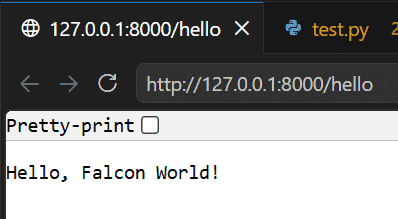
Explanation:
- Creates a resource class named HelloWorldResource.
- The on_get() method handles HTTP GET requests.
- Sets the response status to HTTP 200 OK.
- Returns "Hello, Falcon World!" as the response.
- Registers the /hello endpoint using app.add_route().
- Starts the application using the Waitress WSGI server.
Understanding Falcon Resources
In Falcon, each endpoint is represented by a resource class. Different HTTP methods are handled using separate methods inside the same class.
| Method | Handles |
|---|---|
| on_get() | GET requests |
| on_post() | POST requests |
| on_put() | PUT requests |
| on_delete() | DELETE requests |
| on_patch() | PATCH requests |
This structure makes it easy to organize REST APIs by grouping related operations into a single resource.
URL Routing
Routing is the process of mapping a URL to a specific resource. Falcon uses the add_route() method to associate a URL path with a resource class.
import falcon

class HomeResource:

    def on_get(self, req, resp):
        resp.text = "Welcome to Falcon"

app = falcon.App()
app.add_route("/", HomeResource())
Output
Open the following URL in your browser: http://127.0.0.1:8000/
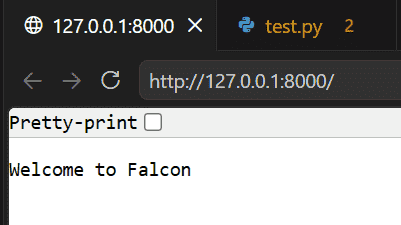
Explanation:
- Creates a resource named HomeResource and handles GET requests using the on_get() method.
- Maps the root URL (/) to the resource and starts the web server using Waitress.
Handling Different HTTP Methods
Falcon allows a single resource to handle multiple HTTP request methods by defining separate methods inside the resource class.
import falcon
from waitress import serve

class UserResource:

    def on_get(self, req, resp):
        resp.text = "Fetching user details"

    def on_post(self, req, resp):
        resp.text = "Creating a new user"

app = falcon.App()
app.add_route("/user", UserResource())

print("Server running at http://127.0.0.1:8000/user")
serve(app, host="127.0.0.1", port=8000)
Output
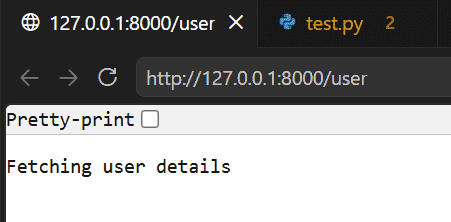
Explanation:
- on_get() processes GET requests.
- on_post() processes POST requests.
- Multiple HTTP methods can be handled by the same resource class.
Returning JSON Response
Most Falcon applications return JSON data instead of plain text. Falcon provides the media attribute to send JSON responses automatically.
import falcon
from waitress import serve

class ProductResource:

    def on_get(self, req, resp):
        resp.media = {
            "id": 101,
            "name": "Laptop",
            "price": 55000
        }

app = falcon.App()
app.add_route("/product", ProductResource())

print("Server running at http://127.0.0.1:8000/product")
serve(app, host="127.0.0.1", port=8000)
Output
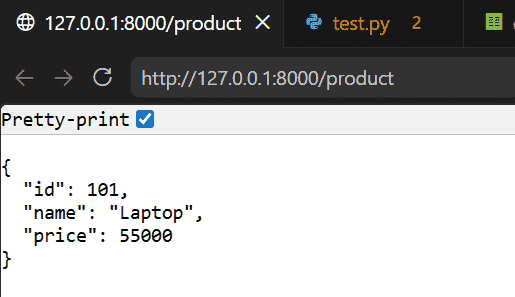
Explanation:
- resp.media automatically converts Python dictionaries into JSON.
- Sets the correct Content-Type (application/json).
- Simplifies API development by eliminating manual JSON conversion.
Advantages
Falcon is designed specifically for building fast and efficient APIs. Some of its major advantages are:
- High Performance: Optimized for handling a large number of requests with low latency.
- Lightweight: Includes only the essential components required for API development.
- REST-Oriented: Provides a clean structure for developing RESTful web services.
- Scalable: Suitable for both small applications and enterprise-level backend services.
- Well Documented: Offers comprehensive documentation and an active open-source community.
Disadvantages
Although Falcon is a framework, it has a few limitations:
- Minimal Built-in Features: Does not include authentication, ORM, templating, or an admin interface like Django.
- Smaller Ecosystem: Provides fewer third-party extensions compared to more popular frameworks.
- API Focused: Best suited for APIs rather than full-stack web applications with server-side rendering.
- Learning REST Concepts: Understanding HTTP methods and REST principles is helpful before using Falcon.
