

A nested dictionary is a dictionary where one or more values are themselves dictionaries. It is commonly used to represent structured or hierarchical data, such as student records, employee information, product catalogs, or configuration settings.
Example: Here, each student ID stores another dictionary containing the student's details.
students = {
    101: {
        "name": "David",
        "marks": 92
    },
    102: {
        "name": "Kate",
        "marks": 85
    }
}
Illustration using Image
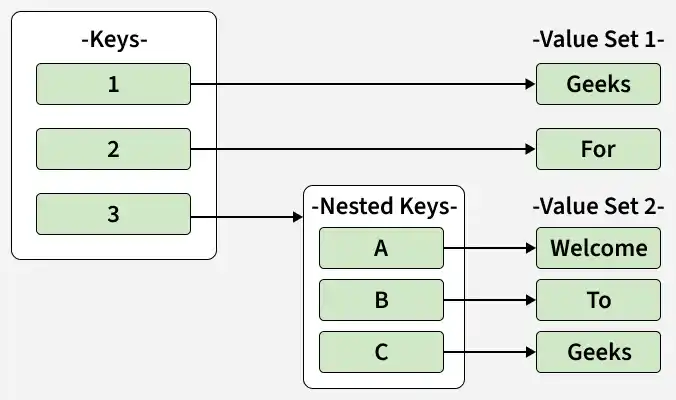
Let’s look at how to create, add to, access and delete data in nested dictionaries.
Creating Nested Dictionary
A nested dictionary can be created by storing one or more dictionaries as values inside another dictionary. This is useful for organizing related information in a structured way.
studs = {
    "student1": {
        "name": "Drake",
        "age": 20,
        "grade": "A"
    },
    "student2": {
        "name": "Travis",
        "age": 21,
        "grade": "B+"
    },
    "student3": {
        "name": "Charlie",
        "age": 19,
        "grade": "A+"
    }
}

print(studs)
Output
{'student1': {'name': 'Drake', 'age': 20, 'grade': 'A'}, 'student2': {'name': 'Travis', 'age': 21, 'grade': 'B+'}, 'student3': {'name': 'Charlie', 'age': 19, 'grade': 'A+'}}
Explanation: outer dictionary stores three student entries. Each key (student1, student2, and student3) maps to another dictionary that contains the student's name, age, and grade. This structure makes it easy to store and manage related information for multiple students.
Adding Elements
We can add data to a nested dictionary by inserting new key-value pairs into an existing inner dictionary or by creating a new inner dictionary in the outer dictionary.
students = {
    "student1": {
        "name": "Janice",
        "age": 20
    }
}

students["student1"]["subject"] = "Python"

students["student2"] = {
    "name": "Jake",
    "age": 21,
    "subject": "Data Science"
}
print(students)
Output
{'student1': {'name': 'Janice', 'age': 20, 'subject': 'Python'}, 'student2': {'name': 'Jake', 'age': 21, 'subject': 'Data Science'}}
Explanation: First, a new key subject is added to the existing dictionary of student1. Then, a new nested dictionary for student2 is created with its own details. This shows how we can easily expand a nested dictionary by updating existing entries or adding new ones.
Accessing Elements
To access data from a nested dictionary, first specify the outer key and then the inner key. This allows you to retrieve specific values stored inside the nested structure.
students = {
    "student1": {
        "name": "Kate",
        "age": 20,
        "subject": "Python"
    }
}

print("Name:", students["student1"]["name"])
print("Subject:", students["student1"]["subject"])
Output
Name: Kate
Subject: Python
Explanation: key "student1" accesses the inner dictionary, and the keys "name" and "subject" retrieve the corresponding values from that dictionary. This is the standard way to access values in a nested dictionary.
Deleting Elements
We can delete data from a nested dictionary using the del statement. You can remove a specific key from an inner dictionary or delete an entire nested dictionary from the outer dictionary.
students = {
    "student1": {
        "name": "John",
        "age": 20,
        "subject": "Python"
    },
    "student2": {
        "name": "Sara",
        "age": 21,
        "subject": "Data Science"
    }
}

del students["student1"]["subject"]
del students["student2"]
print(students)
Output
{'student1': {'name': 'John', 'age': 20}}
Explanation: First, the subject key is removed from the inner dictionary of student1. Then, the entire student2 entry is deleted from the outer dictionary. After these operations, only the updated details of student1 remain.
