1. X
  2. Discord
Log inSign up
Discord
496.7K posts
Image
user avatar
Discord
@discord
Where group chat is all fun & games. Need support? Reach us @discord_support
San Francisco, CA
discord.com
Joined March 2015
1,092
Following
4.7M
Followers
AffiliatesAffiliatesRepliesRepliesArticlesArticlesMediaMedia
  • Pinned
    user avatar
    Discord
    @discord
    Jun 5
    For our 11th birthday, we asked what you wanted us to build. This is a running log of what's making it into the app! some of these requests will take time to get right, check back as we ship a thread ↓
    Image
    Image
    user avatar
    Discord
    @discord
    May 25
    What should we build next? It's our 11th birthday and we're asking YOU. Big features, small fixes, weirdly specific requests...Drop your idea below and ❤️the ones you love.
  • user avatar
    Discord
    @discord
    7m
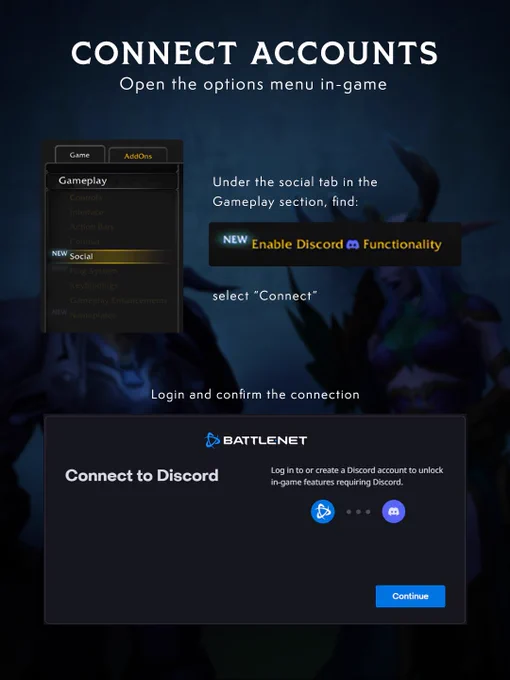
    Discord x @Warcraft Link your Battle.net and Discord to sync conversations BOTH WAYS. Never miss a raid roll call again. Even when you're AFK. Guild Chat beamed straight to your Discord. Lucky you.
    Image
    A human death knight and a night elf druid are talking. Speech bubbles are floating above them saying, “Discord chat” “Guild chat.” There are two icons: Discord to the left, and the WoW icon to the right. Text at the bottom says, “Finally linked”
    Text that the top says, “Connect accounts” and right below that, it says, “Open the options menu in-game” To the left, there’s an image of in-game UI showing you where to go, and to the right there’s instructions that state:  “Under the social tab in the gameplay section, find:” “NEW: Enable Discord Functionality” then “Select “Connect” “ Towards the middle, it says, “Login and confirm the connection” and there’s an image of UI that shows the connection interface
    At the top of the image is a header that reads, “Link Chats - Guild leaders, after you get connected:”. Below, there is an icon of an octopus and text to its right that reads, “In Guild & Communities, select Roster tab then ‘Guild Settings’.” There are two UI boxes that show the Discord integration settings. The first UI screen shows the Discord Server that the Guild Leader has selected, named MORE DOTS; it also shows a dropdown of Discord Channels, with the selected one reads wow-guild-chat. Below the first UI box is text that reads, “A new in-game chat can be made just for these messages.” Next to this text is the second UI box, with “Discord Linked, Server: MORE DOTS, Channel: wow-guild-chat” on it. Under this UI text box is a line with a checked box next to it that reads, “Separate Discord chat from Guild chat.”
    user avatar
    World of Warcraft
    Blizzard Entertainment
    @Warcraft
    21m
    Join in the conversation on @discord when Curse of Ula’tek goes live! Get started with our guide 📖
  • user avatar
    Discord
    @discord
    2h
    Look at allllllllll the stuff we've added lately on Discord:
    Article cover image
    Article
    What's New on Discord - August 2026
    Here's the Discord Changelog from August 11, 2026, so you can stay informed on what’s new in recent app updates! Make a BOLD first impression with new formatting tools on desktop to help put the...
  • user avatar
    Discord
    @discord
    Aug 10
    Image
  • user avatar
    Discord
    @discord
    Aug 4
    ok we did 👍
    user avatar
    Tecnworm Pasha
    @tecnwormpasha
    Aug 4
    Replying to @discord
    Fix.

Log in or sign up for X

See what’s happening and join the conversation

Continue with phone
or
Log in with username or email
Terms·Privacy·Cookies·Accessibility·Ads Info·© 2026 X Corp.
Advertisement
Advertisement