
Bitrig Remote
Build and ship native
Swift apps on the go
Build and ship native
Swift apps on the go
Build and ship native
Swift apps on the go
An app development environment in your pocket. Connect to Bitrig Mac from your iPhone or iPad and build for all major Apple platforms.
An app development environment in your pocket. Connect to Bitrig Mac from your iPhone or iPad and build for all major
Apple platforms.

For iPhone and iPad
EVERYTHING YOU NEED
Go from idea to real app, fast

Frontier Agents
Powered by Claude Code and Codex, using Anthropic and OpenAI’s latest models.

Go Beyond the App
Build Widgets, Live Activities, and Controls. Integrate with Shortcuts, Siri, and, Spotlight.
Bring Your Own Subscription
Connect a Claude or ChatGPT subscription to use alongside, or instead of, your Bitrig credits.
Streaming Simulator
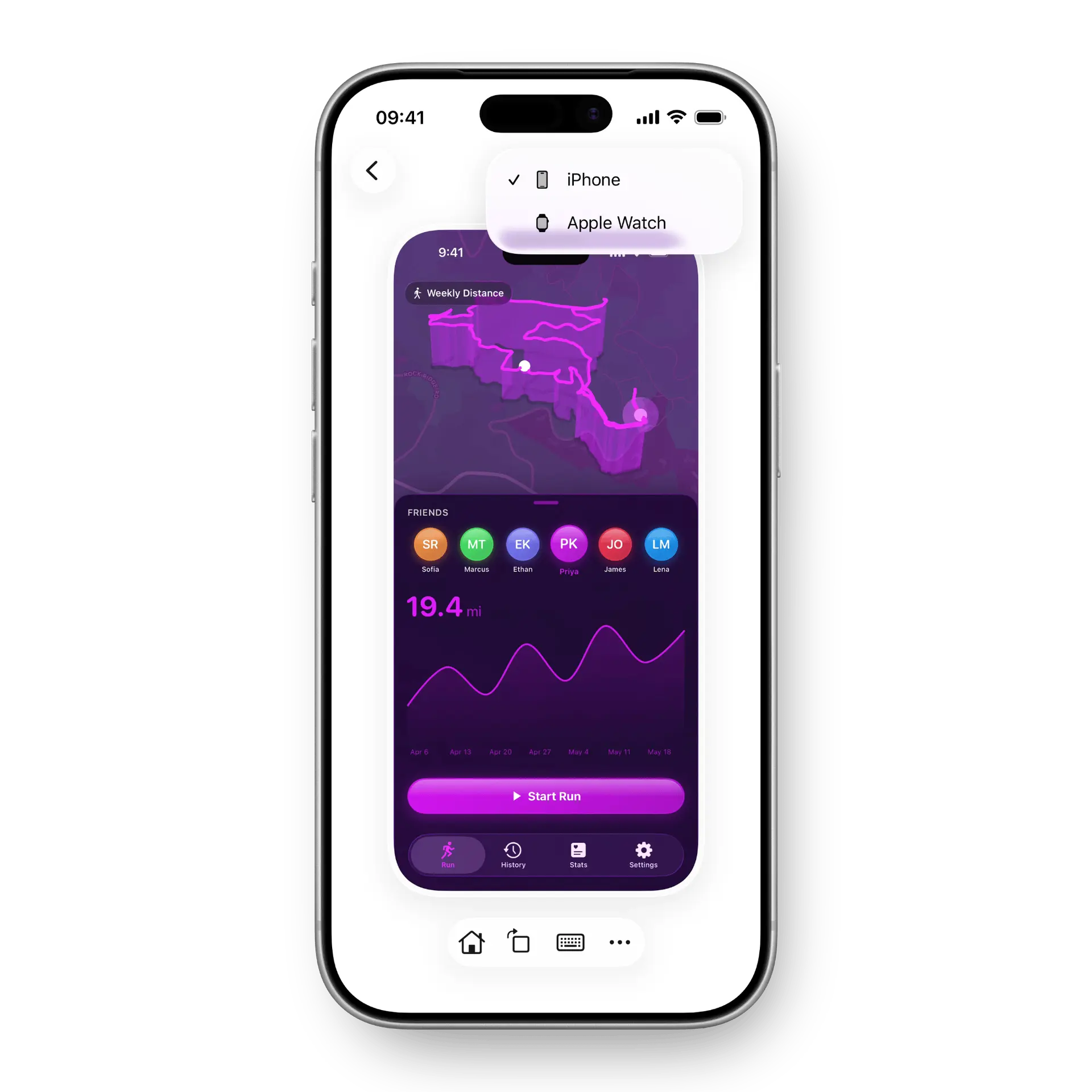
Stream iPhone, iPad, Apple TV, and Watch simulators. Interact with your app directly as it changes.

Full Xcode Projects
Work on your existing codebase. Build, test, and run your existing schemes and targets.

GitHub Integration
Make changes and contribute them back through the GitHub workflow your team already uses.
Frontier Agents
Powered by Claude Code and Codex, using Anthropic and OpenAI’s latest models.
Bring Your Own Subscription
Connect a Claude or ChatGPT subscription to use alongside, or instead of, your Bitrig credits.
Full Xcode Projects
Work on your existing codebase. Build, test, and run your existing schemes and targets.
Go Beyond the App
Build Widgets, Live Activities, and Controls. Integrate with Shortcuts, Siri, and, Spotlight.
Streaming Simulator
Stream iPhone, iPad, Apple TV, and Watch simulators. Interact with your app directly as it changes.
GitHub Integration
Make changes and contribute them back through the GitHub workflow your team already uses.
Frontier Agents
Powered by Claude Code and Codex, using Anthropic and OpenAI’s latest models.
Bring Your Own Subscription
Connect a Claude or ChatGPT subscription to use alongside, or instead of, your Bitrig credits.
Full Xcode Projects
Work on your existing codebase. Build, test, and run your existing schemes and targets.
Go Beyond the App
Build Widgets, Live Activities, and Controls. Integrate with Shortcuts, Siri, and, Spotlight.
Streaming Simulator
Stream iPhone, iPad, Apple TV, and Watch simulators. Interact with your app directly as it changes.
GitHub Integration
Make changes and contribute them back through the GitHub workflow your team already uses.
Frontier Agents
Powered by Claude Code and Codex, using Anthropic and OpenAI’s latest models.
Full Xcode Projects
Work on your existing codebase. Build, test, and run your existing schemes and targets.
Streaming Simulator
Stream iPhone, iPad, Apple TV, and Watch simulators. Interact with your app directly as it changes.
Bring Your Own Subscription
Connect a Claude or ChatGPT subscription to use alongside, or instead of, your Bitrig credits.
Go Beyond the App
Build Widgets, Live Activities, and Controls. Integrate with Shortcuts, Siri, and, Spotlight.
GitHub Integration
Make changes and contribute them back through the GitHub workflow your team already uses.
Make great native apps
for
platforms
Make great native apps
for
platforms
Make great native apps
for
platforms
Make great native apps
for
platforms
Build with the full Xcode toolchain, and use any framework in Apple’s SDKs.
- WidgetsPut a window into your app on the Home Screen, Lock Screen, Mac desktop, and Apple Watch face. Widgets share code and data with your app, so they stay in sync. Bitrig builds them for iPhone, iPad, Mac, and Apple Watch.
- Live ActivitiesShow live progress for an ongoing task or event in the Dynamic Island and on the Lock Screen. Use them for anything with a beginning and an end, like a delivery, a timer, or a game score. Bitrig sets up ActivityKit and the Lock Screen and Dynamic Island layouts for you.
- Liquid GlassBitrig builds with Apple’s real controls and materials, so your app gets Liquid Glass the way Apple’s own apps do. Native SwiftUI controls, toolbars, and tab bars adopt the new material automatically. Bitrig follows Apple’s guidance on hierarchy, tinting, and concentric corners as it builds.
- ControlsSurface your app’s most important actions in Control Center, on the Lock Screen, and on the Action button. Controls run your app’s actions without opening it. Bitrig builds them with App Intents, so the same action also works in Shortcuts and Siri.
- App IntentsExpose your app’s actions and content to the whole system. It’s the foundation for Siri and Apple Intelligence. Describe an action once and it shows up in Shortcuts, Siri, Spotlight, and the Action button. App Entities make your app’s content searchable and usable by the system too.
- ShortcutsLet people combine your app’s actions with other apps to build their own workflows and automations. App Shortcuts are ready the moment your app is installed, no setup required. People can also chain your actions with other apps into their own automations.
- SiriLet people run your app’s actions by voice, with phrases and content you define. Define the phrases people say and the content they refer to. Your actions also become available to Apple Intelligence as Siri gains new capabilities.
- Spotlight SearchMake your app’s content findable, and its actions runnable, right from system search. Index your app’s content so it appears in system search, then let people jump straight into it or run an action from the results.
- Watch ComplicationsPut your app on the watch face, with Digital Crown and Double Tap support too. Bitrig builds independent Apple Watch apps or companions to your iPhone app. Complications keep your app one glance away, right on the watch face.
- Dynamic IslandKeep a Live Activity in view while people use other apps. Each Live Activity has compact, minimal, and expanded layouts, so it adapts to however much room the system gives it.
- HapticsAdd the taps and textures that make an interaction feel physical, then install on your iPhone to feel them for real. Core Haptics lets you design your own patterns, beyond the standard system taps. Install your app on your iPhone from Bitrig to feel exactly what your users will.
- SF SymbolsUse Apple’s 7,000+ symbols, with their variants, rendering modes, and animations. Symbols scale with Dynamic Type, align with the San Francisco font, and come in multiple weights and rendering modes, so your icons match the system.
- Location ServicesBitrig compiles with the full Xcode toolchain, so every framework in the SDK is available, Core Location and MapKit included. Core Location and MapKit are part of the SDK Bitrig builds with, so you can add location features and maps as you would in any Xcode project.
- PencilKitBuild iPad apps with Apple Pencil support, multi-column layouts, and multiple windows. With the full iPadOS SDK, you can add Apple Pencil drawing alongside multi-column layouts and multiple windows. Run it on a connected iPad or in the simulator.
- iCloudSync your users’ data across all their devices with CloudKit. There’s no server to run and nothing for your users to sign up for. CloudKit has sharp edges: there’s more than one way to use it, and schema changes need careful planning. Bitrig handles them. For most apps it’s free, because data lives in each user’s iCloud.
- SupabaseStart a Supabase project or connect one. Bitrig designs your Postgres schema, applies migrations, and writes your Swift models. Add authentication, Row Level Security, and server-side functions. Bitrig checks your backend for security and performance problems before you ship.
- Sign in with AppleBitrig handles the entire Sign in with Apple setup, alongside email, social, and anonymous sign-in. Bitrig handles the entire setup for you, which is usually the fiddly part. It works alongside email, social, and anonymous sign-in.
- Push NotificationsBitrig sets up push notifications end to end, from Xcode capabilities to the server code that sends them. Send from CloudKit rules or your own server. Bitrig sets up APNs keys, registers devices, and handles the development and production environments.
- In-App PurchasesSell digital goods in your app. Bitrig creates the products and configures them in App Store Connect. Bitrig writes the StoreKit code, builds the purchase flow, and gates premium features. It keeps your App Store Connect products and your code in sync.
- SubscriptionsOffer recurring plans with StoreKit. Bitrig sets up subscription groups, upgrades, and downgrades for you. Bitrig builds your paywall and handles renewals, restores, and entitlement checks. Subscription groups are configured in App Store Connect for you.
- RevenueCatBitrig sets up RevenueCat alongside App Store Connect, so your products and paywall stay in sync. Use RevenueCat for cross-platform entitlements, analytics, and paywall experiments. Bitrig wires up the SDK and configures products to match App Store Connect.
- TestFlightUpload builds to TestFlight from Bitrig on your Mac, or straight from your iPhone with Bitrig Remote. Bitrig archives, signs, and uploads your build, then tracks it until it’s ready to test. Share it with testers without opening Xcode or App Store Connect.
- App StoreSet up your app record, upload builds, manage your listing, and submit for review without leaving Bitrig. Bitrig handles code signing and provisioning, tracks your build through processing, and fills in your listing metadata. When it’s ready, submit for review from Bitrig.
- ScreenshotsBitrig captures the App Store screenshots your listing needs. Capture the screenshots your App Store listing needs without leaving Bitrig, then manage the rest of your listing alongside them.
- GitHubImport your existing Xcode projects from GitHub, then send your changes back through pull requests. Bitrig builds, tests, and runs your existing project, commits as it works, and keeps your branch in sync. Review the diff before you open a pull request.
- Add Swift packages to your project, just as you would in Xcode. Bring in the libraries you already use, from networking to analytics. Bitrig resolves and builds them with the full Xcode toolchain.
- Simulator UseBitrig taps, types, and scrolls through your app like a user, then fixes what it finds. Bitrig captures screenshots, reads the accessibility tree, and taps, types, scrolls, and rotates the device. When something breaks, it reads the logs, fixes the code, and tries again.
- 3D SimulatorsRun your app inside a photorealistic 3D device you can grab and spin. Your app runs inside the exact device you select, rendered down to the glass, metal, and buttons. Move your cursor and the device turns to catch the light.
- iPhone DuoBuild for Apple’s foldable and test every pose in a 3D simulator that folds. Try every pose: open, closed, or partly folded, in portrait or landscape. Read hinge data live and drive effects with onHingeChange as the phone folds.
- Figma ImportShare a Figma link and Bitrig builds it as a native Swift app, with Apple’s real controls and materials. Connect Figma through its MCP server and share a link. Bitrig recognizes Apple’s UI Kit components and builds them as real system controls, inside the device you’ve selected.
- Select to EditPoint at any part of your running app and tell Bitrig what to change. Hover to find text, buttons, and images in the simulator, click to add them to your prompt, and mix several selections with text for precise changes.
- Code ReviewReview every change as a diff, and edit the code by hand whenever you want to. Inspect the diff behind any change in the transcript or any commit in your history, in split or unified view. Fix a line yourself and save some tokens.
- Parallel AgentsRun several agents at once, each in its own Git worktree with its own simulator. Start a new task while another is running. Bitrig shares simulators between agents based on your Mac’s memory and notifies you when one finishes or needs you.
- Bring Your Own AgentUse Claude Code, Codex, Cursor, Grok Build, OpenCode, or any agent that speaks the Agent Client Protocol. Bitrig runs your agent from its own configuration, so your MCP servers, skills, and conversations come with it. Switch agents mid-task when one hits a limit.
- Plan ModeTalk an idea through with your agent before it changes anything. Use /plan to work through an approach first, or /goal to let your agent keep going on a long task without waiting for your next prompt.
- DictationSay what you want instead of typing it, and steer your agent while it works. Talk an idea through instead of typing it out. Send a message while the agent works to add a missing detail, or queue its next task with ⌘↵.
- Xcode BetasBuild with the newest Xcode and SDK betas, installed alongside your stable Xcode. Choose which Xcode Bitrig builds with, and manage simulator runtimes for each OS version. Keep the stable release for shipping and the beta for exploring.
- iOS 27Try the newest SwiftUI APIs and frameworks the day the betas land. Bitrig builds with the newest SDKs the day Apple releases them, so you can try new APIs and frameworks right away.
- Apple IntelligenceBuild with Foundation Models, Apple’s on-device model, and bring your app to Siri with App Intents. Run Apple’s on-device model with the Foundation Models framework: private, offline, and free. Expose actions with App Intents so Siri can use them.
- MetalBuild games and graphics with Metal, from iPhone to the big screen on Apple TV. Build games and graphics with Metal and controller support. On Apple TV, add SharePlay so people can watch and play together.

Made by co-creators of SwiftUI
As longtime Apple veterans, we built the frameworks that
power the apps you use every day.
As longtime Apple veterans, we built the frameworks that power the apps you
use every day.
Frequently Asked Questions
What is Bitrig Remote?

Bitrig Remote lets you access and work on Bitrig projects running on your Mac from your iPhone or iPad.
What do I need to run Bitrig Remote?
You'll need Bitrig running on your Mac and an iPhone or iPad running iOS 26.
Do I need a subscription to use Bitrig Remote?
No. Bitrig Remote uses the Claude or ChatGPT subscription you've connected to Bitrig on your Mac.
A Pro subscription is required to install apps to your device and distribute builds to TestFlight and the App Store using Bitrig Remote.
Does my Mac need to be turned on?
Yes. Bitrig Remote connects to Bitrig running on your Mac, so your Mac must be powered on and connected to the internet to use Bitrig Remote.
What is TestFlight? How do I join?
TestFlight is a service provided by Apple that lets you install beta versions of apps prior to their release on the App Store.
To join the Bitrig Remote TestFlight, click here. If you have never used TestFlight before, you'll be prompted to install it and join the Bitrig Remote TestFlight.

Ready to ship?
Download Bitrig Remote and build native Swift
apps on the go from your iPhone or iPad.

Ready to ship?
Download Bitrig Remote and build native Swift
apps on the go from your iPhone or iPad.
Ready to ship?
Download Bitrig Remote and build native Swift
apps on the go from your iPhone or iPad.
