





- We integrate RAG into open-source LVLMs: Video-RAG incorporates three types of visually-aligned auxiliary texts (OCR, ASR, and object detection) processed by external tools and retrieved via RAG, enhancing the LVLM. It’s implemented using completely open-source tools, without the need for any commercial APIs.
- We design a versatile plug-and-play RAG-based pipeline for any LVLM: Video-RAG offers a training-free solution for a wide range of LVLMs, delivering performance improvements with minimal additional resource requirements.
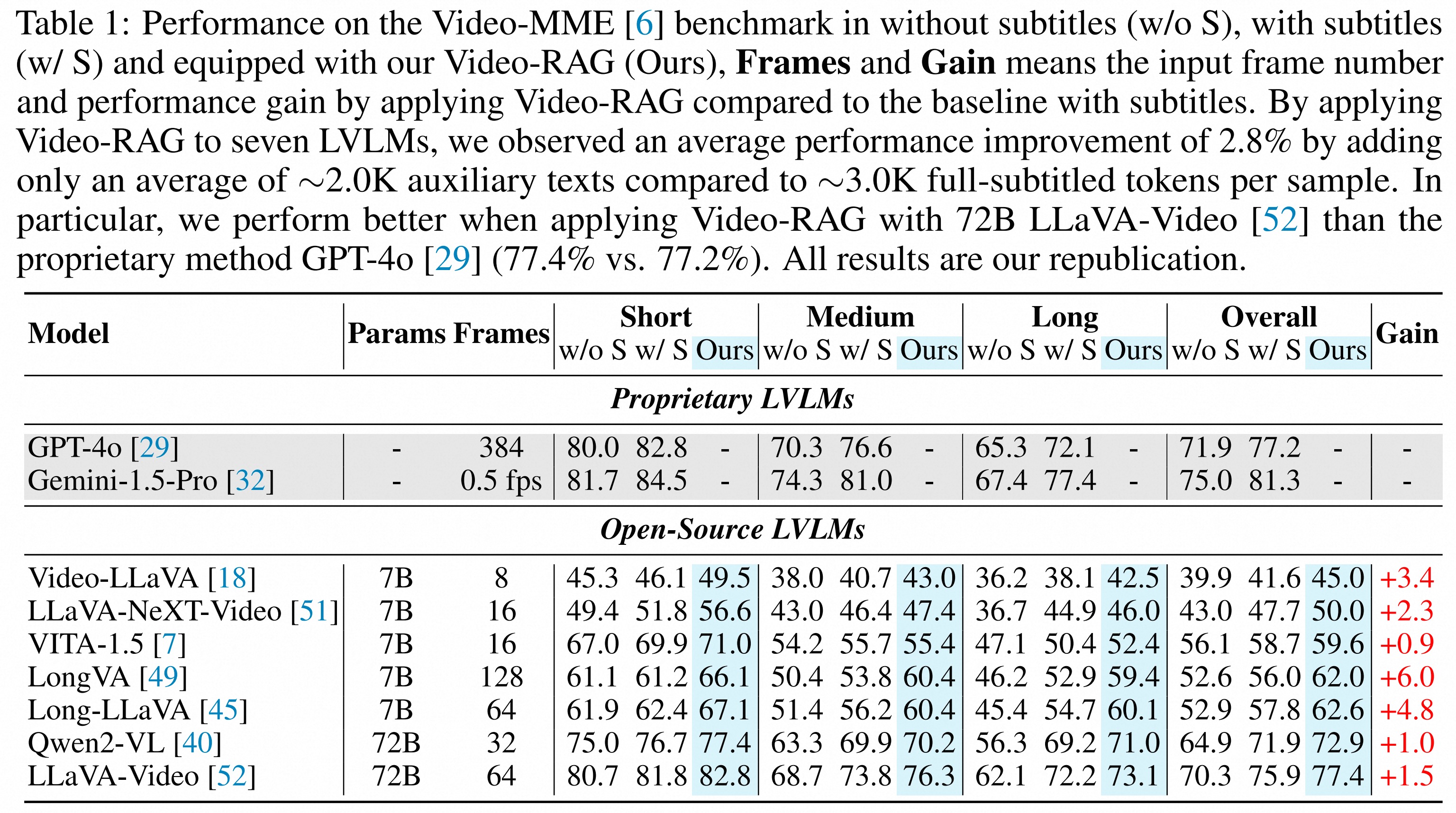
- We achieve proprietary-level performance with open-source models: Applying Video-RAG to a 72B open-source model yields state-of-the-art performance in Video-MME, surpassing models such as Gemini-1.5-Pro.



This repo is built upon LLaVA-NeXT:
- Step 1: Clone and build LLaVA-NeXT conda environment:
git clone https://github.com/LLaVA-VL/LLaVA-NeXT
cd LLaVA-NeXT
conda create -n llava python=3.10 -y
conda activate llava
pip install --upgrade pip  # Enable PEP 660 support.
pip install -e ".[train]"
Then install the following packages in llava environment:
pip install spacy faiss-cpu easyocr ffmpeg-python
pip install torch==2.1.2 torchaudio numpy
python -m spacy download en_core_web_sm
# Optional: pip install https://github.com/explosion/spacy-models/releases/download/en_core_web_sm-3.0.0/en_core_web_sm-3.0.0.tar.gz
- Step 2: Clone and build another conda environment for APE by:
git clone https://github.com/shenyunhang/APE
cd APE
pip3 install -r requirements.txt
python3 -m pip install -e .
-
Step 3: Copy all the files in
vidrag_pipelineunder the root dir of LLaVA-NeXT; -
Step 4: Copy all the files in
ape_toolsunder thedemodir of APE; -
Step 5: Opening a service of APE by running the code under
APE/demo:
python demo/ape_service.py
- Step 6: You can now run our pipeline build upon LLaVA-Video-7B by:
python vidrag_pipeline.py
Note
You can also use our pipeline in any LVLMs by implementing some modifications in vidrag_pipeline.py:
1. The video-language model you load (line #161).
2. The llava_inference() function, make sure your model supports both inputs with/without video (line #175).
3. The process_video() function may suit your model (line #34).
4. The final prompt may suit your model (line #366).
The pipeline ships an opt-in TwelveLabs backend in addition to the default fully open-source path. It is disabled by default and changes nothing unless you set the environment variables below, so the original behavior is preserved.
- Marengo replaces the local Contriever retriever with hosted multimodal
(512-dim) embeddings for the OCR/ASR RAG step — same
retrieve_documents_with_dynamicsignature, same FAISS range search, no local embedding model to load. - Pegasus replaces the local LLaVA-Video model for the final answer step — it reads the source video server-side, so you don't need the LVLM weights or a GPU to produce an answer.
Install the SDK and set a key (free tier at https://twelvelabs.io):
pip install twelvelabs
export TWELVELABS_API_KEY=<your-key>
Marengo retrieval (drop-in for Contriever):
export USE_TWELVELABS_RETRIEVER=1
python vidrag_pipeline.py
Pegasus answering (point it at the source video):
export USE_PEGASUS=1
export TWELVELABS_VIDEO_URL=https://.../video.mp4   # or TWELVELABS_VIDEO_ID / TWELVELABS_ASSET_ID
python vidrag_pipeline.py
Both flags are independent and can be combined. Optional overrides:
TWELVELABS_EMBED_MODEL (default marengo3.0), TWELVELABS_ANALYZE_MODEL
(default pegasus1.5), TWELVELABS_MAX_TOKENS (default 2048).
A focused test (the network part is skipped without a key) lives at
vidrag_pipeline/tools/test_twelvelabs.py:
python tools/test_twelvelabs.py
If you find our paper and code useful in your research, please consider giving a star ⭐ and citation 📝:
@misc{luo2024videoragvisuallyalignedretrievalaugmentedlong,
      title={Video-RAG: Visually-aligned Retrieval-Augmented Long Video Comprehension},
      author={Yongdong Luo and Xiawu Zheng and Xiao Yang and Guilin Li and Haojia Lin and Jinfa Huang and Jiayi Ji and Fei Chao and Jiebo Luo and Rongrong Ji},
      year={2024},
      eprint={2411.13093},
      archivePrefix={arXiv},
      primaryClass={cs.CV},
      url={https://arxiv.org/abs/2411.13093},
}
