

A Godot-style 3D desktop editor, built with Godot's UI, with an independent C++17 game runtime, the Jet renderer and the JetScript scripting language (GDScript syntax). The same runtime runs in the editor, in the SDL2 desktop player and on the Arduino Nano ESP32 firmware.

- Jet Engine: the real game changer, a 3D rendering engine written in C++ by CubeCoders. Go there and star the project! (these guys are crazy <3)
- Godot Engine: Jet Studio is not a Godot modification but an application made entirely with Godot. Because its editor UI is so simple, I tried to recreate the same feel in Jet Studio.
- PlatformIO: under the hood there are two PlatformIO projects that build and flash the microcontrollers.
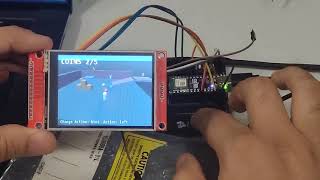 Physics demo |
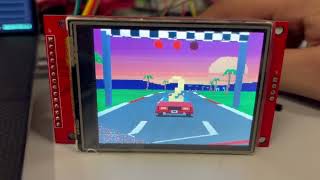 JetRun |
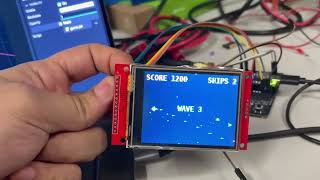 Jet Blaster |
./jet-studio runOn first launch the editor opens the example project examples/first_world; after that it
reopens the last project, with the scenes and scripts that were left open. Project > Project Manager creates or opens other projects.
On Wayland the launcher uses the native Wayland driver: with GNOME fractional scaling the
interface is drawn at the screen's real resolution (under XWayland it would be upscaled and
blurry). JET_STUDIO_DISPLAY=x11 ./jet-studio run forces X11. When launched from the terminal
of a snap app (e.g. VS Code), the launcher removes the snap's GTK/GLib variables, which would
otherwise make the Wayland driver terminate. The interface scale is changed from the Editor menu.
- Top bar: Scene/Project/Debug/Editor/Help menus, 2D · 3D · Script · Game screens, Play (F5), Play current scene (F6), Pause (F7), Stop (F8), target, Build, Flash.
- Scene (top left): node tree.
+or Ctrl+A opens Create New Node; drag nodes to reparent them (the global transform is kept); double-click or F2 renames; Ctrl+D duplicates; Delete deletes; eye icon = visibility; script icon = open script; signal icon = its connections. The context menu's Change Type... turns a node into another type, keeping its name, children, script and the properties both types have. A new scene (Ctrl+N) asks for its root, as Godot: 2D Scene (Node2D), 3D Scene (Node3Dwith a light and an environment), User Interface (aControlas big as the screen) or Other Node. - FileSystem (bottom left): the contents of
res://. Double-click opens scenes and scripts; the context menu creates scripts/scenes/folders, renames, duplicates, deletes (to the trash) and sets the main scene. Drag a.jetonto a node to attach it. Selecting a PNG or an OBJ shows its import settings in the Inspector (like Godot's Import dock), saved next to the file inname.png.import/name.obj.import; "Reimport" applies them. - Inspector and Signals (right): the Signals tab is Godot's Node dock (see Signals). The Inspector has categories per class (MeshInstance3D, Node3D, Node…), collapsible
groups, draggable numeric fields (Shift for precision, Ctrl for snapping, click to type a
value or an expression), a button that reverts to the default value, a property filter and the
@exportvariables of the attached script. A drag produces a single undo step. - Output / Debugger / Serial / Animation (bottom): messages,
print()output from scripts, errors with links to the line, the board's serial monitor (see below) and the animation editor (see Animation).
| Class | Use |
|---|---|
 Node |
organization, global logic |
 Node3D |
transform (position, rotation in degrees YXZ, scale); children inherit it |
 MeshInstance3D |
Box, Sphere, Plane, Pyramid, Cylinder, Capsule, Quad, Torus primitives (Godot's default sizes) or a part of an OBJ model (File), and material (see below) |
( GeometryInstance3D) |
base of MeshInstance3D and Sprite3D: Visibility Range (begin, end, margins, fade mode Self) hides or fades a node by its distance from the camera; outside the range Jet skips it entirely |
 Sprite3D |
a PNG, or one frame of a sprite sheet (hframes, vframes, frame), as a quad in the world: unlit, double-sided, optional billboard, flip_h/flip_v, pixel_size, modulate |
 Camera3D |
vertical FOV, near/far, current; unproject_position() puts 2D halos and labels on 3D points |
 DirectionalLight3D |
color and energy; lights along its own −Z; optional Jet lens flare (a glow on the sun and reflections towards the screen centre), hidden by the meshes in front of the light |
 WorldEnvironment |
background (color, sky/ground gradient, panorama), ambient light, depth fog (geometry fades into the background between Depth Begin and Depth End) and Jet's post-processing |
 StaticBody3D |
collides and does not move on its own (scripts can move it: moving platforms) |
 CharacterBody3D |
character moved by the script with move_and_slide() |
 RigidBody3D |
body with gravity, mass, bounce, friction and impulses |
 Area3D |
reports bodies that enter and exit (coins, triggers, zones) |
 CollisionShape3D |
Box, Sphere or Capsule collision shape, child of a body or an area |
 CPUParticles3D |
particle emitter (sparks, splashes, fountains) using Jet's particle system |
 Node2D |
2D position (canvas pixels, y down), rotation, scale and z_index; children follow it; blend mode Mix, Add, Subtract or Multiply (Godot's CanvasItemMaterial, on Controls too) |
 Sprite2D |
a PNG or one frame of a sprite sheet in the 2D world: centered, offset, flips, Jet's mirroring (a symmetric image stored in half), modulate; rotated and scaled at full resolution |
 AnimatedSprite2D |
a sprite sheet with named animations (idle 0-3 8, run 4-9 12): play(), stop(), autoplay |
 Camera2D |
moves the 2D view (its position at the screen centre), offset, zoom |
 StaticBody2D |
collides and does not move on its own (scripts can move it: moving platforms) |
 CharacterBody2D |
character moved by the script with move_and_slide() |
 RigidBody2D |
body with gravity (980 px/s²), mass, bounce, friction and impulses |
 Area2D |
reports bodies and other areas that enter and exit (bullets, pickups, triggers) |
 CollisionShape2D |
Rectangle, Circle or Capsule shape of a 2D body or area; one_way_collision for jump-through platforms |
 Control |
groups 2D nodes (a HUD): children sit relative to it and are hidden and faded with it |
 Label |
2D text over the scene, the runtime's 7×15 bitmap font (Latin with accents), integer scale |
 TextureRect |
2D PNG image, integer scale or free size, transparent key color |
 ColorRect |
solid or semi-transparent rectangle (fades, bars, panels) |
 Timer |
counts down wait_time and emits timeout; one_shot, autostart, start(), stop(), time_left |
 AnimationPlayer |
Godot's animations: keyed values and method calls on the nodes under its parent, loops, autoplay |
2D nodes (Control) use 320×240 screen pixels; the position is relative to the parent Control.
They have opacity and visibility, are selected by clicking them in the viewport and are moved by
dragging them (Y = 8 px snap); from scripts: text, color, position, size, alpha.
"Arcade" physics with Godot's nodes and API, designed for the ESP32: fixed 60 Hz step,
_physics_process(delta) before _process, Box/Sphere/Capsule shapes (with the node's scale),
collision_layer/collision_mask as in Godot.
- CharacterBody3D:
velocity,move_and_slide()(slides along walls, stays still on slopes belowfloor_max_angle, snaps to the ground when going down, is carried by moving platforms, pushes RigidBody3D nodes),is_on_floor(),is_on_wall(),is_on_ceiling(),get_floor_normal(). Godot's template script works as is. - RigidBody3D:
mass,gravity_scale,bounce,friction,linear_velocity,angular_velocity, damping (plus Godot's default 0.1),freeze,sleeping,apply_central_impulse(),apply_impulse(),apply_central_force(). Spheres roll; boxes do not tip over. Bodies that have been at rest for half a second go to sleep and cost nothing. - Area3D: the signals
body_entered(body)/body_exited(body)and, for other areas in its mask,area_entered(area)/area_exited(area), which any node can connect to; the area's own script also gets_on_body_entered(body)and the others by name (the names Godot gives to connected signals).get_overlapping_bodies(),overlaps_body(),get_overlapping_areas(),overlaps_area().
2D physics has the same nodes and API in canvas pixels with y down: StaticBody2D,
CharacterBody2D (velocity is a Vector2, the floor is below), RigidBody2D (gravity
980 px/s² like Godot, angular_velocity in rad/s, circles roll), Area2D and
CollisionShape2D (Rectangle, Circle, Capsule). one_way_collision makes a platform that
bodies land on from above and jump through from below. 2D and 3D shapes never meet. In the
viewport 2D shapes are outlined where they are drawn (through the Camera2D).
Godot's signals, from scripts: signal health_changed(old, new), health_changed.emit(3, 2),
$Player.health_changed.connect(_on_health_changed), connect("died", _on_died, CONNECT_ONE_SHOT),
disconnect(), is_connected(), emit_signal(). A method or a signal named without calling it is a
Callable or a Signal value ($Timer.timeout.connect($Door.hide)). The engine's nodes emit
body_entered/body_exited/area_entered/area_exited (areas), timeout (Timer),
animation_finished (AnimatedSprite2D, AnimationPlayer), animation_started (AnimationPlayer) and
finished (a one-shot CPUParticles3D).
The connections are kept by the VM, outside the nodes: a node costs no memory for its signals,
and a signal nobody is connected to costs one check when it is emitted. Freeing a node drops its
connections.
Tweens work as in Godot 4: create_tween().tween_property($Ship, "position", Vector2(160, 120), 0.5), with
intervals, callbacks, methods, parallel steps, loops, as_relative(), from(), delays and Godot's twelve
transitions and four eases (see docs/jetscript.md). They cost nothing when there are none.
In the editor, the Signals tab next to the Inspector is Godot's Node dock (Signals): the selected node's
signals (its script's first, then its classes'), each with its connections. Connect... (or a
double-click on a signal) opens Godot's dialog: pick the receiving node, keep or change the
proposed method (_on_wave_timer_timeout, _on_body_entered on itself), One Shot. A method the
receiver's script does not have is added to it and the script opens there; a node without a script
can receive the signal in one of its engine methods (hide, queue_free, start...). The Scene
dock shows a signal icon on the nodes that have connections, the Script screen a slot icon next to
the methods they call. The connections are saved in the .jetscene, follow undo, copies and
deletions, travel in the package and are made when the scene starts or is instantiated, before
_ready(); a missing method is reported in the Output.
In the 3D viewport shapes are drawn in light blue. examples/physics_demo (generated by
./jet-studio examples) uses all of them: a character that jumps, a ramp, a moving platform,
crates to push, bouncing balls and coins to collect (with particles: a fountain and sparks for
each coin collected). On the Nano the demo (63 nodes, 34 shapes,
5 scripts) costs about 2.6 ms of script and physics per frame and runs at ~53 fields per second,
limited by drawing.
As in Godot, a body or an area without a CollisionShape3D does not collide (it falls through
the floor): the Scene dock flags it with the warning icon and Play reports it in the Output.
Bounce and friction combine as in Godot (bounces are added, up to 1; the lower friction wins).
The Animation tab of the bottom panel is Godot's animation editor for the selected AnimationPlayer
(selecting one opens it). Animation creates, renames, duplicates and removes animations; next to it are
Autoplay on load, the time, the length and No Loop / Loop / Ping-Pong. Add Track adds a property track
(any property the runtime can set: position, rotation, scale, visible, colours, alpha, text...) or a Call
Method track on a node under the player's parent. While an animation is open the Inspector shows Godot's
key icons: a click keys the property's current value at the current time. In the timeline, double-click
inserts a key, drag moves it, Delete removes it, the right-click menu does both; the ruler scrubs and the
track's icons switch linear/nearest and remove it. The selected key's value, easing (Godot's ease()
curve to the next key) or method and arguments are edited under the timeline. Moving the time previews
the pose in the viewport without changing the scene. Ctrl+wheel zooms, Shift+wheel scrolls.
Scripts use Godot's API: $AnimationPlayer.play("open"), play_backwards(), stop(), seek(),
animation_finished (see docs/jetscript.md). Method keys call the node's script functions or engine
methods (queue_free, hide, start...) with their arguments.
CPUParticles3D uses Godot's properties: emitting, amount (up to 200; each particle takes
about 40 bytes, Jet's pool of 200 is shared by all emitters to draw them),
lifetime, one_shot, explosiveness, lifetime_randomness, emission_shape (Point,
Sphere, Box), direction and spread (cone), gravity, initial_velocity_min/max,
damping_min/max; from scripts also restart(). Emission and simulation follow Godot's cycle:
direction and cone apply to the initial velocity, so with velocity 0 the particles move only
under gravity, all along the same line. Drawing styles:
- Sparks and Water: Jet's
ParticleSystem, a streak oriented along the velocity (white-hot cooling to blue, optionally additive; foam turning blue), with Jet's colors; - Puff (ours): soft discs that grow (
puff_size→puff_size_end), shift fromcolortocolor_endand fade fromalphato 0: smoke, dust, steam, painted directly into the field (half width, field rows).
Particles behind an opaque mesh are hidden: on the PC with the z-buffer, on the device (which
has no z-buffer) with a depth map of 4×4-pixel cells built from the opaque meshes near the
particles (front faces only, as Jet draws them; rebuilt every other frame). Meshes with
Draw Order Background, transparent or additive meshes hide nothing. At object edges the
coverage is in 4-pixel blocks. No Depth Test (Drawing group, like Godot's material flag)
always draws an emitter on top of the scene and, if no emitter uses depth, skips the map on
the device (about 1 ms per frame with the neon_car car).
Exhaust smoke, for example: Emission Shape Sphere 0.15 m, Direction (0, 1, 0), Spread 30°,
velocity 0.8–1.6 m/s, Damping 0.4–0.8, Gravity (0, 0.4, 0), Lifetime 2.5 s with Randomness 0.4,
Amount 40, Style Puff, color from light gray to dark gray, Opacity 0.55, Size 0.15 → 0.7 m. On
the Nano, in neon_car, it costs about 1.5 ms of drawing plus ~1.1 ms on average for occlusion
behind the car (17.5 ms per frame, ~57 fields per second).
Particles are visible in Play (the 3D viewport shows a gizmo with the emission shape and cone).
On the Nano the physics_demo fountain (~70 particles) costs about 1.3 ms of drawing per frame.
Copy an .obj (with its .mtl and PNG textures) into the project and drag it into the scene or
the 3D viewport: this creates a Node3D with one MeshInstance3D per part (OBJ object ×
material), with color, texture, transparency and shininess taken from the MTL file, as when
Godot instantiates an imported scene. Import: scale (file units → meters), Mirror X, Flip Faces
(models exported inside out), Flip V. The meshes end up in the .jetpack; at most 65535
vertices per part and 262144 per scene.
The editor keeps an eye on the board's budget. A model or image that brings in a texture over 96 KiB triggers an offer to import it at 256 px with 256 colors. A model with more than 3000 triangles gets a warning in the Output, since every triangle costs frame time on the board. Before Build or Flash on the board, a package over 1 MiB (the firmware's limit) stops with the list of textures to shrink, largest first: 256 colors, then half the size. One button compresses them and starts again. Only the import settings change, never the PNG files.
- Textures: project PNGs (FileSystem). Assign them from the Inspector or by dragging the PNG
onto a node, in the tree or in the 3D viewport. Up to 256 colors become palette textures
(half the memory, lossless), otherwise RGB565. Transparent pixels use a key color.
Prefer power-of-2 sides, up to 1024: Jet samples them faster. Import: maximum size, palette
Auto/Quantize(reduction to 256 colors with median cut) /RGB565, Flip V. Palette FPS cycles the palette (Jet's palette animation) while the game runs: the colors, sorted from dark to light, shift by that many steps per second, so gradients flow (water, lava, neon); opaque images only. - Material:
- albedo color, which multiplies the texture as in Godot;
- Nearest or Linear (bilinear) filter, repeat (without it, the outside of the texture is its edge or black), UV scale and offset;
- perspective or affine UVs;
- Gouraud, Flat, Unlit, Phong (with specular), Additive (neon, beams), Water (sky reflection
with ripples), Subtract (fake shadows, dark decals) and Multiply (tinted glass, stains) shading, also from
scripts (
shading). Water can mirror around its far edge instead of the horizon (a lake's far shore reflects right below it), and on the boards it reflects the previous field, already complete; - diffuse coefficient, transparency, Back/Front/Disabled culling and billboard;
- Draw Order: Background (drawn first, in scene order, never covers the rest: room, floor, sky), Default, On Top (always on top);
- Reflection: the albedo texture becomes a reflected panorama (chrome, glass), with UVs recomputed every frame from camera, position and normals.
- Sky (WorldEnvironment): Color, Gradient (sky and ground, with the horizon following the camera's tilt, like ProceduralSkyMaterial) or Panorama (2:1 equirectangular image around the scene, like PanoramaSkyMaterial).
- Post-processing (WorldEnvironment): Jet's effects. CRT scanlines (with their intensity) run on the PC and the boards. Cel shading (4 to 32 bands), FXAA, bloom, pixelate, chromatic aberration and motion blur run in the PC player and the editor only: the boards draw half-width fields, and cel shading would slow their raster loop even when off.
- From scripts:
color,alpha,uv_offset,uv_scale,perspective_correct,texture_filterof the MeshInstance3D.
Examples: examples/jet_blaster (a side-scrolling 2D shooter: Sprite2D stars on three parallax layers, an AnimatedSprite2D ship that tilts and fires on its own, enemies, bullets and explosions spawned with instantiate() and freed when done, hits found by Area2D collision layers and masks and passed on with signals, waves and messages paced by Timer nodes connected in the Signals dock, explosions that free themselves with no script, a Camera2D that shakes on hits; two buttons move the ship; about 62 fps on the Nano and 83 fps on the Nucleo-F746ZG), examples/jetrun (an OutRun-style race: an endless road of recycled segments with curves
and hills, Sprite3D palms and rival cars, the player's car turning through sprite-sheet frames, a start gate with lights,
two buttons to steer, one script per node: game, track, player, traffic, camera, HUD; about 60 fps on the Nano), examples/textured_boxes (JetExamples' "textured boxes" demo, with the CC0 crate),
examples/first_world (panoramic sunset sky) and examples/neon_car (the "Neon Motorworks"
demo: neon workshop, OBJ car with Phong paint and chrome windows, script-driven orbiting camera,
2D titles). The demo's car has no license and is not in the repository:
./jet-studio examples copies it locally from third_party/JetExamples (ignored by Git). Analysis and roadmap for porting the
JetExamples demos (up to the "ESP 88" film): docs/jet-demos-analysis.md.
Coordinates as in Godot: meters, Y up, −Z forward. The runtime converts to Jet's left-handed space. At most 256 nodes and 128 meshes per scene.
The 2D screen is Godot's 2D editor: the canvas alone (no 3D world), with a grid, the axes, the game's screen as a purple rectangle at the origin and each Camera2D's view. Middle or right button (or Alt+left) pans, the wheel zooms where the cursor is, F centres the selection; clicking picks the 2D node or Control under the cursor and dragging moves it. Godot's 2D gizmos: Q select, W move (X/Y arrows lock an axis, so does Shift), E rotate (drag the ring or the node around its origin), S scale (X/Y handles, the centre square or the node for both; Shift keeps the ratio). ColorRect and TextureRect have resize handles, CollisionShape2D handles for its size, radius and height; sprites show their rotated frame. Y (or holding Ctrl) snaps to 8 px, 15° and 10%; arrow keys nudge by 1 px (Shift: 8). Moves follow rotated and scaled parents. Controls sit on the screen rectangle, as Godot shows a CanvasLayer. It is drawn by the runtime at the display's resolution, so it looks like the board. A 2D or UI scene opens in the 2D screen, a 3D one in the 3D screen; Ctrl+F1/F2 switch.
In the 3D screen the navigation is Godot's: middle button orbits, Shift+middle pans, Ctrl+middle zooms,
right button looks around, with WASD/QE to fly (Shift for speed, wheel = speed),
wheel zooms, Alt+left emulates the middle button (touchpad), F focuses the selection,
numpad 1/3/7 for front/right/top views. Tools: Q select, W move, E rotate, R scale,
T local space, Y snap. The editor camera is separate from the game's Camera3D; when a camera
is selected, Preview shows its view. View > Display Wireframe draws the meshes' edges only.
Scripts are .jet files in the project, written in the Script screen (highlighting,
completion, errors as you type, method list, Ctrl+F, Ctrl+L, Ctrl+K) or with an external
editor: external changes are reloaded.
extends MeshInstance3D

@export var speed := 90.0

func _process(delta: float) -> void:
	rotation_degrees.y += speed * delta
	if Input.is_action_pressed("ui_right"):
position.x += 2.0 * deltaA project can have as many scenes as you like. Scripts switch between them as in Godot:
get_tree().change_scene_to_file("res://level2.jetscene")
get_tree().reload_current_scene()
The change happens at the end of the frame: the current scene is freed, the new one is built and
its _ready() runs. Play, Export and Build take every .jetscene of the project, so the package
(and the firmware) contains all of them; they share scripts, textures and models, and only the
current scene is in memory. Stop always goes back to the scene you are editing.
examples/physics_demo goes to win.jetscene after the last coin and back with Space.
A scene can also be a part to spawn while playing (bullets, enemies, explosions), as in Godot:
var bullet_scene = preload("res://bullet.jetscene")

func shoot():
    var bullet = bullet_scene.instantiate()
    bullet.position = position
    get_parent().add_child(bullet)
instantiate() builds the scene's nodes outside the tree with their scripts set up; add_child()
puts them in, and _ready() runs. remove_child() takes a subtree out without freeing it, and
queue_free() releases the nodes and everything they hold at the end of the frame, so spawning
and freeing for a whole game does not grow the memory.
Autoloads (Project > Project Settings > Autoload, as in Godot) keep state across scenes:
pick a script and a name, and every script reaches it as a global or at /root/<Name>:
# res://scripts/game.jet, autoloaded as "Game"
extends Node
var wins := 0Game.wins += 1
get_tree().change_scene_to_file("res://win.jetscene")Autoloads are ready before the first scene and are not freed by a change of scene. The physics demo counts its wins this way.
Boot splash: exported games, the external players and the firmware start with a short
"made with JET STUDIO" screen (the emblem and two labels fading in and out, about 2 s) that then
loads the main scene. It is a hidden scene added to the package at export time, never in Play;
turn it off in Project Settings > General > Boot Splash.
Full language and API reference: docs/jetscript.md.
The compiler and virtual machine are portable C++ (no exceptions or RTTI). The editor compiles
scripts to bytecode as you type and at every Play; export puts the verified bytecode (not the
source) into the .jetpack, so the desktop player and the firmware contain only the virtual
machine, without the compiler.
- F5 runs the main scene, F6 the current scene, in the Game screen (keyboard: arrows/WASD, Space/Enter, Esc). Modified scripts are saved first. Stop restores the scene. While the game runs, the Inspector shows live values.
- A script error pauses the game and opens the script at the error line
(can be disabled from
Debug). Infinite loops are stopped by an instruction limit. Debug > Run External Playeropens the SDL2 player (P pause, Esc quit).Debug > Run Device Emulatoropens the same player built with the firmware's Jet configuration (jet_player_device): it shows exactly how the Nano renders (half-width fields, sorting without z-buffer, row-by-row HUD) even without the board or the display.- Build/Flash use the main scene: target PC builds the player; the board targets, named
after the selected board (Nano · Debug and Nano · Release on the Nano), embed the scene
(with the scripts) in the firmware and upload it over USB.
- Debug: log on the USB serial with
print()output from scripts, errors with file and line, and every 60 frames FPS, frame and script time, triangles, free heap and PSRAM. - Release: no console, logs, statistics or assertions (
firmware/sdkconfig.release): withneon_car, 72 KB less program and 6 KB less static RAM. Flashing over USB stays automatic. Both profiles are optimized for speed (-O2). - Before building, the Output log estimates the game's RAM on the board: frame buffers, textures, compiled scripts and the heaviest scene (nodes, meshes, triangle queues, particles). On boards with PSRAM it shows what goes to PSRAM and what stays in internal RAM; on boards without it says whether the game fits with both field buffers, with one (slower), or not at all. What scripts create while playing (spawned scenes, arrays) is not known in advance: on a Nucleo-F746ZG the estimate stays within ~10% of the measured heap.
- Debug: log on the USB serial with
- Serial (bottom panel): monitor of the board's USB console. ESP-IDF level colors,
clickable script errors (they open the line), device FPS and memory to the right of the tabs,
"Restart" to restart the board over USB and see the log from boot. Crash and watchdog
backtraces are translated into function and file:line (ELF of the Debug build).
It reconnects by itself after a reset; during Flash it releases the port, and after a Debug
flash it opens by itself. On Linux port access needs the
dialoutgroup. On Windows the ports areCOMx, listed with the name the board reports over USB ("Espressif USB JTAG/serial debug unit", "STMicroelectronics ST-Link VCP Ctrl") rather than Windows' generic "USB Serial Device".
From the terminal (export is equivalent to Project > Export .jetpack):
./jet-studio export --project examples/neon_car --pack path/game.jetpack
./jet-studio firmware --pack path/game.jetpack --project examples/neon_car
./jet-studio flash --pack path/game.jetpack --port /dev/ttyACM0
python3 tools/tasks.py flash --target nano --profile release --pack path/game.jetpackThe firmware draws like the JetExamples demos (firmware/config/JetConfig.hpp), while the
editor and the PC player stay at full quality:
- half-width interlaced fields: each frame draws half of the rows (alternating) at 160 columns; the display doubles the columns. HUD and text (Label, TextureRect, ColorRect) stay at full resolution, because they are overlaid row by row during the transfer;
- no z-buffer: triangles are sorted by distance. Large surfaces must be marked
Draw Order: Background (like the
neon_carroom); - two cores and DMA: core 1 prepares the frame and draws half of the screen, core 0 the other half, while a DMA queue sends the previous field to the display.
With neon_car on the Nano: from 148.8 ms per frame (first version) to 16.2 ms per field, about
62 fields per second. The limit is the 40 MHz SPI transfer (16.3 ms); drawing takes 12 ms.
The scene structures live in PSRAM: the runtime recomputes only the transforms that changed and
updates Jet objects only when they move, because every scattered access costs a cache miss.
Project > Project Settings > Hardware selects the board, display, orientation, SPI clock and
display pins (among the board's pins). The game resolution is the display's resolution:
the editor, 3D viewport, player, emulator and firmware follow it, and Build/Flash generate the
firmware configuration (generated_board.hpp and the board's PlatformIO environment).
Boards (hardware/boards) |
Notes |
|---|---|
| Arduino Nano ESP32 | ESP32-S3R8, 16 MB flash, 8 MB octal PSRAM. Tested (board_3d) |
| ESP32-S3-DevKitC-1 N8R8 | 8 MB flash, 8 MB octal PSRAM: the board of the JetExamples demos |
| ESP32-S3-DevKitC-1 N16R8 | 16 MB flash, 8 MB octal PSRAM |
| ESP32-S3-DevKitC-1 N8R2 | 8 MB flash, 2 MB quad PSRAM |
| ESP32 DevKit, WROVER-E N8R8 | classic ESP32 (revision 3), 8 MB flash, 8 MB quad PSRAM (4 MB mapped). Runs (see below) |
| ESP32-C6 SuperMini | ESP32-C6FH4, one RISC-V core at 160 MHz, 512 KB RAM, 4 MB flash, no PSRAM. Runs (see below) |
| ESP32-C3 SuperMini | ESP32-C3FH4, one RISC-V core at 160 MHz, 400 KB RAM, 4 MB flash, no PSRAM. Runs (see below) |
| ST Nucleo-F767ZI | STM32F767, Cortex-M7 216 MHz, 512 KB RAM, 2 MB flash |
| ST Nucleo-F746ZG | STM32F746, Cortex-M7 216 MHz, 320 KB RAM, 1 MB flash. Tested (ILI9341 on SPI1 with DMA, 54 MHz) |
| ST Nucleo-F722ZE | STM32F722, Cortex-M7 216 MHz, 256 KB RAM, 512 KB flash |
| WeAct Black Pill F411CE | STM32F411, Cortex-M4 100 MHz, 128 KB RAM, 512 KB flash: small scenes only |
Classic ESP32 (WROVER-E modules): the same firmware as the ESP32-S3 boards, without the S3's DMA queue and with slower PSRAM. Jet Blaster runs at ~62 fps as on the Nano, the 3D neon car demo at about half the Nano's speed.
ESP32-C3 and ESP32-C6: one core, no FPU and no PSRAM, so they suit 2D games and small 3D scenes. Jet Blaster runs at ~40 fps on the C6 and ~32 fps on the C3.
STM32: F2, F4 and F7 boards (LovyanGFX does not support the H7), with their own firmware project,
firmware_stm32/, running the same runtime and scripts. Flashing and the serial log go through the
ST-LINK USB port. Display SCK and MOSI on SPI1 pins send through DMA; other pins work, but slower.
Without PSRAM the scene has to fit in the internal RAM: on a Nucleo-F746ZG most examples run at
~83 fps, while the physics demo does not fit in its 320 KB.
Display (hardware/displays, SPI RGB565) |
Landscape resolution |
|---|---|
| ILI9341 2.4"/2.8" | 320×240 (tested) |
| ST7796 3.5"/4" | 480×320 (the JetExamples demo display, SPI 80 MHz) |
| ST7789 2" / 1.3"–1.54" / 1.9" | 320×240 / 240×240 / 320×170 |
| GC9A01 1.28" round | 240×240 |
| ST7735S 1.8" | 160×128 |
| Custom | controller (ILI9341, ST7789, ST7796, GC9A01, ST7735S), panel, offset, colors |
All combinations compile; Nano ESP32 + ILI9341 and Nucleo-F746ZG + ILI9341 have been tested on hardware. ESP32-P4
boards (supported by Jet) are not available yet: the PlatformIO espressif32 7.0.1 builder
used by Jet Studio does not know them. The ILI9488 is excluded: over SPI it only accepts 18-bit
colors. New boards or displays are added with a JSON file in hardware/.
Reference wiring for the Nano (ILI9341, SPI 40 MHz): SCK GPIO48 (D13), MOSI GPIO38 (D11),
CS GPIO21 (D10), DC GPIO9 (D6), RESET GPIO18 (D9), MISO not connected, LED to 3V3. PlatformIO
espressif32 7.0.1, ESP-IDF 6.0.1. The first upload from the Arduino bootloader requires the ROM
mode described in the board_3d README (B1 to GND, RST, remove the jumper, upload, RST).
Serial monitor at 115200 baud.
Input Map (Project > Project Settings > Input Map, like Godot's Input Map): the built-in
actions ui_left, ui_right, ui_up, ui_down, ui_accept, ui_cancel plus the project's
own, which can be added, renamed and removed (names with letters, digits and _, at most 32
actions). Each action has its PC keys (Game screen, player, emulator: click the keys button and
press the key) and a board pin: the button goes between the pin and GND, and the firmware enables
the internal pull-up and reads the pins every frame. Scripts read actions by name:
Input.is_action_pressed("jump"). The map travels in the .jetpack; Build checks that the
package and the project have the same actions.
project.jetproject: name, main scene, target, hardware and input map (JSON)..jetscene: JSON version 2, node tree. Version 1 scenes are converted when opened (save them to update the file)..jet: JetScript script.*.import: import settings of a PNG or OBJ (JSON, next to the file)..jetpack: binary package version 20; versions 18 and 19 still load (resolution, Input Map, every scene of the project with its 3D and 2D nodes, animations and signal connections, autoloads, materials, converted textures, imported meshes, script bytecode, exported values) read by the runtime. The bytecode has a version, an instruction-set fingerprint and a CRC; on load every operand and jump is verified. A package must be re-exported when the JetScript version changes.
Platforms: Jet Studio runs on Linux x86_64 (developed and tested on Ubuntu 24.04, X11 and Wayland), and on Windows 10/11 x86_64 from a package cross-built on Linux (step 5; tested on Windows 11 with the editor, the C++ tests, the editor smoke test and the Serial panel on both boards). macOS is not supported yet. The firmware side (PlatformIO, ESP-IDF) is cross-platform.
1. System packages (Ubuntu/Debian):
sudo apt install build-essential git python3 scons pkg-config cmake ninja-build libsdl2-dev \
    libx11-dev libxcursor-dev libxinerama-dev libxi-dev libxrandr-dev libgl1-mesa-dev \
    libglu1-mesa-dev libasound2-dev libpulse-dev libudev-dev libfontconfig-dev \
    libwayland-dev wayland-protocols libxkbcommon-dev libdecor-0-dev
You can skip the next packages unless you change the editor's artwork. The icons, logos and the
runtime's Label font are already in the repository as PNGs and runtime/font_data.hpp, because
our Godot build has no SVG support. ./jet-studio assets rebuilds them from their sources: the
SVGs in editor/assets/src, Godot's editor icons and DejaVu Sans Mono. Run it after you edit an
SVG, add a node icon to the ICONS list in tools/assets.py or change the font:
sudo apt install python3-cairo python3-gi gir1.2-rsvg-2.0 python3-pil fonts-dejavu-core2. PlatformIO Core, for Build/Flash on the boards. Its official installer puts it in
~/.platformio, where the build tasks look for it:
curl -fsSL -o get-platformio.py https://raw.githubusercontent.com/platformio/platformio-core-installer/master/get-platformio.py
python3 get-platformio.py
Keep Jet Studio in a folder whose path has no -L in it (like /home/me/my-Lab): PlatformIO
reads it as a linker flag and the ESP-IDF build fails with cannot open linker script file.
The first firmware build downloads the espressif32 platform and ESP-IDF (a few GB). To use the
Serial panel and to flash over USB, add yourself to the dialout group (sudo usermod -aG dialout $USER, then log in again).
3. Dependencies and build:
./jet-studio setup        # clones Godot, godot-cpp, Jet, LovyanGFX and JetExamples at the locked revisions, applies tools/patches
./jet-studio godot -j 10  # builds the Godot template that runs the editor UI (10-20 minutes)
./jet-studio build -j 8   # builds Jet, the runtime, JetScript, the bridge and the players
./jet-studio examples     # regenerates examples/neon_car (local copy of the JetExamples car) and examples/physics_demo
./jet-studio run
The revisions are in dependencies.lock.json; ./jet-studio setup --update moves Godot and
godot-cpp to their latest master and records the new revisions. Our fixes to the dependencies
live in tools/patches/<name>-*.patch until upstream has them: setup applies them after the
checkout and takes them out before moving to another revision. tools/diagrams.py (the README
diagrams) needs only Python.
4. Release package (optional):
./jet-studio release -j 10It builds the optimized Godot template (another 10-20 minutes the first time), the runtime and the
players, runs the C++ tests, then writes dist/jet-studio-<version>-linux-x86_64/ and its .tar.gz.
The package needs no compiler. Extract it in a writable folder, since firmware builds go inside it.
The editor is embedded in bin/jet-studio.x86_64 (Godot's .pck appended to the executable, with
the bridge library next to it), so you can start that file directly or use ./jet-studio, which
also cleans the environment of snap terminals such as VS Code's. The target machine needs python3 for the build tasks and
libsdl2-2.0-0 for the PC player and the device emulator, plus PlatformIO (step 2) for the boards.
The neon_car example is left out because its car model can not be redistributed.
5. Windows package (optional, built on Linux):
sudo apt install mingw-w64
./jet-studio release-windows -j 10
It cross-compiles the Godot template for Windows (20-30 minutes the first time), the bridge DLL and
the players with MinGW-w64, downloads SDL2 for MinGW (checked against the SHA-256 in
dependencies.lock.json), then writes dist/jet-studio-<version>-windows-x86_64/ and its .zip.
jet-studio.exe at the top of the folder is the editor, with jet_bridge.dll next to it; the players
and SDL2.dll are in build/. Every binary is statically linked, so no MinGW DLLs are needed.
With Wine installed, the C++ tests of build-windows/ run through it (ctest --test-dir build-windows).
Using the Windows package: extract the zip to a short path (like C:\JetStudio: ESP-IDF builds
fail on paths over 260 characters) and start jet-studio.exe. The editor, Play, export and the
Serial panel need nothing else. Build/Flash for the boards need Python 3 and PlatformIO Core, from
a terminal:
winget install -e --id Python.Python.3.12 --scope user
python -m pip install platformio
(or Python from python.org with "Add python.exe to PATH"). Open a new terminal or restart the
editor afterwards so it finds python and pio. As on Linux, the first firmware build downloads
the toolchains and ESP-IDF (a few GB, 15-30 minutes); later builds take a minute or two.
Flashing STM32 boards also needs ST's ST-LINK USB driver (STSW-LINK009): without it the ST-LINK shows
up in Device Manager with an error and the upload stops at "OpenOCD init failed". Until then, a Nucleo
can be flashed by copying firmware_stm32\.pio\build\<board>\firmware.bin (made by Build) to its
NODE_... drive.
./jet-studio test --headless
./jet-studio test --screenshot .cache/tests/editor.png
test runs the C++ tests (runtime, bytecode, "VM-only" player and 2522 JetScript checks) and the editor smoke test: it creates a project,
adds and undoes nodes, edits properties, checks undo merging during drags, the hierarchy,
scripts with exported variables, Play/Stop, the runtime error with pause and line, saving,
reopening and export, the 2D nodes (dragging, picking, text), a RigidBody3D falling onto a
StaticBody3D, and OBJ/MTL import with import settings. The C++ tests also cover OBJ import,
quantization, Quad/Torus, reflections, the 2D overlay, Draw Order, physics (rest, bounce, stacks,
character on the floor, walls and slopes, moving platforms, crate pushing, areas, layers,
disabled shapes), particles, the Input Map, scene changes, autoloads, Sprite3D, signals and the v16 package; device
builds the runtime and Jet with the device configuration and checks fields, the row-by-row HUD
and bands without z-buffer; serial tests the serial port on a pseudo-terminal. They also pass
with AddressSanitizer/UBSan.
Every target uses the same C++17 runtime and the Jet software renderer: the editor's 3D view,
Play, the desktop player, the emulator and the firmware. Two things change between them: the
Jet configuration (runtime/config for a full frame with z-buffer, firmware/config for
the device profile) and whether the JetScript compiler is built in.

The diagrams are drawn by tools/diagrams.py (plain Python): run it after changing them.
- Editor:
editor/is a Godot project run by a Godot template built from source (no 3D module, GL compatibility renderer). Godot draws only the UI. The 3D image is a texture made byJetBridge(native/,editor/bin/libjet_bridge.so), which owns aRuntimewith the full JetScript compiler (jet_runtime).JetSerialis the POSIX serial port of the Serial panel. - Players and firmware link the runtime without lexer, parser and compiler
(
JETSCRIPT_NO_COMPILER,jet_runtime_vm), and the firmware also leaves out OBJ/PNG import.jet_player_device(jet_runtime_device_vm) is built withfirmware/config, which makes it the device emulator.
- A project is
.jetscenefiles (JSON v2:{"format": "jetscene", "version": 2, "root": {id, name, type, properties, children}, "connections": [{from, signal, to, method, flags}]}, nodes by id),.jetscripts, PNG/OBJ/MTL assets with their.importsettings andproject.jetproject(hardware and therefore resolution, Input Map). studio.gdpasses the bridge the resolution and the Input Map, then callsload_scene(doc, scripts, assets). It sends the scene Dictionary, the script sources (with the unsaved buffers of the Script screen) and the GodotImages and OBJ/MTL text of the assets.set_scenes()adds the other scenes of the project for Play and export.JetBridge::load_sceneflattens each tree iteratively, depth-first, into ajetstudio::Description. Nodes becomeNodeDescrecords with a parent index: parents come before children andnodes[0]is the root. Scripts, textures (RGB565 or 8-bit palette,runtime/texture.cpp) and OBJ parts (runtime/obj_import.cpp) go into shared tables, cached perImageand per OBJ/MTL contents. Other scenes becomescenes[]and share the same tables.validate()checks limits and indices.Runtime::load()builds the Jet objects for the edit view.start()(Play) compiles or loads every script, attaches the instances, applies the@exportoverrides and runs_ready()children first.export_pack()callsencode_pack(), which compiles each script and writes its bytecode (save_bytecode), not the source, into the.jetpack(see Formats).jet_playerreads the file directly. For the boards,tools/tasks.pychecks the package header (version, resolution and Input Map against the project) and embeds it as a byte array in<firmware>/src/generated_scene.hpp. It also writesgenerated_inputs.hpp, andgenerated_board.hpp,boards.iniand the sdkconfig defaults throughtools/hardware.py, then runspio run. On the devicedecode_pack()rebuilds theDescription, andload_bytecode()verifies each script (fingerprint, CRC, operands, jumps) before the VM runs it.
Runtime::update(delta) (delta clamped to 0.1 s) runs in this order while playing:
- fixed 60 Hz physics ticks, at most 4 per frame:
_physics_process()of every script (wheremove_and_slide()runs), then the physics step (rigid bodies, contacts, Area3D enter/exit); _process(delta)of every script, with deferredqueue_free()s applied before and after;- a pending
change_scene_to_file()/reload_current_scene(): the script instances of the scene are dropped (the autoloads' stay, they are nodes appended after the scene with reserved ids), the scene is rebuilt and its_ready()runs; - world transforms (cached local transforms; Jet objects are touched only when they moved or their material changed), particle emission and simulation, light, environment and camera.
In the edit view only step 4 runs, without particles. Runtime::render() sets the camera, then
draws the background (clear gradient or per-pixel panorama) and updates the reflection UVs.
Renderer::Scene::render() transforms, sorts and rasterizes the meshes. Particles are drawn
after the raster bands have joined, hidden by the z-buffer on the PC or by a 4×4-pixel depth
grid on the device. Last comes the 2D overlay: full-frame builds composite the OverlayItems
into the framebuffer, field builds leave them to the scanout.
Scenes keep Godot's convention (metres, Y up, −Z forward, rotation in degrees in YXZ order), and
runtime/math3d.hpp computes the transforms in that space. At the boundary to_jet() scales by
100 (1 m = 100 Jet units) and mirrors Z into Jet's left-handed space. Rotations go through
Basis::mirrored_z() (Jet objects take integer Euler angles), world scale is baked into the
vertices, and Godot's vertical FOV becomes Jet's horizontal one.
firmware/src/main.cpp, with the Jet profile of firmware/config/JetConfig.hpp
(HALF_WIDTH_BUFFERS, FIELD_BUFFERS, Z_BUFFERING 0, SORT_TRIANGLES, FAST_Z, no
bilinear filter, no picking):

app_main()startsjet_game(32 KiB stack for the VM and the frame setup) on core 1. While loading,heap_caps_malloc_extmem_enable(1024)sends the scene data (decoded package, Jet objects, meshes, textures) to PSRAM. The decodedDescriptionis freed once the runtime has its copy.- Two field buffers of
width/2 × height/2RGB565 pixels (2 × 38.4 KB at 320×240) are allocated before the scene is built, in internal DMA-capable RAM, with PSRAM as a fallback. Each frame fills the rows of one parity in one buffer while the other buffer is sent. Runtime::set_raster_executor()replaces Jet's raster pass. The game task draws the band abovesplitand thejet_rasterworker (priority 1) the band below. Per-band flags count each triangle once, and the split moves by 4 rows to balance the two cores.- There is no z-buffer. Default meshes are depth-sorted (
preciseDepthSort), Background meshes are drawn first in scene order and On Top meshes last (Jet's draw bands). jet_present(priority 2) owns the display. For each row of the field it doubles the columns in panel byte order (expandSwapRGB565) and composites the HUD at full resolution (compose_overlay_row()). It then queues the row in the 8-rowS3ScanoutDMA queue (from JetExamples) and sleeps while DMA runs, so the raster worker gets core 0.- The STM32 firmware (
firmware_stm32/src/main.cpp) uses the same runtime and profile on one core: update and render, while the field drawn in the previous frame goes out through the SPI DMA. The DMA interrupt sets the next row's window and starts it, and the row after it is prepared (columns doubled, HUD composited) while the DMA works. Palette textures are read from the package in flash (load_pack(..., textures_in_place)); the runtime reserves Jet's triangle queues once per scene, so they never double while drawing.
editor/scripts/ |
Role |
|---|---|
studio.gd |
main window: menus, toolbar, scene tabs, 2D/3D/Script/Game screens, undo/redo, Play/Stop, export, Build/Flash jobs (tasks.py started with OS.create_process, log polled from .cache/jobs/), command-line export, smoke test (--smoke-test) |
scene_document.gd |
scene model: node Dictionaries, class hierarchy, per-class property schema (Inspector rows and defaults), validation, v1 migration, configuration warnings, transforms |
inspector.gd, spin_slider.gd |
Inspector built from the schema and the script's @exports, import settings of PNG/OBJ files |
scene_dock.gd, filesystem_dock.gd, project.gd |
node tree, res:// browser, file I/O of the project folder. The docks emit signals and studio.gd applies the edits |
viewport_3d.gd |
the 2D and 3D views: editor camera with Godot's navigation, or the canvas with pan and zoom (set_editor_canvas()). Shows the bridge's frame, draws grid, selection, gizmos, collision shapes and emitter cones on a 2D overlay with its own projection of the same view, picks with bridge.pick() |
signals_dock.gd, connect_dialog.gd |
Signals tab and Godot's Connect dialog |
new_scene_dialog.gd, create_node_dialog.gd |
a new scene's root; Create New Node, also for Change Type |
script_highlighter.gd |
JetScript colours, token by token |
script_editor.gd |
CodeEdit with highlighting. bridge.compile_script() while typing (errors, warnings, exports, outline), completion from bridge.class_db() |
project_settings_dialog.gd, hardware.gd, input_map.gd |
project settings, board/display catalogue with the pin rules of tools/hardware.py, Input Map |
serial_monitor.gd |
Serial panel on JetSerial |
theme.gd, icons.gd |
theme built in code, Godot's editor icons as PNGs (the template has no SVG module) |
Each scene tab keeps its .jetscene as a Dictionary with undo/redo stacks of deep copies (200
steps). Every edit goes through studio._change(merge_key, final, mutate): snapshot (edits
with the same merge key, such as a drag, make one step), change, then _upload(), which sends
the scene to load_scene() again so the runtime rebuilds its Jet objects. When something has
changed, and on every frame during Play, render_frame() returns the frame as an
ImageTexture converted from RGB565: the 3D view with the editor camera
(set_editor_camera()), the 2D view with the editor's canvas view (set_editor_canvas()), the
Game screen with the scene's Camera3D. It is the same runtime and
Jet code as the device, in the full-frame configuration. During Play _process() passes the
input mask and update(delta), drains the log (a script error pauses the game and opens the
line) and reads node_state() for the live Inspector values. Stop restores the authored scene.
editor/       Godot application: UI, docks, inspector, 3D viewport, script editor
native/       GDExtension: adapts the editor data to the runtime
runtime/      Nodes, transforms, script host, .jetpack codec
runtime/script/  JetScript: lexer, parser, compiler, virtual machine
desktop/      SDL2 player, independent of Godot
firmware/     ESP-IDF + display driver, no dependencies on Godot
firmware_stm32/  Firmware for STM32 F4/F7 (Arduino STM32 core + LovyanGFX)
examples/     Example projects (first_world, textured_boxes, neon_car, physics_demo)
tools/        Setup, build, assets, examples, launcher and asynchronous jobs
Not available yet: audio, await, lambdas and classes in JetScript,
animations, particle preview in the editor, a debugger with breakpoints, physics with box
rotations (arcade only), collisions with OBJ meshes.
The firmware of the example project (scene + 3 scripts in bytecode) compiles: 521 KB of program
out of 3 MB (without the JetScript compiler: −97 KB), 35.7 KB of static RAM (the 300 KiB video
buffers and the runtime structures are allocated separately).
The firmware with the neon_car package (127 KB, car included) compiles: 693 KB of program and
36.1 KB of static RAM in Debug, 620 KB and 29.6 KB in Release; on the Nano it runs at ~62 fields
per second. Flashing, Debug/Release and the frame times are verified on the Nano; all the
measurements so far were taken without a display connected, so the image on a real panel and
the physical buttons are still to be checked.
Jet Studio is released under the MIT license (LICENSE). The third-party parts keep their own.
Godot, godot-cpp and Jet keep their respective MIT licenses in the dependency checkouts;
the editor and theme icons come from Godot (MIT, editor/icons/LICENSE.Godot.txt,
editor/theme_icons/), and the
Inter and JetBrains Mono fonts are under the OFL (editor/fonts). LovyanGFX keeps its own
MIT/BSD licenses; the wiring driver is adapted from JetExamples via board_3d
(hardware/LICENSE.JetExamples). The runtime's bitmap font derives from DejaVu Sans Mono
(runtime/LICENSE.DejaVu.txt). examples/neon_car reproduces the CubeCoders MIT demo; its
panorama and scene are generated by tools/neon_car.py.
