
The Java Arithmetic operators include Addition, Subtraction, Multiplication, Division, and Modulus. All these Arithmetic Operators are binary, which means they operate on two operands.
The table below shows all the Arithmetic Operators in the Java Programming language with examples.
| Java Arithmetic Operators | Example |
|---|---|
| Addition (+) | 10 + 3 = 13 |
| Subtraction (-) | 10 – 3 = 7 |
| Multiplication (*) | 10 * 3 = 30 |
| Division (/) | 10 / 3 = 3 |
| Modulus – It returns the remainder after the division (%) | 10 % 3 = 1 (Here remainder is One). |
Java Arithmetic Operators Example
This program allows the user to insert two integer variables, a and b. Next, we use these two variables to perform various arithmetic operations in this Programming Language operator.
import java.util.Scanner;

public class ArithmeticOperators {
	private static Scanner sc;

	public static void main(String[] args) {
		int a, b;
		int addition, subtraction, multiplication, division, modulus;
		sc = new Scanner(System.in);
		System.out.println("\n Please Enter two integer Value: ");
		a = sc.nextInt();
		b = sc.nextInt();

		addition = a + b;
		subtraction = a - b;
		multiplication = a * b;
		division = a / b;
		modulus = a % b;

		System.out.format("\nAddition of two numbers %d, %d is : %d\n", a, b, addition);
		System.out.format("Subtraction of two numbers %d, %d is : %d\n", a, b, subtraction);
		System.out.format("Multiplication of two numbers %d, %d is : %d\n", a, b, multiplication);
		System.out.format("Division of two numbers %d, %d is : %d\n", a, b, division);
		System.out.format("Modulus of two numbers %d, %d is : %d\n", a, b, modulus);
	}
}
Please Enter two integer Value:
20
16

Addition of two numbers 20, 16 is : 36
Subtraction of two numbers 20, 16 is : 4
Multiplication of two numbers 20, 16 is : 320
Division of two numbers 20, 16 is : 1
Modulus of two numbers 20, 16 is : 4
When using a division ( / ) operator, the result will completely depend upon the data type it belongs to. For example, if the data type is an integer, it will produce the integer value by rounding it (7 / 3 = 2). To get the correct result, then change the data type to float. Please do not get confused; let us see one more example for better understanding.
Java Arithmetic Operators using Float
For this example, we are using two variables, a and b, and their values are 25 and 4. We will use these two variables to show the operator problems we generally face while performing arithmetic operations on Int and Float data types. Refer to the Java tutorial page.
// Program to Perform Division and Modulus on Float data type

package JavaOperators;

public class ArithmeticOperatorsUsingFloat {

	public static void main(String[] args) {
		int a = 25, b = 4;
		int integerdiv, modulus;
		float floatdiv;

		integerdiv = a / b;
		modulus = a % b;
		floatdiv = (float)a / b;

		System.out.format(" Division of two numbers %d, %d is : %d\n", a, b, integerdiv);
		System.out.format(" Modulus of two numbers %d, %d is : %d\n", a, b, modulus);

		System.out.println(" \n---------Correct Results is--------- ");
		System.out.format(" Division of two numbers %d, %d is : %.3f", a, b, floatdiv);
	}
}
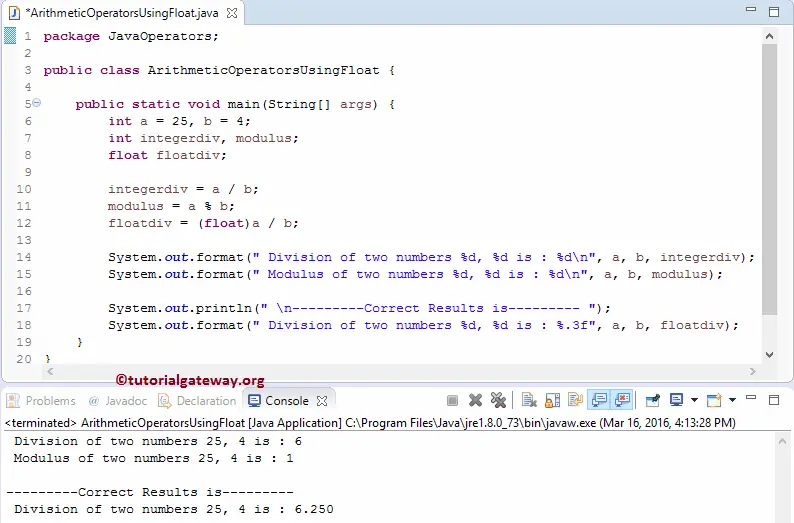
If you observe the above Java arithmetic operators result, we are getting two different results for the same calculation. Because for the first result, both a and b are integers, and the output is also an integer (integerdiv). So, the compiler truncates the decimal point and shows 6 instead of 6.250, and a % b is 1 because the remainder is 1.
Next, we changed the output data type to float (floatdiv) and also converted the result to float to get our desired result. Be careful while using the division operator (Typecasting plays a major role here).
TIP: We can use the Java assignment operators as a shorter version to perform these operations. However, we use the Java comparison operators to validate the expression.
Java Arithmetic Operators using functions
In this example, we divide the code using Object-Oriented Programming. First, we will create a class that holds methods to do this.
public class ArithmeticOperator {
	int addition, subtraction, multiplication, division, modulus;

	public int addition(int a, int b) {
		addition = a + b;
		return addition;
	}
	public int subtraction(int a, int b) {
		subtraction = a - b;
		return subtraction;
	}
	public int multiplication(int a, int b) {
		multiplication = a * b;
		return multiplication;
	}
	public int division(int a, int b) {
		division = a / b;
		return division;
	}
	public int modulus(int a, int b) {
		modulus = a % b;
		return modulus;
	}
}
Within the Main program of an Arithmetic operator example, we will create an instance of the above-specified class and call the methods.
import java.util.Scanner;

public class ArithmeticOperatorsUsingClass {
	private static Scanner sc;

	public static void main(String[] args) {
		int a, b;
		int addition, subtraction, multiplication, division, modulus;
		sc = new Scanner(System.in);
		System.out.println("\n Please Enter two integer Value: ");
		a = sc.nextInt();
		b = sc.nextInt();

		ArithmeticOperator arith = new ArithmeticOperator();
		addition = arith.addition(a, b);
		subtraction = arith.subtraction(a, b);
		multiplication = arith.multiplication(a, b);
		division = arith.division(a, b);
		modulus = arith.modulus(a, b);

		System.out.format("\n Addition of two numbers %d, %d is : %d\n", a, b, addition);
		System.out.format(" Subtraction of two numbers %d, %d is : %d\n", a, b, subtraction);
		System.out.format(" Multiplication of two numbers %d, %d is : %d\n", a, b, multiplication);
		System.out.format(" Division of two numbers %d, %d is : %d\n", a, b, division);
		System.out.format(" Modulus of two numbers %d, %d is : %d\n", a, b, modulus);
	}
}
 Addition of two numbers 12, 3 is : 15
 Subtraction of two numbers 12, 3 is : 9
 Multiplication of two numbers 12, 3 is : 36
 Division of two numbers 12, 3 is : 4
 Modulus of two numbers 12, 3 is : 0
ArithmeticOperator Class Analysis: Here, we declared five functions of integer type, and all those methods accept two integer arguments. Within those functions, we are performing operations using the arithmetic operators.
Main Class of Java Arithmetic Operators Analysis:
First, we created an instance / created an Object of the ArithmeticOperator Class
ArithmeticOperator arith = new ArithmeticOperator();
Next, we call all five methods available in the current Java instance. All those methods return an integer value, so we assign the return value to the corresponding variables.
Lastly, we used the following System.out.format statement to print those arithmetic operators.
Java Arithmetic Operators Precedence Table
When we use a single arithmetic operator, the program performs an arithmetic operation on those two operands and returns the result. However, when we use multiple arithmetic operators in a single expression, Javac performs operations based on the operators’ precedence.
TIP: The general rule for arithmetic operations is from left to right. However, for multiple operators, the execution goes from highest precedence to lowest.
The following list shows the Java arithmetic operators’ precedence levels
- Parentheses () have the highest precedence. This avoids confusion for code evaluation.
- Multiplication (*), Division (/), and Modulus (%) has the highest precedence among the arithmetic operators.
- Addition (+) and Subtraction (-0) has the lowest precedence.
NOTE: If an expression has the same precedence level (Addition and Subtraction), Javac follows left-to-right calculation.
The following program shows how precedence levels affect the overall result of an expression.
- 10 + 20 * 3. Here, * has the highest precedence, so 20 * 3 = 60. Next, add 10 to 60, and the total = 70.
- (10 + 20) * 3. Here, parentheses () have the highest precedence, so (10 + 20) = 30. Next, multiply 30 by 3, and the total = 90.
- 10 + 20 – 3. Both + and – have the same lowest precedence level. So, the arithmetic operation is performed from left to right.
- 100 / 2 * 3. Division and Multiplication have the same precedence (same level), so it is evaluated from left to right. 100 / 2 = 50, then multiply 50 by 3 to get 150.
public class example {
	public static void main(String[] args) {
		int a = 10 + 20 * 3;
		System.out.println(a);

		int b = (10 + 20) * 3;
		System.out.println(b);

		int c = 10 + 20 - 3;
		System.out.println(c);

		int d = 100 / 2 * 3;
		System.out.println(d);

		int e = 100 % (3 * 10);
		System.out.println(e);
	}
}
70
90
27
150
10
Java Integer division by 0 returns ArithmeticException, but float / 0 returns Infinity
The interesting part of the Java arithmetic operators (division and modulus) is how they handle division by 0. When we divide an integer value by 0, both the division (/) and modulus (%) operators return ArithmeticException. However, if we define the variable as float or double, it won’t return any error. Instead, the result becomes Infinity.
- Integer: 10 / 0 throws ArithmeticException.
- Integer: 10 % 0 throws ArithmeticException.
- Double: 10.0 / 0.0 returns Infinity.
- Double: -10.0 / 0.0 returns -Infinity.
- 10.0 % 0.0 returns NaN.
- 0.0 / 0.0 returns NaN.
The following program shows the same.
public class example {
	public static void main(String[] args) {
	double a = 10.0 / 0.0;
		System.out.println(a);

		double b = -10.0 / 0.0;
		System.out.println(b);

		double c = 0.0 /0.0;
		System.out.println(c);

		double d = 10.0 % 0.0;
		System.out.println(d);

		int e = 10 / 0;
		System.out.println(e);
	}
}
Infinity
-Infinity
NaN
NaN
Exception in thread "main" java.lang.ArithmeticException: / by zero
How to fix: Java integer division loses decimal places
Why we perform division: the result depends on the data type. For instance, if we perform integer division and assign the result to an integer. Javac automatically truncates (removes) the decimal places and returns an integer value. For example, the code below returns 3 instead of 3.333.
int a = 10 /3;
System.out.println(a);
This time, we changed the data type of the result and the first operand to 10 to double.
double b = 10.3 /3;
System.out.println(b);
Java Arithmetic Operators Preserve decimal points Example
public class example {
	public static void main(String[] args) {
		int a = 10 /3;
		System.out.println(a);

		double b = 10.0 / 3;
		System.out.println(b);
	}
}
3
3.3333333333333335
This means that to get an accurate result with decimal points, we must convert one of the operands to double. However, we must convert the result to double because decimal values are lost during division, and converting it to double won’t get those decimals back.
In the first example, we cast the result to double, but the decimal value truncation already happened.
public class example {
	public static void main(String[] args) {
		int a = 15;
		int b = 2;
		double r1 = (double) (a / b);
		System.out.println(r1);

		double r2 = (double) a / b;
		System.out.println(r2);

		double r3 =  a / (double)b;
		System.out.println(r3);
	}
}
7.0
7.5
7.5