
The SQL GETDATE function is a Date and Time Function used to return the Current or Today’s Date and Time. In this section, we use this Getdate function to find Today’s date with a practical example.
The GETDATE() function returns the current system database timestamp as a DATETIME data type. It is a simple and better option to get the current date and time because, it exactly timestamp when the query returns.
SQL GETDATE syntax
The return value of this GETDATE function derives from the OS (Operating System) of the computer on which the server instance is running. The syntax of the GETDATE function is as shown below.
GETDATE()
We can use this date function to find out:
- When was the data inserted or updated?
- Maintaining the Log files.
- When was the last order the customer made?
- How long have Employees associated with us? etc
SQL Server GETDATE Example
The GETDATE function returns a datetime data type, and the format is: ‘yyyy-mm-dd hh:mm:ss.mmm’ (you can see, fractional seconds precision is 3). Please refer to the list of SQL Server Date and time functions available on our SQL Tutorial page.
SELECT GETDATE() AS [Current_Date]
OUTPUT
Current_Date
------------
2016-08-22 10:38:57.320
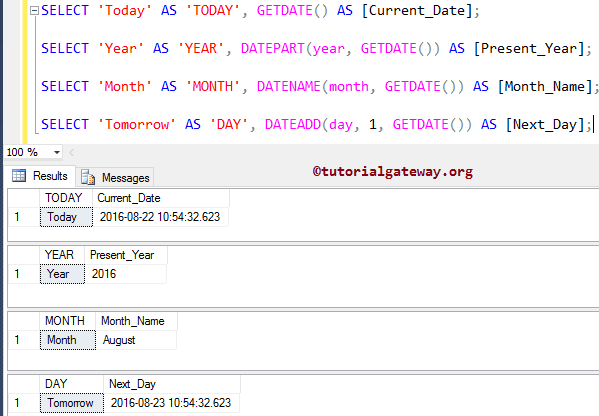
In this example, we are going to show you some of the SQL Server GETDATE function examples.
In the second select statement, we used the SQL DATEPART to display the year value from today’s date. Next, we used the SQL DATENAME to display the Month name from today’s date. In the last, we used the SQL DATEADD function to display the Tomorrow date.
-- Today's date example
SELECT 'Today' AS 'TODAY', GETDATE() AS [Current_Date];

SELECT 'Year' AS 'YEAR', DATEPART(year, GETDATE()) AS [Present_Year];

SELECT 'Month' AS 'MONTH', DATENAME(month, GETDATE()) AS [Month_Name];

SELECT 'Tomorrow' AS 'DAY', DATEADD(day, 1, GETDATE()) AS [Next_Day];
TIP: We can use the FORMAT() function to change the default date and time format returned by the GETDATE() function. For example,
SELECT FORMAT(GETDATE(), 'yyyy, MMMM dd hh:mm tt')
2026, November 04 04:10 PMUse SQL GETDATE() to get the current system date and time
By default, the GETDATE() function returns the current date and time together as a DATETIME data type. However, we can use the SQL CONVERT() function to convert the DATETIME data type to DATE and TIME to extract them separately.
SELECT CONVERT(DATE, GETDATE())
2026-11-04Here, we used TIME as the data type, and CONVERT() returns the time value from GETDATE().
SELECT CONVERT(TIME, GETDATE())
16:05:28.2930000Using SQL GETDATE function to calculate difference
In this Date and Time Function example, we are going to check Employee details (such as: Which date we hired him, how long he associated with this company, etc.). For this SQL today’s date example, we are using the SQL DATEDIFF function.
SELECT [FirstName] + ' '+ [LastName] AS [Full Name]
      ,[Occupation]
      ,[YearlyIncome]
      ,[HireDate]
      ,DATEDIFF (year, [HireDate], GETDATE()) AS [YEARS]
      ,DATEDIFF (quarter, [HireDate], GETDATE()) AS [QUARTERS]
      ,DATEDIFF (month, [HireDate], GETDATE()) AS [MONTHS]
      ,DATEDIFF (day, [HireDate], GETDATE()) AS [DAYS]
  FROM [Employee]
From the screenshot below, you can observe that we used the GETDATE along with the DATEDIFF function to show the difference between the Employee Hire and Today date. Please refer to the SQL CURRENT_TIMESTAMP and SQL SYSDATETIME functions.

Besides DATEPART, we can use the built-in YEAR(), MONTH(), and DAY() functions to extract these parts from the current date and time returned by GETDATE(). For example,
SELECT YEAR(GETDATE())
2026Difference between GETDATE() and CURRENT_TIMESTAMP
Both return the current local date and time. However, GETDATE() is an exclusive Transact query built-in function. On the other hand, ANSI standard SQL CURRENT_TIMESTAMP is supported by most database systems.
SELECT GETDATE()
SELECT CURRENT_TIMESTAMP
2026-11-04 16:12:18.300
2026-11-04 16:12:18.300
Using SQL GETDATE() in an INSERT statement
If you are working in Microsoft SQL Server, there is a high chance of using this function to capture the current timestamp. Here, we insert the current query-running date and time as the Batch StartDate using the GETDATE() function. Refer to SQL INSERT.
INSERT INTO [dbo].[BatchDetails]
           ([BatchName],[Trail No],[StartDate])
     VALUES ('Covid Vaccine', 20, GETDATE())
Using GETDATE() in an UPDATE statement
Similarly, we can use GETDATE() to update the column value. For example, if we want to log the updates, we can use GETDATE() to set the last updated date and time to the current query processing time. Refer to the SQL UPDATE.
UPDATE [dbo].[BatchDetails]
SET LastUpdated = GETDATE()
WHERE BatchID = 45
Using the GETDATE() function in the WHERE clause
There are several situations where we need to use GETDATE() in the WHERE clause. For example, finding the users who logged in or accessed the server today. Refer to SQL WHERE.
SELECT * FROM logins
WHERE CAST(AccessedDate AS DATE) = CAST(GETDATE() AS DATE)
In the example below, we use a query to show employees who have been associated with the company for the last 15 years.
SELECT [FirstName] + ' '+ [LastName] AS [Full Name]
      ,[Occupation]
      ,[HireDate]  FROM [Employee]
  WHERE DATEDIFF (year, [HireDate], GETDATE()) > 15
