
The SQL LEFT function returns the leftmost characters from a given expression. This function uses its second argument to decide how many left characters it should return, and the syntax of it is as shown below.
SELECT LEFT (Character_Expression, Value)
FROM [Source]
- Character_Expression: It will write the leftmost characters from this expression.
- Value: How many characters do you want to extract from the Character_Expression?.
Return Type: The LEFT() function returns VARCHAR for non-Unicode and NVARCHAR for Unicode character data types The index position in the LEFT Function will start from 1, Not 0.
SQL Server LEFT Function Example
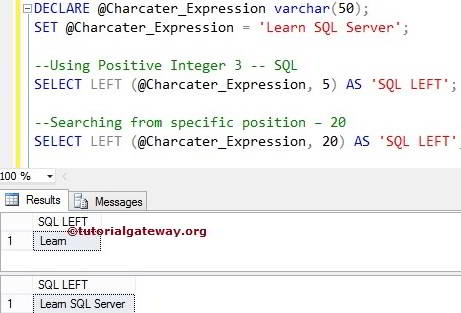
The LEFT function returns the specified number of leftmost characters from the given string. The following query returns leading most 3 and 20 characters.
In the first SELECT statement, we used the LEFT Function to return the five leftmost characters from the @Character_Expression variable.
In the next line, we assigned 20 to the second argument, which is greater than the string length. So, the SQL SELECT query will return all the letters from the @Character_Expression
DECLARE @Charcater_Expression varchar(50)
SET @Charcater_Expression = 'Learn SQL Server'

--Using Positive Integer 3
SELECT LEFT(@Charcater_Expression, 5) AS 'SQLLEFT'

--Searching from specific position – 20
SELECT LEFT(@Charcater_Expression, 20) AS 'SQLLEFT'
Use the SQL LEFT() function with a table data
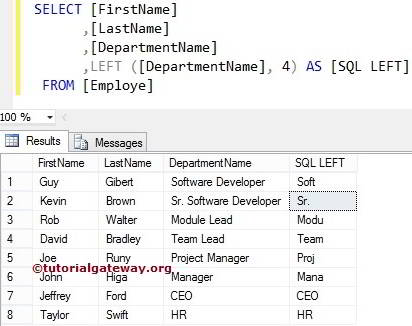
The LEFT function also allows you to select the leftmost characters from the column values. For this example, we use the below-shown data
In this SQL Server example, we will return the leading four words of all the records present inside the Department Name column. Please refer to the list of SQL String Functions from our SQL Server Programming.
SELECT [FirstName]
      ,[LastName]
      ,[DepartmentName]
      ,LEFT([DepartmentName], 4) AS [SQLLEFT]
 FROM [Employe]
LEFT() function to extract the substring before @ symbol (email)
If you observe the second record, there is a space after the Sr. Let us find the index position of a @ symbol present in the Email column using the SQL CHARINDEX function. Next, this String LEFT method will extract the leading letters up to the @ symbol.
TIP: Please refer to the SQL LEN and SQL RIGHT functions.
SELECT [FirstName]
      ,[LastName]
      ,[DepartmentName]
      ,[Email]
      ,LEFT(
              [Email]
      ,CHARINDEX ('@', [Email]) - 1
            ) AS [SQLLEFT]
 FROM [Employe]
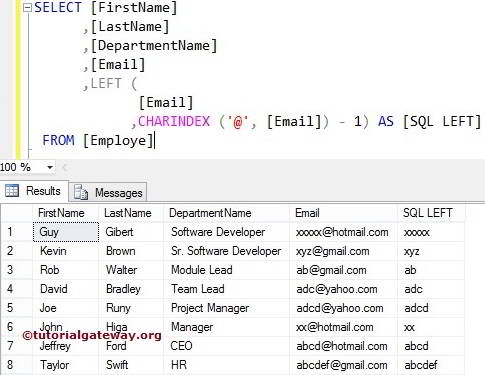
The below LEFT statement returns the index position of the @ symbol. It suggests the CHARINDEX method finds the index position of @ sign in every record.
CHARINDEX ('@', [Email])
We reduced the index position by 1, using the following statement. If you miss this, the output includes the @ symbol as well. Also, refer to the SQL SUBSTRING.
CHARINDEX ('@', [Email]) - 1
