
The SQL UNICODE function is one of the String Functions that return the integer value, as defined in Unicode standards. If we specify the character string (more than one character), the function will return the integer value for the leftmost character of a character expression. The syntax of the UNICODE Function is shown below.
SELECT UNICODE (NCharacter_Expression)
FROM [Source]
Character_Expression: Please specify the valid Expression for which you want to find the UNICODE value. This Function will return the integer value, as defined in Unicode standards of the leftmost character of this expression. This Character_Expression is of type NChar or NVarchar.
SQL UNICODE Function Example
This function returns the Unicode value of the leftmost character of the given expression. The following query may show you multiple ways to use this function.
DECLARE @x NCHAR(25)
DECLARE @y INT

-- Initialize the variables.
SET @x = 'è'
SET @y = 5

SELECT UNICODE(@x) AS Result1,
       UNICODE(@y) AS Result2 ;

SELECT UNICODE('âëxyz') AS Result3;

SELECT UNICODE('Å238') AS Result4;
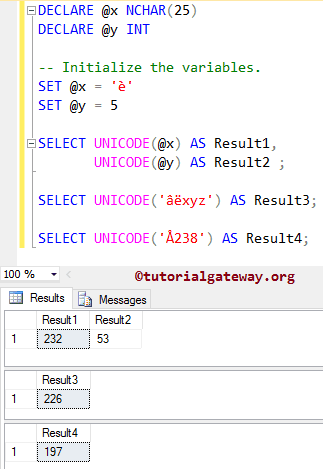
Within this example, the below code’s first four lines are used to declare two variables of type NCHAR and Integer type. Next, we were assigned the string data è, and 5. Please refer to the list of SQL String Functions from our SQL Server Programming.
DECLARE @x NCHAR(25)
DECLARE @y INT

-- Initialize the variables.
SET @x = 'è'
SET @y = 5
From the below statement, you can see that we are finding the UNICODE value of è and integer 5.
SELECT UNICODE(@x) AS Result1,
       UNICODE(@y) AS Result2 ;
In the following line, We used the SQL Server UNICODE function directly on a group of N characters (word). Here, it will return the value of the leftmost character (i.e., â), and that should be 226
SELECT UNICODE('âëxyz') AS Result3;
As you can see from the statement below, we used it directly on the combination of NChars and integers. Here, this String Function will return the value of the leftmost character (i.e., Å), and that should be 197. Please refer to the SQL ASCII function and SQL CHAR function articles.
SELECT UNICODE('Å238') AS Result4;
Using SQL Server UNICODE function with While loop
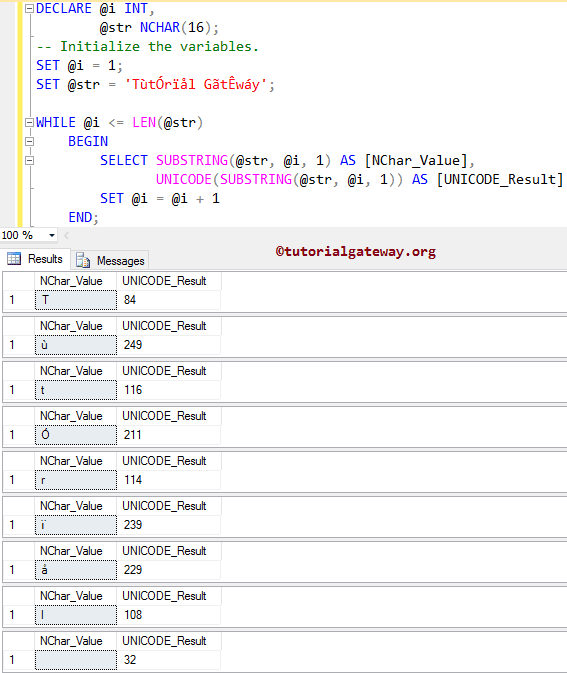
In this example, we will use the UNICODE function inside the WHILE LOOP. Here, the WHILE loop iterates over a string of characters. In each iteration, SUBSTRING() extracts the character, and UNICODE() returns its ASCII value.
I suggest you refer to both the SUBSTRING in SQL and WHILE LOOP in SQL articles to understand the query execution.
DECLARE @i INT,
        @str NCHAR(16);

-- Initialize the variables.
SET @i = 1;
SET @str = 'TùtÓrïål GãtÊwáy';

WHILE @i <= LEN(@str)
	BEGIN
		SELECT SUBSTRING(@str, @i, 1) AS [NChar_Value],
			   UNICODE(SUBSTRING(@str, @i, 1)) AS [UNICODE_Result]
		SET @i = @i + 1
	END;
Using SQL UNICODE and NCHAR functions
The UNICODE function returns the Unicode value of the first character in a string. On the other hand, NCHAR() returns the character at the given Unicode value. Refer to SQL NCHAR.
SELECT UNICODE('a') AS R1,
	NCHAR(UNICODE('a')) AS R2
R1 R2
97 aExample: If we pass a NULL value to UNICODE(), it returns NULL.
SELECT UNICODE(NULL)
NULLUsing UNICODE on table columns
Here, UNICODE() returns the Unicode value of the first character in the product category name.
SELECT [ProductCategoryKey] AS ID
      ,[EnglishProductCategoryName]
      ,UNICODE(EnglishProductCategoryName) AS Value
  FROM [AdventureWorksDW2022].[dbo].[DimProductCategory]
ID	EnglishProductCategoryName	Value
1	Bikes	66
2	Components	67
3	Clothing	67
4	Accessories	65