

LaunchIntel
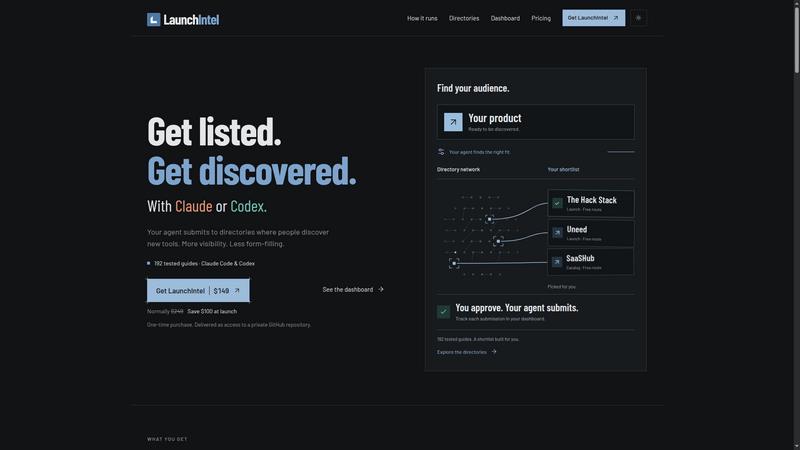
LaunchIntel is a local toolkit that lets browser agents follow tested directory guides and helps teams track software launch submissions.
Categories
Pricing
About LaunchIntel
LaunchIntel combines directory research, an agent workflow, and a dashboard for tracking software launch submissions. The user describes a product, reviews the agent's proposed names, tagline, and description, then approves a shortlist of suitable directories. The browser agent submits one at a time using the guide for that specific form and stores the outcome locally.
The dashboard is useful for seeing which entries were published, submitted, or need attention, and it can provide next steps for items waiting on you. LaunchIntel's guides record practical differences such as sign-up needs, badge rules, CAPTCHA checks, and optional paid routes. The workflow preserves approval points: listing details and the shortlist are reviewed, and paid options require approval. Human input may still be needed at sign-in or CAPTCHA stages. It is distributed as a private GitHub repository and requires Node 20 or newer, git, and an agent able to access local files, a terminal, and a browser.
Features
- Directory-specific tested instructions for submission forms
- Review and approval before copy is submitted and queues run
- Local dashboard showing results and work needing attention
- Source repository includes guides, workflows, scripts, and dashboard
Use cases
- Coordinate submissions for a product launch from a single queue
- Review directory requirements before deciding where to list a product
- Keep submission progress available between agent sessions
Pricing
$99 one time in USD for every product you own. Separate charges may include AI-provider usage and optional directory fees.
Frequently asked questions
What happens when a directory needs my attention?
The dashboard marks it as needing help and provides a next step; sign-ins or CAPTCHAs may require you to act.
Can the agent choose a paid listing route?
It uses free routes unless you approve a paid option.
Where does the dashboard run?
It is a local dashboard that opens on your computer, with no account or server described.
Similar products
Compare alternatives
FoxyLab
FoxyLab makes product videos and banner sets from chat prompts, with website context and API access.
Layerling
Layerling is a browser-based CAD tool for designing 3D printed enclosures and custom parts, with editable dimensions and STL or 3MF export.

Remora
Remora adds persistent, typed memory to AI agents through PostgreSQL and pgvector, with asynchronous ingestion and ranked context retrieval.

Flux3Max.io
Flux3Max.io makes short videos with sound from a scene prompt, a photo, or up to 10 timed keyframes.

HackerTube AI
Search Hacker News video recommendations by topic, creator, or title, and explore technical talks, courses, and tutorials with discussion context.


PosterSize
PosterSize pairs a poster format catalogue with AI generation to help users move from size research to a visual draft.

viddir
Discover AI learning and maths tools alongside products for images, video, coding, and other tasks.
